qoder2api-hub is a free, open source api development & testing project written in Python and released under MIT. It has 500 GitHub stars, 132 forks and 5 open issues, and was last pushed 5 hours ago. On this registry it ranks #185 of 187 tracked projects in API Development & Testing, with 5 head-to-head comparisons available.

What is qoder2api-hub?

qoder2api-hub is a self-hosted, MIT-licensed Python gateway that turns Qoder's domestic (qoder.com.cn) and international (qoder.com) accounts into OpenAI- and Anthropic-compatible API endpoints, built for developers who want to reach Qoder-hosted models from Codex CLI, Claude Code, or any standard OpenAI client.

What it is

The project is a multi-account reverse proxy for Qoder, the coding platform whose user base is served by two separate regional sites. It lives squarely in the OpenAI-compatible API ecosystem and exposes each account pool across three protocol surfaces at once: OpenAI Chat Completions, the Responses API used by Codex, and Anthropic Messages for Claude Code. It is written in Python and uses only the standard library, with COSY signing and AES/RSA implemented in pure Python, and it is also published as amd64 and arm64 Docker images.

The concrete thing it replaces is the official Qoder client as the access path. Qoder credentials and tokens normally live on one logged-in device, and each account's credits, model list, pricing and thinking tiers are managed from there, one account at a time. The gateway imports those credentials instead — through OAuth device authorization, a PAT, or by taking the credentials of a locally logged-in official client — refreshes tokens on a schedule, and pools several accounts per region. It then publishes the official model catalogue at /v1/models, so what a caller sees is a single base URL backed by a pool of accounts rather than a client somebody has to keep open.

Key capabilities

  • Three protocol surfaces on one port: OpenAI Chat Completions, the Responses API used by Codex, and Anthropic Messages for Claude Code, which connects to http://127.0.0.1:8790 without the /v1 suffix.
  • Dual-region account pools with separate egress for the domestic and international sites, automatic region selection by model, account rotation, session affinity, and failover to a cooled-down spare.
  • Client-free credential onboarding through OAuth device authorization, PAT import, or import from a logged-in official client, plus scheduled token refresh and automatic daily Credits check-in.
  • A model catalogue pulled dynamically from the official list, carrying peak and off-peak pricing, context window, thinking tiers and the reason a model is disabled.
  • Anti-risk-control shaping: outbound identity aligned with the official client, an optional per-account concurrency gate and request pacing, and /health telemetry for queueing, throttling and rejection signals.
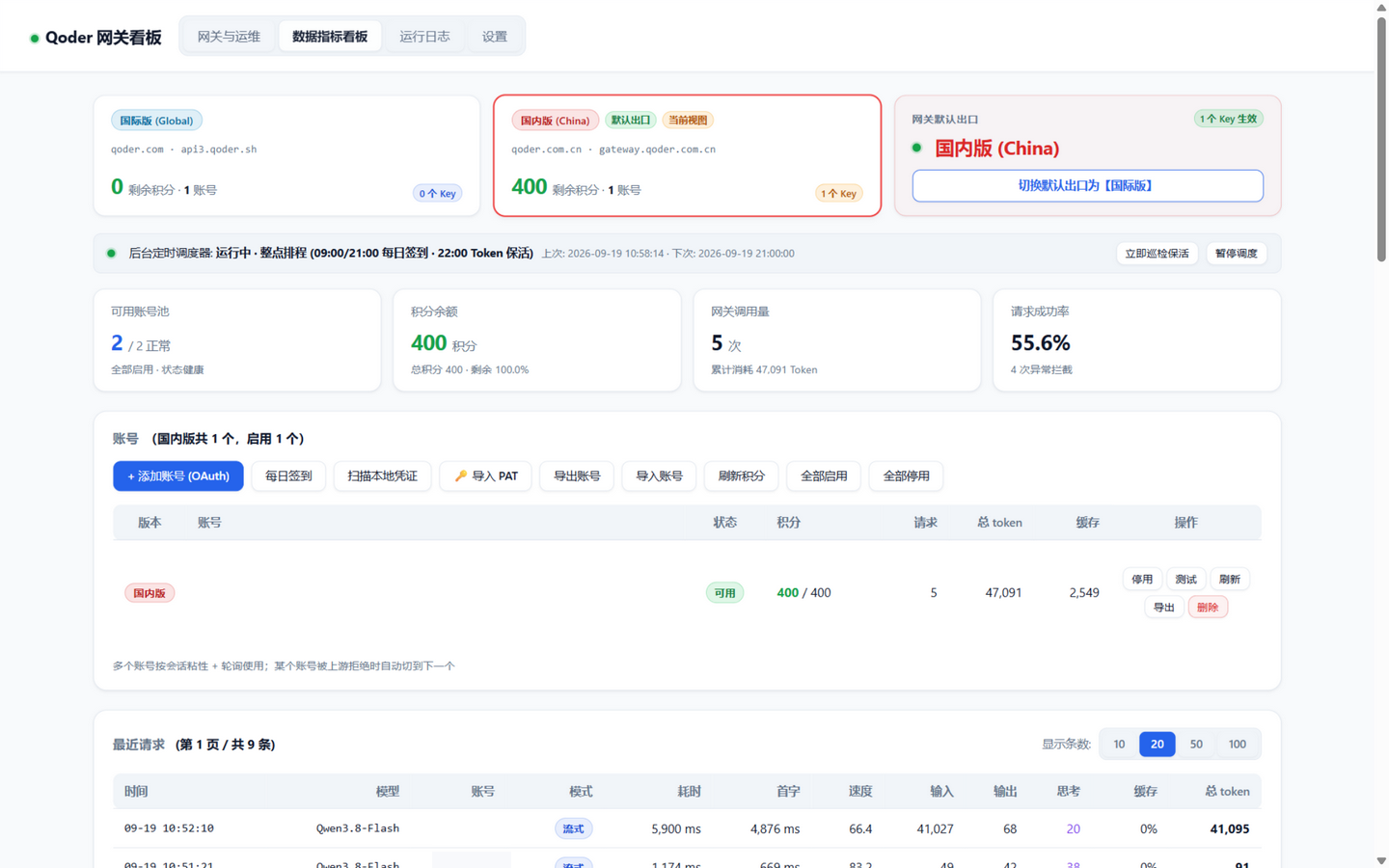
  • A web dashboard on the same port covering accounts, usage and performance metrics, request logs, quota guards, and one-click agent configuration for Claude Code, Codex CLI, OpenCode, DSH and Crush that backs up existing config first.

Who uses it and how

  • Individual developers on a workstation, starting it with start-qoder-proxy.bat on Windows (logs to qoder-proxy.log) or start-qoder-proxy.sh on Linux and macOS (writes qoder-proxy.pid) and calling 127.0.0.1:8790.
  • Small groups sharing one gateway across a LAN, where docker compose up -d starts in LAN mode, enforces an API key generated on first start, and exposes it through docker compose logs qoder-proxy | grep -i "api key".
  • Agent-driven coding setups, since Claude Code, Codex CLI, OpenCode, DSH and Crush each get a documented base URL and protocol pairing and can be written from the dashboard.
  • Hosts that sit behind an egress proxy or in a datacenter, which the deployment and risk-control documents address directly.

Getting started

Python 3.9+ or Docker is required: clone the repository, then run start-qoder-proxy.bat, chmod +x *.sh && ./start-qoder-proxy.sh, or docker compose up -d. The API then answers at http://127.0.0.1:8790/v1 and the dashboard at http://127.0.0.1:8790/ with the default password admin.

How it compares

The facts supply no list of paid products, so the nearest reference points are the tools named in the README: the related WorkBuddy2API Panel governs a wider spread of platforms, including WorkBuddy, CodeBuddy, Trae, MiniMax, Doubao and Huawei Cloud CodeArts alongside Qoder behind one OpenAI-compatible gateway, whereas this project concentrates on Qoder's two regions alone. The credited projects mmqz/cpa-multi-plugins, Liki4/qodercli2api and Sliverkiss/workbuddy2api supplied the dual-region constants, OAuth and COSY signing work and protocol reverse-engineering that this gateway assembles into a dashboard-driven product.

When to use it — and when not to

Self-hosting means running a Python or Docker host, moving the dashboard off the default admin password, and accepting that upstream risk controls still bite: the project's own documentation notes that multiple accounts can still queue, and its internals rest on conclusions reverse-engineered from the official client, which can change without notice. It ships no accounts or credits, and its disclaimer rules out commercial resale and malicious concurrency, so anyone needing a vendor-supported or officially sanctioned integration should look elsewhere.

project readme (upstream, from github) — read inline

Qoder2API-Hub

把 Qoder 国内版(qoder.com.cn)与国际版(qoder.com)封装成 OpenAI / Anthropic 兼容接口的多账号网关

Release Tests Python 3.9+ Zero dependencies MIT

网关总览

特性

  • 三种协议:OpenAI Chat Completions、Responses API(Codex)、Anthropic Messages(Claude Code)
  • 双区多账号:国内版 / 国际版独立账号池与出口,按模型自动选区;账号轮询、会话亲和、故障冷却换号
  • 免客户端登录:OAuth 设备授权、PAT 导入,或直接导入本机官方客户端已登录的凭证
  • 模型与官方同源:动态拉取官方清单,含峰谷价、上下文窗口、思考档位和禁用原因
  • 签到与保活:自动领取每日 Credits 活动,定时刷新 Token
  • 防风控:出站身份形态对齐官方客户端,可选的单号并发闸门与请求节奏控制,/health 提供排队 / 限流 / 拒绝信号遥测
  • Web 看板:账号、用量与性能指标、请求流水、限额护栏、智能体一键配置
  • 零依赖:只用 Python 标准库(COSY 签名、AES / RSA 都是纯 Python 实现),另提供 amd64 / arm64 Docker 镜像

快速开始

需要 Python 3.9+ 或 Docker。先获取代码:

git clone https://github.com/shuishuipingan/qoder2api-hub.git
cd qoder2api-hub

然后选一种方式启动:

平台 启动 停止
Windows 双击 start-qoder-proxy.bat(后台运行,日志写入 qoder-proxy.log) stop-qoder-proxy.bat
Linux / macOS chmod +x *.sh && ./start-qoder-proxy.sh(前台运行;会写 qoder-proxy.pid) Ctrl+C,常驻时用 ./stop-qoder-proxy.sh
Docker docker compose up -d docker compose down

启动后:

  • API:http://127.0.0.1:8790/v1
  • 看板:http://127.0.0.1:8790/,默认密码 admin,首次登录后请到「设置」修改

在看板「账号」页点 + 添加账号 (OAuth),到浏览器里完成授权,账号就加好了。

Docker 以局域网模式启动,会强制使用 API Key。首次启动时自动生成,用 docker compose logs qoder-proxy | grep -i "api key" 查看。 局域网共享、改端口、出口代理见部署。

接入客户端

客户端 Base URL 协议
OpenAI 兼容客户端(Cherry Studio、Chatbox、NextChat 等) http://127.0.0.1:8790/v1 Chat Completions
Codex CLI http://127.0.0.1:8790/v1 Responses API
Claude Code http://127.0.0.1:8790(不带 /v1) Anthropic Messages
  • 模型名:填 /v1/models 返回的 id,也就是官方模型名,例如 Qwen3.8-Max
  • API Key:在看板「设置」中生成。本机运行且没有配置任何 Key 时,可以留空
curl http://127.0.0.1:8790/v1/chat/completions \
  -H "Authorization: Bearer $API_KEY" \
  -H "Content-Type: application/json" \
  -d '{"model": "Qwen3.8-Flash", "messages": [{"role": "user", "content": "你好"}]}'

Claude Code、Codex CLI、OpenCode、DSH、Crush 可以在看板「智能体配置」页一键写入配置,写入前会自动备份,随时可还原。详见客户端接入。

文档

文档 内容
部署 本机 / 局域网 / Docker 部署、防火墙、出口代理、升级
配置参考 命令行参数、环境变量、API Key、模型闸门、限额护栏
账号与签到 添加账号、凭证生命周期、签到与活动规则、定时调度
客户端接入 各协议的接入方式、智能体一键配置
模型 模型来源、命名、双区路由、峰谷价、思考档位
接口参考 HTTP 端点与鉴权方式
故障排查 常见问题、诊断脚本、已知限制
风控与排队 上游的风控维度与处置等级、多账号为什么仍会排队、官方客户端逆向结论
风控处置手册 出口 / 身份 / 调度 / 请求 / 观测各层的处置办法,容器与数据中心的落地方案
实现原理 请求链路、设备指纹、容错重试、工具调用回读
开发与测试 模块结构、测试、维护脚本
更新日志 各版本变更

🔗 相关:多平台合集面板

如果你同时在用别的 AI 编程平台账号,可以看看这块合集面板:

WorkBuddy2API Panel

同样支持 Qoder(每日额度按账号轮转领取、凭证自动续期),另外还统管 WorkBuddy / CodeBuddy / Trae / MiniMax / 豆包 Doubao / 华为云 CodeArts 码道,全部账号共用一个 OpenAI 兼容网关。


致谢

  • mmqz/cpa-multi-plugins:双区常量表、OAuth 设备授权与 PAT 交换、COSY 签名与自定义 Base64、签到与保活排程
  • Liki4/qodercli2api:OAuth 与推理协议的逆向记录(PKCE、deviceToken / jobToken、SSE 信封)
  • Sliverkiss/workbuddy2api:设备指纹派生(derive_id)、整点排程、DeepSeek 思维链回填
  • WorkBuddy2API-Hub:本项目架构、看板交互与功能矩阵的蓝本

免责声明

本项目是非官方的自托管网关,仅供技术研究,以及个人在私有环境中使用自己合法授权的账号。本项目不提供任何账号或额度。请遵守 Qoder 官方服务条款,不得用于商业转售、恶意并发等滥用行为。

MIT License

Frequently asked questions

Is qoder2api-hub free to use?

qoder2api-hub is open source under the MIT licence. There is no licence fee and no seat count — you can self-host it or, where the project offers one, pay a vendor for a managed version instead.

What does qoder2api-hub do?

Qoder国际国内多账号反代网关,Qoder 国际国内双区多账号 OpenAI 兼容网关中枢 — COSY 签名推理、稳定设备指纹防风控、OAuth 设备授权免客户端登录、每日签到与 Pro 福利、后台定时调度器、Web 监控看板,支持 Codex / Claude Code 与标准 OpenAI 客户端

What is qoder2api-hub written in?

qoder2api-hub is primarily written in Python. Its source is publicly available at https://github.com/shuishuipingan/qoder2api-hub, and it has 500 GitHub stars.