python-devtools is an MIT-licensed Python library, installed from PyPI as devtools, that supplies Python's missing debug print command and other development tools for Python programmers who need to see what a value actually contains while their code runs.
What it is
python-devtools is a small Python package published on PyPI under the distribution name devtools and developed in the samuelcolvin/python-devtools repository on GitHub. It sits in the developer tools category and describes itself plainly as "Python's missing debug print command and other development tools." The source is MIT licensed, the documentation lives at python-devtools.helpmanual.io, and the project carries roughly 1,100 stars and 54 forks.
The concrete problem it solves is the ordinary print() call. A bare print tells you the value but not where the call was made, what expression produced it, what type the result has, or how many items it holds, so developers end up hand-writing labels into their print statements and still guessing at the surrounding context. Importing debug from devtools and calling debug(whatever) replaces that pattern with a single annotated line — test.py:4 : whatever: [1, 2, 3] (list) len=3 — which carries the file and line number, the expression text, the rendered value, the type and the length. It is a drop-in substitute for the ad-hoc debug print, not a separate runtime or service.
Key capabilities
- The
debug() function reports the call site (file and line), the expression as written, the value, its type and its length in one output line.
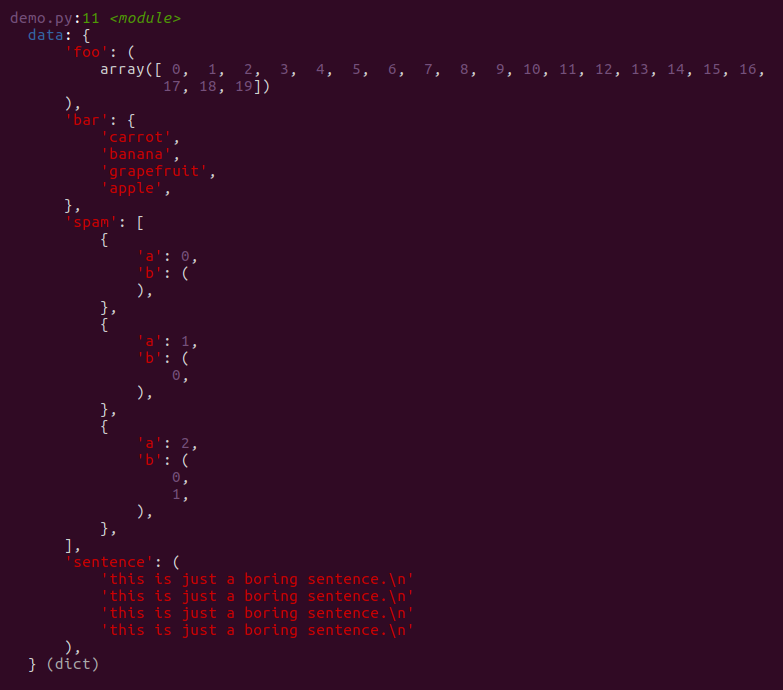
- It renders nested and mixed containers in a readable form, demonstrated in the README with a dictionary holding a
numpy array, a set of strings, a list of dictionaries containing generator objects, and a repeated multi-line string.
- Generator objects inside nested structures are displayed rather than collapsing the output.
debug can be used without an import statement by adding it to builtins in sitecustomize.py, so any module can call it directly.- It ships as the
devtools package on PyPI and requires Python 3.10 or newer with pip.
- The project is MIT licensed and documents its usage at a dedicated documentation site rather than only in the README.
Who uses it and how
- Developers inspecting ad-hoc values inside a script, as in the README's
test.py example, where the output points back to the exact line of the call.
- Anyone debugging data-heavy code where values are nested dictionaries,
numpy arrays, sets or generators that a plain print() renders unhelpfully.
- Teams that prefer a zero-import workflow: adding
debug to builtins via sitecustomize.py makes it available across a project without a per-module import.
- Projects already standardized on Python 3.10 or newer, since that is the stated floor for installation.
Getting started
Install it with pip install devtools on Python 3.10 or later with pip available, then from devtools import debug and call debug(whatever) on the value you want to inspect.
How it compares
The facts provided list no paid products that this project replaces and name no comparable tools, so python-devtools stands alone in this registry. There is no basis in the supplied material for a comparison on licence, hosting or cost.
When to use it — and when not
Reach for it when the debugging you need is a better print statement and you want the context attached automatically. Because it is a pip-installed library rather than a service, there is no database, storage or mail configuration to operate, but that also means it will not help anyone looking for an interactive debugger with breakpoints and stepping, and it is unavailable to projects pinned below Python 3.10. The README is deliberately brief and defers most usage detail to the external documentation site, and the repository carries 27 open issues, so expect a focused utility maintained at a modest scale rather than a broad framework.
project readme (upstream, from github) — read inline
python devtools





Python's missing debug print command and other development tools.
For more information, see documentation.
Install
Just
pip install devtools
If you've got python 3.10+ and pip installed, you're good to go.
Usage
from devtools import debug

whatever = [1, 2, 3]
debug(whatever)
Outputs:
test.py:4 <module>:
    whatever: [1, 2, 3] (list) len=3
That's only the tip of the iceberg, for example:
import numpy as np
from devtools import debug

data = {
    'foo': np.array(range(20)),
    'bar': {'apple', 'banana', 'carrot', 'grapefruit'},
    'spam': [{'a': i, 'b': (i for i in range(3))} for i in range(3)],
    'sentence': 'this is just a boring sentence.\n' * 4
}

debug(data)
outputs:
Usage without Import
devtools can be used without from devtools import debug if you add debug into builtins
in sitecustomize.py.
For instructions on adding debug to builtins,
see the installation docs.