pyspur is a free, open source ai development platforms project written in TypeScript and released under Apache-2.0. It has 5,785 GitHub stars, 428 forks and 41 open issues, and was last pushed 3 months ago. On this registry it ranks #78 of 116 tracked projects in AI Development Platforms, with 5 head-to-head comparisons available.

What is pyspur?

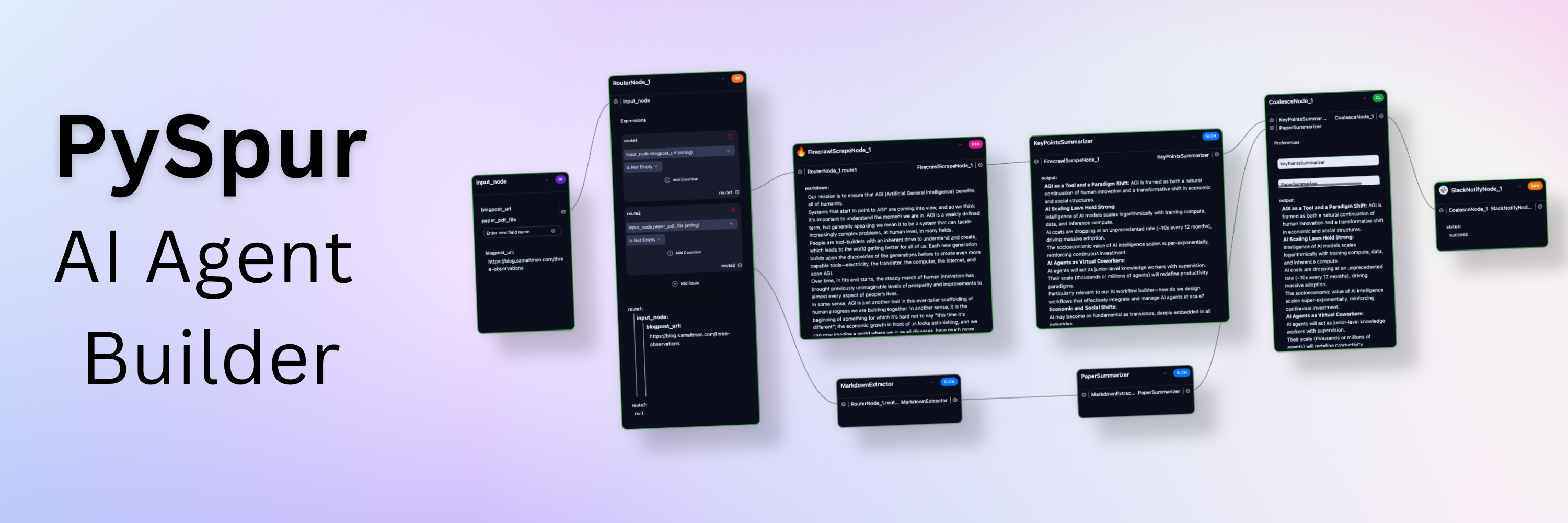
PySpur is an open-source visual playground for building, testing, and deploying AI agents, aimed at AI engineers who want to iterate on agentic workflows without repeatedly rebuilding debugging, tracing, and deployment tooling from scratch.

What it is

PySpur is an Apache-2.0 licensed project that presents agentic workflows as a graph that can be built either in Python code or through a user interface. The project describes itself as a playground for agents, and its stated goal is to let AI engineers iterate over agents visually rather than reinventing the wheel on every new workflow. Workflows are composed as graphs, which connects directly to its "graph" and "framework" topic tags, and the registry places it in the AI and machine learning category as an AI development platform.

The concrete problem it addresses is the unreliability of agent development. The README names three specific pain points: prompt hell, meaning hours of prompt tweaking and trial and error; workflow blindspots, meaning a lack of visibility into how steps interact, which produces hidden failures; and a terminal testing nightmare, meaning squinting at raw outputs and manually parsing JSON. PySpur therefore replaces the ad hoc terminal-and-print-statement loop that AI engineers use to debug agents, offering node-level debugging, persistent workflows, and captured execution traces instead.

Key capabilities

  • Human-in-the-loop breakpoints that pause a workflow when reached and resume only after a human approves, so critical outputs can be verified before the workflow proceeds.
  • Loops for iterative tool calling with memory.
  • File and URL input for multimodal processing across PDFs, video, audio, images, text, and code.
  • Structured outputs through a UI editor for JSON Schemas.
  • Retrieval-augmented generation covering parsing, chunking, embedding, and upsert into a vector database.
  • Tool integrations including Slack, Firecrawl.dev, Google Sheets, and GitHub.
  • One-click deploy that publishes an agent as an API, with execution traces captured automatically for deployed agents, plus evals that evaluate agents on real-world datasets.
  • Any-vendor support spanning more than 100 LLM providers, embedders, and vector databases, and Python-based extensibility where a new node is added by creating a single Python file.

Who uses it and how

  • AI engineers who build and iterate on agents as their primary job, which the README identifies as the target audience.
  • Teams shipping agents that need quality assurance gates, using human-in-the-loop breakpoints to verify critical outputs before a workflow continues.
  • Builders of retrieval pipelines who need document collection creation with chunking and parsing followed by a vector index built from embedding and vector database upsert.
  • Developers evaluating agent performance against real datasets through the evals feature rather than eyeballing individual runs.
  • Engineers debugging a single misbehaving step through node-level debugging when a multi-step workflow fails in a way that is not visible from the final output.

Getting started

Install with pip install pyspur on Python 3.11 or higher, then run pyspur init my-project, change into the created directory, and start the server with pyspur serve --sqlite, which serves the app at http://localhost:6080. The README recommends configuring a PostgreSQL instance URL in the generated .env file for a more stable experience, and provider API keys such as OpenAI or Anthropic can be added through the API Keys tab in the app UI or manually in .env.

How it compares

The provided facts name no similar tools and no list of paid products that PySpur replaces, so on that axis it stands alone in this registry, with no stated contrast against commercial agent platforms on licence, self-hosting, data ownership, or cost model. The only comparison the facts support is with the workflow it displaces, namely manual terminal testing and manual JSON parsing, which PySpur replaces with a visual graph, traces, and evals.

When to use it — and when not to

A self-hoster must run the PySpur server and should expect to operate PostgreSQL rather than the default SQLite for a stable setup, and must supply and manage provider API keys. Anyone who wants a fully managed hosted service, or who needs extensive written documentation of internals, should look elsewhere, because the README is largely an image-driven feature reel and the registry metadata lists the language as TypeScript while the README describes Python-based node authoring, so the primary implementation language is not clearly established by the facts given. The project also carries 41 open issues, which is worth weighing before adopting it as a production dependency.

project readme (upstream, from github) — read inline

PySpur

Iterate over your agents 10x faster. AI engineers use PySpur to iterate over AI agents visually without reinventing the wheel.

README in English 简体中文版自述文件 日本語のREADME README in Korean Deutsche Version der README Version française du README Versión en español del README

Docs Cloud

https://github.com/user-attachments/assets/54d0619f-22fd-476c-bf19-9be083d7e710

🕸️ Why PySpur?

Problem: It takes a 1,000 tiny paper cuts to make AI reliable

AI engineers today face three problems of building agents:

  • Prompt Hell: Hours of prompt tweaking and trial-and-error frustration.
  • Workflow Blindspots: Lack of visibility into step interactions causing hidden failures and confusion.
  • Terminal Testing Nightmare Squinting at raw outputs and manually parsing JSON.

We've been there ourselves, too. We launched a graphic design agent early 2024 and quickly reached thousands of users, yet, struggled with the lack of its reliability and existing debugging tools.

Solution: A playground for agents that saves time

Step 1: Define Test Cases

https://github.com/user-attachments/assets/ed9ca45f-7346-463f-b8a4-205bf2c4588f

Step 2: Build the agent in Python code or via UI

https://github.com/user-attachments/assets/7043aae4-fad1-42bd-953a-80c94fce8253

Step 3: Iterate obsessively

https://github.com/user-attachments/assets/72c9901d-a39c-4f80-85a5-f6f76e55f473

Step 4: Deploy

https://github.com/user-attachments/assets/b14f34b2-9f16-4bd0-8a0f-1c26e690af93

✨ Core features:

  • 👤 Human in the Loop: Persistent workflows that wait for human approval.
  • 🔄 Loops: Iterative tool calling with memory.
  • 📤 File Upload: Upload files or paste URLs to process documents.
  • 📋 Structured Outputs: UI editor for JSON Schemas.
  • 🗃️ RAG: Parse, Chunk, Embed, and Upsert Data into a Vector DB.
  • 🖼️ Multimodal: Support for Video, Images, Audio, Texts, Code.
  • 🧰 Tools: Slack, Firecrawl.dev, Google Sheets, GitHub, and more.
  • 📊 Traces: Automatically capture execution traces of deployed agents.
  • 🧪 Evals: Evaluate agents on real-world datasets.
  • 🚀 One-Click Deploy: Publish as an API and integrate wherever you want.
  • 🐍 Python-Based: Add new nodes by creating a single Python file.
  • 🎛️ Any-Vendor-Support: >100 LLM providers, embedders, and vector DBs.

⚡ Quick start

This is the quickest way to get started. Python 3.11 or higher is required.

  1. Install PySpur:

    pip install pyspur
    
  2. Initialize a new project:

    pyspur init my-project
    cd my-project
    

    This will create a new directory with a .env file.

  3. Start the server:

    pyspur serve --sqlite
    

    By default, this will start PySpur app at http://localhost:6080 using a sqlite database. We recommend you configure a postgres instance URL in the .env file to get a more stable experience.

  4. [Optional] Configure Your Environment and Add API Keys:

    • App UI: Navigate to API Keys tab to add provider keys (OpenAI, Anthropic, etc.)
    • Manual: Edit .env file (recommended: configure postgres) and restart with pyspur serve

😎 Feature Reel

Human-in-the-loop breakpoints:

These breakpoints pause the workflow when reached and resume whenever a human approves it. They enable human oversight for workflows that require quality assurance: verify critical outputs before the workflow proceeds.

https://github.com/user-attachments/assets/98cb2b4e-207c-4d97-965b-4fee47c94ce8

Debug at Node Level:

https://github.com/user-attachments/assets/6e82ad25-2a46-4c50-b030-415ea9994690

Multimodal (Upload files or paste URLs)

PDFs, Videos, Audio, Images, ...

https://github.com/user-attachments/assets/83ed9a22-1ec1-4d86-9dd6-5d945588fd0b

Loops

Loops

RAG

Step 1) Create Document Collection (Chunking + Parsing)

https://github.com/user-attachments/assets/c77723b1-c076-4a64-a01d-6d6677e9c60e

Step 2) Create Vector Index (Embedding + Vector DB Upsert)

https://github.com/user-attachments/assets/50e5c711-dd01-4d92-bb23-181a1c5bba25

Modular Building Blocks

https://github.com/user-attachments/assets/6442f0ad-86d8-43d9-aa70-e5c01e55e876

Evaluate Final Performance

https://github.com/user-attachments/assets/4dc2abc3-c6e6-4d6d-a5c3-787d518de7ae

Coming soon: Self-improvement

https://github.com/user-attachments/assets/5bef7a16-ef9f-4650-b385-4ea70fa54c8a

🛠️ PySpur Development Setup

[ Instructions for development on Unix-like systems. Development on Windows/PC not supported ]

We recommend using Cursor/VS Code with our dev container (.devcontainer/devcontainer.json) for:

  • Consistent development environment with pre-configured tools and extensions
  • Optimized settings for Python and TypeScript development
  • Automatic hot-reloading and port forwarding

Option 1: Cursor/VS Code Dev Container (Recommended)

  1. Install Cursor/VS Code and the Dev Containers extension
  2. Clone and open the repository
  3. Click "Reopen in Container" when prompted

Option 2: Manual Setup

  1. Clone the repository:

    git clone https://github.com/PySpur-com/pyspur.git
    cd pyspur
    
  2. Launch using docker-compose.dev.yml:

    docker compose -f docker-compose.dev.yml up --build -d
    
  3. Customize your setup: Edit .env to configure your environment (e.g., PostgreSQL settings).

Note: Manual setup requires additional configuration and may not include all dev container features.

⭐ Support us

You can support us in our work by leaving a star! Thank you!

star

Your feedback will be massively appreciated. Please tell us which features on that list you like to see next or request entirely new ones.

Frequently asked questions

Is pyspur free to use?

pyspur is open source under the Apache-2.0 licence. There is no licence fee and no seat count — you can self-host it or, where the project offers one, pay a vendor for a managed version instead.

What does pyspur do?

A visual playground for agentic workflows: Iterate over your agents 10x faster

What is pyspur written in?

pyspur is primarily written in TypeScript. Its source is publicly available at https://github.com/PySpur-Dev/pyspur, and it has 5,785 GitHub stars.