Publii is a free, open source content management systems (cms) project written in HTML and released under GPL-3.0. It has 7,312 GitHub stars, 468 forks and 300 open issues, and was last pushed 9 hours ago. On this registry it ranks #12 of 47 tracked projects in Content Management Systems (CMS), with 5 head-to-head comparisons available. It gained 4 stars over the last 3 tracked days.

What is Publii?

What it is

Publii is a desktop-based content management system for Windows, Mac and Linux, built with Electron, that produces static websites from a graphical interface. It is licensed under GPL-3.0, carries over 7,300 stars and 469 forks on GitHub, and sits in the static site generator ecosystem alongside HTML and Handlebars-based tooling. Themes and templating use Handlebars, and the shipped application targets Linux distributions including Fedora, macOS and Windows.

The concrete problem it solves is the gap between two common approaches. Static site generators are frequently unwieldy and difficult for non-technical users, while server-based CMSs such as WordPress or Joomla! require a running application on the site's own server. Publii takes the CMS interface users already understand for writing posts and styling a site, but runs that application locally on the desktop instead of on the web server. Content is authored in the app, rendered into static files, and pushed to hosting with a single upload action. The result is a site that keeps the convenience of a CMS while serving only static output, which the README frames as super-fast and secure.

Key capabilities

  • Desktop CMS application for Windows, Mac and Linux, distributed as .exe, .dmg, .deb, .rpm and .AppImage packages.
  • Local site creation, editing and modification that works entirely offline, without an internet connection.
  • WordPress-style administrative UI for creating posts and other site content, aimed at beginners.
  • Theme system with built-in themes and configuration options, using Handlebars templates.
  • Multiple publishing targets: standard HTTP/HTTPS servers, SFTP, Netlify, Amazon S3, GitHub Pages and Google Cloud.
  • One-click upload of site changes to the configured server or hosting provider.
  • Static HTML output intended for SEO optimization and privacy-focused websites.

Who uses it and how

  • Beginners who want CMS-style authoring without learning a command-line static site generator.
  • Writers who draft and revise content offline, then push the whole site to a server when ready.
  • Publishers deploying static output to Netlify, GitHub Pages, Amazon S3, Google Cloud or plain HTTP/HTTPS hosting.
  • Self-hosters using SFTP to sync generated files to a traditional web server.
  • Theme and template developers working against the Handlebars-based theme system and the developer documentation.

Getting started

Download the application for Mac, Windows or Linux from getpublii.com as .exe, .dmg, .deb, .rpm or .AppImage. Setup and usage are covered in the user documentation, with a separate developer documentation set and a wiki covering

project readme (upstream, from github) — read inline

Publii - Static CMS for privacy-focused, SEO-optimized websites.

GPLv3 license Maintenance OpenCollective Open Source Love svg1

Publii is a desktop-based CMS for Windows, Mac and Linux that makes creating static websites fast and hassle-free, even for beginners.

Current version: 0.47.9 - build 17481

Why Publii?

Unlike static-site generators that are often unwieldy and difficult to use, Publii provides an easy-to-understand UI much like server-based CMSs such as WordPress or Joomla!, where users can create posts and other site content, and style their site using a variety of built-in themes and options. Users can enjoy the benefits of a super-fast and secure static website, with all the convenience that a CMS provides.

What makes Publii even more unique is that the app runs locally on your desktop rather than on the site's server. Available for Windows, Mac, Linux once the app has been installed you can create a site in minutes, even without internet access; since Publii is a desktop app you can create, update and modify your site offline, then upload the site changes to your server at the click of a button. Publii supports multiple upload options, including standard HTTP/HTTPS servers, Netlify, Amazon S3, GitHub Pages and Google Cloud or SFTP.
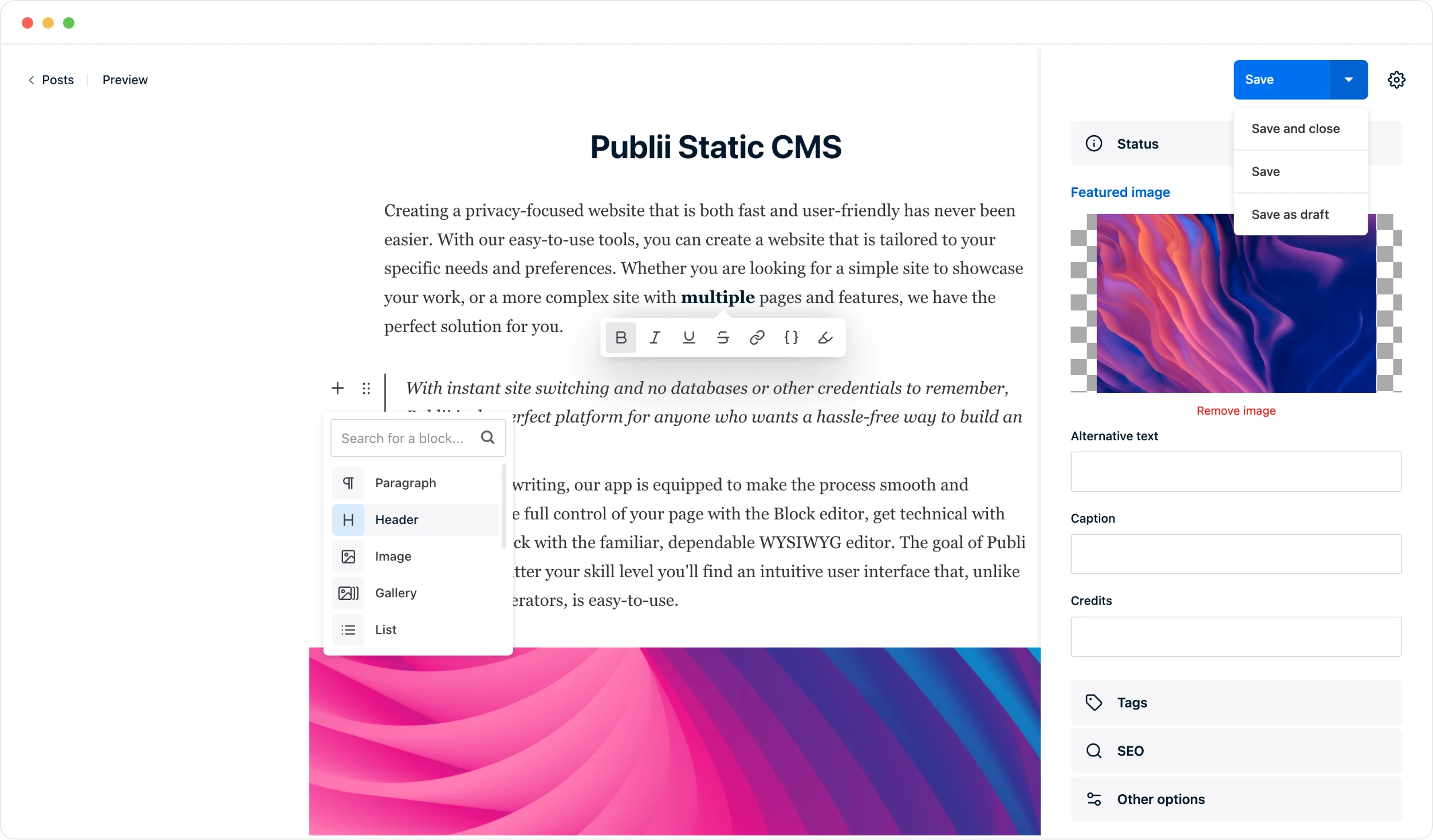
Publii Open Source Static CMS

Download

Publii is available for Mac, Windows, and Linux and can be downloaded from our website:

Download Publii (.exe, .dmg, .deb, .rpm, .AppImage)

Developing

If you want to build newest version of Publii or contribute to the Publii code, please read about app build process.

Getting Started

You can learn more about getting started in our User documentation or Developer documentation. If you have any questions or suggestions, or just need some help with using Publii, you can visit our Community Hub or follow us on Twitter

Learn More

Contributors

This project exists thanks to all the people who contribute.

Backers

Thank you to all our backers! 🙏 [Become a backer]

Sponsors

Support this project by becoming a sponsor. Your logo will show up here with a link to your website. [Become a sponsor]

License

Copyright (c) 2026 TidyCustoms. General Public License v3.0, read LICENSE for details.

Frequently asked questions

Is Publii free to use?

Publii is open source under the GPL-3.0 licence. There is no licence fee and no seat count — you can self-host it or, where the project offers one, pay a vendor for a managed version instead.

What does Publii do?

The most intuitive Static Site CMS designed for SEO-optimized and privacy-focused websites.

What is Publii written in?

Publii is primarily written in HTML. Its source is publicly available at https://github.com/GetPublii/Publii, and it has 7,312 GitHub stars.