
Proxelar
A scriptable local traffic workbench for HTTP, HTTPS, and WebSocket debugging.
Capture, inspect, intercept, replay, and rewrite traffic from your terminal or browser.





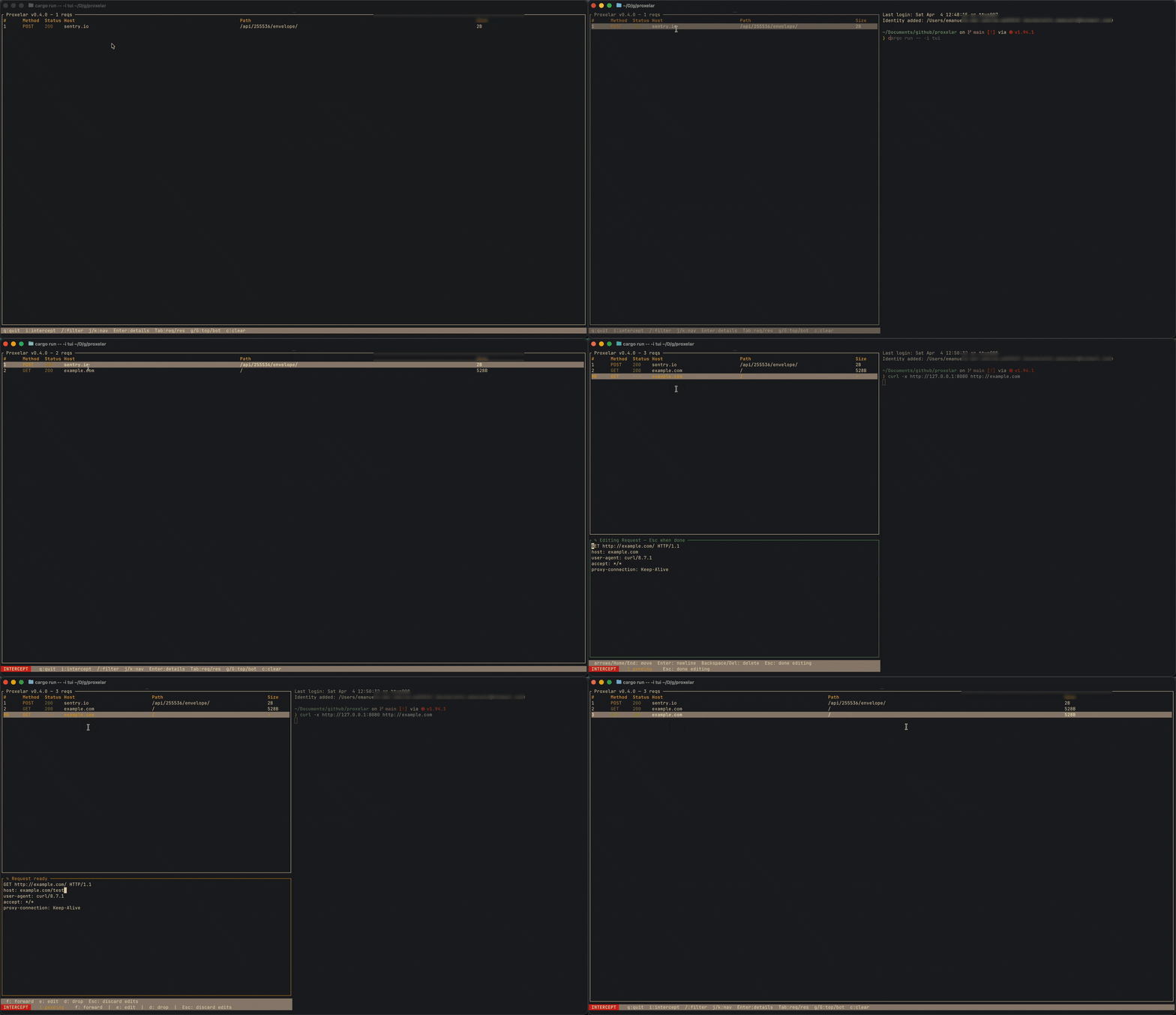
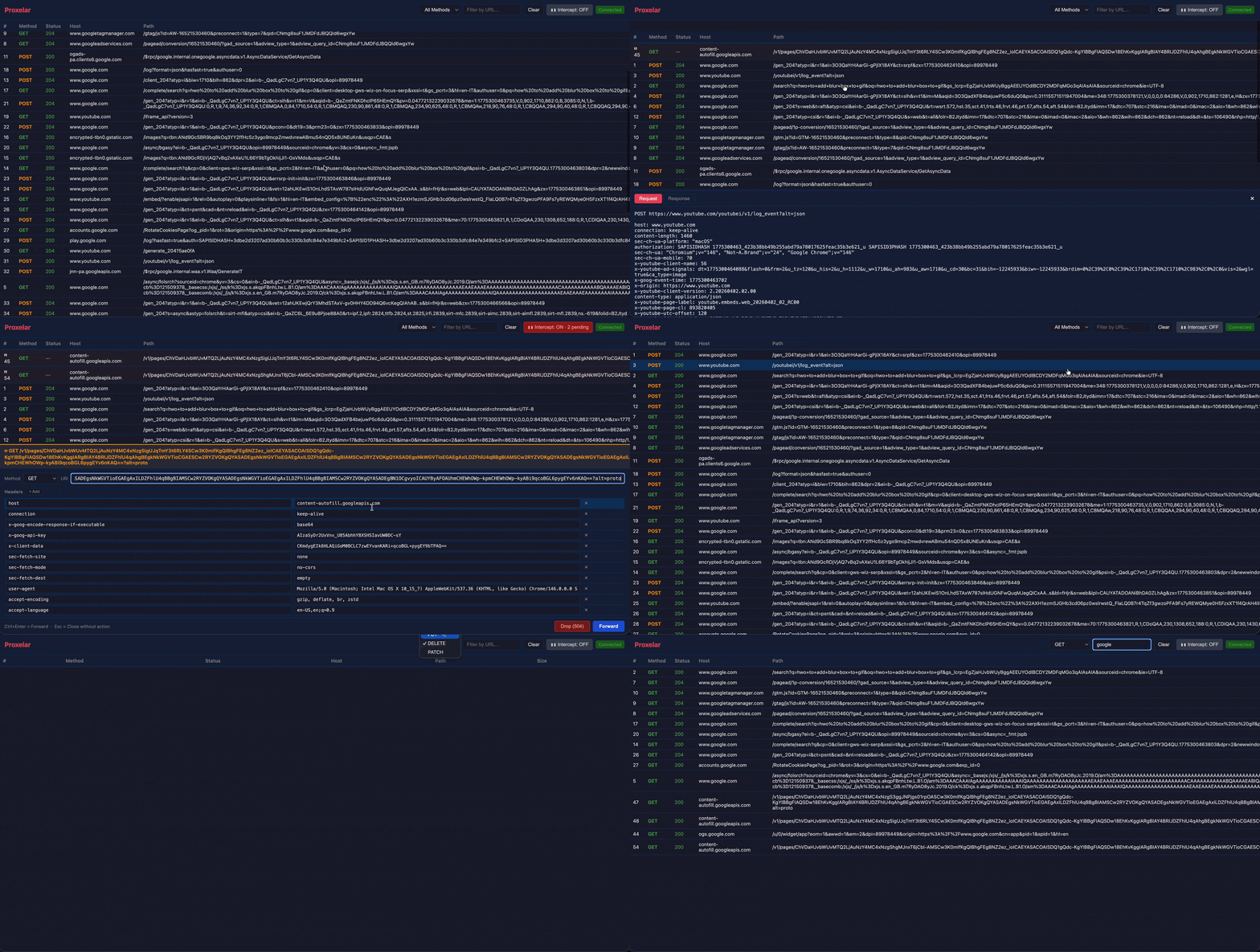
What is Proxelar?
Proxelar is a single-binary MITM proxy for developers who need to see and change what an app is doing on the wire without running a full security suite.
Your app  ──►  Proxelar :8080  ──►  Upstream service
                    │
              Inspect · Intercept · Rewrite · Mock
It is useful for debugging APIs, inspecting browser or mobile traffic, testing WebSocket clients, injecting headers, mocking local services, replaying captured requests, and automating request/response transforms with Lua.
Proxelar is intentionally developer-oriented: terminal-first, scriptable, Rust-native, and usable as a CLI tool or as the proxyapi library.
Why use it?
- One local binary — install with Homebrew, winget, Cargo, Docker/Podman, or GitHub releases.
- Four interfaces — TUI, plain terminal output, browser GUI, or a headless REST API.
- Lua scripting —
on_requestandon_responsehooks can rewrite, block, short-circuit, or mock traffic. - Interactive intercept — pause requests, edit method/URI/headers/body, forward, drop, or replay.
- HTTPS MITM — local CA generation, per-host certificates, and a built-in certificate install page.
- Forward and reverse modes — inspect configured clients or put Proxelar in front of a local service.
- Native protocol core — HTTP/1, HTTP/2, and feature-gated HTTP/3 without Hyper in the proxy data path.
- Six capture modes — forward, reverse, WireGuard, SOCKS5, DNS inspection/rewrite, and fixed-target raw UDP.
- WebSocket inspection — capture connections and browse frames by direction, opcode, and payload preview.
- Portable sessions — save/reload native captures or import/export HAR, curl, and raw HTTP files with secret redaction.
- Rules and automation — map local/remote URLs, mock and redirect requests, hot-reload Lua, or drive the bearer-token REST API.
Installation
Homebrew (macOS / Linux)
brew install proxelar
winget (Windows)
winget install --id EmanueleMicheletti.Proxelar --exact
Cargo
cargo install proxelar
Docker / Podman
The published image supports linux/amd64 and linux/arm64, with Lua and HTTP/3 enabled. Docker and Podman select the matching architecture automatically.
# Web GUI
docker run --rm -it -v ~/.proxelar:/root/.proxelar -p 8080:8080 -p 127.0.0.1:8081:8081 ghcr.io/emanuele-em/proxelar --interface gui --addr 0.0.0.0

# Terminal
docker run --rm -it -v ~/.proxelar:/root/.proxelar -p 8080:8080 ghcr.io/emanuele-em/proxelar --interface terminal --addr 0.0.0.0
The -v ~/.proxelar:/root/.proxelar mount reuses your existing trusted CA certificate so you do not get browser warnings after trusting the CA once. The container always keeps its state at /root/.proxelar; if your host state directory differs (because XDG_CONFIG_HOME is set), mount that path instead of ~/.proxelar.
Quick Start
1. Start the proxy
proxelar
2. Configure a client
Set HTTP and HTTPS proxy to 127.0.0.1:8080 in your browser, OS, mobile device, app, or tool.
3. Install the CA certificate for HTTPS
Visit http://proxel.ar while routing traffic through Proxelar. It serves the generated root certificate and install instructions.
Traffic appears in the TUI immediately.
# quick smoke test
curl -x http://127.0.0.1:8080 http://httpbin.org/get
curl -x http://127.0.0.1:8080 https://httpbin.org/get
Example: mock an API response
Create mock_user.lua:
function on_request(request)
    if request.method == "GET" and string.find(request.url, "/api/user/me") then
        return {
            status = 200,
            headers = { ["Content-Type"] = "application/json" },
            body = '{"id":1,"name":"Local Test User"}',
        }
    end
end
Run Proxelar in front of a local service:
proxelar -m reverse --target http://localhost:3000 --script mock_user.lua
Then call http://127.0.0.1:8080/api/user/me to receive the mocked response.
More scripts are in examples/scripts/, including auth injection, CORS headers, HTML rewriting, cookie stripping, redirects, traffic logging, and JSON body edits.
Portable addons use a versioned proxelar-addon.json manifest with semantic
versioning, declared hooks/native-code requirements, and SHA-256 coverage for
every package file. Proxelar rejects traversal, symlinks, undeclared files, and
tampered content before installation or execution:
proxelar addon verify ./examples/addons/header-tagger
proxelar addon install ./examples/addons/header-tagger
proxelar addon list
proxelar --addon header-tagger
See examples/addons/header-tagger/ for a
minimal distributable package. Existing manifest-free --script directories
remain supported for local development.
Interfaces
proxelar              # interactive TUI (default)
proxelar -i terminal  # plain terminal output
proxelar -i gui       # web GUI at http://localhost:8081
proxelar -i api       # headless REST API at http://localhost:8081
Common options:
proxelar -m reverse --target http://localhost:3000   # reverse proxy
proxelar -m reverse --target http3://localhost:4433  # UDP-only H3 reverse proxy
proxelar -b 0.0.0.0 -p 9090                         # custom bind/port
proxelar --script examples/scripts/block_domain.lua  # with a Lua script
proxelar --body-capture-limit 1048576                # cap captured/editable body bytes
proxelar --upstream-trust default+ca:/path/ca.pem    # trust an extra upstream CA
proxelar --save-session debug.proxelar.json           # save on Ctrl+C
proxelar -i gui --launch-browser                      # isolated Chromium proxy profile
proxelar -m wireguard -b 0.0.0.0 -p 51820 \
  --wireguard-endpoint 192.168.1.10:51820             # mobile/IoT capture
All CLI options
| Flag | Description | Default |
|---|---|---|
-i, --interface |
terminal · tui · gui · api |
tui |
-m, --mode |
forward · reverse · wireguard · socks5 · dns · udp |
forward |
-p, --port |
Listening port | 8080 |
-b, --addr |
Bind address | 127.0.0.1 |
-t, --target |
http://, https://, or http3:// upstream URI for reverse; HOST:PORT for UDP |
— |
--gui-port |
Web GUI port | 8081 |
--ca-dir |
Directory for CA cert/key, addons, and other proxelar state | $XDG_CONFIG_HOME/proxelar if set, else ~/.proxelar |
-s, --script |
Lua script file or addon directory (init.lua) |
— |
--addon |
Load a validated installed addon by name | — |
--addons-dir |
Local addon catalog used by runtime and addon commands |
CA_DIR/addons |
--body-capture-limit |
Maximum body bytes buffered for capture/editing; use free, unlimited, or none for unlimited |
free |
--upstream-trust |
Upstream TLS trust policy: default, default+ca:/path/ca.pem, ca-only:/path/ca.pem, or insecure |
default |
--upstream-proxy |
Chain through http://HOST:PORT or socks5://HOST:PORT |
— |
--load-session, --import-har |
Load prior traffic before capture | — |
--save-session, --export-har, --export-curl, --export-raw |
Write captures on clean shutdown | — |
--rules, --map-local, --map-remote |
Declarative routing, mocks, redirects, and rewrites | — |
--api-token |
Fixed bearer token for the GUI/headless API; random when omitted | random |
--launch-browser |
Launch an isolated Chromium-family profile using the proxy | off |
--wireguard-endpoint |
Public/LAN HOST:PORT written to the generated client config |
derived from bind route |
--theme |
TUI color theme: default/dark/light, system, a bundled name (cyberdream, cyberdream-light), or a custom name without a path or .toml suffix |
default |
--upstream-trust insecure disables upstream certificate and hostname verification. Use it only for controlled debugging.
Configuration
Proxelar keeps its CA certificate/key, addons, and other local state in one directory, resolved in this order:
--ca-dir— explicit override, always wins$XDG_CONFIG_HOME/proxelar— used when that env var is set to a non-empty absolute path~/.proxelar— default when neither of the above applies
# Uses ~/.proxelar (no XDG_CONFIG_HOME set)
proxelar

# Uses $XDG_CONFIG_HOME/proxelar, e.g. ~/.config/proxelar
XDG_CONFIG_HOME=~/.config proxelar

# Always uses the given path, regardless of XDG_CONFIG_HOME
proxelar --ca-dir /path/to/proxelar-state
This directory isn't just for the CA certificate — addons and other local proxelar state live there too, so pointing --ca-dir (or XDG_CONFIG_HOME) somewhere else moves everything at once, not just certs.
Theming
The TUI's colors are configurable via CA_DIR/config.toml, where CA_DIR is the state directory resolved as described above.
theme = "cyberdream"
theme accepts:
default/dark/light— the built-in palette (plain ANSI colors, so it already adapts to whichever light/dark scheme your terminal itself uses)systemdetects the terminal/OS appearance at startup and pickstheme_darkortheme_lightbelow (both default todefaultif unset)- a bundled name:
cyberdream,cyberdream-light,cyberdream-muted,rose-pine,rose-pine-dawn,tokyonight,tokyonight-day,dracula,alucard,catppuccin-mocha,catppuccin-latte - a custom name resolved from
CA_DIR/themes/.toml
To select a light or dark theme at startup (appearance changes while running do not switch themes):
theme = "system"
theme_dark = "cyberdream"
theme_light = "cyberdream-light"
To tweak a handful of colors without creating a theme file:
[colors]
status_bar_bg = "#222222"
status_bar_fg = "#eeeeee"
A custom theme file only needs to specify the colors it changes — everything else falls back to the default palette. Colors are "#rrggbb" hex or a named ANSI color ("red", "light_green", "dark_gray", ...). Unknown keys or invalid colors print a warning and fall back rather than failing to start. --theme on the command line overrides config.toml.
Writing a custom theme
Create each theme file at CA_DIR/themes/.toml. The filename without .toml is the theme name:
CA_DIR/
├── config.toml
└── themes/
    ├── my-dark-theme.toml
    └── my-light-theme.toml
Each file only needs to specify the colors it changes — everything else falls back to the default palette:
# CA_DIR/themes/my-dark-theme.toml
status_bar_bg = "#222222"
status_bar_fg = "#eeeeee"
method_get = "#8fbc8f"
row_error = "#ff6b6b"
Use just the dark theme:
# config.toml
theme = "my-dark-theme"
Or just the light one:
# config.toml
theme = "my-light-theme"
Or select between them at startup based on your terminal/OS appearance:
# config.toml
theme = "system"
theme_dark = "my-dark-theme"
theme_light = "my-light-theme"
For the authoritative list of every colorable key, see known_theme_keys() in proxelar-cli/src/theme.rs, or look at one of the bundled theme presets under proxelar-cli/src/themes/ for a real, fully filled-in example.
Bundled theme credits
The bundled themes are palette ports of these projects — full credit to their authors:
cyberdream/cyberdream-light/cyberdream-muted— cyberdream.nvimrose-pine/rose-pine-dawn— Rosé Pinetokyonight/tokyonight-day— Tokyo Nightdracula/alucard— Draculacatppuccin-mocha/catppuccin-latte— Catppuccin
How it compares
| Tool | Best fit | Proxelar tradeoff |
|---|---|---|
| mitmproxy | Mature general-purpose MITM proxy with a large addon ecosystem, local capture modes, rich flow formats, and years of protocol hardening. | Proxelar is smaller and Rust-native, with integrity-checked Lua addon packages and TUI/web interfaces, but it does not yet match mitmproxy's protocol depth or community inventory. |
| proxyfor | Lightweight Rust proxy with TUI/WebUI and export-oriented workflows. | Proxelar adds interactive interception, replay, portable/redacted exports, Lua transforms, rules, and an embeddable core. |
| Burp Suite / Caido | Professional web security testing, scanning, collaboration, and deep manual testing workflows. | Proxelar is not a security suite. It is better suited to local debugging, scripting, and development workflows. |
| Charles / Proxyman / HTTP Toolkit | Polished desktop app experience for inspecting app traffic. | Proxelar is terminal-first and scriptable, with less desktop polish but a simpler open-source CLI workflow. |
See the full comparison for details.
Current limitations
Proxelar is usable today, but it intentionally has a narrower scope than a full security suite:
- HTTP/1 and HTTP/2 are supported across TCP proxy modes. HTTP/3 interception is intentionally limited to reverse and WireGuard modes:
https://reverse targets listen on TCP and UDP on the same port, whilehttp3://is UDP-only and uses H3 in both directions. There is no heuristic QUIC detection or timeout-based protocol fallback. - The direct HTTP/3 driver preserves informational responses, streaming bodies, ordered duplicate headers, and request/response trailers. QUIC early data, datagrams, and active migration are disabled.
- Generic TCP streams are captured as directional chunks, and fixed-target or WireGuard UDP traffic records request/response datagrams. Protobuf has a lossless wire-field JSON editor and MessagePack has a JSON editor; descriptor-backed field names and raw-TCP schemas are not yet available.
- WireGuard mode currently generates one client identity per CA directory. Proxelar does not modify system proxy settings;
--launch-browseruses a reversible, isolated browser profile instead. - HTTPS interception requires trusting Proxelar's local CA. Certificate-pinned apps and many Android apps will not trust user-installed CAs.
- Remote web GUI use is not a hardened multi-user deployment mode; keep it local or tunnel it carefully.
See Known limitations and the roadmap.
Documentation
Full documentation: proxelar.micheletti.io
- Quick start
- Inspect browser and curl traffic
- Mock or modify a local API
- Lua scripting API
- CA trust and uninstall
- Sessions and export
- Rules and headless API
Contributing
Contributions are welcome. See CONTRIBUTING.md and ROADMAP.md.