Process Compose is an Apache-2.0, Go-based scheduler and orchestrator that starts, orders, and supervises non-containerized applications from a single YAML file, built for developers and operators who want process control without Docker.
What it is
Process Compose sits in the Infrastructure & Operations / Orchestration & Scheduling category and manages applications that run directly on a host instead of inside containers. Written in Go, it ships as a single binary file with no other dependencies, and the registry records 2,779 stars, 149 forks, and 26 open issues, with the last push in September 2026. Workflows are described in a YAML file named process-compose.yaml, which declares a version and a processes map; each process has a command and may declare dependencies on other processes.
The problem it solves is the container toolchain people reach for by default. The README states the motivation plainly: sometimes you do not want to deal with docker files, volume definitions, networks and docker registries. Process Compose replaces that stack for non-containerized workloads. Startup order comes from depends_on conditions such as process_completed, while the scheduler handles parallel or serial execution, recovery policies, and health checks. The same binary also functions as a server exposing a REST API, so orchestration state is reachable outside the terminal.
Key capabilities
- Processes execute in parallel or serially, with dependencies and startup order declared under depends_on using conditions such as process_completed.
- Health checks cover liveness and readiness, alongside process recovery policies and manual process restart.
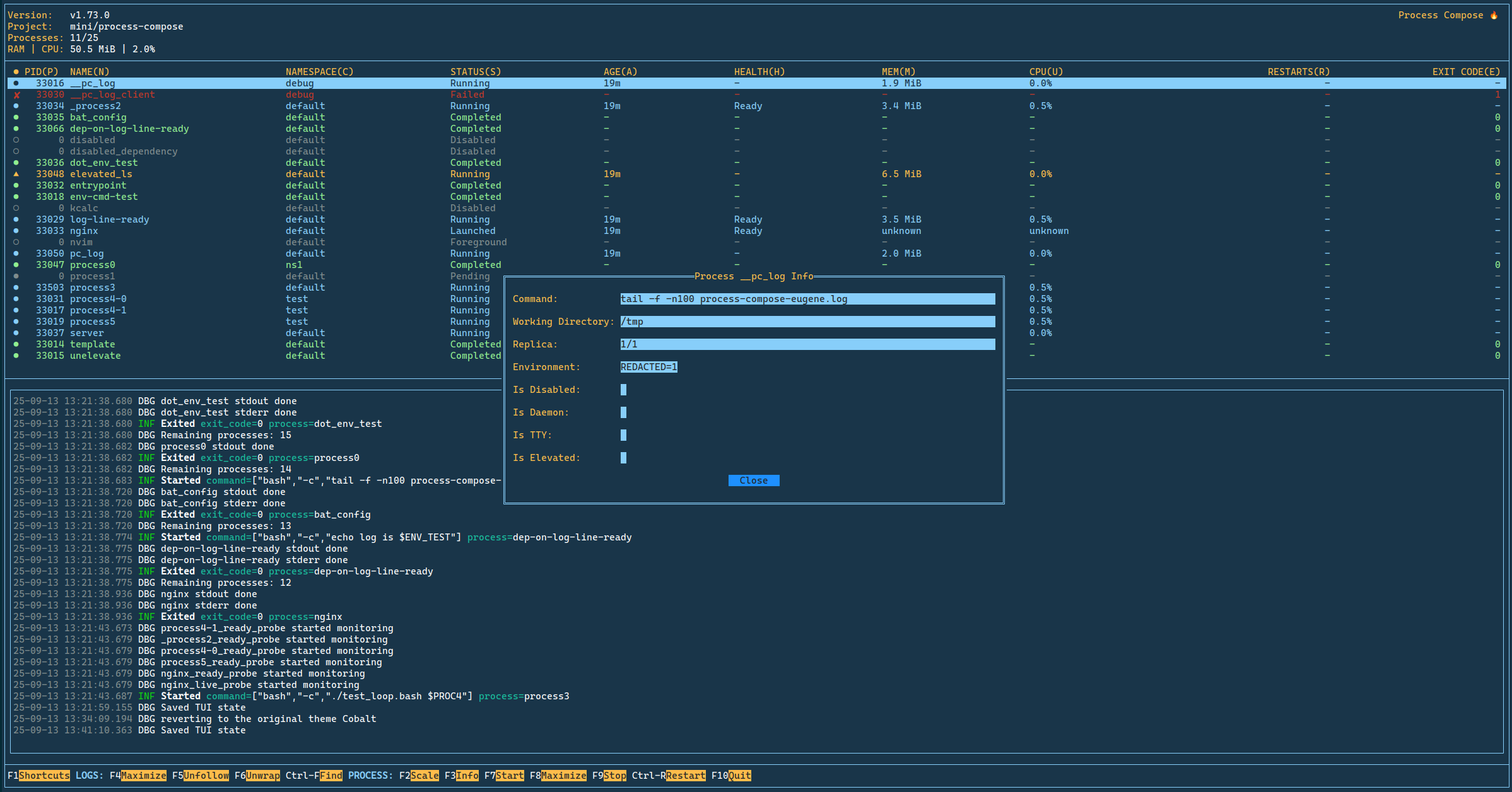
- Terminal User Interface and CLI modes, with configurable shortcuts, themes support, and dependency graph visualization across the CLI, TUI, and API.
- REST API documented with OpenAPI (Swagger), optional token authentication through PC_API_TOKEN, and one binary functioning as both server and client.
- Environment variables per process or globally, expanded with envsubst, plus per-process logs, a single global log file, and logs caching.
- Namespaces with start, stop, and restart operations from CLI and TUI, multiple replicas of a process, cron and interval-based scheduled processes, and file watching that restarts a process on change and can cascade to dependents.
- Additional surface: merge configuration files, on-the-fly process configuration edit, on-the-fly project update, forking services and daemons, interactive and foreground processes, recipes management, MCP Server integration for AI assistants, and a Process Monitor with push notifications.
Who uses it and how
- Developers running a multi-process stack locally: write process-compose.yaml, run the process-compose command, and watch every service in one TUI rather than separate terminals.
- CI pipelines: the published ten-part video course, about 45 minutes total, covers a first config through dependencies, health checks, restart policies, templating, namespaces, the REST API, and CI pipelines.
- Operators on hosts where containers are unavailable or unwanted, relying on one binary and per-process log files instead of container logging infrastructure.
- Teams needing programmatic control, driving the REST API with PC_API_TOKEN and namespace operations to start, stop, or restart groups of processes.
- AI assistant users exposing processes as tools and resources through the MCP Server, optionally including the control plane for start, stop, scale, list, and logs.
Getting started
Install using the installation instructions on the project documentation site, describe the workflow in process-compose.yaml, then run the process-compose command from a terminal. The README links a Quick Start, the launcher documentation, and the video series.
How it compares
The only comparable tool named in the facts is Docker, which the README frames as the thing being avoided: Docker requires docker files, volume definitions, networks, and registries, while Process Compose needs one YAML file and one Go binary with no other dependencies. It is open source under Apache-2.0 and runs processes directly on the host, so logs and process state stay in local files rather than in images and registries. It does not claim to replace a container runtime; it covers the cases where that toolchain was reached for only to get startup order and supervision.
When to use it — and when not to
Choose it when the workload is non-containerized and the need is dependency ordering, health checks, restarts, and a shared control surface without a container runtime; the facts mention no database, storage, or SMTP component a self-hoster must operate. Skip it when the deployment depends on container images, registries, or network definitions, which are outside its stated scope. The honest caveat is documentation depth: the README reads as a long feature list, the author notes that English is not their native language and welcomes grammar corrections, and 26 issues remain open, so review the documentation and video course before committing.
project readme (upstream, from github) — read inline
Process Compose





Process Compose is a simple and flexible scheduler and orchestrator to manage non-containerized applications.

Why? Because sometimes you just don't want to deal with docker files, volume definitions, networks and docker registries.
Since it's written in Go, Process Compose is a single binary file and has no other dependencies.
Once installed, you just need to describe your workflow using a simple YAML schema in a file called process-compose.yaml:
version: "0.5"

processes:
  hello:
    command: echo 'Hello World'
  pc:
    command: echo 'From Process Compose'
    depends_on:
      hello:
        condition: process_completed
And start it by running process-compose from your terminal.
Check the Documentation for more advanced use cases.
Features
- Processes execution (in parallel or/and serially)
- Processes dependencies and startup order
- Process recovery policies
- Manual process [re]start
- Processes arguments
bash or zsh style (or define your own shell)
- Per process and global environment variables using envsubst
- Per process or global (single file) logs
- Health checks (liveness and readiness)
- Terminal User Interface (TUI) or CLI modes
- Forking (services or daemons) processes
- REST API (OpenAPI a.k.a Swagger) with optional token authentication
PC_API_TOKEN
- Logs caching
- Functions as both server and client
- Configurable shortcuts
- Merge Configuration Files
- Namespaces
- Namespace Operations (Start, Stop, Restart via CLI and TUI)
- Run Multiple Replicas of a Process
- Run a Foreground Process
- Interactive Process
- Themes Support
- On the fly Process configuration edit
- On the fly Project update
- Recipes Management
- Scheduled Processes (cron and interval-based)
- File Watching - restart a process when its files change, optionally cascading to its dependents
- Dependency Graph visualization (CLI, TUI, and API)
- MCP Server integration for AI assistants — expose processes as tools/resources and (optionally) the project's own control plane (start/stop/scale/list/logs)
- Process Monitor (Push Notifications)
Get Process Compose
Installation Instructions
Documentation
Quick Start
Documentation
Video Series
Process Compose Intro is a ten part course, about 45 minutes in total. It goes from a first config through dependencies, health checks, restart policies, the TUI, templating, namespaces, the REST API and CI pipelines. Every episode has chapter markers.
How to Contribute
- Fork it
- Create your feature branch (git checkout -b my-new-feature)
- Commit your changes (git commit -am 'Add some feature')
- Push to the branch (git push origin my-new-feature)
- Create new Pull Request
See the Contributing page for more details.
English is not my native language, so PRs correcting grammar or spelling are welcome and appreciated.
Consider supporting the project ❤️
Github (preferred)
Huge thanks to my amazing GitHub sponsors:

Bitcoin

3QjRfBzwQASQfypATTwa6gxwUB65CX1jfX
Thank You!