


Prisme Analytics is a free, open source web & product analytics project written in TypeScript and released under AGPL-3.0. It has 131 GitHub stars, 4 forks and 1 open issues, and was last pushed 7 months ago. On this registry it ranks #24 of 25 tracked projects in Web & Product Analytics, with 5 head-to-head comparisons available.

What is Prisme Analytics?

Prisme Analytics is a self-hosted, privacy-focused web analytics service written in Go that delivers cookie-less traffic measurement through Grafana dashboards, and it is built for website and web application owners who want GDPR-compliant insight without shipping visitor data to a third party.

What it is

Prisme Analytics is an open-source analytics platform distributed under the AGPL-3.0 licence. It runs in the Grafana ecosystem: the ingestion service collects pageviews and custom events, ClickHouse stores them, and Grafana supplies the query and visualisation layer, including user management, team management, permission management, multi-organisation support, and custom dashboards. The repository's own description frames it as a high-performance, self-hosted and privacy-focused service written in Go, and the README positions it as an alternative to other analytics products, naming Google Analytics as the point of contrast.

The concrete problem it solves is measurement that would otherwise require a third-party tag. Most sites still run a hosted script that sets cookies, collects identifiable data, and exports the resulting audience data to a vendor. Prisme replaces that tag with a roughly 2 kB tracking script, or a 35-byte single pixel image at /api/v1/noscript/events/pageviews when JavaScript is unavailable. The README states the tracking script is around 22 times smaller than Google Analytics. Data stays in the operator's own ClickHouse instance, and campaigns can still be measured through UTM parameters.

Key capabilities

  • Cookie-less collection of anonymized data, described in the README as suitable for GDPR, PCCA, PECR and Schrems II compliance.
  • Grafana-based interface providing user management, team management, permission management, multi-organisation support and custom dashboards.
  • ClickHouse as the underlying store, listed in the repository topics alongside grafana and metrics.
  • Custom events and custom dashboards for measuring beyond default pageviews.
  • UTM parameter capture for campaign and newsletter traffic attribution.
  • Automatic SPA support through any pushState-based frontend router, with no extra configuration.
  • Automatic filtering of bots, scrapers and spam traffic under the "Humans only" behaviour.
  • Published load test using k6 at tests/k6/events reporting more than 50,000 requests per second on an AMD Ryzen 7 7840U.

Who uses it and how

  • Operators running a Docker-based self-hosted deployment, following the self-host guide to stand up ingestion, ClickHouse and Grafana together.
  • Teams that need multiple organisations, users and permission boundaries, which the Grafana layer supplies rather than the analytics service itself.
  • Marketing and growth teams capturing UTM-tagged campaign and newsletter traffic to compare channel performance.
  • Developers of single-page applications built on pushState routers, who get navigation-aware tracking without custom instrumentation.
  • Organisations under GDPR, PCCA, PECR or Schrems II obligations that cannot send visitor data to an external processor.
  • Smaller teams that would rather create an account on Prisme Cloud than operate the stack.

Getting started

Self-host a Prisme instance by following the official Docker self-hosting guide, or create an account on Prisme Cloud. After that, add the tracking script to the site and pageview data appears in the Web Analytics dashboard.

How it compares

Against Google Analytics, the difference the README draws is size and data handling: the Prisme script is roughly 2 kB, collection is cookie-less, and only anonymized data is stored. Prisme is AGPL-3.0 licensed and its README states that all features are available in the open-source version with no vendor lock-in, so the software can be self-hosted rather than rented. Cost and data ownership therefore follow from the operator's own infrastructure instead of a vendor subscription.

When to use it — and when not to

A self-hoster must operate the ingestion server plus ClickHouse and Grafana; Prisme is not a single binary that replaces all three. Teams wanting zero operational surface, or those who expect a polished hosted product without touching infrastructure, should look elsewhere or use Prisme Cloud. Be aware that the repository is small (131 stars, 4 forks) and that its own published benchmark shows a 13.80% request failure rate under the shared-iterations scenario, while the repository language metadata lists TypeScript even though the README describes the service as written in Go — treat the performance claims as self-reported.

project readme (upstream, from github) — read inline

PRs welcome! Docker Image Size (tag) Go version Prisme Analytics Twitter

◢ Prisme Analytics

An Open Source, privacy-focused and progressive analytics service.
Documentation | Live demo

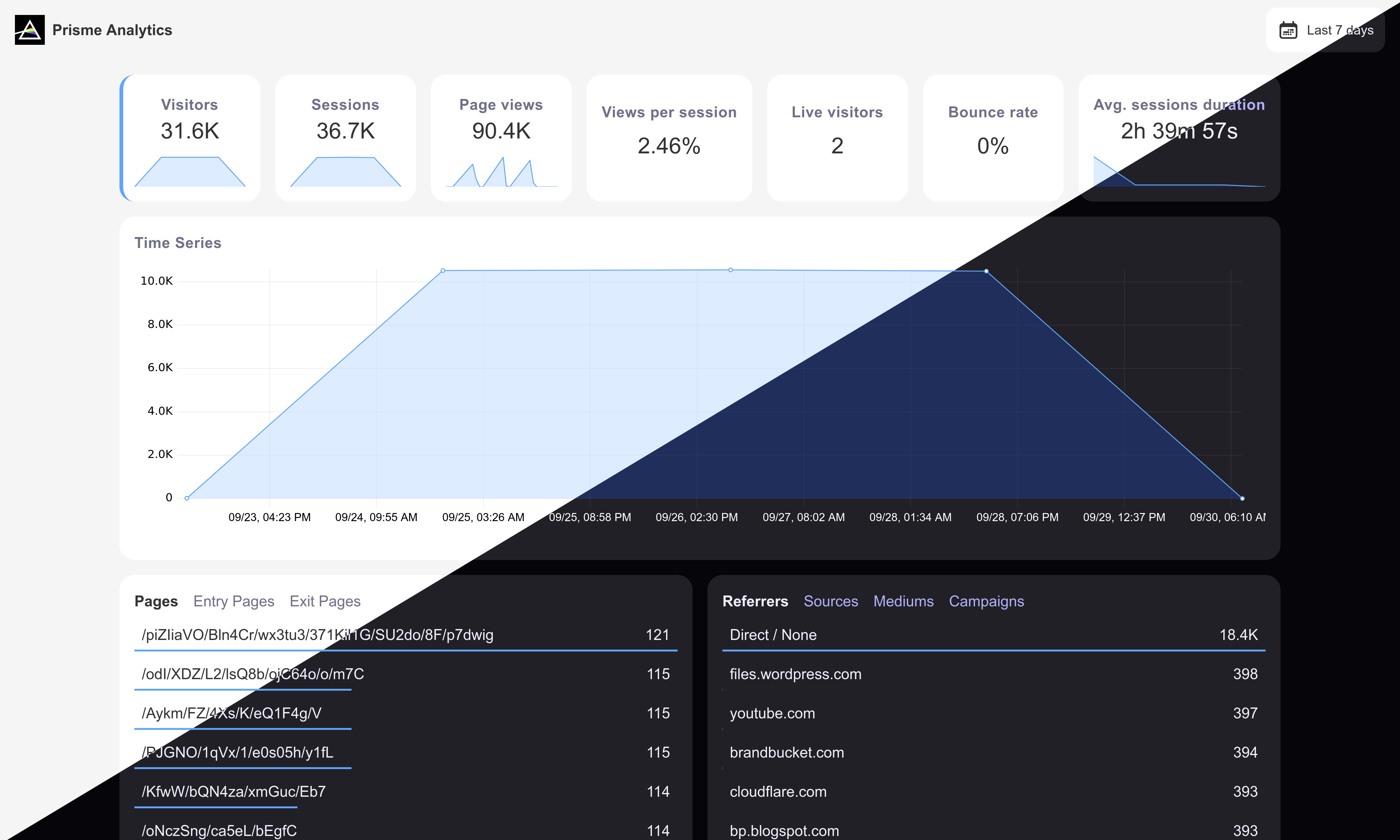
grafana dashboard

Why Prisme ?

Here's what makes Prisme a great alternative to other analytics:

  • Easy setup: Gain valuable insights into your website or web application after a 3-minutes setup.
  • Simple analytics: Easy to use dashboards with filters and definition for each metrics.
  • Analytics that matter: Custom events and dashboards gives you the flexibility to measure what matters most, providing personalized insights to inform your business decisions.
  • Privacy-focused: Worry-free GDPR, PPCA, PECR and Shrems II compliance with cookie-less analytics that collect only anonymized data.
  • Lightweight: Prisme tracking script is around 2kB (~22x smaller than Google Analytics) and single pixel image returned for javascript less tracking is 35 bytes.
  • Humans only: Bots, scrapers and spam traffic are automatically filtered.
  • Campaigns & newsletters: Use UTM to collect data on how much traffic your campaigns generate.
  • No vendor lock-in: all features are available in Open Source versions, and Prisme is designed to be easy to self-host.
  • SPA support: Prisme is built with modern web frameworks in mind and it works automatically with any pushState based router on the frontend.
  • Grafana based: Prisme integrates with Grafana that provides:
    • User managements
    • Team managements
    • Permissions managements
    • Multi organizations support
    • Custom dashboards

Getting started

Follow this guide to self-host a Prisme analytics instance or create an account on Prisme Cloud.

Then, you can simply add tracking script to your website:

<script src="https://<your-prisme-instance-hostname>/static/wa.js" defer></script>
<noscript>
    <img src="https://<your-prisme-instance-hostname>/api/v1/noscript/events/pageviews" style="position:absolute;top:-100px">
</noscript>

That's it! You should now see data in your Web Analytics dashboard.

Configuration

You can find configuration documentation on our website.

Performance

Prisme Analytics ingestion server is easily capable of ingesting more than 50,000 req/s on my AMD Ryzen 7 7840U w/ Radeon 780M Graphics with injectors running on the same machine.

$ cat /proc/cpuinfo | head | grep 'model name'
model name	: AMD Ryzen 7 7840U w/ Radeon  780M Graphics

$ cd tests/k6/events
$ make start test clean

          /\      |‾‾| /‾‾/   /‾‾/
     /\  /  \     |  |/  /   /  /
    /  \/    \    |     (   /   ‾‾\
   /          \   |  |\  \ |  (‾)  |
  / __________ \  |__| \__\ \_____/ .io

     execution: local
        script: /data/main.js
        output: -
 
     scenarios: (100.00%) 1 scenario, 4096 max VUs, 10m30s max duration (incl. graceful stop):
              * sharedIterationsPageViewEvents: 131072 iterations shared among 4096 VUs (maxDuration: 10m0s, gracefulStop: 30s)

     data_received..................: 90 MB  9.9 MB/s
     data_sent......................: 130 MB 14 MB/s
     http_req_blocked...............: avg=928.82µs min=330ns    med=1.07µs   max=268.74ms p(90)=2.45µs   p(95)=3.16µs  
     http_req_connecting............: avg=911.42µs min=0s       med=0s       max=268.71ms p(90)=0s       p(95)=0s      
     http_req_duration..............: avg=73.92ms  min=57.4µs   med=67.47ms  max=808.82ms p(90)=139.72ms p(95)=167.03ms
       { expected_response:true }...: avg=74.08ms  min=60.26µs  med=67.63ms  max=808.82ms p(90)=139.92ms p(95)=167.43ms
     http_req_failed................: 13.80% ✓ 62640        ✗ 391185
     http_req_receiving.............: avg=3.71ms   min=3.4µs    med=12.13µs  max=221.36ms p(90)=729.89µs p(95)=19.92ms 
     http_req_sending...............: avg=282.26µs min=2.37µs   med=7.27µs   max=216.54ms p(90)=19.27µs  p(95)=105.73µs
     http_req_tls_handshaking.......: avg=0s       min=0s       med=0s       max=0s       p(90)=0s       p(95)=0s      
     http_req_waiting...............: avg=69.92ms  min=45.89µs  med=67.16ms  max=750.36ms p(90)=125.53ms p(95)=140.88ms
     http_reqs......................: 453825 50018.387644/s
     ✓ { event_type:custom }........: 117531 12953.696068/s
     ✓ { event_type:pageview }......: 336294 37064.691576/s
     iteration_duration.............: avg=274.18ms min=121.44µs med=152.26ms max=3.12s    p(90)=680.26ms p(95)=958.77ms
     iterations.....................: 131072 14446.119331/s
     vus............................: 2100   min=2100       max=4096
     vus_max........................: 4096   min=4096       max=4096

running (00m09.1s), 0000/4096 VUs, 131072 complete and 0 interrupted iterations
sharedIterationsPageViewEvents ✓ [ 100% ] 4096 VUs  00m09.1s/10m0s  131072/131072 shared iters

Contributing

If you want to contribute to prismeanalytics to add a feature or improve the code, open an issue or make a pull request.

:stars: Show your support

Please give a :star: if this project helped you!

buy me a coffee button

:scroll: License

Prisme Analytics is distributed under AGPL-3.0-only. For MIT exceptions, see LICENSING.md

Frequently asked questions

Is Prisme Analytics free to use?

Prisme Analytics is open source under the AGPL-3.0 licence. There is no licence fee and no seat count — you can self-host it or, where the project offers one, pay a vendor for a managed version instead.

What does Prisme Analytics do?

Privacy-friendly web analytics for data-driven decisions

What is Prisme Analytics written in?

Prisme Analytics is primarily written in TypeScript. Its source is publicly available at https://github.com/prismelabs/analytics, and it has 131 GitHub stars.