
preswald is a free, open source marketing & customer engagement project written in Python and released under Apache-2.0. It has 4,272 GitHub stars, 647 forks and 330 open issues, and was last pushed 5 months ago. On this registry it ranks #29 of 76 tracked projects in Marketing & Customer Engagement, with 5 head-to-head comparisons available. It gained 4 stars over the last 30 tracked days.

What is preswald?

Preswald is an Apache-2.0 Python static-site generator that packages interactive data apps — compute, data access, and UI — into self-contained .html files that run entirely in the browser on a WebAssembly runtime built from Pyodide and DuckDB, aimed at analysts, data engineers, and developers who need to hand a working dashboard, report, or inspection tool to someone who will not install anything.

What it is

Preswald is a static-site generator for building interactive data apps in Python. It packages compute, data access, and UI into self-contained apps that run locally in the browser, built on a WASM runtime with Pyodide and DuckDB. The README positions it as a lightweight alternative to heavier web app platforms: it ships built-in UI components and reactive state tracking, so a single Python file can become a dashboard, report, prototype, workflow, or notebook that stays reactive, portable, and secure by default. Apps are code-based rather than notebook- or JS-framework-based, and the entrypoint, configuration, secrets, and data all live in one project folder.

The concrete problem it solves is delivery. Bundling logic, UI, and data into one shareable file means a tool can be shipped to a stakeholder who should not need to install anything, sensitive data can stay under full local control, and the resulting artifact runs offline in any modern browser — including in secure or airgapped settings. It lives in the Python data ecosystem, drawing on Pyodide, DuckDB, Pandas, Plotly, and Matplotlib, and it replaces the heavier web app platforms the README names as the alternative, along with the notebook-plus-JS-framework pattern for distributing data tools.

Key capabilities

  • Code-based app authoring in Python using components such as text, table, and get_df, with no notebook or JS framework involved.
  • File-first packaging: preswald export builds the app into a static site inside dist/, bundling Python code via Pyodide, data, and DuckDB queries, shareable as a file folder or embeddable in hosting platforms.
  • In-browser computation through a WASM runtime with Pyodide and DuckDB, with Pandas, Plotly, and Matplotlib in the stack; runs offline even with large data.
  • Reactive engine that re-runs only what is needed, powered by a DAG of dependencies.
  • Composable UI from prebuilt components including tables, charts, and forms.
  • Configuration through a single preswald.toml covering [project] metadata and runtime settings, [branding] such as logo, favicon, and primaryColor, and [logging] level and format.
  • Secrets handling via secrets.toml for API keys, with no server required for local execution.

Who uses it and how

  • Analysts building data summaries and visualizations and shipping them as static sites.
  • Teams delivering interactive reports and notebooks that update live based on user input.
  • Engineers and operators building data inspection tools to explore files, logs, or snapshots through purpose-built UIs.
  • Field and security teams packaging offline kits for fieldwork, secure, or airgapped environments.
  • Experiment owners comparing runs, tracking metrics, and presenting results in standalone interactive apps.

Getting started

Install with pip install preswald (or uv pip install preswald), then run preswald init my_app, cd my_app, and preswald run, which launches a development server and typically serves the app at http://localhost:8501.

How it compares

The facts name no paid products that Preswald replaces, and no directly comparable tool in this registry, so it stands alone here. Its neighbouring names — Pyodide, DuckDB, Pandas, Plotly, Matplotlib — are the components it composes into a packaging layer, not competitors it substitutes for.

When to use it — and when not to

Choose Preswald when the deliverable is a file: an analyst dashboard, report, or inspection tool that must run offline without installation. Do not choose it for workflows that depend on an always-on server, since local execution with no server is the design centre. Honest caveats: the project carries 330 open issues against 646 forks, and the README's documentation section cuts off mid-sentence, so documentation coverage is thinner than the feature list implies.

project readme (upstream, from github) — read inline

Create interactive data apps with a full data stack that runs in the browser (no local dependencies!),runs offline, and is shareable in a single file.

Apache 2.0 License Python Version Slack Community PyPI Version

Website Documentation Studio Book a Demo

What is Preswald?

Preswald is a static-site generator for building interactive data apps in Python. It packages compute, data access, and UI into self-contained data apps that run locally in the browser. Built on a WASM runtime with Pyodide and DuckDB, Preswald enables portable, file-based apps that are fast, reactive, and shareable.

You can think of Preswald as a lightweight alternative to heavier web app platforms. It provides built-in UI components and reactive state tracking, so you can use it to build dashboards, reports, prototypes, workflows, and notebooks that are reactive, portable, and secure by default.

Preswald is especially useful when:

  • You want to bundle logic, UI, and data into a shareable file
  • You need to ship a tool to a stakeholder who shouldn't need to install anything
  • You're working with sensitive data and want full local control
  • You want to give AI systems structured, modifiable tools

Key Features

  • Code-based. Write apps in Python, not in notebooks or JS frameworks
  • File-first. One command creates a fully-packaged .html app
  • Built for computation. Use Pyodide + DuckDB directly in-browser
  • Composable UI. Use prebuilt components like tables, charts, forms
  • Reactive engine. Only re-run what's needed, powered by a DAG of dependencies
  • Local execution. No server. Runs offline, even with large data
  • AI-ready. Apps are fully inspectable and modifiable by agents

Export as a Static App

preswald export

This command builds your app into a static site inside dist/. The folder contains all the files needed to run your app locally or share it.

  • Works offline in any modern browser
  • Bundles your Python code (via Pyodide), data, and DuckDB queries
  • Preserves app UI, logic, and reactive state
  • Shareable as a file folder or embeddable in hosting platforms

Installation

https://pypi.org/project/preswald/

pip install preswald

or 

uv pip install preswald
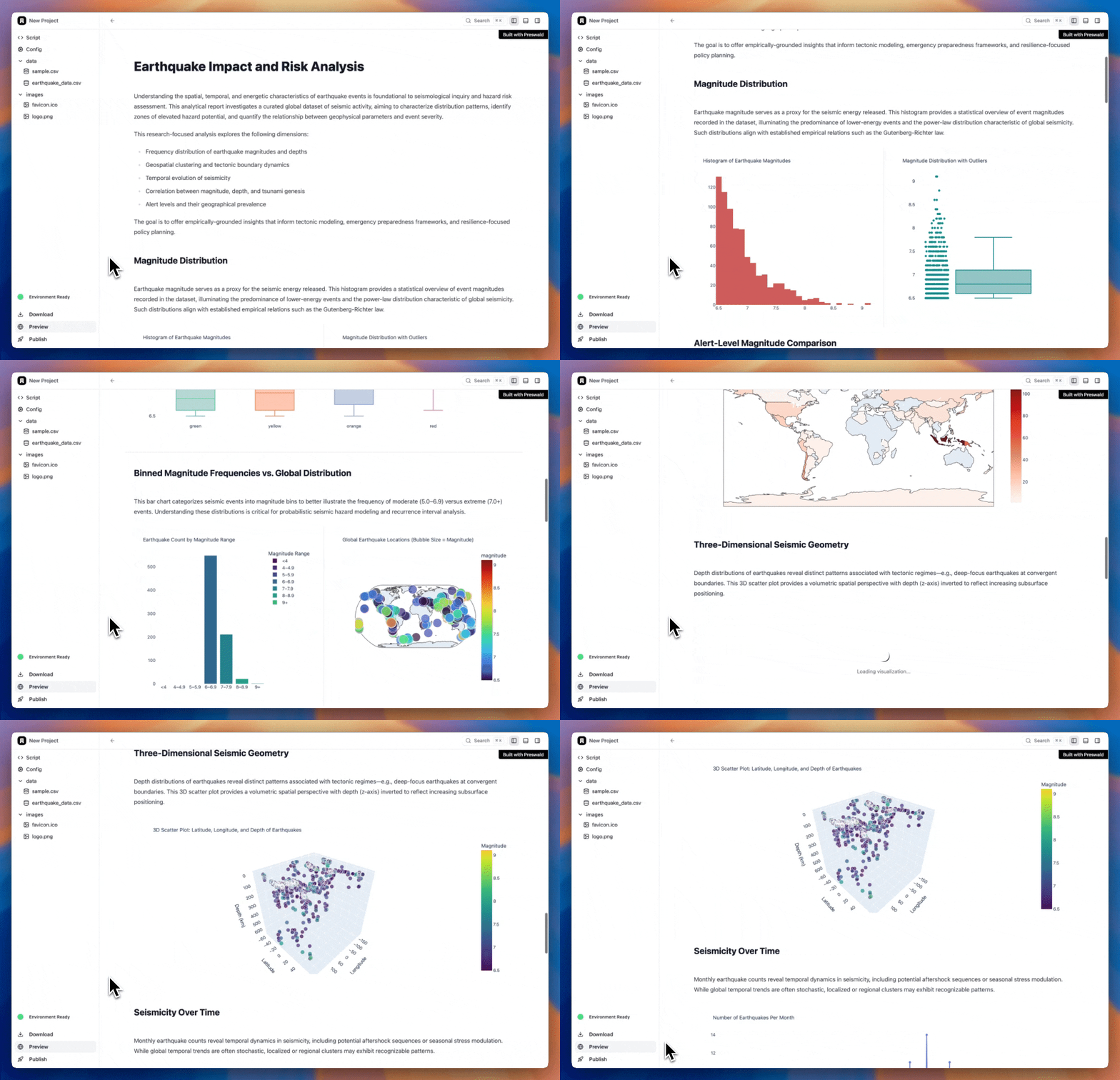
Demo GIF

Quick Start

pip install preswald
preswald init my_app
cd my_app
preswald run

This will create a folder called my_app:

my_app/
├── hello.py           # Your app logic
├── preswald.toml      # App metadata and config
├── secrets.toml       # Secrets (e.g. API keys)
├── data/sample.csv    # Input data files
├── images/logo.png    # Custom branding

Edit hello.py to build your app.

from preswald import text, table, get_df

text("# Hello Preswald")
df = get_df("sample.csv")
table(df)
...

Now run your app locally with:

preswald run

This command launches a development server, and Preswald will let you know where your app is hosted. Typically, it’s here:

🌐 App running at: http://localhost:8501

Open your browser, and voilà—your first Preswald app is live!

Configuration

Preswald uses a simple preswald.toml file for configuration. This defines the app's metadata, runtime settings, UI branding, and data sources. Here's a sample:

[project]
title = "Preswald Project"
version = "0.1.0"
port = 8501
slug = "preswald-project"
entrypoint = "hello.py"

[branding]
name = "Preswald Project"
logo = "images/logo.png"
favicon = "images/favicon.ico"
primaryColor = "#F89613"

[logging]
level = "INFO"  # Options: DEBUG, INFO, WARNING, ERROR, CRITICAL
format = "%(asctime)s - %(name)s - %(levelname)s - %(message)s"

Use Cases


📚 Documentation

We’re here to help! Check out our full documentation at Preswald Docs.


🤝 Contributing

Check out CONTRIBUTING.md.


🎉 Join the Community

  • GitHub Issues: Found a bug? Let us know here.
  • Community Forum: Reach out here
  • Discussions: Share your ideas and ask questions in our discussion forum.
  • Contributors: Meet the awesome people who make Preswald better here.

📢 Stay Connected

Follow us on LinkedIn Follow us on Twitter

📄 License

Preswald is licensed under the Apache 2.0 License.

✨ Contributors

Thanks to everyone who has contributed to Preswald 💜

Frequently asked questions

Is preswald free to use?

preswald is open source under the Apache-2.0 licence. There is no licence fee and no seat count — you can self-host it or, where the project offers one, pay a vendor for a managed version instead.

What does preswald do?

Preswald is a WASM packager for Python-based interactive data apps: bundle full complex data workflows, particularly visualizations, into single files, runnable

What is preswald written in?

preswald is primarily written in Python. Its source is publicly available at https://github.com/StructuredLabs/preswald, and it has 4,272 GitHub stars.