English · Français · Deutsch · Español · Português · Русский · 简体中文

Powerful note-taking without the hassle.
A free, self-hosted, open-source alternative to Notion, Obsidian, Evernote, or OneNote.




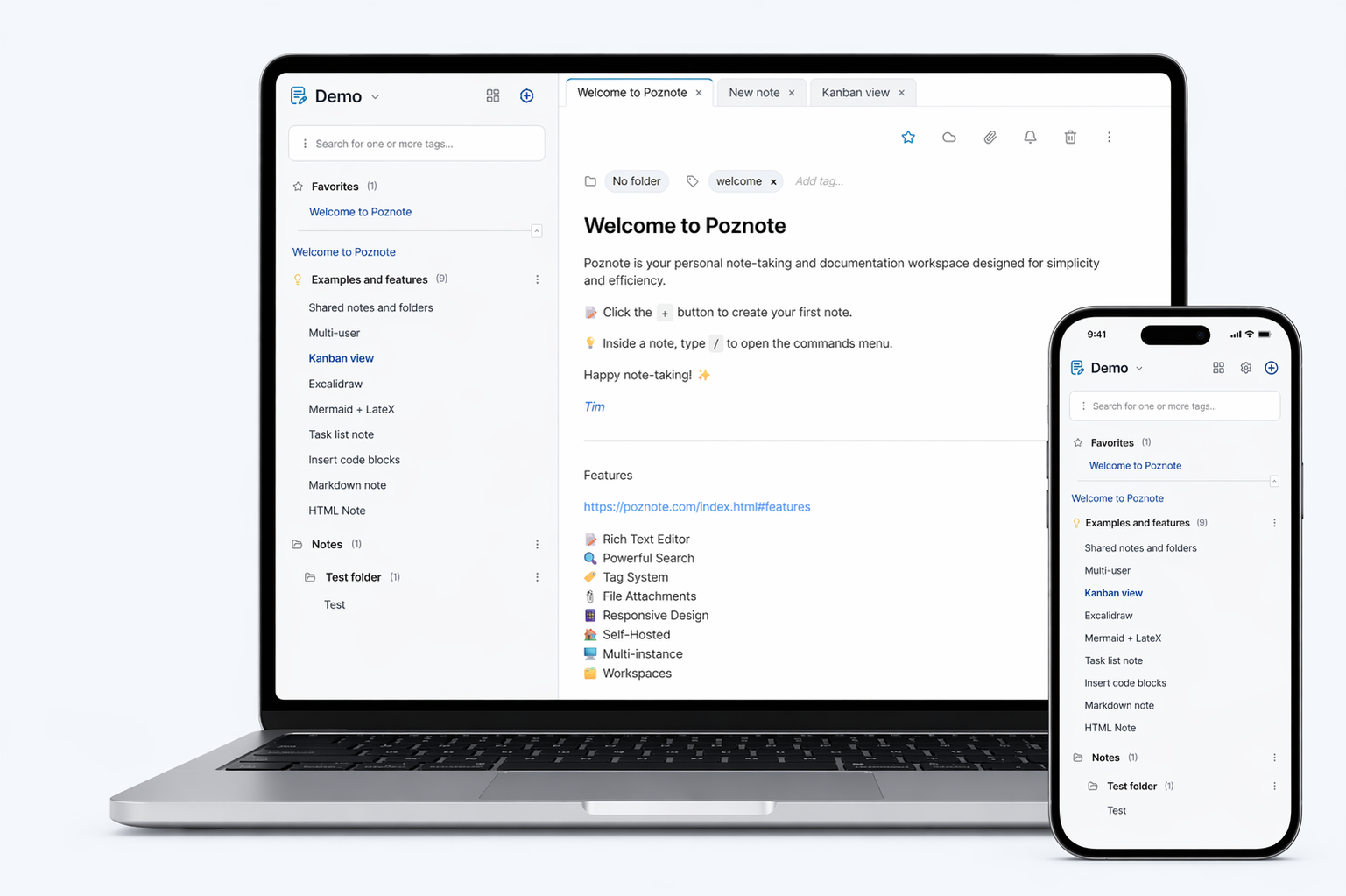
Features
Discover all the features here.
Screenshots
See all the screenshots here.
Demo
Login: poznote
Password: poznote
They talk about Poznote
https://poznote.com/press.html
Discord
Join the community to ask questions, share feedback or follow the development:
Table of content
- Install
- Access
- Change Settings
- Update application
- Authentication
- App Passwords
- Note types
- Snapshots
- Personalization
- Multi-users
- Activity Log
- Webhooks
- Git Synchronization
- S3 Attachment Storage
- S3 Backups
- Backup / Export
- Restore / Import
- Offline View
- Multiple Instances
- AI Assistant
- Transcription (speech to text)
- MCP Server
- Chrome Extension
- Share to Poznote on Android
- API Documentation
- Tech Stack
Install
The official image is multi-arch (linux/amd64, linux/arm64) and supports Windows/macOS via Docker Desktop, as well as ARM64 devices like Raspberry Pi, NAS systems etc.
Choose your preferred installation method below:
🖥️ Windows
Step 1: Prerequisite
Install and start Docker Desktop
Step 2: Deploy Poznote
Create a new directory:
mkdir poznote
Navigate to the Poznote directory:
cd poznote
Create the environment file:
curl -o .env https://raw.githubusercontent.com/timothepoznanski/poznote/main/.env.template
Edit the .env file:
notepad .env
Download the Docker Compose configuration file:
curl -o docker-compose.yml https://raw.githubusercontent.com/timothepoznanski/poznote/main/docker-compose.yml
Download the latest Poznote Webserver and Poznote MCP images :
docker compose pull
Start Poznote containers:
docker compose up -d
🐧 Linux
Step 1: Prerequisite
- Install Docker engine
- Install Docker Compose
Step 2: Install Poznote
Create a new directory:
mkdir poznote
Navigate to the Poznote directory:
cd poznote
Create the environment file:
curl -o .env https://raw.githubusercontent.com/timothepoznanski/poznote/main/.env.template
Edit the .env file:
vi .env
Download the Docker Compose configuration file:
curl -o docker-compose.yml https://raw.githubusercontent.com/timothepoznanski/poznote/main/docker-compose.yml
Download the latest Poznote Webserver and Poznote MCP images:
docker compose pull
Start Poznote containers:
docker compose up -d
🍎 macOS
Step 1: Prerequisite
Install and start Docker Desktop
Step 2: Deploy Poznote
Create a new directory:
mkdir poznote
Navigate to the Poznote directory:
cd poznote
Download the environment file:
curl -o .env https://raw.githubusercontent.com/timothepoznanski/poznote/main/.env.template
Edit the .env file:
vi .env
Download the Docker Compose configuration file:
curl -o docker-compose.yml https://raw.githubusercontent.com/timothepoznanski/poznote/main/docker-compose.yml
Download the latest Poznote Webserver and Poznote MCP images:
docker compose pull
Start Poznote containers:
docker compose up -d
☁️ Cloud
Don't want to manage a server? Two hosts run Poznote for you. With either one, you first need to create an account with the host, then you deploy Poznote from their catalog in a few clicks. Both give you free credit when you sign up, so you can try without paying anything.
- Caliber Node, from $2.50 a month: updates arrive as soon as they are released, fixed plans (you move up to the next tier if you need more), SSH console and automatic snapshots included. A good fit if you want as little to manage as possible and don't have that many notes.
- PikaPods, from $2 a month: updates are tested before rollout so they arrive a little later, RAM, CPU and disk can be adjusted independently, backups run automatically but you set up where they are stored (S3). A good fit if you want room to grow as your notes pile up.
🗄️ Proxmox VE
On a Proxmox VE host, the Proxmox VE Community Scripts project installs Poznote in its own container with a single command, no Docker involved: it creates an unprivileged Debian 13 LXC (1 vCPU, 512 MB of RAM and a 4 GB disk by default) and serves Poznote from nginx and PHP inside it.
Run this from the Proxmox host shell:
bash -c "$(curl -fsSL https://raw.githubusercontent.com/community-scripts/ProxmoxVE/main/ct/poznote.sh)"
Poznote then answers at http://:8040, with the same default credentials as any other install. To update it later, run update in the container console.
This script is written and maintained by the community, not by Poznote. See the Poznote script page for its options and notes.
☸️ Kubernetes with Helm
Step 1: Prerequisite
Install Helm and make sure your Kubernetes context points to the cluster where you want to deploy Poznote.
Step 2: Deploy Poznote
Add the HelmForge chart repository:
helm repo add helmforge https://repo.helmforge.dev
Update your local chart index:
helm repo update
Install Poznote:
helm install poznote helmforge/poznote --namespace poznote --create-namespace
The Poznote Helm chart is maintained by the HelmForge community as a Kubernetes-native installation option. See the HelmForge Poznote chart documentation for values, persistence, service exposure, probes, security contexts, and other production-oriented settings.
🔒 Rootless
Poznote also ships a rootless image variant that runs entirely as an unprivileged user (uid/gid 1000) instead of root — for environments that forbid root inside containers (Kubernetes restricted PodSecurityStandard, rootless Podman, docker run --user, etc). It works exactly like the default image; the only differences are that it listens internally on port 8080 and cannot fix the ownership of your data directory at startup.
Step 1: Prerequisite
- Install Docker engine
- Install Docker Compose
Step 2: Deploy Poznote
Create a new directory:
mkdir poznote
Navigate to the Poznote directory:
cd poznote
Create the data directory and make it owned by uid/gid 1000 (required: unlike the default image, the rootless container cannot fix this ownership itself at startup):
mkdir -p data
sudo chown -R 1000:1000 data
sudo is often not needed here: if your user already has uid 1000 the chown can be skipped, and on rootless Podman/Docker it can run without root, see Running rootless.
Create the environment file:
curl -o .env https://raw.githubusercontent.com/timothepoznanski/poznote/main/.env.template
Edit the .env file:
vi .env
Download the rootless Docker Compose configuration file:
curl -o docker-compose.rootless.yml https://raw.githubusercontent.com/timothepoznanski/poznote/main/docker-compose.rootless.yml
Download the latest Poznote rootless Webserver and Poznote MCP images:
docker compose -f docker-compose.rootless.yml pull
Start Poznote containers:
docker compose -f docker-compose.rootless.yml up -d
To migrate an existing Poznote instance to the rootless variant, or for more details, see Running rootless in the Troubleshooting Guide.
If you encounter installation issues, see the Troubleshooting Guide.
Access
After installation, access Poznote in your web browser:
- Username:
admin_change_me - Password:
admin - Port:
8040
Rename the default administrator account and change the default password after the first login.
Change Settings
Most day-to-day settings are changed from the Poznote interface. Use the .env file only for deployment/runtime values that are read when containers start.
Use the .env file for
HTTP_WEB_PORTPOZNOTE_OIDC_CLIENT_IDPOZNOTE_OIDC_CLIENT_SECRETPOZNOTE_OIDC_DISABLE_NORMAL_LOGIN- Optional runtime overrides such as
POZNOTE_MCP_PORTandPOZNOTE_DEBUG POZNOTE_PHP_FPM_MAX_CHILDRENto change the number of simultaneous PHP requests (default 10) on a busy instance, see the Troubleshooting GuidePOZNOTE_PHP_MEMORY_LIMITto change the PHP memory limit per request, in MB (default 512), see the Troubleshooting GuidePOZNOTE_LISTEN_PORTto change the port the web server listens on inside the container (default 80), only needed withnetwork_mode: host, see the Troubleshooting GuidePOZNOTE_SETTINGS_PASSWORDto ask for an extra password before the Settings page opens, left empty by defaultPOZNOTE_MCP_AUTH_TOKENto require a bearer token from MCP clients, see MCP Server
Use the UI for
- Admin/global settings such as OIDC provider settings, Git Sync enablement, import limits, and custom CSS upload
- User/profile settings such as local account passwords, theme, font sizes, note sorting, workspace background, and hidden UI elements
Modify System Settings (.env)
Navigate to your Poznote directory:
cd poznote
Stop the running Poznote containers:
docker compose down
Edit your .env file with your preferred text editor (e.g., nano .env or notepad .env).
Save the file and start the containers again to apply changes:
docker compose up -d
Update application
Navigate to your Poznote directory:
cd poznote
Stop the running containers before updating:
docker compose down
Download the latest Docker Compose configuration:
curl -o docker-compose.yml https://raw.githubusercontent.com/timothepoznanski/poznote/main/docker-compose.yml
Download the latest .env.template:
curl -o .env.template https://raw.githubusercontent.com/timothepoznanski/poznote/main/.env.template
Use sdiff to review .env.template and add any new variables to your .env file if needed:
sdiff .env .env.template
Download the latest Poznote Webserver and Poznote MCP images:
docker compose pull
Start the updated containers:
docker compose up -d
Your data is preserved in the ./data directory and will not be affected by the update.
Authentication
Poznote supports multiple authentication methods including local accounts and external identity providers. Apps and extensions that talk to the REST API use app passwords, a separate credential described in the next section.
Local Accounts Authentication
Poznote authenticates users against their profile using a username or email address and a password.
Default account
On a fresh installation, Poznote creates one active administrator profile:
- Username:
admin_change_me - Password:
admin
Change the default password and rename the account after the first login.
Password management
Passwords are managed through the Poznote web interface, not through .env:
- Users can change their own password from Settings > Change Password.
- Administrators can set a custom password for any user or reset it to the default from Settings > Admin Tools > User Management.
- The Remember me option keeps the session for 30 days.
- Changing a password invalidates existing remember-me cookies for that user.
Default passwords
- Administrator accounts:
admin - Standard user accounts:
user
When a user has not yet changed their password, the default value above is used. Once a password is changed through the interface, a secure bcrypt hash is stored in the database and takes priority.
OIDC / SSO Authentication (Optional)
Poznote supports OpenID Connect (authorization code + PKCE) for single sign-on integration. This allows users to log in using external identity providers such as Auth0, Keycloak, Azure AD, or Google Identity.
How it works
- The login page displays a
Continue with [Provider Name]button when OIDC is enabled. - Users authenticate with the OIDC authorization code flow secured by PKCE.
- Access can be restricted with allowed groups and, if needed, a legacy allowed users list.
- After authentication, Poznote links the identity in this order:
sub(oidc_subject), thenpreferred_username, thenemail. - If auto-create users is enabled and no profile matches, Poznote creates one automatically. Such a profile has no password at all: it never went through the initial-credential handover an admin does when creating an account, so it does not answer to the default password. Sign-in goes through the provider, or an admin sets an explicit password from Settings > Admin Tools > User Management.
- If
POZNOTE_OIDC_DISABLE_NORMAL_LOGIN=true, the username/password form is hidden and the login page becomes SSO-only. - REST API clients can authenticate with
Authorization: Bearerwhen OIDC is enabled; Poznote validates the provider JWKS, issuer, expiration, audience, and configured access controls. - Clients that cannot perform an OIDC flow at all (browser extension, mobile app, scripts) use an app password instead, which each user creates from their own settings.
Configuration
OIDC is configured from the admin UI: go to Settings > Admin Tools > OIDC / SSO.
Most settings (enabled, issuer, provider name, scopes, access control, allowed groups/users, auto-create users, HTTP Basic Auth behavior, etc.) are managed from this page and stored in the database.
For REST API Bearer JWT authentication, configure API JWT audience if your provider issues access tokens for a dedicated API audience. When it is empty, Poznote accepts the configured OIDC Client ID as the JWT audience.
The following settings remain in the .env file:
POZNOTE_OIDC_CLIENT_ID=your_client_id
POZNOTE_OIDC_CLIENT_SECRET=your_client_secret
POZNOTE_OIDC_DISABLE_NORMAL_LOGIN=false
Use POZNOTE_OIDC_DISABLE_NORMAL_LOGIN=true if you want to hide the local username/password form and force SSO-only login. This is the only switch that blocks password authentication: it removes the form, rejects password POSTs server-side, and hides the "Change Password" setting.
Recovering from an identity provider outage. SSO-only means exactly that: while
POZNOTE_OIDC_DISABLE_NORMAL_LOGIN=true, nobody can sign in with a password, admins included, so there is no in-browser escape hatch. This is deliberate, since an attacker who compromised an admin account cannot re-enable password login to give themselves a persistent way in. Recovery needs server access: setPOZNOTE_OIDC_DISABLE_NORMAL_LOGIN=falsein.env, restart the container, and sign in with a local password. Before enabling SSO-only, make sure at least one admin account has an explicit password set (Settings > Admin Tools > User Management), otherwise flipping the flag back will not help. Note that an admin profile auto-provisioned by OIDC has no password until one is set.
Breaking change: previous OIDC settings in
.envare no longer read, exceptPOZNOTE_OIDC_CLIENT_ID,POZNOTE_OIDC_CLIENT_SECRET, andPOZNOTE_OIDC_DISABLE_NORMAL_LOGIN. After upgrading, re-enter the other OIDC settings from the admin page.
Access Control Example (Groups + Auto-Provision)
From the OIDC admin page, configure:
- Groups claim:
groups - Allowed groups:
poznote - Auto-create users: enabled
If auto-provisioning is enabled, Poznote generates a username from the OIDC claims (preferred_username, nickname, email local part, name, then sub) and stores the OIDC subject on the created profile.
App Passwords
Apps cannot sign in through an identity provider the way a browser can. An app password is a separate credential you create for one client (the browser extension, a phone, a script) and can revoke at any time, so you never have to hand out your account password.
Create one from Settings > App passwords: give it a name, optionally an expiry, and copy the generated secret. It is shown once and never again. Then, in the client, enter your usual username and the app password where it asks for a password. It travels as ordinary HTTP Basic Auth, so every existing client works as-is:
curl -u 'username:pzn_2f7c…' https://YOUR_SERVER/api/v1/notes
An app password only reaches the REST API, and only for its own profile: it cannot open the web interface, call an admin endpoint, change your password or manage your account, even when the account is an administrator. A leaked one therefore exposes the notes of one account and nothing more, and revoking it closes the hole. On an SSO-only instance, where accounts created by OIDC have no password at all, it is the only credential the API accepts over Basic Auth.
The full list of limits and the endpoints that manage app passwords are in the REST API documentation.
Note types
Poznote supports two primary note formats, each tailored for different workflows.
HTML Notes
- Editor: Direct WYSIWYG (What You See Is What You Get) editing.
- Storage: Saved as
.htmlfiles in the user data directory. Since they are standard HTML, they can be opened directly in any web browser. - Exclusive Features:
- Rich Formatting: Native support for text colors, highlighting, and standard HTML elements.
- Interactive UI: Direct manipulation of elements in the editor.
Markdown Notes
- Editor: Markdown syntax editor with real-time preview.
- Storage: Saved as
.mdfiles in the user data directory. - Exclusive Features:
- Mermaid Diagrams: Native support for generating diagrams (flowcharts, sequence, etc.) via
```mermaidcode blocks. - Math Equations: Robust LaTeX support for mathematical formulas using
$ inline $and$$ block $$syntax. - Portability: Standard Markdown format compatible with any external editor or static site generator.
- Mermaid Diagrams: Native support for generating diagrams (flowcharts, sequence, etc.) via
Task Lists
- Usage: Manage tasks and projects with interactive checklists.
- Workflow: Track progress with checkboxes that can be toggled directly in the editor or the notes list. A progress bar shows the completion of each list.
- Task Options: Each task can have a due date with an optional time, a reminder notification that fires at the due time, and an important flag, and can be moved to another list.
- Tasks Page: A dedicated Tasks page, opened from the left icon rail, gathers in one place every task of your task lists and, optionally, the checkboxes sitting inside ordinary notes. It offers status filters (to do, important, overdue, with due date, completed), a text filter, and a calendar view of the tasks that carry a due date.
- Public Collaboration: Task lists can be shared via a public URL. If edit permissions are granted, external collaborators can check items off the list without needing a Poznote account.
Shortcuts
- Functionality: Create a reference to an existing note in another location.
- Use Case: Allows a note to be referenced in two different places simultaneously. For example, a note can live in a classification folder while its shortcut appears on a Kanban board for active tracking.
Templates
- Functionality: Reuse pre-written content to standardize your documentation, from a full note to a short snippet.
- Setup: Put the notes you want to reuse in a folder named
Templates(sub-folders are fine). A workspace namedTemplatesworks too and is offered from every workspace. The name is also recognized in the language of the interface (Modèles,Vorlagen,Plantillas,Modelos,Шаблоны,模板). - Insert into a note: Type
/template(or/followed by the template's title) in an HTML or Markdown note and pick a template: its content is pasted at the cursor, converted if the template and the note are not of the same type. - New note from a template: Duplicate the template note, or duplicate a whole
Templatesfolder to start a project with a ready-made folder structure.
Daily Notes (Diary)
- Usage: Write one note per day, journal-style, from a dedicated Diary board.
- Workflow: The "Create today's entry" button creates today's note (it reads "Go to today's entry" once the note exists), titled with the current date and stored automatically in a
Diary/YYYY/MMfolder structure. - Board View: Entries are displayed as cards grouped by month, newest first, with a filter to quickly find past entries.
- Journal View: The scroll button next to the view controls switches to one reading column: every entry with its full content, newest first, loaded as you scroll. The filter works there too. Click an entry, or its pencil, to edit it right there; changes are saved as you type.
- Format: New entries are created as HTML or Markdown notes, depending on the "Diary entry format" setting under Settings > Behavior.
Snapshots
Snapshots keep earlier versions of a note's content so you can go back to a previous state from the note's Snapshots menu.
How snapshots work
- Automatic: a snapshot is taken the first time a note is opened each day. The 3 most recent automatic snapshots are kept per note; this number can be changed under Settings > Behavior > Snapshots.
- Manual: "Take snapshot now" adds a snapshot at any time, and so does Ctrl + Alt + S (Cmd + Alt + S on Mac) while a note is open. Manual snapshots are unlimited and do not count toward that number.
- Before an AI edit: a snapshot is taken automatically right before the AI assistant or the MCP server changes the content of a note, so a rewrite that goes wrong is one click away from being undone. These snapshots are labeled "Before AI edit" or "Before MCP edit" in the history, are skipped when the latest snapshot already holds the same content, and the 20 most recent ones are kept per note, a number you can change in Settings → Snapshots (1 to 200) if your instance edits a lot of notes through AI or MCP.
- Expiry: every snapshot, automatic or manual, is deleted 30 days after it was taken. A snapshot can also be deleted by hand from the Snapshots modal.
- Attachments and images: snapshots only store the note text. Attachments are never copied, so a file referenced by several snapshots exists once on disk. A file removed from a note stays on disk, hidden from the note, as long as a snapshot still contains it, so restoring that snapshot brings it back. It is deleted for good once the last snapshot containing it expires or is deleted, or when the note is permanently deleted. Keeping more snapshots therefore never duplicates files. It only keeps removed files around for longer, 30 days at most.
Personalization
Poznote offers several built-in personalization options directly from the application, without requiring any configuration file changes.
Display, Behavior and Markdown Settings
Under Settings > Display, you can configure:
- App font: pick the typeface used across the interface
- Font size: adjust text size for notes, sidebar, code blocks, and the settings page
- Note colors: choose the palette offered when colouring a note
- Icons by note type: give task lists and Markdown notes their own icon in the notes list
- Index icon scaling: resize icons in the note index
- Icon sidebar order: reorder the buttons of the left icon rail and change their colors (a right-click on a button of the rail also opens the color picker)
- Note content width: control the max width of the note editor area
- Attachment previews: show attachments as previews inside the note
- Default image border: frame inserted images without adding padding
- Highlight current folder tree: dim the notes and folders outside the folder hierarchy you are working in
- Login page title: change the title shown on the login page
- Element visibility: hide the interface elements you do not use, see below
Under Settings > Behavior, you can configure:
- Note sorting: choose how notes are ordered in the list
- Note age filter: only list the notes updated within the chosen number of days
- Snapshots: how many automatic snapshots are kept per note
- Task list insert order: control where new tasks are inserted
- Show notes after folders: list notes without folders below the folder list
- Code block word wrap: enable or disable word wrap in code blocks
- Diary entry format: create diary entries as HTML or Markdown notes
- Interface language, timezone and date format, attachments and backlinks at the bottom of a note, spell check, and the keyboard shortcuts
Under Settings > Markdown, you can configure the default view mode, the editor font, framed and coloured Markdown, and code block line numbers.
The theme is not a card here: the button at the bottom of the left icon rail walks through the themes, and an administrator chooses which ones it offers in Settings > Admin Tools > Theme list.
Workspace Background Image
You can set a background image per workspace: open the Workspaces page and use the Background action of the workspace to upload an image and adjust its opacity, so each workspace gets its own visual identity.
Element Visibility
Poznote allows you to declutter the interface by hiding elements you don't use.
Configure it in Settings > Display > Element visibility.
- Granular Control: Toggle visibility for home cards, toolbar actions, slash menu items, and more. The creation date badge on notes (Show creation date) and the note count next to each folder (Show folder note counts) are turned on and off here too.
- Per-User: Each user can have their own unique interface layout.
- Administrators: The same modal shows a second "Users" column next to the administrator's own "Me" column, to hide elements for every user of the instance (administrators excepted).
- Searchable: Easily find the element you want to hide using the filter in the configuration modal.
Custom CSS Overrides
If you want to adjust fonts, spacing, or other visual details beyond the built-in options, you can upload extra stylesheets that are applied to every HTML page for all users.
Configure them in Settings > Admin Tools > Custom CSS path.
Notes:
- Click Upload CSS file to select a
.cssfile from your computer. - Every uploaded file is kept, so you can store several themes and switch between them without uploading again.
- The modal lists what is stored: pick the one to apply to every user, or No custom CSS to go back to the built-in appearance, then click Save.
- Uploading a file that has the name of a stored one replaces that theme.
- The files are stored in
data/css/(your Docker volume), so they survive image updates. - Click the bin icon next to a theme to delete that file from your volume.
- Poznote appends a cache-busting
v=parameter automatically. - The stylesheet is injected near the end of ``, so it can override the default application styles.
- Only administrators can upload, apply or delete a custom CSS file.
The theme list
Settings > Admin Tools > Theme list says what the theme button at the bottom of the icon rail walks through: one theme per click, in the order shown.
- Tick the built-in themes you want to keep, and leave out the ones nobody uses.
- Tick a stored CSS file to offer it as a theme of its own. It gets a palette icon and the name of the file.
- Use the arrows to set the order the button walks through.
- A custom theme paints over a light or a dark base, which the file cannot say on its own: choose it next to the file. That is what
data-themeis set to, so a stylesheet written for the dark mode needs Dark here. - The list is a global setting, so everyone walks through the same themes; which one is applied stays each user's own choice.
- Whoever is on a theme you take out of the list gets the first theme of the list right away.
- Picking a custom theme loads that file for that user only, in place of the stylesheet applied instance-wide.
- Deleting a CSS file removes it from the list too.
- With a single theme in the list there is nothing to walk to, so the button opens this list for an administrator, and does nothing for everyone else.
Before writing any CSS, check whether a built-in theme already does what you want: the theme button at the bottom of the icon rail walks through Light, Dark, Black, Lavender, Sepia and Terminal.
Examples
Colours, spacing, radii and font weights are design tokens, so most changes are a short list of variable overrides rather than a fight with selectors. The full list is in src/public/css/tokens.css.
Change the accent colour
:root {
    --pz-accent: #d6336c;
    --pz-accent-hover: #a61e4d;
    --pz-accent-rgb: 214, 51, 108;   /* same colour, channels only, used for tints */
}
html[data-theme='dark'] {
    --dm-accent: #f783ac;            /* lighter, because it sits on a dark ground */
}
Two tokens rather than one because a fill and a label cannot be the same colour: --pz-accent fills buttons, --dm-accent is the accent as text in dark mode.
Recolour the note toolbar icons
.note-edit-toolbar .toolbar-btn i,
.note-edit-toolbar .toolbar-btn [class*="lucide-"],
.note-edit-toolbar .toolbar-btn:hover i,
.note-edit-toolbar .toolbar-btn:hover [class*="lucide-"] {
    color: #e5322d !important;
}
Icons are CSS masks painted with background-color: currentColor, so color is all you need. !important is needed here because a few of those icons already carry a colour of their own (the star when a note is a favourite, the share icon when it is published, the paperclip when it has attachments).
No CSS needed to colour a single icon: right-click it in the note toolbar or in the icon rail and pick a colour. Those colours are saved per user and leave the state colours above alone.
Warm up the whole interface
:root {
    --pz-bg: #f6ecd8;          /* page and note background */
    --pz-surface: #efe0c4;     /* panels, cards, menus */
    --pz-text: #3b2c1a;
    --pz-border: #d4bd94;
}
Write a full theme
Override the tokens on :root for light and on :root[data-theme='dark'] for dark, and nothing else. src/public/css/README.md documents every token and shows a complete example; the built-in Lavender, Sepia and Terminal themes in src/public/css/tokens.css are the same thing, written the same way.
One thing a theme cannot reach yet: a handful of icons that a page rule colours explicitly render in the generic icon grey in dark mode.
Multi-users
Not to be confused with the Multiple Instances feature.
Poznote is multi-user: each profile has its own notes, workspaces, tags, folders, attachments and settings, and signs in with its own username or email address and password.
- User management: administrators create, disable and manage profiles from Settings > Admin Tools > User Management, and can give a user access to another user's account without transferring its ownership.
- Sharing: notes, folders and entire workspaces can be shared with other users of the instance, read-only or editable, or publicly through dedicated links. When several users can access the same note, only one edits it at a time and the others see who holds the lock.
- Editing the same note: one person edits at a time. When a note is locked, the read-only banner offers to take over: the previous editor's screen turns read-only and their unsaved changes stay in their browser, offered again once the note is free. An open note picks up changes made elsewhere within a few seconds. For a Markdown note with unsaved edits on both sides, the two sets of changes are merged automatically when they touch different lines, and a banner lets you choose when they overlap. Rich-text notes are never merged, you choose which version to keep. Keep scripts and other code in fenced code blocks (
```): raw HTML outside a code block is sanitized on save, which can make an otherwise clean merge look like a conflict. - Tenant isolation (SaaS mode): administrators can stop non-admin users from discovering the other accounts of the instance, sharing with them, or registering personal webhooks. Leave everything unchecked for a family or team instance.
Data layout on disk
Poznote uses a master database (data/master.db) for shared coordination data, and separate per-user databases and files for actual note content.
data/
├── master.db                    # Profiles, global settings, shared links, account access, edit locks
├── css/                         # Custom CSS files uploaded by an administrator
└── users/
    ├── 1/                       # User ID 1 (default admin)
    │   ├── database/poznote.db  # User's notes database
    │   ├── entries/             # User's note files (HTML/MD)
    │   ├── attachments/         # User's attachments
    │   ├── snapshots/           # Earlier versions of the user's notes
    │   ├── backgrounds/         # Workspace background images
    │   └── backups/             # Backup archives prepared for download
    ├── 2/                       # User ID 2
    └── ...
Activity Log
Poznote keeps a history of the sensitive operations performed on the instance, so administrators can see what happened, when, and by whom: logins and logouts, account and quota changes, workspace creation and sharing, backups and restores, trash emptying and permanent deletions, app passwords. It is available from Settings > Admin Tools > Activity log, restricted to administrators, and the help icon at the top of the page lists every recorded operation.
The log records that an operation happened, not the data it touched: note content and passwords are never written to it, and routine activity such as writing a note or moving it to the trash is left out. Entries are kept for 90 days by default (30, 90, 365 days or unlimited), and the log can be cleared from the same page.
Webhooks
Poznote can notify external services when something happens on the instance, by sending outgoing webhooks (HTTP POST requests with a JSON payload) to the endpoints you register, so it plugs into automation tools such as n8n, Zapier, or your own scripts. Administrators register instance events (accounts, quotas, signups) under Settings > Admin Tools > Admin Webhooks, and every user can register endpoints for their own notes and reminders under Settings > User Webhooks.
Deliveries are signed with HMAC-SHA256 when the webhook has a secret, and note content is never sent. Every event, the payload fields, signature verification and delivery guarantees are covered in the Webhooks documentation.
Git Synchronization
Poznote supports automatic and manual synchronization with GitHub, GitLab (gitlab.com or a self-hosted instance) or Forgejo. Each user configures their own repository independently. There is no shared global repository.
Git Sync talks to the provider's REST API over HTTPS, so authentication is always token-based. SSH keys are not used.
How to configure Git Sync
Step 1 — Enable the feature (admin, in Settings > Admin Tools)
Toggle Git Sync to enabled in the Admin Tools section of the Settings page. This enables Git Sync globally and makes the user-level Git Sync card/configuration available from Settings.
Step 2 — Each user configures their own repo (Settings > Git Sync)
| Field | Description |
|---|---|
| Provider | GitHub, GitLab or Forgejo |
| API Base URL | GitHub: auto-filled (read-only). GitLab: https://gitlab.com/api/v4, or your instance URL, e.g. https://gitlab.example.com/api/v4. Forgejo: your instance URL, e.g. https://forgejo.example.com/api/v1 |
| Access Token | GitHub PAT (ghp_...), GitLab token with the api scope (glpat-..., personal or project access token) or Forgejo token (Settings > Applications) |
| Repository | owner/repo format. GitLab: the full project path, including subgroups, e.g. group/subgroup/project |
| Branch | Default: main |
| Author Name / Email | Used for commit metadata |
🔒 Access tokens are encrypted at rest using AES-256-GCM. An encryption key is automatically generated and stored in
data/.app_secret.
Automatic sync
When enabled by the user, Poznote will automatically:
- Pull on login
- Push on every note create, update, or delete
Manual push/pull is also available from the Push and Pull buttons of the left icon rail.
Synced workspaces
By default every workspace is synced. In Settings > Git Sync, each user can instead restrict Git Sync to selected workspaces:
- Only notes and attachments from the selected workspaces are pushed and pulled.
- A pull never touches notes in the other workspaces.
- A push removes repository files that fall outside the selected workspaces, so the repository always mirrors exactly the synced set.
- The Push and Pull sidebar buttons, automatic push, and the pull prompt only appear while viewing a synced workspace.
S3 Attachment Storage
By default, note attachments are stored on the local disk. Administrators can instead store them in an S3-compatible object storage (AWS S3, MinIO, Garage, Cloudflare R2, Backblaze B2, ...). The setting applies to all users of the instance.
How to configure S3 storage
Configure it in Settings > S3 Attachments (administrators only).
- Configuration: Endpoint URL, region, bucket, access key, secret key, and path-style addressing, with a built-in connection test.
- Migration: Move existing attachment files between the local disk and the bucket, in both directions and for every user. Migration runs in batches and can be safely interrupted and resumed.
- Privacy: Attachments are stored under
attachments/{user id}/in the bucket and are always served through Poznote, so the bucket can stay private. - Quotas: A per-user S3 storage quota can be set, and S3 usage appears in the admin storage statistics.
- Backups: Zip exports include S3 attachments by default (fetched from the bucket on the fly), whether they are made from the Backup window, through the REST API or by the automatic S3 backups. An option in the Backup window lets you leave them out for a lighter archive. If the bucket cannot be read while an archive is being built, the export fails with an error instead of producing an archive with missing files.
Restoring a backup that is missing some of the attachment files it references is refused while S3 storage is enabled, because a full restore replaces the bucket content and the missing files would be lost. Two ways to restore such a backup:
- Easiest: turn off the "Store attachments in S3" switch (keep the credentials), restore the backup, then turn the switch back on. A restore in local mode never touches the bucket, and the attachments still stored there keep being served. This is also the right path on a fresh server when the bucket is intact, since the attachments export of the other option needs an instance that still knows the notes.
- Rebuild a complete archive:
- Download the Attachments Export from the Backup window: it contains every attachment of your account in a
files/folder. - Unzip the backup, copy the files from
files/into the backup'sattachments/folder, and zip it again. Careful when re-zipping: select the backup's contents (database/,entries/,attachments/, ...) and compress that selection, not the folder containing them. The folders must sit at the root of the zip, otherwise the restore reports thatdatabase/poznote_backup.sqlis missing. - Restore the rebuilt zip normally.
- Download the Attachments Export from the Backup window: it contains every attachment of your account in a
Git Sync ignores attachments while S3 storage is enabled.
S3 Backups
Administrators can send complete backup archives (one ZIP per user, identical to the Complete Backup download) to an S3-compatible bucket, manually or automatically on a schedule. The configuration is independent from the S3 Attachment Storage one, so backups can target a different bucket or provider.
How to configure S3 backups
Configure it in Settings > S3 Backups (administrators only).
- Master switch: A toggle at the top of the page enables or disables the whole feature. When disabled, automatic backups stop and the S3 backup and restore sections disappear for every user (the self-service actions are refused server-side too).
- Configuration: Endpoint URL, region, bucket, access key, secret key, and path-style addressing, with a built-in connection test.
- User selection: Checkboxes choose which users are covered by the backups. Everyone is checked by default, and while everyone is checked, new accounts are included automatically.
- Manual backups: A "Back up now" button uploads a fresh archive for each selected user, one user at a time, with per-user progress. It works as soon as the connection is configured, even when automatic backups are off.
- Automatic backups: When enabled, a background worker backs up the selected users on the chosen frequency (daily, weekly, or monthly). The first run happens within a few minutes of enabling, the next ones after the chosen interval.
- Retention: Only the most recent N archives are kept per user, older ones are deleted from the bucket after each backup (0 keeps everything).
- Browsing: The page lists the archives currently in the bucket, with download and delete actions.
- Restore: Archives are stored under
backups/{user id}/in the bucket and can be restored with the standard Restore / Import page. - Self-service: Once the bucket is configured, every user gets an "S3 Backups" section on their Backup / Export page to upload a fresh archive of their own account, and to download or delete their existing archives. A "Restore from S3" section on the Restore / Import page restores their account directly from one of those archives.
- Tenant isolation: Two options ("S3 backups on the Backup page" and "S3 restore on the Restore page") disable these self-service sections for non-admin users. They are enforced server-side, so the blocked actions are refused even when called directly.
When attachments are stored in S3 (S3 Attachment Storage), they are included in the archives by default, fetched from the bucket on the fly. An option lets you leave them out of the backups for lighter archives and faster runs.
Backup / Export
Poznote includes built-in Backup / Export functionality accessible through Settings.
Complete Backup to Poznote zip
Single ZIP containing database, all notes, and attachments for all workspaces:
- Includes an
index.htmlat the root for offline browsing - Notes are organized by workspace and folder
- Attachments are accessible via clickable links
The archive is built in the background by a worker process, not during the request that starts it, so a large account cannot hit a browser or reverse proxy timeout. The page follows the progress of the job, and the download starts on its own once the file is ready. You can leave the page and come back, the preparation continues. A prepared archive stays available for 24 hours, and a button lets you delete it right away.
Per-User vs Complete Backups
Poznote provides flexible backup options:
Via Web Interface (Settings > Backup/Export):
- All users can backup and restore their own profile
- Admins can select which user profile to backup or restore
- Backups contain the user's database, notes, and attachments
Via API/Script (Administrators only):
- Automated backups using the
backup-poznote.shscript - Programmatic access via REST API v1
- Requires admin credentials
Backup Scopes:
- Per-User Backups: Created from Settings or via API. Contains only the data belonging to a specific user (their database, notes, and attachments).
- Complete System Backup: Created manually by backing up the entire
/datadirectory. This is the only way to backup the master configuration and all users' data at once.
# Complete system backup via CLI
tar -czvf poznote-full-backup.tar.gz data/
Export Individual Notes
Export individual notes using the Export button in the note toolbar:
- HTML notes: Export to HTML, or to a single HTML file with the images embedded
- Markdown notes: Export to Markdown, to HTML, or to a single HTML file with the images embedded
- Task lists: the same options, plus a raw JSON export of the list
Automated Backups with Bash Script
For automated scheduled backups via API, you can use the included backup-poznote.sh script.
IMPORTANT: Only administrators can create backups via the API.
Use the current password of the admin profile you authenticate with. On a fresh installation, that is the default admin password (admin) until it is changed in Poznote. Once a custom password is set, that custom password is required for API calls.
Script location: backup-poznote.sh in the tools folder of the Poznote repository
Administrator Usage:
Admins can backup any user profile - no need to know user IDs, just the username:
# Backup your own profile
bash backup-poznote.sh 'https://poznote.example.com' 'admin' 'admin_password' 'admin' '/backups' '30'

# Backup another user's profile (Nina)
bash backup-poznote.sh 'https://poznote.example.com' 'admin' 'admin_password' 'Nina' '/backups' '30'
Usage:
bash backup-poznote.sh '<poznote_url>' '<admin_username>' '<admin_password>' '<target_username>' '<backup_directory>' '<retention_count>'
Example with crontab (admin backing up Nina):
# Add to crontab for automated backups twice daily
0 0,12 * * * bash /root/backup-poznote.sh 'https://poznote.example.com' 'admin' 'admin_password' 'Nina' '/root/backups' '30'
Parameters explained:
'https://poznote.example.com'- Your Poznote instance URL'admin'- Admin username for authentication (must be an admin)'admin_password'- Current admin password for the API profile (defaultadminuntil changed, then the custom password)'Nina'- Target username to backup'/root/backups'- Parent directory where backups will be stored (createsbackups-poznote-folder)'30'- Number of backups to keep (older ones are automatically deleted)
How the backup process works:
- The script authenticates with admin credentials
- Automatically looks up the user ID from the username
- Creates a backup via the API
- Calls the Poznote REST API v1 (
POST /api/v1/backupswithX-User-IDheader) - Downloads the backup ZIP locally to
backups-poznote-/ - Automatically manages retention (keeps only the specified number of recent backups)
Note: Each user's backups are stored in separate folders (backups-poznote-Nina, backups-poznote-Tim, etc.)
Restore / Import
Poznote provides flexible restoration options through the web interface (Settings > Restore/Import) or programmatically via the REST API for administrators. Users can restore their own profile data from a full ZIP backup or import individual files, while administrators can manage restorations across the entire system.
Complete Restore from Poznote zip backup
Upload the complete backup ZIP to restore everything:
- Replaces database, restores all notes, and attachments
- Works for all workspaces at once
There is no practical size limit. The archive is uploaded in slices (a slice that fails is retried instead of losing the whole upload), reassembled on the server, then extracted and restored by a background worker, so neither the browser nor a reverse proxy in front of the instance can time the restore out. A progress bar covers the whole pipeline: upload, extraction, database, notes, then attachments. When the restore finishes, Poznote asks which workspace you want to open.
Restoring from an S3 bucket (see S3 Backups) runs as the same background job, so fetching a large archive from the bucket and restoring it does not depend on a request staying alive either.
If the upload is not possible at all, the Restore / Import page also offers a direct copy fallback: copy the archive into the Poznote container at exactly /tmp/backup_restore.zip over SSH, reload the page, and restore from there.
Import Individual files
Import one or more HTML, Markdown or text notes directly:
- Supports
.html,.md,.markdown,.txtand.jsonfile types - Up to 50 files can be selected at once, configurable in Settings > Admin Tools > Import Limits
Import ZIP file
Import a ZIP archive containing multiple notes:
- Supports
.html,.md,.markdownor.txtfile types - ZIP archives can contain up to 300 files, configurable in Settings > Admin Tools > Import Limits
- When importing a ZIP archive, Poznote automatically detects and recreates the folder structure
There is no practical size limit on the archive. Like a complete restore, it is uploaded in slices (a slice that fails is retried instead of losing the whole upload), reassembled on the server, then processed by a background worker, so neither the browser nor a reverse proxy in front of the instance can time the import out. A progress bar covers the whole pipeline: upload, images and attachments, then notes.
Migrate an Obsidian vault
An Obsidian vault is a folder of Markdown files, so it can be imported as it is, in a single ZIP archive.
Steps
- Compress your vault folder into a ZIP file. There is nothing to clean up first: hidden folders such as
.obsidianor.trashare ignored. - In Poznote, open Settings > Restore/Import and go to the section that imports files and ZIP archives. Pick the destination workspace (a new, empty workspace makes the result easy to check), select the ZIP and start the import. Dropping the ZIP onto the notes list of the main page does the same thing.
- Read the summary shown at the end: it gives the number of notes, folders, images and PDF files imported, and names the files that could not be.
A ZIP can hold up to 300 notes (images and PDF files do not count), a limit an administrator can raise in Settings > Admin Tools > Import Limits. The size of the archive is not limited, see Import ZIP file.
What is carried over
- Notes: every
.mdfile becomes a Markdown note named after the file, or after thetitlekey of its front matter. - Folders: the folder tree of the vault is recreated, subfolders included. When the whole vault sits in a single top-level folder of the ZIP, that folder is skipped.
- Tags: the
tagskey of the front matter, and a line of#tagsat the very top of a note. Spaces in a tag become underscores. - Front matter:
title,folder,tags,favorite,createdandupdatedare read, see Markdown Front Matter Support. - Links between notes:
[[Note title]]works as it is. Poznote resolves it by title, shows it as an internal link and counts it in the backlinks and in the graph. - Images:
![[image.png]],![[image.png|caption]]andbecome attachments of the note and are displayed in place, wherever the image is stored in the vault (next to the notes, in a subfolder or in anattachmentsfolder). - PDF files: a PDF linked from a note (
![[file.pdf]],[[file.pdf]]or a Markdown link) is attached to that note, and the link points to the attachment. Any other PDF, next to the notes or in anattachmentsfolder, becomes a note named after the file, with the PDF as its attachment, in the folder matching its place in the vault.
What is not
- Links with an alias or a heading (
[[Note|alias]],[[Note#Heading]]) stay in the text but do not resolve to a note. - Note embeds (
![[Other note]]) and plugin content: Dataview queries,.canvasfiles, drawings made with the Obsidian Excalidraw plugin. - Tags written in the middle of a note stay as plain text.
- Files of other types lying next to the notes (audio, video, Office documents) are ignored. Attach them to the relevant note afterwards.
Images and PDF files are matched by file name, not by path. If two files of the vault share the same name, rename one of them before the import.
Markdown Front Matter Support
Markdown files can include YAML front matter to specify note metadata. The following keys are supported:
title— Override the note title (default: filename without extension)folder— Override the target folder. A plain name must match a folder that already exists in the workspace; a path such asProjects/2026creates the folders it needs.tags— Array of tags to apply to the note. Supports both inline[tag1, tag2]and multi-line syntaxfavorite— Mark note as favorite (trueorfalse)created— Set custom creation date (format:YYYY-MM-DD HH:MM:SS)updated— Set custom update date (format:YYYY-MM-DD HH:MM:SS)
Example with inline array syntax:
---
title: My Important Note
folder: Projects
tags: [important, work]
favorite: true
created: 2024-01-15 10:30:00
updated: 2024-01-20 15:45:00
---
Example with multi-line syntax:
---
title: My Important Note
folder: Projects
tags:
  - important
  - work
favorite: true
created: 2024-01-15 10:30:00
updated: 2024-01-20 15:45:00
---
Offline View
The 📦 Complete Backup creates a standalone offline version of your notes. Simply extract the ZIP and open index.html in any web browser. This allows you to read your notes offline, but without the full Poznote functionality, it's a read-only