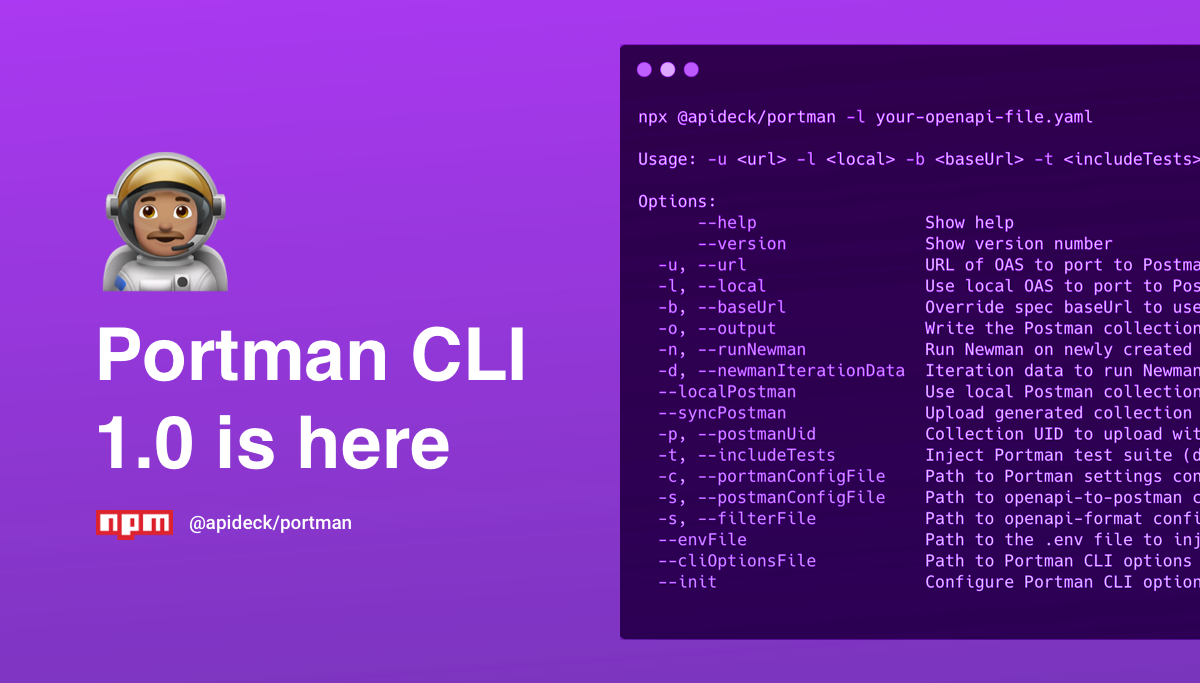



Portman 👨🏽🚀
Port OpenAPI Spec to Postman Collection, with contract & variation tests included!
Portman leverages OpenAPI documents, with all its defined API request/response properties, to power your Postman collection. Let Portman do all the work and inject contract & variation tests with a minimum of configuration. Customize the Postman requests & variables with a wide range of options to assign & overwrite variables.
[!IMPORTANT]
Important Change: If you are using version 1.28.0 with a custom Postman config file specified by the--postmanConfigFileflag, please ensure that theparametersResolutionoption is set to either "Example" or "Schema". The optionsrequestParametersResolutionandexampleParametersResolutionare deprecated openapi-to-postman options.
Why use Portman?
Convert your OpenAPI spec to Postman, generate contract & variation tests, upload the Postman collection & run the tests through Newman. Include the Portman CLI as part of an automated process for injecting the power of Portman directly into your CI/CD pipeline.
Features
With Portman, you can:
- Convert an OpenAPI document to a Postman collection
- Support for OpenAPI 3.0
- Support for OpenAPI 3.1
- Extend the Postman collection with capabilities
- Inject Postman Contract Tests - learn more
- Assign collection variables - learn more
- Inject Postman Variation Tests - learn more
- Inject Postman Integration Tests
- Inject Postman with Pre-request & Tests scripts on a collection or operation level - learn more
- Modify Postman requests - learn more here and here
- Fuzz Postman requests - learn more
- Upload the Postman collection to your Postman app - learn more
- Test the Postman collection with Newman - learn more
- Split the configuration into multiple files using $ref
- Manage everything in config file for easy local or CI/CD usage - learn more
Getting started
- Install Portman
- Initialize Portman CLI configuration by running:
$ portman --init
OR
- Install Portman
- Copy
.env.exampleto.envand add environment variables you need available to your collection - Copy/rename and customize each of the ____.default.json config files in the root directory to suit your needs
- Start converting your OpenAPI document to Postman
OR
If you have an existing OpenAPI specification, try running Portman without any special setup to see how it can generate a Postman collection with contract tests with it's default configuration.
- Install Portman
- Run portman on your OpenAPI spec, ie:
npx portman -l my-openapi-spec.yaml- (if your spec is hosted use the
-uparameter, ie:npx portman -u https://petstore3.swagger.io/api/v3/openapi.json
This will generate a postman collection that contains a request for every method:endpoint combination defined in your spec, and include a set of "Contract Tests" for each one. You can learn more about contract tests, and how to examine the generated collection here.
(Running portman with no explicit configuration is the same as running it with this configuration file)
All configuration options to convert from OpenAPI to Postman can be found in the openapi-to-postman package documentation. All configuration options to filter flags/tags/methods/operations/... from OpenAPI can be found in the openapi-format package documentation or using the online openapi-format playground.
Installation
Local Installation (recommended)
You can add the Portman CLI to the node_modules by using:
$ npm install --save @apideck/portman
or using yarn:
$ yarn add @apideck/portman
Note that this will require you to run the Portman CLI with npx @apideck/portman -l your-openapi-file.yaml or, if
you are using an older version of npm, ./node_modules/.bin/portman -l your-openapi-file.yaml.
Global Installation
$ npm install -g @apideck/portman
NPX usage
To execute the CLI without installing it via npm, use the npx method.
$ npx @apideck/portman -l your-openapi-file.yaml
CLI Usage
Usage: -u <url> -l <local> -b <baseUrl> -t <includeTests>

Options:
 --help                     Show help                                                                        [boolean]
 --version                  Show version number                                                              [boolean]
 --url,-u                   URL of OAS to port to Postman collection                                         [string]
 --local, -l                Use local OAS to port to Postman collection                                      [string]
 --baseUrl, -b              Override spec baseUrl to use in Postman                                          [string]
 --output, -o               Write the Postman collection to an output file                                   [string]
 --oaOutput                 Write the (filtered) OpenAPI file to an output file                              [string]
 --runNewman, -n            Run Newman on newly created collection                                           [boolean]
 --newmanRunOptions         JSON stringified object to pass options for configuring Newman                   [string]
 --newmanOptionsFile        Path/URL to Newman options file to pass options for configuring Newman           [string]
 --newmanIterationData, -d  Iteration data to run Newman with newly created collection                       [string]
 --localPostman             Use local Postman collection, skips OpenAPI conversion                           [string]
 --syncPostman              Upload generated collection to Postman (default: false)                          [boolean]
 --syncPostmanCollectionIds Synchronises the IDs of newly created postman collections with those already
                            on Postman, useful when you want to use Postman pull request (default: false)    [boolean]
 --postmanFastSync          Postman sync creates new collection (new UID),instead of update (default: false) [boolean]
 --postmanRefreshCache      Postman sync will refresh all local cached Postman API data (default: false)     [boolean]
 --postmanUid, -p           Postman collection UID to upload with the generated Postman collection           [string]
 --postmanWorkspaceName     Postman Workspace name to target the upload of the generated Postman collection  [string]
 --includeTests, -t         Inject Portman test suite (default: true)                                        [boolean]
 --bundleContractTests      Bundle Portman contract tests in a separate folder in Postman (default: false)   [boolean]
 --portmanConfigFile, -c    Path/URL to Portman settings config file (portman-config.json)                   [string]
 --postmanConfigFile,-s     Path to openapi-to-postman config file (postman-config.json)                     [string]
 --filterFile               Path/URL to openapi-format config file (oas-format-filter.json)                  [string]
 --envFile                  Path to the .env file to inject environment variables                            [string]
 --collectionName           Overwrite OpenAPI title to set the Postman collection name                       [string]
 --cliOptionsFile           Path/URL to Portman CLI options file                                             [string]
 --ignoreCircularRefs       Ignore circular references in OpenAPI spec (default: false)                      [boolean]
 --logAssignVariables       Toggle logging of assigned variables (default: true)                             [boolean]
 --warn/--no-warn           Toggle warnings for missing openApiOperationIds (default: true)                  [boolean]
 --init                     Configure Portman CLI options in an interactive manner                           [string]
 --extraUnknownFormats      Add extra unknown formats to json schema tests                                   [array]
Environment variables as Postman variables
Portman uses dotenv to not only access variables for functionality, but you can also add environment variables that you'd like declared within your Postman environment.
Simply prefix any variable name with PORTMAN_, and it will be available for use in your Postman collection as the camel-cased equivalent. For example:
PORTMAN_CONSUMER_ID=test_user_id
will be available in your collection or tests by referencing:
{{consumerId}}
It is possible to set a spec-specific .env file, that lives next to your config files. The path can be passed in via envFile cli option.
This is useful if you have Portman managing multiple specs that have unique environment requirements.
By default, Portman will leverage any ENVIRONMENT variable that is defined that starts with PORTMAN_.
Another option to set variables is by configuring them as collectionVariables in the globals section of your Portman configuration.
CLI Options
Initialize Portman CLI configuration
portman --init
The init option will help you to configure the cliConfig options and put the default config, env file in place to kick-start the usage of Portman.
Pass in the remotely hosted spec
portman -u https://specs.apideck.com/crm.yml
Overwrite the baseUrl in spec and run Newman
portman -u https://specs.apideck.com/crm.yml -b http://localhost:3050 -n true
Path pass to a local data file for Newman to use for iterations
portman -u https://specs.apideck.com/crm.yml -b http://localhost:3050 -n true -d ./tmp/newman/data/crm.json
Pass the path to a local spec (useful when updating your specs) and output Postman collection locally
portman -l ./tmp/specs/crm.yml -o ./tmp/specs/crm.postman.json
Skip tests and just generate collection
portman -l ./tmp/specs/crm.yml -t false
Filter OpenAPI and generate collection
portman -u https://specs.apideck.com/crm.yml --filterFile examples/cli-filtering/oas-format-filter.json
For more details, review the cli-filtering example.
Add extra forms to Json schema validation
portman -l ./tmp/specs/crm.yml -o ./tmp/specs/crm.postman.json --extraUnknownFormats ulid one two
This makes the schema validation more lenient, and solves problems with unknown formats
Upload newly generated collection to Postman, which will upsert the collection, based on the collection name
portman -l ./tmp/specs/crm.yml --syncPostman
Upload newly generated collection to Postman using the collection UID to overwrite the existing.
portman -l ./tmp/specs/crm.yml --syncPostman -p 9601963a-53ff-4aaa-92a0-2e70a8a2a748
When a collection gets large, the Postman API will compare all the requests when updating the collection. This can take some time even result in 5xx errors.
To overcome this, you can use the --postmanFastSync option. This option will sync your collection to Postman by using "delete" and "create" operations instead of the "update".
REMARK: Using --postmanFastSync will result in a new Postman collection and Postman UID for each sync.
portman -l ./tmp/specs/crm.yml --syncPostman --postmanFastSync
Portman caches a set of Postman API data to facilitate faster lookups and uploads, preventing unnecessary connecting to the Postman API.
In case you need to reset the cache you simply remove the .portman.cache.json file or set the --postmanRefreshCache option when running the Postman sync.
portman -l ./tmp/specs/crm.yml --syncPostman --postmanRefreshCache
Pass custom paths for config files
All configuration options to convert from OpenAPI to Postman can be on the openapi-to-postman package documentation.
Portman provides a default openapi-to-postman configuration postman-config.default.json, which will be used if no custom config --postmanConfigFile is passed.
Portman configuration file in JSON format:
portman -u https://specs.apideck.com/crm.yml -c ./tmp/crm/portman-config.json -s ./common/postman-config.json
Portman configuration file in YAML format:
portman -u https://specs.apideck.com/crm.yml -c ./tmp/crm/portman-config.yaml -s ./common/postman-config.json
Pass all CLI options as JSON/YAML file
All the CLI options can be managed in a separate configuration file and passed along to the portman command. This will make configuration easier, especially in CI/CD implementations.
Portman CLI options settings in JSON format
portman --cliOptionsFile ./examples/cli-options/portman-cli-options.json
Portman CLI options settings in YAML format
portman --cliOptionsFile ./examples/cli-options/portman-cli-options.yaml
All the available Portman CLI options can be used in the config file. By passing the CLI options as parameter, you can overwrite the defined CLI options defined in the file.
For more details, review the cli-options example.
Run Newman with Newman options
All Newman configuration options to run Newman can be passed along through Portman.
portman -u https://specs.apideck.com/crm.yml -c ./tmp/crm/portman-config.json --runNewman --newmanOptionsFile ./tmp/crm/newman-options.json
For more details, review the cli-options example.
NOTE: Newman is set to ignore redirects to allow for testing redirect response codes. If you are running collections within Postman UI, you'll need to ensure Postman is set to the same, or your redirect tests will fail.
Postman > Preferences > Automatically follow redirects > OFF
Output
Without specifying the output location, your generated Postman Collection is written to ./tmp/converted/${specName}.json if you are manually importing to Postman or need to inspect for debugging.
By using -o or --output parameter, you can define the location where the Postman collection will be written.
portman -l ./tmp/specs/crm.yml -o ./tmp/specs/crm.Postman.json
Portman settings
The Portman settings consist out of multiple parts:
- version : which refers to the JSON Portman configuration version.
- tests : which refers to the definitions for the generated contract & variance tests.
- contractTests : refers to the options to enabled autogenerated contract tests.
- contentTests : refers to the additional Postman tests that check the content.
- variationTests : refers to the options to define variation tests.
- integrationTests : refers to the options to define integration tests.
- extendTests : refers to the custom additions of manually created Postman tests.
- assignVariables : which refers to setting Postman collection variables for easier automation.
- overwrites : which refers to the custom additions/modifications of the OpenAPI/Postman request data.
- operationPreRequestScripts : which refers to injecting Postman Pre-request Scripts for requests.
- globals : which refers to the customization that applies for the whole Postman collection.
Portman targeting
It is possible to inject Postman tests and pre-register scripts, assign variables and overwrite query params, headers, request body data with values.
To be able to do this very specifically, there are options to define the targets:
openApiOperationId (String) : References to the OpenAPI operationId, example:
leadsAllopenApiOperationIds (Array) : References to an array of OpenAPI operationIds, example:
['leadsAll', 'companiesAll', 'contactsAll']openApiOperation (String) : References to a combination of the OpenAPI method & path, example:
GET::/crm/leadsexcludeForOperations (Array) : References to OpenAPI operations that will be skipped for targeting. It supports both the
openApiOperationIdandopenApiOperationformat, example:["leadsAdd", "GET::/crm/leads/{id}"]
An openApiOperationId is an optional property. To offer support for OpenAPI documents that don't have operationIds, we
have added the openApiOperation definition, which is the unique combination of the OpenAPI method & path, with a ::
separator symbol. The targeting option excludeForOperations is really useful when using wildcards, to allow exclusions from the wildcard.
This will allow targeting for very specific OpenAPI items.
To facilitate managing the filtering, we have included wildcard options for the openApiOperation option, supporting
the methods & path definitions.
REMARK: Be sure to put quotes around the target definition.
Strict matching example:
"openApiOperation": "GET::/crm/leads",This will target only the "GET" method and the specific path "/crm/leads"Method wildcard matching example:
"openApiOperation": "*::/crm/leads",This will target all methods ('get', 'put', 'post', 'delete', 'options', 'head', 'patch', 'trace') and the specific path "/crm/leads"Path wildcard matching example:
"openApiOperation": "GET::/crm/*"This will target only the "GET" method and any path matching any folder behind the "/crm", like "/crm/companies" and "/crm/leads".Method & Path wildcard matching example:
"openApiOperation": "*::/crm/*",A combination of wildcards for the method and path parts is even possible.
Portman - tests properties
The Portman tests is where you would define the tests that would be applicable and automatically generated by Portman, based on the OpenAPI document.
The contract tests are grouped in an array of contractTests.
contractTests options
openApiOperationId (String) : References to the OpenAPI operationId. (example:
leadsAll)openApiOperationIds (Array) : References to an array of OpenAPI operationIds, example:
['leadsAll', 'companiesAll', 'contactsAll']openApiOperation (String) : References to a combination of the OpenAPI method & path (example:
GET::/crm/leads)excludeForOperations (Array | optional) : References to OpenAPI operations that will be skipped for targeting, example:
["leadsAdd", "GET::/crm/leads/{id}"]openApiRequest (String | optional) : References to the OpenAPI request body content-type (supports wildcards like
application/*) to use for the contract test. If not defined, the default request content-type from OpenAPI will be used, with a preference forapplication/json.openApiResponse (String | optional) : References to the OpenAPI response object code or
code::content-type(supports wildcards liketext/*) for which a contract test will be inserted. Examples:"404","200::text/plain","200::text/*". If not defined, the 1st response object from OpenAPI will be taken as expected response.Contract tests are always attached to the main request that Portman generates for an operation. When your OpenAPI document lists multiple request or response content types, only one set will be used for that request. You can control which types are selected with the
openApiRequestandopenApiResponseoptions. To create individual requests for every content type, use the variation testing concept described below.statusSuccess (Boolean) : Adds the test if the response of the Postman request returned a 2xx
statusCode (Boolean, HTTP code) : Adds the test if the response of the Postman request return a specific status code.
responseTime (Boolean) : Adds the test to verify if the response of the Postman request is returned within a number of ms.
- maxMs (number) : Define the expected number of ms for the
responseTimecheck.
- maxMs (number) : Define the expected number of ms for the
contentType (Boolean) : Adds the test if the response header is matching the expected content-type defined in the OpenAPI spec.
jsonBody (Boolean) : Adds the test if the response body is matching the expected content-type defined in the OpenAPI spec.
schemaValidation (Boolean) : Adds the test if the response body is matching the JSON schema defined in the OpenAPI spec. The JSON schema is inserted inline in the Postman test.
- additionalProperties (Boolean) : Extend the expected JSON schema used for the
schemaValidationby setting all theadditionalProperties.
- additionalProperties (Boolean) : Extend the expected JSON schema used for the
headersPresent (Boolean) : Adds the test to verify if the Postman response header has the required header names present, like defined in the OpenAPI spec.
For more details, review the contract-tests example and the testsuite-contract-content-types example for some more details about targeting request body & response content-types.
variationTests options
openApiOperationId (String) : References to the OpenAPI operationId for which a variation will be created. (example:
leadsAll)openApiOperationIds (Array) : References to an array of OpenAPI operationIds, example:
['leadsAll', 'companiesAll', 'contactsAll']openApiOperation (String) : References to a combination of the OpenAPI method & path for which a variation will be created. (example:
GET::/crm/leads)excludeForOperations (Array | optional) : References to OpenAPI operations that will be skipped for targeting, example:
["leadsAdd", "GET::/crm/leads/{id}"]openApiResponse (String | optional) : References to the OpenAPI response object code or
code::content-type. Supports wildcards for both the code (e.g.4*or*) and the content type (e.g.text/*or*). Examples:"404","200::text/plain","2*::application/json","2*::application/*","*::*". If not defined, the 1st response object from OpenAPI will be taken as expected response. If the configured response code is not defined in the OpenAPI document, Portman will not generate a variation for the targeted operations.openApiRequest (String | optional) : References to the OpenAPI request body content-type (supports wildcards like
application/*) for which a variation will be created. If not defined, the default request content-type from OpenAPI will be used.overwrites : which refers to the custom additions/modifications of the OpenAPI/Postman request data, specifically for the variation.
fuzzing : Fuzz testing sets unexpected values for API requests, to cause unexpected behavior and errors in the API response.
tests : which refers to the definitions for the generated contract & variance tests for the variation.
- contractTests : refers to the options to enabled autogenerated contract tests for the variation.
- contentTests : refers to the additional Postman tests that check the content for the variation.
- extendTests : refers to the custom additions of manual created Postman tests to be included in the variation.
assignVariables : This refers to setting Postman collection variables that are assigned based on variation.
For more details, review the content-variation example and the content-type variation example.
integrationTests options
- name (String) : As Integration tests will normally contain multiple operations, this is the folder name that will be generated in the Integration Tests folder in your Postman collection.
- operations (Array) : Array of operations to be performed
Portman - contentTests properties
Content tests will validate if the response property values will match the expected defined values.
While the Portman tests verify the "contract" of the API, the contentTests will verify the content of the API.
contentTests options
openApiOperationId (String) : References to the OpenAPI operationId. (example:
leadsAll)openApiOperationIds (Array) : References to an array of OpenAPI operationIds, example:
['leadsAll', 'companiesAll', 'contactsAll']openApiOperation (String) : References to a combination of the OpenAPI method & path (example:
GET::/crm/leads)excludeForOperations (Array | optional) : References to OpenAPI operations that will be skipped for targeting, example:
["leadsAdd", "GET::/crm/leads/{id}"]responseBodyTests (Array) : Array of key/value pairs of properties & values in the Postman response body.
- key (String) : The key that will be targeted in the response body to check if it exists.
- To look up a key within in array of objects, you can use an array index (example
data.websites[0].url) or a * wildcard (example:data.websites[*].url) which uses thevalueto match an object in an array. - To test a response body that is a single value instead of a JSON object, set this to '.'
- To look up a key within in array of objects, you can use an array index (example
- value (String) : The value that will be used to check if the value in the response body property matches.
- contains (String) : The value that will be used to check if the value is present in the value of the response body property.
- oneOf (String[],Number[],Boolean[]) : The value that will be used to check one of the values is matching the response body property.
- length (Number) : The number that will be used to check if the value of the response body property (string/array) has a length of the defined number.
- minLength (Number) : The number that will be used to check if the value of the response body property (string/array) has a minimum length of the defined number.
- maxLength (Number) : The number that will be used to check if the value of the response body property (string/array) has a maximum length of the defined number.
- notExist (Boolean) : The inverse of the key check that verify if the key does not exist in the response body.
- assert (String) : A custom Postman assertion to check if the value in the response body property matches with the provided assertion (example:
not.to.be.null).
- key (String) : The key that will be targeted in the response body to check if it exists.
responseHeaderTests (Array) : Array of key/value pairs of properties & values in the Postman response header.
- key (String) : The header name that will be targeted in the response header to check if it exists.
- value (String) : The value that will be used to check if the value in the response header matches.
- contains (String) : The value that will be used to check if the value is present in the value of the response header.
- oneOf (String[],Number[],Boolean[]) : The value that will be used to check one of the values is matching the value of the response header.
- length (Number) : The number that will be used to check if the value of the response header has a length of the defined number of characters.
- minLength (Number) : The number that will be used to check if the value of the response header has a minimum length of the defined number of characters.
- maxLength (Number) : The number that will be used to check if the value of the response header has a maximum length of the defined number of characters.
- notExist (Boolean) : The inverse of the key check that verify if the key does not exist in the response header.
- assert (String) : A custom Postman assertion to check if the value in the response header matches with the provided assertion (example:
not.to.be.null).
For more details, review the content-tests example.
Portman - extendTests properties
When you need to add additional tests or overwrite the Portman-generated test, you can use the extendTests to define the raw Postman tests.
Anything added in the tests array will be added to the Postman test scripts.
extendTests options
openApiOperationId (String) : References to the OpenAPI operationId. (example:
leadsAll)openApiOperationIds (Array) : References to an array of OpenAPI operationIds, example:
['leadsAll', 'companiesAll', 'contactsAll']openApiOperation (String) : References to a combination of the OpenAPI method & path (example:
GET::/crm/leads)excludeForOperations (Array | optional) : References to OpenAPI operations that will be skipped for targeting, example:
["leadsAdd", "GET::/crm/leads/{id}"]tests (Array) : Array of additional Postman test scripts. Values can be the script content or path to the script file (with
file:prefix).overwrite (Boolean true/false | Default: false) : Resets all generateTests and overwrites them with the defined tests from the
testsarray.append (Boolean true/false | Default: true) : Place the tests after (append) or before (prepend) all generated tests.
Portman - assignVariables properties
The "assignVariables" allows you to set Postman collection variables for easier automation.
assignVariables options
openApiOperationId (String) : Reference to the OpenAPI operationId for which the Postman pm.collectionVariables will be set. (example:
leadsAll)openApiOperationIds (Array) : References to an array of OpenAPI operationIds, for which the Postman pm.collectionVariables will be set. example:
['leadsAll', 'companiesAll', 'contactsAll']openApiOperation (String) : Reference to the combination of the OpenAPI method & path, for which the Postman pm.collectionVariables will be set. (example:
GET::/crm/leads)excludeForOperations (Array | optional) : References to OpenAPI operations that will be skipped for targeting, example:
["leadsAdd", "GET::/crm/leads/{id}"]collectionVariables (Array) : Array of key/value pairs to set the Postman collection variables.
- responseBodyProp (String) : The property for which the value will be taken from the response body and set the value as the pm.collectionVariables value. To store the root level, use
.as key. - responseHeaderProp (String) : The property for which the value will be taken from the response header and set the value as the pm.collectionVariables value.
- requestBodyProp (String) : The property for which the value will be taken from the request body and set the value as the pm.collectionVariables value.
- value (String) : The defined value that will be set as the pm.collectionVariables value. The value can be generated using template expressions. For the full list of template expressions, check the Assign & Overwrite example
- name (string OPTIONAL | Default: .) : The desired name that will be used to as the Postman variable name. If the
nameis not provided, Portman will generate a variable name, using the.. You can pass your own template expressions, to dynamically generate variable names. The template can contain the following dynamic expressions:results in the OpenAPI operation ID (example `leadsAdd`),results in the OpenAPI operation ID (example/crm/leads),results in the Portman operation (example `POST::/crm/leads_POST`),results in the OpenAPI method (exampleGET), `` results in the OpenAPIoperationIdwith a fallback to thepathRefin case the OpenAPI does not contain an operation ID. For the full list of dynamic expressions, check the Assign & Overwrite example.
- responseBodyProp (String) : The property for which the value will be taken from the response body and set the value as the pm.collectionVariables value. To store the root level, use
For more details, review the Assign variables example and Assign & Overwrite example.
Portman - overwrites properties
To facilitate automation, you might want to modify properties with "randomized" or specific values. The overwrites are mapped based on the OpenAPI operationId or OpenAPI Operation reference.
overwrites options
openApiOperationId (String) : Reference to the OpenAPI operationId for which the Postman request will be overwritten or extended. (example:
leadsAll)openApiOperationIds (Array) : References to an array of OpenAPI operationIds, for which the Postman request will be overwritten or extended (example:
['leadsAll', 'companiesAll', 'contactsAll'])openApiOperation (String) : Reference to combination of the OpenAPI method & path, for which the Postman request will be overwritten or extended (example:
GET::/crm/leads)excludeForOperations (Array | optional) : References to OpenAPI operations that will be skipped for targeting. (example:
["leadsAdd", "GET::/crm/leads/{id}"])overwriteRequestBaseUrl (Object) :
Key/value pair to overwrite the Postman Request Base URL.
- value (String) : The value that will be used to overwrite/extend the value in the request base URL. (example:
https://example.comor{{baseUrl}}). - overwrite (Boolean true/false | Default: true) : Overwrites the request base URL value OR attach the value to the original request base URL value.
- remove (Boolean true/false | Default: false) : Removes the targeted request base URL from Postman.
- value (String) : The value that will be used to overwrite/extend the value in the request base URL. (example:
overwriteRequestQueryParams (Array) :
Array of key/value pairs to overwrite in the Postman Request Query params.
- key (String) : The key that will be targeted in the request Query Param to overwrite/extend. Supports wildcard * to match any sequence of characters. For example,
filter[*]matchesfilter[0],filter[1], etc. - value (String) : The value that will be used to overwrite/extend the value in the request Query Param OR use the Postman Dynamic variables to use dynamic values like
{{$guid}}or{{$randomInt}}. Supports also templating to generate variable names. The template can contain the following dynamic expressions:results in the OpenAPI operation ID (example `leadsAdd`),results in the OpenAPI operation ID (example/crm/leads),results in the Portman operation (example `POST::/crm/leads_POST`),results in the OpenAPI method (exampleGET), `` results in the OpenAPIoperationIdwith a fallback to thepathRefin case the OpenAPI does not contain an operation ID. For the full list of dynamic expressions, check the Assign & Overwrite example. - overwrite (Boolean true/false | Default: true) : Overwrites the request query param value OR attach the value to the original request query param value.
- disable (Boolean true/false | Default: false) : Disables the request query param in Postman.
- remove (Boolean true/false | Default: false) : Removes the targeted request query param from Postman.
- insert (Boolean true/false | Default: true) : Insert additional the request query param in Postman that are not present in OpenAPI.
- description (String) : Overwrites the request query param description in Postman.
- key (String) : The key that will be targeted in the request Query Param to overwrite/extend. Supports wildcard * to match any sequence of characters. For example,
overwriteRequestPathVariables (Array) :
Array of key/value pairs to overwrite in the Postman Request Path Variables.
- key (String) : The key that will be targeted in the request Path variables to overwrite/extend.
- value (String) : The value that will be used to overwrite/extend the value in the request path variable OR use the Postman Dynamic variables to use dynamic values like
{{$guid}}or{{$randomInt}}. Supports also templating to generate variable names. The template can contain the following dynamic expressions:results in the OpenAPI operation ID (example `leadsAdd`),results in the OpenAPI operation ID (example/crm/leads),results in the Portman operation (example `POST::/crm/leads_POST`),results in the OpenAPI method (exampleGET), `` results in the OpenAPIoperationIdwith a fallback to thepathRefin case the OpenAPI does not contain an operation ID. For the full list of dynamic expressions, check the Assign & Overwrite example. - overwrite (Boolean true/false | Default: true) : Overwrites the request path variable value OR attaches the value to the original request Path variable value.
- remove (Boolean true/false | Default: false) : Removes the targeted request path variable from Postman.
- insert (Boolean true/false | Default: true) : Insert additional the request path variable in Postman that are not present in OpenAPI.
- description (String) : Optional, Overwrites the request path variable description in Postman.
overwriteRequestHeaders (Array) :
Array of key/value pairs to overwrite in the Postman Request Headers.
- key (String) : The key that will be targeted in the request Headers to overwrite/extend.
- value (String) : The value that will be used to overwrite/extend the value in the request headers OR use the Postman Dynamic variables to use dynamic values like
{{$guid}}or{{$randomInt}}. Supports also templating to generate variable names. The template can contain the following dynamic expressions:results in the OpenAPI operation ID (example `leadsAdd`),results in the OpenAPI operation ID (example/crm/leads),results in the Portman operation (example `POST::/crm/leads_POST`),results in the OpenAPI method (exampleGET), `` results in the OpenAPIoperationIdwith a fallback to thepathRefin case the OpenAPI does not contain an operation ID. For the full list of dynamic expressions, check the Assign & Overwrite example. - overwrite (Boolean true/false | Default: true) : Overwrites the request header value OR attaches the value to the original request header value.
- disable (Boolean true/false | Default: false) : Disables the request header in Postman.
- remove (Boolean true/false | Default: false) : Removes the targeted request header from Postman.
- insert (Boolean true/false | Default: true) : Insert the additional request header in Postman that are not present in OpenAPI.
- description (String) : Overwrites the request header description in Postman.
overwriteRequestBody (Array) :
Array of key/value pairs to overwrite in the Postman Request Body.
Applicable for request body types: JSON/form-data/x-www-form-urlencoded
- key (String) : The key that will be targeted in the request body to overwrite/extend. Use the
.notation to target nested properties. To target the root level, use.as key. - value (Any) : The value that will be used to overwrite/extend the key in the request body OR use the Postman Dynamic variables to use dynamic values like
{{$guid}}or{{$randomInt}}. The value can be a text/number/boolean/array/object or Postman variable (to pass the Postman variable as type boolean or number, use{{{variableName}}}surrounded by 3x {{{ and 3x }}}). Supports also templating to generate variable names. The template can contain the following dynamic expressions:results in the OpenAPI operation ID (example `leadsAdd`),results in the OpenAPI operation ID (example/crm/leads),results in the Portman operation (example `POST::/crm/leads_POST`),results in the OpenAPI method (exampleGET), `` results in the OpenAPIoperationIdwith a fallback to thepathRefin case the OpenAPI does not contain an operation ID. For the full list of dynamic expressions, check the Assign & Overwrite example. - overwrite (Boolean true/false | Default: true) : Overwrites the request body value OR attaches the value to the original request body value.
- remove (Boolean true/false | Default: false) : Removes the request body property, including the value.
Applicable for request body types: form-data/x-www-form-urlencoded
- insert (Boolean true/false | Default: true) : Insert the additional request form key/value in Postman that are not present in OpenAPI.
- description (String) : Overwrites the request form data description in Postman.
- key (String) : The key that will be targeted in the request body to overwrite/extend. Use the
overwriteRequestSecurity (Object) :
A Postman RequestAuthDefinition object that will be applied to the request.The security overwrites provides a number of security types:
remove (Boolean true/false | Default: false) : Unsets the Authorization type in Postman.
apiKey: The API key auth will send a key-value pair to the API either in the request headers or query parameters.
- value (String) : The value that will be inserted as the Postman apiKey value. It can be a plain value or a Postman variable.
- key (String | optional) : The "key" value that will be inserted in the Postman apiKey key field. It can be a plain value or a Postman variable.
- in (String | optional) : The "in" value that defines where the Api Key will be added in the Postman request Header or Query params. Postman supports
headerfor "Header" orqueryfor "Query Params".
"overwriteRequestSecurity": { "apiKey": { "value": "{{apiKey}}" } }- bearer: The bearer tokens allow requests to authenticate using an access key, such as a JSON Web Token (JWT).
- token (String) : The "token" that will be inserted as the Postman bearer token value. It can be a plain value or a Postman variable.
"overwriteRequestSecurity": { "bearer": { "token": "{{bearerToken}}" } }- basic: Basic authentication involves sending a verified username and password with your request.
- username (String) : The username that will be inserted as the basic authentication username value
- password (String) : The password that will be inserted as the basic authentication password value
"overwriteRequestSecurity": { "basic": { "username": "{{username}}", "password": "{{password}}", } }- Postman security options: Overwrite/Insert Postman authorization settings.
- Postman Type (Array) : The Postman authorization option type. Supported types are:
awsv4,digest,edgegrid,ntlm,oauth1,oauth2- Attributes : key/value/type as defined in Postman (the easiest way to define it, is to set it manually in Postman, export the collection and extract the matching values from the JSON file).
- Postman Type (Array) : The Postman authorization option type. Supported types are:
For more details, review the Overwrites example and Assign & Overwrite example.
Portman - fuzzing properties
Fuzzing or fuzz testing is an automated software testing technique that involves providing invalid, unexpected, or random data as inputs to a computer program (a REST API in the case of Portman).
Fuzzing changes the requests (body, query params, ... ) to unexpected values in an effort to cause unexpected behavior and errors in the API response. For Portman, we want to provide a simple form of Fuzzing, with the goal to trigger validation/error responses, which can be contract tested. The automatic fuzzing is based on the OpenAPI request properties, where for each fuzzing variation a new Postman request will be generated, with optional contract tests.
The Fuzzing options describe the configuration setting for available OpenAPI fuzzing variations.
REMARKS:
- Postman Dynamic variables are rendered before being fuzzed.
- Regular Postman variables are skipped from fuzzing.
fuzzing options
requestBody (Array) :
An array of fuzzing options for the Postman Request Body.
REMARK: Fuzzing is only applicable for OpenAPI request bodies of media type: "application/json"
- requiredFields (Boolean) : Removes the properties & values from the request body that are marked as "required" in OpenAPI.
- minimumNumberFields (Boolean) : Changes the values of the numeric fields to a lower value than the defined "minimum" property in the OpenAPI document.
- maximumNumberFields (Boolean) : Changes the value of the numeric fields to a higher value than the defined "maximum" property in the OpenAPI document.
- minLengthFields (Boolean) : Changes the length of the value to a lower length than the defined "minLength" property in the OpenAPI document.
- maxLengthFields (Boolean) : Changes the length of the value to a higher length than the defined "maxLength" property in the OpenAPI document.
requestQueryParams (Array) :
An array of fuzzing options for the Postman Request Query parameters.
- requiredFields (Boolean) : Removes the properties & values from the request query params that are marked as "required" in OpenAPI.
- minimumNumberFields (Boolean) : Changes the values of the numeric fields to a lower value than the defined "minimum" property in the OpenAPI document.
- maximumNumberFields (Boolean) : Changes the value of the numeric fields to a higher value than the defined "maximum" property in the OpenAPI document.
- minLengthFields (Boolean) : Changes the length of the value to a lower length than the defined "minLength" property in the OpenAPI document.
- maxLengthFields (Boolean) : Changes the length of the value to a higher length than the defined "maxLength" property in the OpenAPI document.
requestHeaders (Array) :
An array of fuzzing options for the Postman Request Headers.
- requiredFields (Boolean) : Removes the properties & values from the request headers that are marked as "required" in OpenAPI.
- minimumNumberFields (Boolean) : Changes the values of the numeric fields to a lower value than the defined "minimum" property in the OpenAPI document.
- maximumNumberFields (Boolean) : Changes the value of the numeric fields to a higher value than the defined "maximum" property in the OpenAPI document.
- minLengthFields (Boolean) : Changes the length of the value to a lower length than the defined "minLength" property in the OpenAPI document.
- maxLengthFields (Boolean) : Changes the length of the value to a higher length than the defined "maxLength" property in the OpenAPI document.
For more details, review the fuzzing example.
Portman - operationPreRequestScripts properties
The operationPreRequestScripts configuration will inject pre-request scripts in the Postman collection, on request level.
Postman executes pre-request scripts before a request runs. If you want to set the Postman Collection pre-request scripts on the collection level, you can use the globals > collectionPreRequestScripts configuration.
The operationPreRequestScripts is inserted on the request level.
operationPreRequestScripts options
openApiOperationId (String) : Reference to the OpenAPI operationId on which the "Pre-request Scripts" will be inserted. (example:
leadsAll)openApiOperationIds (Array) : References to an array of OpenAPI operationIds, for which the "Pre-request Scripts" will be inserted (example:
['leadsAll', 'companiesAll', 'contactsAll']openApiOperation (String) : Reference to combination of the OpenAPI method & path, for which the "Pre-request Scripts" will be inserted (example:
GET::/crm/leads)excludeForOperations (Array | optional) : References to OpenAPI operations that will be skipped for targeting. (example:
["leadsAdd", "GET::/crm/leads/{id}"])scripts (Array) : Array of scripts that will be injected as Postman Pre-request Scripts on request level, that will be executed before the targeted requests in this collection. Values can be the script content or path to the script file (with
file:prefix).
Portman - globals property
The configuration defined in the globals will be executed on the full Postman collection. This is handy if you need to do mass replacements of variables or specific words/keys/values in the full collection that cannot be overwritten per request.
globals options
stripResponseExamples (Default: false) : Strip the response examples from the generated Postman collection.
variableCasing : Change the casing of the auto-generated Postman variables. Supported values are:
camelCase,pascalCase,kebabCase,trainCase,snakeCase,adaCase,constantCase,cobolCase,dotNotation. See the Assign & Overwrite example for the different casing options.separatorSymbol (Default: "::") : Change the separator symbol for the auto-generated Postman testName description (Example:
[GET]::/crm/leads - Status code is 2xx). Helpful when using the postman-to-k6 converter.collectionPreRequestScripts : Array of scripts that will be injected as Postman Collection Pre-request Scripts that will be executed by Postman before every request in this collection. Values can be the script content or path to the script file (with
file:prefix).collectionTestScripts: Array of scripts that will be injected as Postman Collection Test Scripts will be executed by Postman after every request in this collection. Values can be the script content or path to the script file (with
file:prefix).collectionVariables: A map of key value pairs that will inserted as Postman collection variables.
keyValueReplacements : A map of parameter key names that will have their values replaced with the provided Postman variables.
valueReplacements : A map of values that will have their values replaced with the provided values.
rawReplacements : Consider this a "search & replace" utility, that will search a string/object/... and replace it with another string/object/... This is very useful to replace data from the OpenAPI specification, before it is used in the Portman test automation generation.
portmanReplacements : The "search & replace" utility right before the final Postman file is written, that will search a string/object/... and replace it with another string/object/... This is practical to replace any data from the generated Portman collection, before it is used in Postman / Newman test execution.
orderOfOperations : The
orderOfOperationsis a list of OpenAPI operations, which is used by Portman to sort the Postman requests in the desired order, in their folder. The ordering fromorderOfOperationsis performed per folder. Items that are not defined in theorderOfOperationslist will remain at their current order.orderOfFolders : The
orderOfFoldersis a list of Postman folder names, which is used by Portman to sort the Postman folders in the desired order. Folders that are not defined in theorderOfFolderslist will remain at their current order, after the re-order folders.securityOverwrites : Overwrite of the OpenAPI Security Scheme Object (supported types: "apiKey", "http basic auth", "http bearer token") or inject a Postman authorization option (supported types: awsv4, digest, edgegrid, ntlm, oauth1, oauth2) on a collection level.
The security overwrites provides a number of security types:
remove (Boolean true/false | Default: false) : Unsets the Authorization type in Postman.
apiKey: The API key auth will send a key-value pair to the API either in the request headers or query parameters.
- value (String) : The value that will be inserted as the Postman apiKey value. It can be a plain value or a Postman variable.
- key (String | optional) : The "key" value that will be inserted in the Postman apiKey key field. It can be a plain value or a Postman variable.
- in (String | optional) : The "in" value that defines where the Api Key will be added in the Postman request Header or Query params. Postman supports
headerfor "Header" orqueryfor "Query Params".
"securityOverwrites": { "apiKey": { "value": "{{apiKey}}" } }- bearer: The bearer tokens allow requests to authenticate using an access key, such as a JSON Web Token (JWT).
- token (String) : The "token" that will be inserted as the Postman bearer token value. It can be a plain value or a Postman variable.
"securityOverwrites": { "bearer": { "token": "{{bearerToken}}" } }- basic: Basic authentication involves sending a verified username and password with your request.
- username (String) : The username that will be inserted as the basic authentication username value
- password (String) : The password that will be inserted as the basic authentication password value
"securityOverwrites": { "basic": { "username": "{{username}}", "password": "{{password}}", } }- Postman security options: Overwrite/Insert Postman authorization settings.
- Postman Type (Array) : The Postman authorization option type. Supported types are:
awsv4,digest,edgegrid,ntlm,oauth1,oauth2- Attributes : key/value/type as defined in Postman (the easiest way to define it, is to set it manually in Postman, export the collection and extract the matching values from the JSON file).
- Postman Type (Array) : The Postman authorization option type. Supported types are:
{
  "globals": {
    "securityOverwrites": {
      "oauth1": [
        {
          "key": "addEmptyParamsToSign",
          "value": true,
          "type": "boolean"
        },
        {
          "key": "timestamp",
          "value": "1461319769",
          "type": "string"
        },
        {
          "key": "nonce",
          "value": "ik3oT5",
          "type": "string"
        },
        {
          "key": "consumerSecret",
          "value": "D+EdQ-gs$-%@2Nu7",
          "type": "string"
        },
        {
          "key": "consumerKey",
          "value": "RKCGzna7bv9YD57c",
          "type": "string"
        },
        {
          "key": "signatureMethod",
          "value": "HMAC-SHA1",
          "type": "string"
        },
        {
          "key": "version",
          "value": "1.0",
          "type": "string"
        },
        {
          "key": "addParamsToHeader",
          "value": false,
          "type": "boolean"
        }
      ]
    }
  }
}
For more details on the globals configuration options , review the globals example and ordering example
Configure automatic upload to Postman App
REMARK: Portman does not require you to have a Postman account.
In case you want to sync the generated Postman collection with the Postman app (portman --syncPostman), you would need a Postman account since Portman leverages the Postman API to sync the collection.
This can be a "free" Postman account or any of the paid Postman plans.
The generated Postman collection can always be imported manually, without a Postman account.
To enable automatic uploads of the generated Postman collection through Portman, follow these steps:
- Get your Postman API key
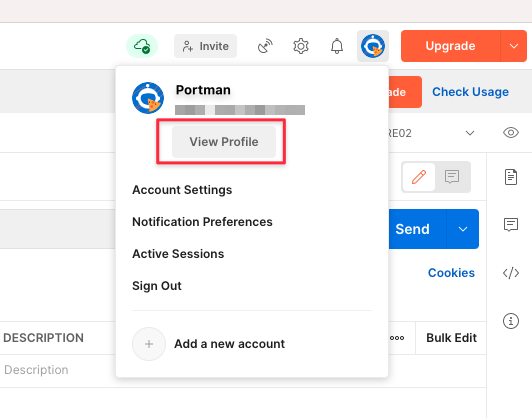
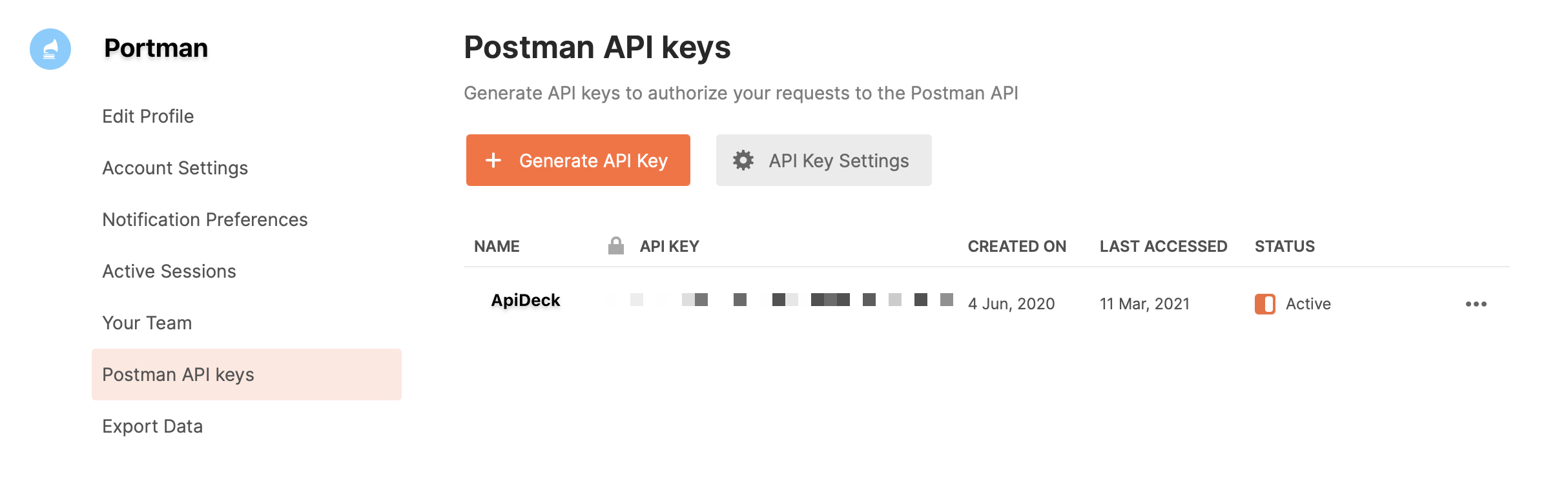
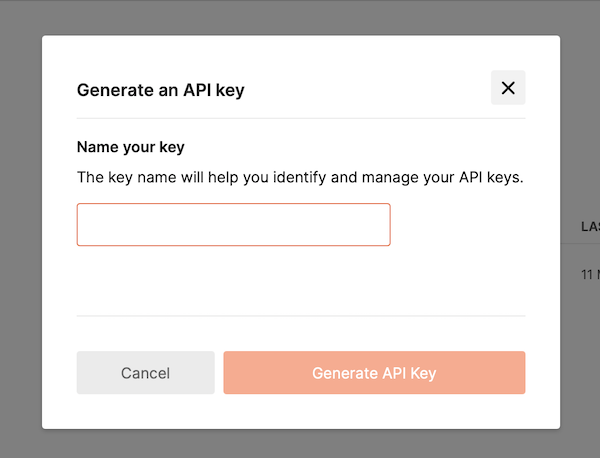
Goto the root folder of your project
Copy env-postman-app-example as
.envin the root folder of your projectEnter your Postman API key in a local
.envfile, asPOSTMAN_API_KEY=[replace with Postman api key]
Next to the Postman API key, you can also pass along the Postman Workspace name & the specific Postman Collection UID.
Supported Postman API .ENV variables:
- POSTMAN_API_KEY : Postman API key
- POSTMAN_WORKSPACE_NAME : Postman Workspace name to target the upload of the generated Postman collection
- POSTMAN_COLLECTION_UID : Postman collection UID to upload with the generated Postman collection
The POSTMAN_WORKSPACE_NAME & POSTMAN_COLLECTION_UID variables can also be set as CLI Options --postmanWorkspaceName & --postmanUid , which will ov