Plasmo is an MIT-licensed, TypeScript-based browser extension framework that packages the build toolchain, manifest generation, and runtime APIs for Chrome, Edge, and Firefox add-ons into a single SDK for React and TypeScript developers.
What it is
Plasmo Framework is an open-source browser extension SDK published under the MIT licence and written in TypeScript. The repository has accumulated 13,152 stars and 460 forks, with its homepage at plasmo.com and documentation at docs.plasmo.com. It positions itself as a bundler-driven SDK — the topic list names parcel alongside browser-extension, bundler, chrome-extension, edge-addon, firefox-addon, reactjs, sdk, and typescript — and the README describes it as "like Next.js for browser extensions." Development targets Node.js 16.x or later on macOS, Windows, or Linux, with pnpm strongly recommended.
The concrete problem it solves is the configuration overhead that surrounds browser extension development. Rather than hand-maintaining a manifest.json and reconciling per-browser differences by hand, Plasmo asks developers to write entry files such as popup.tsx, options.tsx, content.ts, and background.ts, and generates the manifest declaratively — the documentation answers "Where is the manifest.json file?" as a design question rather than a file location. It also replaces the pattern of duplicating build setup for each browser and manifest pair, offering a single build that targets multiple browser and manifest combinations, plus automated deployment through BPP.
Key capabilities
- Declarative development, where the extension manifest is generated rather than written by hand.
- First-class React and TypeScript support, with live-reloading and React HMR during development.
- Content Scripts UI and Tab Pages for embedding interface surfaces inside web pages and browser tabs.
- Storage API and Messaging API for extension-side state and cross-context communication.
- Support for
.env* files, so environment configuration follows the same conventions as other Node toolchains.
- Remote code bundling, explicitly described as usable for cases such as Google Analytics.
- Targeting of multiple browser and manifest pairs, plus optional support for Svelte and Vue via the
with-svelte and with-vue repositories.
Who uses it and how
- React and TypeScript teams building a product extension who want to organize source in a root directory, in per-feature directories (
popup/, options/, contents/), or in a src sub-directory.
- Teams shipping one codebase to several targets, since the framework covers Chrome extensions, Edge add-ons, and Firefox add-ons from a shared source tree.
- Projects that already depend on adjacent stacks: the examples repository demonstrates integration with Firebase Authentication, Redux, Supabase authentication, and Tailwind.
- Maintainers who need repeatable publishing, using automated deployment via BPP instead of manual submission steps.
- Developers who want shortcuts around store testing, using the Itero cloud offering for instant beta testing.
Getting started
Scaffold a project with pnpm create plasmo example-dir, change into the directory, and run pnpm dev. Node.js 16.x or later is required, and pnpm is strongly recommended.
How it compares
The README names no direct competing framework, but it draws its own comparison: Plasmo is "like Next.js for browser extensions," meaning it takes the same position for extension projects that Next.js occupies for React web applications. The topic list also places it in the Parcel family, since Parcel is the bundler underneath, so it sits among JavaScript build tools rather than among hosted extension platforms.
When to use it — and when not to
A self-hoster runs only a Node.js toolchain — Node 16.x or later and pnpm — with no database, object storage, or SMTP service to operate, and the Itero cloud is optional rather than required. Developers who are not working in React, TypeScript, Svelte, or Vue get less from the framework, and anyone who needs the full supported browser matrix spelled out in the repository README will be sent to the external documentation instead. The tracker carries 371 open issues, which is worth weighing for teams that need fast upstream turnaround on build problems.
project readme (upstream, from github) — read inline






English | 简体中文 | Tiếng Việt | Deutsch | French | Indonesian | Русский | Turkish | 日本語 | 한국어
Production Cloud: We've built a cloud offering for browser extensions called Itero. Check it out if you want instant beta testing and more awesome features.
Plasmo Framework
The Plasmo Framework is a battery-packed browser extension SDK made by hackers for hackers. Build your product and stop worrying about config files and the odd peculiarities of building browser extensions.
It's like Next.js for browser extensions!
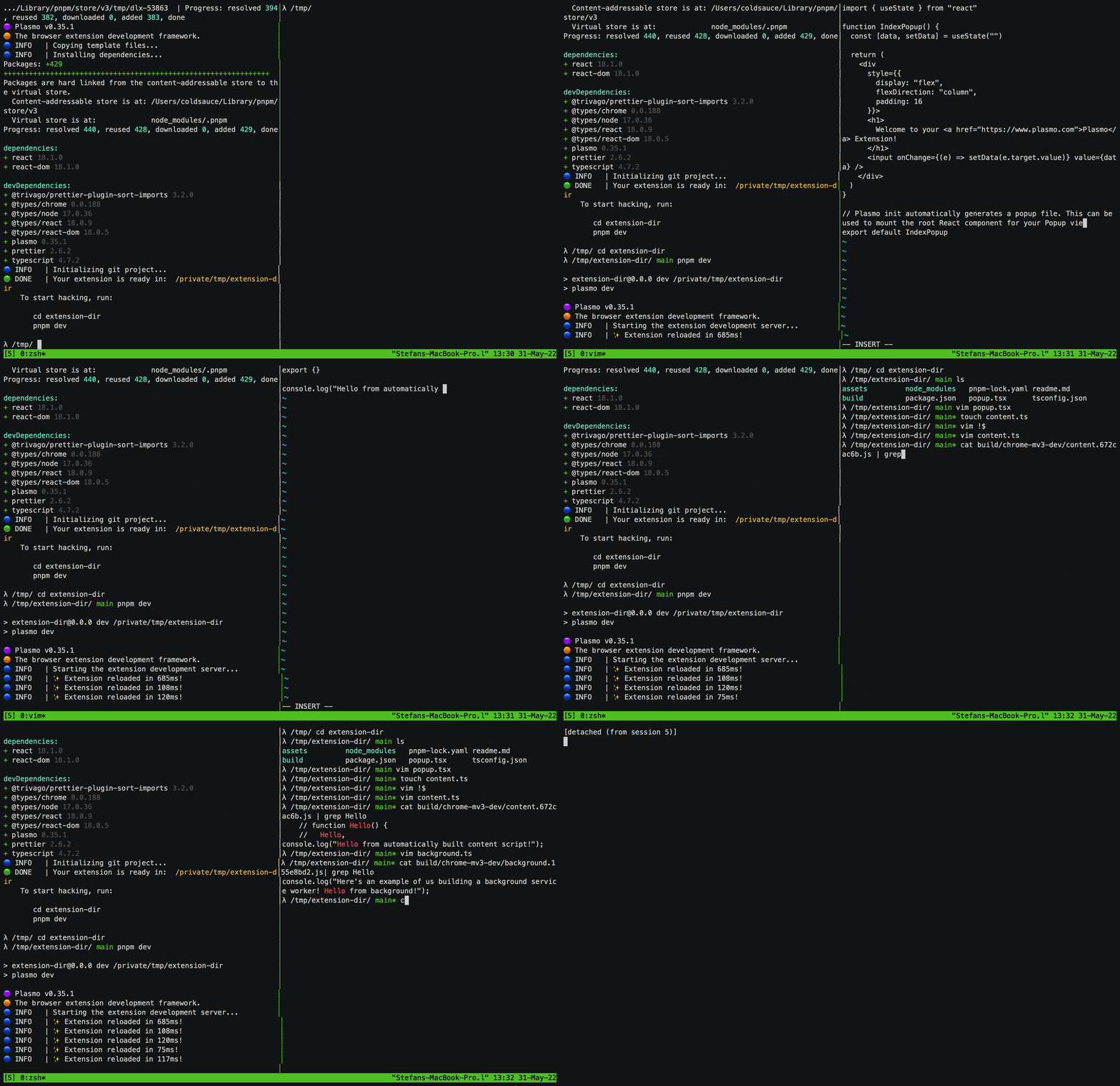
Highlighted Features
And many, many more! 🚀
System Requirements
- Node.js 16.x or later
- MacOS, Windows, or Linux
- (Strongly Recommended) pnpm
Examples
We have examples showcasing how one can use Plasmo with Firebase Authentication, Redux, Supabase authentication, Tailwind, and many more. To check them out, visit our examples repository.
Documentation
Check out the documentation to get a more in-depth view into the Plasmo Framework.
Browser Extensions Book
For a more in-depth view into how browser extensions work, and how to develop them, we highly recommend Matt Frisbie's new book "Building Browser Extensions"
Usage
pnpm create plasmo example-dir
cd example-dir
pnpm dev
The road ahead is filled with many turns.
- Popup changes go in
popup.tsx
- Options page changes go in
options.tsx
- Content script changes go in
content.ts
- Background service worker changes go in
background.ts
Directories
You can also organize these files in their own directories:
ext-dir
├───assets
|   └───icon.png
├───popup
|   ├───index.tsx
|   └───button.tsx
├───options
|   ├───index.tsx
|   ├───utils.ts
|   └───input.tsx
├───contents
|   ├───site-one.ts
|   ├───site-two.ts
|   └───site-three.ts
...
Finally, you can also avoid putting source code in your root directory by putting them in a src sub-directory, following this guide. Note that assets and other config files will still need to be in the root directory.
Supported Browsers
To see a list of supported browser targets, please refer to our documentation here.
Community
The Plasmo community can be found on Discord. This is the appropriate channel to get help with using the Plasmo Framework.
Our Code of Conduct applies to all Plasmo community channels.
Contributing
Please see the contributing guidelines to learn more.
A big thanks to all of our amazing contributors ❤️
Feel free to join the fun and send a PR!
Plasmo Framework



Disclaimer
Plasmo is currently alpha software, and some things might change from version to version, so please be mindful and use it at your own risk.
License
MIT ⭐ Plasmo