



Planify
Never worry about forgetting things again
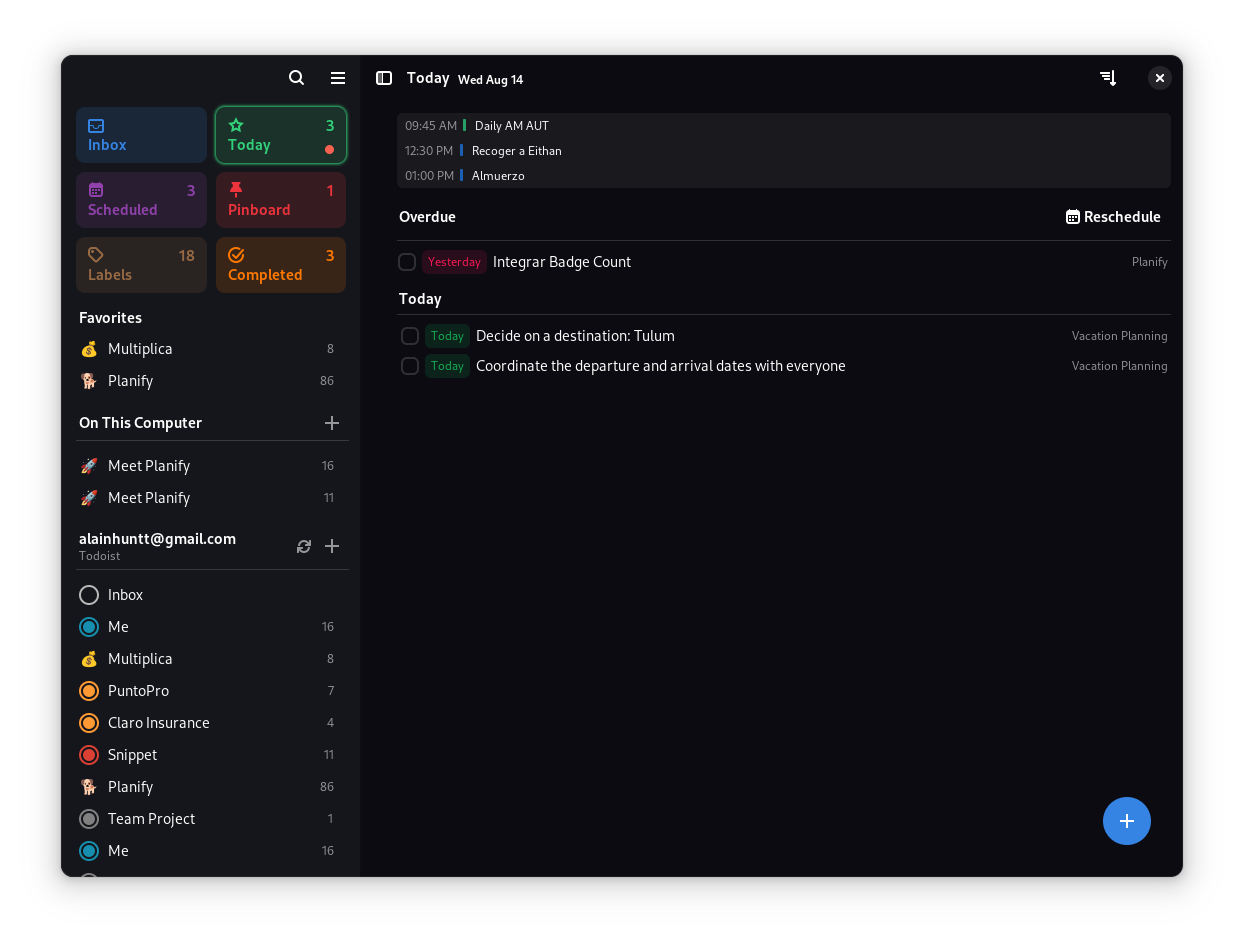
✨ Features
🎯 Core Functionality
- 🚀 Modern Interface: Clean, intuitive design that gets out of your way
- 🤚 Drag & Drop: Effortlessly organize tasks and projects with natural gestures
- 💯 Progress Tracking: Visual indicators show completion status at a glance
- 📂 Smart Organization: Group tasks into sections for better workflow management
- 📅 Calendar Integration: Visualize your schedule and plan your day effectively
- ⏰ Flexible Reminders: Set multiple reminders per task - never miss a deadline
- 🌙 Dark Mode: Seamless integration with system themes
- 🔍 Quick Search: Find anything instantly with powerful search capabilities
☁️ Cloud Synchronization
- Todoist Integration: Full sync with your existing Todoist account
- Nextcloud Support: Keep your data private with self-hosted solutions
- Offline Mode: Work without internet - sync when you're back online
- Cross-Platform: Access your tasks from anywhere
Note: Planify is not created by, affiliated with, or supported by Doist
💎 Advanced Features
- 🔔 Smart Notifications: Never miss important tasks
- 🔁 Recurring Tasks: Set up repeating schedules with flexible patterns
- 📊 Analytics: Track your productivity over time
- 🏷️ Labels & Filters: Organize and find tasks with custom labels
- 📎 Attachments: Add files and links to your tasks
- 🎨 Customization: Personalize colors and themes
📥 Installation
🏪 Official Distribution
🛠 Build from Source
System Requirements & Dependencies
Minimum Requirements:
- Linux distribution with GTK4 support
- 2GB RAM
- 500MB disk space
Build Dependencies:
| Package | Version |
|---|---|
| meson | ≥ 0.56 |
| valac | ≥ 0.48 |
| gio-2.0 | ≥ 2.80.3 |
| glib-2.0 | ≥ 2.80.3 |
| gee-0.8 | ≥ 0.20.6 |
| gtk4 | ≥ 4.14.4 |
| libsoup-3.0 | ≥ 3.4.4 |
| sqlite3 | ≥ 3.45.1 |
| libadwaita-1 | ≥ 1.5.3 |
| json-glib-1.0 | ≥ 1.8.0 |
| libecal-2.0 | ≥ 3.52.4 |
| libedataserver-1.2 | ≥ 3.52.4 |
| libportal | ≥ 0.7.1 |
| libportal-gtk4 | ≥ 0.7.1 |
| gxml-0.20 | ≥ 0.21.0 |
| libsecret-1 | ≥ 0.21.4 |
| libspelling-dev | latest |
| gtksourceview-5 | 5.12.1 |
| libicu-dev | ≥ 76.1 |
Install Dependencies:
Fedora/RHEL:
sudo dnf install vala meson ninja-build gtk4-devel libadwaita-devel libgee-devel libsoup3-devel libportal-devel libportal-gtk4-devel evolution-devel libspelling-devel gtksourceview5-devel libicu-devel
Ubuntu/Debian:
sudo apt install valac meson ninja-build libgtk-4-dev libadwaita-1-dev libgee-0.8-dev libjson-glib-dev libecal2.0-dev libsoup-3.0-dev libportal-dev libportal-gtk4-dev libspelling-1-dev libgtksourceview-5-dev libicu-dev
Build Instructions:
# Clone the repository
git clone https://github.com/alainm23/planify.git
cd planify

# Configure build
meson build --prefix=/usr

# Compile
cd build
ninja

# Install
sudo ninja install

# Run
io.github.alainm23.planify
🏗️ Development Setup
Using GNOME Builder:
- Install GNOME Builder
- Clone this repository
- Open the project in GNOME Builder
- Click "Run" to build and test
🤝 Contributing
We welcome contributions! Here's how you can help:
🐛 Bug Reports & Feature Requests
- Check existing issues first
- Use our issue templates for better communication
- Include system information and steps to reproduce
💻 Code Contributions
- Read our Architecture Guide
- Review our AI Policy for guidelines on AI-assisted contributions
- Fork the repository and create a feature branch
- Follow our coding standards and commit message format
- Submit a pull request with a clear description
🌍 Translations
Help make Planify available in your language:
- Weblate (Recommended): Join our translation project
- Manual: Check our Translation Guide
📋 Code of Conduct
Planify follows the GNOME Code of Conduct. We are committed to providing a welcoming and inclusive environment for all contributors.
Our Principles:
- Be friendly - Use welcoming and inclusive language
- Be empathetic - Respect differing viewpoints and experiences
- Be respectful - Disagree politely and constructively
- Be considerate - Remember that decisions often involve competing priorities
- Be patient - Help others learn and grow
- Be concise - Read discussions before commenting
💝 Support the Project
If you find Planify useful, consider supporting its development:




Made with 💗 in Perú

