
Official codebase for PIXELRAG: Web Screenshots Beat Text for Retrieval-Augmented Generation
Yichuan Wang*,
Zhifei Li*,
Zirui Wang,
Paul Teiletche,
Lesheng Jin
Matei Zaharia†,
Joseph E. Gonzalez†,
Sewon Min†
* Equal contribution † Equal advising
Work done at Berkeley SkyLab & BAIR & Berkeley NLP
Search any document by how it looks, not just the text it contains.





What it is · Give Claude eyes · How it works · Pipelines
pip install pixelrag
The two core operations — render a page to screenshots, search a visual index:
# Render any page or document to screenshot tiles
pixelshot https://en.wikipedia.org/wiki/Python --output ./tiles

# Search a hosted index of 8.28M Wikipedia pages — no setup, runs against the live API
curl -X POST https://api.pixelrag.ai/search \
  -H "Content-Type: application/json" \
  -d '{"queries": [{"text": "What is the capital of France?"}], "n_docs": 5}'
Live, hosted endpoint —
https://api.pixelrag.aiserves a pre-built index of 8.28M Wikipedia pages. No setup, no API key. It even takes an image as the query (visual search) — see the API reference →.
Or try it in the browser at pixelrag.ai, or run the demo notebook in
Colab  — it
renders a page and searches the hosted index, with the images inline.
— it
renders a page and searches the hosted index, with the images inline.
What it is
PixelRAG renders documents — web pages, PDFs, images — as screenshots and retrieves over the images directly. Visual structure that HTML parsing throws away — tables, charts, layout, infographics — stays intact, so the reader model can actually answer questions about it. Wikipedia's 8.28M articles ship as a pre-built index; the pipeline itself is general-purpose.
Give Claude eyes
The renderer also ships as a Claude Code plugin — the pixelbrowse skill. Instead of fetching
raw HTML, Claude screenshots a page with pixelshot and reads the image, so it sees
charts, diagrams, tables, and layout the way a person does.
Install it — no clone needed. Install the pixelshot CLI so it's on your PATH
(use uv tool or pipx to keep it isolated yet always available to Claude — a
plain pip install into a project venv may leave pixelshot off PATH):
uv tool install pixelrag                            # pixelshot on PATH (or: pipx install pixelrag)
claude plugin marketplace add StarTrail-org/PixelRAG
claude plugin install pixelbrowse@pixelrag-plugins
Then just ask Claude to look at a page:
claude -p "screenshot https://news.ycombinator.com and summarize the top stories"
claude -p "screenshot https://arxiv.org/abs/2404.12387 and explain the key findings"
Or use the slash command in an interactive session: /screenshot https://example.com.
No MCP server, no backend: the skill just calls pixelshot (Playwright/CDP) on your machine.
opencode users get the same screenshot tool via the @startrail/pixelbrowse npm package
— with pixelshot on PATH, add it to opencode.json:
{
  "$schema": "https://opencode.ai/config.json",
  "plugin": ["@startrail/pixelbrowse"]
}
See plugin/opencode/ for details.
How it works
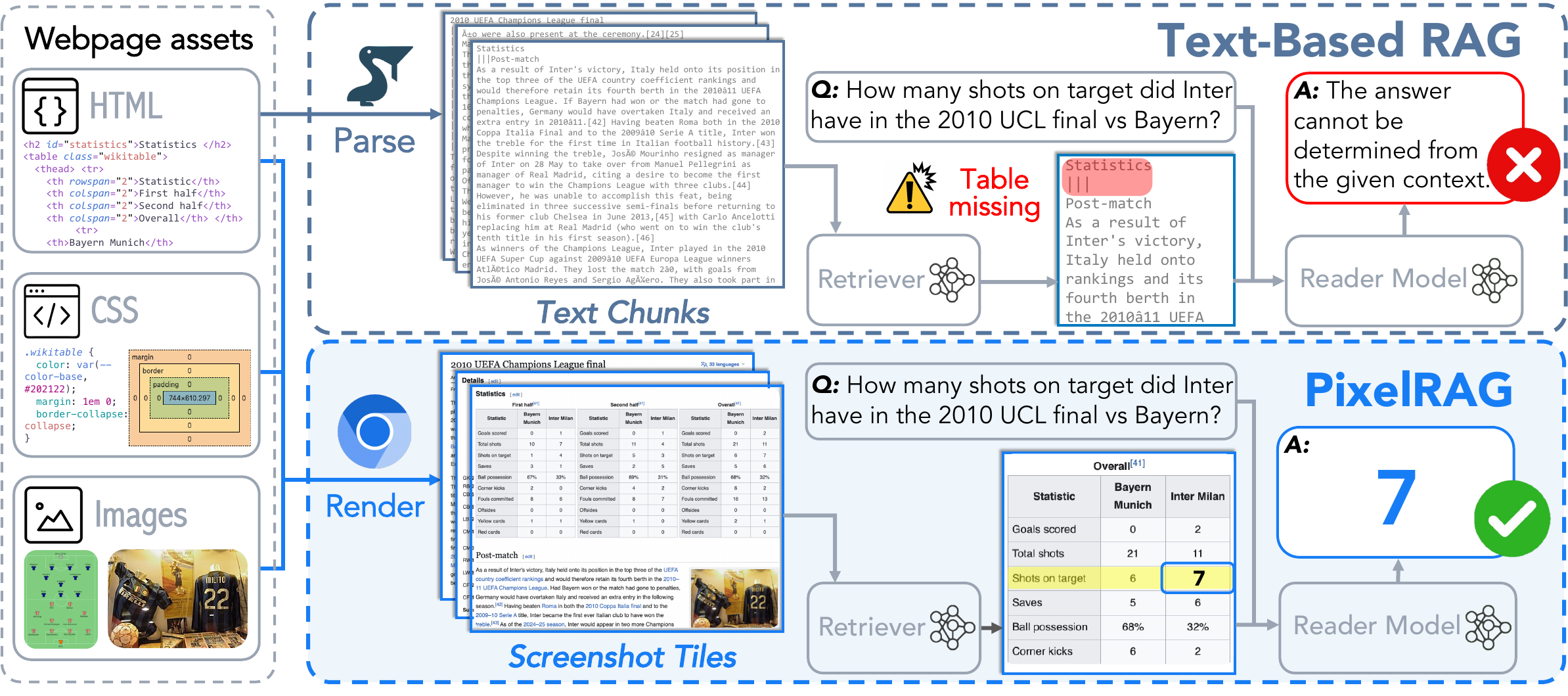
Text-based RAG parses the page to text chunks and loses the table — the reader can't find the answer. PixelRAG renders the page to screenshot tiles, retrieves the right tile, and the reader reads the number straight off the image.
Two pieces make this work: (1) rendering documents to images instead of parsing them to text, and
(2) a Qwen3-VL-Embedding model, LoRA-fine-tuned on screenshot data, that embeds page images into
a space where visual content is retrievable.
Pipelines
Capture is the standalone pixelshot command; the rest of the pipeline runs through the
pixelrag umbrella — pixelrag . Install only the stages you need:
| Command | What it does | Install |
|---|---|---|
pixelshot |
Document → image tiles (Playwright CDP, PDF) | pip install pixelrag |
pixelrag chunk · embed · build-index |
Tiles → vectors → FAISS index | pip install 'pixelrag[embed]' |
pixelrag index |
Orchestrates the full pipeline: source → ingest → embed → index | pip install 'pixelrag[index]' |
pixelrag serve |
FAISS search API (FastAPI, CPU or GPU) | pip install 'pixelrag[serve]' |
render ←── index ──→ embed serve (independent) train → serve (HTTP)
train is a separate uv project with its own pinned env (torch==2.9.1+cu129,
transformers==4.57.1, cuDNN 9.20) — install it from inside train/, not from the root.
Search a pre-built index
pip install 'pixelrag[serve]'

# Download a pre-built index from Hugging Face. The dataset repo holds four FAISS indexes
# (base/LoRA Wikipedia pixel, Wikipedia text, news pixel); grab just the base one (~217G) here.
huggingface-cli download StarTrail-org/pixelrag-faiss-indexes \
  --repo-type dataset --include "search_index_normed_v2/*" --local-dir ./index

# Serve, then query
pixelrag serve --index-dir ./index/search_index_normed_v2 --port 30001

curl -X POST http://localhost:30001/search \
  -H "Content-Type: application/json" \
  -d '{"queries": [{"text": "What is the capital of France?"}], "n_docs": 5}'
Build an index from your own documents
Works on Linux (CUDA) and macOS (Apple Silicon / MPS) — device: auto picks the best backend.
pip install 'pixelrag[index]'

# Create pixelrag.yaml
cat > pixelrag.yaml << 'EOF'
source:
  type: local
  path: ./my_docs

embed:
  model: Qwen/Qwen3-VL-Embedding-2B
  device: auto          # cuda on Linux, mps on macOS, cpu as fallback

output: ./my_index
EOF

# Build, then serve
pixelrag index build
pixelrag serve --index-dir ./my_index --port 30001
Try it: index a PDF and search it locally
No GPU required — runs on macOS (Apple Silicon) or any machine with Python 3.10+.
PDF rendering needs the pdf extra and poppler (brew install poppler, or
apt-get install poppler-utils on Debian/Ubuntu).
pip install 'pixelrag[index,pdf]'

# 1. Grab a sample PDF (or use your own)
curl -L -o paper.pdf https://raw.githubusercontent.com/StarTrail-org/PixelRAG/main/assets/pixelrag-paper.pdf

# 2. Create config (device: auto picks MPS on Mac, CUDA on Linux)
cat > pixelrag.yaml << 'EOF'
source:
  type: local
  path: ./paper.pdf

embed:
  model: Qwen/Qwen3-VL-Embedding-2B
  device: auto

output: ./paper_index
EOF

# 3. Build the index (~3 min on Apple M-series, ~1 min on GPU)
pixelrag index build

# 4. Serve it
pixelrag serve --index-dir ./paper_index --port 30001

# 5. Search — should return page 2 (the overview diagram)
curl -X POST http://localhost:30001/search \
  -H "Content-Type: application/json" \
  -d '{"queries": [{"text": "Overview of PixelRAG and the diagram"}], "n_docs": 1}'
Render a page programmatically
from pixelrag_render import render_url

# render a single page to tiles — e.g. for an agent to read
tiles = render_url("https://en.wikipedia.org/wiki/Python", "./tiles")
The same rendering is available as a CLI — pixelshot ships with pip install pixelrag:
# Web page → tiles (headless Chromium via CDP)
pixelshot https://en.wikipedia.org/wiki/Python -o ./tiles

# PDF → tiles (requires poppler; install the pdf extra: pip install 'pixelrag[pdf]')
curl -sL -o paper.pdf https://arxiv.org/pdf/2503.09516
pixelshot paper.pdf -o ./tiles --dpi 200

# URLs and local files can be mixed freely
pixelshot https://github.com/StarTrail-org/PixelRAG paper.pdf -o ./tiles
Chrome on Windows/macOS — the bundled turbo
headless_shellauto-installs on linux-x64 only. Elsewhere,pixelshotuses your system Chrome/Chromium (or Playwright's Chromium), auto-detected from the standard install locations. Point it at a specific binary withCHROME_PATH=/path/to/chromeif it isn't found automatically. Each render runs in an isolated, throwaway Chrome profile, so it works even while you have Chrome open.
Embed tools (standalone)
Each stage runs independently, without the orchestrator:
pip install 'pixelrag[embed]'

pixelrag chunk --tiles-dir ./tiles
pixelrag embed --shard-dir ./tiles --output-dir ./embeddings --gpu-ids 0,1
pixelrag build-index --embeddings-dir ./embeddings --output-dir ./index
Qdrant backend
Qdrant is an open-source vector search engine for high-performance and massive scale. FAISS remains the default for local indexes. Use Qdrant for configurable quantization, disk-backed vectors, payload filtering, and one collection shared by multiple PixelRAG servers.
Quantization compresses vectors to reduce memory use and speed up search, with a recall tradeoff that depends on the method and settings.
To configure quantization, pass any Qdrant quantization_config object in a JSON file.
See Qdrant's quantization guide for supported methods and parameters.
{
  "scalar": {
    "type": "int8",
    "quantile": 0.99,
    "always_ram": true
  }
}
pip install 'pixelrag[serve,qdrant]'   # or 'pixelrag[index,qdrant]'

# Build against a Qdrant server.
# Start one locally with: docker run -p 6333:6333 qdrant/qdrant
pixelrag build-index --embeddings-dir ./embeddings --output-dir ./index \
    --backend qdrant --qdrant-url http://localhost:6333 --collection pixelrag \
    --qdrant-quantization-config ./quantization.json

# Add documents to an existing collection.
pixelrag build-index --embeddings-dir ./more --output-dir ./index \
    --backend qdrant --qdrant-url http://localhost:6333 --collection pixelrag --append

# Replace an existing collection and its configuration.
pixelrag build-index --embeddings-dir ./embeddings --output-dir ./index \
    --backend qdrant --qdrant-url http://localhost:6333 --collection pixelrag --recreate

# Serve the collection. PixelRAG reads the backend from summary.json.
pixelrag serve --index-dir ./index --qdrant-url http://localhost:6333 \
    --qdrant-client-config ./qdrant-client.json --port 30001
Configure the orchestrator in pixelrag.yaml:
index:
  backend: qdrant
  qdrant_url: http://localhost:6333
  collection: pixelrag
  client_config: ./qdrant-client.json
  quantization_config: ./quantization.json
  # Set append: true or recreate: true when the collection already exists.
Training
Fine-tuning lives in train/ — a separate uv project (wiki-screenshot-training) with its own
pinned env. It LoRA-fine-tunes Qwen/Qwen3-VL-Embedding-2B for webpage retrieval; run it from
inside train/ (cd train && uv sync). See train/README.md for the full recipe.
You don't need to retrain to use the model — the trained adapters are published at
Chrisyichuan/wiki-screenshot-embedding-lora.
We also release the full training set
(Chrisyichuan/screenshot-training-natural-filtered-v2),
so you can adapt other backbones yourself — a larger Qwen, or any other embedding model.
The data curation pipeline (LLM-augmented query generation, filtering, hard-negative mining)
is documented in train/docs/synthetic_data_pipeline.md.
Citation
If you find PixelRAG useful, please cite our paper:
@misc{wang2026pixelragwebscreenshotsbeat,
      title={PIXELRAG: Web Screenshots Beat Text for Retrieval-Augmented Generation},
      author={Yichuan Wang and Zhifei Li and Zirui Wang and Paul Teiletche and Lesheng Jin and Matei Zaharia and Joseph E. Gonzalez and Sewon Min},
      year={2026},
      eprint={2606.28344},
      archivePrefix={arXiv},
      primaryClass={cs.IR},
      url={https://arxiv.org/abs/2606.28344},
}
Acknowledgments
Thanks to Rulin Shao for support.
Thanks also to Claude Code and OpenAI Codex for supporting open-source contributors with credits and plans, which we earned by working on LEANN.
This work is done by the Berkeley Sky Computing Lab, BAIR, and the Berkeley NLP Group.
License
Apache-2.0