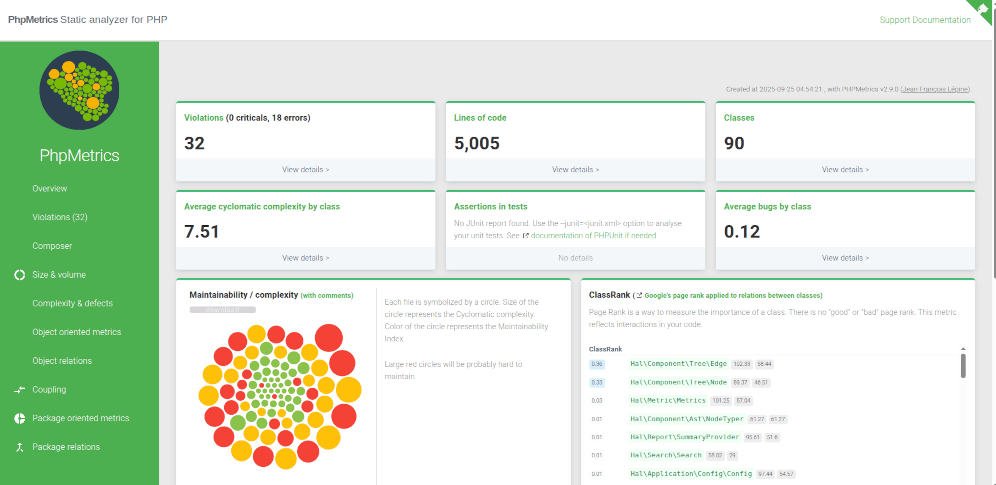
PhpMetrics is an MIT-licensed static analysis tool for PHP, distributed through Composer as phpmetrics/phpmetrics, that computes metrics about a PHP project and its classes and renders them as an HTML report for developers, tech leads, and CI pipelines that need visible code-quality data.
What it is
PhpMetrics is a static analyzer that lives in the PHP and Composer ecosystem. It reads a PHP codebase and produces metrics about the project as a whole and about individual classes, then writes those metrics into an HTML report that the README describes as "beautiful and readable." The tool ships as a Composer package and runs as a command-line binary, so it fits the same install-and-run workflow that PHP projects already use for their other development dependencies. Its homepage hosts the documentation site, including a quick start guide, a configuration reference, and a detailed list of the metrics it calculates.
The concrete problem it solves is turning raw quality signals into something a team can actually read. Instead of assembling bespoke parsing scripts or reading analyzer output line by line in a terminal, a developer runs one command and gets a browsable report written to a directory on disk. The README also exposes php ./vendor/bin/phpmetrics --metrics, which lists the metrics the tool provides, so the set of measurements is discoverable from the command line rather than only from the documentation. Because the analysis is static, it does not need the application to boot, serve traffic, or connect to a database in order to report on the code.
Key capabilities
- Collects metrics about a PHP project and about its classes, per the README description of what the tool reports.
- Generates an HTML report to a chosen output directory with
--report-html=myreport, browsable at ./myreport/index.html.
- Lists every available metric from the CLI with
php ./vendor/bin/phpmetrics --metrics.
- Supports a configuration file to customize the report, add options, and configure rules for Continuous Integration.
- Integrates with CI workflows, reflected in the
ci topic and in the README's reference to configuring CI rules.
- Installs as a development dependency with
composer require phpmetrics/phpmetrics --dev.
- Runs as an executable at
./vendor/bin/phpmetrics after installation.
Who uses it and how
- PHP teams that run it inside a continuous integration pipeline, where the configuration file defines the rules the build enforces.
- Developers who install it as a dev dependency and run it locally against a folder before opening a pull request.
- Reviewers and tech leads who read the generated HTML report instead of asking for a walkthrough of a diff.
- Projects that need class-level quality data without granting the analyzer runtime access to production systems, since the analysis is static.
- Maintainers who keep the tool's output in a CI job artifact so the report can be inspected after a build finishes.
Getting started
Install the package as a development dependency with composer require phpmetrics/phpmetrics --dev, then generate a report with php ./vendor/bin/phpmetrics --report-html=myreport and open ./myreport/index.html in a browser. The quick start guide on the project website covers the same path.
How it compares
No paid products or competing tools are named in the supplied facts, so there is nothing to contrast on licence, hosting model, or cost. On the evidence available, PhpMetrics stands alone in this registry.
When to use it — and when not to
A self-hoster needs a working PHP runtime and Composer, because the tool installs and runs through Composer and emits a static HTML report rather than operating a hosted service; no database, storage layer, or mail server is mentioned as a requirement. It is a poor fit for anyone who needs runtime profiling or production traffic analysis, since it is a static analyzer and never executes the code it measures. It is also a poor fit for teams that want a fully self-contained repository README, because the facts show a short README that points most substantive documentation, including the metric list and configuration reference, at the external website. The maintainer states that the project is built and maintained in free time and asks for sponsorship to fund maintenance and new metrics, so feature pace depends on volunteer effort rather than a funded roadmap.