PDFx is a free, MIT-licensed, open-source desktop application and file format that bundles many PDF documents into a single valid PDF, aimed at people who need to organise, view, reorder and export large collections of documents on macOS, Windows or Linux.
What it is
PDFx is an open, backwards compatible extension of PDF. It bundles many documents into one file, paired with a minimal desktop viewer that runs on macOS, Windows and Linux. The project is written in TypeScript and built with Electron, Vite and React; PDF rendering is done by pdf.js and document assembly by pdf-lib. The entire mechanism is deliberately small: one embedded JSON manifest, described in SPEC.md. Files produced are fully valid PDFs, so they open anywhere and every page shows in sequence.
The concrete problem it solves is handling a pile of separate documents that must stay separate in meaning but travel as one artefact. It replaces the usual workflow of juggling multiple files, renaming, zipping, or merging everything irreversibly into one flat document. Open a PDFx file in an ordinary viewer and the pages read in order; open it in PDFx and it splits back into the original documents. Plain single PDFs work as they are, so no conversion step is required.
Key capabilities
- Bundles multiple documents into one file that remains a valid PDF, using one embedded JSON manifest as described in SPEC.md.
- Splits a bundled file back into its original documents when opened in the PDFx viewer.
- Accepts drag and drop of
.pdf files, images or folders anywhere in the window.
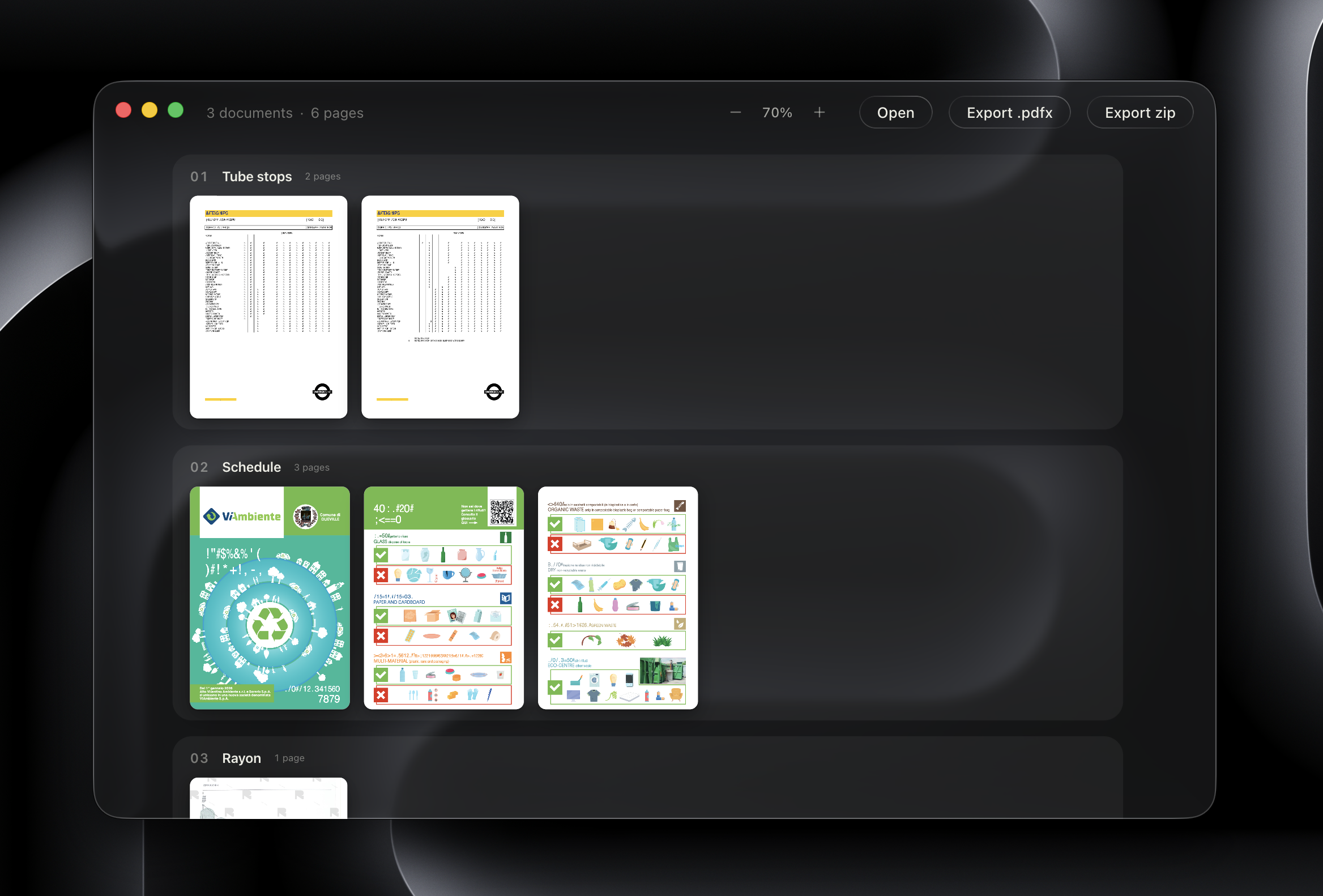
- Renders each document as a horizontal strip of pages, with documents stacked vertically.
- Supports reordering and removing documents before export.
- Exports the whole collection as a single file through the Export PDF action.
- Includes an AI assistant that requires a provider API key from Google, Anthropic or OpenAI.
Who uses it and how
- Individuals and small teams on macOS, Windows or Linux who need one file covering many documents without losing the boundaries between them.
- Case or project work where a bundle of related PDFs must be sent as a single attachment but still reviewed document by document.
- Review workflows that need reordering and removal of documents before a final export, done visually rather than through command-line tooling.
- Mixed-source collections, since images and folders can be dragged in alongside
.pdf files.
- Anyone already working in a browser context, because a web build is available via
yarn dev:web alongside the desktop targets.
Getting started
Install and run from source with Yarn using yarn, then yarn dev for development or yarn dev:web for the web build. Platform builds use yarn build:mac, yarn build:win or yarn build:linux, and a prebuilt download is offered at the project homepage, pdfx.zip. The AI assistant needs a provider API key: copy .dev.vars.example to .dev.vars and set the key.
How it compares
No paid products this project replaces are listed in the facts, and no comparable tools are named either, so PDFx stands alone in this registry. Its licence is MIT, which permits self-hosting and redistribution, and the file format it produces is an open specification rather than a proprietary container. Cost model is therefore whatever the underlying provider costs are, plus nothing for the software itself.
When to use it — and when not to
Choose PDFx when documents must stay individually identifiable inside one portable file and when an open, MIT-licensed format matters. A self-hoster takes on the Electron, Vite and React toolchain plus the build targets for three platforms, and anyone wanting the AI assistant must supply and pay for a third-party provider API key. The README is sparse on operational detail and does not describe a server-side deployment, so teams expecting a hosted, multi-user document management system with databases and accounts should look elsewhere; the project is a local desktop viewer and format, with open issues standing at three and no roadmap given in the facts.
project readme (upstream, from github) — read inline
PDFx
One file. Many documents. Still a PDF.





What it is
PDFx is an open, backwards compatible extension of PDF that bundles many documents into a single file, plus a minimal desktop viewer for macOS, Windows, and Linux.
The files produced are fully valid PDFs: open them anywhere and every page shows in sequence. Open them in PDFx and it splits back into the original documents. Plain single PDFs work as they are.
Drag and drop .pdf files, images or folders anywhere in the window. Each document renders as a horizontal strip of pages, and documents stack vertically. Reorder or remove them, then Export PDF to save the whole collection as one file.
See SPEC.md for the format. It is short: the entire trick is one embedded JSON manifest.
How to run
Built with Electron, Vite, TypeScript, and React. PDF rendering by pdf.js, assembly by pdf-lib.
yarn              # install
yarn dev          # run in development
yarn dev:web      # run on the web
yarn build:mac    # build:win for windows, build:linux for linux
The AI assistant needs a provider API key: copy .dev.vars.example to .dev.vars, and set your key (Google, Anthropic, or OpenAI).
License
MIT