



papermill is a free, open source publishing project written in Python and released under BSD-3-Clause. It has 6,486 GitHub stars, 463 forks and 196 open issues, and was last pushed 2 months ago. On this registry it ranks #11 of 46 tracked projects in Publishing, with 5 head-to-head comparisons available. It gained 1 stars over the last 3 tracked days.

What is papermill?

Papermill is a Python tool published under the BSD-3-Clause licence by the nteract project that parameterizes, executes, and analyzes Jupyter notebooks, and it is aimed at teams who need to run the same notebook repeatedly with different inputs inside data pipelines.

What it is

Papermill is a library and command line tool for taking a Jupyter notebook, substituting values into it, running it to completion, and writing the result out. It lives in the Jupyter notebook ecosystem and is maintained under the nteract organization, with topic tags covering jupyter, notebook, notebooks, notebook-generator, pipeline, publishing, and nteract itself. Although the tool is written in Python, the topics it carries β€” julia, r, scala β€” show that the notebooks it drives are not limited to one kernel language. It takes what the README calls an opinionated approach to notebook parameterization and execution, based on the authors' experience using notebooks at scale in data pipelines.

The concrete problem it solves is that a notebook is normally a one-off, hand-driven artifact: changing a value means opening the file, editing a cell, and rerunning it by hand. Papermill turns that into a repeatable operation, so a financial report can be run with different values on the first or last day of a month or at the beginning or end of a year simply by passing parameters. It also replaces the manual work of copying and pasting from notebook to notebook, because a workflow can run one notebook and, depending on its results, choose which notebook to run next.

Key capabilities

  • Parameterization through a cell tagged parameters, which holds the defaults that Papermill overrides at execution time.
  • Injection of a cell tagged injected-parameters containing the input values, inserted at the top of the notebook when no cell is tagged parameters.
  • Reuse of the injected-parameters cell from a prior run when a notebook is rerun, with the old cell replaced by the new run's inputs.
  • Execution through the Python API, as in pm.execute_notebook('path/to/input.ipynb', 'path/to/output.ipynb', parameters=dict(alpha=0.6, ratio=0.1)).
  • Execution through the command line interface, as in papermill local/input.ipynb s3://bkt/output.ipynb -p alpha 0.6 -p l1_ratio 0.1, which writes the output notebook directly to a cloud path.
  • Optional IO dependency bundles named s3, azure, and all, installed as pip install papermill[all].
  • Optional Black-based formatting of parameters, added through an extra requirement of black.

Who uses it and how

  • Data pipeline teams that run notebooks at scale and need each run to carry its own inputs rather than editing cells by hand.
  • Reporting workflows such as a financial report executed with different values at the start or end of a month or year.
  • Branching workflows where one notebook is run and its results determine which notebook runs next.
  • Publishing workflows that write executed notebooks to remote storage, for example an Amazon S3 location passed as s3://bkt/output.ipynb.

Getting started

Install from the command line with pip install papermill, or use pip install papermill[all] to pull in all optional IO dependencies. Documentation is hosted at papermill.readthedocs.io.

How it compares

The facts provided name no paid products that Papermill replaces, and they name no similar tools either. It therefore stands alone in this registry.

When to use it β€” and when not to

Use it when notebooks need to be run repeatedly and unattended with different parameters, and when Python 3.10 or later is available, since that is the supported baseline. A self-hoster must supply the execution environment and the credentials or paths behind any remote output such as an s3:// URL, because remote IO comes only through optional bundles. Anyone who does not run notebooks as a programmatic step, or who needs a fully interactive notebook session rather than batch execution, will get little from it, and the 196 open issues indicate a project with a substantial outstanding backlog despite recent activity on 2026-07-06.

project readme (upstream, from github) β€” read inline

CI CI image Documentation Status badge badge PyPI - Python Version Code style: black papermill Anaconda-Server Badge pre-commit.ci status

papermill is a tool for parameterizing, executing, and analyzing Jupyter Notebooks.

Papermill lets you:

  • parameterize notebooks
  • execute notebooks

This opens up new opportunities for how notebooks can be used. For example:

  • Perhaps you have a financial report that you wish to run with different values on the first or last day of a month or at the beginning or end of the year, using parameters makes this task easier.
  • Do you want to run a notebook and depending on its results, choose a particular notebook to run next? You can now programmatically execute a workflow without having to copy and paste from notebook to notebook manually.

Papermill takes an opinionated approach to notebook parameterization and execution based on our experiences using notebooks at scale in data pipelines.

Installation

From the command line:

pip install papermill

For all optional io dependencies, you can specify individual bundles like s3, or azure -- or use all. To use Black to format parameters you can add as an extra requires ['black'].

pip install papermill[all]

Python Version Support

This library currently supports Python 3.10+ versions. As minor Python versions are officially sunset by the Python org papermill will similarly drop support in the future.

Usage

Parameterizing a Notebook

To parameterize your notebook designate a cell with the tag parameters.
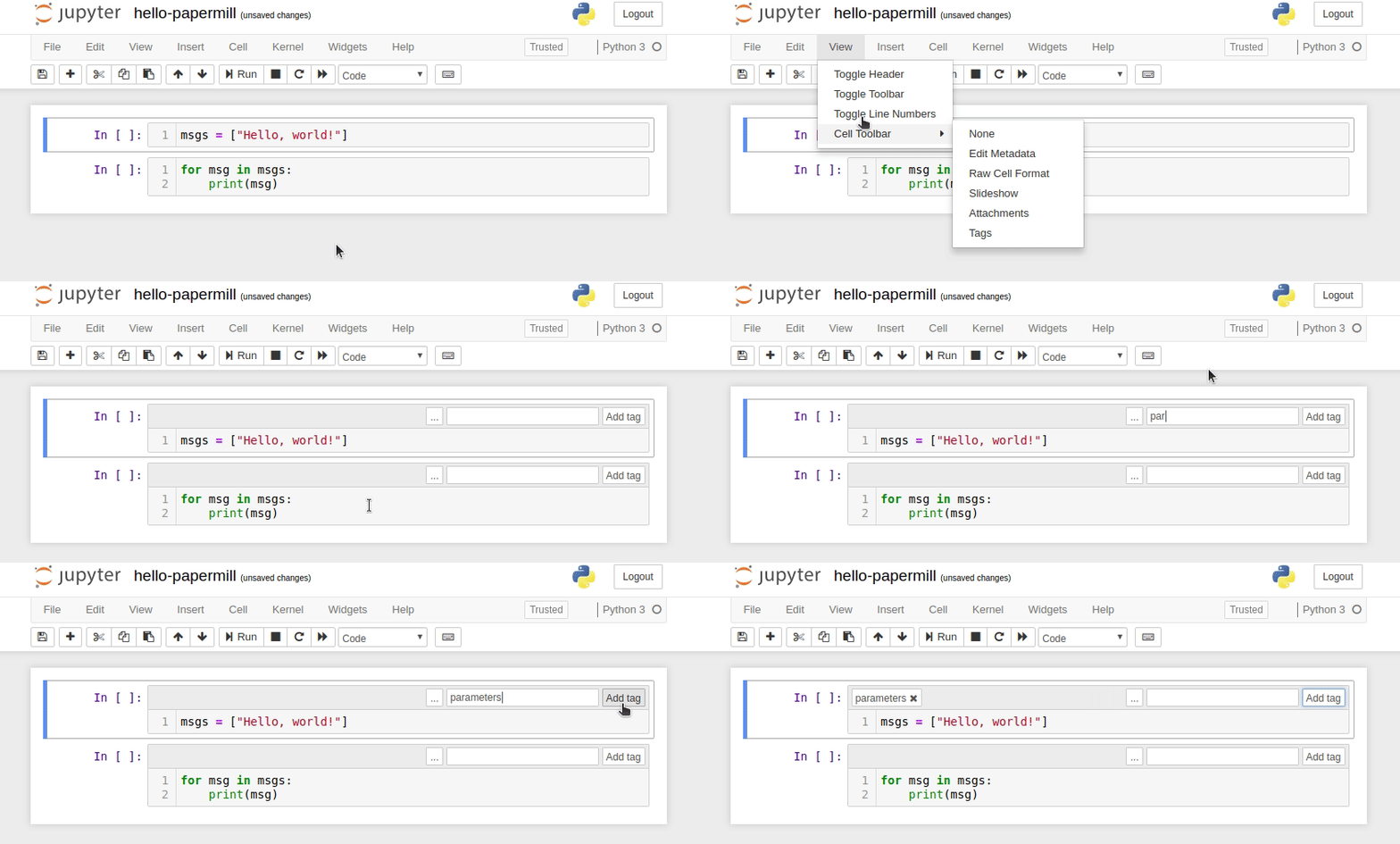
enable parameters in Jupyter

Papermill looks for the parameters cell and treats this cell as defaults for the parameters passed in at execution time. Papermill will add a new cell tagged with injected-parameters with input parameters in order to overwrite the values in parameters. If no cell is tagged with parameters the injected cell will be inserted at the top of the notebook.

Additionally, if you rerun notebooks through papermill and it will reuse the injected-parameters cell from the prior run. In this case Papermill will replace the old injected-parameters cell with the new run's inputs.

image

Executing a Notebook

The two ways to execute the notebook with parameters are: (1) through the Python API and (2) through the command line interface.

Execute via the Python API
import papermill as pm

pm.execute_notebook(
   'path/to/input.ipynb',
   'path/to/output.ipynb',
   parameters = dict(alpha=0.6, ratio=0.1)
)
Execute via CLI

Here's an example of a local notebook being executed and output to an Amazon S3 account:

$ papermill local/input.ipynb s3://bkt/output.ipynb -p alpha 0.6 -p l1_ratio 0.1

NOTE: If you use multiple AWS accounts, and you have properly configured your AWS credentials, then you can specify which account to use by setting the AWS_PROFILE environment variable at the command-line. For example:

$ AWS_PROFILE=dev_account papermill local/input.ipynb s3://bkt/output.ipynb -p alpha 0.6 -p l1_ratio 0.1

In the above example, two parameters are set: alpha and l1_ratio using -p (--parameters also works). Parameter values that look like booleans or numbers will be interpreted as such. Here are the different ways users may set parameters:

$ papermill local/input.ipynb s3://bkt/output.ipynb -r version 1.0

Using -r or --parameters_raw, users can set parameters one by one. However, unlike -p, the parameter will remain a string, even if it may be interpreted as a number or boolean.

$ papermill local/input.ipynb s3://bkt/output.ipynb -f parameters.yaml

Using -f or --parameters_file, users can provide a YAML file from which parameter values should be read.

$ papermill local/input.ipynb s3://bkt/output.ipynb -y "
alpha: 0.6
l1_ratio: 0.1"

Using -y or --parameters_yaml, users can directly provide a YAML string containing parameter values.

$ papermill local/input.ipynb s3://bkt/output.ipynb -b YWxwaGE6IDAuNgpsMV9yYXRpbzogMC4xCg==

Using -b or --parameters_base64, users can provide a YAML string, base64-encoded, containing parameter values.

When using YAML to pass arguments, through -y, -b or -f, parameter values can be arrays or dictionaries:

$ papermill local/input.ipynb s3://bkt/output.ipynb -y "
x:
    - 0.0
    - 1.0
    - 2.0
    - 3.0
linear_function:
    slope: 3.0
    intercept: 1.0"
Supported Name Handlers

Papermill supports the following name handlers for input and output paths during execution:

Development Guide

Read CONTRIBUTING.md for guidelines on how to setup a local development environment and make code changes back to Papermill.

For development guidelines look in the DEVELOPMENT_GUIDE.md file. This should inform you on how to make particular additions to the code base.

Documentation

We host the Papermill documentation on ReadTheDocs.

Frequently asked questions

Is papermill free to use?

papermill is open source under the BSD-3-Clause licence. There is no licence fee and no seat count β€” you can self-host it or, where the project offers one, pay a vendor for a managed version instead.

What does papermill do?

πŸ“š Parameterize, execute, and analyze notebooks

What is papermill written in?

papermill is primarily written in Python. Its source is publicly available at https://github.com/nteract/papermill, and it has 6,486 GitHub stars.