What it is
Papermark open-source document-sharing alternative to DocSend. Project lives in Next.js/TypeScript web stack, category Business Software / Document Management & E-Signatures. GitHub metadata: 9166 stars, 1392 forks, 239 open issues, last push 2026-08-28T15:58:25Z. README says built-in analytics and custom domains. It is self-hosted, open-source, and customizable as needed. License field says NOASSERTION, so license terms need separate check.
It solves paid SaaS lock-in for secure document links: user hosts own app, uses own database, own blob storage, own email service, own analytics backend. It lets user send custom link for document, add own domain and branding, track document views.
Key capabilities
- Share documents through custom secure links, with PDF and dataroom topics indicating document-centric use.
- Add custom domain and branding to viewer-facing pages.
- Gain insights through document tracking; page-by-page analytics listed as soon.
- Self-hosted app built with Next.js, TypeScript, Tailwind, shadcn/ui, and Prisma.
- Store app data in PostgreSQL through Prisma, authenticate through NextAuth.js.
- Send email through Resend, process payments through Stripe, host through Vercel, store files in AWS S3 or Vercel Blob.
Who uses it and how
- Teams replace DocSend for PDF and dataroom-style document sharing.
- Self-hosters deploy Next.js app against PostgreSQL, S3 or Vercel Blob, Resend, Tinybird.
- Developers customize viewer pages, data model, and self-hosted app using Next.js, TypeScript, Prisma, Tailwind, shadcn/ui.
- Operators push Tinybird datasources and endpoints, then set TINYBIRD_TOKEN for analytics collection.
- Users create shareable links, attach custom branding, and inspect document tracking data.
Getting started
Clone repo, npm install, copy .env.example to .env, run npm run dev:prisma, run npm run dev, open http://localhost:3000; prerequisites include Node.js version >= 18.17.0, PostgreSQL, AWS S3 or Vercel Blob, and Resend. Tinybird setup uses pipenv, Tinybird CLI, tb push datasources/, tb push endpoints/get_, and TINYBIRD_TOKEN; README also mentions Vercel hosting and contributing by fork plus pull request.
When to use it — and when not to
Use Papermark when DocSend replacement and self-hosted control matter. Avoid it when managed-only, no ops, or current page-by-page analytics required. Self-hoster must operate PostgreSQL, blob storage, Resend email, Tinybird analytics, and Node.js app; Stripe and Vercel also appear in stack. Facts show weakness: page-by-page analytics soon, contributors 0, 239 open issues, repo age 0 years, license NOASSERTION. README lists clone/npm path and Vercel hosting, not Docker image names or hosted option.
project readme (upstream, from github) — read inline
Papermark
The open-source DocSend alternative.

papermark.com



Papermark is the open-source document-sharing alternative to DocSend, featuring built-in analytics and custom domains.
Features
- Shareable Links: Share your documents securely by sending a custom link.
- Custom Branding: Add a custom domain and your own branding.
- Analytics: Gain insights through document tracking and soon page-by-page analytics.
- Self-hosted, Open-source: Host it yourself and customize it as needed.
Demo
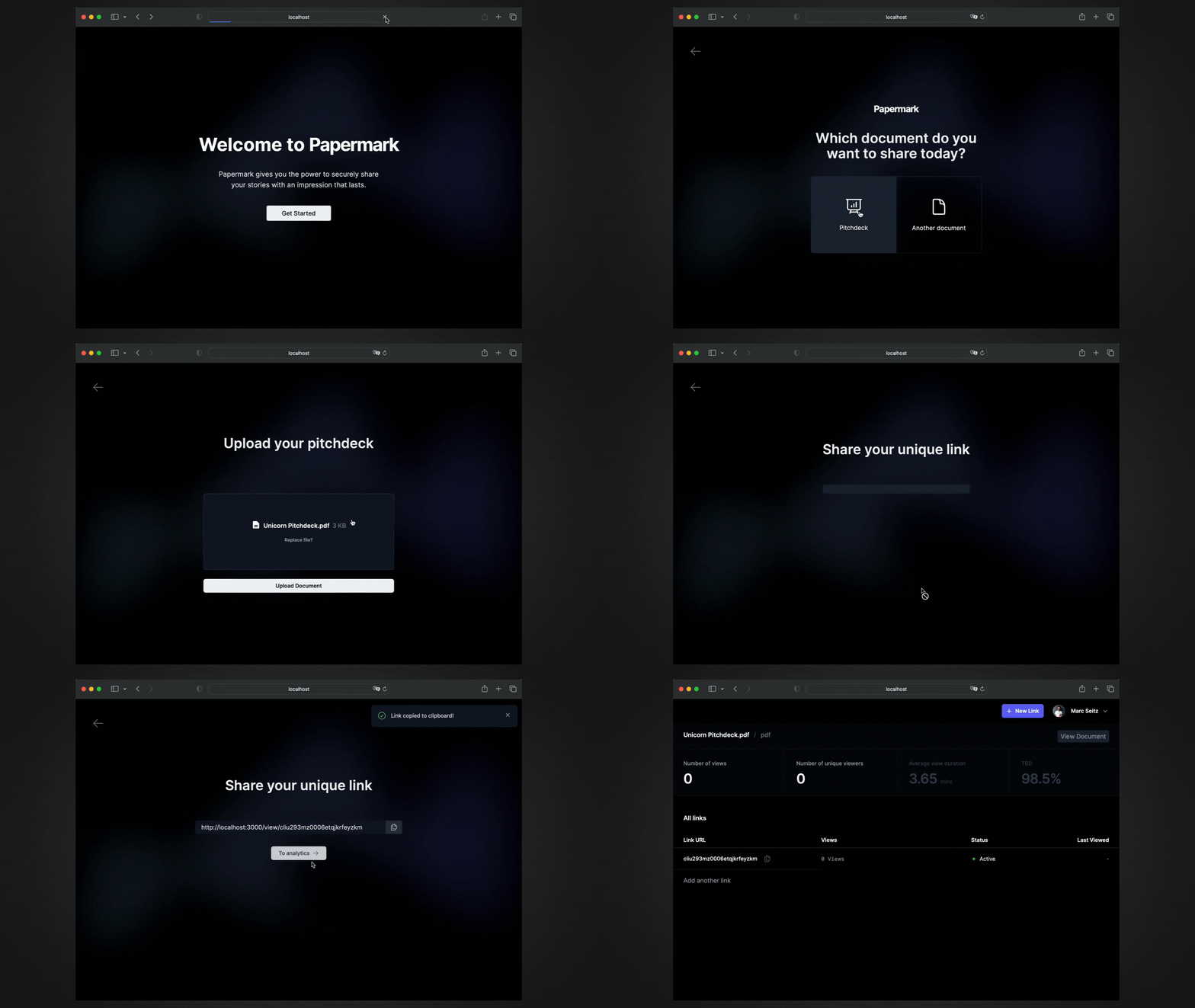
Tech Stack
Getting Started
Prerequisites
Here's what you need to run Papermark:
- Node.js (version >= 18.17.0)
- PostgreSQL Database
- Blob storage (currently AWS S3 or Vercel Blob)
- Resend (for sending emails)
1. Clone the repository
git clone https://github.com/mfts/papermark.git
cd papermark
2. Install npm dependencies
npm install
3. Copy the environment variables to .env and change the values
cp .env.example .env
4. Initialize the database
npm run dev:prisma
5. Run the dev server
npm run dev
6. Open the app in your browser
Visit http://localhost:3000 in your browser.
Tinybird Instructions
To prepare the Tinybird database, follow these steps:
- We use
pipenv to manage our Python dependencies. If you don't have it installed, you can install it using the following command:pkgx pipenv
- Download the Tinybird CLI from here and install it on your system.
- After authenticating with the Tinybird CLI, navigate to the
lib/tinybird directory:cd lib/tinybird
- Push the necessary data sources using the following command:
tb push datasources/*
tb push endpoints/get_*
- Don't forget to set the
TINYBIRD_TOKEN with the appropriate rights in your .env file.
Updating Tinybird
pipenv shell
## start: pkgx-specific
cd ..
cd papermark
## end: pkgx-specific
pipenv update tinybird-cli
Contributing
Papermark is an open-source project, and we welcome contributions from the community.
If you'd like to contribute, please fork the repository and make any changes you'd like. Pull requests are warmly welcome.
Our Contributors ✨