palmier-pro is a free, open source photo & video editors project written in Swift and released under GPL-3.0. It has 14,431 GitHub stars, 1,118 forks and 95 open issues, and was last pushed 9 days ago. On this registry it ranks #9 of 22 tracked projects in Photo & Video Editors, with 5 head-to-head comparisons available.

What is palmier-pro?

Palmier Pro is a Swift-native macOS video editor with built-in generative AI and a Model Context Protocol server, aimed at Apple Silicon editors who want agents such as Claude, Codex, or Cursor to create and edit directly on the timeline.

What it is

Palmier Pro is a video editor for macOS, written from scratch in Swift, that combines a conventional timeline editor with built-in AI generation and MCP support. The README states the north star is Premiere Pro, with the project's own take on integrating AI into the editing workflow. It lives in the macOS creative-tools ecosystem as a desktop application rather than a web service, and it requires macOS 26 (Tahoe) or later on Apple Silicon (M-series) hardware only. Distribution happens through binary releases hosted in the repository and through the project homepage at palmier.io.

The concrete problem it solves is the handoff between a conversational agent and an editing application. Instead of describing an edit in a chat window and performing it by hand in a separate editor, Palmier Pro exposes an MCP server at http://127.0.0.1:19789/mcp over HTTP while the app is open, so an external agent and the in-app agent can operate on the same project. The specific thing it replaces is the manual round trip between an AI tool and a non-AI editor; the README frames Premiere Pro as the workflow it is measured against, extended with agent access to the timeline.

Key capabilities

  • Swift-native video editor built from scratch, with Premiere Pro named in the README as the north star for the editing workflow.
  • Built-in generative AI for video and images using models named in the README: Seedance, Kling, and Nano Banana Pro, generated inside the timeline editor.
  • MCP server exposed at http://127.0.0.1:19789/mcp over HTTP whenever the application is open.
  • Claude Code connection through claude mcp add --transport http palmier-pro http://127.0.0.1:19789/mcp.
  • Codex connection through codex mcp add palmier-pro --url http://127.0.0.1:19789/mcp.
  • Cursor connection through HelpMCP InstructionsInstall in Cursor, or manual entry in ~/.cursor/mcp.json.
  • Claude Desktop connection through a bundled mcpb one-click Desktop Extension, and an in-app agent that works on the same project as external agents.

Who uses it and how

  • Individual editors on Apple Silicon Macs running macOS 26 (Tahoe), who want generation and editing in one application.
  • Developers already working inside Claude Code, Codex, or Cursor, who register the local MCP endpoint and drive edits on the timeline from their existing agent session.
  • Claude Desktop users who install the bundled mcpb Desktop Extension rather than editing configuration files.
  • Mixed workflows where the in-app agent and an external agent operate on the same project concurrently.
  • Community-scale adoption is visible in the repository itself, with 14,431 stars and 1,118 forks reported.

Getting started

Download a binary release from the repository or from palmier.io and run it on macOS 26 (Tahoe) with Apple Silicon; there is no package-manager or container install path in the README. To connect an agent, register the MCP endpoint using the Claude Code, Codex, Cursor, or Claude Desktop instructions above.

How it compares

The facts provide no list of paid products that this project replaces, so comparison is limited to tools the README names itself. Premiere Pro is named as the north star, meaning Palmier Pro targets that style of editing workflow while adding built-in generation and MCP access to the timeline. On licensing, published source through v0.7.6 and the last-gpl-source branch remain under GPLv3, while binary releases after v0.7.6 are proprietary under BINARY_LICENSE.md.

When to use it — and when not to

There is no server infrastructure to operate, because the MCP endpoint binds to the local machine while the app runs, but the platform requirement is strict: macOS 26 (Tahoe) on Apple Silicon only, with no Intel or non-Mac option. This project is a poor fit for anyone who needs open source across all versions, since releases after v0.7.6 are proprietary with no corresponding source published, and the repository no longer accepts code contributions. The project also carries 95 open issues, and its known weaknesses are visible in the README itself: a hardware and OS floor that excludes most machines, and a licence split that changes at v0.7.6.

project readme (upstream, from github) — read inline

[!IMPORTANT] Palmier Pro releases through v0.7.6, and source code through last-gpl-source, were published under GPLv3. Later binary releases are proprietary, and their corresponding source is not published. This repository preserves the historical source and hosts current binary releases and update metadata.

Palmier Pro

The video editor built for AI.

Requires macOS 26 (Tahoe) on Apple Silicon

Follow on X Join Discord Y Combinator S24

English · Español · 简体中文 · 繁體中文 · 日本語 · 한국어 · Tiếng Việt · हिन्दी · বাংলা · العربية · Italiano · Português (Brasil) · Français · Русский · Türkçe
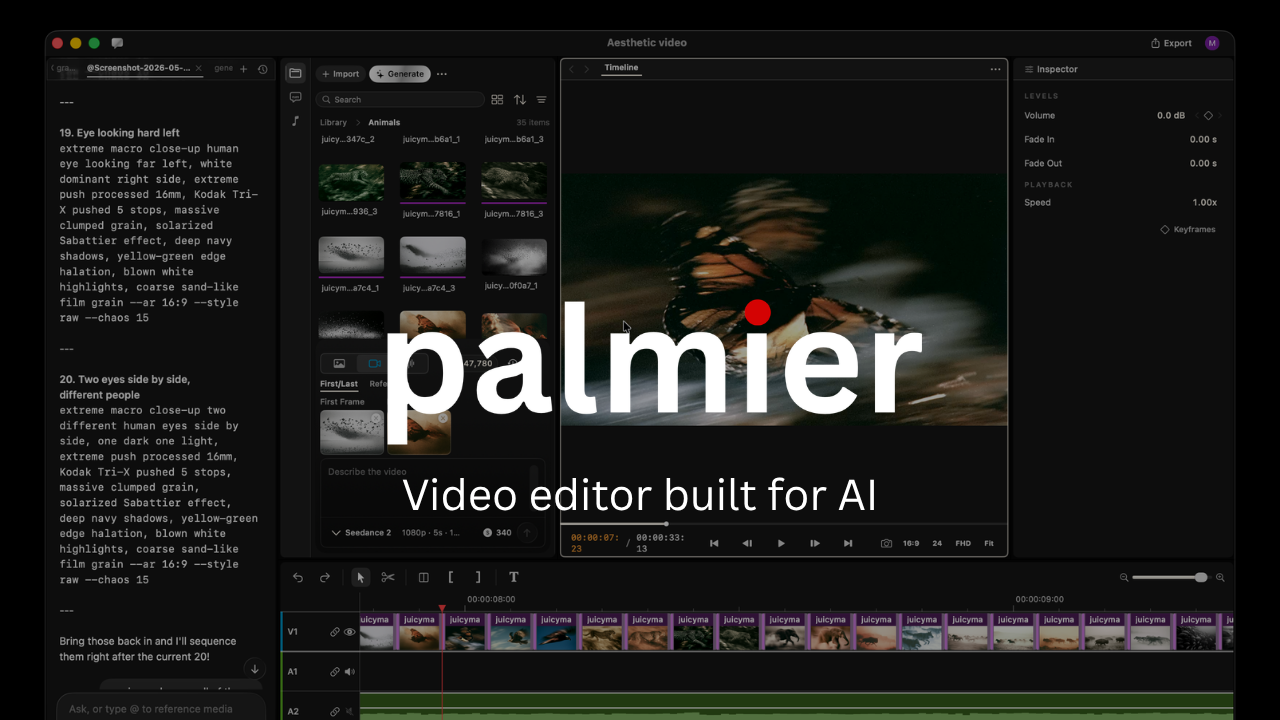

Palmier Pro is a macOS video editor with built-in AI generation and MCP support, allowing agents to create and edit directly on the timeline.

Swift-native video editor

We built Palmier Pro from scratch with Swift. The north star is Premiere Pro, with our take on integrating AI into the workflow.

Built-in Generative AI

Generate videos and images with SOTA models like Seedance, Kling, Nano Banana Pro inside the timeline editor.

Integrates with your agents

Connects your Claude/Codex/Cursor via MCP, or use the in-app agent to work on the same project together.

MCP server

When the app is open, it exposes an MCP server at http://127.0.0.1:19789/mcp via HTTP. To connect:

Claude Code

claude mcp add --transport http palmier-pro http://127.0.0.1:19789/mcp

Codex

codex mcp add palmier-pro --url http://127.0.0.1:19789/mcp

Cursor

The easiest way is go inside the app Help -> MCP Instructions -> Install in Cursor, or install manually by adding this to ~/.cursor/mcp.json:

{
  "mcpServers": {
    "palmier-pro": {
      "type": "http",
      "url": "http://127.0.0.1:19789/mcp"
    }
  }
}

Claude Desktop

We bundle a mcpb with the app that allows a one click install Desktop Extension on Claude Desktop. Go to Help -> MCP Instructions -> Install in Claude Desktop

FAQ

Which versions of Palmier Pro are open source?

Releases through v0.7.6 and source through last-gpl-source remain available under GPLv3. Later releases are proprietary.

What platforms does it support?

macOS 26 (Tahoe) or later on Apple Silicon (M series) only.

Contributing

This repository no longer accepts code contributions. The published source remains available for use, modification, and redistribution under GPLv3.

Community & Support

License

Copyright (C) 2026 Palmier, Inc.

The source code published in this repository remains available under GPLv3.

Palmier Pro binary releases after v0.7.6 are proprietary and subject to the binary license.

Frequently asked questions

Is palmier-pro free to use?

palmier-pro is open source under the GPL-3.0 licence. There is no licence fee and no seat count — you can self-host it or, where the project offers one, pay a vendor for a managed version instead.

What does palmier-pro do?

macOS video editor built for AI

What is palmier-pro written in?

palmier-pro is primarily written in Swift. Its source is publicly available at https://github.com/palmier-io/palmier-pro, and it has 14,431 GitHub stars.
