
Send it, with PairDrop
Local file sharing in your web browser.
Inspired by Apple's AirDrop.
Fork of Snapdrop.
Report a bug
Request feature
Features
File sharing on your local network that works on all platforms.
- A multi-platform AirDrop-like solution that works.
- Send images, documents or text via peer-to-peer connection to devices on the same local network.
- Internet transfers
- Join temporary public rooms to transfer files easily over the Internet.
- Web-app
- Works on all devices with a modern web-browser.
Send a file from your phone to your laptop?
Share photos in original quality with friends using Android and iOS?
Share private files peer-to-peer between Linux systems?
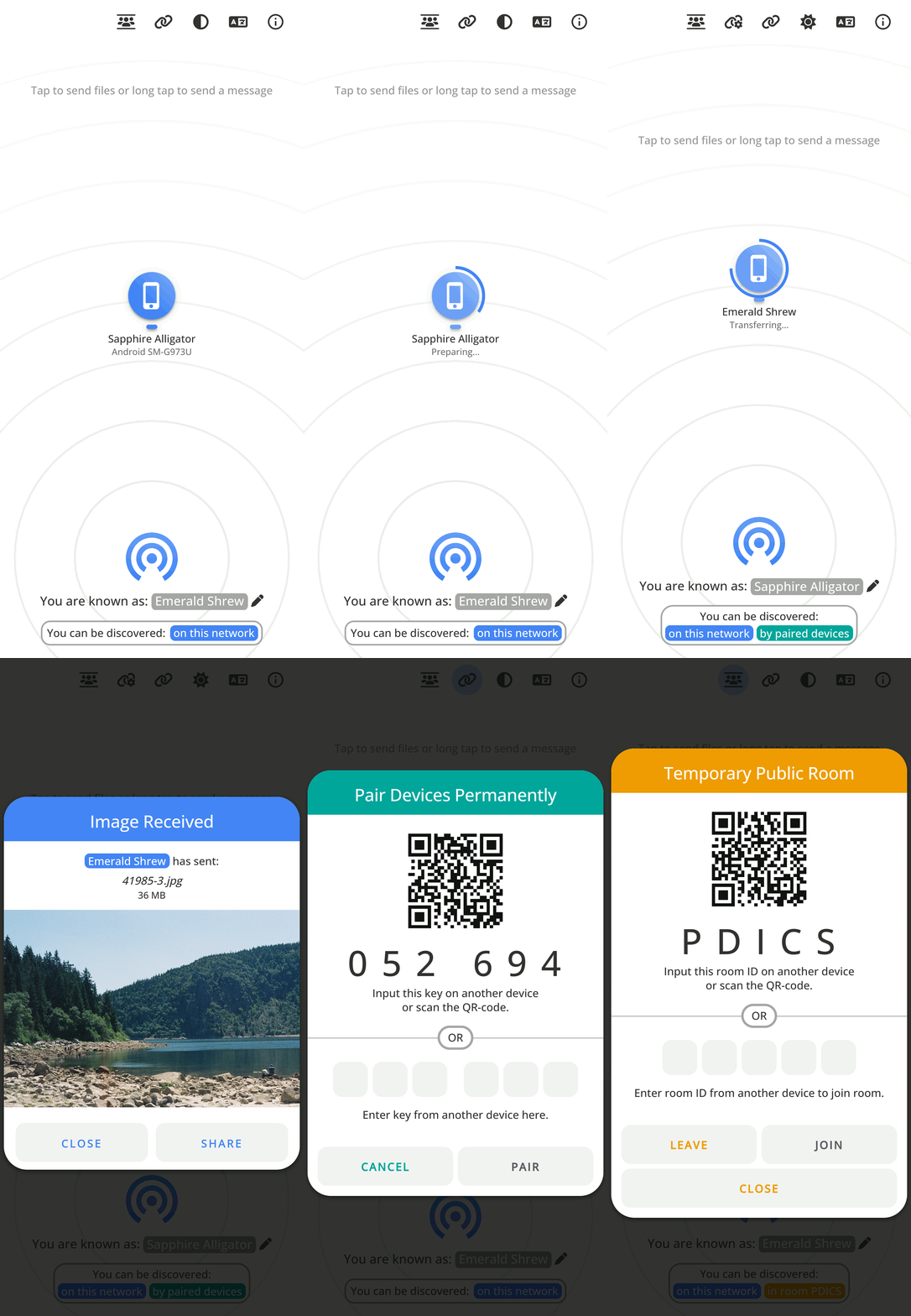
Differences to the Snapdrop it is based on
View all differences
Paired Devices and Public Rooms — Internet Transfer
- Transfer files over the Internet between paired devices or by entering temporary public rooms.
- Connect to devices in complex network environments (public Wi-Fi, company network, iCloud Private Relay, VPN, etc.).
- Connect to devices on your mobile hotspot.
- Devices outside of your local network that are behind a NAT are auto-connected via the PairDrop TURN server.
- Devices from the local network, in the same public room, or previously paired are shown.
Persistent Device Pairing
Always connect to known devices
- Pair devices via a 6-digit code or a QR-Code.
- Paired devices always find each other via shared secrets independently of their local network.
- Pairing is persistent. You find your devices even after reopening PairDrop.
- You can edit and unpair devices easily.
Temporary Public Rooms
Connect to others in complex network situations, or over the Internet.
- Enter a public room via a 5-letter code or a QR-code.
- Enter a public room to temporarily connect to devices outside your local network.
- All devices in the same public room see each other.
- Public rooms are temporary. Closing PairDrop leaves all rooms.
Improved UI for Sending/Receiving Files
- Files are transferred after a request is accepted. Files are auto-downloaded upon completing a transfer, if possible.
- Multiple files are downloaded as a ZIP file
- Download, share or save to gallery via the "Share" menu on Android and iOS.
- Multiple files are transferred at once with an overall progress indicator.
Send Files or Text Directly From Share Menu, Context Menu or CLI
- Send files directly from context menu on Ubuntu (using Nautilus)
- Send files directly from the context menu on Windows
- Send directly from the "Share" menu on iOS
- Send directly from the "Share" menu on Android
- Send directly via the command-line interface
Other Changes
- Change your display name to easily differentiate your devices.
- Paste files/text and choose the recipient afterwards
- Prevent devices from sleeping on file transfer
- Warn user before PairDrop is closed on file transfer
- Open PairDrop on multiple tabs simultaneously (Thanks @willstott101)
- Video and audio preview (Thanks @victorwads)
- Switch theme back to auto/system after dark or light mode is on
- Node-only implementation (Thanks @Bellisario)
- Auto-restart on error (Thanks @KaKi87)
- Lots of stability fixes (Thanks @MWY001 @skiby7 and @willstott101)
- To host PairDrop on your local network (e.g. on Raspberry Pi): All peers connected with private IPs are discoverable by each other
- When hosting PairDrop yourself, you can set your own STUN/TURN servers
- Translations.
Translate PairDrop on Hosted Weblate

Built with the following awesome technologies:
- Vanilla HTML5 / JS ES6 / CSS 3 frontend
- WebRTC / WebSockets
- Node.js backend
- Progressive web app (PWA) unified functionality
- IndexedDB API storage handling
- zip.js library
- cyrb53 super-fast hash function
- NoSleep display sleep, add wake lock (MIT)
- heic2any HEIC/HEIF to PNG/GIF/JPEG (MIT)
- Weblate web-based localization tool
- BrowserStack This project is tested with BrowserStack
Host your own instance with Docker or Node.js.
Support

PairDrop is libre, and always will be.
If you find it useful and want to support free and open-source software, please consider donating using the button above.
I footed the bill for the domain and the server, and you can help create and maintain great software by supporting me.
Thank you very much for your contribution!
Contributing
Feel free to open an issue or a pull request, following the Contributing Guidelines.