Page Agent is an MIT-licensed TypeScript library from Alibaba that embeds a natural-language GUI agent directly inside a web page, aimed at product teams, accessibility engineers, and automation developers who want to drive their own interfaces with plain-language instructions instead of hand-written scripts.
What it is
Page Agent describes itself as the GUI agent living in your webpage: one script gives any web page its own AI agent. It is distributed as the npm package page-agent, written in TypeScript, published under the MIT licence by the alibaba organisation, and filed in this registry under Data & Analytics / Data Extraction & Web Scraping. The agent runs as in-page JavaScript, performing text-based DOM manipulation rather than screenshot analysis, which removes the need for multi-modal LLMs and special browser permissions. It works with most mainstream models, including locally deployed ones, and ships an optional Chrome extension for multi-page tasks plus an MCP Server in Beta for control from outside the page.
The concrete problem it solves is external automation plumbing. Driving a web interface normally means a browser extension, a Python stack, or a headless browser, each carrying its own install, permission, and maintenance burden. Page Agent replaces that with a script tag or an import: the page itself hosts the agent, so there is no separate driver to keep in step with the interface, no backend rewrite to expose a copilot, and no screenshot pipeline to operate.
Key capabilities
- One-line CDN integration that boots a working agent with a free demo LLM; append
?autoInit=false to load the script without auto-creating the demo agent, then instantiate with new window.PageAgent(...).
- NPM install path:
npm install page-agent, then import { PageAgent } from 'page-agent' and construct an agent with model, baseURL, apiKey, and language options before calling await agent.execute('Click the login button').
- Text-based DOM manipulation with no screenshots, so no multi-modal LLM and no special browser permissions are required.
- Bring-your-own-LLM configuration, demonstrated against
qwen3.5-plus through the OpenAI-compatible endpoint https://dashscope.aliyuncs.com/compatible-mode/v1.
- Optional Chrome extension (web store ID
akldabonmimlicnjlflnapfeklbfemhj) that extends a single-page agent across browser tabs.
- MCP Server (Beta) so external agent clients can control the browser.
- Dual-language documentation, English and Chinese via
docs/README-zh.md, with CI defined in .github/workflows/main-ci.yml and zod declared as a peer dependency excluded from the published bundle-size figure.
Who uses it and how
- SaaS product teams ship an AI copilot inside their own application in lines of code, with no backend rewrite.
- Organisations running ERP, CRM, and admin systems turn twenty-click workflows into a single sentence through smart form filling.
- Accessibility teams expose any web app to natural-language control, covering voice commands and screen readers.
- Teams that need cross-tab behaviour install the Chrome extension and let one agent follow a task across multiple pages.
- Agent-platform builders connect their MCP clients to a browser and let the outside agent drive pages through the Beta MCP Server.
Getting started
Add the one-line CDN script to a page to try Page Agent against the free testing LLM API, or install the package with npm install page-agent and pass your own model, baseURL, and apiKey to new PageAgent(...); full programmatic usage is documented at alibaba.github.io/page-agent/docs/introduction/overview.
How it compares
No list of paid products this project replaces is provided in the facts, and no comparable named tools appear either, so Page Agent stands alone in this registry. The README positions it against approaches rather than products: it removes the need for a browser extension, a Python stack, or a headless browser by moving the agent into the page itself.
When to use it — and when not to
Pick Page Agent when the interface you want to automate is your own web page and you can supply an LLM endpoint and API key; there is no database, object storage, or SMTP service to operate, since the agent runs client-side with the model you point it at. Do not treat the CDN demo as production: it uses a free testing LLM API and the README marks it for technical evaluation only, with separate terms. Weaknesses to weigh are that the MCP Server is still Beta, cross-page tasks depend on installing the optional Chrome extension, and any deployment sends page content to whichever model endpoint is configured, which rules it out where DOM data cannot leave the browser or the organisation.
project readme (upstream, from github) — read inline
Page Agent








The GUI Agent Living in Your Webpage. One script gives any web page its own AI agent.

🌐 English | 中文
🚀 Demo | 📖 Docs | 📢 HN Discussion | 𝕏 Follow on X
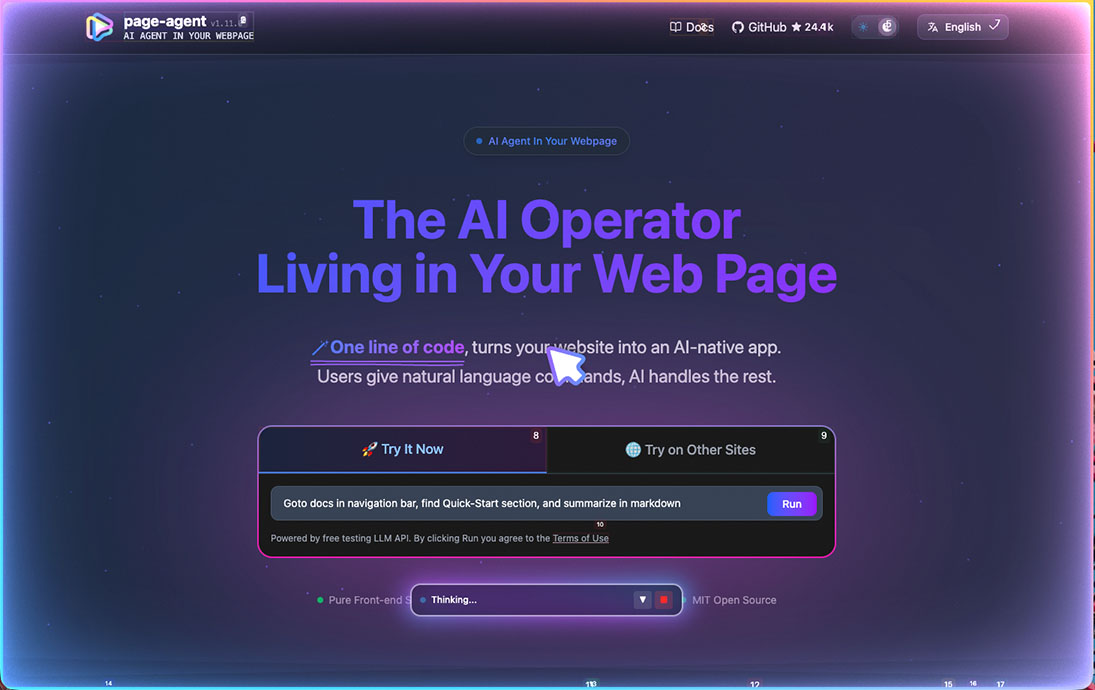
✨ Features
- 🎯 Easy integration
- No need for
browser extension / python / headless browser.
- Just in-page javascript. Everything happens in your web page.
- 📖 Text-based DOM manipulation
- No screenshots. No multi-modal LLMs or special permissions needed.
- 🧠 Bring your own LLMs
- Works with most mainstream models, including locally deployed ones. See supported models.
- 🐙 Optional chrome extension for multi-page tasks.
💡 Use Cases
- SaaS AI Copilot — Ship an AI copilot in your product in lines of code. No backend rewrite.
- Smart Form Filling — Turn 20-click workflows into one sentence. Perfect for ERP, CRM, and admin systems.
- Accessibility — Make any web app accessible through natural language. Voice commands, screen readers, zero barrier.
- Multi-page Agent — Extend your own web agent's reach across browser tabs via the Chrome extension.
- MCP - Allow your agent clients to control your browser.
🚀 Quick Start
One-line integration
Fastest way to try PageAgent with our free Demo LLM:
<script
    src="https://cdn.jsdelivr.net/npm/page-agent@1.12.4/dist/iife/page-agent.demo.js"
    crossorigin="anonymous"
></script>

<!-- China CDN mirror if you can't access jsDelivr -->
<!-- https://registry.npmmirror.com/page-agent/1.12.4/files/dist/iife/page-agent.demo.js -->
⚠️ For technical evaluation only. This demo CDN uses our free testing LLM API. By using it, you agree to its terms.
Add ?autoInit=false to load the script without creating the demo agent automatically. You can then instantiate it with new window.PageAgent(...) and your own LLMs.
NPM Installation
npm install page-agent
import { PageAgent } from 'page-agent'

const agent = new PageAgent({
    model: 'qwen3.5-plus',
    baseURL: 'https://dashscope.aliyuncs.com/compatible-mode/v1',
    apiKey: 'YOUR_API_KEY',
    language: 'en-US',
})

await agent.execute('Click the login button')
For more programmatic usage, see 📖 Documentations.
🤝 Contributing
We welcome contributions from the community! See CONTRIBUTING.md for guidelines and docs/developer-guide.md for local development workflows.
Built something cool with PageAgent? Share it in Show and Tell. 🙌
Please read the maintainer's note on principles and current state.
Contributions generated entirely by bots or AI without substantial human involvement will not be accepted.
⚖️ License
MIT License
👏 Acknowledgments
This project builds upon the excellent work of browser-use.
PageAgent is designed for client-side web enhancement, not server-side automation.
DOM processing components and prompt are derived from browser-use:

Browser Use <https://github.com/browser-use/browser-use>
Copyright (c) 2024 Gregor Zunic
Licensed under the MIT License

We gratefully acknowledge the browser-use project and its contributors for their
excellent work on web automation and DOM interaction patterns that helped make
this project possible.
⭐ Star this repo if you find PageAgent helpful!