Take control over your content and stream it yourself.

Explore the docs »
View Demo
·
FAQ
·
Report Bug
·
Report Security Issue
Table of Contents
- 📒 About the Project
- 🚀 Getting Started
- 👨💻 Use with your broadcasting software
- 🛠 Building from source
- 👏 Contributing
- 💵 Donors
- Security
- 📝 License
- Contact
About The Project
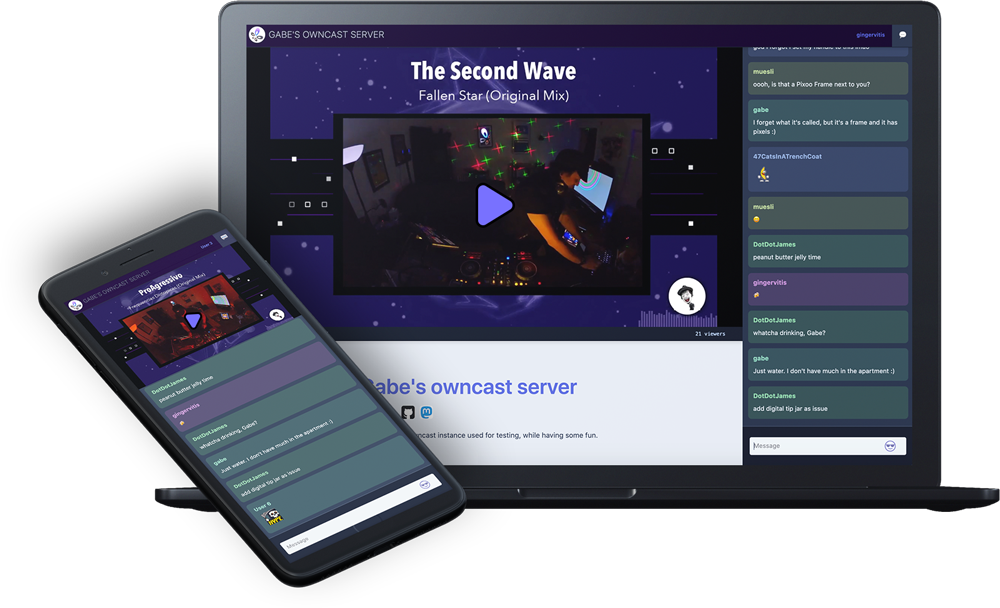
Owncast is an open source, self-hosted, decentralized, single user live video streaming and chat server for running your own live streams similar in style to the large mainstream options. It offers complete ownership over your content, interface, moderation and audience. Visit the demo for an example.




Getting Started
The goal is to have a single service that you can run and it works out of the box. Visit the Quickstart to get up and running.
Use with your existing broadcasting software
In general, Owncast is compatible with any software that uses RTMP to broadcast to a remote server. RTMP is what all the major live streaming services use, so if you’re currently using one of those it’s likely that you can point your existing software at your Owncast instance instead.
OBS, Streamlabs, Restream and many others have been used with Owncast. Read more about compatibility with existing software.
Building from Source
Owncast consists of two projects.
- The Owncast backend is written in Go.
- The frontend is written in React.
Read more about running from source.
Important note about source code and the develop branch
The develop branch is always the most up-to-date state of development and this may not be what you always want. If you want to run the latest released stable version, check out the tag related to that release. For example, if you'd only like the source prior to the v0.1.0 development cycle you can check out the v0.0.13 tag.
Note: Currently Owncast does not natively support Windows servers. However, Windows Users can use Windows Subsystem for Linux (WSL2) to install Owncast. For details visit this document.
Backend
The Owncast backend is a service written in Go.
- Ensure you have prerequisites installed.
- C compiler, such as GCC compiler or a Musl-compatible compiler
- ffmpeg
- Install the Go toolchain (1.24 or above).
- Clone the repo.
git clone https://github.com/owncast/owncast go run main.gowill run from the source.- Visit
http://yourserver:8080to access the web interface orhttp://yourserver:8080/adminto access the admin. - Point your broadcasting software at your new server and start streaming.
Frontend
The frontend is the web interface that includes the player, chat, embed components, and other UI.
- This project lives in the
webdirectory. - Run
npm installto install the Javascript dependencies. - Run
npm run dev
Contributing
Owncast is a growing open source project that is giving freedom, flexibility and fun to live streamers. And while we have a small team of kind, talented and thoughtful volunteers, we have gaps in our skillset that we’d love to fill so we can get even better at building tools that make a difference for people.
We abide by our Code of Conduct and feel strongly about open, appreciative, and empathetic people joining us. We’ve been very lucky to have this so far, so maybe you can help us with your skills and passion, too!
If you're new to the project, maybe you'd be interested in looking at  .
.
There is a larger, more detailed, and more up-to-date guide for helping contribute to Owncast on our website.
Donors
The Owncast project is possible thanks to the people who make a donation to support us and our work. Thank you to all our donors who help keep Owncast running by donating on OpenCollective. You can support this project by becoming a backer/sponsor.

Security
Report suspected security vulnerabilities privately to security@owncast.online. This is the security-reporting address. The personal contact information in the Support section is for general contact, not vulnerability reports.
See the repository security policy for scope, disclosure, and credit details.
License
Distributed under the MIT License. See LICENSE for more information.
Support
- Browser testing via

- Project chat provided by

- CDN services by

- UI testing with Chromatic
- Infrastructure and hosting by

Contact
Project chat: Join us on Rocket.Chat if you want to contribute, follow along, or if you have questions.
Gabe Kangas - @gabek@social.gabekangas.com - email gabek@real-ity.com
Project Link: https://github.com/owncast/owncast