Outline is a free, open source note taking & knowledge management project written in TypeScript and released under a custom open-source licence. It has 40,590 GitHub stars, 3,562 forks and 78 open issues, and was last pushed 10 hours ago. On this registry it ranks #6 of 25 tracked projects in Note Taking & Knowledge Management, and is listed as an open source replacement for 2 paid products, with 5 head-to-head comparisons available. It gained 66 stars over the last 6 tracked days.

Outline — Fast, collaborative wiki for teams who need organized docs

What is Outline?

What it is

Outline is an open-source knowledge base application built with React and Node.js, designed for teams needing a fast, collaborative documentation platform. It runs as a self-hosted service or via a hosted option at getoutline.com, and its source code powers the public instance along with all supporting services. The project lives in the JavaScript/TypeScript ecosystem and uses MobX for state management.

It solves the problem of fragmented, slow, or expensive internal documentation by offering a unified, real-time collaborative environment that replaces proprietary tools like Notion and Atlassian Confluence. Teams gain a markdown-compatible wiki with built-in versioning, search, and permissions—without vendor lock-in or recurring per-user licensing fees.

Key capabilities

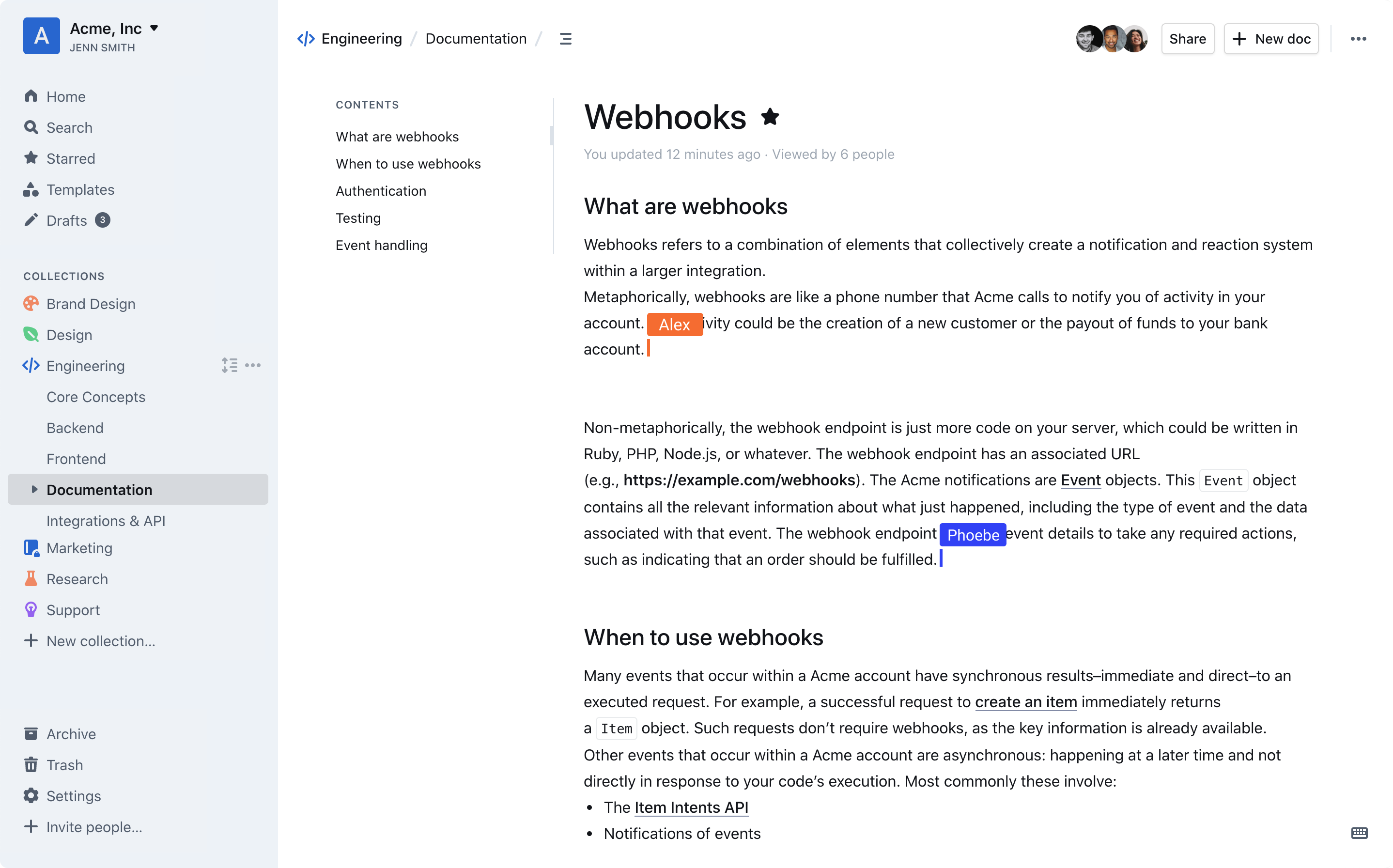
  • Real-time collaborative editing with live cursor tracking and presence indicators
  • Markdown support with rich formatting, embedded code blocks, and live previews
  • Role-based access control with granular permissions per document and space
  • Slack integration for notifications, search, and document linking
  • Docker-based deployment with official container images for stable and nightly releases
  • Built-in search with full-text indexing and filtering by author, date, or tag
  • JSON logging in production for integration with external observability pipelines

Who uses it and how

Engineering teams self-host Outline as a drop-in replacement for internal wikis, using Docker to deploy across staging and production environments. Product and operations teams use the hosted version to maintain product specs, runbooks, and onboarding guides with shared access across departments. Developers contribute bug fixes and features after engaging with maintainers via GitHub issues and discussions, following strict contribution guidelines.

Getting started

Deploy using the official Docker images outlinewiki/outline:latest or outlinewiki/outline:nightly; full production setup instructions and environment variable requirements are documented at docs.getoutline.com/s/hosting/. Alternatively, sign up for the hosted version at www.getoutline.com without local infrastructure.

When to use it — and when not to

Use Outline when you need a self-hosted, markdown-native wiki with real-time collaboration and no per-user cost. Avoid it if you require native mobile apps, advanced workflow automation, or deep Jira integration—its focus is documentation over full suite integration. Self-hosting requires managing PostgreSQL, Redis, and optional SMTP for email notifications; the project does not bundle these dependencies.

project readme (upstream, from github) — read inline

A fast, collaborative, knowledge base for your team built using React and Node.js.
Try out Outline using our hosted version at www.getoutline.com.


screenshot

TypeScript Styled Components

This is the source code that runs Outline and all the associated services. If you want to use Outline then you don't need to run this code, A hosted version of the app is offered at getoutline.com. You can also find documentation on using Outline in our guide.

If you'd like to run your own copy of Outline or contribute to development then this is the place for you.

Installation

Please see the documentation for running your own copy of Outline in a production configuration.

Available container images:

  • Container Image Release
  • Container Image Nightly

If you have questions or improvements for the docs please create a thread in GitHub discussions.

Contributing

Note: Please do not submit AI-generated pull requests. We receive a high volume of mass, low-quality PRs generated by AI tools like Claude, ChatGPT, and Copilot from contributors who are unfamiliar with the codebase. These PRs are almost never mergeable and waste maintainer time reviewing them. If you’d like to contribute, please take the time to understand the codebase and write your changes thoughtfully.

Before submitting a pull request you must discuss with the core team by creating or commenting in an issue on GitHub – we’d also love to hear from you in the discussions. This way we can ensure that an approach is agreed on before code is written and that you have read these instructions. This will result in a much higher likelihood of your code being accepted.

If you’re looking for ways to get started, here’s a list of ways to help us improve Outline:

  • Translation into other languages
  • Issues with good first issue label
  • Performance improvements, both on server and frontend
  • Developer happiness and documentation
  • Bugs, quality fixes, and other issues listed on GitHub

Development

There is a short guide for setting up a development environment if you wish to contribute changes, fixes, and improvements to Outline.

Architecture

If you're interested in contributing or learning more about the Outline codebase please refer to the architecture document first for a high level overview of how the application is put together.

Debugging

In development Outline outputs simple logging to the console, prefixed by categories. In production it outputs JSON logs, these can be easily parsed by your preferred log ingestion pipeline.

HTTP logging is disabled by default, but can be enabled by setting the DEBUG=http environment variable. logging can be enabled for all categories by setting DEBUG=* or for specific categories such as DEBUG=database and LOG_LEVEL=debug, or LOG_LEVEL=silly for very verbose logging.

Tests

We aim to have sufficient test coverage for critical parts of the application and aren't aiming for 100% unit test coverage. All API endpoints and anything authentication related should be thoroughly tested.

To add new tests, write your tests with Vitest and add a file with .test.ts extension next to the tested code.

# To run all tests
make test

# To run backend tests in watch mode
make watch

Once the test database is created with make test you may individually run frontend and backend tests directly with vitest:

# To run backend tests
yarn test:server

# To run a specific backend test in watch mode
yarn test path/to/file.test.ts --watch

# To run frontend tests
yarn test:app

Migrations

Sequelize is used to create and run migrations, for example:

yarn db:create-migration --name my-migration
yarn db:migrate
yarn db:rollback

Or, to run migrations on test database:

yarn db:migrate --env test

Activity
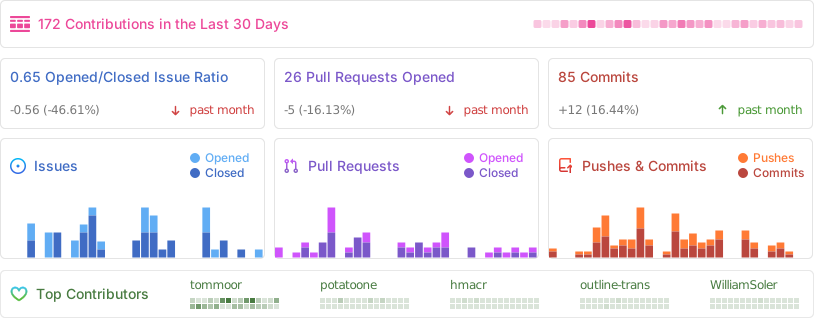
Alt

License

Outline is BSL 1.1 licensed.

Frequently asked questions

Is Outline free to use?

Outline is open source. There is no licence fee and no seat count — you can self-host it or, where the project offers one, pay a vendor for a managed version instead.

What does Outline do?

Fast, collaborative wiki for teams who need organized docs

What is Outline written in?

Outline is primarily written in TypeScript. Its source is publicly available at https://github.com/outline/outline, and it has 40,590 GitHub stars.

What is a good open source alternative to Atlassian Confluence?

Outline is one of the open source options listed as an alternative to Atlassian Confluence, Notion. Compare licences, stars and activity side by side on the Outline profile.

