Orkas
Command a team of AI agents from one desktop chat — not one chatbot.
Orkas is an open-source, local-first multi-agent desktop app. Describe a goal; its Commander plans the work, handles the general parts itself, and coordinates specialist agents in parallel or in sequence. Nine specialist agents ship with the app, ready the moment you launch it, out of 30 in the marketplace. Bring your own model keys — Claude · OpenAI · Gemini · DeepSeek · Kimi · GLM · Qwen · MiniMax · Doubao. macOS · Windows · Linux.






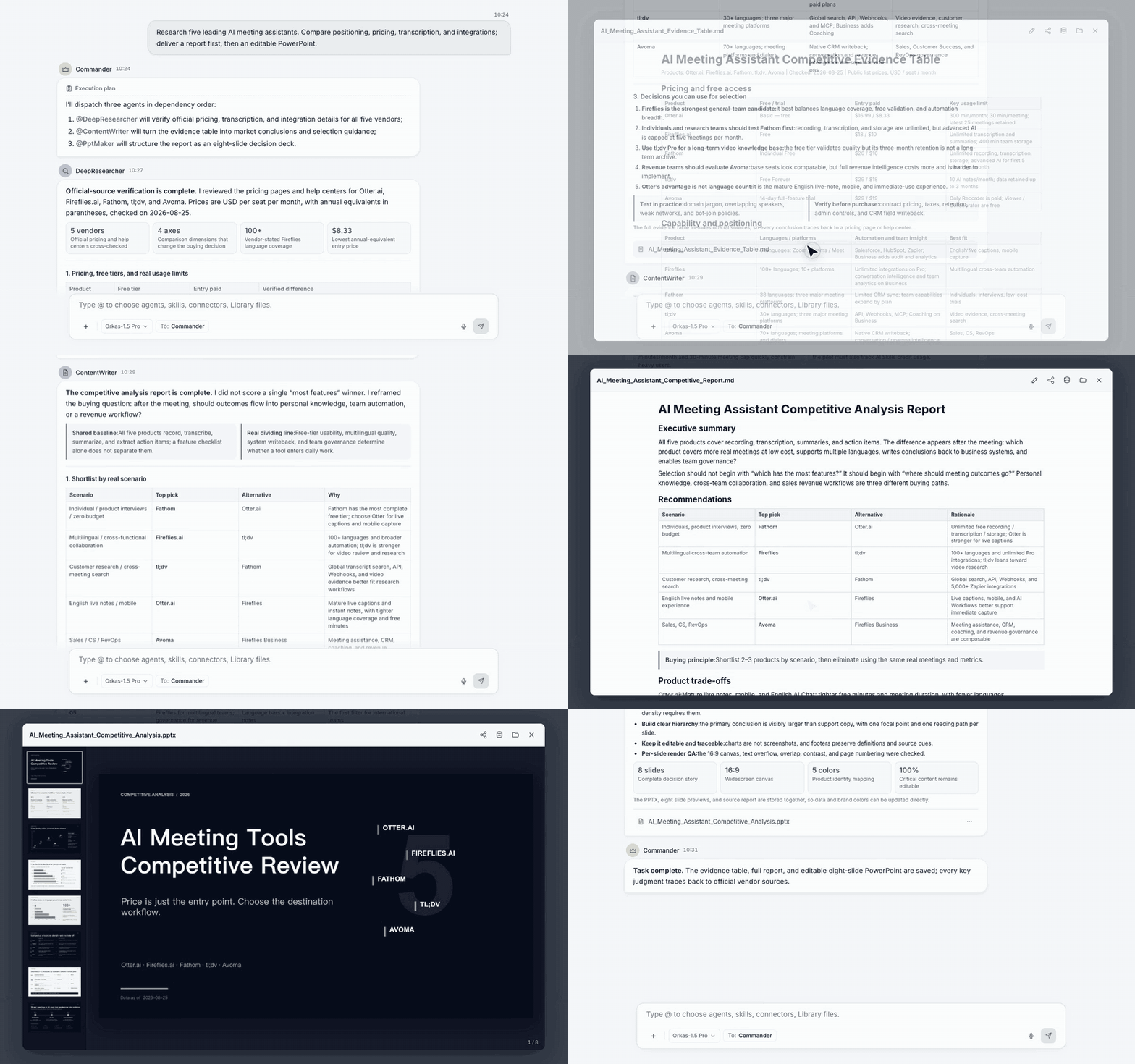
You: "Research the top 5 competitors, write it up, and turn it into a deck."
Orkas: the Commander breaks the goal into steps and runs them across specialists — DeepResearcher gathers and verifies the sources, ContentWriter drafts the report, PptMaker builds the slides. One chat, one shared plan, finished files on your disk.
Agents that ship with the app
Installed and ready the first time you launch Orkas — each with its own skills, memory, and tools.
| Agent | What it does |
|---|---|
| DeepResearcher | Evidence-grounded research — plans the investigation, verifies sources, flags contradictions, ships an auditable report with citations |
| ContentWriter | Turns a goal, source material, or a rough draft into publish-ready posts, articles, newsletters, and case studies |
| PptMaker | Turns a topic, outline, or document into an attractive, editable, reviewable PPTX deck |
| ProductDeveloper | Repo-aware engineering — implement a PRD, fix bugs, refactor, review code, with verifiable results |
| OfficeWorker | Create, edit, check, and deliver Word / Excel / PowerPoint / PDF files, one at a time or in batches |
| VideoStudio | Make and edit video — narration, AI presenters, captions and dubbing, highlight clips, localization |
| ImageStudio | Posters, covers, social images, infographics — HTML/CSS/SVG first, image models when the shot needs them |
| UIDesigner | Product goals, PRDs, screenshots, or Figma material into editable, HTML-first UI deliverables |
| SeoGeoAgent | Give it a URL — technical audit, content quality, Core Web Vitals, GEO citability, health score, ranked fix list |
More on the built-in agents → orkas.ai/agents · Browse all 30 → agent marketplace · or just describe what you need and the Commander builds a custom agent for you.
Why Orkas
- A super-powered Commander — understands context, breaks down goals, chooses the right agents, skills, connectors, and tools, and directly handles analysis, writing, research, file work, and automation when no specialist is a better fit.
- Drives the open-source ecosystem — plug in external CLI agents as local sessions — the coding agents Claude Code, Codex and OpenCode, plus the personal agents OpenClaw and Hermes-Agent — and onboard open-source projects like HyperFrames as local tools, all coordinated by the same Commander.
- Local-first by design — conversations, files, API keys, knowledge bases, and custom agents all stay on your disk. Model calls go straight from your machine to the provider — never through Orkas servers.
- No vendor lock-in — mix providers across agents: one on Claude, another on DeepSeek, another on a local endpoint.
- Agents that get better — each agent has its own private skills and memory, and improves through reflection after each task.
⭐ If Orkas is useful to you, a star helps more people find the project.
Download
Packaged installers for macOS and Windows. glibc-based Linux x64/arm64 runs from source today — see Quick start.
- macOS Apple Silicon → Orkas-mac-arm64.dmg
- macOS Intel → Orkas-mac-x64.dmg
- Windows x64 → Orkas-Setup.exe
What can you build with it?
- Automate recurring reports & market research — a specialist agent gathers, summarizes, and ships a weekly report.
- Turn a product spec into dev tasks — the Commander breaks a PRD into tasks and dispatches them across agents.
- Chat with your documents & run local data analysis — drop files in, keep the data on your machine.
- Go beyond code — video, slides, and more — the Commander drives open-source tools like HyperFrames and hands off to CLI agents — the coding agents Claude Code, Codex and OpenCode, plus the personal agents OpenClaw and Hermes-Agent — and other local agents, so one chat produces code, research, video, and slide decks.
Explore use cases → research workflows · data analysis · chat with documents · for developers · automate your workspace
How Orkas compares
| Tool | What it is | How Orkas differs |
|---|---|---|
| LangChain | A developer framework/library for building LLM apps and agents — code-first, embedded in your own Python/JS app. | Orkas is a local-first multi-agent desktop app you direct through chat, not by writing orchestration code. Data and keys stay local by default. |
| CrewAI | A Python framework for orchestrating role-playing autonomous agents — you define crews and agents in code. | Orkas brings multi-agent orchestration into a desktop app, with local-first storage and per-agent self-evolution built in. |
| Cloud agent platforms (SaaS orchestrators) | Server-hosted; conversations, files, and API keys live on the vendor's infrastructure. | Orkas is local-first: everything stays on your machine, and model API calls go straight to the provider — never archived by Orkas. |
| OpenClaw | A single always-on personal assistant reaching you across messaging channels. | Orkas gives you a team rather than one assistant: the Commander coordinates specialist agents from one desktop chat, and OpenClaw plugs in as an Orkas CLI backend. |
| Hermes-Agent | Nous Research's self-improving personal agent (TUI + multi-channel gateway). | Orkas is a local-first multi-agent desktop app, with per-agent private skills and meta-cognition — and Hermes-Agent plugs in as an Orkas CLI backend. |
Orkas is for you if you want a team of agents rather than one assistant, a desktop GUI with file drop-in and visual agent management, and your data, keys, and agents on your own disk rather than a vendor cloud.
Not for you if you just want a single all-purpose chatbot, a fully hosted/cloud team where your data lives on a vendor's servers, or a pure code library to embed in your own app.
Full side-by-side comparisons → vs Claude Code · vs Cline · vs LangChain · vs ChatGPT · vs OpenClaw
FAQ
What is Orkas? Orkas is an open-source, local-first multi-agent desktop app. A super-powered Commander plans your goal and coordinates specialist agents to complete it together — nine of them ship with the app. Not a single chatbot, not a code framework, not a hosted SaaS.
Is Orkas a local LLM? No. Orkas runs on your machine but calls the models you choose through your own API keys (or a local model endpoint). It orchestrates agents and tools — it is not itself a model.
Can I use local models like Ollama or LM Studio? Yes. Add them under Settings → AI Providers → Custom (OpenAI-compatible) and point the base URL at your local endpoint. You can run one agent on a local model and another on a hosted one in the same chat.
Where are my API keys and data stored? On your disk. Conversations, files, knowledge bases, agents, and keys stay local; model calls go straight from your machine to the provider and are never proxied or archived by Orkas.
Does Orkas work offline? The app is fully offline-capable — only the model calls need network. Point agents at a local model endpoint and you can run without the cloud.
Do I need an Orkas account? The packaged desktop app asks you to sign in when you first launch it. The source build in this repository has no account layer at all — it boots straight into the app. Either way your model keys are your own and stay on your machine.
Can Orkas drive Claude Code and other CLI agents? Yes. Beyond its own Commander and specialist agents, Orkas can drive five external CLI agents as local subprocesses — the coding agents Claude Code, Codex and OpenCode, plus the personal agents OpenClaw and Hermes-Agent — and onboard open-source projects like HyperFrames, all directed from the same chat.
How is Orkas different from Claude Desktop / CrewAI / LangChain? Claude Desktop is a single assistant; CrewAI and LangChain are code-first frameworks. Orkas is a local-first multi-agent desktop app: the Commander coordinates specialist agents, keeps data and keys local, and gives each agent its own private skills and memory. See the full comparisons.
Which platforms does Orkas support? macOS (Apple Silicon and Intel) and Windows 10+ have packaged installers. glibc 2.34+ Linux x64/arm64 runs from source today, with no installer yet. Local speech transcription is supported on Linux through the pinned whisper.cpp runtime prepared on first launch. Alpine and other musl-based distributions are not supported. The source bootstrap needs Node 22.12+; Python 3 and a C/C++ build toolchain are needed only when a native npm package has no compatible prebuilt binary and must be rebuilt locally.
Is Orkas free and open source? Yes — the app is MIT licensed and free to use. Bring your own model keys and you pay only your model providers; Orkas never takes a cut. Optionally, the desktop app also offers a built-in Orkas model for people who don't want to manage API keys — that one is billed by Orkas in credits (membership or credit packs). It is entirely opt-in, and every other feature works on your own keys. Pricing →
Quick start
Want a packaged installer instead? See Download above. To run from source — currently the way to run Orkas on Linux:
Requirements: Node 22.12+ · macOS / Windows 10+ / glibc 2.34+ Linux x64 or arm64. Keep Python 3 and a C/C++ build toolchain available for the uncommon native-module source-build fallback.
git clone https://github.com/Orkas-AI/Orkas.git
cd Orkas
./run.sh           # macOS / Linux
run.cmd            # Windows
Linux source runs require glibc 2.34+. Alpine and other musl-based distributions are not supported. Local speech transcription downloads and verifies the target-native whisper.cpp runtime and multilingual model during the first source launch.
run.sh / run.cmd installs the locked npm dependency tree and prepares the pinned Python, uv, Node, embedding model (~95 MB), OfficeCLI, FFmpeg, whisper.cpp, and multilingual speech model resources on first launch. Linux startup then verifies the platform-native modules and Whisper runtime under Electron's ABI before opening the app. OCR and Skill-specific Python packages are installed into isolated local environments when those features are first used. First launch creates a workspace under ~/.orkas/ (macOS / Linux) or :\.orkas\ (Windows). Then open Settings → AI Providers to add an API key or OAuth.
Native dependency errors: use Node.js 24 LTS (minimum 22.12.0), then run
npm run native:repair from this checkout. This restores optional packages,
repairs SQLite for Electron, prepares bundled Node for isolated image processing,
and checks SQL, sqlite-vec and sharp before success.
Use npm run native:check for a check without installation.
See native dependency setup and troubleshooting.
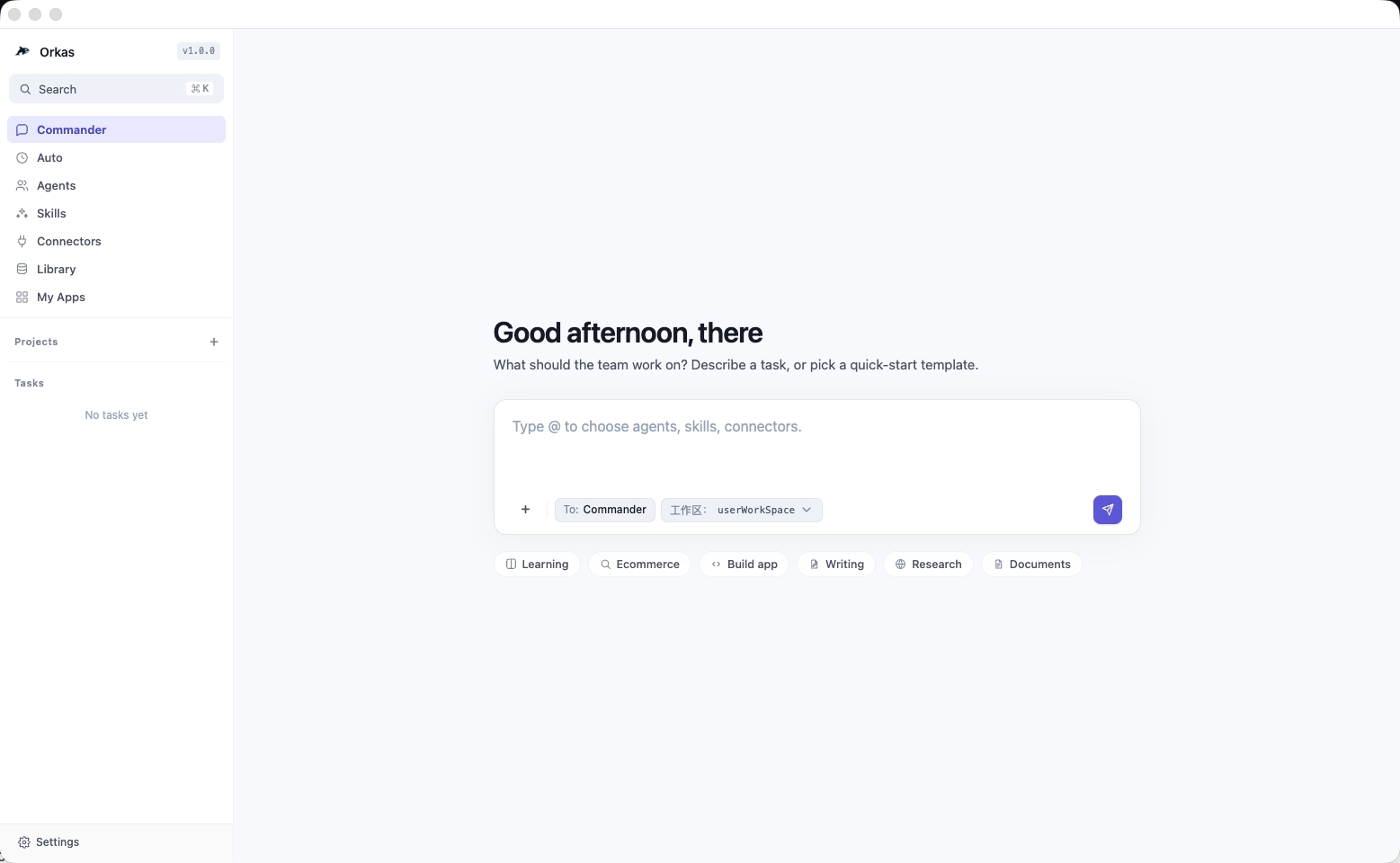
Screenshots
How it works (core design)
Full design and hard constraints →
CLAUDE.md
Three dispatch verbs, and the rule for choosing between them
The Commander is the only actor holding dispatch tools — workers and agents have none. Which verb it picks decides who the user hears from and whether the Commander stays in the loop:
| Verb | User sees the agent's reply | Result returns to the Commander | Commander's turn |
|---|---|---|---|
hand_off_to({ to, message }) |
yes | no | ends — the agent's reply stands as the answer |
dispatch_to({ to, message }) |
yes | yes | continues with a named next step |
run_worker({ to, task }) |
no — private input | yes | continues |
The Commander has to name its concrete next action before it may choose dispatch_to; if all that remains is restating the agent's reply, the rule forces hand_off_to. That single constraint is what stops a multi-agent chat from ending in a redundant re-summary of what you already read. Emitting several run_worker calls in one response runs them concurrently.
One runtime, bounded fan-out
Each conversation has a single FIFO runtime, and top-level turns run through it serially; parallelism happens inside a turn as nested in-process dispatch (bus.ts). Two separate semaphores bound it — globalSlots = 10 across all users, and dispatchSlots = 4 for nested dispatches (ORKAS_MAX_DISPATCH_CONCURRENCY).
Nested runs deliberately skip globalSlots: the parent turn already holds a slot, so a nested acquire would deadlock as parent-waits-on-child. That shortcut is safe only because dispatch tools belong to the Commander alone, so the semaphore is never acquired re-entrantly — the deadlock is ruled out by construction, not by a timeout.
Context budget: derived from the model, not a fixed number
Every compaction threshold is derived from the model in use, so one policy fits a 32K window and a 1M one alike (context-budget.ts):
usableInput   = contextWindow − maxOutputTokens − safety
messageBudget = max(usableInput × 0.2, usableInput − systemPrompt − toolDefs)
Every trigger is a share of messageBudget — 0.3 for the in-turn layer, 0.2 for cross-turn history, 0.1 for one round's inline tool results — and everything else derives from its trigger, so the shares are the only tunable surface. They sum to well under 1, leaving room for injected runtime state and for the growth that happens between a trigger firing and its summary landing. The max is a fuse: when a large tool set would otherwise swallow the window, messages keep a floor share instead of computing a negative budget.
A run compacts as many times as it needs to — there is deliberately no ceiling on successful passes. What is bounded is wasted work instead: a fingerprint check refuses to compact identical state twice, a minimum-savings threshold rejects passes that would free too little, and three consecutive failures stop LLM-backed compaction.
Summarization loses detail, so what an agent must not forget is kept as structure rather than prose. A workspace ledger of files written, files read, and commands run survives compaction (workspace-state.ts), and a spin detector — two or more compactions plus 75% of the tool budget consumed — nudges the agent once to re-anchor on that ledger instead of re-deriving work it just summarized away.
Memory: hybrid retrieval over a local index
A knowledge base is a SQLite index built on your machine — FTS5 for full text, stored vectors for similarity (memory/). Documents are chunked at 512 lines with 64 lines of overlap; a query runs both ways and the two ranked lists merge by reciprocal rank fusion, weighted 0.7 vector to 0.3 keyword. Agents reach it through memory_search and memory_read, over stored documents and past sessions alike.
Embeddings are computed on device by a bundled ONNX model (bge-small-zh-v1.5, ~95 MB, fetched once during install), so indexing a knowledge base sends nothing anywhere. Cloud embedding providers — OpenAI, Gemini, Voyage, Mistral — are available if you prefer them.
Four independent runaway guards
- Turn ceiling —
MAX_WORKER_TURNS = 100counts turns, not wall-clock time, so a slow-but-progressing model isn't killed. - Per-turn tool rounds — Commander 120, named agent 100, ephemeral worker the schema default (
actor-budgets.ts), pinned by unit tests so they can't silently drift. loop_detection— nudges the model after N consecutive identical or near-duplicate tool calls.- Tool-idle watchdog — for turns that stall rather than loop.
Self-evolution: signal-triggered, not after every task
Each agent keeps meta/COMPETENCE.md (what it is and isn't good at) and meta/LEARNING_STRATEGIES.md (methods that have worked for it), both fed back into its system prompt on the next run.
Reflection is not a fixed counter. A weighted trigger scores six signals — error_recovery, user_correction, complexity, known_weakness, weakness_succeeded, skill_ineffective — and reviews only when the total clears a threshold, generating the review prompt from whichever signal dominated (metacognition.ts). Through skill_manage an agent can also crystallize "how I solved X" into a private SKILL.md that it can use from the next turn on.
Acknowledgments
Some core modules draw on these open-source projects — special thanks to: