operaton is a free, open source orchestration & scheduling project written in Java and released under Apache-2.0. It has 501 GitHub stars, 134 forks and 68 open issues, and was last pushed 17 hours ago. On this registry it ranks #130 of 130 tracked projects in Orchestration & Scheduling, with 5 head-to-head comparisons available.

What is operaton?

Operaton is an Apache-2.0 BPMN 2.0 process engine that runs on the Java Virtual Machine, built for teams that need to embed or self-host mission-critical workflow automation under community governance.

What it is

Operaton is a native BPMN 2.0 process engine that runs inside the Java Virtual Machine. It was born from the Camunda 7 community edition and continues as a community-driven project under the Apache License 2.0, with no open-core model and no commercial editions. It is a full-stack platform: the Operaton Engine executes BPMN 2.0 processes, a REST API provides remote access to running processes, and three web applications cover the rest of the lifecycle — Operaton Cockpit for process operations and monitoring, Operaton Tasklist for managing and completing user tasks, and Operaton Admin for users, groups and access permissions.

The concrete problem it solves is continuity for organizations whose business processes are already modelled in BPMN and running on the Camunda 7 community edition. Operaton keeps the REST API, the database schema and deployable BPMN and DMN models compatible with Camunda 7, and ships an OpenRewrite migration recipe so existing deployments move across without re-modelling. Because the engine runs inside any Java application, with Spring, CDI and Quarkus integration, teams keep process execution in their own infrastructure rather than handing it to an external service.

Key capabilities

  • Executes BPMN 2.0 processes natively on the JVM, with integration for Spring Boot, Quarkus and Jakarta EE.
  • Provides the full set of web applications for the BPM lifecycle: Operaton Cockpit for process operations and monitoring, Operaton Tasklist for user tasks, and Operaton Admin for users, groups and permissions.
  • Exposes a REST API for remote access to running processes.
  • Supports H2, PostgreSQL, MySQL, MariaDB, Oracle, SQL Server and DB2 as backing databases.
  • Stays compatible with existing Camunda 7 BPMN, DMN and Forms models, REST API and database schema.
  • Includes an MCP server for integrating AI assistants and LLMs with the engine.
  • Extends through plugins and connectors, with a Keycloak identity provider plugin, official Docker images and Helm charts for Kubernetes.

Who uses it and how

  • Java teams embedding the engine inside Spring Boot, Quarkus or Jakarta EE services so that process execution stays in-process.
  • Organizations already running Camunda 7, which migrate with the OpenRewrite recipe while preserving their models, schema and REST clients.
  • Operations staff who monitor running processes in Cockpit and complete human tasks in Tasklist, with access controlled through Admin.
  • Teams deploying on-premise, on cloud providers or on application servers, including Kubernetes through the Helm charts, and buying support or consulting from third-party service providers.

Getting started

The quick-start path is the official Docker image: docker run -d --name operaton -p 8080:8080 operaton/operaton:latest, after which the web interface is served on port 8080 with the demo / demo credentials. New projects can be scaffolded with the Operaton Starter at start.operaton.org, and the Getting Started Guide at docs.operaton.org covers detailed setup.

How it compares

Operaton's closest relative in the facts is Camunda 7: it continues that community edition rather than reimagining it, and matching REST API, database schema and deployable models mean an existing Camunda 7 installation can move across with an OpenRewrite recipe instead of being rebuilt. On governance and cost it is Apache-2.0 with no open-core model, no commercial editions and no single-vendor control, with support and consulting available from multiple service providers.

When to use it — and when not to

A self-hoster has to operate a JVM deployment alongside one of the seven supported relational databases, plus the web applications needed for operations and task management; the Docker command above is a quick start, not a managed service. Teams that want a vendor-run hosted platform, or that are unwilling to operate a relational database, should not select it on the basis of the material here, since only self-managed Docker, Helm and application-server deployment is described. The project is also carried by a community rather than a single vendor, and the registry snapshot records 68 open issues, so the governance and support model should be an explicit part of the decision.

project readme (upstream, from github) — read inline

Operaton

The open-source BPMN platform for mission-critical process automation


Build Status Maven Central License GitHub Stars SonarCloud JVM 17-25

Forum · Documentation · Roadmap


Operaton is a native BPMN 2.0 process engine that runs inside the Java Virtual Machine. Born from the Camunda 7 community edition, Operaton continues to evolve and modernize the platform as a truly community-driven project.

  • Proven — Evolved from the Camunda 7 codebase, with over a decade of production use by thousands of companies worldwide.
  • Embeddable — Runs inside any Java application. Integrates with Spring Boot, Quarkus, and Jakarta EE.
  • Full Stack — Process engine, REST API, and web apps (Cockpit, Tasklist, Admin) for the complete BPM lifecycle.
  • Community-Driven Open Source — Apache License 2.0. No single-vendor control, no open-core model — built collaboratively by contributors from multiple companies.
  • Compatible — Fully compatible REST API, database schema, and deployable models. Migrate from Camunda 7 using the OpenRewrite migration tool.
  • Extensible — Vital ecosystem of plugins and connectors.
  • Multi-Database — Supports H2, PostgreSQL, MySQL, MariaDB, Oracle, SQL Server, and DB2.
  • AI-Ready — Integrate with AI assistants and LLMs via the Model Context Protocol (MCP) server.
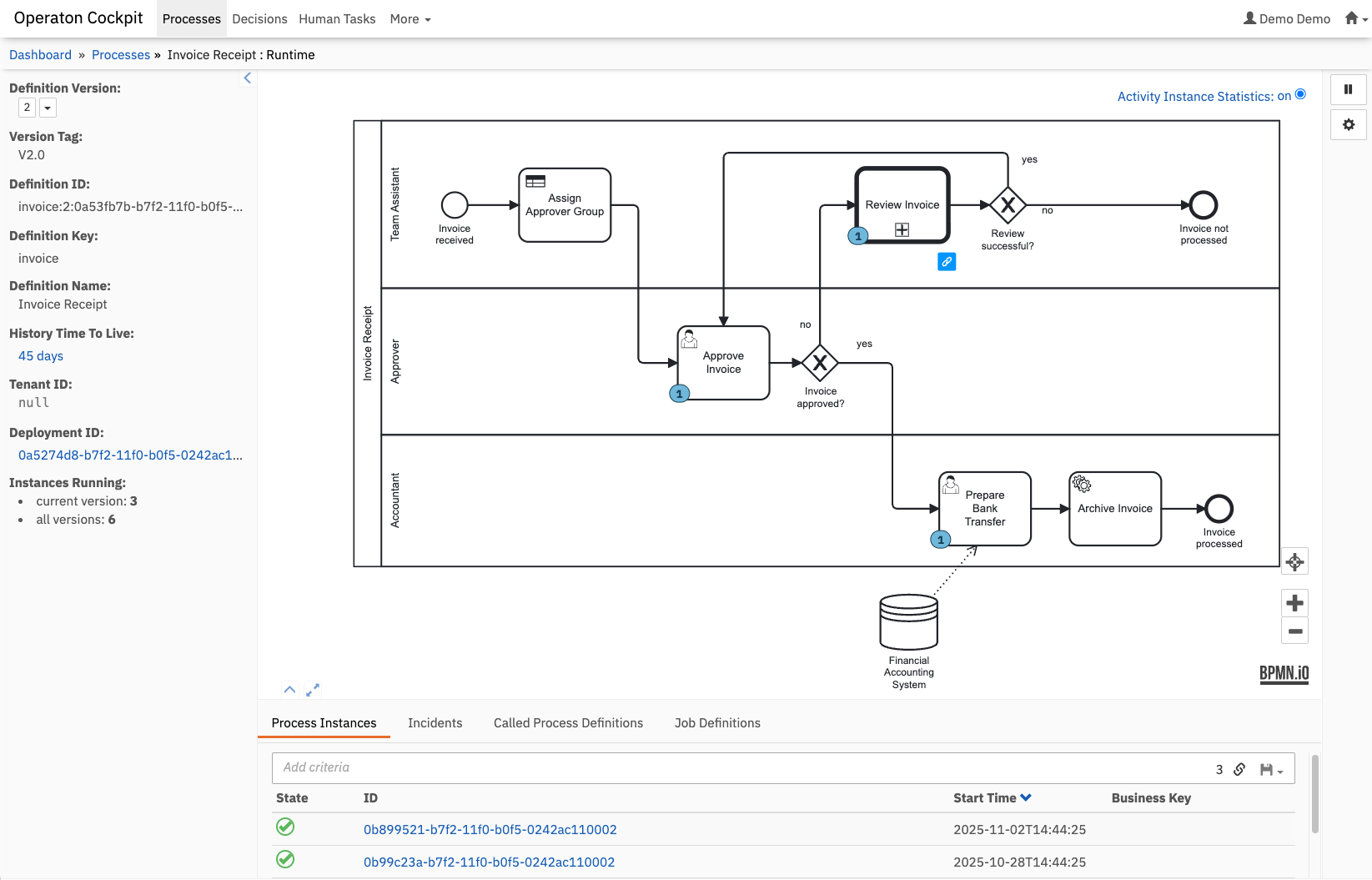
Operaton Cockpit

Why Operaton?

  • Operaton is a reliable, extensible BPM platform for mission-critical business processes.
  • Evolved and modernized by an active community of BPM experts and software engineers from multiple companies worldwide.
  • Easily embeddable inside your Java applications, giving you full control over your BPM platform.
  • Deployable on-premise, on cloud providers, or on application servers.
  • Fully compatible REST API, database schema, and deployable BPMN/DMN models — migrate from Camunda 7 with ease.
  • A truly community-driven Open Source project under the Apache License 2.0 — no open-core model, no commercial editions.
  • Professional support and consulting services are available from multiple service providers.

⚡ Quick Start

Run Operaton with Docker:

docker run -d --name operaton -p 8080:8080 operaton/operaton:latest

Then open http://localhost:8080 and log in with demo / demo.

➜ Use the Operaton Starter for creating new projects or starting with examples.

➜ See the Getting Started Guide for detailed setup instructions.

For snapshot artifacts from the development branch, add the Sonatype Snapshots repository.

Components

Process Implementation and Execution

  • Operaton Engine — The core component responsible for executing BPMN 2.0 processes.
  • REST API — Remote access to running processes.
  • Spring, CDI, Quarkus Integration — Programming model integration for Java applications interacting with running processes.

Process Operations

  • Operaton Cockpit — Web application for process operations and monitoring.
  • Operaton Admin — Web application for managing users, groups, and access permissions.

Human Task Management

  • Operaton Tasklist — Web application for managing and completing user tasks in the context of processes.

Process Modeling

Operaton is fully compatible with your existing BPMN, DMN models and Forms created for Camunda 7.

Ecosystem

Project Description
Web Apps Next-generation web applications for Operaton
Migration Tool OpenRewrite recipe to migrate from Camunda 7
Docker Images Official Docker images (DockerHub)
Helm Charts Kubernetes deployment via Helm
MCP Server Model Context Protocol server for AI integration
Keycloak Plugin Keycloak identity provider integration

Resources

Development

Prerequisites: JDK 17 or newer (tested on 17, 21, 25)

./mvnw clean install

For a faster build, skip tests and frontend:

./mvnw clean install -DskipTests -Dskip.frontend.build=true

See CONTRIBUTING.md for contribution guidelines, TESTING.md for testing tips, and Architectural Decision Records for design context.

License

The source files in this repository are made available under the Apache License Version 2.0.

Operaton uses and includes third-party dependencies published under various licenses. By downloading and using Operaton artifacts, you agree to their terms and conditions. Refer to LICENSE_BOOK.md in distribution archives for an overview of third-party libraries and particularly important third-party licenses we want to make you aware of.

Security

Please see our security policy for how to report security vulnerabilities.

Frequently asked questions

Is operaton free to use?

operaton is open source under the Apache-2.0 licence. There is no licence fee and no seat count — you can self-host it or, where the project offers one, pay a vendor for a managed version instead.

What does operaton do?

BPMN-Process automation for everyone

What is operaton written in?

operaton is primarily written in Java. Its source is publicly available at https://github.com/operaton/operaton, and it has 501 GitHub stars.

