OpenTabs is an open-source TypeScript tool that lets an AI agent call real web APIs through your authenticated browser session instead of driving a headless browser, for developers using MCP-capable AI clients such as Claude Code or OpenCode.
What it is
OpenTabs consists of a CLI (@opentabs-dev/cli), a Chrome extension, and a local server. The extension bridges your browser to that local server, and your AI then calls web APIs through the session you are already logged into — no API keys, no OAuth setup, no screenshots, and no DOM scraping. It works with any MCP client, and it also offers a CLI mode for people who would rather not use MCP.
The specific problem it addresses is that browser automation is a fragile way to make an AI do routine web work: it clicks buttons and reads pixels where the site already exposes a clean API. Because OpenTabs runs the call through your existing login, it removes the credential-plumbing step that normally blocks an agent from acting on services like Slack, Discord, GitHub, Jira, Notion, Figma, AWS, or Stripe. In the README's own example, an AI sends a Discord message and adds reactions as genuine API calls rather than simulated clicks.
Key capabilities
- Ships 100+ plugins covering roughly 2,000 tools across services including Slack, Discord, GitHub, Jira, Notion, Figma, AWS, and Stripe, installed with the single command
opentabs plugin install and usable immediately without a restart.
- Includes built-in browser tools — screenshots, clicking, typing, and network capture — that work on any open tab without needing a plugin.
- Scaffolds a new plugin in one command, lets you publish it to npm for anyone to install, and can point your AI at an arbitrary website so it discovers the APIs and builds the plugin for you.
- Applies an off-by-default security model: no tool executes until you explicitly enable it, your AI reviews the plugin source before you enable it, and permissions reset whenever a plugin updates.
- Provides three permission levels — Off, Ask (a confirmation dialog), and Auto — settable per-plugin or per-tool.
- Runs entirely locally with no cloud component, keeps a full audit log, and sends only anonymous telemetry that you can opt out of.
- Requires no API keys or OAuth configuration; if you are logged in, your AI can use the service.
Who uses it and how
- Developers running an MCP client such as Claude Code or OpenCode who want their agent to act on authenticated web services without provisioning credentials for each one.
- Solo and team setups that want the tooling on their own machine, since everything runs locally with an audit log rather than through a hosted service.
- Plugin authors who scaffold, review, and publish plugins to npm so that other users can install them with one command.
- Teams that want a staged rollout of agent permissions, enabling tools one at a time through the Ask confirmation level before granting Auto.
- Contributors working in TypeScript who build with
npm run build and validate with npm run check, which runs the build plus type-check, lint, knip, and tests.
Getting started
Requires Node.js 22+ and Chrome: install with npm install -g @opentabs-dev/cli, run opentabs start, then load the extension from ~/.opentabs/extension via Developer mode → Load unpacked in chrome://extensions/ and run opentabs plugin install.
How it compares
No paid products this project replaces are named in the available facts, and no comparable open-source tools are listed either, so it stands alone in this registry.
When to use it — and when not to
You must be willing to operate a local stack: a Node.js 22+ runtime, a Chrome instance with an unpacked extension loaded, and the local server that the extension bridges to, plus the judgment to review each plugin's source before enabling it. It is a poor fit if you need headless, server-side scraping without a signed-in browser, if you cannot expose a Chrome extension to your environment, or if your agent must work without any interactive session — and note that the project carries an MIT licence with a disclaimer that it is not affiliated with or endorsed by any third-party service.
project readme (upstream, from github) — read inline



Docs · Plugins · Discord
Your AI calls real web APIs through your browser session — no screenshots, no DOM scraping.
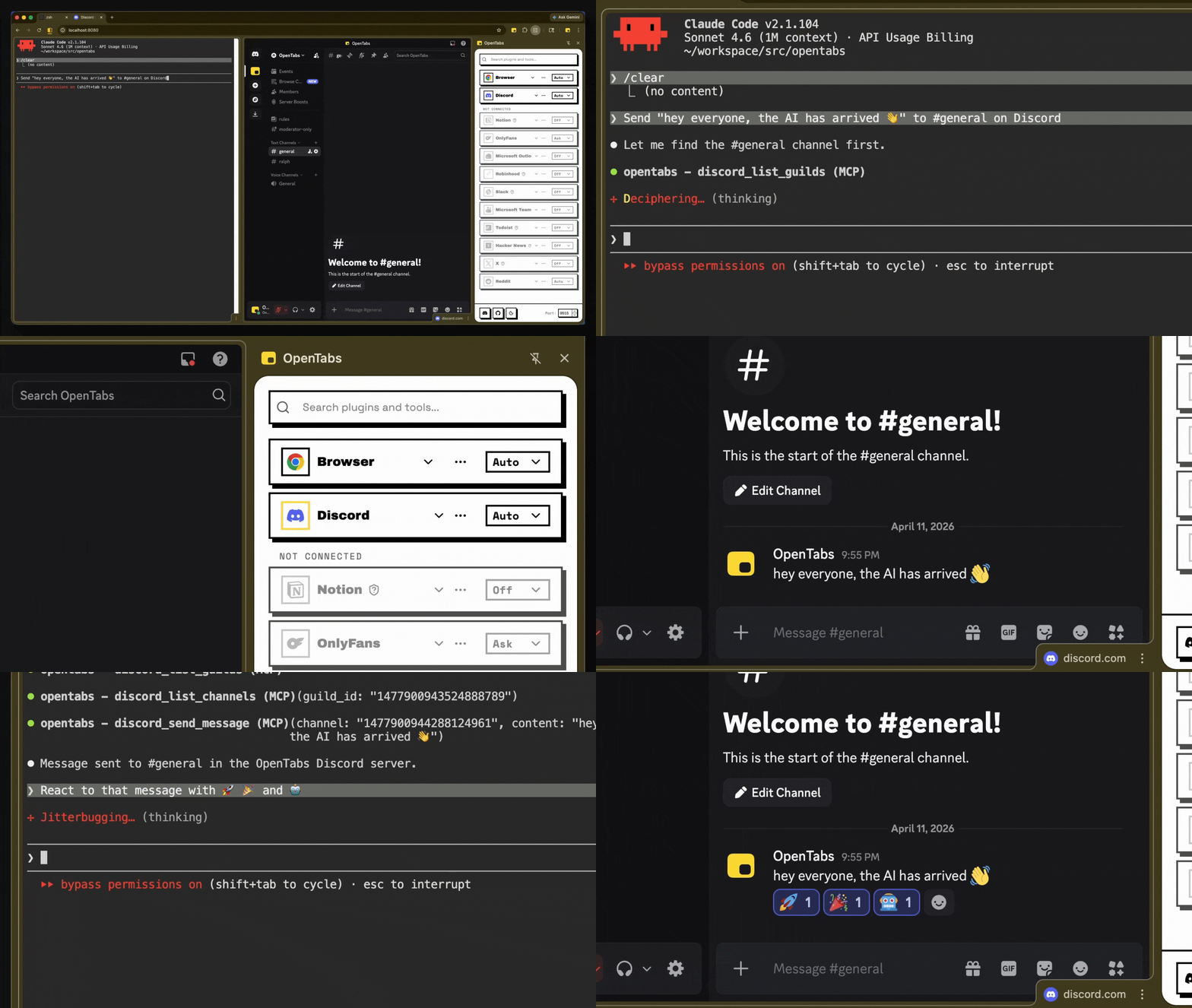
AI sending a Discord message and adding reactions — real API calls, not browser automation
How It Works
- Install the CLI and load the Chrome extension
- Connect — the extension bridges your browser to a local server
- Use — your AI calls web APIs through your authenticated session
No API keys. No OAuth setup. If you're logged in, your AI can use it.
Works with any MCP client. Don't want MCP? Use CLI mode instead.
Quick Start
Requires Node.js 22+ and Chrome.
npm install -g @opentabs-dev/cli
opentabs start
Load the extension from ~/.opentabs/extension in chrome://extensions/ (Developer mode → Load unpacked).
opentabs plugin install <plugin-name>
Full walkthrough: Quick Start guide
What You Get
100+ plugins, ~2,000 tools. Slack, Discord, GitHub, Jira, Notion, Figma, AWS, Stripe, and a lot more. One command to install, works immediately.
Built-in browser tools. Screenshots, clicking, typing, network capture — works on any tab, no plugin needed.
Build your own. Scaffold a plugin in one command, publish to npm, anyone can install it. Or point your AI at any website — it discovers the APIs and builds the plugin for you. Plugin Development guide
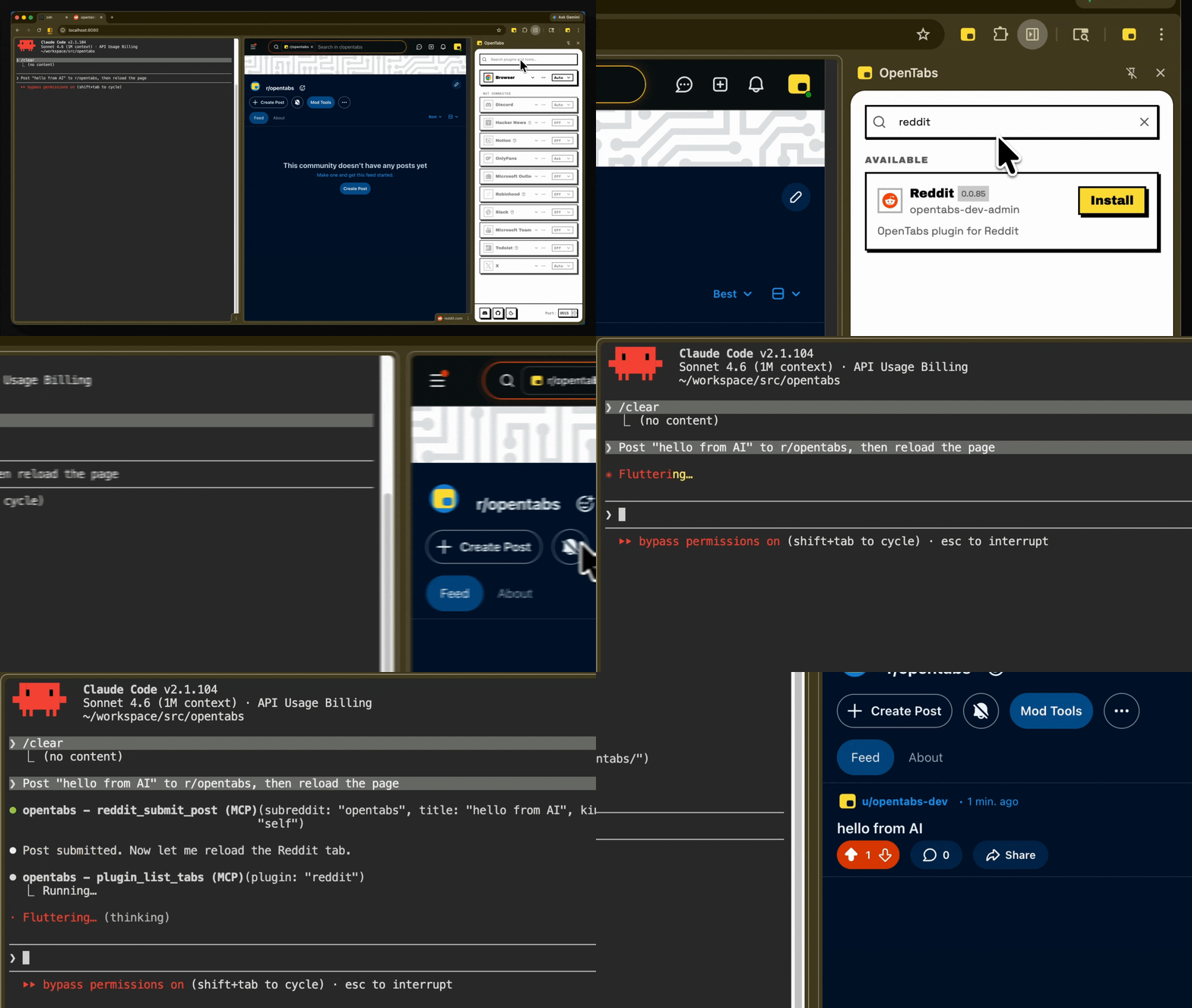
Install a plugin, use it immediately — no restart needed
Security
- Everything starts off. No tool executes until you explicitly enable it.
- Code review built in. Your AI reviews the plugin source before you enable it.
- Version-aware. Permissions reset when a plugin updates.
- Three permission levels. Off, Ask (confirmation dialog), or Auto — per-plugin or per-tool.
- Runs locally. No cloud. Full audit log. Anonymous telemetry (opt-out).
Contributing
git clone https://github.com/opentabs-dev/opentabs.git
cd opentabs && npm install && npm run build
npm run dev       # tsc watch + MCP server + extension
npm run check     # build + type-check + lint + knip + test
Development Setup guide · Discord
License
MIT — Not affiliated with or endorsed by any third-party service. Full disclaimer.
Docs ·
Quick Start ·
Plugin Development ·
SDK Reference ·
Browser Tools ·
CLI Reference
Built with Claude Code, OpenCode, Ralph, and RetroUI.