
OpenSurge for Mac
把 Mac 变成可按设备分流的 Surge 风格全屋透明代理网关——既可让指定设备通过旁路由手动接入,也支持 DHCP/DNS 自动接管与实验性下游 IPv6 接管





简体中文 · English
官网 · 下载 · 使用文档 · App 指南 · 能力 · 每设备策略 · Web GUI · Agent 工作区
|
|
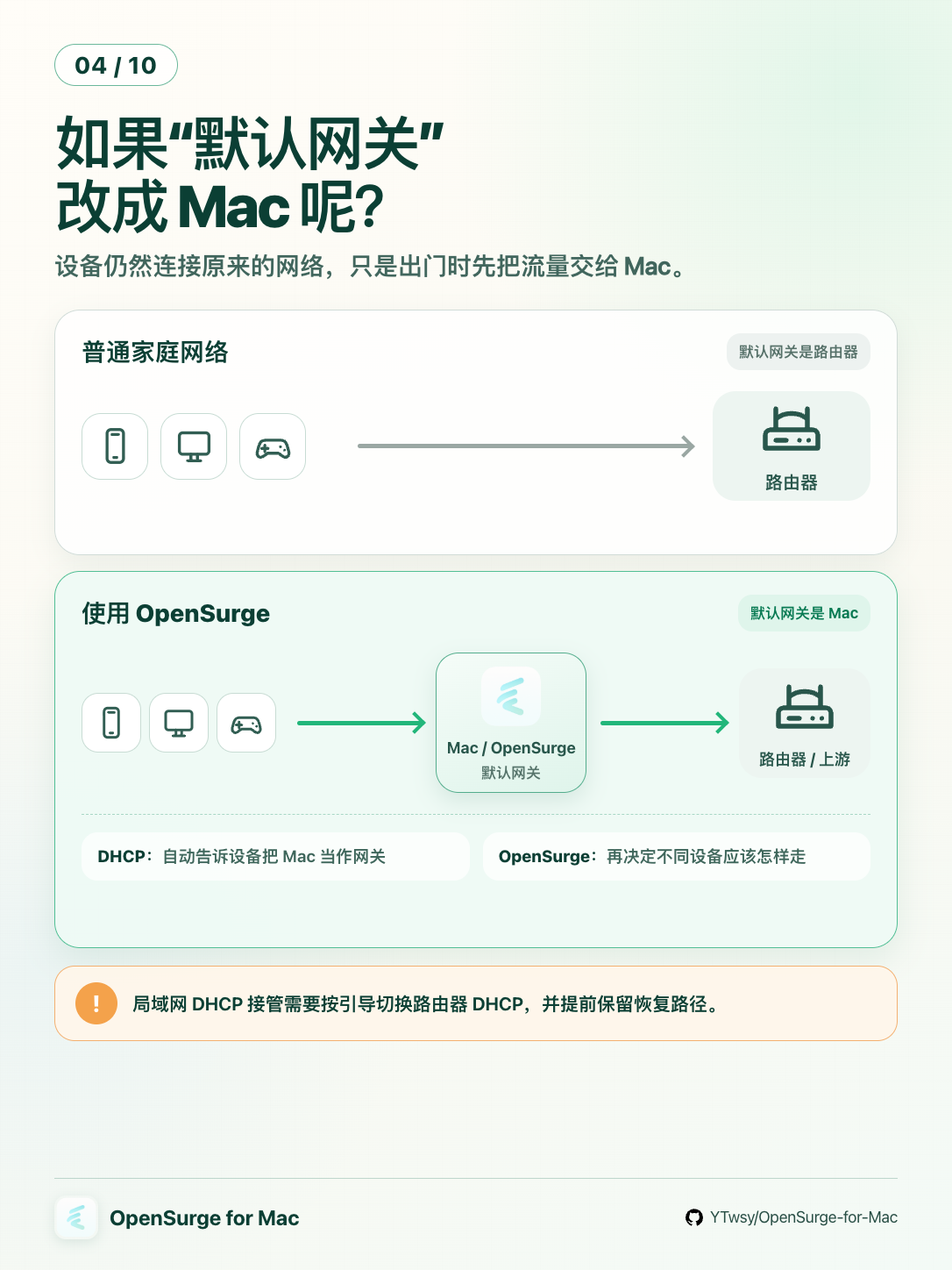
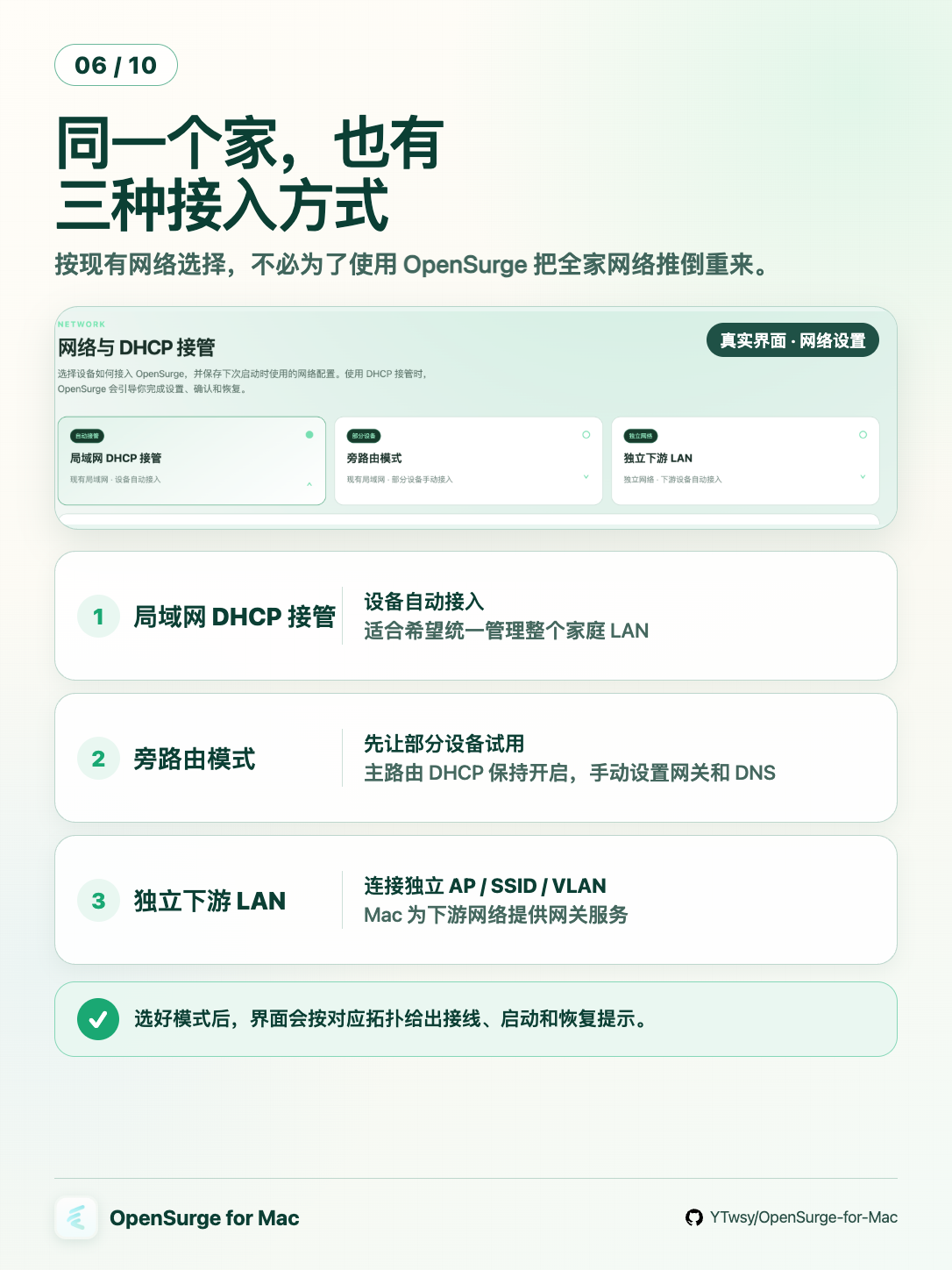
OpenSurge for Mac 是一个开源的 Surge 风格 macOS 网关与控制面。多数用户可以先从 旁路由模式开始:主路由 DHCP 保持开启,只让需要接入的设备使用稳定 IPv4,并把网关和 DNS 指向 Mac。需要让同一局域网的设备自动接入时,也可以选择局域网 DHCP 接管;有独立 AP、SSID 或 VLAN 时,则可以使用独立下游 LAN。三种模式均可按需启用实验性的 IPv6 接管。
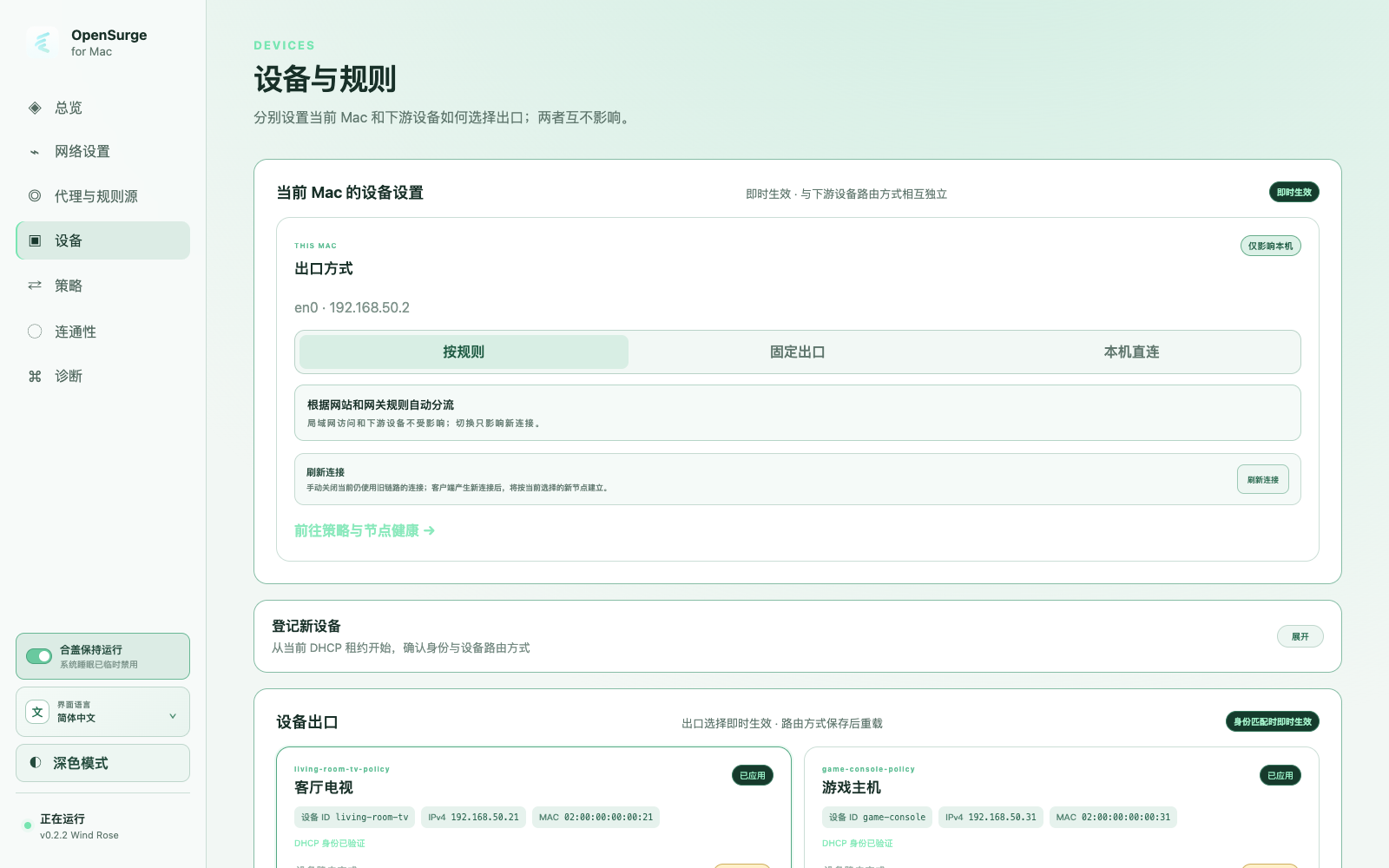
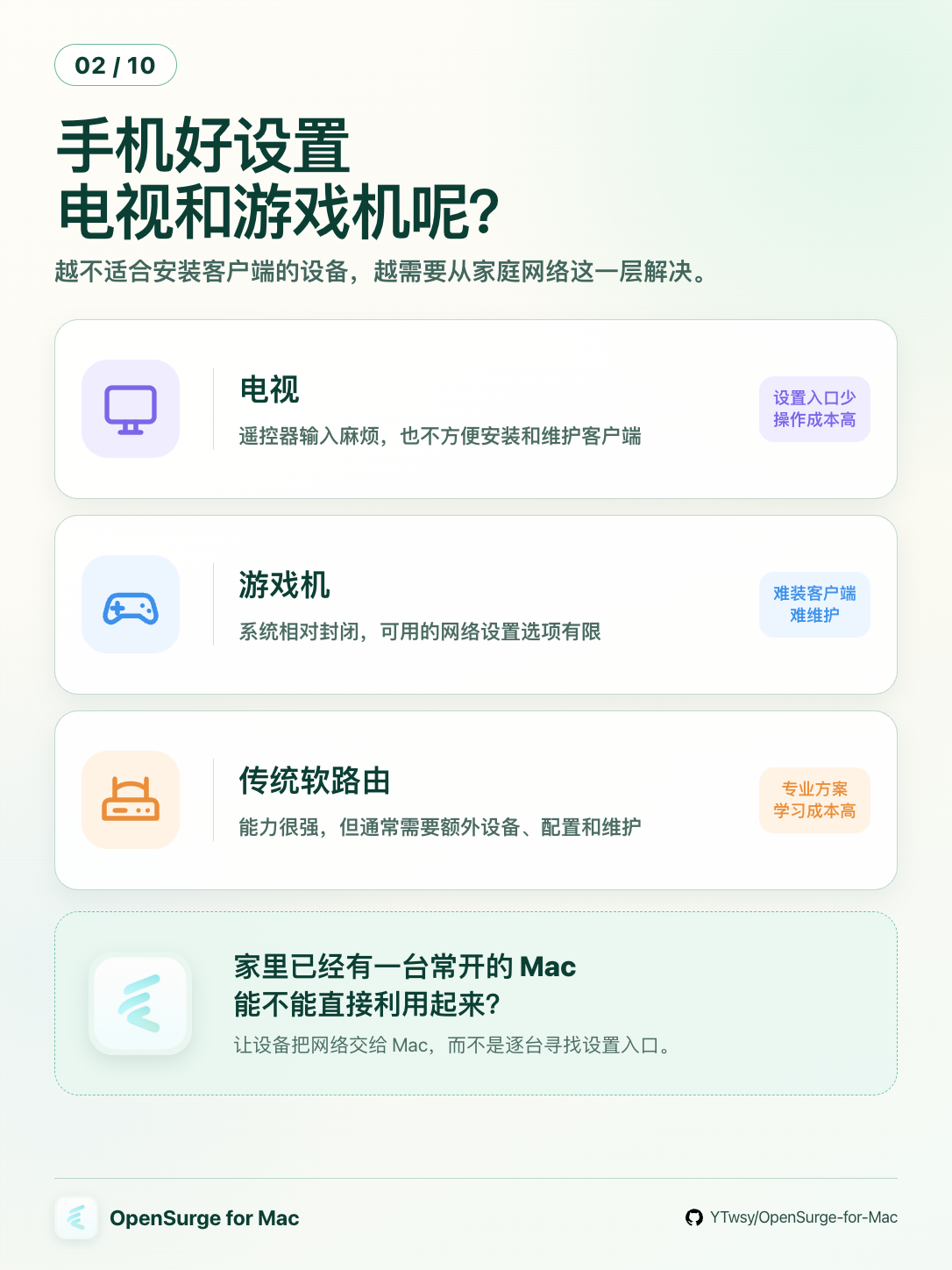
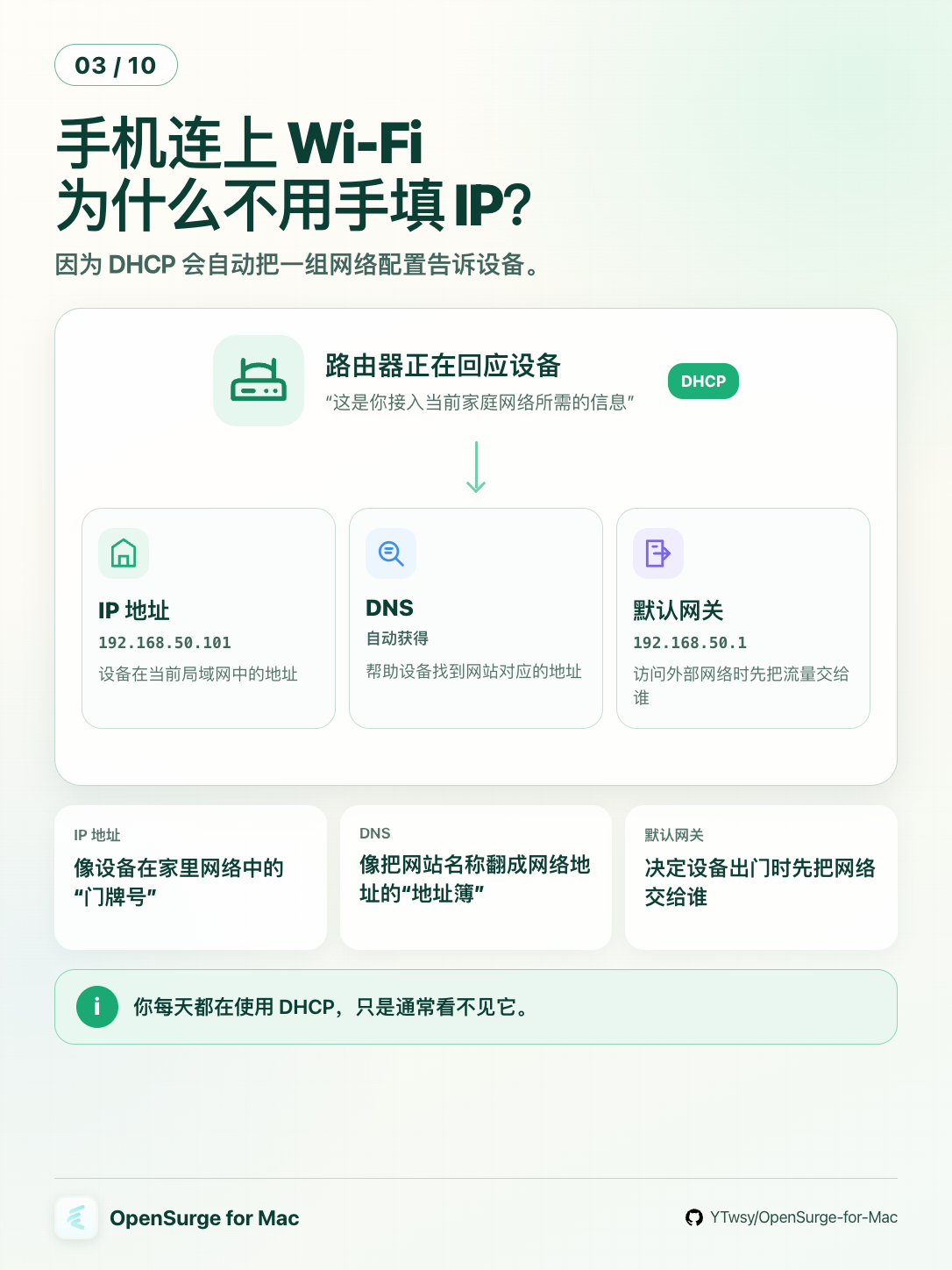
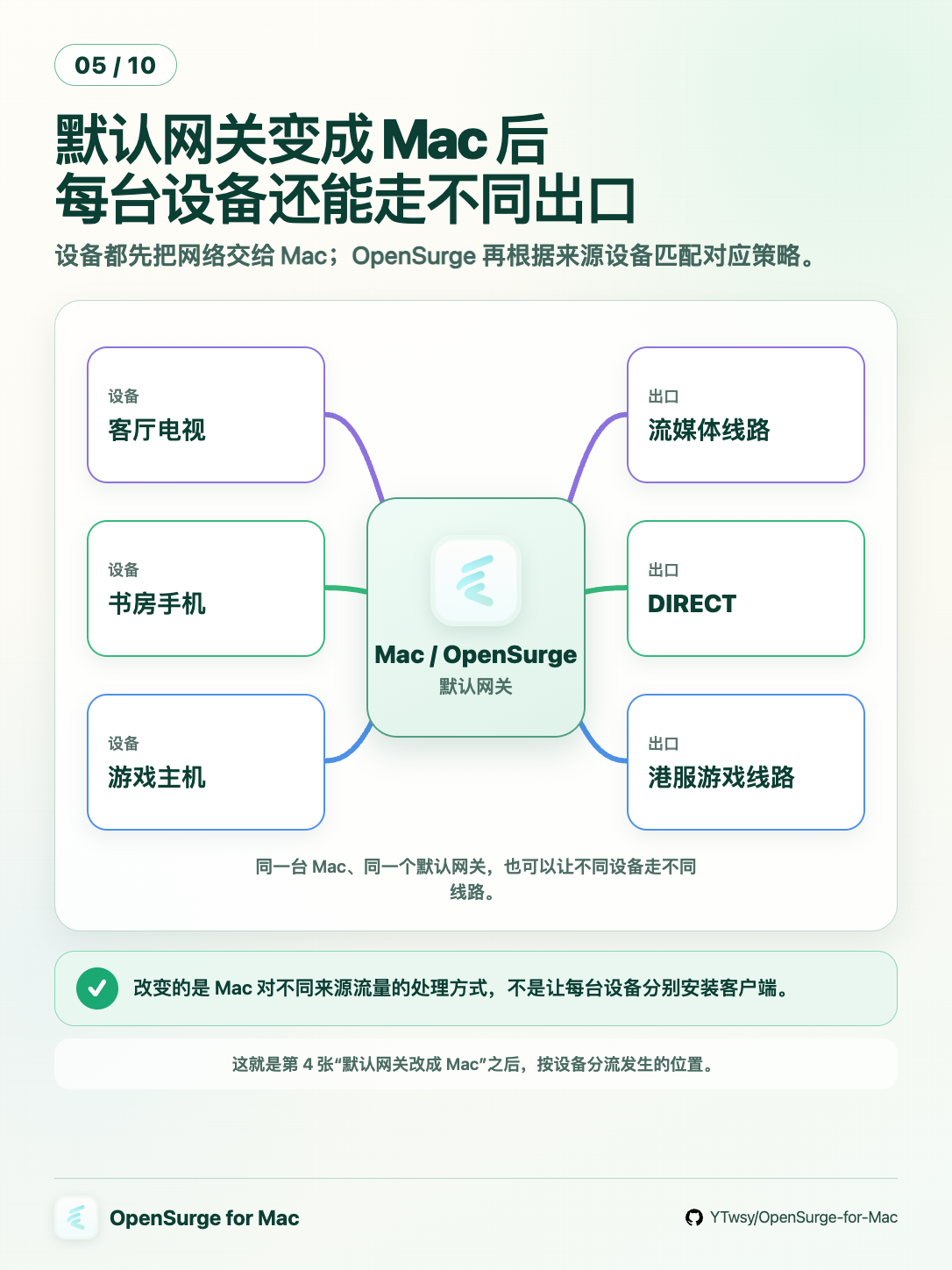
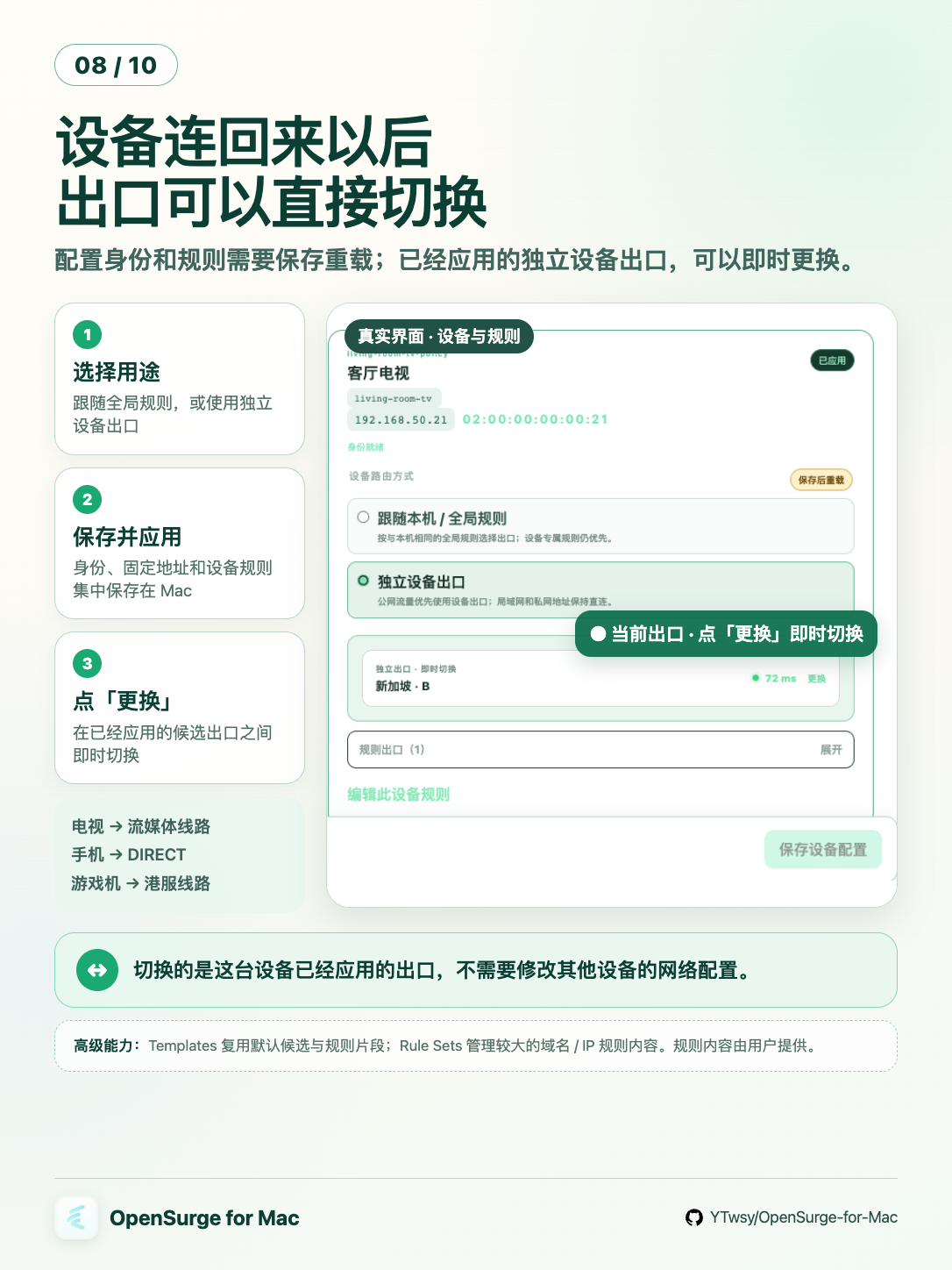
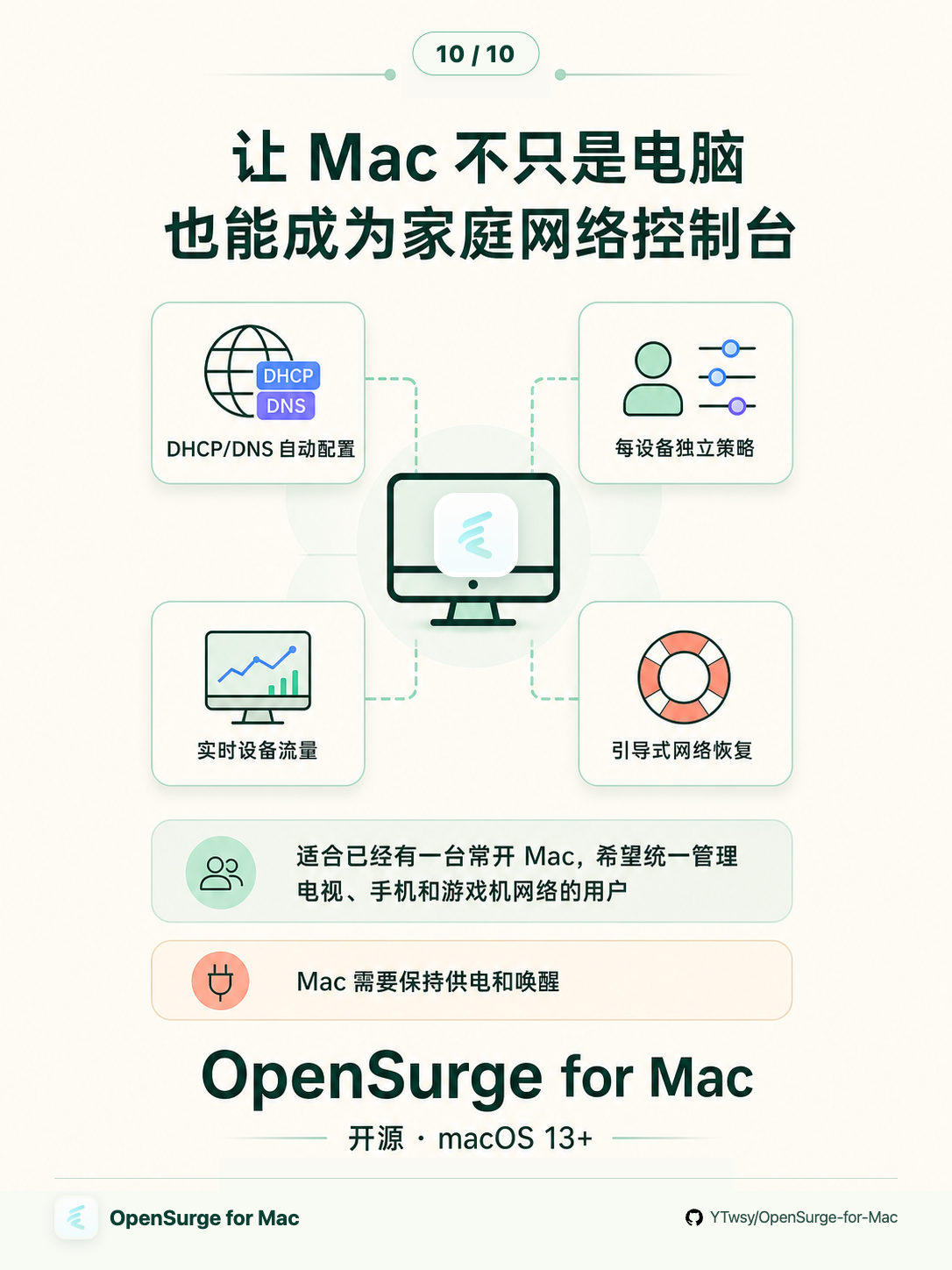
无论采用哪种模式,你都可以为已登记设备配置不同的出口策略:手机和 Mac 一起走规则 分流、游戏机连美服、电视走流媒体节点。在局域网 DHCP 接管和独立下游 LAN 模式下, 接入相应网络的手机、电视、PS5 和 VR 设备,都可以自动从 Mac 获取 DHCP/DNS,无需逐台 修改网关和 DNS。
想了解 OpenSurge 的具体功能、安装配置和常见使用场景,请访问 OpenSurge 官网。
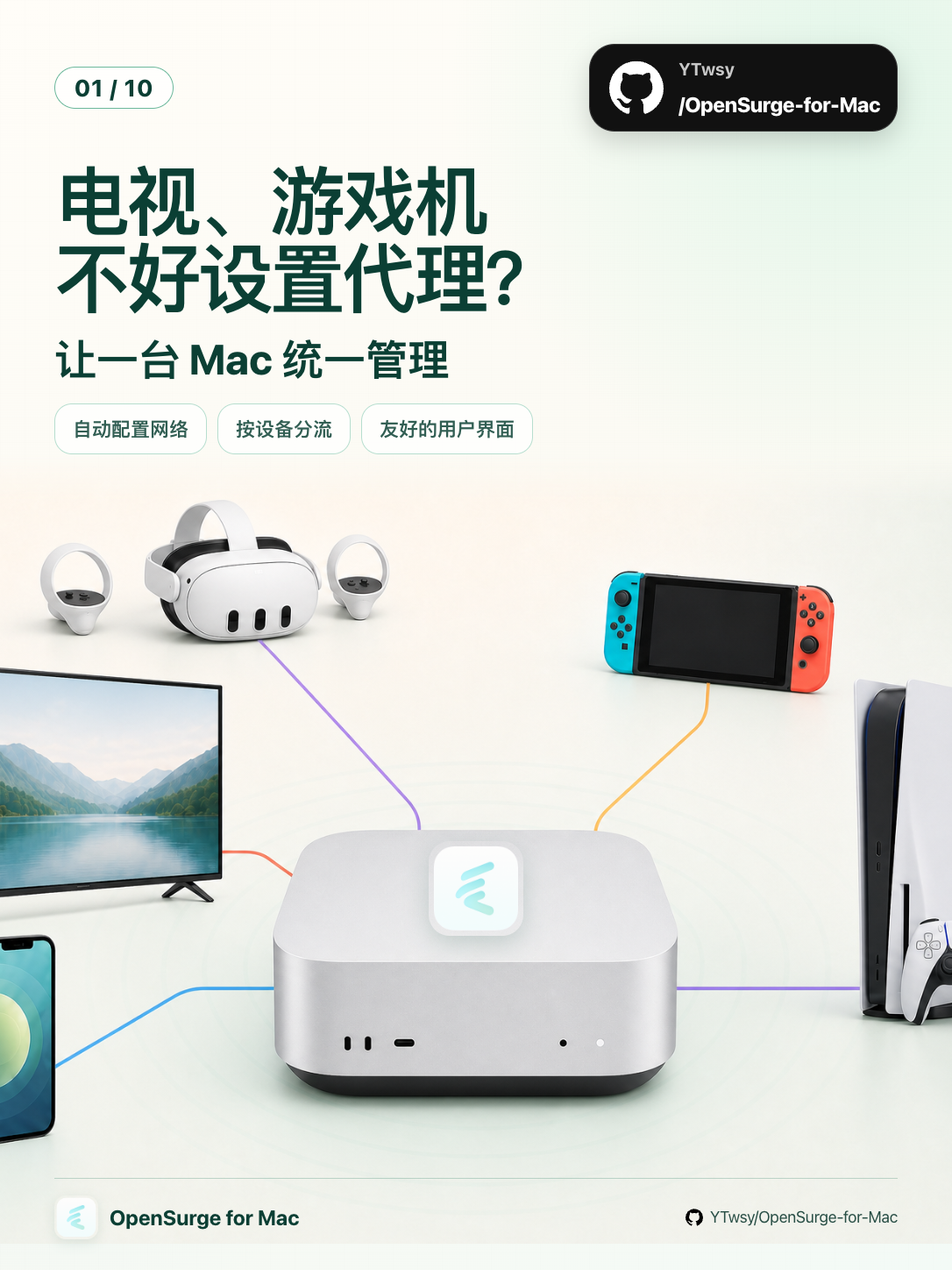
十张图带你了解 OpenSurge
左右滚动查看完整图文。
| 模式 | 适合场景 | 对现有网络的影响 |
|---|---|---|
| 旁路由模式(常用,推荐首次体验) | 先接入手机、电视、游戏机等指定设备 | 主路由 DHCP 保持开启;指定设备使用稳定 IPv4,并手工设置网关和 DNS |
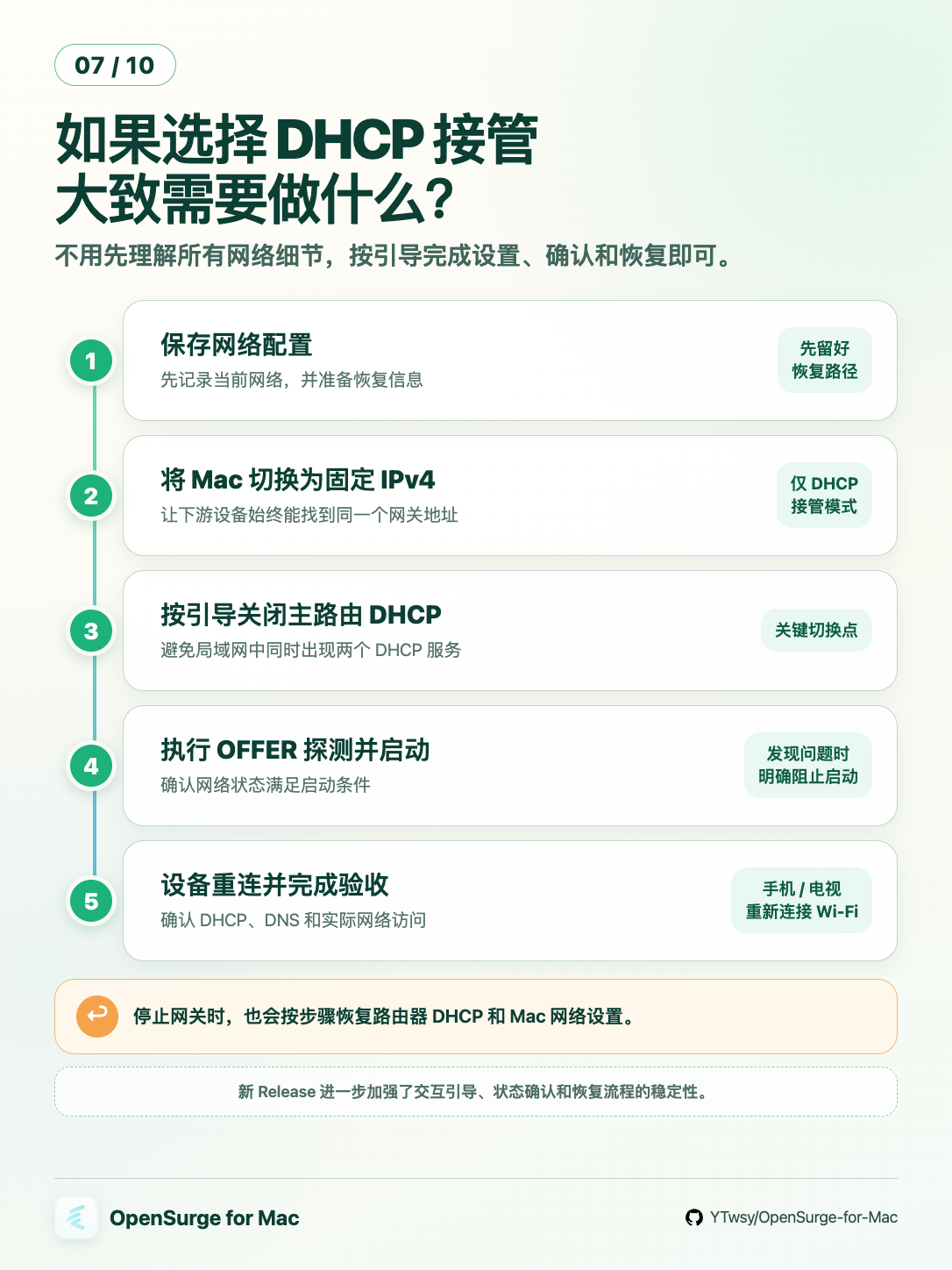
| 局域网 DHCP 接管(进阶 · 自动接入) | 希望同一 LAN 的设备自动使用 OpenSurge | 需要按引导关闭主路由 DHCP,停止时按恢复流程重新开启 |
| 独立下游 LAN | 独立 AP、SSID 或 VLAN | 不改变现有 LAN 的 DHCP;Mac 为独立下游网络提供 DHCP/DNS 和网关 |
- 导入已有的 mihomo 配置或订阅是可选能力;默认折叠的全局附加配置可以单独添加节点、 Provider、策略组、DNS 与规则。即使网关停止、没有任何导入源,也能在策略页预览最终 合成结果、选择节点和检测延迟,或从 Web GUI 直接启动同一份配置;刷新订阅或保存草稿 不会自动改变运行中的网关
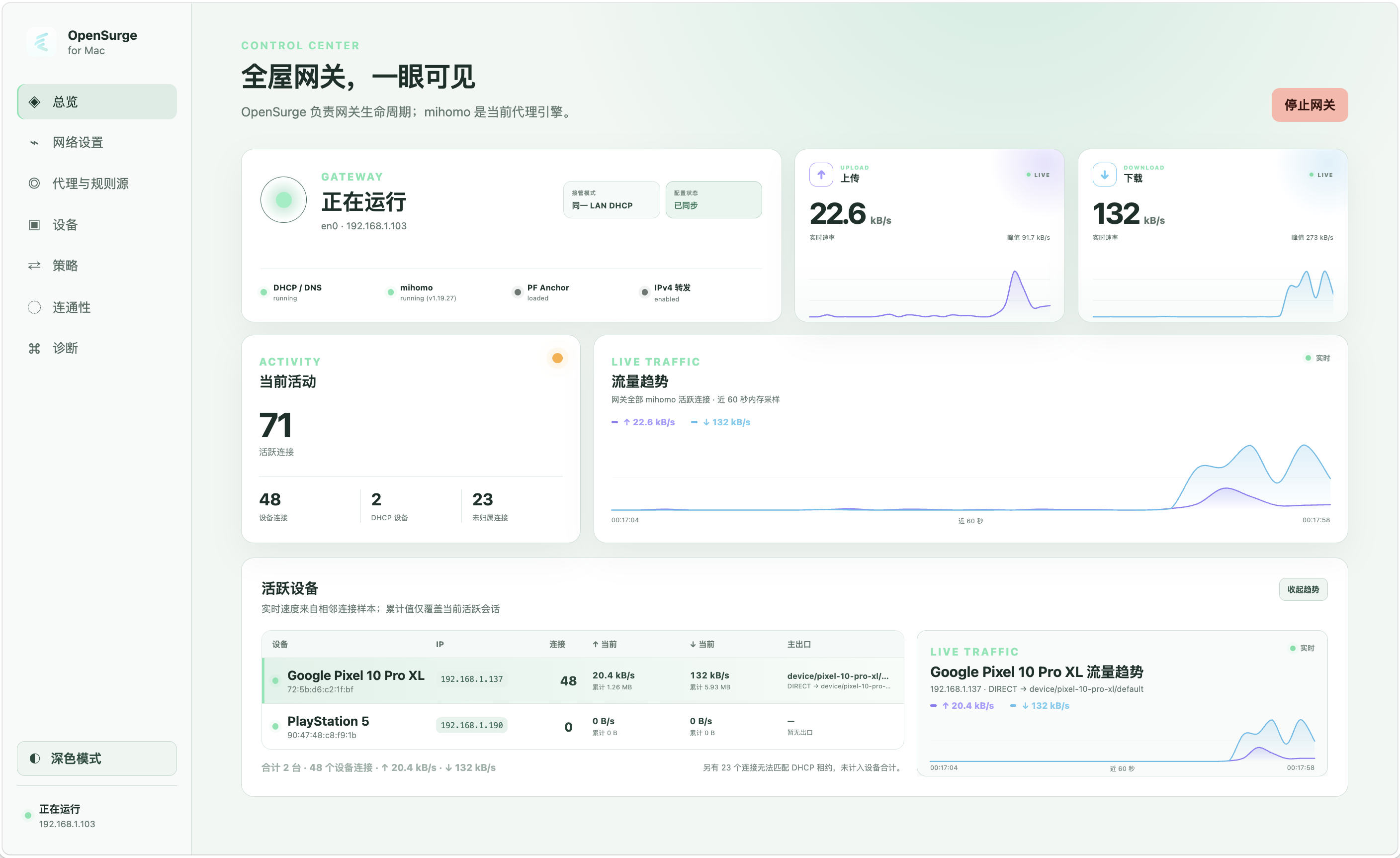
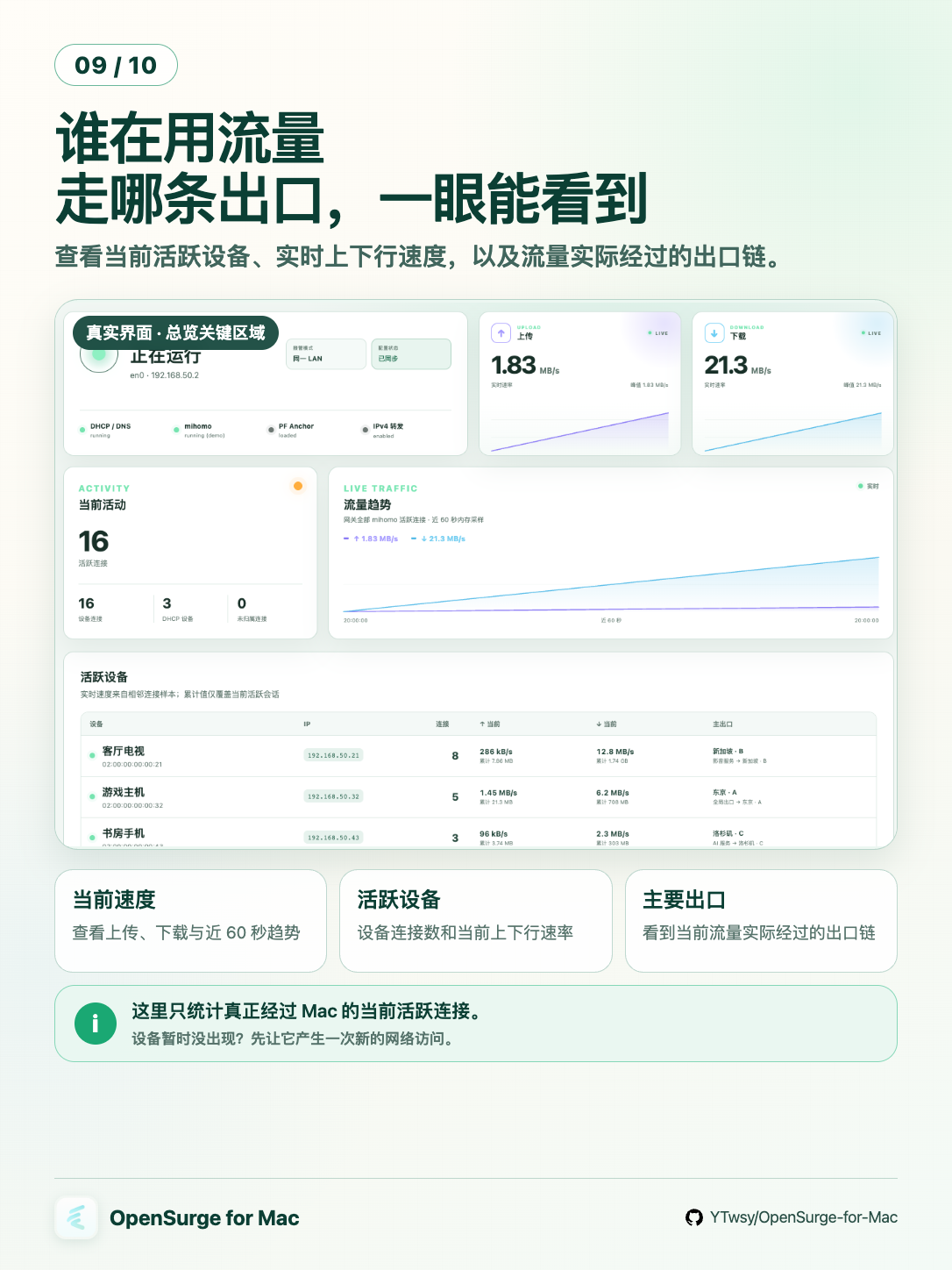
- Web GUI 实时展示每台设备的连接、上下行流量和实际出口链;菜单栏随时查看网关状态与恢复提醒。
- 菜单栏与 Web GUI 提供默认关闭、仅本次运行有效的合盖保持运行开关。
底层由 dnsmasq 提供 DHCP/DNS,mihomo 作为代理引擎。IPv4 使用 macOS pf 与 forwarding 提供原生网关路径;实验性的下游 IPv6 则由 dnsmasq RA/SLAAC/RDNSS、 macOS BPF packet broker 和本项目补丁构建的 mihomo 用户态数据面共同接管。
这个仓库也被有意设计成一个 AI Agent 友好工作区:项目知识与代码一起版本化,高风险 网络行为有可执行的证据门槛,Virtual Lab 与真实设备产生的证据会回流到下一轮工程 循环。
能力
友好的 App 体验
- 通过 macOS 菜单栏 App 随时查看状态、接收网络恢复提醒并打开本地 Web GUI;再次打开
/Applications/OpenSurge.app会直接展开与菜单栏图标相同的状态面板; - 按需临时阻止空闲与合盖睡眠;开关不依赖网关状态,不保存偏好,退出 OpenSurge 或重启 Mac 后恢复正常睡眠;
- 在一个控制面中完成订阅导入、网络设置、设备分流、节点健康、连通性检查与诊断;
- 使用恢复状态机引导局域网 DHCP 接管的启动、客户端验收、停止和网络恢复。
第一次使用请参阅 OpenSurge for Mac App 使用指南。遇到常见 网络、TUN 或设备配置问题时,请参阅 常见问题。
网关与代理
- 启停 DHCP/DNS、mihomo、pf NAT 与 IPv4 forwarding,并带 rollback;
- 通过 mihomo
mixed-port提供显式代理; - 通过 mihomo TUN 提供 macOS 透明代理;
- 把 Tailscale / Headscale 作为 mihomo 的按需出站:可按 MagicDNS 后缀、Tailnet
peer 或明确的 subnet route 限定 Mac/下游设备访问,也可把指定 Exit Node
作为独立策略组加入所有用户定义的手动
select组,同时保留 Mac 全局出口和设备 出口候选; - 在实验性的下游 IPv6 模式中,独立下游 LAN 与局域网 DHCP 接管通过 dnsmasq RA/SLAAC/RDNSS 自动接入,旁路由模式则使用手工 ULA;IPv6 流量不经过 macOS 系统 TUN,而由 BPF packet broker 送入本项目补丁构建的 mihomo gVisor 数据面,覆盖 TCP、 UDP 和以 UDP/443 承载的 QUIC,并保留 MAC 设备身份用于独立策略;
- 在不改变下游设备的前提下,为 Mac 本机经 TUN/显式代理的新连接切换 规则 / 全局 / 直连;默认不修改 macOS 系统代理,也可在 TUN 模式下显式启用 HTTP/HTTPS 系统代理协同,兼容 SafeDNS、DNS Proxy 等 Network Extension 干扰 TUN-only 本机 DNS 的场景;
- DHCP 接管模式为带 MAC 的登记设备生成固定 IPv4 租约;旁路由模式(手工网关) 允许只按主路由侧保持稳定的静态 IPv4 登记设备,MAC 是可选身份信息,两者都可使用 独立出口策略。
可观测性
- 把活跃会话流量归属到 DHCP 设备或同 LAN 的静态登记/当前观察设备,显示每设备 连接数、实时上下行速率、累计字节与占主要流量的 mihomo 出口链;
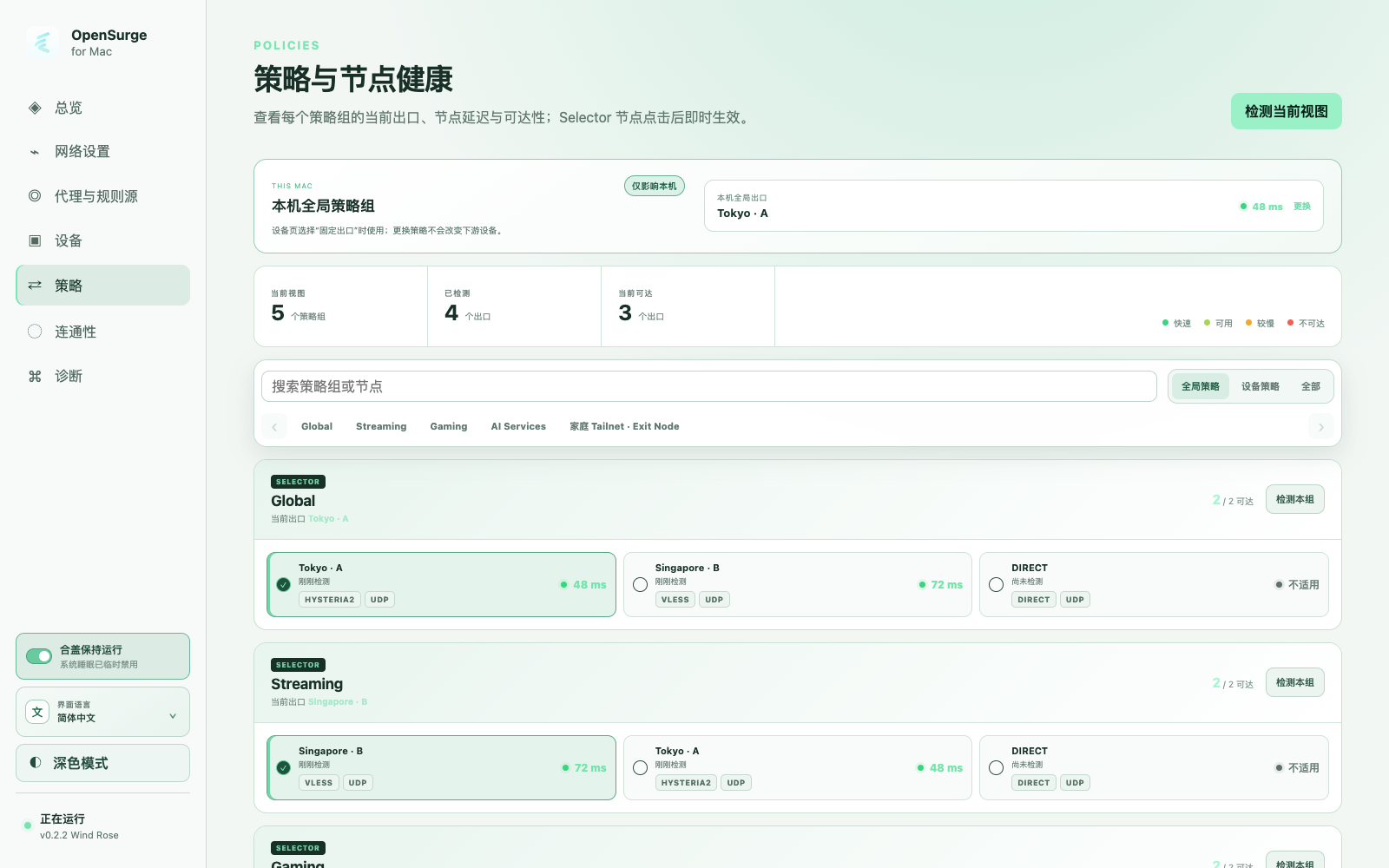
- 网关运行时或停止时都可集中检测代理节点可达性/延迟,并从最终合成的策略视图切换 Selector;
- 通过 applied mihomo mixed-port 和当前 Mac 本机模式探测固定真实服务目录,展示 三轮中位延迟、命中规则与实际出口链;
- 查看与切换策略组、查看 imported proxy/rule provider 状态、查看当前连接;
- 输出文本/JSON 形式的 status / doctor / logs / snapshot,并收集允许局部失败的 JSON snapshot 供诊断与 UI 使用。
安全与验证
- 配置校验、TUN-only 透明代理、rollback 与明确的恢复契约;
- 在接触普通 LAN 前,先用隔离的虚拟 LAN lab 验证高风险网络行为。
每设备策略
一个 mihomo 进程可以对已登记的 LAN 设备应用独立策略。DHCP 接管模式会为带 MAC 的设备
配置固定 IPv4 租约;旁路由模式只需主路由侧保持稳定的静态 IPv4,MAC 可留空,并可从
当前经过 Mac 的流量与 ARP 邻居观察辅助登记。切换到 DHCP 模式时,GUI 会要求确认当前
可观察到的 MAC;仍无 MAC 的登记会保留,但设备专属策略暂停,补全 MAC 后恢复。当前拓扑中
身份信息充分的设备会生成各自的 mihomo selector group 和 SRC-IP-CIDR 规则。安装版默认
启用每设备策略,Web GUI 始终保留该能力;JSON 策略文件让每台设备要么跟随网关规则,要么在
全局规则之前走设备专属 selector;它也支持 REJECT 这类设备专属动作,以及按
域名/IP/协议/端口/rule-provider 叠加的规则覆盖。dedicated 模式下,本地/私有目标
保持直连。Mac 本机的规则 / 全局 / 直连开关不改变这些下游规则;详见
Mac 本机流量模式。
Web GUI 的规则库把规则集、不带出口的分流模版和每台设备的命中出口分开管理。 其中提供一份可查看的 Claude Code 社区规则示例,但不会默认应用到任何设备;其他策略内容由操作者提供,空 starter 文件也是合法配置。JSON 模型、优先级、CLI 命令和验证边界见 每设备策略覆盖。
Tailscale 出站
Web GUI 的“代理与规则源”页面可以管理一个 OpenSurge 托管的 Tailscale
outbound。Auth Key 只写入权限受限的独立文件,配置和 API 响应不会回显;
本地 state-dir 保留节点身份,所以停用后再启用不需创建新设备。“忘记本地
身份”是单独动作,只能在 Tailscale 已停用且网关已停止时执行;它不会从
Tailscale / Headscale 管理后台删除节点。
卡片内的折叠设置会只读检测本机 Tailscale App,把当前 Tailnet 的 MagicDNS 后缀、peer
精确地址、在线状态、已接受的私网路由和可用 Exit Node 显示为待确认建议;不会
自动保存或扩大访问范围。成功发现会保存不含密钥的受限缓存;本机 App 断开后仍可
继续配置,界面会标明信息来源和检测/缓存时间,不把快照描述成实时状态。若本机
Tailscale App 已通过自己的 utun 接管同一条
子网路由,界面会在运行中网关重载前指出具体路由和接口,并要求先关闭 App 的
“接受子网路由”或断开连接;OpenSurge 不会自动修改另一个 App。首次注册仍需要
单独的 Auth Key,界面可直接打开官方 Keys 页面,并提示使用一次性、非 Ephemeral
的 key。本机 App 与 OpenSurge 托管
节点不共享登录身份或 state;检测失败时仍可使用折叠的高级手动配置。
Tailnet 访问和 Exit Node 是两种不同角色:
- Tailnet-only 只在明确的 MagicDNS 后缀、peer IP/CIDR 或已接受的远端子网命中时
选择 Tailscale,目标不可达时不回退
DIRECT; - 只有配置了明确 Exit Node 才会生成
open-surge/tailscale-exit独立策略组; 它会成为 Mac 全局出口、每设备 Selector,以及所有用户定义手动type: select组的 可选成员,但不会加入自动测速/故障转移/负载均衡组; - 远端 subnet route 必须逐条确认,与 OpenSurge LAN 重叠时会拒绝保存;
- mihomo 按 outbound 首次请求启动 Tailscale 节点;OpenSurge 会在网关启动、
重载和 mihomo 恢复后主动预热,但第一次业务访问仍可能需要重试。界面仍显示
“按需连接”,且不会用公网
generate_204误判 Tailnet-only 节点。
当前边界是 outbound-only:OpenSurge 不向 Tailnet 发布本地 LAN,也不用这个节点 提供入站服务。
Web GUI 与菜单栏 App
通过安装包使用 OpenSurge 时,请从 OpenSurge for Mac App 使用指南开始。
本地 Control API、React Web GUI 和以状态展示为主的 SwiftUI 菜单栏 launcher 已进入仓库。开发构建:
make web-install
make control-build
./bin/opensurge-control --config examples/config.example.yaml
make menubar-build
控制服务只监听 127.0.0.1,启动时会输出一次性 Web GUI 链接。菜单栏 App 显示
状态、恢复警报并打开 Web GUI;除独立的临时合盖运行开关外,不提供网关 start/stop 或
策略切换。它区分“只退出菜单栏
App”和“退出 OpenSurge”:后者只在网关数据面已经停止时退出菜单栏 App 与用户级
Control Service;系统 launchd 托管的 root Helper 保持空闲加载,下次打开无需再次授权。
菜单栏还提供独立的“卸载 OpenSurge”入口:只要网关已经停止即可通过 macOS 管理员授权
移除 App、Control Service 与 root Helper,并可选择保留配置数据供以后重新安装或彻底删除。
架构、安全边界与构建说明见 Web GUI 与菜单栏 App。
Web GUI 内置 applied 配置 + 当前 Mac 本机模式的连通性页面,并提供 Net.Coffee 的
独立浏览器本机检测入口;两者都不会被描述成下游设备网关规则或 DHCP/DNS/TUN 路径
已经验收。
make gui-installer 会在取得真实 mihomo、dnsmasq 二进制后构建 macOS 安装包。
Developer ID 签名和 notarization 必须显式提供发布凭据。GitHub 正式发布同时提供文件名中
明确带有 arm64-unsigned.pkg 与 x86_64-unsigned.pkg 的架构专用构建,但不能把正式
Release 描述成已经签名、已经 notarize 或可被 Gatekeeper 直接放行的安装包。
安装 GitHub 未签名正式发布包
当前正式发布同时提供 Apple Silicon 与 Intel Mac 安装包。请从对应 GitHub Release 下载
arm64-unsigned.pkg(Apple Silicon)或 x86_64-unsigned.pkg(Intel),以及
SHA256SUMS。可运行 shasum -a 256 -c SHA256SUMS 核对已下载文件,并使用以下命令
验证所选安装包的 GitHub 构建来源:
gh attestation verify OpenSurge-for-Mac-*-arm64-unsigned.pkg \
  -R YTwsy/OpenSurge-for-Mac
gh attestation verify OpenSurge-for-Mac-*-x86_64-unsigned.pkg \
  -R YTwsy/OpenSurge-for-Mac
双击安装包。如果 Gatekeeper 阻止安装,进入系统设置 → 隐私与安全性,选择
仍要打开并完成身份验证,然后再次打开同一个安装包。不要全局关闭 Gatekeeper,
也不要递归删除 quarantine。使用管理员账户完成 Installer 后,从 /Applications
打开 OpenSurge。安装过程会启动本地 helper 与 Control Service,但网关
仍保持停止,只有在控制面中明确操作才会启动。
pkg 升级会在同一 LAN DHCP 恢复未完成时拒绝执行。替换 payload 前,preinstall 先停止
菜单栏 App 以阻断 Control Service 自动唤醒,再卸载用户级 Control Service;随后使用
新安装包自带的当前版本恢复 CLI 读取已安装配置并安全清理网关,最后
卸载 root helper。升级会保留现有配置、导入源、策略数据和 runtime 历史;只有首次安装
才会用包内示例生成 config.yaml。
透明代理与下游 IPv6 接管
OpenSurge 使用两条入口机制不同、但共享 mihomo 规则与出口的透明数据路径:下游 IPv4
与 Mac 本机透明代理使用 mihomo TUN 主线;实验性的下游 IPv6 则通过 macOS BPF packet
broker 和本项目补丁增加的 opensurge-packet listener 进入 mihomo gVisor。
两条路径都以 transparent.mode: "tun" 作为网关整体前置条件,但下游 IPv6 流量不会
进入 macOS 系统 utun。这不会重新启用 redir-port 或 PF TCP 重定向。
mihomo TUN 主线
下游 IPv4 与 Mac 本机透明代理使用 mihomo TUN。mihomo redir-port 和 PF TCP 重定向
被有意禁用,因为当前 Darwin 构建在运行时报告 redir 不受支持。请保持
mihomo.redir_port 和 pf.redirect_tcp_to 为 0。
OpenSurge 不会在启动前根据现有 utun 或公网路由猜测冲突。实际启动会等待 mihomo 运行时确认 TUN ready;失败时给进程短暂清理窗口、回滚网关运行时,并根据实际 TUN 错误补充冲突路由的接口/网关信息。默认不支持两个全局 TUN 同时占有公网路由。
下游 IPv6 接管(实验性)
网络设置页提供两个独立开关:dns.ipv6 决定 OpenSurge DNS 是否回答 AAAA 并生成
fake IPv6;transparent.tun_ipv6 决定是否在下游发布 IPv6 网关、SLAAC/RDNSS 和
用户态透明数据面,可选 off、auto 或 always。auto 只在上游接口有公网全局
IPv6 地址(不把 ULA 当成公网能力)和 IPv6 默认路由时启用;always 即使上游没有
原生 IPv6 也会建立下游路径。
三种拓扑均要求 transparent.mode: "tun"。独立下游 LAN 自动发布 RA/SLAAC/RDNSS;
局域网 DHCP 接管也可作为全 LAN IPv6 提供者,但必须先关闭主路由 IPv6 RA/DHCPv6,
或用 RA Guard 保证 OpenSurge 是唯一默认路由提供者,再确认
transparent.ipv6_shared_l2_ready: true。两种自动模式都使用标准 Medium RA 路由器
优先级。旁路由模式不广播 RA,只接入逐台手工设置 OpenSurge ULA、Mac link-local
默认网关和 link-local DNS,且移除原主路由 IPv6 默认路由的设备;网络设置页会显示可照填的
IPv4/IPv6 速查卡。
这条 IPv6 数据面依赖本项目为 mihomo 新增的 opensurge-packet listener。OpenSurge
安装包中的 mihomo 由固定上游源码应用本仓库
patches/mihomo 中的 packet-listener 补丁后构建,并非上游原版
二进制;对应版本、许可证和上游来源记录在第三方声明中。
下游 IPv6 流量不会进入 macOS 系统 utun。macOS BPF broker 从物理 Ethernet 帧读取
IPv6 L3 packet 和 source MAC,通过权限为 0600 的 Unix datagram 交给
opensurge-packet listener;listener 再把 packet 注入 mihomo gVisor,将 MAC 映射成
IN-USER(device:),并复用现有设备规则和 outbound。返回包沿相反路径由 broker
写回下游 Ethernet。该路径覆盖 TCP 与 UDP;QUIC 按 UDP/443 承载,不代表任意 IPv6
协议均可代理。
局域网 DHCP 接管中的按设备“直连主路由”只绕行 IPv4。启用下游 IPv6 时,该设备经过
OpenSurge packet path 的 IPv6 会以最高优先级 REJECT,其他设备的 IPv6 不受影响。
设备仍可能保留 SLAAC 地址或 RDNSS,因此界面只显示“IPv6 出站已阻止”。如果主路由
仍发布 RA,设备可能直接从主路由走 IPv6、完全绕过 OpenSurge;必须关闭主路由
RA/DHCPv6 或使用 RA Guard。
always 也不会凭空提供公网 IPv6。上游无原生 IPv6 时,fake IPv6 目标仍可通过支持
相应流量的代理出口;真实公网 IPv6 的 DIRECT 会因没有上游路由而失败,HTTP-only
代理也不能承载 UDP/QUIC。
mihomo profile
OpenSurge for Mac 可以渲染托管的 mihomo 配置,也可以导入已有 mihomo profile。
在 imported 模式下,OpenSurge 仍然接管 LAN 绑定、allow-lan、DNS 监听与
fake-IP 网段、TUN、external-controller 和 runtime 路径等网关关键字段。导入的
profile 会贡献 proxies、proxy-providers、proxy-groups、rule-providers、
rules,以及不改变网关边界的 DNS 解析器/过滤字段。保留
nameserver-policy、proxy-server-nameserver、fake-ip-filter 等字段,可以让依赖
专用 DNS 的代理节点域名继续正确解析,同时不允许 profile 替换网关 DNS 监听或
TUN DNS 契约。
导入 profile 不是使用高级配置的前置条件。Web GUI 的“全局附加配置”可以在 managed
最小 profile 上独立增加节点、Provider、手动策略组与规则。网关停止时,“策略”页会通过
一个不接管 TUN、DHCP/DNS、PF 或 forwarding 的准备态 mihomo 展示最终配置,并允许选择
节点与测速;也可以不访问策略页,直接从 Web GUI 启动,服务端会先合成并用真实
mihomo -t 校验,成功后保存并启动同一个候选配置。预览、选择与测速不会提交 desired
配置;运行中保存附加配置草稿也不改变实际流量。仅附加配置的草稿在下次 App 启动时采用;
sudo omg start 继续使用已持久化的配置,不读取 Web 草稿。
mihomo:
  profile_mode: "imported"
  profile: "./profiles/home.yaml"
  store_fake_ip: true
相对形式的 mihomo.profile 会基于 OpenSurge 配置文件所在目录解析。导入的
proxy-providers 和 rule-providers 内部如果有相对 path:,会基于被导入的
mihomo profile 所在目录解析。HTTP 与 file Provider 都保留原有路径语义;绝对路径、
URL 形式和未指定路径不由 OpenSurge 重新命名,缓存仍由 mihomo 按原规则处理。
新合成配置使用现有受信任的工作目录,不按配置摘要切换缓存或 Tailscale 状态目录。
OpenSurge 会渲染 profile.store-selected: true,
让 mihomo 可以跨重启保存策略组选择;默认的 mihomo.store_fake_ip: true 会生成
profile.store-fake-ip: true,在 apply/restart 后恢复已有 fake-IP 映射。网关停止时可在
Web GUI 的“高级 Mihomo / DNS 设置”中关闭该行为,但长驻进程缓存的旧 fake-IP 可能因此
在 mihomo 重启后失效。
启动网关服务前,可以先预览最终生成的 mihomo 配置:
go run ./cmd/omg doctor --config examples/config.imported-profile.example.yaml
go run ./cmd/omg render-mihomo --config examples/config.example.yaml
go run ./cmd/omg render-mihomo --config examples/config.imported-profile.example.yaml
当 mihomo.binary 指向已安装的 mihomo 二进制时,可以使用
validate-mihomo。它会渲染最终配置,并运行 mihomo 自己的 -t 校验,但不会
启动网关服务。
go run ./cmd/omg validate-mihomo --config examples/config.imported-profile.example.yaml
CLI 使用方式
下面的命令适合开发、自动化和诊断。普通安装包用户可以直接使用 App 使用指南中的图形界面流程。
状态与诊断
go run ./cmd/omg doctor --config examples/config.example.yaml
go run ./cmd/omg status --config examples/config.example.yaml
go run ./cmd/omg status --config examples/config.example.yaml --format json
go run ./cmd/omg logs --config examples/config.example.yaml --tail 50 --format json
go run ./cmd/omg snapshot --config examples/config.example.yaml --tail 50 --format json
策略、设备与 Provider
go run ./cmd/omg policies --config examples/config.imported-profile.example.yaml
go run ./cmd/omg policy-select \
  --config examples/config.imported-profile.example.yaml \
  --group Proxy \
  --policy DIRECT

# Mac 本机规则 / 全局 / 直连(不会改变下游设备):
go run ./cmd/omg local-routing \
  --config examples/config.imported-profile.example.yaml
go run ./cmd/omg local-routing-set \
  --config examples/config.imported-profile.example.yaml \
  --mode global \
  --policy Proxy

# 配置 device_policy.file 后:
go run ./cmd/omg devices --config ./config.yaml --format json
go run ./cmd/omg device-policy-select \
  --config ./config.yaml \
  --device alice-phone \
  --slot default \
  --policy DIRECT

go run ./cmd/omg connections \
  --config examples/config.imported-profile.example.yaml \
  --format json
go run ./cmd/omg providers \
  --config examples/config.imported-profile.example.yaml \
  --format json
go run ./cmd/omg provider-update \
  --config examples/config.imported-profile.example.yaml \
  --provider demo-provider \
  --format json
配置渲染
go run ./cmd/omg render-mihomo --config examples/config.example.yaml
go run ./cmd/omg validate-mihomo \
  --config examples/config.imported-profile.example.yaml
网关生命周期
以下操作会修改 DHCP、DNS、PF、IPv4 forwarding 或 mihomo 运行状态,需要 sudo:
sudo go run ./cmd/omg start --config examples/config.example.yaml --format json
sudo go run ./cmd/omg reload --config examples/config.example.yaml --format json
sudo go run ./cmd/omg restart-mihomo --config examples/config.example.yaml --format json
sudo go run ./cmd/omg stop --config examples/config.example.yaml --format json
补充说明:
- 原始
sudo omg start只启动已经写入 root 配置的 desired graph,不读取某个登录用户 Control Store 中的全局附加配置草稿;Web GUI 策略页只用于预览、选择与测速。要提交草稿, 请通过 App 的“启动网关”或已有来源应用流程,校验通过后才更新 desired; policy-select会读取 live mihomo 策略组,并在发送切换请求前拒绝未知 group 或 policy;provider-update --provider会请求 mihomo 刷新指定 proxy provider,并返回 刷新后的 provider 状态;logs --tail N --format json会返回最近的 dnsmasq 和 mihomo 日志行,并标出每个 日志文件的存在状态和读取错误;snapshot --format json会聚合 status、doctor、leases、日志、策略组、连接和 provider 状态;mihomo API 失败不会阻止其余 snapshot 返回;restart-mihomo只重启代理核心,不会停止 dnsmasq、卸载 PF、恢复 IPv4 forwarding 或修改本机网络设置;--format json会保留非零失败退出码,并在 stderr 输出结构化错误。成功的start和stop会返回包含command、ok和config_path的 payload。
AI Agent 友好工作区
OpenSurge 把仓库本身也视为工程系统的一部分,而不只是存放代码的地方。目标是让 产品意图、网络安全规则、运行时证据与积累下来的项目知识,都能被人类贡献者和 Coding Agent 直接理解和使用。
Harness Engineering:设计 Agent 周围的工程环境
这个工作区实践了 Harness Engineering 的核心思想: Agent 是否可靠,不只取决于模型,还取决于模型周围的上下文、约束、工具、可观测性 与验收门槛。
AGENTS.md是精简的入口地图:它定义产品身份、硬性网络不变量,并告诉 Agent 针对不同任务必须继续阅读哪些文档。docs/agent-wiki/以渐进披露的方式提供架构、决策与 验证上下文,避免每个任务都从全仓库重新拼装心智模型。status、doctor、logs、snapshot等机器可读 CLI,加上确定性的make入口与保留的 artifacts,让 Agent 能直接观察正在运行的系统。- 配置校验、只允许 TUN 的透明代理、rollback、隔离 Lab 与明确的恢复契约,把安全 指引变成可以执行和检查的边界。
Loop Engineering:用可执行证据闭环
OpenSurge 实践 Loop Engineering 的核心:设计一套 能够反复执行、观察、验证、恢复,并把结果带入下一轮的系统,而不是依赖一次写得很 漂亮的 prompt。
目标 + 约束
    ↓
AGENTS.md → Agent Wiki → 事实来源
    ↓
实现 → 快速测试 → Virtual LAN Lab
    ↓
ADB 辅助或人工真实设备验证
    ↓
日志 + artifacts + 清理/恢复证据
    ↓
可复用知识回写 sources/ 与 wiki/
    ↺
这些验证层互相补充:
make test与聚焦的 UI/控制面 gate 构成快速内循环。- 基于 Lima + socket_vmnet 的 Virtual LAN Lab,把需要权限的 DHCP、DNS、pf/NAT、 forwarding、TUN、策略、rollback 与清理行为放进可复现的隔离环境,不冒险干扰 普通 LAN。
- 真实设备与 same-LAN/same-WiFi runner 负责闭合物理拓扑循环。ADB 可以收集 Android 路由、DNS 与连通性证据,Mac 侧同时关联 dnsmasq/mihomo 日志;当操作者 需要保留手机侧直接控制时,也支持人工检查点。
- 对 DHCP 接管等高风险流程,恢复本身就是验收的一部分。流量探针成功,但路由器、 Mac 或客户端无法回到已知正常状态,仍不能算闭环完成。
Virtual Lab 不能替代真实设备行为,一次真机 smoke 也不能替代确定性的 Lab gate。 每个门槛究竟允许支持什么结论,见 验证契约。
Agent Wiki:外置的项目记忆
Agent Wiki 融入了 LLM Wiki 思想:把可复用的长期记忆 从短暂的上下文窗口移到小型、版本化、带来源的知识层中。
docs/agent-wiki/sources/保存稳定的项目简报、决策与验证契约。docs/agent-wiki/wiki/把来源材料整理成短小、互相链接的页面,让 Agent 按任务 渐进加载。.codex/hooks.json在本机安装 Session Wiki hook 后,把 session 延续与 compaction 接入项目本地记忆,同时不把私有 session 状态提交到仓库。
这个知识层只收录可复用、已经验证的内容;一次性日志、临时输出、未经验证的猜测和 普通 TODO 不进入 Agent Wiki。
许可证
OpenSurge for Mac 自有代码以及未另行声明的资产采用
GNU General Public License version 3 only(GPL-3.0-only)。随包分发的
第三方程序与库继续保留各自许可证;详见
第三方声明,其中包含内置 mihomo、dnsmasq 准确版本的
对应源码链接。
安全
start 和 stop 需要用 sudo 运行,因为它们会管理 DHCP、pf 和 IPv4
forwarding。运行时文件会写入配置文件中的 runtime.dir。
开发流程
把 make test 作为快速默认门禁。CI 当前只运行这个单元测试门禁,所以普通
push 和 pull request 不需要主机网络、免密 sudo、Lima 或 socket_vmnet。
在提交或评审高风险网络改动前,请本地运行 make lab-test。这包括 DHCP、
DNS、mihomo 启动/配置渲染、pf 规则、forwarding/rollback 行为、网关生命周期、
lab 脚本,以及会影响运行时流量的示例配置。除非有专用 macOS runner 能提供同样
受控的主机权限和网络隔离,否则虚拟 LAN lab 应保持为本地、夜间或手动门禁。
使用 make lab-test-tun 验证支持的透明代理路径。该测试会让客户端不配置代理,
并要求 mihomo 日志中出现通过 TUN inbound 观察到的直连 HTTPS 请求。修改
mihomo profile 导入或 overlay 行为时,使用
make lab-test-tun-imported-profile;它会用 imported profile fixture 跑同一个
TUN 门禁。修改 imported provider 或会影响透明 TUN 流量的策略选择行为时,使用
make lab-test-tun-imported-egress;它会使用本地 HTTP provider 和受控 HTTP
CONNECT proxy,证明 policy-select 可以把 TUN 出口路径在 DIRECT 与受控代理
之间切换。
修改 Mac 本机规则 / 全局 / 直连、open-surge/mac-* 选择器或本机/下游隔离时,
使用 make lab-test-tun-local-routing。它会分别证明本机 Global 可使用受控代理而
下游仍按网关规则直连,以及本机 Direct 可绕过代理而下游仍使用网关代理。
修改 MAC 租约、每设备 selector 或设备覆盖的数据路径时,使用
make lab-test-tun-device-policy。它会证明两个客户端获得各自的固定租约、可独立
选择不同的 TUN 出口,并验证设备级域名 REJECT 生效。域名/协议规则编译、模板和
HTTP/MRS rule-provider 配置由单元测试覆盖;不需要为每条操作者规则运行 Lab。
修改 Tailscale 目标/来源规则、MagicDNS、managed tsnet 配置或本机 Tailscale 发现时,
使用 make lab-test-tailscale。它用独立 Lima Tailnet peer 验证精确 peer IP 的
TCP/UDP、完整 MagicDNS 名称、Control API 自动发现、单设备允许和其他设备
fail-closed,并从 peer 观察到的来源地址排除 Mac 原生 Tailscale 路由造成的假阳性。
首次运行需要为 peer 与 OpenSurge managed 节点提供仓库外、权限为 0600 的 Auth Key
文件;两枚 one-off key 或由两个变量共用的一枚 reusable、非 Ephemeral key 都可以。
身份持久化后的普通复跑不再需要 key。该门槛不证明 subnet router、Exit Node、
Headscale 或真实远端 LAN。
修改下游 IPv6 RA/SLAAC、BPF broker、patched Mihomo packet listener、IPv6 设备身份
或停止撤销时,按拓扑使用 make lab-test-ipv6-userspace、
make lab-test-ipv6-same-wifi 和 make lab-test-ipv6-same-lan。自动 RA 门槛要求两台
客户端获得 OpenSurge IPv6 地址、Medium 优先级默认路由与 link-local DNS;旁路由门槛
要求手工 ULA、Mac link-local 默认网关与 link-local DNS 且不产生 RA。三者都通过本机受控
fixture 验证 TCP、UDP request/response、QUIC-shaped UDP carrier,以及没有
TCP/HTTP2 fallback 的真实 HTTP/3-only request/response。HTTP/3 会分别验证 DIRECT、
支持 UDP 的受控 SOCKS5 出口和 HTTP-only 出口 fail-closed,同时检查设备策略、BPF
双向证据与 stop rollback。该门槛只证明这些受控场景,不代表完整覆盖所有 QUIC/HTTP3
实现、版本、连接迁移或公网代理组合。
策略组控制面和机器可读 CLI 改动优先使用 make policy-control-test。它会启动真实
mihomo 二进制,但不使用 sudo、dnsmasq、pf 或 TUN,并通过 live external-controller
API 检查 policies、policy-select、mihomo 重启后的策略选择恢复、通过
mixed-port 进行的本机/私网 DIRECT 保护、专用 local-routing 三模式控制,以及
connections、providers、针对 file 与 HTTP proxy provider 的 provider-update
和 snapshot;其中也会验证未知 policy 和内部组会被普通 policy-select 拒绝。
使用 make same-lan-start-tun 和 make same-lan-adb-check 验证窄范围的同
LAN 默认网关 smoke。这个 gate 会保持 DHCP disabled,要求 TUN,并通过 ADB 检查
一台默认网关和 DNS 指向 Mac LAN IP 的 Android 测试设备。需要先验证单个域名的
真实代理出口时,可以配合 OMG_SAME_LAN_* 上游代理环境变量使用
make same-lan-start-tun-proxy,例如先测 api.ipify.org,再讨论完整订阅导入。
更接近真实设备路径的 imported provider 策略切换 smoke 使用
make same-lan-start-tun-imported-egress 和
make same-lan-adb-check-imported-egress:它会导入 provider-backed TunEgress
group,并把同 LAN TUN 流量从 DIRECT 切到受控本地 HTTP CONNECT proxy。这些 gate
不宣称已经具备全 LAN 上线能力或真实远端订阅出口。
如果明确不使用 ADB,也可以通过人工 Android 浏览器探针收集同一 imported egress
证据;见tests/same-lan/README.zh-CN.md。
对于专门测试 Wi-Fi,路由器 DHCP 已由人工关闭后,可使用
make same-wifi-dhcp-start-imported-egress,让 Android 以 DHCP 模式重新加入,再运行
make same-wifi-dhcp-adb-check-imported-egress。这个独立高风险 runner 使用
gateway.mode: "same_wifi_dhcp",要求显式提供受保护的静态地址列表和路由器 DHCP
已关闭的操作确认。其 stop gate 会验证 OpenSurge 清理,但路由器 DHCP 与客户端自动
获取仍需人工恢复;详见
tests/same-lan/WIFI-DHCP-RUNNER.zh-CN.md。
虚拟 LAN lab
集成 lab 会用两个轻量 Linux 客户端测试真实的 macOS 网关。Lima 提供客户端,
socket_vmnet 创建一个没有竞争 DHCP 服务器的隔离二层主机网络。测试覆盖 DHCP、
DNS、ICMP/NAT、直连 HTTPS,以及通过 mihomo mixed-port 的显式 HTTPS。
make lab-install
make lab-up
sudo -v
make lab-test
make lab-test-tun
make lab-test-tun-imported-profile
make lab-test-tun-imported-egress
make lab-test-tun-device-policy
make lab-test-tailscale
make lab-test-ipv6-userspace
make lab-test-ipv6-same-wifi
make lab-test-ipv6-same-lan
make lab-down
一次性安装器会添加一个 root 拥有、功能固定的网络 helper,并添加一个很窄的
sudoers 规则,只允许启动、停止和查看 lab 网络状态。网关二进制本身不会获得免密
root 权限;端到端测试前请用 sudo -v 刷新 sudo ticket。拓扑、安全检查和排障
步骤见 tests/lab/README.zh-CN.md。