The open-source AI workbench for scientific research.
Give it a goal. It reads the literature, writes and runs the code, runs the experiments, and writes up what it found, with every step on the record.




Download · Quickstart · Documentation · Changelog · Contributing
What it is
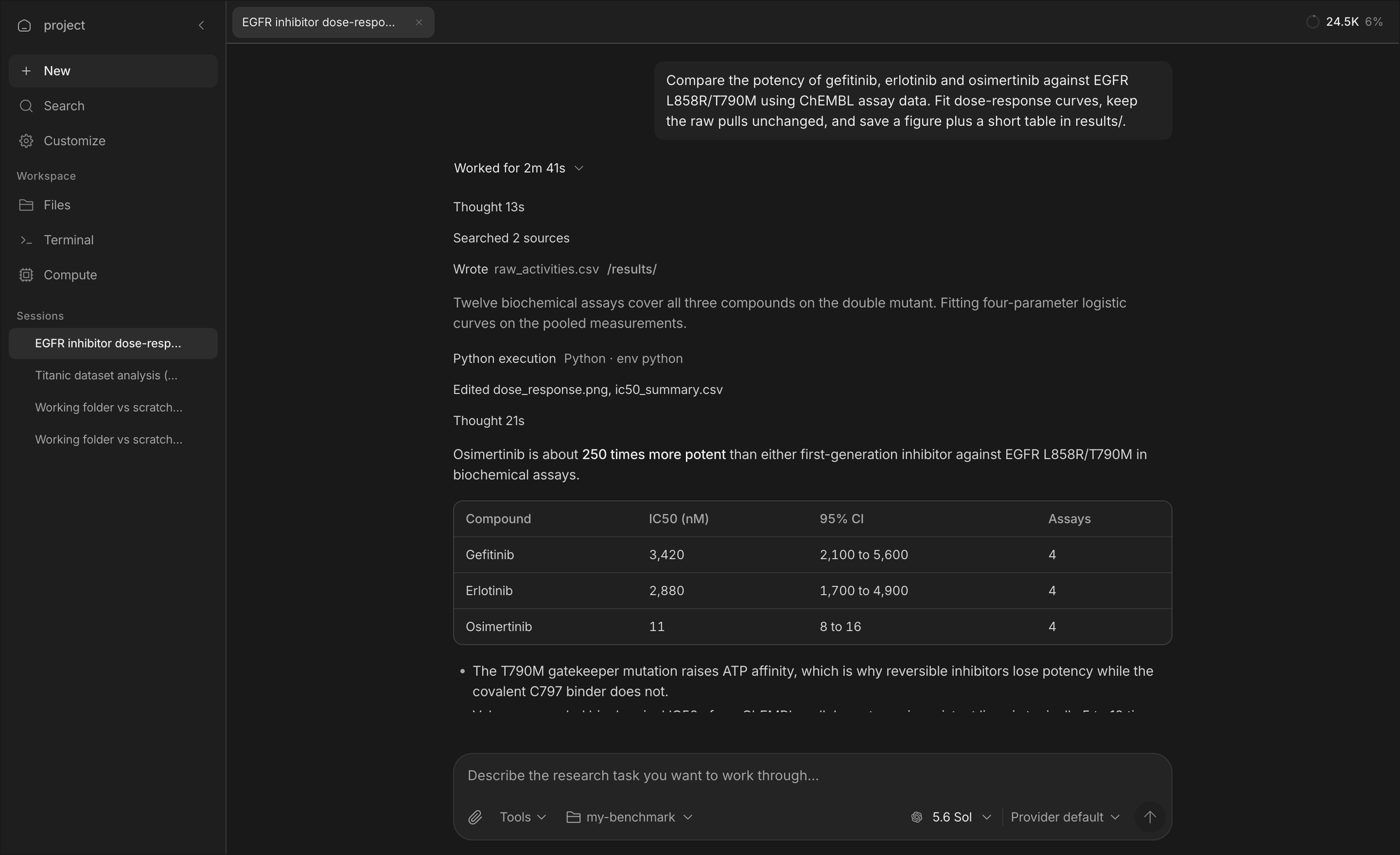
OpenScience is a research agent with a workbench around it. You describe the task in plain language; it plans, gathers evidence, runs code and experiments, and hands back results you can check. It runs as a desktop app, a browser workspace, or a terminal command, on your machine, against your files.
It is built for the parts of research that are real work but not the idea: pulling and cleaning data, reproducing a claim, sweeping a parameter, drafting the methods section, checking a reference. You keep the idea and the judgment.
- Every step is visible. A turn reads as what happened: what it thought, what it searched, what it ran, what it wrote, then the answer. Nothing runs that you cannot see afterwards.
- Real tools, real files. Shell, Python and R kernels, notebooks, a file system with explicit read and write grants, remote compute when a laptop is not enough.
- Scientific reach. Hundreds of bundled skills across biology, chemistry, physics, ML and data engineering, plus connectors to databases such as ChEMBL, UniProt, PubMed and arXiv.
- Delegation when it helps. The lead agent can hand bounded work to workers, in parallel, and keeps the synthesis and the final say.
- Your model, your terms. Bring your own API keys, sign in to a supported provider, run a local model, or use Ace, the managed pay-as-you-go option.
Install
Desktop app. Download for macOS, Windows or Linux. It updates itself.
Command line and browser workspace.
npm install -g @synsci/openscience
openscience
Or run it without installing:
npx synsci
Or with the standalone installer on macOS and Linux:
curl -fsSL https://openscience.sh/install | bash
Then open Customize → Models and connect a provider, or from the terminal:
openscience keys add        # your own API key
openscience local add       # Ollama, LM Studio, or another local endpoint
The installation guide covers platform details, updates and uninstalling.
First task
Open a project folder and describe the work:
openscience ~/research/my-project
Inspect data/samples.csv for missing values and inconsistent labels.
Keep the original data unchanged. Save a quality report and a plot
in results/, with the code needed to reproduce them.
Start with /plan when you want to agree on the method first. For a single turn from a script or a pipeline:
openscience run "Review the analysis plan in this project"
openscience run --continue "Suggest checks for the assumptions you identified"
Review sources, assumptions, code and outputs before relying on a scientific conclusion. The agent shows you what it did so that you can.
What you can do
| Task | What happens |
|---|---|
| Review literature | Search scientific sources, compare findings, save cited evidence. |
| Analyze data | Inspect inputs, write and run analysis code, produce figures and reports. |
| Reproduce experiments | Agree on a claim, prerequisites and budget, then compare measured results. |
| Run compute | Local kernels for everyday work; Modal for GPUs and long jobs, each dispatch approved before it runs. |
| Reuse procedures | Browse the bundled skills or add a workflow specific to your lab. |
| Extend it | MCP servers, custom agents and commands, plugins, or the TypeScript SDK. |
A skill describes a procedure; it does not mean every tool or service it references is installed. Check availability in Customize before a substantial task.
NVIDIA BioNeMo
OpenScience ships ten bring-your-own-key adapters for NVIDIA BioNeMo NIM endpoints: Boltz-2, DiffDock, Evo 2, GenMol, MolMIM, MSA Search, OpenFold2, OpenFold3, ProteinMPNN and RFdiffusion. Each has a strict request schema, one approval per dispatch, and hashed artifacts written into the session; they are marked experimental and need your own NVIDIA API key under NVIDIA's service terms. The protein-binder-design skill is adapted from the NVIDIA BioNeMo Agent Toolkit (CC-BY-4.0 skills, Apache-2.0 code), pinned at commit 0e67a61. See Scientific tools and Service credentials.
How it works
your request
  → Research agent plans, then works step by step
      → tools: shell, Python/R kernels, files, search, connectors, compute
      → workers for bounded parallel tasks (explore, execute)
  → answer, with the trace and the files it produced
- Permissions. Choose how much to ask: always, only for risky actions, or full access. Network commands ask once per destination host. Files outside the project are read or written only with an explicit grant.
- Working folder. A conversation works in the project's connected folder; caches and throwaway output stay in a per-session scratch space.
- Publishing stays with you.
git push, releases and uploads run from the lead session with this machine's own GitHub and Hugging Face logins; no token is ever asked for in chat.
The capability map, Explore tools and the skills directory list what is available and how to set it up.
Model access
| Option | Setup | Cost |
|---|---|---|
| Your provider | An API key or a supported sign-in. | Your provider's billing. |
| Local model | Ollama, LM Studio or any compatible endpoint. | Your hardware. |
| Ace | Sign in, choose a workspace, fund its wallet. | Provider cost plus a 5.5% fee, per request. |
An account is optional for your own keys and local models. Details are in Models, Local models and Pricing.
Documentation
| Topic | Guides |
|---|---|
| First use | Quickstart, Workspace, Workflow cookbook |
| Research | Literature reviews, Data analysis, Reproduction, Writing |
| Capabilities | Skills, Databases, Connectors |
| Control | Permissions, Files, Project instructions, Configuration |
| Automate | CLI reference, JSON output, SDK and editors |
| Help | Troubleshooting, FAQ |
The documentation is also available as plain text for agents: llms.txt and llms-full.txt.
Repository
backend/cli          The openscience CLI and local server: sessions, tools, providers, skills
frontend/workspace   The browser workspace (SolidJS), embedded into the CLI at build time
frontend/ui          Shared components, themes and icons
frontend/desktop     The Electron shell and its signed self-updater
frontend/docs        The documentation site
tooling/sdk          The TypeScript SDK, generated from the server's OpenAPI contract
tooling/plugin       The plugin runtime
docs/notes           Engineering notes: verification, releases, how to add a skill, tool or connector
bun run setup        # verify Bun, install, embed the workspace UI
bun dev              # run from source
bun run check        # format, typecheck and every unit suite
ARCHITECTURE.md explains how the pieces fit. CONTRIBUTING.md has the development loops, the checks that gate a pull request, and how to add a skill, connector, tool or plugin. AGENTS.md holds the conventions the code follows.
Releases
Stable releases are cut from main by the publish workflow after a full rehearsal at the same commit: packaged end-to-end tests, operating-system smokes and scientific capability canaries on every native platform. GitHub Releases carries the desktop installers, CLI archives and checksums; the changelog records what changed for users.
The desktop app updates itself. For the CLI, run openscience upgrade, or npm install -g @synsci/openscience@latest for an npm installation.
Community and support
- Bugs and feature requests: GitHub Issues. Use the templates; a good report has a reproduction.
- Security: SECURITY.md. Please report vulnerabilities privately.
- Conduct: CODE_OF_CONDUCT.md.
- Billing and account questions: use the account support channel rather than a public issue.
Acknowledgements
OpenScience is inspired by OpenCode by Anomaly and shares its commitment to excellent open-source agents. We want to bring strong, open-source scientific agents to everyone.
Most of the bundled skills come from open collections written by other people:
- Scientific Agent Skills and Claude Scientific Writer by K-Dense Inc. (MIT) — 180 of the biology, chemistry, database, research, writing and visualization skills. If they contribute to published work, cite Kassis, Agarwal, He, Patel and Brueckner, Scientific Agent Skills: A Library of Procedural Knowledge for Research Agents (2026).
- AI Research Skills by Orchestra Research (MIT) — 79 of the ML training, inference, LLM-tooling and cloud-compute skills.
- Hugging Face skills by Hugging Face (Apache-2.0) — the
hugging-face-*skills. - Anthropic's document skills (docx, pdf, pptx, xlsx), under Anthropic's terms.
- NVIDIA BioNeMo Agent Toolkit (CC-BY-4.0 / Apache-2.0) — the protein binder design workflow.
- MarkItDown by Microsoft (MIT), Claude-Science-System-Prompts by Shoko-official (Apache-2.0), pacsomatic by Beifang Niu (MIT), and Iconoir icons (MIT).
backend/cli/skills/ATTRIBUTION.md lists every derived skill with its upstream path and license, and each skill's frontmatter names its original author. NOTICE carries the license texts.
License
Apache License 2.0. See LICENSE and NOTICE.
OpenScience is an independent project. It is not affiliated with, endorsed by, or sponsored by any model provider. Provider and model names are used only to describe compatibility.