

openGemini is a free, open source monitoring & observability project written in Go and released under Apache-2.0. It has 1,175 GitHub stars, 175 forks and 117 open issues, and was last pushed 9 days ago. On this registry it ranks #212 of 271 tracked projects in Monitoring & Observability, with 5 head-to-head comparisons available.

What is openGemini?

openGemini is a cloud-native distributed time-series database written in Go and licensed under Apache-2.0, hosted as a CNCF sandbox project and built to store and analyse massive volumes of telemetry data for IoT, observability and DevOps workloads.

What it is

openGemini is a distributed time-series database that runs either standalone or as a cluster and concentrates on the storage and analysis of massive telemetry data. It is implemented in Go, released under the Apache-2.0 licence, and holds sandbox status in the Cloud Native Computing Foundation. It lives in the cloud-native monitoring and observability ecosystem, and it comes with dedicated deployment tooling from the same organisation: the openGemini-operator for containerised installation and gemix for conventional installation.

The concrete problem it addresses is the cost of storing and querying telemetry at scale. Its high cardinality storage engine is aimed at excessive index memory usage and low read and write performance, which are the usual failure modes when series counts grow. For teams already running InfluxDB v1.x, openGemini is compatible with the InfluxDB v1.x Line Protocol, InfluxQL and the read and write APIs, and it also works with the existing InfluxDB toolchain, so it can take the place of an InfluxDB v1.x deployment without rewriting queries or replacing client tooling. It likewise serves as Prometheus backend storage.

Key capabilities

  • MPP architecture with distributed cluster deployment that can be expanded as load grows.
  • LSM-based storage engine with automatic partitioning.
  • Dedicated high cardinality storage engine that targets index memory pressure and slow reads and writes.
  • Column-format storage with per-data-type compression algorithms, reporting compression ratios of 15:1 or higher.
  • Compatibility with the InfluxDB v1.x Line Protocol, InfluxQL, read and write APIs, and the existing InfluxDB toolchain.
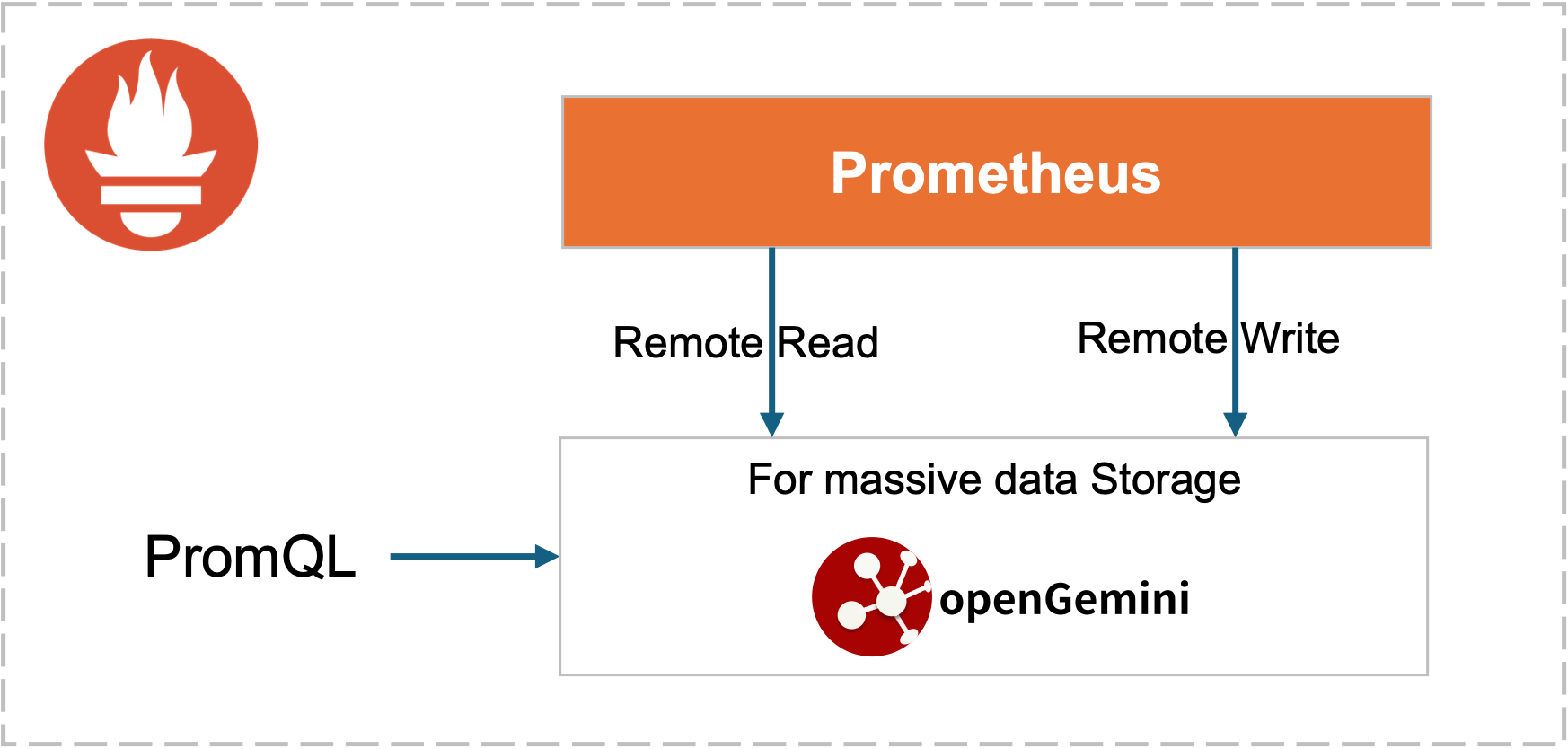
  • Prometheus backend storage with remote read and write support and PromQL support.
  • OpenTelemetry backend storage for a simplified architecture, plus KubeEdge integration for edge device data.
  • Deployment flexibility across virtual machines, physical machines, containers and clouds, with one-click tooling in openGemini-operator and gemix.

Who uses it and how

  • Observability teams that need a backend store for OpenTelemetry data and want a simplified architecture instead of several separate components.
  • Prometheus operators who keep Prometheus for collection and move long-term storage to openGemini through remote read and write, querying with PromQL.
  • IoT and edge deployments that use the KubeEdge integration to manage device data.
  • Platform teams running containers, which deploy the cluster through openGemini-operator, or provision virtual machines, physical machines and cloud hosts with gemix.
  • Organisations already invested in InfluxDB v1.x, which can reuse InfluxQL queries and the existing toolchain against a different storage backend.

Getting started

Build from source with Go v1.22 or later and Python v3.7 or later, following the quick start compilation steps; alternatively deploy with the one-click tooling, using openGemini-operator for containers or gemix for a conventional installation.

How it compares

Among the similar tools named in the available facts, openGemini positions itself as a compatible alternative to InfluxDB v1.x rather than a parallel ecosystem, since it accepts the InfluxDB v1.x Line Protocol, InfluxQL and the read and write APIs and works with the existing InfluxDB toolchain. It also sits behind Prometheus as remote storage, supporting remote read and write together with PromQL, so it can serve as the long-term store while Prometheus remains the collector.

When to use it — and when not to

Choose openGemini when the workload is telemetry at a scale where series cardinality, index memory and read and write throughput are the binding constraints, and when existing InfluxQL queries and InfluxDB v1.x tooling must keep working. A self-hoster takes on operating a distributed time-series cluster, or a standalone instance at smaller scale, and should be prepared to build from source with Go v1.22 or later and Python v3.7 or later if the one-click tooling does not fit the target environment. The README is thin in places — the "Application Scenes" section is empty and the quick start defers to external documentation — and the project is at CNCF sandbox stage with 117 open issues, so teams needing long-established operational track records should weigh that before adopting it.

project readme (upstream, from github) — read inline

README

color

license OpenSSF Best Practices language codeCov release Ask DeepWiki

English | 简体中文

Official Website | Docs | Contribution Guide | RoadMap | Performance
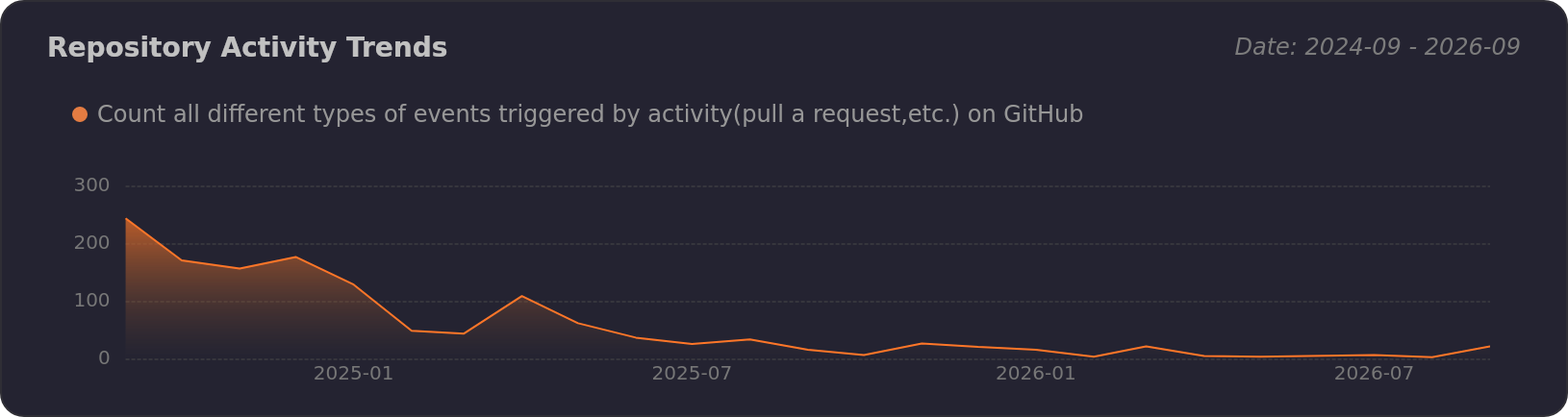
Activity Trends of openGemini/openGemini - Last 28 days

About openGemini

openGemini is a cloud-native distributed time series database, focusing on the storage and analysis of massive telemetry data.

If you have used openGemini, please let us know and click submit Usage Information

cncf_logo

openGemini is an sandbox project of the Cloud Native Computing Foundation (CNCF). Please consider joining the CNCF if you are an organization that wants to take an active role in supporting the growth and evolution of the cloud native ecosystem.

Why openGemini

Compared with other time series database, openGemini has the following advantages:

  • High Performance

    Store and query data quickly and efficiently with automatic partitioning, LSM-based storage techniques, and better data process engineering, see performance reports

  • High Scalability

    Adopting MPP architecture, support distributed cluster deployment and can be flexibly expanded as business grows to meet higher load requirements, see Architecture

  • High Cardinality

    A new high cardinality storage engine solves problems such as excessive index memory usage and low read and write performance, see high cardinality storage engine

  • Data Compression

    Data is stored in column format, and different data types use dedicated data compression algorithms. The data compression ratio is as high as 15:1 or higher, see Data compression algorithm

  • Flexible Deployment

    Supports stand-alone and cluster deployment, and supports various forms of deployment such as virtual machines, physical machines, containers, and clouds. Provides one-click container deployment tool (openGemini-operator) and one-click normal installation and deployment tool (gemix)

  • Ecosystem compatibility

    Compatible with InfluxDB v1.x Line Protocol, Influxql and read/write APIs, also compatible with existing InfluxDB toolchain

Support for Cloud Native Scenarios

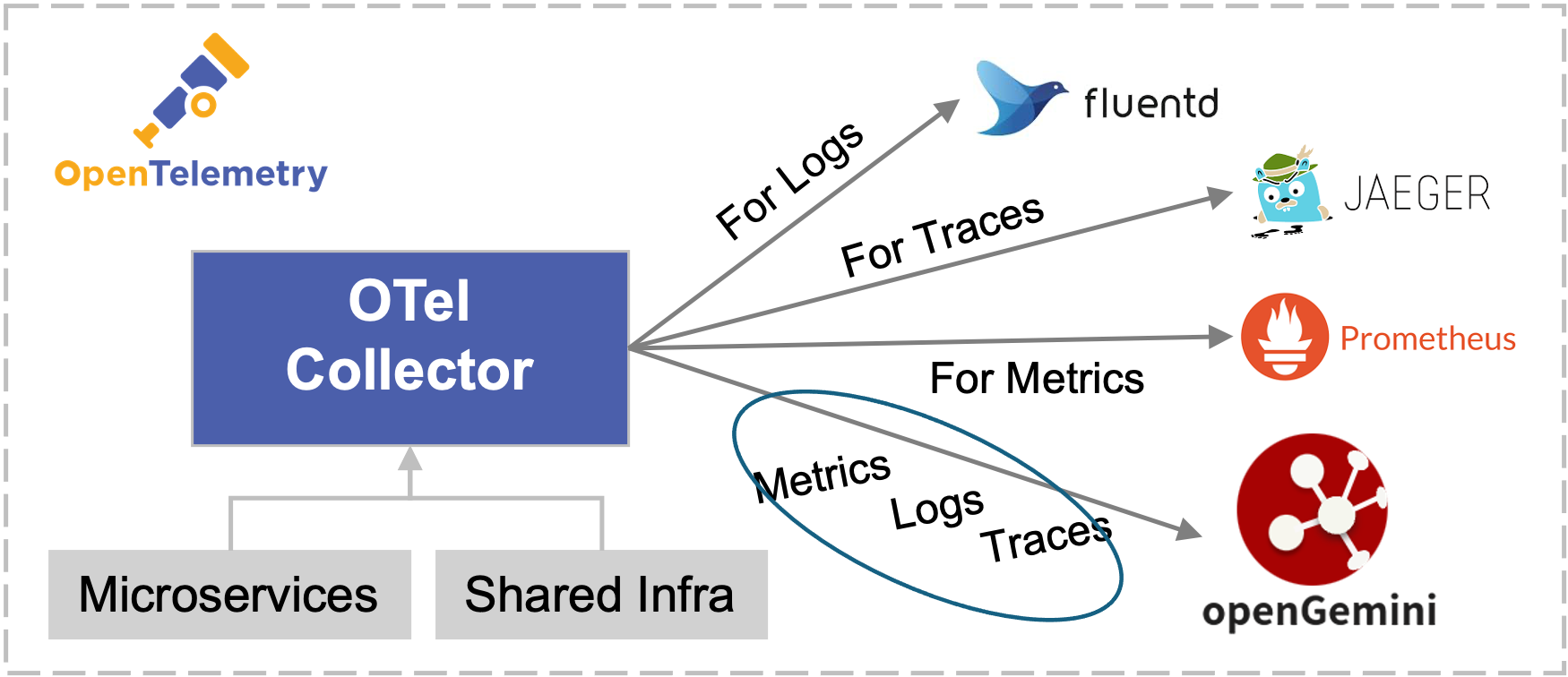
  • openTelemetry backend storage, simplified architecture
  • Prometheus backend storage,support remote read/write, and Support PromQL
  • KubeEdge integration with openGemini, better manage edge device data

Application Scenes

Quick Start

For a more detailed introduction, please visit our official website User Guide

This section mainly contains the following:

  • How to compile openGemini source code
  • How to run openGemini

Compiling environment information

GO version v1.22+

Python version v3.7+

How to set GO environment variables

Open ~/.profile configuration file and add the following configurations to the end of the file:

export GOPATH=/path/to/dir
export GOBIN=$GOPATH/bin
export GO111MODULE=on
export GONOSUMDB=*
export GOSUMDB=off

Compiling

  1. Clone source codes from Github
> cd $GOPATH
> mkdir -p {pkg,bin,src}
> cd src
> git clone https://github.com/openGemini/openGemini.git
  1. Enter the home directory
> cd openGemini
  1. Compiling
> export CGO_LDFLAGS="-Wl,-z,now -Wl,-z,relro -Wl,-z,noexecstack -fPIE -ftrapv"
> export CGO_CFLAGS="-fstack-protector-strong -D_FORTIFY_SOURCE=2 -O2"
> python build.py

The compiled binary file is in the build directory

> ls build
ts-meta ts-monitor ts-server  ts-sql  ts-store

Configuration

The configuration file is in the conf directory. For more information about the configuration items, please refer to User Guide --> Reference --> Configuration Files

Run openGemini

Standalone operation

> cd openGemini
> mkdir -p /tmp/openGemini
> sh scripts/install.sh

Refer to cluster deployments in User Guide

Using openGemini

Install ts-cli

> go install github.com/openGemini/openGemini-cli/cmd/ts-cli@latest

Use the openGemini-cli to connect to openGemini

> ts-cli --host 127.0.0.1 --port 8086

After successful login, the following message will be displayed

> ts-cli --host 127.0.0.1 --port 8086
openGemini CLI 0.1.0 (rev-revision)
Please use 'quit', 'exit' or 'Ctrl-D' to exit this program
>

Create a database

> create database sensordb
> use sensordb

The openGemini supports three ways for creating a measurement.

  • Implicit creation, automatic creation measurement when data is written. By default, partition is based on time.
  • explicit creation, without specifying the partition key, as the same as implicit creation.
> create measurement sensor
  • explicit creation, specifying partition keys during table creation, During data storage, the table will be primarily partitioned by time, and then secondarily partitioned according to the specified partition keys.
> create measurement sensor with shardkey farmID

Write data

insert sensor,farmID=f1,deviceID=d0 sensorID="s20",value=50.98

Query data

> select * from sensor
name: sensor
+---------------------+----------+--------+----------+-------+
| time                | deviceID | farmID | sensorID | value |
+---------------------+----------+--------+----------+-------+
| 1657959880895515464 | d0       | f1     | s20      | 50.98 |
+---------------------+----------+--------+----------+-------+
5 columns,1 rows in set
Elapsed: 7.723332ms

Join & Contribute

Tips for Contribution

Code of Conduct

openGemini follows the CNCF Code of Conduct.

Contact Us

  1. Slack

  2. Twitter

  3. Email

  4. mailing list

License

openGemini is licensed under the Apache License 2.0. Refer to LICENSE for more details.

For third-party software usage notice, see Open_Source_Software_Notice

Frequently asked questions

Is openGemini free to use?

openGemini is open source under the Apache-2.0 licence. There is no licence fee and no seat count — you can self-host it or, where the project offers one, pay a vendor for a managed version instead.

What does openGemini do?

CNCF sandbox project, an open source distributed time-series database with high concurrency, high performance, and high scalability

What is openGemini written in?

openGemini is primarily written in Go. Its source is publicly available at https://github.com/openGemini/openGemini, and it has 1,175 GitHub stars.