

OpenCost — your favorite open source cost monitoring tool for Kubernetes and cloud spend
OpenCost give teams visibility into current and historical Kubernetes and cloud spend and resource allocation. These models provide cost transparency in Kubernetes environments that support multiple applications, teams, departments, etc. It also provides visibility into the cloud costs across multiple providers.
OpenCost was originally developed and open sourced by Kubecost. This project combines a specification as well as a Golang implementation of these detailed requirements. The web UI is available in the opencost/opencost-ui repository.
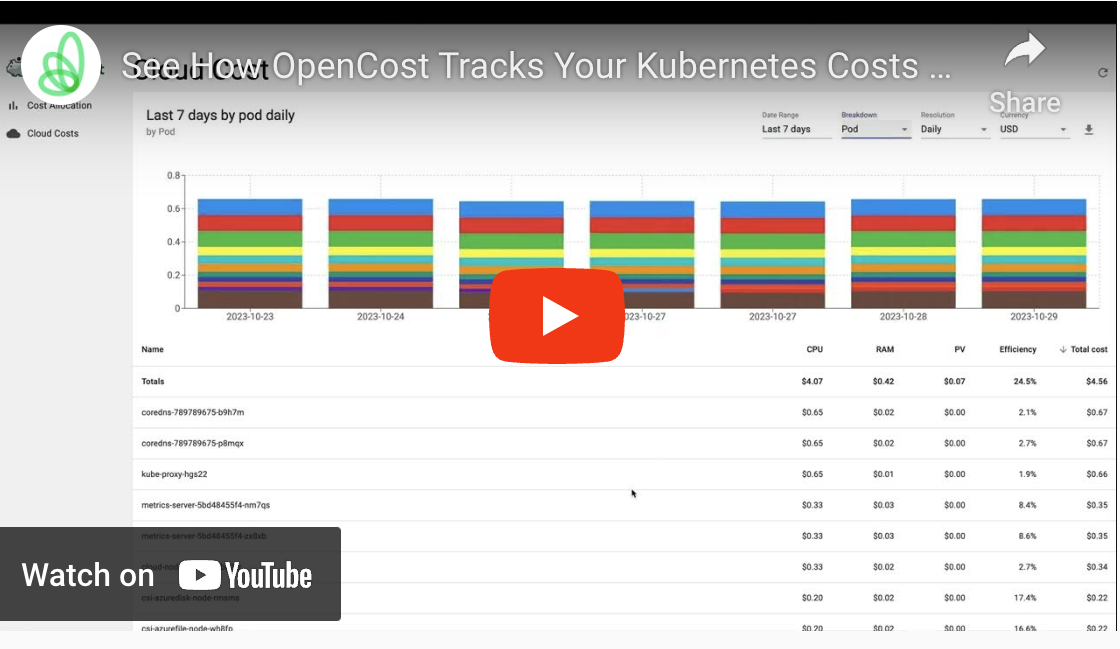 OpenCost UI Walkthrough
To see the full functionality of OpenCost you can view OpenCost features. Here is a summary of features enabled:
- Real-time cost allocation by Kubernetes cluster, node, namespace, controller kind, controller, service, or pod
- Multi-cloud cost monitoring for all cloud services on AWS, Azure, GCP
- Dynamic on-demand k8s asset pricing enabled by integrations with AWS, Azure, and GCP billing APIs
- Supports on-prem k8s clusters with custom CSV pricing
- Allocation for in-cluster K8s resources like CPU, GPU, memory, and persistent volumes
- Easily export pricing data to Prometheus with /metrics endpoint (learn more)
- Carbon costs for cloud resources
- MCP support
- AI inference cost tracking for vLLM-based deployments (llm-d and compatible): cost per million tokens (input/output), KV cache-corrected pricing, shared infrastructure attribution, REST APIs and Prometheus metrics
- Support for external costs like Datadog through OpenCost Plugins
- Free and open source distribution (Apache2 license)
Getting Started
OpenCost is now installed and managed via the official Helm chart only.
Quick install on any Kubernetes 1.20+ cluster:
helm repo add opencost https://opencost.github.io/opencost-helm-chart
helm repo update
helm install opencost opencost/opencost
Note: The standalone Kubernetes manifest files have been removed. Please use Helm for all installations and upgrades. See the Helm installation docs for details and configuration.
Note for sharded Prometheus users: If you run Prometheus in a sharded (HA) setup, set
PROMETHEUS_SERVER_ENDPOINTto a global query endpoint (e.g., Thanos Query, Cortex, or Mimir). Pointing to a single Prometheus pod may result in incomplete or intermittent export results. See the Prometheus integration docs for details.
Usage
MCP Server
The OpenCost MCP (Model Context Protocol) server provides AI agents with access to cost allocation and asset data through a standardized interface. The MCP server is disabled by default (opt-in) in all OpenCost deployments, runs on port 8081, and is built into the Helm chart for easy production deployment. Users have full control to enable it or configure custom ports and settings.
Features
- Opt-in by Default: MCP server is disabled by default to minimize the attack surface and must be explicitly enabled
- Full User Control: Easy to enable or configure port and settings
- Allocation Queries: Retrieve cost allocation data with filtering and aggregation
- Asset Queries: Access detailed asset information including nodes, disks, load balancers, and more
- Cloud Cost Queries: Query cloud cost data with provider, service, and region filtering
- HTTP Transport: Uses HTTP for reliable communication with MCP clients
- Simple Configuration: Easy to enable using standard environment variables
- Helm Integration: Built into the official Helm chart for production deployments
Quick Start
Using Tilt (Development)
# Clone and start OpenCost with MCP server
# You may also need to clone opencost-ui and opencost-helm-charts repositories
# Make sure the cloned repositories are in the same parent tree as opencost

git clone https://github.com/opencost/opencost.git
cd opencost
tilt up
Default Configurations
The UI and Prometheus both run on port 9090. You may need to port-forward to a non-default port to access both them at the same time.
Tilt configuration notes (cloud costs):
OpenCost's Tilt values (tilt-values.yaml) include extra environment variables to enable Cloud Cost ingestion in dev:
# tilt-values.yaml (excerpt)
opencost:
  exporter:
    extraEnv:
      CLOUD_COST_ENABLED: "true"
      CLOUD_COST_CONFIG_PATH: "/var/cloud-integration/cloud-integration.json"
- Set
CLOUD_COST_ENABLEDto "true" to turn on cloud cost ingestion. - Point
CLOUD_COST_CONFIG_PATHto the mounted cloud integration file used by Tilt (e.g.,/var/cloud-integration/cloud-integration.json). - Adjust other values in
tilt-values.yamlas needed during development.
Using Helm (Production)
# Add the OpenCost Helm repository
helm repo add opencost https://opencost.github.io/opencost-helm-chart
helm repo update

# Deploy OpenCost with MCP server enabled (opt-in)
helm install opencost opencost/opencost --set opencost.mcp.enabled=true

# Access MCP server via port forwarding (example)
kubectl port-forward svc/opencost 8081:8081
The MCP server is disabled by default in the Helm chart. For custom configuration:
# Deploy with MCP server enabled
helm install opencost opencost/opencost \
  --set opencost.mcp.enabled=true

# Deploy with custom MCP port
helm install opencost opencost/opencost \
  --set opencost.mcp.port=9091

# Deploy with debug logging
helm install opencost opencost/opencost \
  --set opencost.mcp.extraEnv.MCP_LOG_LEVEL=debug
Configuration Summary
| Configuration | Command | Description |
|---|---|---|
| Default | helm install opencost opencost/opencost |
MCP disabled by default |
| Enable | --set opencost.mcp.enabled=true |
Enable MCP server on port 8081 |
| Custom Port | --set opencost.mcp.port=9091 |
Use different port |
| Debug Mode | --set opencost.mcp.extraEnv.MCP_LOG_LEVEL=debug |
Enable debug logging |
MCP Client Configuration
Configure your MCP client (e.g., Cursor) to connect to the OpenCost MCP server:
Default configuration (port 8081):
{
  "mcpServers": {
    "opencost": {
      "type": "http",
      "url": "http://localhost:8081"
    }
  }
}
Custom port configuration:
{
  "mcpServers": {
    "opencost": {
      "type": "http",
      "url": "http://localhost:9091"
    }
  }
}
For Kubernetes deployments:
{
  "mcpServers": {
    "opencost": {
      "type": "http",
      "url": "http://opencost.opencost.svc.cluster.local:8081"
    }
  }
}
For external access (with LoadBalancer/Ingress):
{
  "mcpServers": {
    "opencost": {
      "type": "http",
      "url": "http://your-opencost-domain.com:8081"
    }
  }
}
Available MCP Tools
The MCP server provides these tools for AI agents:
get_allocation_costs
Retrieve cost allocation data with filtering and aggregation.
Parameters:
window(required): Time window (e.g., "7d", "1h", "30m")aggregate(optional): Aggregation properties (e.g., "namespace", "pod", "node")step(optional): Resolution step sizeaccumulate(optional): Whether to accumulate over timeshare_idle(optional): Whether to share idle costsinclude_idle(optional): Whether to include idle resources
get_asset_costs
Retrieve asset cost data including nodes, disks, load balancers, and more.
Parameters:
window(required): Time window (e.g., "7d", "1h", "30m")
get_cloud_costs
Retrieve cloud cost data with provider, service, and region filtering.
Parameters:
window(required): Time window (e.g., "7d", "1h", "30m")aggregate(optional): Aggregation properties (e.g., "provider", "service", "region")accumulate(optional): Time accumulation ("day", "week", "month")provider(optional): Filter by cloud provider (e.g., "aws", "gcp", "azure")service(optional): Filter by service (e.g., "ec2", "compute", "s3")category(optional): Filter by category (e.g., "compute", "storage", "network")region(optional): Filter by region (e.g., "us-west-1", "us-central1")accountID(optional): Filter by account ID
get_efficiency
Retrieve resource efficiency metrics with rightsizing recommendations and cost savings analysis.
Parameters:
window(required): Time window (e.g., "7d", "1h", "30m")aggregate(optional): Aggregation properties (e.g., "pod", "namespace", "controller")filter(optional): Filter expression for allocationsbuffer_multiplier(optional): Buffer multiplier for recommendations (default: 1.2 for 20% headroom)step(optional): Query step size (e.g., "1h", "6h"); smaller steps reduce peak memory by batching large windows, but may increase query time/requests
Supported Asset Types
- Node: Compute instances with CPU, RAM, GPU details
- Disk: Storage volumes with usage and cost breakdown
- LoadBalancer: Load balancer instances with IP and private status
- Network: Network-related costs and usage
- Cloud: Cloud service costs with credit information
- ClusterManagement: Kubernetes cluster management costs
Example Usage
Once configured, AI agents can query cost data like:
// Get cost allocation for the last 7 days
const allocation = await mcpClient.callTool('get_allocation_costs', {
  window: '7d',
  aggregate: 'namespace,node'
});

// Get asset costs for the last 24 hours
const assets = await mcpClient.callTool('get_asset_costs', {
  window: '1d'
});

// Get cloud costs for AWS EC2 in us-west-1
const cloudCosts = await mcpClient.callTool('get_cloud_costs', {
  window: '7d',
  aggregate: 'service',
  provider: 'aws',
  service: 'ec2',
  accumulate: 'day',
  filter: 'regionID:"us-west-1"'
});

// Get efficiency metrics with rightsizing recommendations
const efficiency = await mcpClient.callTool('get_efficiency', {
  window: '7d',
  aggregate: 'namespace,controller',
  step: '6h',
  buffer_multiplier: 1.2
});
For detailed setup instructions and advanced configuration, see the Helm chart documentation.
Contributing
We :heart: pull requests! See CONTRIBUTING.md for information on building the project from source and contributing changes.
Community
If you need any support or have any questions on contributing to the project, you can reach us on CNCF Slack in the #opencost channel or attend the biweekly OpenCost Working Group community meeting from the Community Calendar to discuss OpenCost development.
FAQ
You can view OpenCost documentation for a list of commonly asked questions.