
OPEN DRONELOG




A high-performance application for analyzing drone flight logs (DJI and Litchi CSV formats). Available as a Tauri v2 desktop app or a Docker-deployable web app. Built with DuckDB and React.
[!IMPORTANT] DJI is a registered trademark of SZ DJI Technology Co., Ltd. DroneLogbook® is a registered trademark of DroneAnalytics Inc. Litchi is a trademark of VC Technology Ltd. Airdata or Airdata UAV is a trademark of Airdata UAV, Inc. This project is independent and is not affiliated with, sponsored by, authorized by, or endorsed by SZ DJI Technology Co., Ltd., DroneAnalytics Inc., VC Technology Ltd., Airdata UAV, Inc., or their affiliates.
[!NOTE] This project repository is dynamically mirrored in Codeberg as a backup. An alternative docker image is available at codeberg.org/arpanghosh8453/open-dronelog.
Contents
- Features
- Accessing flight log files
- Setup and installation (Windows/MacOS/Android)
- Usage
- Building from source (Linux users)
- Docker deployment (Self-hosted Web)
- Profiles and Password Protection
- Security Warning (Web/Docker)
- Configuration
- Context Management
- Tech Stack
- Project Structure
- How to obtain your own DJI Developer API key
- Contribution Guidelines
- Socials and Support
- Love this project?
- License
- Acknowledgments
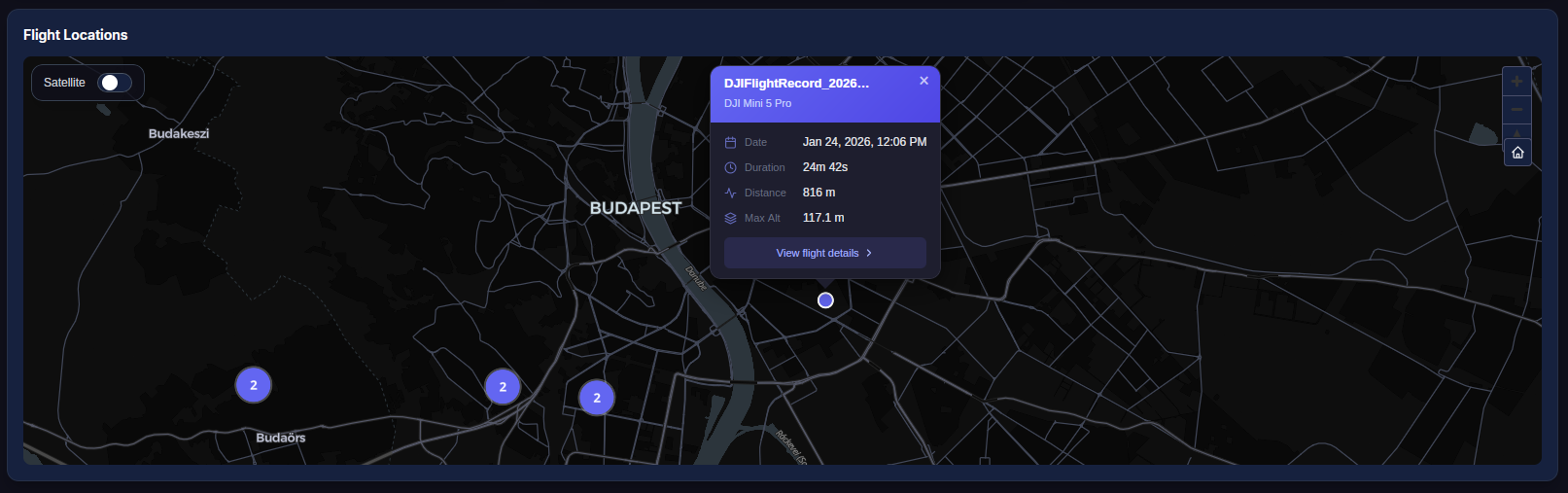
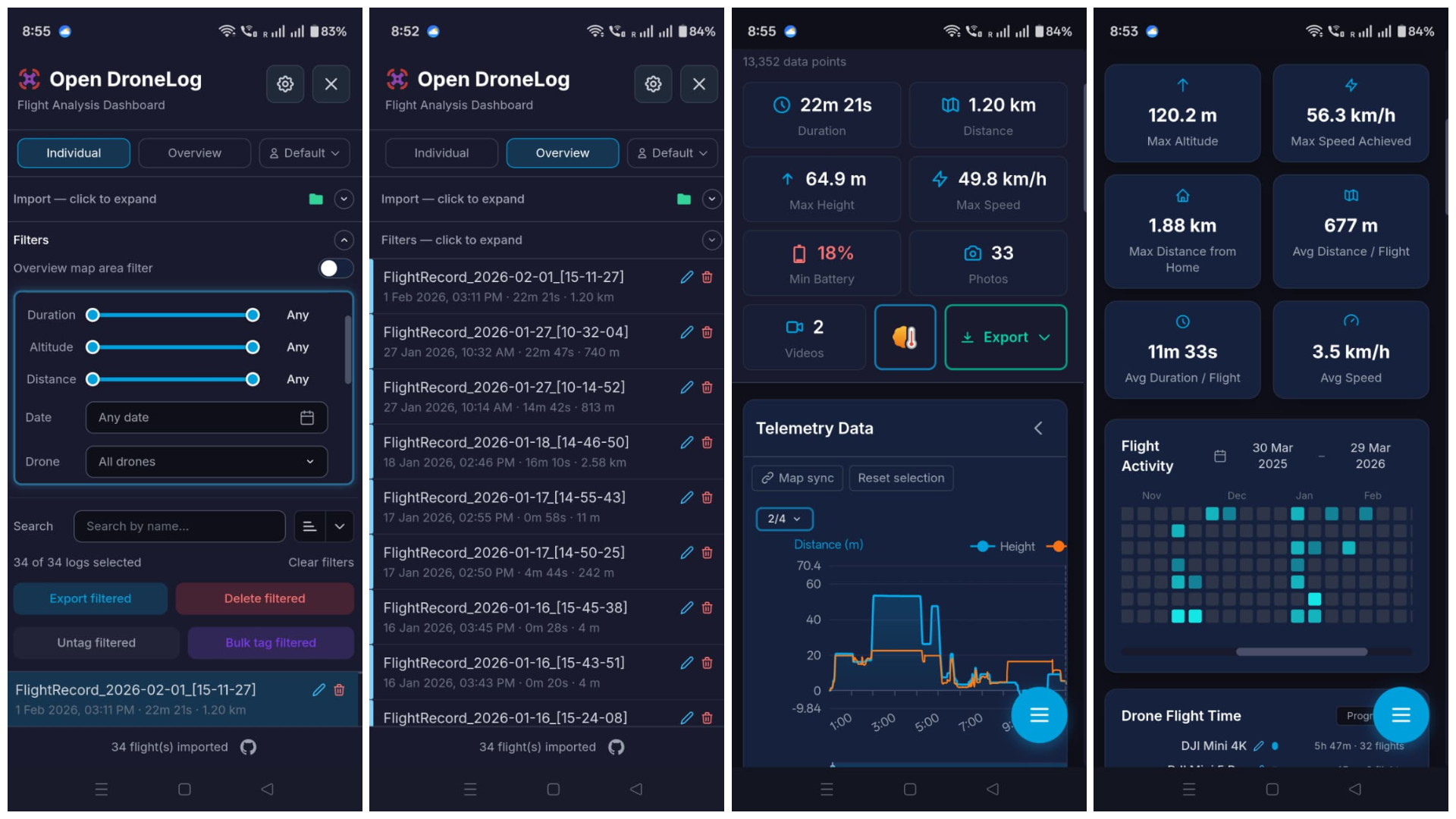
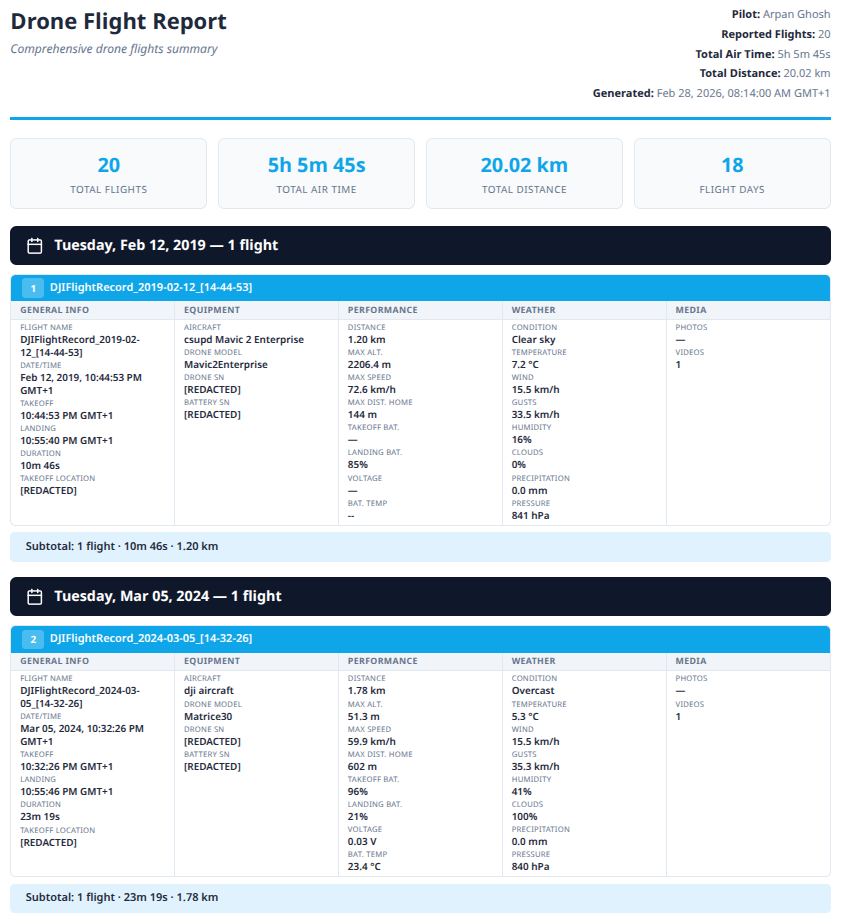
Features
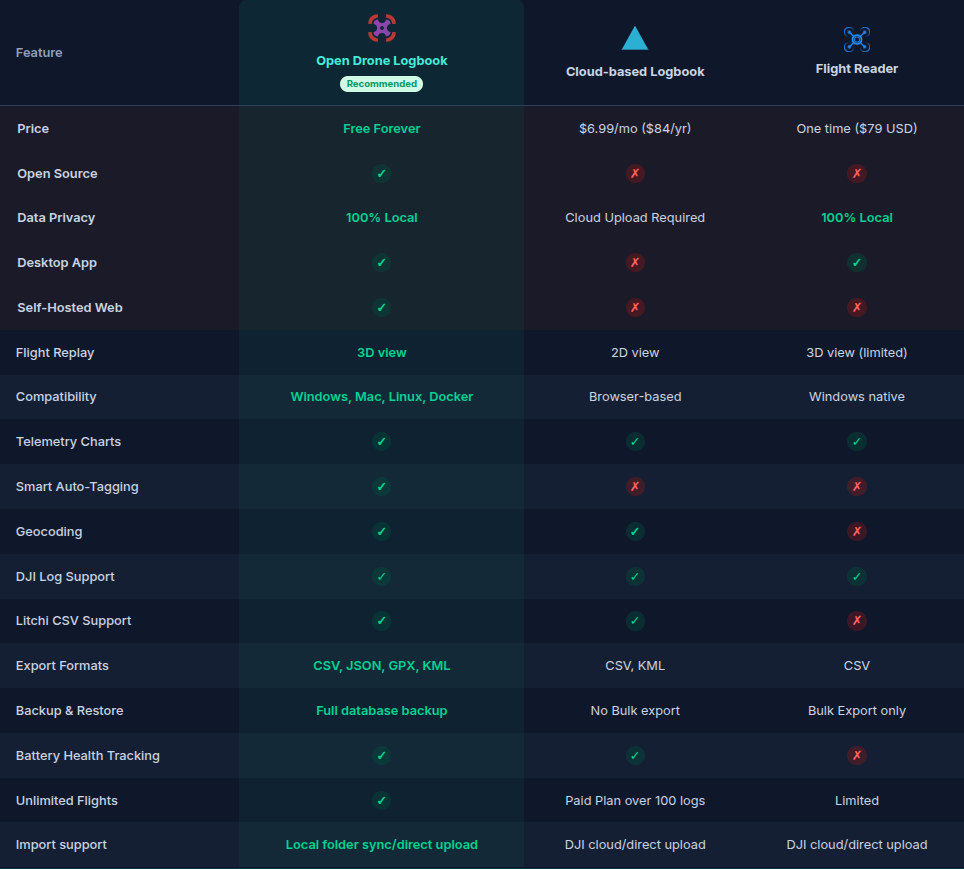
- High-Performance Analytics: DuckDB-powered queries with automatic downsampling for large datasets. Free, open source, no subscription required.
- Multi-Format Support: Import DJI logs (.txt), Litchi CSV, and Airdata CSV exports with automatic unit detection. Third-party apps (Dronelink, DroneDeploy) supported. Optional external parser plugins can be configured via
parsers.json. - Smart Deduplication: Prevents duplicate imports based on drone serial, battery serial, and start time.
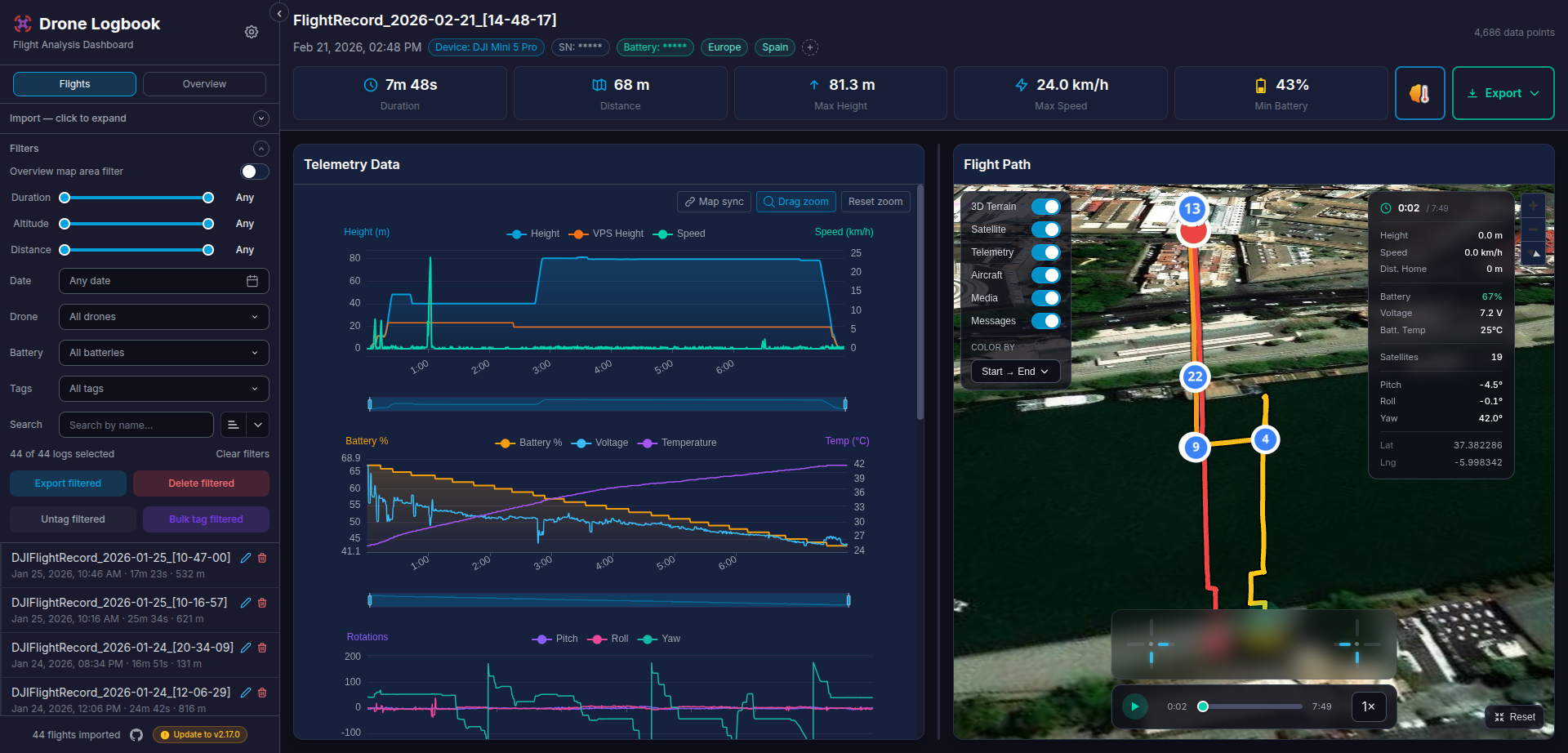
- Interactive Flight Maps: 3D terrain, map-type selection (Satellite, Topographic, OpenStreetMap), flight replay with speed control (0.5x-16x), live telemetry overlay, and RC joystick visualization.
- Telemetry Charts: Height, speed, battery, cell voltages, attitude, RC signal, GPS, distance-to-home, velocity, battery full capacity, and battery remaining capacity with synchronized drag-to-zoom, per-profile telemetry color customization, and collapsible panel controls.
- Local-First Storage: All data in a local DuckDB database. No cloud upload required (except DJI key fetch during first import).
- Smart Tags: Auto-tagging (Night Flight, High Speed, Low Battery, etc.) and offline reverse geocoding for location tags. Manual tags and bulk operations supported.on.
- Filters & Search: Date range (calendar + typed
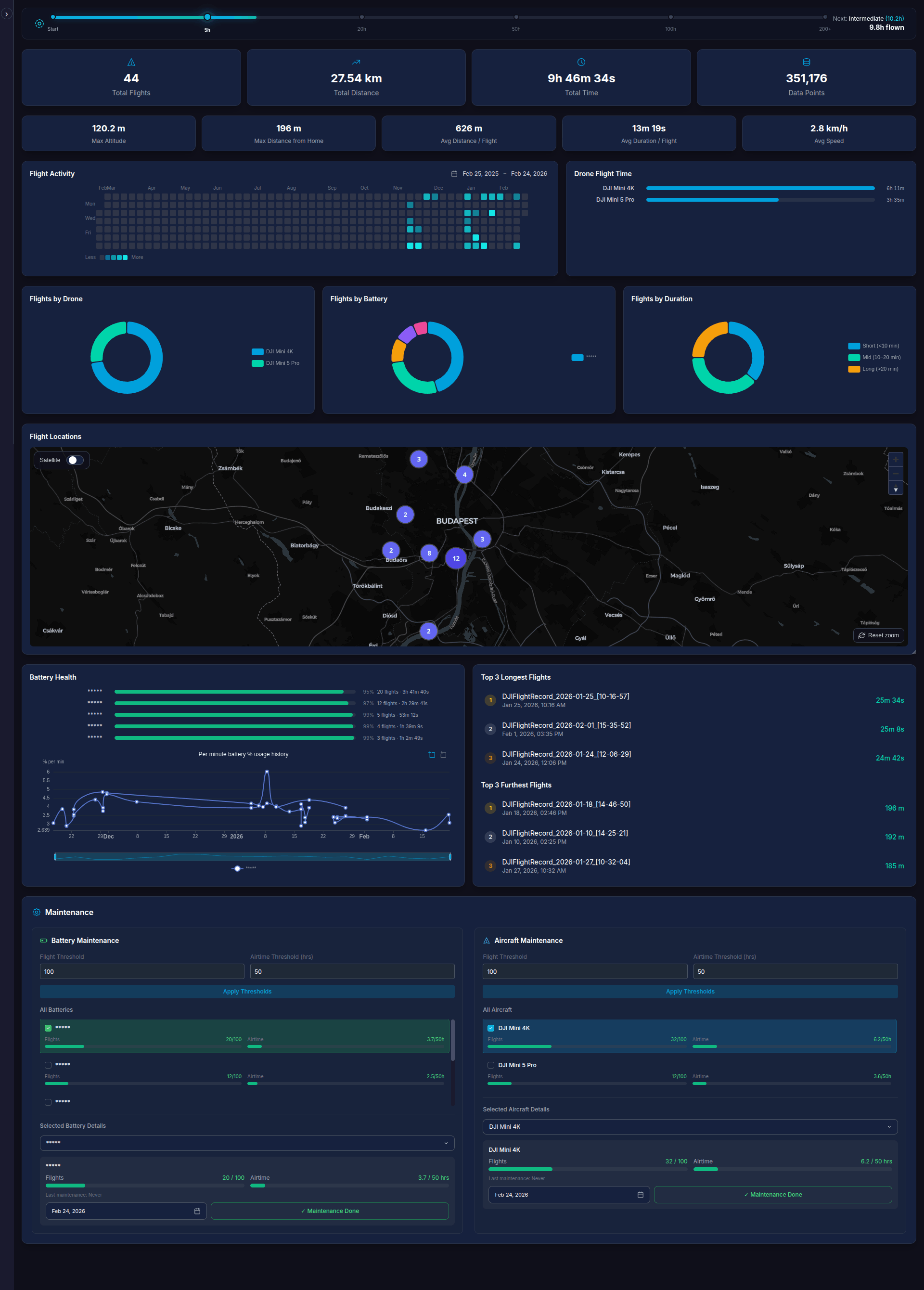
YYYY-MM-DDstart/end quick entry), drone/battery/controller/color filters, duration/altitude/distance sliders, tag filter, map area filter, and filter inversion. - Overview Dashboard: Aggregate stats, activity heatmap, pie charts by drone/battery/duration, time-of-day radial chart, cluster map with optional heatmap layer, and top-flight highlights.
- Battery Health: Per-battery health bars with cycle count tracking, serial renaming, per-minute usage history with zoom, and battery capacity history chart with multi-select battery dropdown showing full-charge capacity trends over time.
- Maintenance Tracking: Configurable thresholds with color-coded progress bars and date-based maintenance recording.
- Exports: CSV, JSON, GPX, KML, and Summary CSV export. FlyCard generator for shareable 1080x1080 social media images.
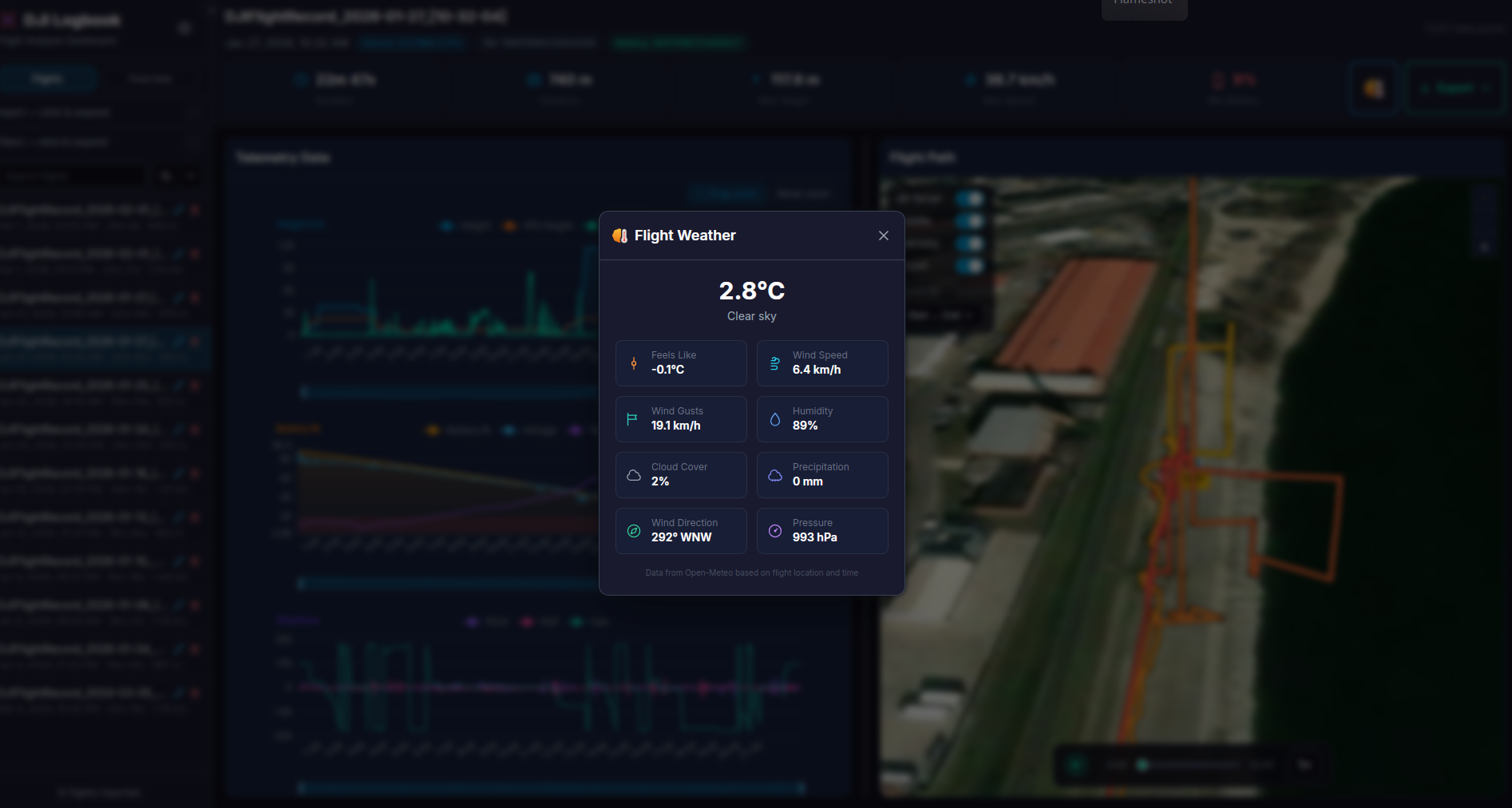
- HTML Report: Generate a configurable, print-ready flight regulation report (A4 layout) with selectable field groups, weather data, and day-by-day grouping. Can be printed as PDF via Ctrl+P. Pilot name and field preferences can be customized and will persist across sessions.
- Manual Flight Entry: Record flights without log files with optional coordinates and metadata.
- Multi-Language Support: Full internationalization with 11 language locales (English, German, Spanish, French, Italian, Japanese, Korean, Dutch, Polish, Portuguese, Chinese) and locale-aware number and date formatting.
- Progressive Web App (PWA): Optionally install the application directly from the browser for a native-like experience on desktop and mobile.
- Backup & Restore: Export/import full database across desktop and Docker instances.
- Profile System: Create multiple profiles to separate flight data by pilot, drone fleet, or purpose. Each profile has its own database, config, uploads, and sync folder.Optionally lock any profile (including the default) with a password.
Accessing flight log files
You first need to collect the supported flight log files that you can import to this application.
Automated Sync (Windows/Mac)
You can sync your DJI flight logs directly from the mobile (Android/iPhone) or RC/RC-2/RC-Pro directly and seamlessly using the Litchi Hub Bridge companion app on your Windows/Mac desktop or laptop. This is a free application that lets you sync your flight logs from the phone's DJI Fly app or the RC devices directly to a local folder.
Download Here - Windows | MacOS
After installation, run it and check the tray menu (it usually gets minimizedto tray after start) - Right click on tray icon and pick settings - Check the Start with Windows in General tab and go to Flight Logs Sync tab to pick a local folder where the logs will be synced. Select the Auto-sync when a device connects for a seamless experience. After this setup, as soon as you plug in your RC or Android/iPhone (should be unlocked and mounted to your desktop/laptop) which you use to fly your drones, it will automatically search for the relevant folders and copy the .txt logs from there to your selected local folder.
[!TIP] After you set up Open Drone Log, you will have an option to pick a Sync folder from where the application (Open Drone Log) syncs files on startup for new log files. If you select the same log folder for both application, you will not have to find or copy new logs manually anymore - it syncs automatically with your Oopen Drone Log application!
Manual Log collection
This project supports modern DJI log files in the .txt format. For DJI fly apps on Android or RC remotes, they are usually in Internal Storage > Android > data > dji.go.v5 > files > FlightRecord. For iOS, Connect your iPhone/iPad to a computer, open iTunes/Finder, select the device, go to the "File Sharing" tab, select the DJI app, and copy the "Logs" folder. If you are already using other online sync applications, you can download the original logs files directly from there too.
You can find more details resources from this simple google search
Litchi flight logs can be exported as CSV files from the Litchi app. Litchi-imported flights are automatically tagged with "Litchi" for easy filtering.
Airdata Exports
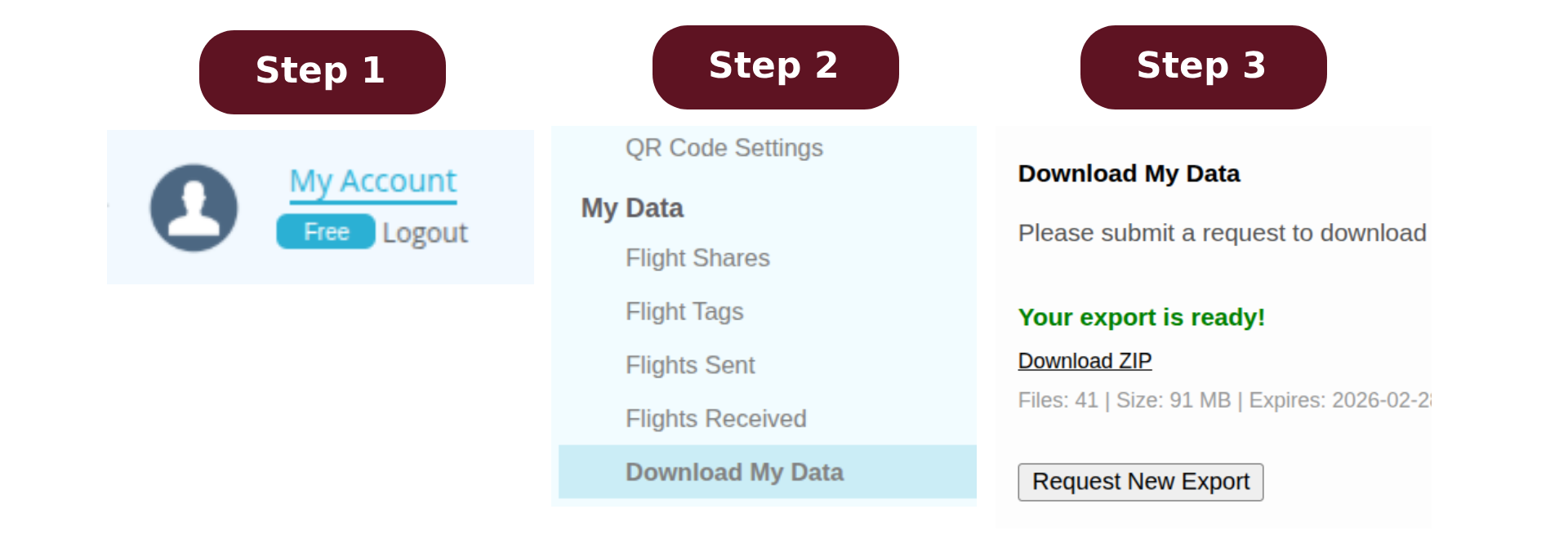
If you use Airdata to sync your flight logs, you can export the original DJI log files directly from the Airdata website:
- Go to your Airdata flight logs and click on
my account - In the left sidebar, under
My Datasecction, pickDownload my data - Click Request Export and wait for their email with zip containing the
.txtfiles
These exported log files can then be imported directly into Open DroneLog.
Setup and installation (Windows/MacOS)
There is no installation step if you want to use the standalone binary builds, just visit the latest release page, and download the appropriate binary for Windows or MacOS and run them.
[!WARNING] For macOS, there are additional steps required before you can use the application.
[!IMPORTANT] When you are copying from RC or mobile device, you can NOT directly drag and drop the files to the interface. This is because these external devices are mounted differently and only accessible to the file manager. Please copy the files to a local folder or the device sync folder before trying to upload or sync.
[!TIP] Explore the full manual if you want to have a comprehensive overview of all the available options and features inside the app.
Windows (64-bit)
Open.DroneLog_(version)_x64-setup.exe: Standard installer. Best for most users.Open.DroneLog_(version)_x64_en-US.msi: Enterprise installer. For IT admins deploying to multiple PCs.
macOS
(Files available for both aarch64 / Apple Silicon and x64 / Intel)
...dmg: Standard disk image. Best for most users (drag and drop to Applications)....app.tar.gz: Compressed app bundle. A quick, alternative way to download the app without mounting a drive.open-dronelog_darwin_...: Command-line binary. For advanced terminal users only.
Linux (64-bit)
Open.DroneLog_(version)_amd64.deb: Package for Ubuntu, Mint, and Debian systems.Open.DroneLog-(version).x86_64.rpm: Package for Fedora, CentOS, and Red Hat systems.Open.DroneLog_(version)_amd64.AppImage: Universal portable app. Runs on any Linux distro without installing.open-dronelog_linux_x86_64: Command-line binary. For advanced terminal users only.
Android APK Releases
Recommended for most users:
open-dronelog_(version)_android-universal.apk: Universal APK that works on most Android devices.
Advanced / smaller download option:
open-dronelog_(version)_arm64-v8a_android.apk: Modern 64-bit ARM phones/tablets (most current Android devices).open-dronelog_(version)_armeabi-v7a_android.apk: Older 32-bit ARM devices.open-dronelog_(version)_x86_64_android.apk: 64-bit x86 devices/emulators.open-dronelog_(version)_x86_android.apk: 32-bit x86 devices/emulators.
If you are unsure which one to use, install the universal APK.
General / Verification
checksums.txt: Security file. Use to verify your downloaded files aren't corrupted or tampered with.
Try the Webapp First (No Installation Required)
Want to quickly test the tool before committing to a full installation? Try the hosted webapp. Please only use it for evaluation and temporary visit.
- Zero setup – just open the link in your browser
- Perfect for evaluation – see if the tool fits your needs before installing
- Single flight visualization – upload and analyze one flight log at a time
- All core features – view telemetry charts, 3D flight path replay, and flight statistics
- No data persistence – your data is processed locally in the browser and not stored on any server
Note: For the full experience with multi-flight management, database persistence, filtering, overview analytics, and backup/restore capabilities, use the desktop app or self-hosted Docker deployment.
Hosting Open Drone Log for Teams
If you are using Open Drone Log for a team with multiple drone operators, and want a common hosted instance where everyone can import their logs from their own machine to the server, without managing your own self-hosted server, an easy option is PikaPods. They host and manage the application in a container, and you get a unique URL for your own hosted instance of Open Drone Log for a monthly fee less than $2 USD!

macOS Users: "Damaged File" Error Fix
[!IMPORTANT] If you see "Open DroneLog is damaged and can't be opened" on macOS, this is a Gatekeeper security warning for unsigned apps, not a corrupted file. Apple charges $99/year for developer signing, so we provide these free workarounds instead.
Method 1: Right-Click to Open
This is the simplest method and works for most users:
- Locate the app in your Applications folder (or wherever you placed it after downloading)
- Right-click (or Control+click) on "Open Dronelog.app"
- Select "Open" from the context menu
- Click "Open" in the dialog that appears
Method 2: Terminal Command
Open Terminal (search for "Terminal" in Spotlight) and run:
Simply type xattr -cr (with a space at the end), then drag and drop the app onto the Terminal window - it will auto-fill the file path:
xattr -cr <delete-this-part-after-cr-and-drag-and-drop-the-app-here>
Then press Enter and try opening the app again.
Usage
- Import a Flight Log: Click "Browse Files" or drag-and-drop a drone log file
- Select a Flight: Click on a flight in the sidebar
- Analyze Data: View telemetry charts and the 3D flight path on the map
- Filter/Search/Sort: Use date range (calendar or typed
YYYY-MM-DDstart/end + Go), drone/device, battery serial filters, search, and sorting - Overview Analytics: Sidebar filters (date, drone, battery, duration) automatically apply to overview statistics
- Export: Use the Export dropdown in the stats bar (CSV/JSON/GPX/KML)
- Backup & Restore: Use Settings → Backup Database to export, or Import Backup to restore
- Configure Settings: Set API key, theme, units, and view app data/log directories
Building from source (Linux users)
Prerequisites
# Clone the repository
git clone https://github.com/arpanghosh8453/open-dronelog
cd open-dronelog

# Install frontend dependencies
npm install

# Run in development mode
npm run tauri
Docker deployment (Self-hosted Web)
The app can also be deployed as a self-hosted web application using Docker. This uses an Axum REST backend instead of Tauri IPC, with Nginx serving the frontend and proxying API requests.
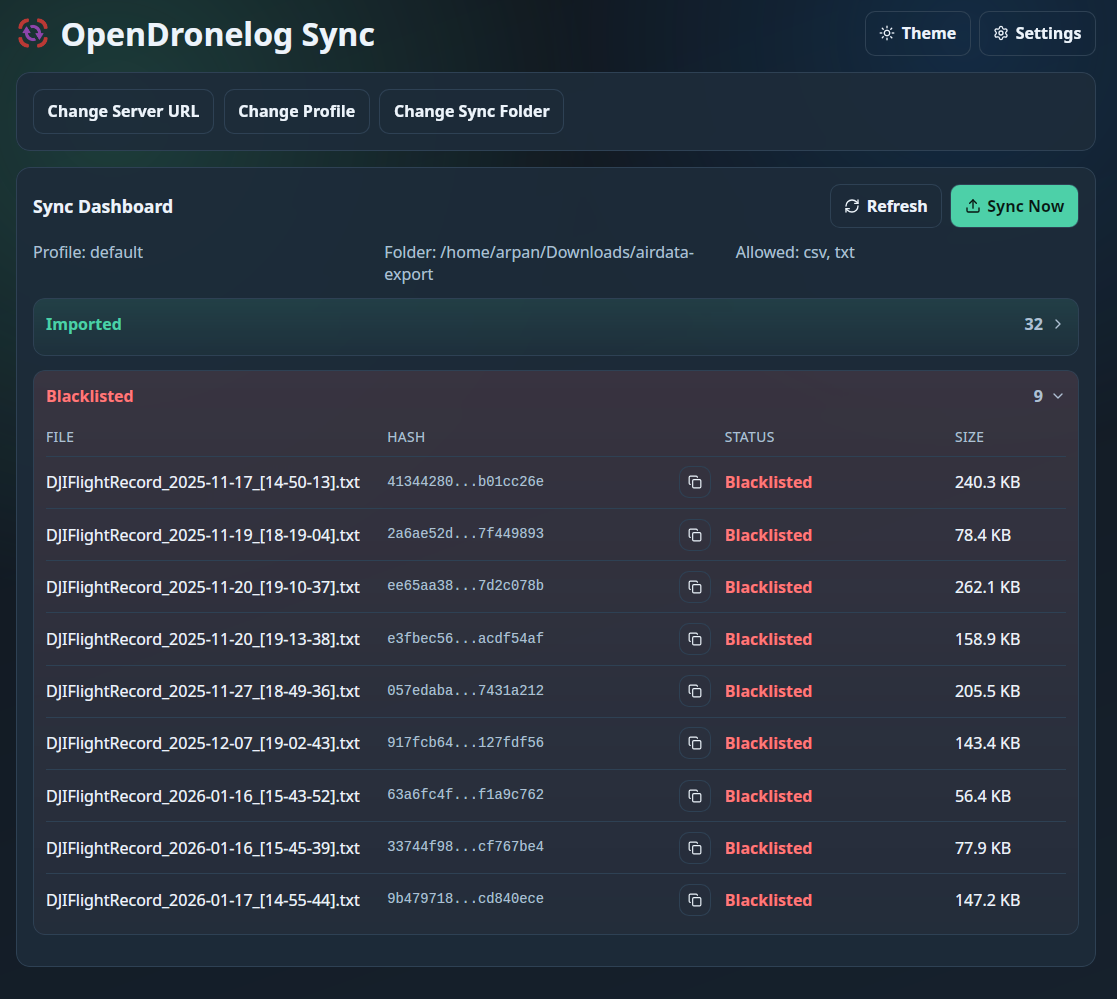
[!TIP] For hosted/server deployments where you want a dedicated desktop/mobile uploader that watches a local folder and syncs logs to your hosted ODL server automatically, use the companion utility: opendronelog-sync.
[!IMPORTANT] This Web interface is primarily designed for Desktop or larger screen viewing. Basic mobile responsiveness is available but the full experience is best on larger screens.
Quick start (recommended)
Pull the pre-built image from GitHub Container Registry:
docker pull ghcr.io/arpanghosh8453/open-dronelog:latest

docker run -d \
  -p 8080:80 \
  -v drone-data:/data/drone-logbook \
  --name open-dronelog \
  ghcr.io/arpanghosh8453/open-dronelog:latest
Or use docker-compose (uses the same pre-built image):
git clone https://github.com/arpanghosh8453/open-dronelog
cd open-dronelog
docker compose up -d
Then open http://localhost:8080 in your browser.
Building locally from source
If you want to build the Docker image from source instead of pulling the pre-built one:
git clone https://github.com/arpanghosh8453/open-dronelog
cd open-dronelog
docker compose -f docker-compose-build.yml up -d
Note: The initial build takes ~10–15 minutes (Rust compilation). Subsequent rebuilds are much faster thanks to Docker layer caching.
Data persistence
All flight data (DuckDB database, cached decryption keys, and optionally uploaded log files) is stored in a Docker named volume (drone-data) mapped to /data/drone-logbook internally inside the container. Data persists across container restarts, image updates, and rebuilds. It is only removed if you explicitly delete the volume with docker compose down -v.
When KEEP_UPLOADED_FILES=true is set, original log files are preserved in an uploaded subfolder using their SHA256 hash as filename for deduplication.
Environment variables
| Variable | Default | Description |
|---|---|---|
DATA_DIR |
/data/drone-logbook |
Database and config storage |
RUST_LOG |
info |
Log level (debug, info, warn) |
DJI_API_KEY |
(bundled default) | Set your own for better rate limits. See How to obtain your own DJI Developer API key. |
SYNC_LOGS_PATH |
(not set) | Path to internal folder for automatic log import (e.g., /sync-logs) |
SYNC_INTERVAL |
(not set) | Cron expression for scheduled sync (e.g., 0 0 */8 * * * for every 8 hours) |
KEEP_UPLOADED_FILES |
true |
When true, keeps copies of uploaded log files in the uploaded folder |
PROFILE_CREATION_PASS |
(not set) | Master password required for creating or deleting profiles in web/Docker mode. When unset, anyone can create and delete profiles. |
DEFAULT_PROFILE_PASSWORD |
(not set) | Optional one-time initializer for the default profile password at startup. If a default password already exists, it is not overwritten and startup logs that initialization was skipped. If unset or empty (and no existing password), the default profile remains unprotected. |
SESSION_TTL_HOURS |
24 |
Session token lifetime in hours. After expiry the user must re-authenticate. |
Automatic log sync (Docker)
You can mount a folder containing your drone flight logs and have the app automatically import new files:
- Uncomment the volume mount in
docker-compose.ymland set the path to your logs folder:- /path/to/your/drone/logs:/sync-logs:ro - Uncomment the
SYNC_LOGS_PATHenvironment variable:- SYNC_LOGS_PATH=/sync-logs - (Optional) Enable scheduled automatic sync by setting a cron expression:
- SYNC_INTERVAL=0 0 */8 * * * - Restart the container.
Sync behavior:
- Without
SYNC_INTERVAL: Manual sync only - use the "Sync" button in the web interface to import new files - With
SYNC_INTERVAL: The server automatically syncs at the scheduled times, plus manual sync via the button
Common cron expressions:
| Expression | Schedule |
|---|---|
0 0 */8 * * * |
Every 8 hours |
0 0 0 * * * |
Daily at midnight |
0 0 */2 * * * |
Every 2 hours |
0 30 6 * * * |
Daily at 6:30 AM |
0 0 0 * * 0 |
Weekly on Sunday at midnight |
The sync status and a manual "Sync" button will appear in the Import section when configured. During sync, the app shows file-by-file progress (current filename, X of Y counter) matching the desktop app experience.
Keep uploaded files (Docker)
To retain copies of uploaded log files in Docker, enable the KEEP_UPLOADED_FILES environment variable (true by default):
Uploaded files are stored in /data/drone-logbook/uploaded inside the container (part of the drone-data volume). You can adjust the external mount volume to have direct access.
[!TIP] You can set the external host path same for both
/sync-logsand/data/drone-logbook/uploadedto unify the log file collection. Make sure to remove the:ropart from the/sync-logsmount. I do it myself for convinience, but we recommend our users to keep them separate to make sure you accidentally don't lose any log files from the sync folder due to overwrite or any issue with the application.
Profiles and Password Protection
Open DroneLog supports multiple named profiles. Each profile is a fully isolated environment with its own database, config, uploads, and sync folder. Profiles are managed from the profile selector dropdown in the header.
Creating and switching profiles
- Click the profile selector (top-left, next to the logo) and choose New Profile
- Enter a name and, optionally, a password to protect it
- Switch between profiles by selecting them from the dropdown
- Each browser tab can be on a different profile (uses
sessionStoragefor isolation)
Password protection
- Set, change, or remove a profile password from Settings → Profile Password
- Protected profiles display a lock icon and prompt for a password when switching to them
- Passwords are hashed with argon2id and verified server-side
- In web/Docker mode, a session token is issued after successful authentication and sent via the
X-Sessionheader - Lockout policy: 5 consecutive failed attempts lock the profile for 60 seconds
Master password (web/Docker only)
Set the PROFILE_CREATION_PASS environment variable to require a master password for creating and deleting profiles. This is useful for shared or publicly exposed instances.
environment:
  - PROFILE_CREATION_PASS=your-secret-master-password
When set, any create or delete operation must include the matching master password.
Security Warning (Web/Docker)
[!WARNING] Open DroneLog is designed as a local-first application and does NOT include TLS/HTTPS. If you expose your instance to the internet, passwords and session tokens are transmitted in plaintext over HTTP.
Strongly recommended for internet-facing deployments:
- Use a reverse proxy (e.g., Nginx, Caddy, Traefik) with TLS termination in front of the container
- Do not expose port 80 directly to the public internet without encryption
- Set
PROFILE_CREATION_PASSto prevent unauthorized profile creation
Security limitations
| Area | Limitation |
|---|---|
| Transport | No built-in TLS - passwords and tokens sent in plaintext over HTTP |
| Session storage | Sessions are in-memory only; a server restart invalidates all sessions |
| CSRF | No CSRF token; relies on same-origin policy and the X-Session / X-Profile custom headers |
| Brute force | Argon2id provides strong hashing, but without TLS an attacker on the network can intercept tokens via MITM |
For production deployments, a reverse proxy with TLS is essential.
Configuration
- DJI API Key: Stored locally in
config.json. You can also provide it via.envor via thesettingsmenu inside the application. The standalone app ships with a default key, but users should enter their own to avoid rate limits for log file decryption key fetching. - External Parsers: Optional parser plugins can be configured in
parsers.json(app-data directory on desktop, and fixed path/app/plugins/parsers.jsonin Docker/web). - Sync folder: Set and use the
sync folder(application interface for Desktop and ENV variable for docker) for seamless log file import and re-import with de-duplication. The files uploaded through drag and drop or browse are also collected by default in theUploadedfolder of application storage (customizable via settings options for Desktop and ENV variable for docker). You can use a common folder (essentially unifying the raw log files storage location), but that is not generally recommended to prevent any mishaps or file overwrites. - Database Location: Stored in the platform-specific app data directory (e.g., AppData on Windows, Application Support on macOS, and local share on Linux). In Docker mode, data is stored in
/data/drone-logbook(persisted via a Docker volume). - API Guide: Available API request paths and response structure is provided in the API documentation page.
- Log Files: App logs are written to the platform-specific log directory and surfaced in Settings. In Docker mode, logs are written to stdout.
Context Management
This project uses a modular, machine-parsable context system under context/ for agentic development.
- Setup and workflow guide:
docs/context-management.md - Context root documentation:
context/README.md
Core commands:
npm run context:build
npm run context:check
Tech Stack
Backend (Rust)
- Tauri v2: Desktop application framework (feature-gated behind
tauri-app) - Axum 0.7: Web REST API server for Docker/web deployment (feature-gated behind
web) - DuckDB: Embedded analytical database (bundled, no installation required)
- dji-log-parser: DJI flight log parsing library
- reverse_geocoder: Offline city/country/continent geocoding (bundled GeoNames dataset)
Frontend (React)
- React 18 + TypeScript: UI framework
- Vite: Build tool
- Tailwind CSS: Styling
- Zustand: State management
- ECharts: Telemetry charting
- react-map-gl + MapLibre: Map visualization
- deck.gl: 3D flight path overlay
Project Structure
├── src-tauri/               # RUST BACKEND
│   ├── src/
│   │   ├── main.rs          # Entry point (feature-gated: Tauri or Axum)
│   │   ├── server.rs        # Axum REST API (web feature only)
│   │   ├── database.rs      # DuckDB connection & schema
│   │   ├── parser.rs        # dji-log-parser wrapper
│   │   ├── models.rs        # Data structures
│   │   ├── api.rs           # DJI API key fetching (if present)
│   │   ├── profile_auth.rs  # Per-profile password hashing (argon2id)
│   │   └── session_store.rs # Session token management (web only)
│   ├── Cargo.toml           # Rust dependencies + feature flags
│   └── tauri.conf.json      # App configuration
│
├── src/                     # REACT FRONTEND
│   ├── components/
│   │   ├── dashboard/       # Layout components
│   │   ├── charts/          # ECharts components
│   │   ├── map/             # MapLibre components
│   │   └── ui/              # Reusable UI components (Select)
│   ├── stores/              # Zustand state
│   ├── types/               # TypeScript interfaces
│   └── lib/
│       ├── utils.ts         # Utilities
│       └── api.ts           # Backend adapter (invoke/fetch)
│
├── docker/                  # DOCKER CONFIG
│   ├── nginx.conf           # Nginx reverse proxy config
│   └── entrypoint.sh        # Container startup script
│
├── Dockerfile               # Multi-stage build
├── docker-compose.yml       # Deploy with pre-built GHCR image
├── docker-compose-build.yml # Build from source locally
│
└── [App Data Directory]     # RUNTIME DATA
    ├── flights.db           # DuckDB database (flights, telemetry, flight_tags, keychains)
    ├── config.json          # API key and smart tags settings
    └── keychains/           # Cached decryption keys
How to obtain your own DJI Developer API key
[!NOTE] Unless you set up your own API key, the import process will be rate limited because you are using a shared key (provided by me) for the project alongside other users. You may see a 5 second
cooling down...message during each new log file import when the default key is in use.
I have shipped this project with my own API key to save you from some extra painful steps. If you are tech savvy please read the following guide to generate and use your own API key for this project. To acquire an apiKey, follow these steps:
- Visit DJI Developer Technologies and log in. Create an account if you don't have one, this is different registration than your existing DJI account, but you can login with your existing account as well.
- Fill out personal info (for those who value privacy, I’m not sure if it needs to be real info)
- Click
CREATE APP, chooseOpen APIas the App Type, and provide the necessary details likeApp Name,Category, andDescription. - After creating the app, activate it through the link sent to your email.
- On your developer user page, find your app's details to retrieve the 31 character long alphanumeric ApiKey (labeled as the SDK key or APP key). Do not use the APP ID number, that is not your API key.
Contribution Guidelines
We welcome meaningful contributions to Open DroneLog!
[!IMPORTANT]
Before implementing a new feature or fixing an existing bug, please open an issue first to discuss your idea with the maintainer to ensure it aligns with the project's scope and avoid any wasted effort on both ends.
If you are using AI to help with your contribution, please disclose this in your PR and make sure you understand the code you are submitting. Please test the desired features throughly to ensure they work as expected and no existing features are broken.
For more details, see CONTRIBUTING.md.
User Scripts
Looking to extend functionality without waiting for official features? Check out the Discussions channel with the User-Script tag, where community members share custom scripts, collaborate with developers, and find useful enhancements for custom workflow.
Custom Parsers
Open DroneLog supports optional external parser plugins for bringing in logs from additional formats beyond the built-in DJI/Litchi/Airdata support. You can configure parser definitions, map fields, and control how imported data is normalized.
See the guide: custom parser documentation.
Telemetry video overlay
Check out the Open Drone Log telemetry overlay poject for details on how to export overlay telemetry data on your videos.
Socials and Support


Love this project?
I'm thrilled that you're using this dashboard. Your interest and engagement mean a lot to me! You can view and analyze more detailed DJI flight statistics with this setup than paying for any commertial solution.
[!NOTE] I am a big drone enthusiast myself, and currently fundraising for a DJI Neo 2 drone for myself to test the new features of this budget friendly drone. If you'd like to support this goal, please consider donating here.
Maintaining and improving this project takes a significant amount of my free time. Your support helps keep me motivated to add new features and work on similar projects that benefit the community.
If you find this project helpful, please consider:
⭐ Starring this repository to show your support and spread the news!
☕ Buying me a coffee if you'd like to contribute to its maintenance and future development.

License
AGPL-3.0 - see LICENSE for details.
Declaration
While some parts of this codebase were written with AI assistance (Claude Opus 4.6 and GPT-5.3-Codex) for convinience, the entirety of OpenDroneLog is thoughtfully architected, manually tested before every release, and managed by me in my free time. Long-term maintenance remain my priority with this project as it grows. See docs/context-management.md for more details on how the context management works for this project. This schema is given for people interested in building on top of this project with agentic workflow.
Acknowledgments
- dji-log-parser - DJI log parsing
- DuckDB - Analytical database
- Tauri - Desktop app framework
- Esri World Imagery - Satellite map tiles
- OpenStreetMap - Base map data and contributors
- OpenTopoMap - Topographic map tiles and style (CC-BY-SA)
Sponsors
| Platinum Supporters | Gold Supporters | Silver Supporters |
|---|---|---|

|
- | - |
Want to feature your logo and sponsor this project? Get in touch.

|
Free code signing on Windows provided by SignPath.io, certificate by SignPath Foundation |