ollaya is a free, open source machine learning infrastructure project written in Rust and released under Apache-2.0. It has 1,388 GitHub stars, 83 forks and 4 open issues, and was last pushed 12 hours ago. On this registry it ranks #64 of 89 tracked projects in Machine Learning Infrastructure, with 5 head-to-head comparisons available.

What is ollaya?

Ollaya is an Apache-2.0 inference server and command-line tool, written in Rust, that pulls open decision models by name and serves them from a local daemon behind a Jev-compatible API at /v1/systemone, for developers who need fast, typed, calibrated probabilities for agent routing, guardrails, triage and tool approval rather than generated text.

What it is

A decision model reads a state — a message, an email, a ticket or any JSON — together with typed questions such as choice, score and noul, and returns calibrated probabilities in a single forward pass, in milliseconds. It never generates text. Ollaya is the runtime for that class of model: it fetches them from their authors' Hugging Face repositories and serves them locally, in the way Ollama serves language models. It lives in the local inference-server ecosystem, is written in Rust and is published under Apache-2.0.

The concrete problem it addresses is the hosted dependency. TypeSafe's Jev is a proprietary cloud API that accepts a state plus typed questions at POST /v1/systemone and returns answers, which means the data in those requests leaves the machine. Ollaya replaces that hosted endpoint with a self-hosted one: /v1/systemone, /v1/decisions and GET /v1/models are wire-identical to TypeSafe's definitions as published in typesafe-sdk 0.7.1, so the official SDK and any existing Jev client work unchanged once they are pointed at Ollaya and an open model is named.

Key capabilities

  • A single binary provides the daemon and the CLI: ollaya serve runs the daemon, while ollaya run, pull, list, ps, show, rm, cp, stop and create behave the way their Ollama equivalents do, and the CLI starts the daemon if it is not already running.
  • The TypeSafe-compatible surface covers POST /v1/systemone, /v1/decisions and GET /v1/models; existing code migrates by setting TYPESAFE_BASE_URL to http://localhost:11435, TYPESAFE_API_KEY to any non-empty value and TYPESAFE_DEFAULT_MODEL to an open model such as winnow:e4b.
  • A native API extends the compatibility layer: /api/decide adds routing information and timings, /api/pull streams NDJSON progress, and /api/tags, /api/show and /api/ps are documented in docs/api.md.
  • Typed questions are first class, with choice, score and noul types; the triage preset on winnow:e4b returns labelled probabilities such as intent refund at 0.91 and churn_risk at 0.99.
  • Weights stay with their authors: Ollaya publishes only small ONNX graphs of about 3 MB each, which read the original model.safetensors file from the author's Hugging Face repository, pinned to a commit and verified by sha256, and models that ship GGUF files such as winnow and jevk5 are supported directly.
  • The catalogue spans 25 model families, including Laya, pplx-decider, Clef, Winnow and coba, drawn from authors such as Perplexity, Cloudflare, PostHog and Bespoke Labs.
  • It is distributed as a CLI, a desktop app, a Docker image and an MCP server, and ships with a public bench.

Who uses it and how

  • Agent teams that already call TypeSafe's SDK but must keep message content, tickets or emails on their own infrastructure can redirect the SDK to a local daemon and keep the same request and response shapes.
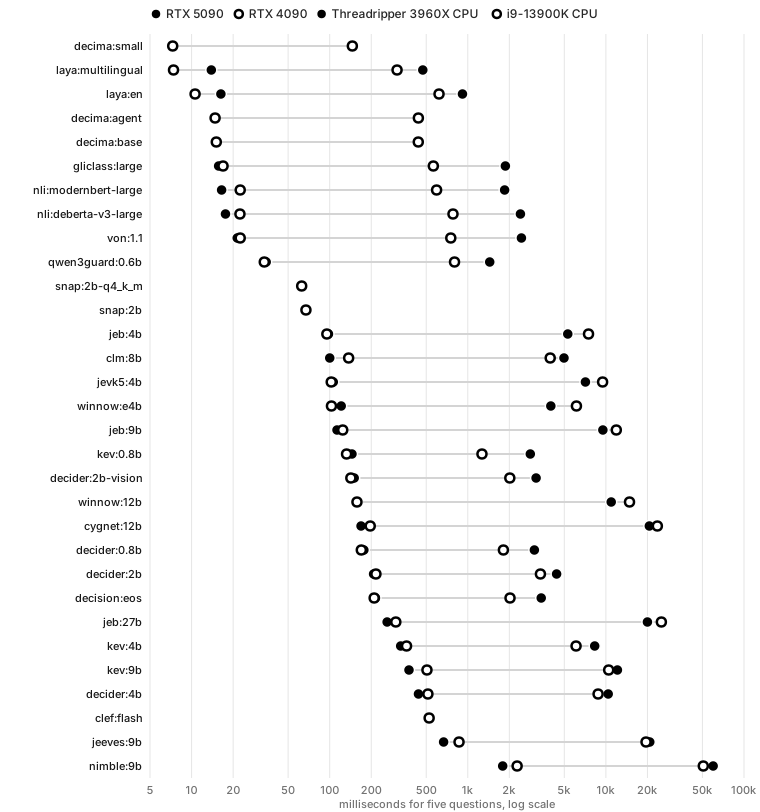
  • Latency-sensitive pipelines use winnow:e4b, a 4B-class language model that answers five questions in 113 ms on an RTX 5090, for steps such as routing, guardrails and tool approval where a text-generating model would be too slow.
  • CPU-only deployments start with laya, where laya:multilingual answers five questions in 516 ms on a CPU without an NVIDIA GPU.
  • Agent tooling integrations use the MCP server, while desktop users run the packaged app and server deployments use the Docker image.

Getting started

Install with the shell script at https://ollaya.dev/install.sh, then run a model directly, for example ollaya run winnow:e4b --preset triage followed by the text to classify, or ask custom questions with ollaya run kev --ask and --choice flags.

How it compares

TypeSafe Jev is proprietary and hosted, so requests leave the machine, whereas Ollaya is Apache-2.0, self-hosted and keeps state local, moving the cost from a hosted service to your own hardware. Ollama also runs locally under MIT and exposes /v1/systemone, but returns raw softmax scores and ships its own GGUF builds of nine decision models as of version 0.40 in October 2026, while Ollaya serves each author's calibration across 25 model families.

When to use it — and when not

Choose it when data residency is non-negotiable, when existing Jev client code must keep working, or when decisions have to return in milliseconds on modest hardware. It is a weaker fit if the highest measured accuracy is the deciding factor, since winnow:e4b scores 0.724 on typed decisions against the 0.738 TypeSafe reports for its Jev, or if the team cannot operate a daemon and fetch weight files from upstream Hugging Face repositories pinned to specific commits. The project is created and maintained by a single author, Mert Cobanov, which is worth weighing for long-term support planning.

project readme (upstream, from github) — read inline

ollaya

Run open decision models locally, the way Ollama runs LLMs.

System 1 for AI agents: fast, typed, calibrated decisions for routing, guardrails, triage and tool approval.

Website · Models · Bench · Docs · Releases · Hugging Face

Created and maintained by Mert Cobanov (@mertcobanov).

A decision model reads a state (a message, an email, a ticket, any JSON) plus typed questions (choice, score, noul) and returns calibrated probabilities in a single forward pass, in milliseconds. It never generates text. Ollaya pulls these models by name and serves them from a local daemon behind a self-hosted, Jev-compatible API (TypeSafe's /v1/systemone wire format), so the TypeSafe SDK and existing Jev clients work unchanged once they point at Ollaya and name an open model.

curl -fsSL https://ollaya.dev/install.sh | sh
ollaya run winnow:e4b --preset triage "Third time this year you've double-charged me. Refund it today or I'm cancelling and moving to a competitor."
intent            refund                                ███████████████░ 0.91
is_urgent         yes                                   ███████████████░ 0.92
frustration       2.89 / 3  very angry or using stron…  ██████████████░░ 0.86
refund_requested  yes                                   ████████████████ 0.99
churn_risk        yes                                   ████████████████ 0.99

Or ask your own questions: `ollaya run kev --ask "Is a refund requested?" --ask "Which team?" --choice billing --choice sales Median latency of five-question requests for every model on each GPU and CPU we measured
Install

  • Linux (x86_64 or arm64, glibc ≥ 2.38, e.g. Ubuntu 24.04+): curl -fsSL https://ollaya.dev/install.sh | sh. When an NVIDIA GPU is present (driver R525+), the installer adds the CUDA runtime: CUDA 13 for R580+, CUDA 12 for older drivers.
  • macOS (Apple silicon): the same command.
  • Windows (x64): irm https://ollaya.dev/install.ps1 | iex in PowerShell. When an NVIDIA GPU is present (driver R527+), the installer adds the CUDA runtime, as on Linux.
  • Desktop app for macOS, Windows and Linux: start and stop the server, download models and run them in one window. On macOS it lives in the menu bar. Get it from ollaya.dev/download.
  • Docker: docker run -d --gpus=all -p 11435:11435 ghcr.io/ollaya-dev/ollaya:cuda (:cuda12 for host drivers older than R580), or ghcr.io/ollaya-dev/ollaya for CPU only.

Configuration is through environment variables: OLLAYA_HOST, OLLAYA_MODELS, OLLAYA_KEEP_ALIVE, OLLAYA_DEVICE, OLLAYA_API_KEY and others, listed in docs/api.md §15.

Repository

Path What
crates/ollaya The binary: CLI, daemon, runner
crates/ollaya-server HTTP API, scheduler (one runner process per model), model resolution
crates/ollaya-api API types and client; the contract is docs/api.md
crates/ollaya-registry Model names, manifests, blob store, resumable pulls
crates/ollaya-decision Question schema, sequence layouts, calibration, answers
crates/ollaya-runner Inference engines (ONNX Runtime, and llama.cpp for GGUF models)
crates/ollaya-lang Script and language detection for routers
convert/ Build-time Python: ONNX export, parity checks, packaging
site/ The website and the static model registry host

Development

cargo test --workspace
cargo build --release -p ollaya --features cuda   # CUDA build (x86-64 Linux and Windows)

Tests come in three tiers, all with the same parity tolerances:

  • K1, every change: the tests, and smoke parity for the families the change touches. A parity example run with --smoke checks only the cases listed in crates/ollaya-runner/examples/smoke/cases.txt, about 40 questions per family: every question type, refused requests, a long state and many options.
    cargo run --release -p ollaya-runner --example parity --   cpu --smoke
    
  • K2, every release: the full goldens on every GPU device a release ships, and on the CPU the full set for models of 4B and under and --smoke for larger ones. CPU goldens count only on the machine and build that made them.
  • K3, major releases, a llama.cpp or ONNX Runtime update, a new device or a new model: full CPU parity of the large models and the quality benchmarks. The site, this README and the reports are updated from those results.

convert/ rebuilds models. It exports them, checks parity against the PyTorch reference, generates golden fixtures, and packages the result into registry/. See the module docstrings. cd convert && uv sync installs it: with CUDA 13 torch on Linux and Windows, and with the CPU and MPS build from PyPI on Apple silicon Macs, where exports and parity run on the CPU.

License

Apache-2.0. Each model keeps its own license: laya (Convai Innovations), decider (Mapika), kev (Jared Palmer, on Qwen3.5 by the Qwen team), decision (the vLLM Semantic Router contributors, on Qwen3.5), qwen3guard (Qwen team), gliclass (Knowledgator), von (Victor Hugo Panisa), winnow (EldanRing, on Gemma 4 by Google DeepMind), jevk5 (alibiserikbay, on Qwen3.5), nimble (Bespoke Labs, on Qwen3.5), pplx-decider (Perplexity, on Qwen3.5), strands-decider (Strands Agents, on Qwen3.5), jeeves (PostHog, on Qwen3.5), clef (Cloudflare, on Qwen3.5), jeb (Jason Brashear, on Qwen3.5 and Qwen3.8), cygnet (Gemma 4 by Google DeepMind; the Cygnet recipe is MIT), snap (logitlab, on MiniCPM5 by OpenBMB; snap's prompt is MIT), decima (A. M. Madani, on mmBERT-base by JHU CLSP and multilingual-e5-small by intfloat, both MIT), largha (Phocinae, on mmBERT-small by JHU CLSP, MIT) and nli:modernbert-large are Apache-2.0, and nli:deberta-v3-large (Moritz Laurer) is MIT. arbiter's LoRA adapter and head (Codekins Pvt Ltd, Zyot Lab) are Apache-2.0; its base model, Gemma 3 4B IT by Google DeepMind, is under the Gemma Terms of Use. nimble:9b-v3's adapter (Bespoke Labs) is CC BY-NC 4.0, which does not allow commercial use; its base, Qwen3.5-9B, is Apache-2.0. d1 (Liquid AI) is under the LFM Open License v1.0: commercial use by an organization with US$10 million or more in annual revenue is not covered by it. llama.cpp, which Ollaya ships for GGUF models, is MIT.

Ollaya is an independent project. It is not affiliated with or endorsed by Ollama or TypeSafe.

Frequently asked questions

Is ollaya free to use?

ollaya is open source under the Apache-2.0 licence. There is no licence fee and no seat count — you can self-host it or, where the project offers one, pay a vendor for a managed version instead.

What does ollaya do?

Jev-compatible API server for open decision models. Ollama for decision models: pull and serve 25 model families (Laya, pplx-decider, Clef, Winnow, coba...) loc

What is ollaya written in?

ollaya is primarily written in Rust. Its source is publicly available at https://github.com/ollaya-dev/ollaya, and it has 1,388 GitHub stars.