offen is a free, open source web & product analytics project written in JavaScript and released under Apache-2.0. It has 981 GitHub stars, 54 forks and 18 open issues, and was last pushed 7 months ago. On this registry it ranks #18 of 25 tracked projects in Web & Product Analytics, with 5 head-to-head comparisons available.

What is offen?

Offen Fair Web Analytics is a free, open-source, self-hosted web analytics application for website operators and teams who want privacy-compliant usage statistics with end-to-end encrypted data, and for the visitors who can review or delete their own data.

What it is

Offen Fair Web Analytics is a self-hosted web analytics application written in JavaScript and released under the Apache-2.0 licence. It lives in the self-hosted web analytics ecosystem, is catalogued under Data & Analytics / Web & Product Analytics, and ships as a single binary file or a Docker image. It collects page-level usage data for one or more websites, encrypts that data in the browser before it leaves the client, and presents it as dashboards written so that both operators and their visitors can read and understand the numbers. Documentation lives at https://docs.offen.dev, the project homepage is https://www.offen.dev, and the repository shows 981 stars, 54 forks and 18 open issues, with the most recent push on 4 March 2026.

The problem it solves is that conventional analytics usually means embedding a third-party, ad-funded tracker that collects IP addresses, User-Agent strings and similar identifiers, which creates GDPR obligations and erodes visitor trust. Offen replaces that third-party dependency rather than wrapping it: data collection is opt-in only, only first-party cookies are used, and visitors who do not actively opt in never leave a trace at all. After opting in, the installation collects only the minimum data needed to produce meaningful statistics, and because clients encrypt usage data before it leaves the browser, the server that stores it has no way to decrypt it.

Key capabilities

  • Opt-in data collection only, so users who decline leave no trace, with no ads and no third parties involved.
  • End-to-end encryption performed client-side before data leaves the browser, so the storing server cannot decrypt it.
  • Deliberate non-collection of IP addresses and User-Agent strings.
  • First-party cookies only, which keeps compliance with GDPR guidelines inside the operator's own domain.
  • Metric filtering by URL, Location, Referrer, UTM parameters, Landing Pages and Exit Pages.
  • Multiple websites analysed from a single installation, with website accounts shared across a team.
  • User data stored for 6 months and then deleted automatically, plus a user-facing view where visitors read detailed explanations of metrics and terms and can opt out or delete their data at any time.
  • Deployment as a single binary file or a Docker image, with automatic SSL certificate installation and renewal, and SQLite as an option when a dedicated database is not wanted.

Who uses it and how

  • Self-hosters running it on-premises or in any deployment scenario that fits their infrastructure, by downloading the binary or pulling the Docker image onto a server.
  • Teams that share website accounts, so several people in one organisation read the same installation's dashboards.
  • Operators running several websites who want all of them measured from one installation rather than one tracker per site.
  • Organisations that need to demonstrate GDPR compliance and prefer an opt-in model with no third-party involvement.
  • Site visitors themselves, who opt in, review their own visited pages, and delete their data or opt out permanently at any time.

Getting started

Download the single binary file or pull the Docker image and run it on a server, then integrate the tracking code snippet into the pages to be measured. Full deployment instructions are in the documentation at https://docs.offen.dev.

How it compares

The facts provided name no paid products that Offen Fair Web Analytics replaces, and they name no comparable or competing analytics tools either, so no direct comparison can be drawn here. On the evidence available, it stands alone in this registry, with its Humane Tech listing and REUSE status as the only external markers recorded.

When to use it — and when not to

Anyone self-hosting Offen Fair Web Analytics operates the server themselves, including the optional automatic SSL certificate installation and renewal, and chooses between a dedicated database and SQLite stored directly on the server, with the tracking snippet and a route for visitors to reach their own data also falling to the operator. It is the wrong choice for anyone who needs device-level, fingerprint-level or identity-resolved reporting, because the project deliberately collects no IP addresses or User-Agent strings. It is also not for teams that want a zero-operations hosted service, since self-hosting is the intended deployment model. The README excerpt supplied here is truncated mid-sentence and gives no release cadence, so the documentation at https://docs.offen.dev should be treated as the authoritative source.

project readme (upstream, from github) — read inline
Offen Fair Web Analytics logo

Offen Fair Web Analytics


License Docs Awesome Humane Tech REUSE status

Let your users access their data.
Gain valuable insights at the same time.
Open, lightweight, self hosted and free.

Contents

Software

Community

Core features

Secure & free
Our code is open source. All usage data is encrypted end-to-end. Offen Fair Web Analytics will always be available for free.

Self hosted
Comply with GDPR guidelines. No ads, no third parties involved. Offen Fair Web Analytics uses first-party cookies only.

Fair & by choice
Opt-in only. Users must actively give their consent to data collection. They have full access to their data.

How it works

Your job

  • Self host Offen Fair Web Analytics while protecting your users' data.
  • Integrate the code snippet into pages you want to track.
  • Make your users aware of the access to their data.
  • Improve your services with fair and transparent insights.

Benefits for your users

  • Opt in to data collection or decide to not participate at all.
  • Review own data with detailed explanations of metrics and terms.
  • Only delete usage data or opt out completely at any time.

What you see
Data of all pages where your installation is active. For example:
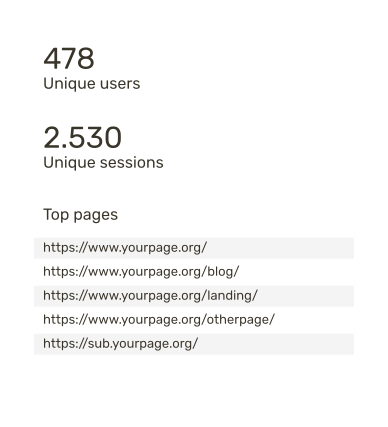
Example A

What your users see
Data of all pages a user has visited where your installation is active. For example:
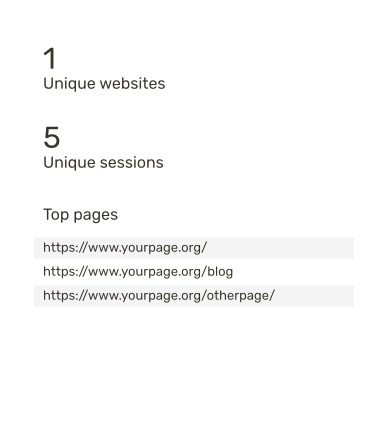
Example B

More features

  • Easily analyze multiple websites within one installation.
  • All website accounts can be shared within teams.
  • User data is only stored for 6 months and then deleted.
  • A detailed documentation on how to run Offen Fair Web Analytics is available.

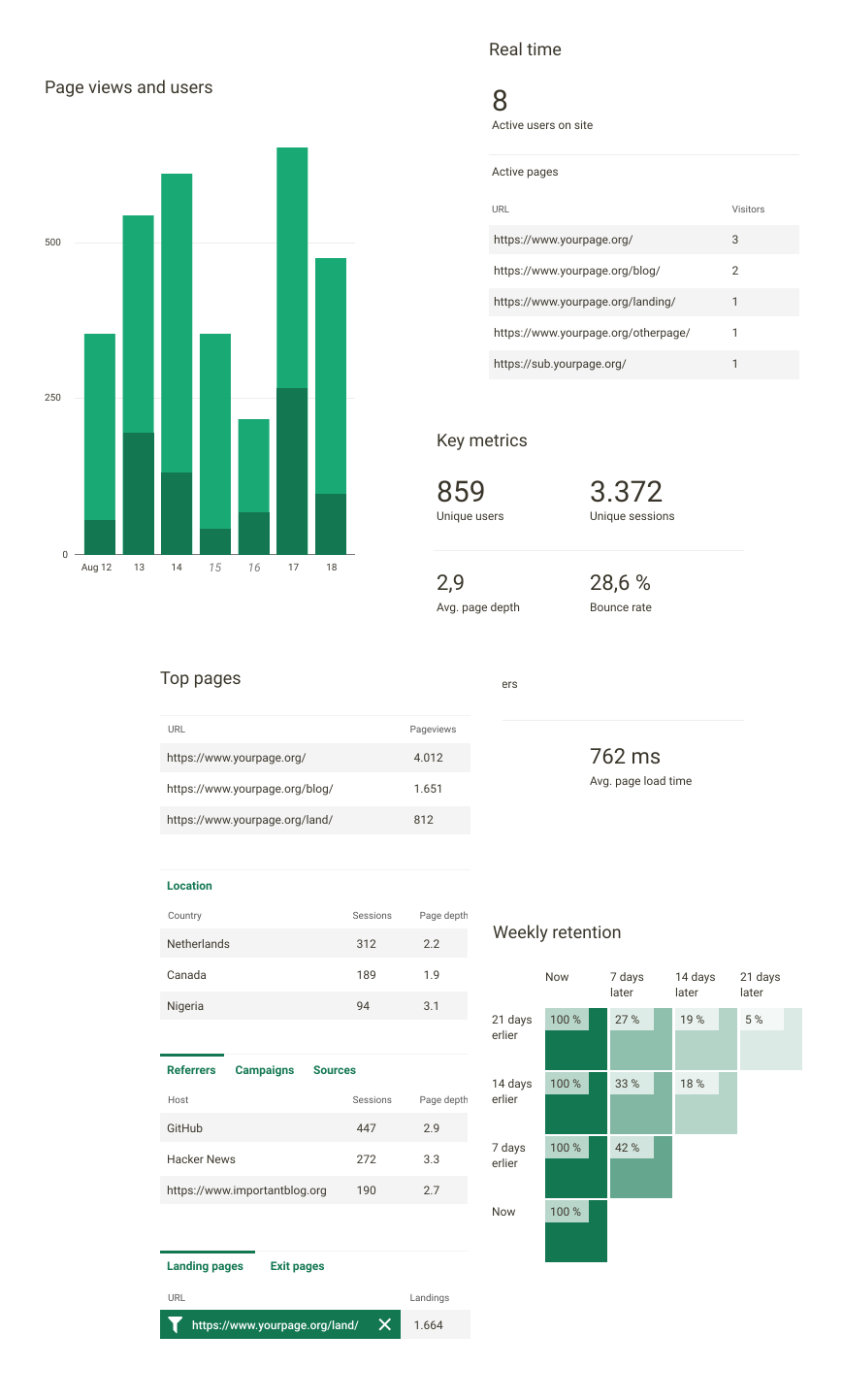
Essential metrics

All important statistics that help you to improve your service.
Filter collected data by URL, Location, Referrer, UTM parameters, as well as Landing Pages and Exit Pages. Essential metrics
Objectives

Privacy friendly
Collection of usage data is opt in, users that do not actively opt in will never leave a trace. After opt in, Offen Fair Web Analytics collects the minimal amount of data needed to generate meaningful statistics for operators. No IPs, User-Agent strings or similar are being collected or even looked at.

Secure
Data in Offen Fair Web Analytics is encrypted End-To-End. Clients encrypt usage data before it leaves the browser and there is no way for the server storing this data to decrypt it. Attackers have no means to compromise an instance, accidental data leaks cannot expose user data.

Self hosted and lightweight
You can run Offen Fair Web Analytics on-premises, or in any other deployment scenario that fits your need. All you need to do is download a single binary file or pull a Docker image, and run it on your server. Offen Fair Web Analytics will automatically install and renew SSL certificates for you if you want it to. If you do not want to deploy a dedicated database, you can use SQLite to store data directly on the server.

Transparent and fair
Offen Fair Web Analytics treats the user as a party of equal importance in the collection of usage data. Users have access to the same set of tools for analyzing their own data and they can delete their data at any time.

Localize

Offen Fair Web Analytics is currently available in English, French, German, Portuguese, Spanish and Vietnamese. Our consent banner and the Auditorium for operators as well as users can be displayed in the respective locale.

If you want to support fair web analytics by contributing Italian, Dutch, Polish or other language versions, don't hesitate to request an invite.

Customize

Our consent banner is customizable in color, shape and basic font specifications to match your design. Learn more.

Test drive

Give Offen Fair Web Analytics a test drive right now. Open your terminal and type:

curl https://demo.offen.dev | bash

This creates an ephemeral one-off installation that is populated with random data and is running on http://localhost:9876. There, you can log in using the account [email protected] and password demo.

License

Work in this repository is licensed under multiple licences.

  • All original source code is licensed under Apache-2.0.
  • All documentation is licensed under Apache-2.0.
  • The Offen Fair Web Analytics icon and logo are licensed as CC-BY-NC-ND-4.0.

See the NOTICE file for license information on works that get bundled by Offen Fair Web Analytics.

Feedback and contributions welcome

Found an issue or want to add something? Please do not hesitate to file an issue or open a pull request (or send an email in case you don't want to use GitHub). For details on how to get started head over to our contributing guidelines.


This repository contains all source code needed to work on Offen Fair Web Analytics, both on the server as well as on the client. The development setup requires docker and the compose plugin to be installed.

After cloning the repository

$ git clone [email protected]:offen/offen.git

you can build the containers and install dependencies using:

$ make setup

Next seed the database for the server application:

$ make bootstrap

You can test your setup by starting the application:

$ make up

which should enable you to access and use the Auditorium

Run the tests for all subapplications using

$ make test

Detailed instructions on how to get started with development can be found at our dedicated docs site.


The documentation site at is also part of this repository. To run this site locally, you can:

make setup-docs
make docs

This will serve the documentation site on .

Kind support

NLnet Foundation

We are happy to work with NLnet Foundation, which has supported our efforts as part of its Next Generation Internet initiative.

Cross-Browser testing provided by BrowserStack.

Who's using Offen Fair Web Analytics?

We're happy to feature you in this README. Send a PR adding your site or app to this section.

Links

Website
Docs
Mastodon

Frequently asked questions

Is offen free to use?

offen is open source under the Apache-2.0 licence. There is no licence fee and no seat count — you can self-host it or, where the project offers one, pay a vendor for a managed version instead.

What does offen do?

Offen Fair Web Analytics

What is offen written in?

offen is primarily written in JavaScript. Its source is publicly available at https://github.com/offen/offen, and it has 981 GitHub stars.