What it is
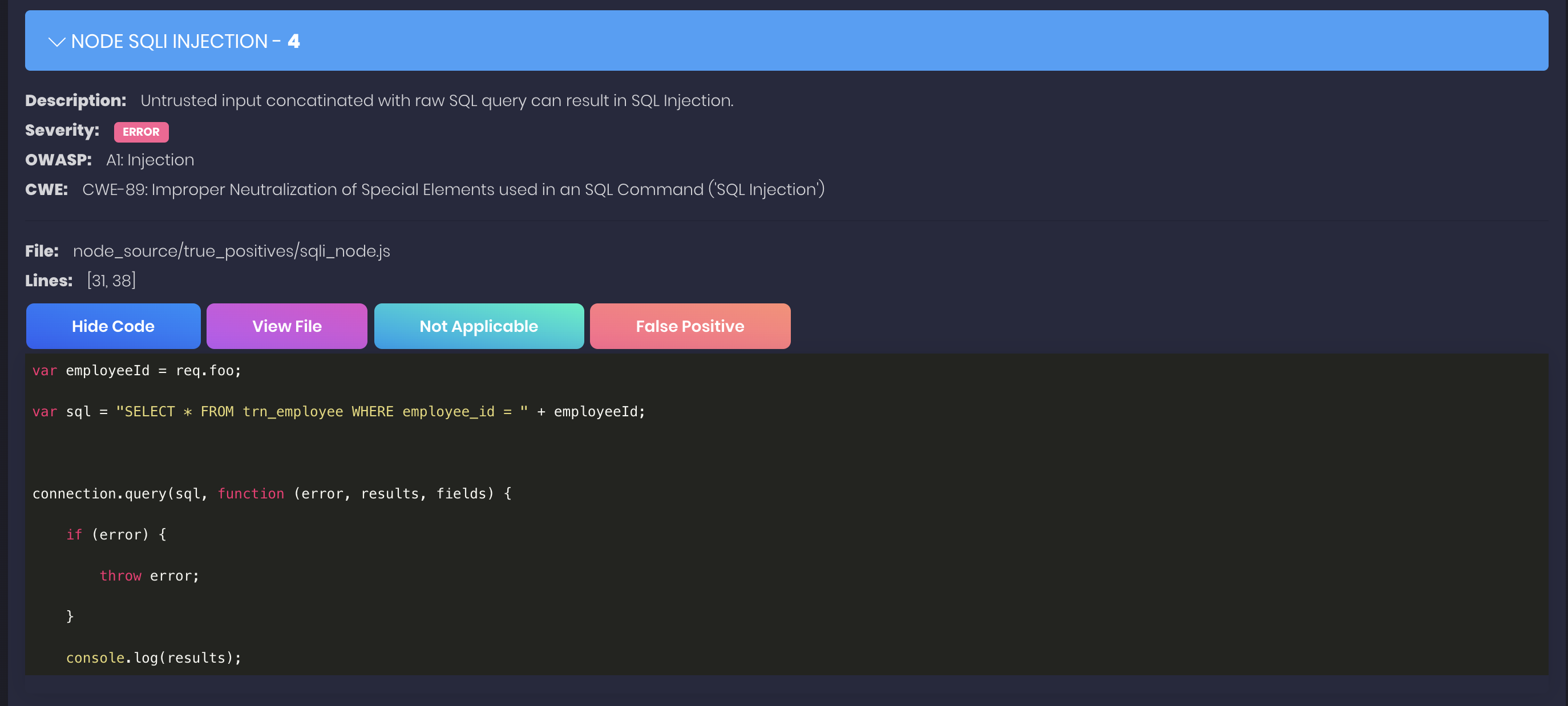
nodejsscan is a static security code scanner for Node.js applications. It analyzes JavaScript and Node.js source code before runtime to identify security issues. The project sits in the developer tools and DevSecOps ecosystem, and it is built on libsast and semgrep.
The problem it addresses is that Node.js projects can contain insecure coding patterns that are not obvious during normal development. Instead of relying only on manual code review, teams can run nodejsscan to produce findings from source files. The project provides a web user interface, command line usage, and a Python API, so scanning can happen locally or as part of an automated workflow.
Key capabilities
- It scans Node.js application source code for security issues using static analysis, as indicated by the SAST, node-security, and security-scanner topics.
- It is powered by libsast and semgrep, which supply the underlying analysis foundation described in the README.
- It provides a web user interface at http://127.0.0.1:9090 when the local server is started with run.sh.
- It supports command line use and a Python API through the related njsscan interface described in the README.
- It can send Slack and email alerts when a Slack webhook URL or SMTP settings are configured in settings or environment variables.
- It supports CI/CD or DevSecOps workflows through GitHub Actions, GitLab CI/CD, and Travis CI integrations.
Who uses it and how
- Development teams use it to scan Node.js code during code review or automated checks, because the README describes static analysis, lint, and code-review topics.
- Security engineers use it as a DevSecOps scanner, because the topics include devsecops and the README lists GitHub Actions, GitLab CI/CD, and Travis CI integrations.
- Application and operations teams use the web interface, command line interface, or Python API to review findings or run scans in automated pipelines.
Getting started
The typical quick start is to pull and run the Docker image opensecurity/nodejsscan:latest on port 9090. For a local installation, users clone the repository, create a Python virtual environment, install requirements, configure Postgres through SQLALCHEMY_DATABASE_URI, recreate the database schema, and run ./run.sh.
When to use it — and when not to
nodejsscan is useful when a team wants an open-source Node.js SAST scanner with a web interface, CLI, Python API, and notification integrations. A self-hoster must operate Postgres for the web application, and must also configure SMTP or Slack webhooks if alerting is required. Windows support is dropped from version 4 onward, so teams that need Windows deployment should use Docker or run on Linux or macOS.
project readme (upstream, from github) — read inline
nodejsscan 
Static security code scanner (SAST) for Node.js applications powered by libsast and semgrep.
Made with  in India




Support nodejsscan
- Donate via Paypal:

- Sponsor the Project:

e-Learning Courses & Certifications
 OpSecX Node.js Security: Pentesting and Exploitation - NJS
Run nodejsscan
docker pull opensecurity/nodejsscan:latest
docker run -it -p 9090:9090 opensecurity/nodejsscan:latest
Setup nodejsscan locally
Install Postgres and configure SQLALCHEMY_DATABASE_URI in nodejsscan/settings.py or as environment variable.
From version 4 onwards, windows support is dropped.
git clone https://github.com/ajinabraham/nodejsscan.git
cd nodejsscan
python3 -m venv venv
source venv/bin/activate
pip install -r requirements.txt
python3 manage.py recreate-db # Run once to create database schema
To run nodejsscan
./run.sh
This will run nodejsscan web user interface at http://127.0.0.1:9090
Command Line Interface(CLI) and Python API

Presentations
Integrations
Slack Alerts
Create your slack app Slack App and set SLACK_WEBHOOK_URL in nodejsscan/settings.py or as environment variable.

Email Alerts
Configure SMTP settings in nodejsscan/settings.py or as environment variable.
CI/CD or DevSecOps
Build Docker image
docker build -t nodejsscan .
docker run -it -p 9090:9090 nodejsscan
nodejsscan screenshots