Node-Media-Server v4




Introduction
Node-Media-Server is a high-performance/low-latency/open-source Live Streaming Server developed based on Nodejs.
v4 is design to implement enhanced RTMP FLV v1 support for native HEVC, VP9, AV1.
v4 is no longer compatible with the cn_cdn extension id flv_265 standard.
v4 is no longer compatible with flashplayer's rtmp protocol.
v4 is incompatible with v2. Do not upgrade across major versions.
Installation
npm install node-media-server -g
or run directly
npx node-media-server
Cli Options
Options:
  -c, --config <path>    Path to the config file (default: bin/config.json)
  -b, --bind <addr>      Bind address, overrides the "bind" config value
      --rtmp-port <n>    RTMP port, overrides rtmp.port
      --rtmps-port <n>   RTMPS port, overrides rtmps.port
      --http-port <n>    HTTP/WebSocket port, overrides http.port
      --https-port <n>   HTTPS/WSS port, overrides https.port
      --data-path <path> Runtime data directory, overrides store.path
      --record-path <p>  Record output directory, overrides record.path
      --record-auto      Enable auto recording, forces record.auto on
      --notify-url <url> Event webhook URL, overrides notify.url
      --auth-play        Enable play authentication, forces auth.play on
      --auth-publish     Enable publish authentication, forces auth.publish on
      --no-admin         Disable the webadmin console (/admin), media only
  -h, --help             Show this help

Command line values take precedence over config file values and are
never written back to the config file.
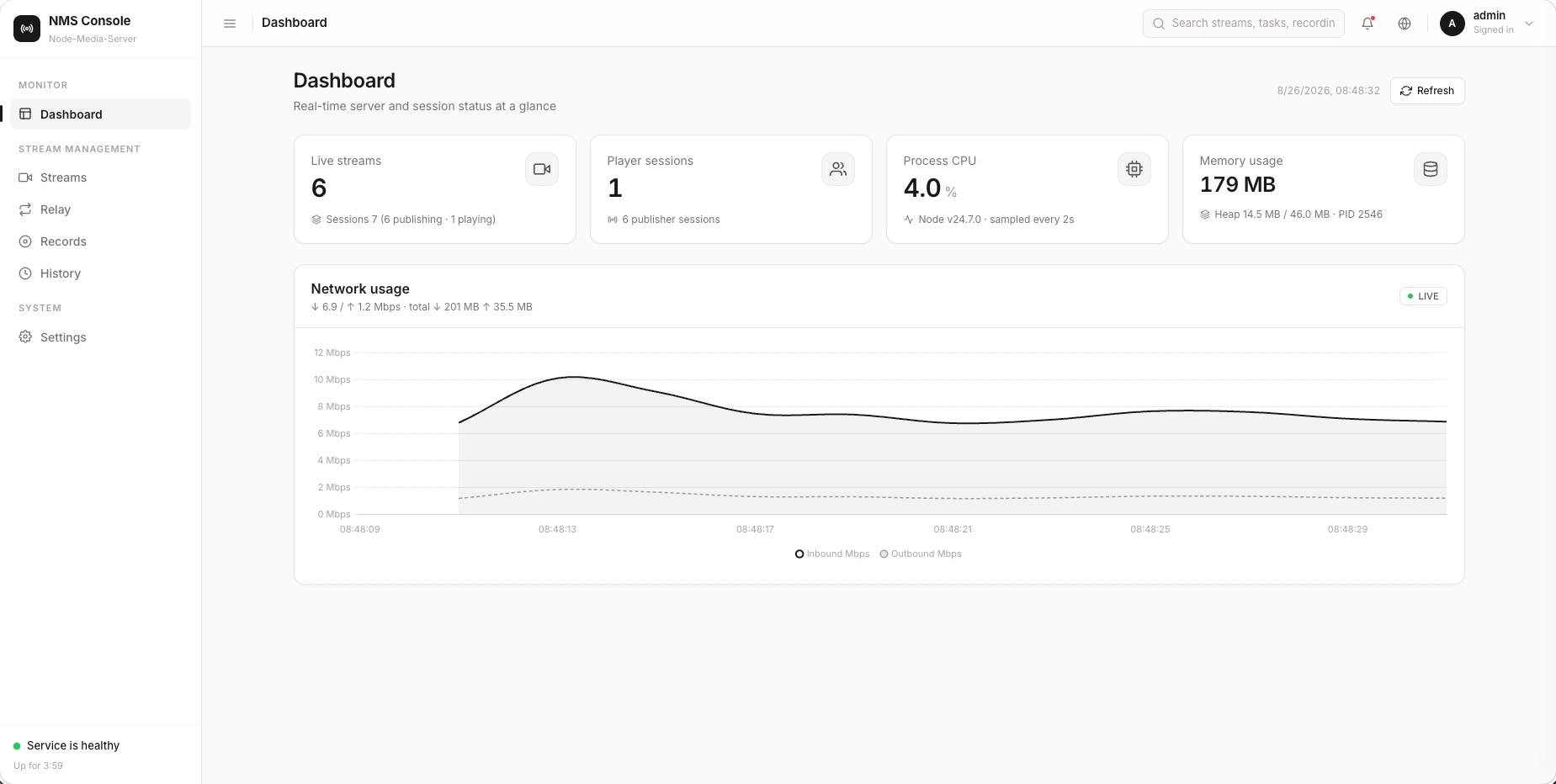
WebAdmin
Features
- HTTP/HTTP2-flv Push/Play
- WS/WSS-flv Push/Play
- RTMP/RTMPS Push/Play
- GOP cache
- Notification
- Authentication
- Static file server
- Record to flv file
- REST API System (New in v4.2.0)
- JWT-based Authentication (New in v4.2.0)
- Real-time Monitoring & Statistics (New in v4.2.0)
- Session Management (New in v4.2.0)
- Session Deletion (New in v4.2.0)
- Advanced Health Monitoring (New in v4.2.0)
- RTSP/RTMP Relay Tasks with persistence and management API (New in v4.3.0)
- Web Admin UI with Dashboard, Streams, Records, History, Relay and Settings (New in v4.3.0)
- Username/Password Login with scrypt hashing and login rate limiting (New in v4.3.0)
- Configuration Management API with validation (New in v4.3.0)
- Change Password API (New in v4.3.0)
- Record File Download (New in v4.3.0)
- Record Session Resume within publish grace period (New in v4.3.0)
- History Search by stream path, IP and time range (New in v4.3.0)
- Network Bandwidth Statistics (New in v4.3.0)
- Graceful Shutdown (New in v4.3.0)
Static file services
Node-Media-Server can provide static file services for a directory.
"static": {
    "router": "/",
    "root": "./html"
}
Record to flv file
Node-Media-Server can record live streams as FLV files.
When the static file server is enabled and recordings are saved in its directory.
It can provide video-on-demand services.
"record": {
    "path": "./html/record",
    "auto": true
}
Set "auto": false to disable auto-recording of every published stream; streams can then be recorded on demand via the webadmin streams page or POST /api/v1/streams/{app}/{name}/record.
http://server_ip:8000/record/live/stream/unix_time.flv
or
https://server_ip:8443/record/live/stream/unix_time.flv
REST API System (New in v4.2.0)
Node-Media-Server v4.2.0 provides a REST API system for server management and monitoring, featuring:
- JWT-based authentication with challenge-response login
- Stream and session management
- Relay (RTSP pull / RTMP pull-push) task management
- Real-time monitoring & statistics
- Advanced health monitoring
See the full API documentation in docs/api.md.
Supported clients
| Client | H.264 | HEVC | VP9 | AV1 |
|---|---|---|---|---|
| OBS_29.1+ | ✅ | ✅ | ❌ | ✅ |
| FFmpeg/FFplay_6.1+ | ✅ | ✅ | ✅ | ✅ |
| NodePlayer.js_1.0+ | ✅ | ✅ | ❌ | ❌ |
| NodeMediaClient_3.0+ | ✅ | ✅ | ❌ | ❌ |
QLive
Free Android Live Streaming App
NodePlayer.js pure javascript implementation live streaming player
- ASM.js, WASM, SIMD, WebWorker, WebCodecs, MediaSource multiple technical implementations
- H.264/H.265+AAC/G711 software and hardware decoder
- Ultra-low latency, Under extreme conditions less than 100 milliseconds
- Enhanced HTTP/WS-FLV Protocol, Natively support h.265
- Android/iOS/HarmonyOS/Chrome/Edge/Firefox/Safari, All modern browsers or platforms
NodePublisher.js pure javascript implementation live streaming publisher
- WebSocket-FLV Protocol
- H.264+AAC hardware encoder
- Only chrome or chromium based browsers are supported at the moment
- wss is required
NodeMediaClient-iOS iOS live streaming player and publisher SDK
- Objective-C/Swift
- RTMP/HTTP-FLV/RTSP
- H.264/H.265+AAC/OPUS/G711
- Ultra-low latency, Under extreme conditions less than 100 milliseconds
- Enhanced RTMP/FLV Protocol, Natively support H.265/OPUS
- Built-in beauty filter
NodeMediaClient-Android Android live streaming player and publisher SDK
- JAVA/Kotlin
- armv7/arm64/x86/x86_64
- RTMP/HTTP-FLV/RTSP
- H.264/H.265+AAC/OPUS/G711
- Ultra-low latency, Under extreme conditions less than 100 milliseconds
- Enhanced RTMP/FLV Protocol, Natively support H.265/OPUS
- Built-in beauty filter
expo-nodemediaclient Expo module for NodeMediaClient
- iOS and Android
- player and publisher
License
Apache 2.0