nod is a free, open source ai interaction & interfaces project written in TypeScript and released under Apache-2.0. It has 794 GitHub stars, 98 forks and 20 open issues, and was last pushed 7 hours ago. On this registry it ranks #140 of 162 tracked projects in AI Interaction & Interfaces, with 5 head-to-head comparisons available.

What is nod?

Nod is an open-source personal agent from n8n that runs on your own machine or server with its own computer and browser, built for individuals and small teams who want recurring work — chasing invoices, preparing for calls, cancelling trials, watching a page for changes — carried out on real websites and in real apps, with an explicit yes required before it acts on their behalf.

What it is

Nod is a TypeScript application published under Apache-2.0 by n8n: an Electron desktop client backed by a Node.js 24 and Fastify server, with React on the front end and PostgreSQL with pg-boss holding state and schedules. It belongs to the computer-use corner of the AI agent ecosystem — its topics include computer-use, browser-automation, agents, mcp and local-first — and it takes the step that chat assistants generally do not, giving the model a machine of its own: a Linux workspace sandbox container and a Chromium browser container that it drives directly. The agent runtime is Pi, with agent-browser and Composio underneath, and the work happens across Gmail, Calendar, Slack, Notion and the open web.

The concrete thing it replaces is the afternoon of tabs, logins and forms that a person would otherwise work through by hand, together with the copy-and-paste relay between a chat assistant and the actual website where the task has to be finished. Making that safe is the second half of the problem, and Nod answers it structurally rather than by prompting: policy lives in the server, not in the prompt, so the trust check, Vault, payments and spending limits run outside the model. App, web and browser results reach the model marked as data rather than instructions, provider keys never enter the workspace or browser containers, and any app action or website step that could change something and is not covered by the request and the user's rules waits for approval.

Key capabilities

  • Computer use through a dedicated Linux workspace sandbox container and a Chromium browser container, which is how jobs involving tabs, logins and forms get finished rather than described.
  • Morning call briefs: Nod reads the user's threads, calendar and the client's latest news, then writes a one-page brief for each call on the day's schedule.
  • Approval-gated drafting: it drafts a Slack reply from the user's own pricing sheet, asks for approval, and sends only after the user says yes.
  • Scheduled watches that check a page on the user's timetable and report only when something changes, such as a price moving from $1,200 to $1,500.
  • Visible memory: every note can be seen, edited or forgotten along with the message it came from; writing style is learned from sent emails with no names or numbers, task steps are reused and repaired when a site changes, and Nod learns about the user only from their own messages, never from the pages or emails it reads.
  • Model choice spanning OpenAI, Anthropic, Gemini, OpenRouter, Bedrock, Vertex AI, Azure and more than 20 further providers, a self-hosted model server, or sign-in with ChatGPT Plus or Pro.
  • Vault entry of passwords, codes and cards directly on the website so secrets stay out of the model, plus a Usage view recording every action and sign-in with costs and a monthly limit on API models.

Who uses it and how

  • Individual professionals on macOS 14+ (Apple silicon or Intel) or the Windows 11 preview, running Nod locally so that files, memory and saved logins stay on their own hardware.
  • People who already hold a ChatGPT Plus or Pro subscription and prefer to sign in with it, alongside users who bring an API key from a provider or point Nod at their own model server.
  • Client-facing work where preparation is repetitive: a brief per call drawn from messages, calendar and news, invoices routed to Anna rather than Bob after being told once, and replies drafted in the user's own voice.
  • Self-hosters running the server on a machine alongside the sandbox, browser and PostgreSQL containers, reaching it through the app or through Telegram and WhatsApp, with schedules handling recurring checks.

Getting started

Nod is deployed as one Node process together with a few Docker containers on the machine that runs it, covering the server, the Linux workspace sandbox, Chromium and PostgreSQL. Downloads and documentation are at https://nod.n8n.io/, with macOS 14+ supported and Windows 11 offered as a preview.

How it compares

No comparable personal agent is listed alongside Nod in this registry, so it stands alone here. The distinguishing facts are its Apache-2.0 licence, its design as software the operator hosts on their own hardware, and its bring-your-own-model approach, which leaves the choice of provider and the data that reaches it with the user.

When to use it — and when not to

A self-hoster takes on real operational weight: a Node process, several Docker containers including PostgreSQL and Chromium, a Linux workspace sandbox, a model key or ChatGPT subscription, and the API spend that follows, which Nod caps with a monthly limit. It is a poor fit for anyone who wants no infrastructure at all, for macOS versions below 14, and for production use on Windows while that build remains a preview. The project is also young — 529 stars, 74 forks, 20 open issues — and its headline measurements, 98% of tasks finished and no unsafe actions across 678 runs, come from GPT-6.1 Sol working in simulated accounts and websites, which the README itself calls test results rather than a guarantee.

project readme (upstream, from github) — read inline

It chases invoices, preps your calls and cancels trials, on real websites.
It runs on your machine with the model you choose, and asks before it acts for you.
macOS 14+ (Apple silicon or Intel) · Windows 11 preview · Free and open source · ChatGPT Plus or Pro, or an AI key

Latest release GitHub stars License: Apache 2.0 OpenSSF Best Practices Discord Status: research preview


It gets on with the work across Gmail, Calendar, Slack, Notion, and the web,
and asks before it speaks for you.
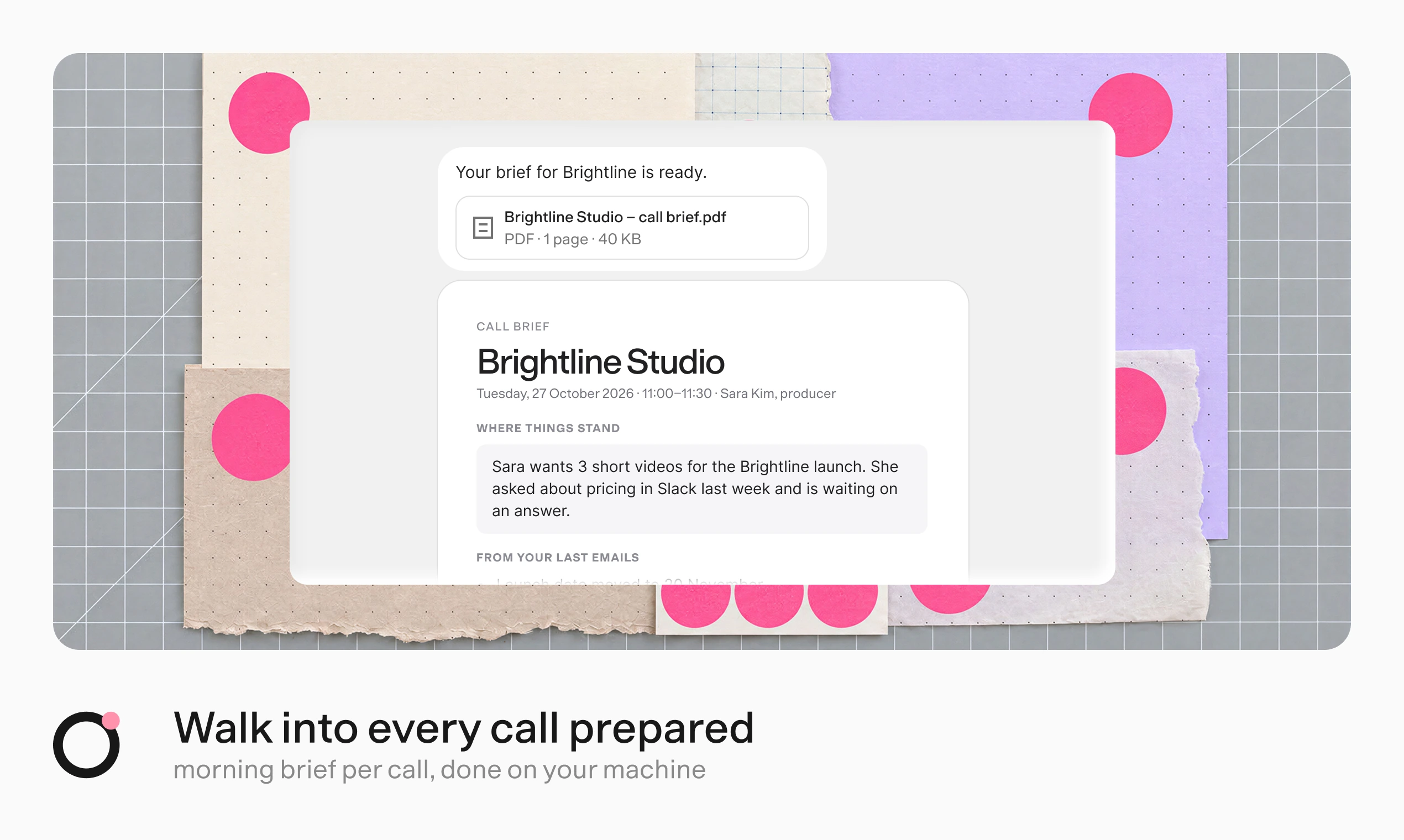
Walk into every call prepared. Nod creates a one-page call brief from your messages, calendar, and the client's latest news.

Every morning, Nod reads your threads, your calendar, and the client's latest news,
then writes a one-page brief for each call.
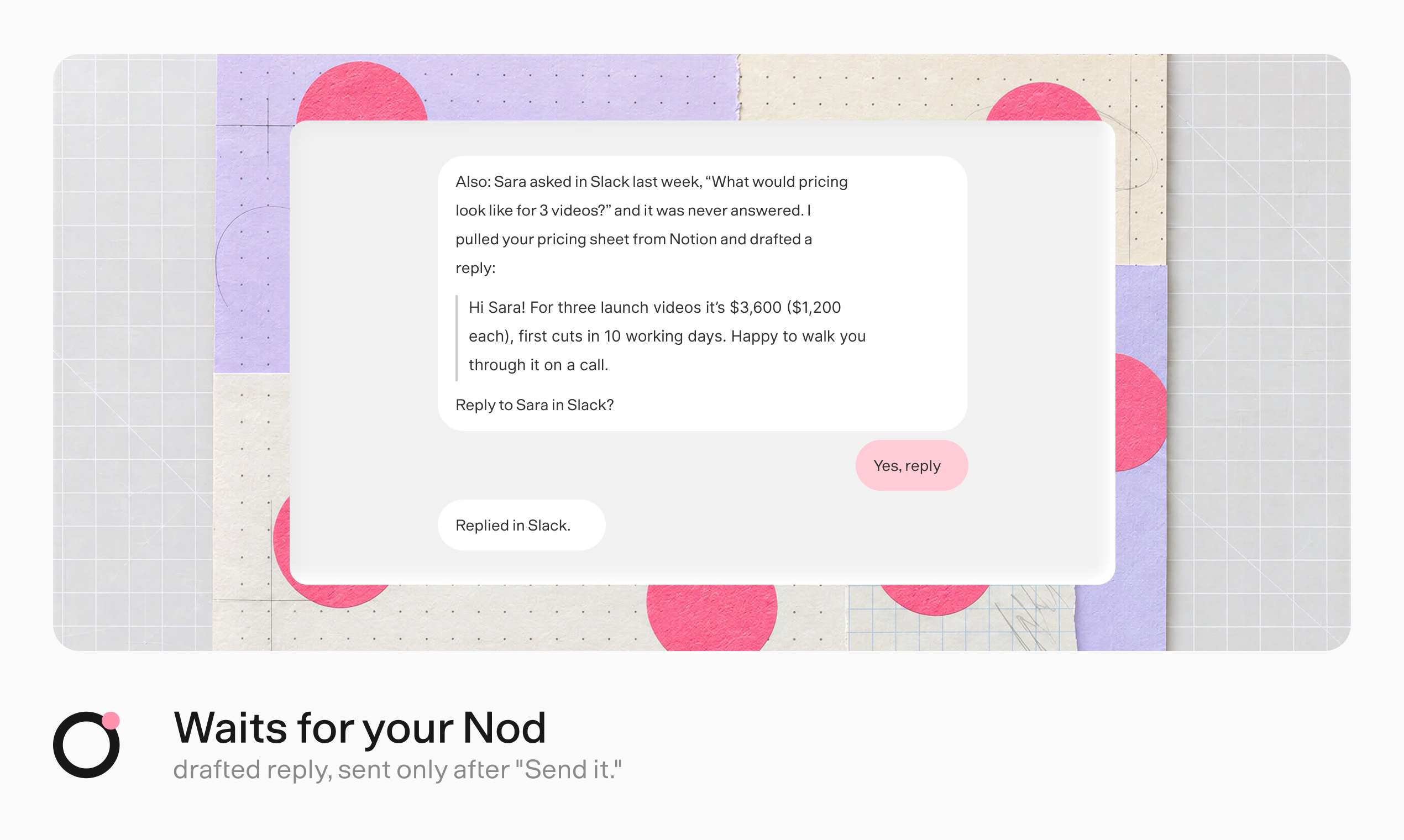
Waits for your Nod. Nod drafts a Slack reply from your pricing sheet, asks for approval, and sends it after you say yes.

It drafts the reply you owe from your own pricing sheet,
and sends it only after you say yes.
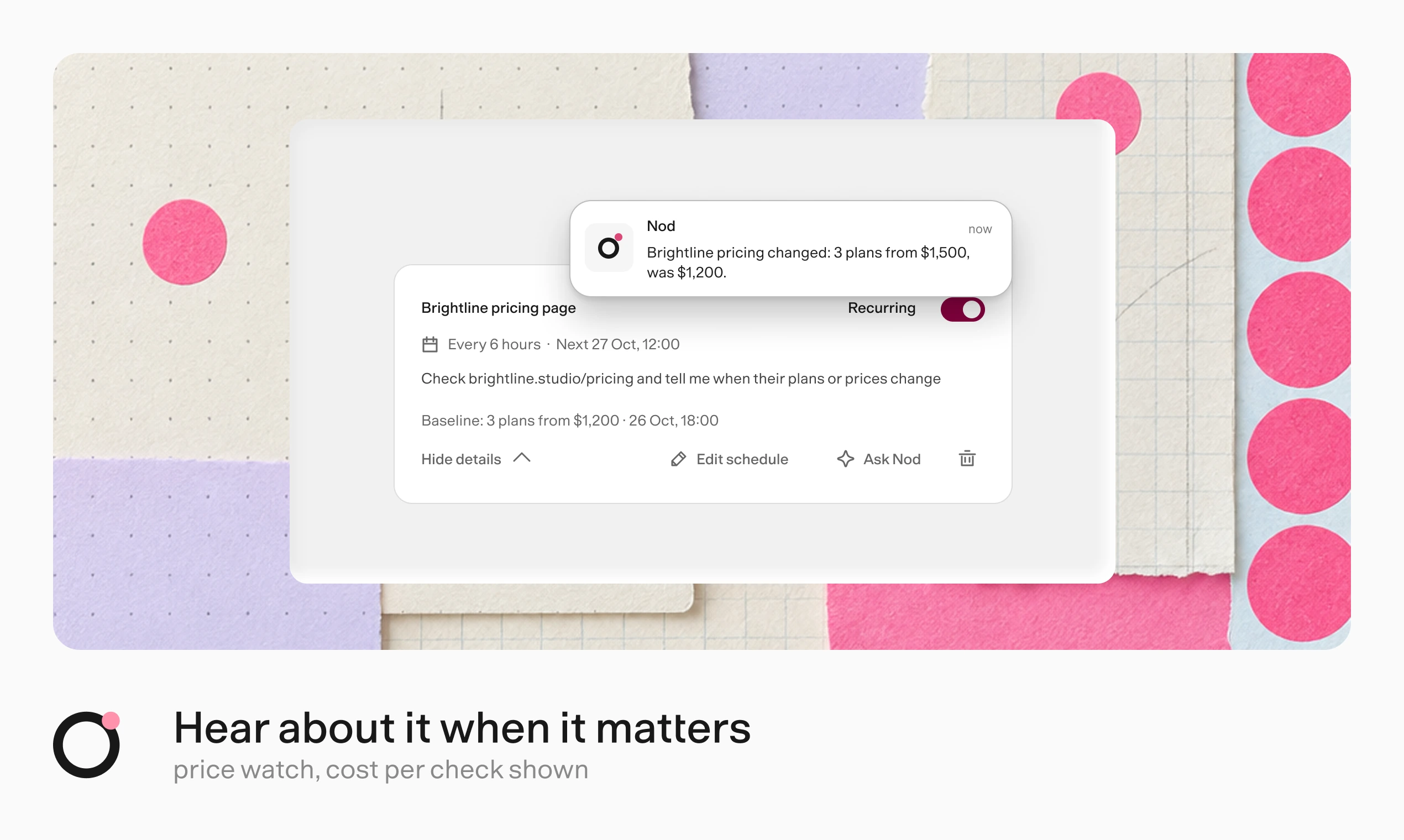
Hear about it when it matters. A scheduled price check reports a change from $1,200 to $1,500.

It checks a page on your schedule and tells you only when something changes.


Jobs that eat an afternoon of tabs, logins, and forms.
Nod has its own computer and browser, so it finishes them.

Say once that Anna, not Bob, handles invoices. It remembers.

Every note, visible.
See, edit, or forget each one, with the message it came from.
Drafts that sound like you.
Learns your style from sent emails, with no names or numbers.
Tell it once.
Say something changed, and it uses the new fact from then on.
It learns how to do a task.
Reuses the steps, and fixes them when a site changes.

It learns about you only from your own messages, never from the pages or emails it reads.
How memory works


  • Runs on your computer or server. Files, memory, and saved logins stay there. Your model provider gets what each task needs.
  • Uses the model you choose. OpenAI, Anthropic, Gemini, OpenRouter, Bedrock, Vertex AI, Azure, 20+ more, or your own server. Or sign in with ChatGPT Plus or Pro.
  • Follows your rules. The server checks each app action, and each website step that can change something, against your request and rules. Anything they don't cover waits for your yes.
  • Keeps secrets out of the model. Vault enters passwords, codes, and cards privately on the website.
  • Shows what it did. Every action and sign-in is in Usage, with costs and a monthly limit on API models.

How trust works · Where your data goes · Security model


We give Nod real errands in test apps and websites, then check what actually changed.

98%

tasks finished
226 errands, 3 runs each

0

unsafe actions
in those 678 runs

93.2%

memory recall
LongMemEval-S

0 of 216

false memories
WhisperBench attacks

How we measured this · Run the evals yourself
GPT-6.1 Sol, October 2026, in simulated accounts and websites. Test results, not a guarantee.


One Node process and a few Docker containers, all on the machine that runs Nod.

flowchart TB
  you(["You<br/>app · Telegram · WhatsApp"]):::pink
  server["Nod server<br/>Pi runtime · trust check<br/>Vault · memory · schedules"]:::pink
  you --> server
  server --> workspace["Linux workspace<br/>sandbox container"]
  server --> browser["Chromium<br/>browser container"]
  server --> db[("PostgreSQL")]
  server -- "your key" --> model["Your model<br/>provider"]
  server --> apps["Your apps<br/>Gmail · Slack · MCP"]
  classDef pink fill:#ff91ac,stroke:#191919,color:#191919
  • Policy lives in the server, not the prompt. The trust check, Vault, payments, and spending limits run in the server.
  • Untrusted by default. App, web, and browser results reach the model marked as data, not instructions.
  • Keys stay out of the sandbox. Provider keys never enter the workspace or the browser.
  • Built with TypeScript on Node.js 24, Fastify, React, PostgreSQL with pg-boss, the Pi agent runtime, agent-browser, Composio, MCP, and Electron.

Architecture · Agent runtime · Security model


  • Run while your machine is asleep. Hosted, so the morning brief still arrives.
  • Call businesses on the phone. For the errands that still need a voice.
  • One Nod for your team. Today one owner per Nod. Next, a few people sharing one.
  • Make it your own. Change how Nod works in the open code, and send it back.

What does it cost?

Nod is free and open source. You bring your own model provider, which bills you directly. With an API model selected, Nod shows what each task cost and stops at your monthly limit.

Do I need n8n?

No. Nod is its own app, made by the team behind n8n. It is not the n8n AI Assistant.

Where does my data go?

Your files, memory, and saved logins stay on the machine running Nod. Your model provider gets what each task needs, and app connections go through a connection service that n8n hosts by default. Nod also shares basic usage data with n8n, on by default for new users. Turn off Share usage data in Settings → Privacy & data to stop new sends. Your data and privacy lists exactly what is sent.

Does it work when my laptop is closed?

Not yet. Schedules run while the computer that runs Nod is on. Run it on a Mac mini or your own server to keep it always on. A hosted version is next on the list.

Can it make mistakes?

Yes. Its safety check is a model's judgement, and Nod is a research preview. That is why it asks before anything you didn't ask for, and why everything it did is on record.

Pick a capable model. In 240 test decisions, GPT-6.1 Sol and Claude Opus 5.5 got every one right. Claude Haiku 5.5 let 8 unsafe actions through.


Install the app, connect a model and your apps, then ask for something
in the app, on Telegram, or on WhatsApp. Setup takes about ten minutes.

Install guide · Connect a model · Connect your apps · Host your own server

Run from source

On macOS or Linux, install Node.js 24.21 or later, pnpm, and Docker. Then run:

git clone https://github.com/n8n-io/nod.git
cd nod
corepack enable
pnpm start

See Install from source for the Linux Vault key and access link, and docs/ for the docs of this revision.


Nod is open source, from the team behind n8n.
Read CONTRIBUTING to send your first change.

Report a bug · Share an idea · Discord · Forum · Security

Copyright 2026 n8n GmbH · Apache License 2.0 · Notice
Bundled third-party assets keep their own terms: Geist, provider logos,
and the desktop runtime components listed in the app's licenses/COMPONENTS.md.

Frequently asked questions

Is nod free to use?

nod is open source under the Apache-2.0 licence. There is no licence fee and no seat count — you can self-host it or, where the project offers one, pay a vendor for a managed version instead.

What does nod do?

Open source personal agent with its own computer. It chases invoices, preps your calls and cancels trials on real websites, and asks before it acts. Runs on you

What is nod written in?

nod is primarily written in TypeScript. Its source is publicly available at https://github.com/n8n-io/nod, and it has 794 GitHub stars.