Nimbalyst: Open-source visual workspace for building with Codex, Claude Code, OpenCode, and other coding agents.
Work on everything in one place: sessions, worktrees, tasks, docs, diagrams, mockups, commits, and code. Visually editable. Deeply linked. Free and MIT licensed. Desktop app for macOS, Windows, and Linux, with an iOS companion app.


Website · Download · Documentation · Discord
https://github.com/user-attachments/assets/bfd89552-61f4-4db1-8301-cc2495423b89
What you get
- Visual editing of the agent's work. WYSIWYG editors for markdown, mockups, Mermaid, Excalidraw, CSV, data models, and code in Monaco. You and the coding agent edit the same files.
- Red/green diff review. Step through the agent's proposed edits in the rendered document and accept or reject each one.
- Parallel agent sessions. Run several coding agents at once, each isolated in its own git worktree.
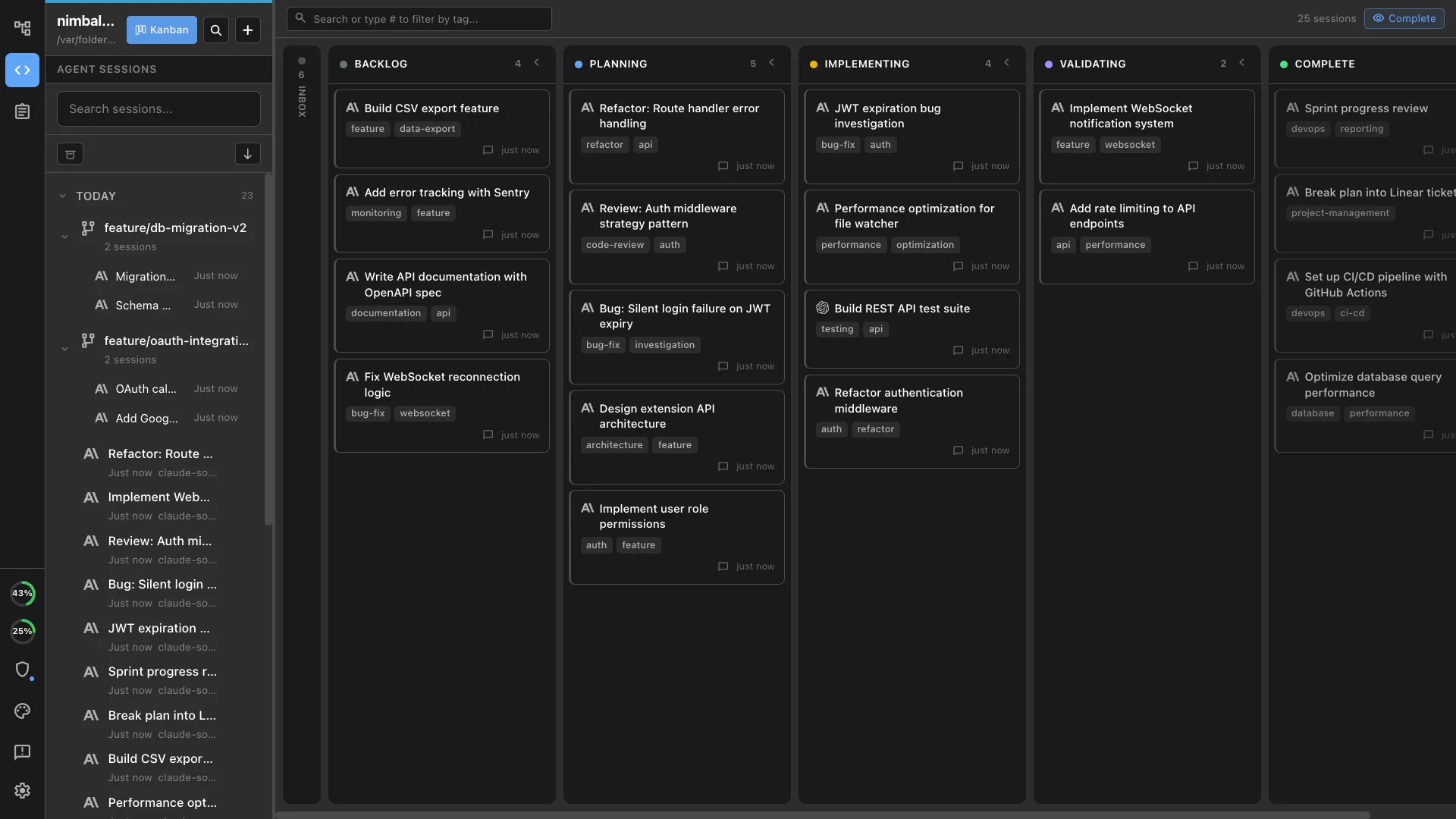
- Session kanban. Track every session on a board. Search, resume, and link sessions to the files they touched.
- Task tracking. Plans, bugs, features, and todos in trackers your agents read and update alongside you.
- Heterogeneous agents. Codex and Claude Code side by side, plus OpenCode and GitHub Copilot in alpha and a Gemini provider.
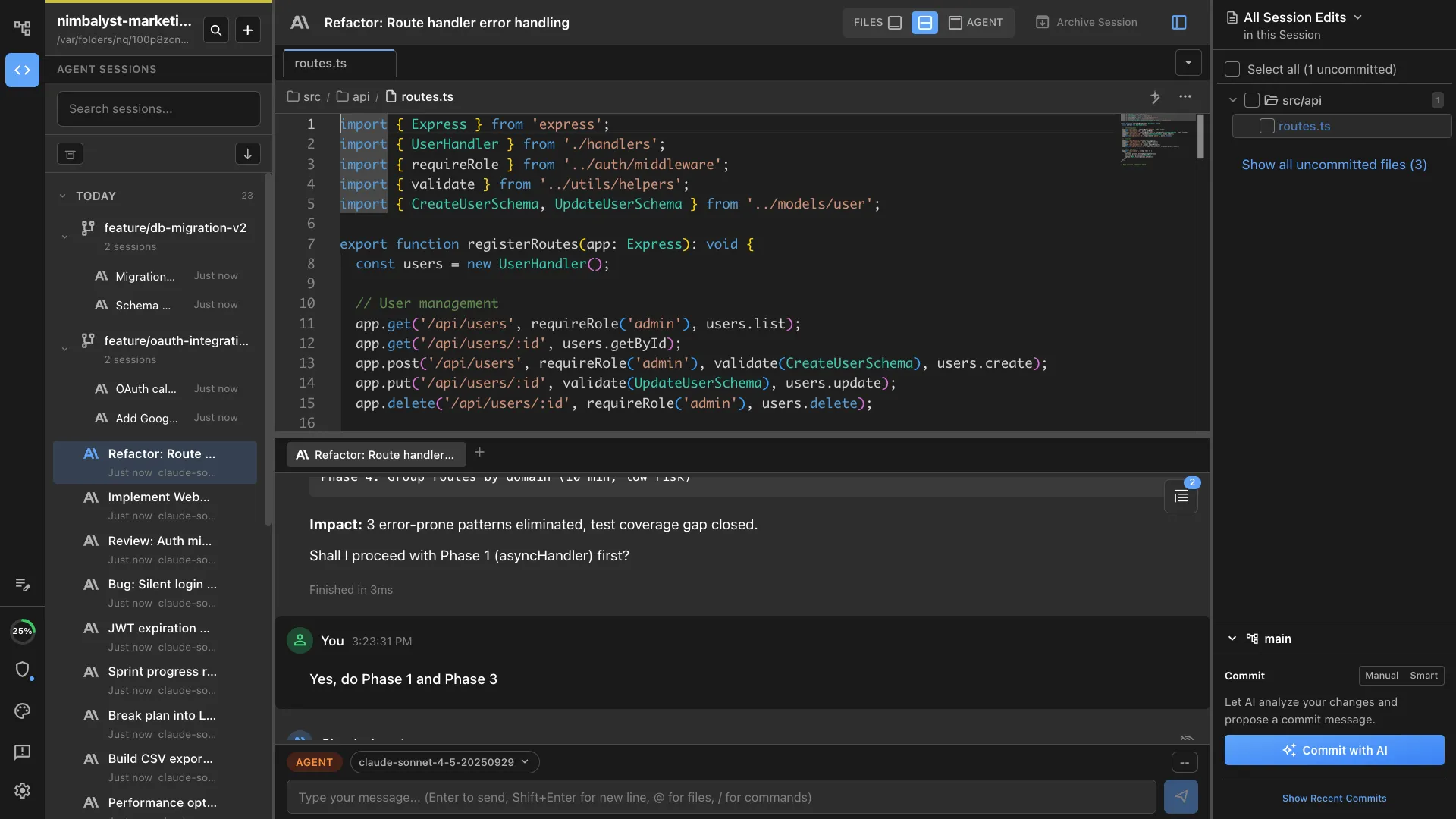
- Git built in. Branch and worktree management, staging, AI-drafted commits, and an embedded terminal.
- MCP client and servers. Connect any MCP server, with tool results rendered as visual widgets rather than raw JSON.
- Extension SDK. Every editor, including the built-in ones, goes through the same
EditorHostcontract, so an editor you build is first-class. Ask your agent to build one for a file type we do not ship. - Plain files on disk. Content and status in markdown, workflows in slash commands, everything in your git repo. No proprietary store to migrate out of.
- iOS companion. See which agents need you, reply by text or voice, swipe through diffs, queue the next task, and get a push when an agent is waiting.
Features
Visual Editors: Built-in WYSIWYG editors where you and your coding agents collaborate visually. Approve agent changes as red/green diffs, edit, annotate, and iterate.
- Markdown
- Mockups with annotations
- Mermaid
- Excalidraw
- CSV
- Data Models
- Code with Monaco

Session Management: Manage coding agents' work across parallel sessions in a UI
- Link sessions to files and files to sessions
- Open files in your sessions. Group files touched by a session
- Run parallel sessions
- Search and resume sessions
- Manage in a Kanban board
Task Tracking: Keep track of your plans, bugs, features, todos etc.
- Have the agent edit tasks, add them, move them, and execute them
- Humans view and edit them too
For Developers
- Manage git state
- Use AI to git commit
- Use the embedded ghostty terminal
- Leverage worktrees
Mobile App
- Session dashboard: see which agents need you and which are still working
- Reply to questions via text or voice, agents resume immediately
- Visual diff review: swipe through changes, tap to approve
- Queue next tasks: keep the pipeline full, don't let agents sit idle
- Push notifications: agents tell you when they need you
Extension System
- Pluggable editors for any file type. Every editor (including built-ins) goes through the same
EditorHostcontract, so custom editors are first-class. - Current extensions include an Astro website editor, visual git log, mindmap, slides, and a 3D object editor.

Supported Coding Agents
- Codex
- Claude Code
- Opencode (alpha)
- Copilot (alpha)
Download
Download the latest version for your platform:
| Platform | Download | Requirements |
|---|---|---|
| macOS Apple Silicon | Download .dmg | macOS Apple Silicon 12+ |
| macOS Intel | Download .dmg | macOS Intel 12+ |
| Windows | Download .exe | Windows 10+ |
| Linux (Debian, Ubuntu) | Download .deb | Debian, Ubuntu, or a derivative |
| Linux (other) | Download AppImage | Linux — on Ubuntu 24.04+ see Linux installation |
Getting Started
- Create or open a document — click "New" or press
Cmd/Ctrl+N - Write in markdown — write/edit in the WYSIWYG editor
- Use the AI assistant — ask AI to research, edit the document, work across your files
- Accept/reject AI changes — step through suggested AI edits and accept or reject
- Work in Agent Manager — switch to the agent manager view and run multiple agent sessions in parallel
- Search/resume sessions — search and resume sessions, manage your work
Auto-Updates
Nimbalyst automatically checks for updates and notifies you when a new version is available. You can also manually check via Help → Check for Updates.
By default, fresh installs are on the stable release channel and only receive promoted releases. If you want early-access builds, switch to the alpha channel under Settings → Advanced → Release Channel. Alpha builds are rougher and may break; revert to stable any time.
Telemetry
Nimbalyst sends anonymous usage analytics to PostHog so we can understand how the app is used and prioritize improvements. We never collect:
- Usernames, emails, or IP addresses (no PII)
- File contents or file paths (categorized buckets only)
- API keys or authentication tokens
- Document, session, or chat content
A randomly-generated anonymous ID is used to correlate events from the same install. You can opt out at any time in Settings → Advanced → Analytics.
For the complete list of every event we send and its properties, see POSTHOG_EVENTS.md. For the privacy rules our analytics code follows, see ANALYTICS_GUIDE.md.
Building from Source
Nimbalyst is a TypeScript / Electron monorepo using npm workspaces.
# Install dependencies (npm 7+ required)
npm install

# Start the Electron app in dev mode
cd packages/electron && npm run dev

# Build a local Mac binary
cd packages/electron && npm run build:mac:local
Major workspaces:
packages/ios— Native iOS app (SwiftUI)packages/electron— Desktop application (Electron)packages/runtime— Cross-platform runtime services (AI, sync, Lexical editor)packages/collab-protocol— Wire-format types for the collaboration sync protocol (shared with the sync server)packages/extension-sdk— Extension development kitpackages/extensions— Built-in extensions
The collaboration sync server (talked to at wss://sync.nimbalyst.com) is a separate project.
For deeper architecture and contributor guidance, see CLAUDE.md and the docs under docs/. For contribution rules and the DCO sign-off requirement, see CONTRIBUTING.md.
Community
- Documentation — watch videos and read the docs
- Discord — join the discussion
- Website — learn more about Nimbalyst
License
- This repository is licensed under the MIT License — see LICENSE.
- The collaboration sync server (the Cloudflare Worker that powers
wss://sync.nimbalyst.com) is a separate project. Clients in this repo talk to it over the wire protocol defined inpackages/collab-protocol/. - For licensing context and contact information, see LICENSING.md.
Contributing
- 💡 Have a vague idea or question? → Join the discussion
- 🐛 Found a bug? → Report it in-app with Send Feedback (left rail or Help menu). Your agent helps draft the report, and you approve everything before it goes to GitHub.
- 🗺️ Curious what we're building? → See the roadmap
- 🤝 Want to help with roadmap work? → Community view
- ✨ Have a concrete feature request? → Send it in-app with Send Feedback (left rail or Help menu) and your agent will help draft it.
- 🌱 Looking for a smaller place to start? → Good first issues
We rank features and bugs by 👍 reactions. Don't comment "+1" — react with 👍 instead. Sort issues by reactions →
Acknowledgments
Built with:
- Electron
- Lexical by Meta
- React
- Monaco Editor
- Excalidraw