
nging is a free, open source file management & sync project written in Go and released under AGPL-3.0. It has 1,594 GitHub stars, 223 forks and 13 open issues, and was last pushed 16 days ago. On this registry it ranks #48 of 65 tracked projects in File Management & Sync, with 5 head-to-head comparisons available.

What is nging?

Nging is a self-hosted website server administration panel written in Go for sysadmins and self-hosters who need to manage Caddy and Nginx sites, databases, scheduled tasks, and network tooling from one web interface across Windows, Linux, macOS, and ARM devices.

What it is

Nging V5 is an open-source server management panel written in Go and released under the AGPL-3.0 licence. It is a website service program that manages and configures Caddy and Nginx sites and bundles a set of operational tools around them: scheduled tasks, MySQL management, Redis management, FTP management, SSH management, and server monitoring. It runs on mainstream platforms including Windows, Linux, and macOS, and also on ARM hardware such as Raspberry Pi devices and routers, and it stores its own data in either MySQL or SQLite3.

The problem it addresses is the fragmentation of day-to-day server administration: cron-style jobs, database administration, file transfer, reverse-proxy configuration, dynamic DNS, and tunnel setup are typically handled through separate tools and shells. Nging consolidates these into a single panel, replacing hand-edited configuration and scattered command-line utilities with browser-based forms and visual configuration screens.

Key capabilities

  • Manage and generate configuration for both Caddy and Nginx sites from the panel interface.
  • Run scheduled tasks (cron-jobs) alongside MySQL, Redis, FTP, SSH, and server management modules.
  • Visual configuration of FRP (frp-ui) and DDNS, alongside an SFTP client and FTP server capability.
  • Cloud storage management (cloud-storage), plus an offline-download facility.
  • File manager and database manager (database-manager, mysql-client, redis-client) exposed through the web UI.
  • Persist panel data in either MySQL or SQLite3, configured at install time via ./nging init --type=sqlite ... or a MySQL connection string.
  • Install itself as a system service with ./nging service install, optionally on a custom port with -p 9998, defaulting to port 9999.

Who uses it and how

  • Operators of single servers who install Nging as a startup service (./nging service install and ./nging service start) and administer sites through the browser.
  • Users on ARM hardware — Raspberry Pi boxes and routers — who need a panel that runs on those platforms alongside Windows, Linux, and macOS.
  • Administrators who prefer an automated install: the nging-installer.sh script downloads Nging, registers it as a system service, and supports upgrade, up, uninstall, and un subcommands with pinned versions such as install 5.2.6.
  • Teams managing Docker containers, who are directed to install the 5.3.x series ("先锋版") specifically for Docker container management needs.
  • Administrators who initialise without a browser, passing --user, --password, --host, --database, --adminUser, --adminPass, and --adminEmail to ./nging init, or who configure from a mobile-oriented interface with two-step verification.

Getting started

Install with sudo wget https://raw.githubusercontent.com/admpub/nging/master/nging-installer.sh -O ./nging-installer.sh && sudo chmod +x ./nging-installer.sh && sudo ./nging-installer.sh, or download a platform package, unpack it, and run the nging executable; a Docker installation path is documented in README_docker.md.

How it compares

Nging stands alone in this registry among the tools listed here, and no comparable products are named in the project's own documentation to contrast against.

When to use it — and when not

A self-hoster must be prepared to operate the backing database (MySQL or SQLite3), and the panel's scope means running a web service on port 9999 together with the FTP, SSH, and download components it manages. It is a poor fit for anyone unwilling to run a control panel on the host itself, and the documentation is written in Chinese, which is a real barrier for readers of English only; the project also carries 13 open issues and older versions have been moved off the main branch into separate v4, v3, v2, and v1 branches.

project readme (upstream, from github) — read inline

Nging V5

Nging's logo

Open in Gitpod

注意:这是Nging V5源代码,旧版V4.x、V3.x、V2.x、V1.x已经转移到 v4分支 v3分支 v2分支 v1分支

Nging支持MySQL和SQLite3数据库

Nging是一个网站服务程序,可以管理和配置 Caddy 和 Nginx 站点,并附带了实用的周边工具,例如:计划任务、MySQL管理、Redis管理、FTP管理、SSH管理、服务器管理等。

赞助支持

赞助支持

可执行文件下载

安装方式

  1. 安装Nging

    1). 自动安装方式:

    sudo wget https://raw.githubusercontent.com/admpub/nging/master/nging-installer.sh -O ./nging-installer.sh && sudo chmod +x ./nging-installer.sh && sudo ./nging-installer.sh
    
    # 如果是中国境内网络,可以选择采用以下命令:
    sudo wget https://gitee.com/admpub/nging/raw/master/nging-installer.sh -O ./nging-installer.sh && sudo chmod +x ./nging-installer.sh && sudo ./nging-installer.sh
    

    nging-installer.sh 脚本支持的命令如下

    命令 说明 示例
    ./nging-installer.sh 或 ./nging-installer.sh install 安装(自动下载nging并启动为系统服务) 安装默认最新基础版本: ./nging-installer.sh install
    安装指定版本: ./nging-installer.sh install 5.2.6
    如有 Docker 容器管理需求,推荐通过指定版本号来安装 5.3.x 系列版本(也称之为先锋版):
    ./nging-installer.sh install 5.3.2
    ./nging-installer.sh upgrade 或 ./nging-installer.sh up 升级 升级到指定版本: ./nging-installer.sh up 5.2.6
    ./nging-installer.sh uninstall 或 ./nging-installer.sh un 卸载 ./nging-installer.sh un

    2). 手动安装方式:
    下载相应平台的安装包,解压缩到当前目录,进入目录执行名为“nging”的可执行程序(在Linux系统,执行之前请赋予nging可执行权限)。 例如在Linux64位系统,分别执行以下命令:

    cd ./nging_linux_amd64
    chmod +x ./nging
    ./nging
    

    3). Docker 安装方式

  2. 初始化配置Nging
    打开浏览器,访问网址 , 在页面中配置数据库和管理员账号信息进行安装。

    从 v5.2.5 和 v5.3.1 开始支持如下两种方式

    • 1). 通过网页安装界面配置 (适用于已经启动 nging 的情形):

      打开浏览器,访问网址 , 在页面中配置数据库和管理员账号信息进行安装。

    • 2). 通过命令来配置 (适用于尚未启动 nging 的情形):

      • 安装到 MySQL 数据库的方式
        ./nging init --user= --password= --host= --database= --adminUser= --adminPass= --adminEmail=
        
        例如:
        ./nging init --user=root --password="root" --host="127.0.0.1:3306" --database=nging --adminUser=admin --adminPass="admin123" --adminEmail="admin@coscms.com"
        
      • 安装到 SQLite 数据库的方式
        ./nging init --type=sqlite --database= --adminUser= --adminPass= --adminEmail=
        
        例如:
        ./nging init --type=sqlite --database="config/nging.db" --adminUser=admin --adminPass="admin123" --adminEmail="admin@coscms.com"
        

      执行成功后,启动 nging。

安装成功后,通过 使用管理员账号登录。

Nging手动升级步骤

  1. 备份数据库和旧版可执行文件;
  2. 停止旧版本程序的运行;
  3. 将新版本所有文件复制到旧版文件目录里进行覆盖;
  4. 启动新版本程序;
  5. 登录后台检查各项功能是否正常;
  6. 升级完毕

从 V3 升级

将 config/config.yaml 文件内的 caddy、 ftp、download 配置块移动到 extend 块内(ftp改名为ftpserver)。即:

extend {
    caddy {
        // 内容略...
    }
    ftpserver {
        // 内容略...
    }
    download {
        // 内容略...
    }
}

开机自动运行

  1. 首先,安装为服务,执行命令 ./nging service install
  2. 启动服务,执行命令 ./nging service start

与服务相关的命令:

命令 说明 其它用例
./nging service install 安装服务 Nging 默认使用 9999 端口,在安装为服务时,可以指定自定义端口 ./nging service install -p 9998
./nging service start 启动服务 无
./nging service stop 停止服务 无
./nging service restart 重启服务 无
./nging service uninstall 卸载服务 无

Ⅰ、功能介绍

Ⅱ、先睹为快

手机端界面展示:

登录界面 两步验证界面 面板首页
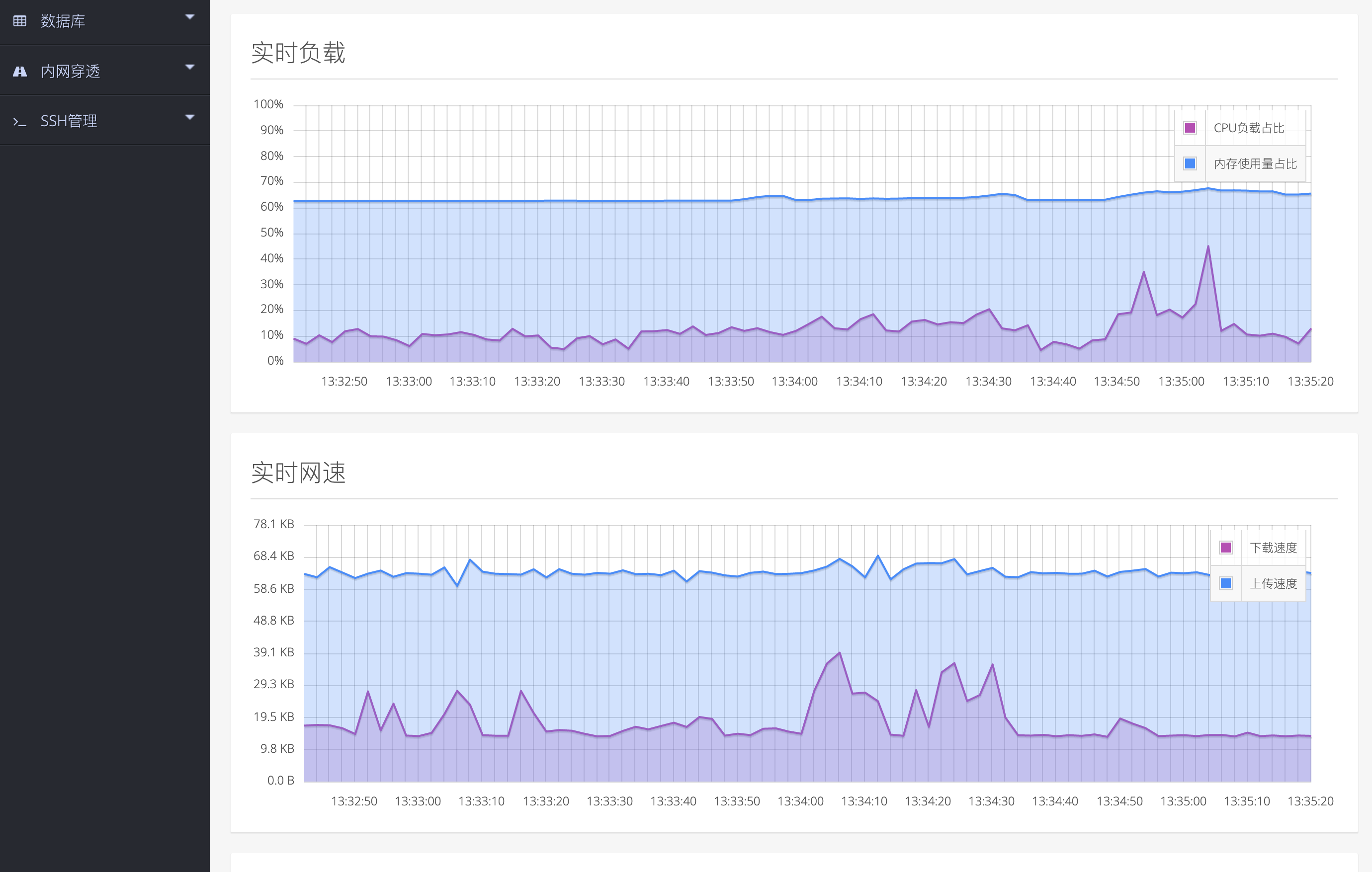
负载统计图 网速统计图 菜单界面
数据库管理界面 系统配置界面 控制台终端

PC端界面展示:

运行

安装

安装:

安装

登录:

登录

系统信息:

系统信息

实时状态:

实时状态

在线编辑文件:

在线编辑文件

添加计划任务:

添加计划任务

MySQL数据库管理:

MySQL数据库管理

Ⅲ、开发指引

请注意,本系统的源代码基于AGPL协议发布,不管您使用本系统的完整代码还是部分代码,都请遵循AGPL协议。

如果需要更宽松的商业授权协议,请联系我购买授权。

Frequently asked questions

Is nging free to use?

nging is open source under the AGPL-3.0 licence. There is no licence fee and no seat count — you can self-host it or, where the project offers one, pay a vendor for a managed version instead.

What does nging do?

网站服务器管理面板,包含:计划任务 / MySQL管理 / Redis管理 / FTP管理 / SSH管理 / 服务器管理 / Caddy和Nginx配置 / DDNS / FRP可视化配置 / 云存储管理 等功能。可运行于 Windows / Linux / MacOS 等主流系统平台和 树莓派 / 路由器 等ARM

What is nging written in?

nging is primarily written in Go. Its source is publicly available at https://github.com/admpub/nging, and it has 1,594 GitHub stars.