NextAI Translator is an open-source, AGPL-3.0 licensed browser extension and cross-platform desktop application that performs selected-text translation, polishing, and summarization through the ChatGPT API, and it is aimed at readers, writers, and developers who want all three of those operations available on Windows, macOS, and Linux rather than on a single platform.
What it is
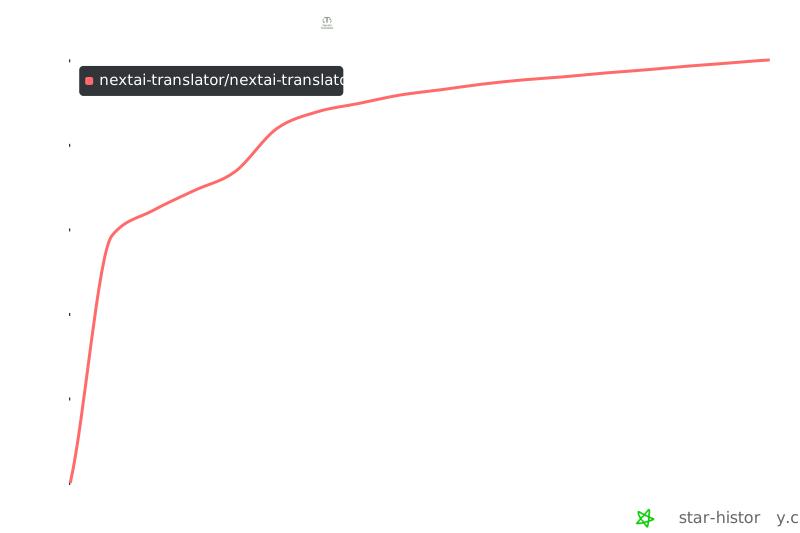
NextAI Translator is a TypeScript project distributed as both a browser extension and a desktop application, and it lives in the ChatGPT and OpenAI API ecosystem: it does not ship a translation model of its own, and instead drives large language models from providers such as OpenAI, TeamoRouter, Azure OpenAI Service, and MiniMax. The project began as a Chrome extension and has since evolved into a multi-platform desktop app, and the same functionality is exposed in browsers and on desktop. It sits in the Productivity and Utilities category under Browsers and Extensions, carries the AGPL-3.0 licence, and has accumulated roughly 24,983 stars and 1,850 forks, with the repository last pushed in September 2026. The project was renamed to NextAI Translator after receiving a trademark ownership warning from OpenAI.
The concrete problem it solves is platform lock-in. The same author previously built a Bob plugin that used the ChatGPT API to provide global word translation on macOS, but that plugin is only useful to people who have access to macOS. Users on Windows or Linux, or users who want translation inside a browser rather than in a separate macOS utility, had no equivalent path. This project replaces that macOS-only plugin with an application that runs on Windows, macOS, and Linux as a desktop app and in the browser as an extension, so the translation, polishing, and summarization workflow is no longer tied to one operating system. It also replaces the single-purpose dictionary popup with three modes — translation, polishing, and summarization — in one tool.
Key capabilities
- Three modes covering translation, polishing, and summarization, rather than translation alone.
- Mutual translation, polishing, and summarization across 55 languages.
- Streaming mode, so output appears as the model produces it instead of arriving in one block.
- User-customizable translation text, allowing the prompt sent to the model to be adjusted.
- One-click copying of results and Text-to-Speech output.
- Screenshot translation, for text that cannot be selected directly.
- Vocabulary books with generated memory aids derived from the words they contain.
- Provider choice across OpenAI, TeamoRouter, Azure OpenAI Service, MiniMax, and other LLM providers.
Who uses it and how
- Desktop users on Windows, macOS, and Linux install the same application and get the same three modes on each platform.
- Browser users install the Chrome extension and translate selected text without leaving the page.
- macOS users on Apple Silicon install the
aarch64 .dmg, and may need to clear the quarantine attribute or re-add the app under Privacy and Security before shortcuts work.
- Users who want one key for several model vendors select TeamoRouter as the provider in Settings and paste a single API key.
- Users in regions where OpenAI is unreachable configure an OpenAI API proxy to route requests.
Getting started
Download the Windows .exe installation package or the macOS .dmg package for the matching chip from the Latest Release page and run it, then select a provider and supply an API key in Settings; an OpenAI API key or an Azure OpenAI Service API key is required.
How it compares
The closest tool named in the project's own facts is the author's Bob plugin, bob-plugin-nextai-translator, which provides ChatGPT-based global word translation but only on macOS. NextAI Translator descends directly from that work and generalizes it, so its distinguishing position within this registry is cross-platform coverage: the same three modes reach Windows, Linux, and the browser, where the plugin reached only macOS. No paid products are listed in the available facts, so no licence-versus-subscription or hosting comparison can be made here.
When to use it — and when not to
A self-hoster here does not operate a server, but every user must supply their own API key and reach an LLM provider, and macOS installation carries real friction: the developer cannot be verified, the app may need xattr to clear quarantine, and supporting permissions may need to be re-added before shortcut translation works. Anyone who wants a zero-configuration, no-key translator should not pick this, and the captured README excerpt breaks off partway through the Linux install section, so Linux desktop installation is not documented in the material available. The repository also carries 529 open issues, which is worth weighing against the otherwise active update cadence.
project readme (upstream, from github) — read inline
Due to receiving a trademark ownership warning from OpenAI, this project and product has been renamed to nextai translator. We hope you understand.
English | 中文
The translator that does more than just translation






Why Yet another Translator
I have developed a Bob plugin that utilizes ChatGPT API to provide global word translation on macOS. However, since not all users have access to macOS to benefit from the plugin, I have created this project!
More than just a browser extension
What began as a Chrome extension has now evolved into a multi-platform desktop app that I am currently developing.

More than just translation
What began as a translation tool has now evolved to include surprisingly effective word polishing and summarization capabilities, accidentally.
How to use

Features
- It offers three modes: translation, polishing and summarization.
- Our tool allows for mutual translation, polishing and summarization across 55 different languages.
- Streaming mode is supported!
- It allows users to customize their translation text.
- One-click copying
- Text-to-Speech (TTS)
- Available on all platforms (Windows, macOS, and Linux) for both browsers and Desktop
- Support screenshot translation
- Support for vocabulary books, as well as support for generating memory aids based on the words in the vocabulary books
- Supports OpenAI, TeamoRouter, Azure OpenAI Service, MiniMax, and other LLM providers
Preparation
- (recommended) Use TeamoRouter — an OpenAI-compatible LLM gateway that gives you OpenAI, Claude, Gemini and more through a single API key, at up to 90% off. It's built in: just select TeamoRouter as the provider in Settings and paste your API key.
- (required) Apply for an OpenAI API key here or Azure OpenAI Service API Key
- (optional) If you cannot access OpenAI, you can use the OpenAI API Proxy.
Installation
Windows
Install Manually
- Download the installation package ending in
.exe from the Latest Release page.
- Double click the downloaded file to install it.
- If prompted as unsafe, you can click on
More Info -> Run Anyway to proceed with the installation.
- Ready to use!
MacOS
Install Manually
- Go to the Latest Release page and download the corresponding chip's
.dmg installation package. Note: Use aarch64 version for Apple Silicon machines and run xattr command below.
- Double click the downloaded file to install it.
- Ready to use!
Troubleshooting
- "NextAI Translator" can’t be opened because the developer cannot be verified.

- Click the `Cancel` button, then go to the `Settings` -> `Privacy and Security` page, click the `Still Open` button, and then click the `Open` button in the pop-up window. After that, there will be no more pop-up warnings when opening `NextAI Translator`. 🎉


-   If you cannot find the above options in `Privacy & Security`, or get error prompts such as broken files with Apple Silicon machines. Open `Terminal.app` and enter the following command (you may need to enter a password halfway through), then restart `NextAI Translator`:

    ```sh
    sudo xattr -d com.apple.quarantine /Applications/NextAI\ Translator.app
    ```
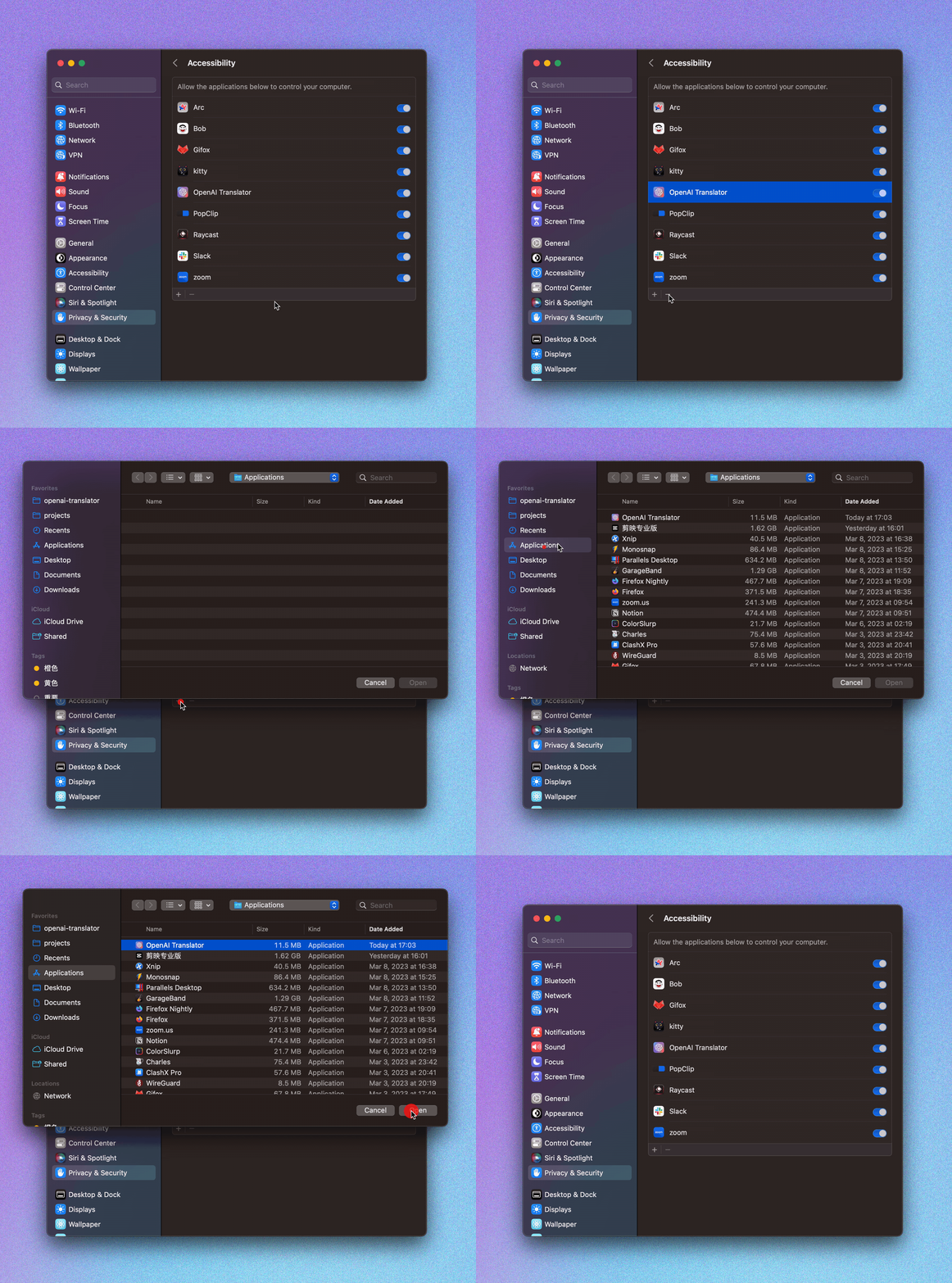
- If you encounter a permission prompt every time you open it, or if you cannot perform a shortcut translation, please go to
Settings -> Privacy & Security -> Supporting Features to remove NextAI Translator, and then re-add NextAI Translator.

Installing Desktop Clip Extensions
For details, see Desktop Clip Extension

Browser Extension
- Visit your Browser Extension Store to install this plugin:


- Click on the NextAI Translator icon in the browser plugin list, and enter the obtained API KEY into the configuration interface that pops up from this plugin.

- Refresh the page in the browser to enjoy the smooth translation experience 🎉!
Configure Azure OpenAI Service
const API_URL = `https://${resourceName}.openai.azure.com`
const API_URL_PATH = `/openai/deployments/${deployName}/chat/completions?api-version=${apiVersion}`
- resourceName: Your Azure OpenAI Service resource name.
- deployName: Your Azure OpenAI Service model deploy name, you can change your model here.
- api-version: 2023-05-15, or newer. (supported api-version can be found at Azure's official doc)
License
LICENSE
Star History