NextPlaid & ColGREP
NextPlaid is a multi-vector search engine. ColGREP is semantic code search, built on it.
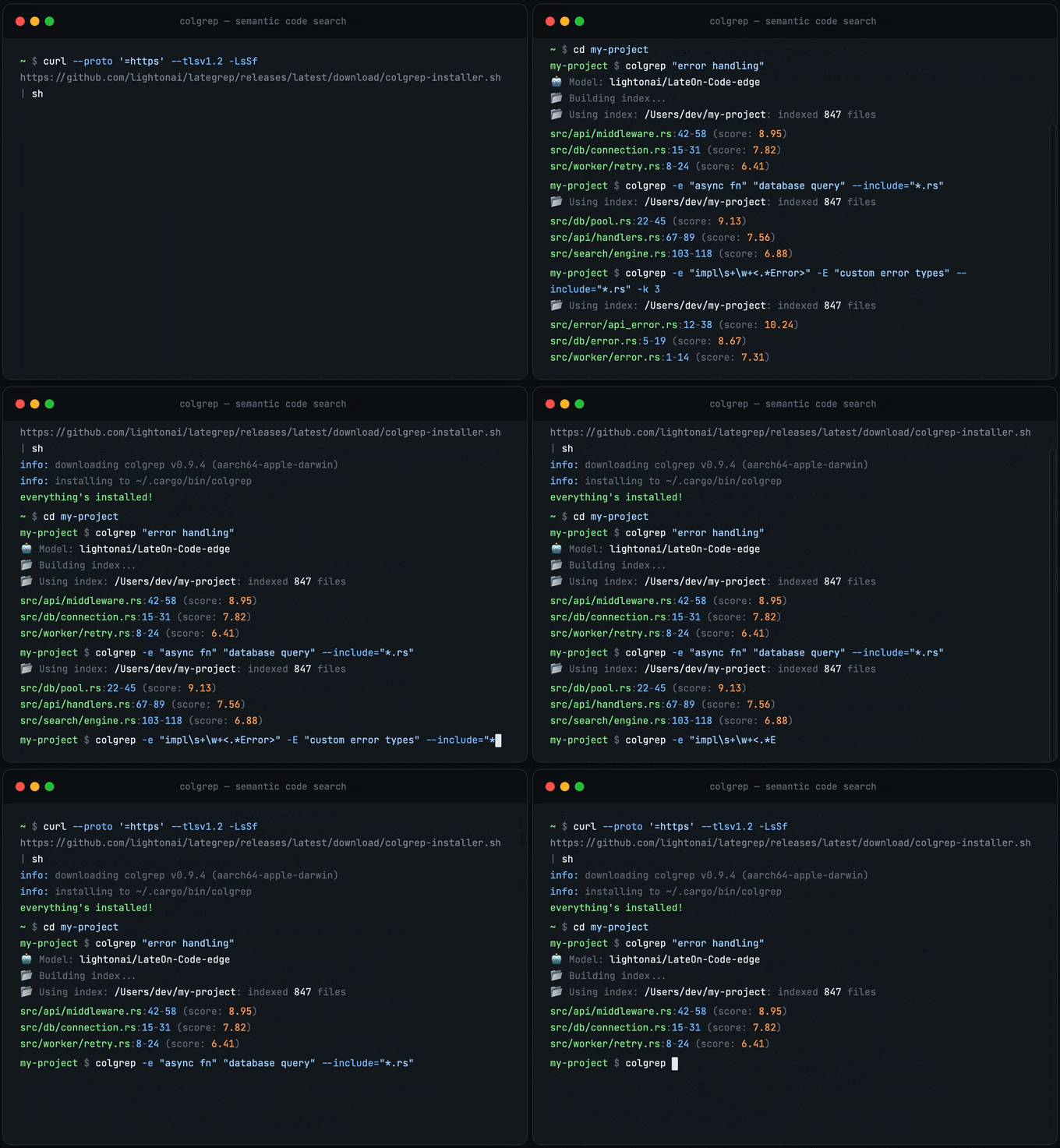
ColGREP
Semantic code search for your terminal and your coding agents. Searches combine regex filtering with semantic ranking. All local, your code never leaves your machine.
Quick start
Install:
# Homebrew (macOS / Linux)
brew install lightonai/tap/colgrep

# Shell installer
curl --proto '=https' --tlsv1.2 -LsSf https://github.com/lightonai/next-plaid/releases/latest/download/colgrep-installer.sh | sh
Build the index:
colgrep init /path/to/project  # specific project
colgrep init                   # current directory
Search:
colgrep "database connection pooling"
That's it. No server, no API, no dependencies. ColGREP is a single Rust binary with everything baked in. colgrep init builds the index for the first time. After that, every search detects file changes and updates the index automatically before returning results.
Regex meets semantics:
colgrep -e "async.*await" "error handling"
Change the model
The default is lightonai/LateOn-Code-edge. Switch to any other ColBERT-style model on HuggingFace:
# Persist as the default (existing indexes for other models are kept)
colgrep set-model lightonai/LateOn-Code

# One-shot override for a single query or init
colgrep --model lightonai/LateOn-Code "database connection pooling"

# See which model an index was built with
colgrep status

# Private HuggingFace model
HF_TOKEN=hf_xxx colgrep set-model myorg/private-model
Each (project, model) pair has its own index directory, so switching models never corrupts existing indexes and you can flip back and forth without re-indexing. colgrep clear scopes to the active model; colgrep clear --all wipes every index.
Agent integrations
| Tool | Install |
|---|---|
| Claude Code | colgrep --install-claude-code |
| OpenCode | colgrep --install-opencode |
| Codex | colgrep --install-codex |
| Hermes | colgrep --install-hermes |
Restart your agent after installing. Claude Code has full hooks support. OpenCode, Codex, and Hermes integrations are basic for now, PRs welcome.
How it works
flowchart TD
    A["Your codebase"] --> B["Tree-sitter"]
    B --> C["Structured representation"]
    C --> D["LateOn-Code-edge · 17M"]
    D --> E["NextPlaid"]
    E --> F["Search"]

    B -.- B1["Parse functions, methods, classes"]
    C -.- C1["Signature, params, calls, docstring, code"]
    D -.- D1["Multi-vector embedding per code unit · runs on CPU"]
    E -.- E1["Rust index binary · quantized · memory-mapped · incremental"]
    F -.- F1["grep-compatible flags · SQLite filtering · semantic ranking
100% local, your code never leaves your machine"]

    style A fill:#4a90d9,stroke:#357abd,color:#fff
    style B fill:#50b86c,stroke:#3d9956,color:#fff
    style C fill:#50b86c,stroke:#3d9956,color:#fff
    style D fill:#e8913a,stroke:#d07a2e,color:#fff
    style E fill:#e8913a,stroke:#d07a2e,color:#fff
    style F fill:#9b59b6,stroke:#8445a0,color:#fff
    style B1 fill:none,stroke:#888,stroke-dasharray:5 5,color:#888
    style C1 fill:none,stroke:#888,stroke-dasharray:5 5,color:#888
    style D1 fill:none,stroke:#888,stroke-dasharray:5 5,color:#888
    style E1 fill:none,stroke:#888,stroke-dasharray:5 5,color:#888
    style F1 fill:none,stroke:#888,stroke-dasharray:5 5,color:#888
What the model sees. Each code unit is converted to structured text before embedding:
# Function: fetch_with_retry
# Signature: def fetch_with_retry(url: str, max_retries: int = 3) -> Response
# Description: Fetches data from a URL with retry logic.
# Parameters: url, max_retries
# Returns: Response
# Calls: range, client.get
# Variables: i, e
# Uses: client, RequestError
# File: src/utils/http_client.py

def fetch_with_retry(url: str, max_retries: int = 3) -> Response:
    """Fetches data from a URL with retry logic."""
    for i in range(max_retries):
        try:
            return client.get(url)
        except RequestError as e:
            if i == max_retries - 1:
                raise e
This structured input gives the model richer signal than raw code alone.
Documentation: install variants, performance tuning, all flags and options → ColGREP documentation
Benchmark
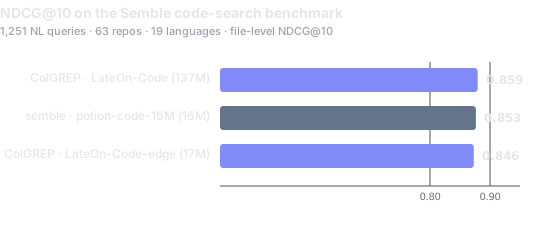
ColGREP against Semble public bench: 1,251 queries × 63 repos × 19 languages (FP32).
Why multi-vector?
Standard vector search collapses an entire document into one embedding. That's a lossy summary. Fine for short text, bad for code where a single function has a name, parameters, a docstring, control flow, and dependencies.
Multi-vector keeps ~300 embeddings of dimension 128 per document instead of one. At query time, each query token finds its best match across all document tokens (MaxSim). More storage upfront. That's what NextPlaid solves with quantization and memory-mapped indexing.
NextPlaid
A local-first multi-vector database with a REST API. It's what powers ColGREP under the hood, but it's a general-purpose engine you can use for any retrieval workload.
- Built-in encoding. Pass text, get results. Ships with ONNX Runtime for ColBERT models, no external inference server needed.
- Memory-mapped indices. Low RAM footprint, indices live on disk and are paged in on demand.
- Product quantization. 2-bit or 4-bit compression. A million documents fit in memory.
- Incremental updates. Add and delete documents without rebuilding the index.
- Metadata pre-filtering. SQL WHERE clauses on a built-in SQLite store. Filter before search so only matching documents are scored.
- CPU-optimized. Designed to run fast on CPU. CUDA supported when you need it.
NextPlaid vs FastPlaid. FastPlaid is a GPU batch indexer built for large-scale, single-pass workloads. NextPlaid wraps the same FastPlaid algorithm into a production API that handles documents as they arrive: incremental updates, concurrent reads/writes, deletions, and built-in encoding. Use FastPlaid for bulk offline indexing and experiments, NextPlaid for serving and streaming ingestion.
Quick start
Run the server (Docker):
# CPU
docker pull ghcr.io/lightonai/next-plaid:cpu-1.7.0
docker run -p 8080:8080 -v ~/.local/share/next-plaid:/data/indices \
  ghcr.io/lightonai/next-plaid:cpu-1.7.0 \
  --host 0.0.0.0 --port 8080 --index-dir /data/indices \
  --model lightonai/answerai-colbert-small-v1-onnx --int8
# GPU
docker pull ghcr.io/lightonai/next-plaid:cuda-1.7.0
docker run --gpus all -p 8080:8080 -v ~/.local/share/next-plaid:/data/indices \
  ghcr.io/lightonai/next-plaid:cuda-1.7.0 \
  --host 0.0.0.0 --port 8080 --index-dir /data/indices \
  --model lightonai/GTE-ModernColBERT-v1 --cuda
Query from Python:
pip install next-plaid-client
from next_plaid_client import NextPlaidClient, IndexConfig

client = NextPlaidClient("http://localhost:8080")

# Create index
client.create_index("docs", IndexConfig(nbits=4))

# Add documents, text is encoded server-side
client.add(
    "docs",
    documents=[
        "next-plaid is a multi-vector database",
        "colgrep is a code search tool based on NextPlaid",
    ],
    metadata=[{"id": "doc_1"}, {"id": "doc_2"}],
)

# Search
results = client.search("docs", ["coding agent tool"])

# Search with metadata filtering
results = client.search(
    "docs",
    ["vector-database"],
    filter_condition="id = ?",
    filter_parameters=["doc_1"],
)

# Delete by predicate
client.delete("docs", "id = ?", ["doc_1"])
Or via the CLI (pip install "next-plaid-client[cli]"):
next-plaid index create docs
next-plaid document add docs --text "hello world"
next-plaid search docs "hello"
Once the server is running: Swagger UI · OpenAPI spec
Documentation: REST API reference, Docker Compose, environment variables → NextPlaid documentation
API Benchmarks
End-to-end benchmarks against the NextPlaid API on BEIR datasets. Documents are uploaded as raw text in parallel batches of 64. Search queries are sent as raw text, one at a time, with 16 concurrent workers to simulate real user traffic. All throughput numbers (docs/s, QPS) include encoding time — the model runs inside the API, so every document and query is embedded on the fly within the API.
Setup: lightonai/GTE-ModernColBERT-v1 on NVIDIA H100 80GB, top_k=100, n_ivf_probe=8, n_full_scores=4096. CPU search uses INT8-quantized ONNX encoding on the same machine.
| Dataset | Documents | MAP | NDCG@10 | NDCG@100 | Recall@10 | Recall@100 | Indexing (docs/s) | GPU QPS | GPU P95 (ms) | CPU QPS | CPU P95 (ms) |
|---|---|---|---|---|---|---|---|---|---|---|---|
| arguana | 8,674 | 0.2457 | 0.3499 | 0.3995 | 0.7126 | 0.9337 | 77.1 | 13.6 | 170.1 | 17.4 | 454.7 |
| fiqa | 57,638 | 0.3871 | 0.4506 | 0.5129 | 0.5184 | 0.7459 | 41.3 | 18.2 | 170.6 | 17.6 | 259.1 |
| nfcorpus | 3,633 | 0.1870 | 0.3828 | 0.3427 | 0.1828 | 0.3228 | 86.7 | 6.6 | 262.1 | 16.9 | 219.4 |
| quora | 522,931 | 0.8170 | 0.8519 | 0.8644 | 0.9309 | 0.9730 | 105.5 | 20.9 | 126.2 | 17.7 | 235.1 |
| scidocs | 25,657 | 0.1352 | 0.1914 | 0.2732 | 0.2020 | 0.4418 | 46.9 | 17.5 | 139.3 | 16.5 | 281.7 |
| scifact | 5,183 | 0.7186 | 0.7593 | 0.7775 | 0.8829 | 0.9633 | 53.1 | 7.9 | 169.5 | 16.9 | 305.4 |
Models
Any HuggingFace ColBERT-style model can be exported to ONNX. By default, both FP32 and INT8 quantized versions are created. INT8 quantization reduces size (~4x smaller) and improves speed with minimal quality loss.
pip install pylate-onnx-export

# Export model (creates model.onnx and model_int8.onnx)
pylate-onnx-export lightonai/GTE-ModernColBERT-v1 -o ./my-models

# Export + push to HuggingFace Hub
pylate-onnx-export lightonai/GTE-ModernColBERT-v1 -o ./my-models --push-to-hub myorg/my-onnx-model
Ready-to-use models
These can be served with NextPlaid and used with ColGREP without export:
| Model | Use case |
|---|---|
lightonai/LateOn-Code-edge |
Code search, lightweight |
lightonai/LateOn-Code |
Code search, accurate |
lightonai/mxbai-edge-colbert-v0-32m-onnx |
Text retrieval, lightweight |
lightonai/answerai-colbert-small-v1-onnx |
Text retrieval, lightweight |
lightonai/GTE-ModernColBERT-v1 |
Text retrieval, accurate |
Any PyLate-compatible ColBERT model from HuggingFace can be used when converted to ONNX.
License
Apache-2.0
Citation
@software{next-plaid,
  title        = {NextPlaid, ColGREP: Multi-vector search, from database to coding agents.},
  url          = {https://github.com/lightonai/next-plaid},
  author       = {Sourty, Rapha\"{e}l},
  contributors = {Dinaburg, Artem and Oruc, Omer Faruk and Tripathi, Abhishek and Carron, Igor and Hsu, Chao-Chun (Joe) and Ellis, Jonathan and NickSdot and Weitekamp, Raymond and R\k{a}czka, Szymon and Motliuk, Mark and Chechenev, Ivan},
  year         = {2026},
}

@misc{LateOn-Code,
  title  = {LateOn-Code: a Family of State-Of-The-Art Late Interaction Code Retrieval Models},
  author = {Chaffin, Antoine},
  url    = {https://huggingface.co/collections/lightonai/lateon-code},
  year   = {2026}
}