





Automate your <a href="https://github.com/inlife/awesome-ae">Adobe After Effects</a> rendering workflows. Create data-driven and template based videos.
Table of contents
- Introduction
- Installation
- Usage
- Template rendering
- Network rendering
- Tested with
- Additional Information
Introduction
nexrender is a simple, small, carefully designed application with the main goal of rendering automation for Adobe After Effects based rendering workflows.
The information in this document is targeted at people at least somewhat comfortable with scripting or development, and who have basic knowledge of javascript language and json formats.
If coding isn’t your thing or you want a quick managed solution, we got you! We offer a range of services to help you get started much faster and hassle-free.
- Nexrender Cloud is a ready-to-use SaaS rendering platform created with ease in mind and supplemented with additional features.
- If you’re looking for something super flexible, tailored specifically to your unique needs, we also build custom infrastructures based on your requirements and integrated with your existing setup.
- In case, you just need to render something very quickly, let us know too! We offer batch rendering just for such cases.
Features
- data-driven, dynamic, personalized video rendering
- automated video management, processing, and delivery
- network-oriented project structure, render farm
- highly modular nature, extensive plugin support
- works only in cli mode, never launches After Effects GUI application
- does not require licenses for Adobe After Effects on any worker machine
- free to use and open source
How it works
- rendering: It uses Adobe After Effects' aerender command-line interface application.
- compositing: It creates a temporary folder, copies project and replaces assets with provided ones.
- personalization: It uses AE's expressions, scripting, and compositing (noted above).
- scheduling: It stores projects in a local database, managed from anywhere using http api.
- network: It renders project per machine, and can be used to render several projects simultaneously.
- farm: Can be used to render a single project on several machines via Multi-Machine Sequence.
Alternatives
The main alternative to our open-source project is Nexrender Cloud - our hosted SaaS platform with easy setup, additional features and best price on the market.
Among more expensive and less flexible alternatives, there is Plainly, a tool built on Nexrender infrastructure that offers cloud rendering. Another noteworthy option currently available is Dataclay's Templater bot edition.
Installation
You can download binaries directly from the releases section, or install them using npm, whichever option works better for you.
However, please note: the npm version of the binaries doesn't include all optional plugin packages that are covered in the usage section.
If you wish to install them as well, please do so by providing each one individually:
npm i -g @nexrender/cli @nexrender/action-copy @nexrender/action-encode ...
Usage
We will be using nexrender-cli binary for this example. It's recommended to download/install it if you haven't already.
⚠ If using WSL check out wsl support
Job
A job is a single working unit in the nexrender ecosystem. It is a json document, that describes what should be done, and how it should be done. Minimal job description always should contain a pointer onto Adobe After Effects project, which is needed to be rendered, and a composition that will be used to render.
The pointer is src (string) field containing a URI pointing towards specified file, followed by composition (string) field, containing the name of the composition that needs to be rendered.
Note: check out supported protocols for
srcfield.
// myjob.json
{
    "template": {
        "src": "file:///users/myuser/documents/myproject.aep",
        "composition": "main"
    }
}
or for remote file accessible via http
// myjob.json
{
    "template": {
        "src": "http://example.com/myproject.aep",
        "composition": "main"
    }
}
Submitting this data to the binary will result in start of the rendering process:
$ nexrender-cli '{"template":{"src":"file:///home/documents/myproject.aep","composition":"main"}}'
Note: on MacOS you might need to change the permissions for downloaded file, so it would be considered as an executable. You can do it by running:
$ chmod 755 nexrender-cli-macos
or more conveniently using the --file option
$ nexrender-cli --file myjob.json
Note: its recommended to run
nexrender-cli -hat least once, to read all useful information about available options.
More info: @nexrender/cli
After Effects 2023
Please note that for After Effects 2023, it's vital to set up an Output Module, even if you want to rely on the default output module. After Effects 2023 rendering binary (aerender) in a lot of cases will not render a composition unless it has a configured output module. Additionally, AE2023 now allows rendering directly to mp4, so consider setting up a custom value for outputExt as well. To do that, take a look at following example:
// myjob.json
{
    "template": {
        "src": "file:///users/myuser/documents/myproject_ae2023.aep",
        "composition": "main",
        "outputModule": "H.264 - Match Render Settings - 15 Mbps",
        "outputExt": "mp4",
        "settingsTemplate": "Best Settings"
    }
}
Assets
We've successfully rendered a static project file using nexrender, however, there is not much point doing that unless we are going to add some dynamic data into the mix.
A way to implement something like that is to add an asset to our job definition:
// myjob.json
{
    "template": {
        "src": "file:///d:/documents/myproject.aep",
        "composition": "main"
    },
    "assets": [
        {
            "src": "file:///d:/images/myimage.png",
            "type": "image",
            "layerName": "background.png"
        }
    ]
}
What we've done there is we told nexrender to use a particular asset as a replacement for something that we had defined in our aep project.
More specifically, when rendering is gonna happen, nexrender will copy/download this asset file, and attempt to find and replace footage entry by specified layer name.
Check out: detailed information about footage items.
Actions
You might've noticed that unless you added --skip-cleanup flag to our command, all rendered results will be deleted,
and a big warning message will be shown every time you attempt to run the nexrender-cli with our job.
The reason is that we haven't defined any actions that we need to do after we finished actual rendering. Let's fix that and add a simple one, copy.
// myjob.json
{
    "template": {
        "src": "http://example.com/assets/myproject.aep",
        "composition": "main"
    },
    "assets": [
        {
            "src": "http://example.com/assets/myimage.png",
            "type": "image",
            "layerName": "background.png"
        }
    ],
    "actions":{
        "postrender": [
            {
                "module": "@nexrender/action-encode",
                "preset": "mp4",
                "output": "encoded.mp4"
            },
            {
                "module": "@nexrender/action-copy",
                "input": "encoded.mp4",
                "output": "d:/mydocuments/results/myresult.mp4"
            }
        ]
    }
}
We've just added a postrender action, that will occur right after we finished rendering.
A module that we described in this case, is responsible for copying the result file from a temp folder to the output folder.
There are multiple built-in modules within nexrender ecosystem:
- @nexrender/action-copy
- @nexrender/action-encode
- @nexrender/action-upload
- @nexrender/action-cache
- @nexrender/action-decompress
- (list will be expanded)
Every module might have its own set of fields, however, module field is always there.
Also, you might've noticed that actions is an object, however, we described only one (postrender) field in it.
And there are more:
predownload- can be used to modify the job before the assets are downloadedpostdownload- can be used to modify the job after the assets are downloadedprerender- can be used to process data/assets just before the actual render will start.
Also, if you are planning on having more than one action, please note: actions are order-sensitive, that means if you put let's say some encoding action after upload, the latter one might not be able to find a file that needs to be generated by the former one, since the ordering was wrong.
If you have at least some experience with Node.js, you might've noticed that the module definition looks exactly like a package name.
And well, yes it is. When nexrender stumbles upon a module entry, it will try to require this package from internal storage,
and then if no module has been found, it will attempt to look for globally installed Node.js modules with that name.
That means if you are comfortable with writing Node.js code, you can easily create your own module, and use it by
providing either absolute/relative path (on a local machine), or publishing the module and installing it globally on your target machine.
npm i -g my-awesome-nexrender-action
And then using it:
{
    "actions":{
        "postrender": [
            {
                "module": "my-awesome-nexrender-action",
                "param1": "something big",
                "param2": 15
            }
        ]
    }
}
Also, you can checkout packages made by other contributors across the network:
Details
Job structure has more fields, that we haven't checked out yet. The detailed version of the structure looks like this:
{
    "tags": String,
    "priority": Number,
    "template": {
        "src": String,
        "composition": String,

        "frameStart": Number,
        "frameEnd": Number,
        "incrementFrame": Number,

        "continueOnMissing": Boolean,
        "settingsTemplate": String,
        "outputModule": String,
        "outputExt": String,

        "renderSettings": String,
        "outputSettings": String,
    },
    "assets": [],
    "actions": {
        "predownload": [],
        "postdownload": [],
        "prerender": [],
        "postrender": [],
    },
    "onChange": Function,
    "onRenderProgress": Function,
    "onRenderError": Function
}
Majority of the fields are just proxied to the aerender binary, and their descriptions and default
values can be checked here.
tags(optional) (exampleprimary,plugins: comma delimited ) is a piece of information that describes the job that it is assigned to. It can be used by the worker(s) / or api client(s) to pickup the job with specific tags (seetagSelectorhere ). Tags name must be an alphanumeric.priority(default 0) is a number of priority. Jobs are selected based on their priority field by the worker, in case of a collision it will choose the oldest one.onChangeis a callback which will be triggered every time the job state is changed (happens on every task change).onRenderProgressis a callback which will be triggered every time the rendering progress has changed.onRenderErroris a callback which will be triggered whenarenderencounters an error during its runtime. So far known errors are (please contribute):- Errors from nexrender.jsx - most likely issue in the
assetssection within the job. No comp was found with the given name.- Composition fromtemplate.compositionnot present in the AE file.After Effects error: file is damaged.- AE file is broken and could not be opened (caused by incomplete transfer/download)
- Errors from nexrender.jsx - most likely issue in the
Note: Callback functions are only available via programmatic use. For more information, please refer to the source code.
Job States
Note: Job states are mainly used for network rendering. If you are using
nexrender-cliyou can skip this section.
Job can have state field (job.state) be set to one of those values:
created(default)queued(when pushed to the nexrender-server)picked(when somebody picked up job on nexrender-server)started(when worker started preparing and running the job)render:setup(bunch of states that are specific to each render step)render:predownloadrender:downloadrender:postdownloadrender:prerenderrender:scriptrender:dorenderrender:postrenderrender:cleanupfinished(when worker successfully finished rendering the job)error(when worker got an error at any step starting fromstartedstate)
If you want to monitor the status of all your running jobs, consider trying our SaaS solution, Nexrender Cloud, which offers enhanced visibility and a range of other cool features. Here is how it looks like:
Programmatic
In case you are building your own application and just need to use a rendering part, or you wanna manually trigger jobs from your code, there is a way to use nexrender programmatically:
Install the @nexrender/core
$ npm install @nexrender/core --save
And then load it, and run it
const { render } = require('@nexrender/core')

const main = async () => {
    const result = await render(/*myJobJson*/)
}

main().catch(console.error);
Or you can go more advanced, and provide some settings as your 2nd argument to the render function:
const { render } = require('@nexrender/core')

const main = async () => {
    const result = await render(/*myJobJson*/, {
        workpath: '/Users/myname/.nexrender/',
        binary: '/Users/mynames/Apllications/aerender',
        skipCleanup: true,
        addLicense: false,
        debug: true,
    })
}

main().catch(console.error);
Information
The module returns 2 methods, init and render. render calls init internally, if it sees that there were some options provided to render as 2nd argument.
First one is responsible for setting up the env, checking if all needed patches for AE are in place, automatically adding render-only license file for a free usage of Adobe's product (unless disabled), and a few other minor things.
Second one is responsible for mainly job-related operations of the full cycle: downloading, rendering, processing, and uploading.
init accepts an object, containing additional options:
workpath- string, manually set path to working directory where project folder will be created, overrides default one in system temp folderbinary- string, manually set path pointing to the aerender(.exe) binary, overrides auto found onedebug- boolean, enables or disables debug mode, false by defaultskipCleanup- boolean, providing true will prevent nexrender from removing the temp folder with project (false by default)skipRender- boolean, providing true will prevent nexrender from running actual rendering, might be useful if you only want to call scriptsmultiFrames- boolean, providing true will attmpt to use aerender's built-in feature of multi frame rendering (false by default)multiFramesCPU- integer between 1-100, the percentage of CPU used by multi frame rendering, if enabled (90 by default)reuse- boolean, false by default, (from Adobe site): Reuse the currently running instance of After Effects (if found) to perform the render. When an already running instance is used, aerender saves preferences to disk when rendering has completed, but does not quit After Effects. If this argument is not used, aerender starts a new instance of After Effects, even if one is already running. It quits that instance when rendering has completed, and does not save preferences.maxMemoryPercent- integer, undefined by default, check original documentation for more infoimageCachePercent- integer, undefined by default, check original documentation for more infoaddLicense- boolean, providing false will disable ae_render_only_node.txt license file auto-creation (true by default)forceCommandLinePatch- boolean, providing true will force patch re-installationnoAnalytics- boolean, enables or disables built-in fully-anonymous analytics, false by defaultwslMap- String, set WSL drive map, check wsl for more infomaxRenderTimeout- Number, set max render timeout in seconds, will abort rendering if it takes longer than this value (default: 0 - disabled)cache- boolean or string. Set the cache folder used by HTTP assets. Iftruewill use the default path of${workpath}/http-cache, if set to a string it will be interpreted as a filesystem path to the cache folder.
More info: @nexrender/core
Using the ${workPath} mask in @nexrender/action-encode
The output of @nexrender/action-encode is always prepended by the working path of the job, so you don't have to guess paths. However if you want to use the working path of the job for something else such as encoding in multiple bitrates it is necessary to use the ${workPath} mask.
This is especially useful for HLS encoding
//HLS encoding
{
    "module": "@nexrender/action-encode",
    "output": "encoded_playlist_%v.m3u8",
    "params": {
        "-acodec": "aac",
        "-vcodec": "libx264",
        "-pix_fmt": "yuv420p",
        "-map": [
            "0:0",
            "0:0",
            "0:0"
        ],
        "-b:v:0": "2000k",
        "-b:v:1": "1000k",
        "-b:v:2": "500k",
        "-f": "hls",
        "-hls_time": "10",
        "-hls_list_size": "0",
        "-var_stream_map": "v:0,name:high v:1,name:medium v:2,name:low",
        "-master_pl_name": "master.m3u8",
        "-hls_segment_filename": "${workPath}\\encoded%d_%v.ts"
    }
}
The -hls_segment_filename flag requires the absolute paths or else it would save on the working path of the nexrender application hence the use of ${workPath}
Template rendering
One of the main benefits of using nexrender is an ability to render projects using data other than what has been used while the project has been created. Data means any sort of source/footage material, it can be images, audio tracks, video clips, text strings, values for colors/positions, even dynamic animations using expressions. All of those things can be replaced for every job without even opening a project file or starting After Effects.
Note: Also this process can be called in other ways: templated, data-driven or dynamic video generation.
This approach allows you to create a .aep file once, and then reuse it for as many target results as you need to. However, what is needed to get started?
Footage items
Footage item replacement is what briefly has been covered in the Job section of this document.
The idea is quite simple, you describe which asset will replace existing described footage item in a specific layer,
by specifying src, and one of the layerName or layerIndex options.
Fields
src: string, a URI pointer to the specific resource, check out supported protocolstype: string, for footage items, is one of (image,audio,video)layerName: string, target layer name in the After Effects projectlayerIndex: integer, can be used instead oflayerNameto select a layer by providing an index, starting from 1 (default behavior of AE jsx scripting env)composition: string, composition where the layer is. Useful for searching layer in specific compositions. If none is provided, it uses the wildcard composition "*", that will result in a wildcard composition matching, and will apply this data to every matching layer in every matching composition. If you want to search in a nested composition you can provide a path to that composition using"->"delimiter. For example,"FULL_HD->intro->logo comp"matches a composition namedlogo compthat is used in compositionintrowhich in turn is used in compositionFULL_HD. Note, thatFULL_HDdoesn't have to be the root composition. Make sure to specify a composition name, not a layer name.name: string, an optional filename that the asset will be saved as. If not provided thelayerNameor the basename of the file will be usedextension: string, an optional extension to be added to the filename before it is sent for rendering. This is because After Effects expects the file extension to match the content type of the file. If none is provided, the filename will be unchanged.useOriginal: boolean, an optional feature specific to thefile://protocol that prevents nexrender from copying an asset to a local temp folder, and use original insteadsequence: boolean, an optional feature that allows you to specify that the asset is a sequence of images. If set to true, the asset will be treated as a sequence of images and will be imported as such in After Effects. (default: false) For more information on how to use sequences, check out the Adobe After Effects documentationremoveOld: boolean, an optional feature that allows you to specify that the old asset should be removed from the project. If set to true, the old asset will be removed from the project. (default: false). Please note that removing the old asset will remove all instances of the asset from the project, (including all layers it was added to), not just the one that was replaced.
The specified asset from src field will be downloaded/copied to the working directory, and just before rendering will happen,
a footage item with specified layerName or layerIndex in the original project will be replaced with the freshly downloaded asset.
This way you (if you are using network rendering) can not only deliver assets to the target platform but also dynamically replace them.
Note: if
layerNameis used for footage file asset, it should always contain the extension in the name as well.
Example
{
    "assets": [
        {
            "src": "https://example.com/assets/image.jpg",
            "type": "image",
            "layerName": "MyNicePicture.jpg"
        },
        {
            "src": "https://example.com/assets/jpeg-without-extension",
            "type": "image",
            "layerName": "MyOtherNicePicture.jpg",
            "extension": "jpg"
        },
        {
            "src": "file:///home/assets/audio.mp3",
            "type": "audio",
            "name": "music.mp3",
            "layerIndex": 15
        }
    ]
}
Companies often need to review render results on-the-go to avoid producing videos with misaligned images, fonts, or other errors. Our SaaS solution, Nexrender Cloud, offers this capability. Here's a glimpse of how it works:
HTTP caching
When using the http or https protocol, you can utilize local caching to minimize the amount of data that have to be transferred over a network and speed up project/assets download. To use HTTP caching, the server serving your assets must support the relevant HTTP caching semantics.
The simplest way to enable caching is to use the setting wide cache option (setting--cache flag if using CLI or worker CLI, setting cache: true when using programmatically). This will enable HTTP based caching for all your assets and project files if they are requested over HTTP from a server that supports the relevant headers.
You can also control caching on a more granular level if desired. For each asset's setting if a params property is set, it will be passed directly to make-fetch-happen which includes the cachePath property that you can set to a custom folder path (or null if you want to disable caching for a particular asset only).
Note: caches are not cleared automatically so you may need to monitor the cache folder size if you are using a lot of large assets over time. Assets, if they have been cached, will always resolve even if they are stale and the server is not available.
Example
{
    "assets": [
        {
            "src": "https://example.com/assets/image.jpg",
            "type": "image",
            "layerName": "MyNicePicture.jpg",
            "params": {
                "cachePath": "/tmp/my-nexrender-cache"
            }
        },
        {
            "src": "https://example.com/assets/jpeg-without-extension",
            "type": "image",
            "layerName": "MyOtherNicePicture.jpg",
            "extension": "jpg",
            "params": {
                "cachePath": "/tmp/my-nexrender-cache"
            }
        }
    ]
}
Original source
For file protocol based assets (assets coming from the local filesystem/shared network), you can provide an additional option, useOriginal, that would force nexrender to use an original file
rather than creating a local copy inside of the temp rendering folder. That could be useful for large asset files, that would otherwise take a long time to copy.
Example
{
    "assets": [
        {
            "src": "file:///D:/assets/MyBigAsset.wav",
            "type": "audio",
            "useOriginal": true,
            "layerIndex": 15
        }
    ]
}
Static assets
There is also a plain asset type that allows you to simply provide a src, and that file will be downloaded in the folder with the project.
No additional automated actions will happen with that asset, unless you manually use scripting to do something with those.
Might be useful for some static data-based injections, or some other use cases.
Example:
{
    "assets": [
        {
            "src": "http://example.com/assets/something.json",
            "type": "static"
        },
        {
            "src": "http://example.com/assets/something_else.csv",
            "name": "mydata.csv",
            "type": "static"
        }
    ]
}
Data Assets
The second important point for the dynamic data-driven video generation is the ability to replace/change/modify non-footage data in the project.
To do that, a special asset of type data can be used.
Fields
type: string, for data items, is alwaysdatalayerName: string, target layer name in the After Effects projectlayerIndex: integer, can be used instead oflayerNameto select a layer by providing an index, starting from 1 (default behavior of AE jsx scripting env)property: string, indicates which layer property you want to changevalue: mixed, optional, indicates which value you want to be set to a specified propertyexpression: string, optional, allows you to specify an expression that can be executed every frame to calculate the valuecomposition: string, composition where the layer is, useful for searching layer in specific compositions. If none is provided, it uses the wildcard composition "*", that will result in a wildcard composition matching, and will apply this data to every matching layer in every matching composition. If you want to search in a nested composition you can provide a path to that composition using"->"delimiter. For example,"FULL_HD->intro->logo comp"matches a composition namedlogo compthat is used in compositionintrowhich in turn is used in compositionFULL_HD. Note, thatFULL_HDdoesn't have to be the root composition. Make sure to specify a composition name, not a layer name.continueOnMissing: boolean (default false), optional, allows you to bypass an error exception if couldn't find any layers. Probably should not be used by users, unless they know what are they doing.
Since both value and expression are optional, you can provide them in any combination, depending on the effect you want to achieve.
Providing value will set the exact value for the property right after execution, and providing an expression will make sure it will be evaluated every frame.
Note: If you are not sure what expressions are, and how to use them, please refer to this page
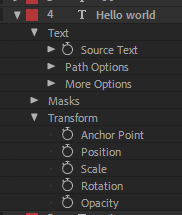
And if you are not sure what a property is or where to get it, you can refer to this image:
Property Example
As you can see there are a few
Property Groupslike Text, Masks, Transform that include actual properties. Those properties are what can be used as a target.
In case you need to change some deep properties, as shown on this image...
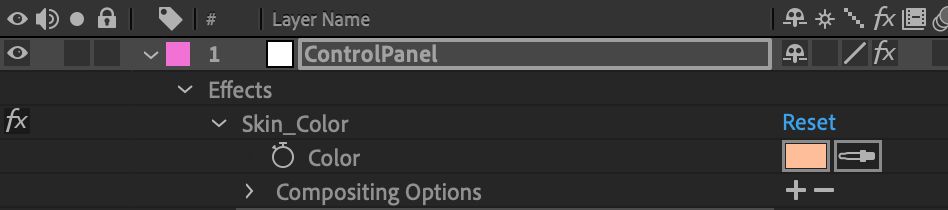
... you can do that by providing the property name using a dot . separator (e.g. "Effects.Skin_Color.Color").
In case your property already has . in the name, and you are sure it will lead to a collision while parsing, you can instead use an arrow symbol ->.
You can also change the deeper attributes of properties, for example the font of a text layer, using "Source Text.font" or the font size by "Source Text.fontSize".
Example
{
    "assets": [
        {
            "type": "data",
            "layerName": "MyNicePicture.jpg",
            "property": "Position",
            "value": [500, 100]
        },
        {
            "type": "data",
            "layerName": "my text field",
            "property": "Source Text",
            "expression": "time > 100 ? 'Bye bye' : 'Hello world'"
        },
        {
            "type": "data",
            "layerName": "my text field",
            "property": "Source Text.font",
            "value": "Arial-BoldItalicMT"
        },
        {
            "type": "data",
            "layerName": "background",
            "property": "Effects.Skin_Color.Color",
            "value": [1, 0, 0]
        },
        {
            "type": "data",
            "layerIndex": 15,
            "property": "Scale",
            "expression": "[time * 0.1, time * 0.1]"
        },
    ]
}
Note: any error in expression will prevent the project from rendering. Make sure to read error messages reported by After Effects binary carefully.
Script Asset
🚀 NEW: Now you can pass arguments to JSX dynamically! Read below for more information 🚀
The last and the most complex and yet the most powerful is an ability to execute custom jsx scripts just before the rendering will start.
This approach allows you to do pretty much anything that is allowed for scripting,
like creating/removing layers, adding new elements, restructuring the whole composition, and much more.
With some basic knowledge of ExtendScript Toolkit, you can write custom scripts that nexrender will pass through to the underlying CLI (or render network) to execute before rendering. You'll just need to provide a src pointing towards the script resource and a type of "script".
Fields
src: string, a URI pointer to the specific resource, check out supported protocolstype: string, for script items, is alwaysscriptkeyword: (optional) string, name for the configuration object holding all the dynamically injected parameters. Defaults to NXparameters: (optional) object, object where all the dynamically injected parameters are defined. Script variables that are not included in this list default tonull.globalDefaultValue(optional) any, An override for the default value of any unknown or undefined NX (or thekeywordvalue, if set) config values. Use caution when overriding defaults like this. It is suggested to leave it as is and check fornullvalues in your JSX code.
Dynamic Parameters
With dynamic parameters, you can set a parameter in your Job declaration to be used on a JSX Script!
Each parameter object must have the following:
- key (required) : The key of the variable. Example: Key = dog => NX.dog.
- value (required) : The target value for the variable. Example: Key = dog, Value = "doggo" => NX.dog = "doggo". See Supported Parameter Types.
Supported Parameter Types
We currently support all standard JSON Parameters with the addition of javascript functions, which can be named, anonymous or self-invoking.
Parameter Types examples
String
    "parameters" : [
        {
            "key" : "fullName",
            "value": "John Doe"
        }
    ]
Number
    "parameters" : [
        {
            "key" : "orangeAmount",
            "value": 37
        }
    ]
Array
    "parameters" : [
        {
            "key" : "officesList",
            "value": ["Santiago", "London", "Paris", "Kyoto", "Hong-Kong"]
        }
    ]
Object
    "parameters" : [
        {
            "key" : "carDetails",
            "value": {
                "model" : "Tesla Model S",
                "maxBatteryLife" : 500000,
                "color" : "vermilion"
            }
        }
    ]
Null
This is the default value for parameters used on any given JSX script that are not initializated.
    "parameters" : [
        {
            "key" : "carDetails"
        }
    ]
NX.get("carDetails") will be equal to null.
Functions
Functions are useful if you need some dynamic calculation of specific values. You can use them in conjuction with other dynamic parameters as well. Currently we support Self-invoking Functions, Named Functions and Anonymous Functions. After Effects ExtendedScript does not support arrow functions at the moment (cc 2020).
Warnings
- You must only use one function per parameter; If there's more than one function defined in the parameter
valuethe job will crash due to limitations in function detection and parsing. - Use well-formed functions and be aware of the computational weight of your functions. Malformed functions will cause the script to fail and subsequently the job to crash.
Self-Invoking Functions Example
Self-invoking functions are useful when concatenating strings, or in places where you want the function output without redeclaring it.
    "parameters" : [
        {
            "key" : "onePlusOne",
            "value": "(function() { return 1+1; })()"
        }
    ]
The above function could be use in a string concatenation such as
alert("Miss, what's the mathematical operation required to compute the number" + NX.get("onePlusOne") + " ?"); // A typical second grade question.
    "parameters" : [
        {
            "key" : "invitees",
            "value": ["Steve", "Natasha", "Tony", "Bruce", "Wanda", "Thor", "Peter", "Clint" ]
        },
        {
            "key" : "eventInvitation",
            "value": "(function (venue) { alert( 'This years\' Avengers Gala is on the prestigious ' + venue.name + ' located at ' + venue.location + '. Our special guests ' + NX.get('invitees').value.map(function (a, i) { return (i == NX.get('invitees').value.length - 1) ? ' and ' + a + ' (whoever that is)' : a + ', '; }).join('') + '  going to be present for the ceremony!');
    })({ name: NX.arg('venue'), location: NX.arg('location') })",
            "arguments": [
                {
                    "key" : "venue",
                    "value" : "Smithsonian Museum of Natural History"
                },
                {
                    "key" : "location",
                    "value": "10th St. & Constitution Ave."
                }
            ]
        }
    ]
This convoluted function would return a lovely invitation string to an event using a dynamic parameter set on the json Job, as well as having additional required parameters with their defaults and could be used as follows:
    alert(NX.get("eventInvitation"));

    // Output:

    /*
        This years' Avengers Gala is on the prestigious Smithsonian Museum of Natural History located at 10th St. & Constitution Ave. Our special guests Steve, Natasha,Tony, Wanda, Thor, Peter and Clint (whoever that is) are going to be present for the ceremony!
    */
Named Functions
    "parameters" : [
        {
            "key" : "sum",
            "value": "function namedSumFunction(a, b) { return a + b; }"
        }
    ]
var result = NX.call("sum", [400, 20]); // 420
Note that the usage of the named method is sum and not namedSumFunction due to JS' hoisting, so named functions are implemented and used the same way as anonymous functions.
Anonymous Functions
    "parameters" : [
        {
            "key" : "sumValues",
            "value": "function (a, b) { return a + b; }"
        }
    ]
var result = NX.call("sumValues", [400, 20]); // 420
Complete functions example
{
    "template": {
        "src": "file:///template.aep",
        "composition": "BLANK_COMP"
    },
    "assets": [
        {
            "src": "file:///sampleParamInjection.jsx",
            "type": "script",
            "parameters": [
                {
                    "type": "array",
                    "key" : "dogs",
                    "value": [ "Captain Sparkles", "Summer", "Neptune"]
                },
                {
                    "type" : "number",
                    "key" : "anAmount"
                },
                {
                    "type": "function",
                    "key": "getDogsCount",
                    "value" : "function() { return NX.get('dogs').length; }"
                },
                {
                    "type": "function",
                    "key": "exampleFn",
                    "value": "function ( parameter ) { return parameter; }"
                },
                {
                    "type" : "function",
                    "key" : "dogCount",
                    "value" : "(function(length) { return length })(NX.arg('dogCount'))",
                    "arguments": [
                        {
                            "key" : "dogCount",
                            "value": ["NX.call('exampleFn', [NX.call('getDogsCount') + NX.get('anAmount')])"]
                        }
                    ]
                }
            ]
        }
    ]
}
Examples
No dynamic parameters.
{
    "assets": [
        {
            "src": "http://example.com/scripts/myscript.jsx",
            "type": "script"
        }
    ]
}
Dynamic variable - Array type parameter
"assets": [
    {
        "src": "file:///C:/sample/sampleParamInjection.jsx",
        "type": "script",
        "parameters": [
            {
                "key": "name",
                "value": "Dilip"
            }
        ]
    }
]
Default Dynamic Variable Keyword Parameter
The value could be a variable or a function, but beware that there is no sanitization nor validation so if the input is malformed it could crash the job
By default the keyword is set to NX, so you would call your variables or methods like NX.get("foo") or NX.call("bar", ["sampleStringParameter"]). To change this keyword simply set "keyword" as shown below:
"assets": [
    {
        "src": "file:///C:/sample/sampleParamInjection.jsx",
        "type": "script",
        "keyword": "_settings",
        "parameters": [
            {
                "key": "name",
                "value": "Dilip"
            }
        ]
    }
]
This way instead of NX.get("foo") it would be _settings.get("foo")
All dynamic parameters used in the script should have a JSX default
Example JSX Script with defaults:
{
    return "Hello " + NX.get("name") || "John";
}
The code above will output either:
"Hello John"if no parameter defined on the JSONparametersarray or this parameter is missing."Hello NAME"if parameternamehas avalueofNAMEon the JSONparametersarray.
Example JSX Script without defaults:
{
    // The code below will crash if it's executed directly in After Effects. See documentation on how to enable cross environment fault tolerance.
    return "There are " + NX.get("beerBottlesAmount") + " beer bottles ready to drink!"
}
The code above will output either:
"There are null beer bottles ready to drink!"if no parameter defined on the JSONparametersarray."There are 20 beer bottles ready to drink!"if parameterbeerBottlesAmounthas avalueof20on the JSONparametersarray.
But don't you worry about missing any of the examples above. If you use a variable in your JSX with the default keyword and no initialization whatsoever, the console will output a handy initialization code snippet for both JSON and JSX for you to copy and modify with your own values!
That pretty much covers basics of templated rendering.
Network rendering
We've covered basics on how to set up a minimal rendering flow using local cli machine rendering. Now, what if you want to start rendering on a remote machine, to reduce load while you are working on your local machine? Or maybe you need to render several videos at once, requiring a fleet of nodes running on some cloud cluster.

With nexrender, you can quickly and easily spin up your own rendering cluster.
Using binaries
You can download compiled versions of binaries directly from the releases section, or install them using npm, whichever option works better for you.
nexrender-server
Description:
A CLI application which is responsible for job management, worker node cooperation,
communications with the nexrender-worker instances, serves mainly as a producer in the nexrender network model.
Technically speaking, its a very tiny HTTP server with minimal REST API support.
Optional support for external databases can be added (like Redis, MongoDB, MySQL, etc.), with some of them already in place. Please check modules for more info.
Supported platforms:
Windows, macOS, Linux
Requirements:
None
Example
$ nexrender-server \
        --port=3050 \
        --secret=myapisecret
More info: @nexrender/server
nexrender-worker
Description:
A CLI application which is responsible mainly for actual job processing and rendering,
communication with the nexrender-server, and serves mainly as a consumer in the nexrender network model.
Supported platforms:
Windows, macOS
Requirements:
Installed licensed/trial version of Adobe After Effects
Example
$ nexrender-worker \
        --host=https://my.server.com:3050 \
        --secret=myapisecret
Note: its recommended to run
nexrender-worker -hat least once, to read all useful information about available options.
More info: @nexrender/worker
Using API
Now, after you've loaded up your worker and server nodes, they will need some jobs to be submitted to the server to start actual rendering. There are 2 main ways to do that. You can send a direct POST request:
curl \
    --request POST \
    --header "nexrender-secret: myapisecret" \
    --header "content-type: application/json" \
    --data '{"template":{"src":"http://my.server.com/assets/project.aep","composition":"main"}}' \
    http://my.server.com:3050/api/v1/jobs
Or you can use the javascript API client:
npm install @nexrender/api --save
const { createClient } = require('@nexrender/api')

const client = createClient({
    host: 'http://my.server.com:3050',
    secret: 'myapisecret',
})

const main = async () => {
    const result = await client.addJob({
        template: {
            src: 'http://my.server.com/assets/project.aep',
            composition: 'main',
        }
    })

    result.on('created', job => console.log('project has been created'))
    result.on('started', job => console.log('project rendering started'))
    result.on('progress', (job, percents) => console.log('project is at: ' + percents + '%'))
    result.on('finished', job => console.log('project rendering finished'))
    result.on('error', err => console.log('project rendering error', err))
}

main().catch(console.error);
More info: @nexrender/api
Tested with
Current software was successfully tested on:
- Adobe After Effects CS 5.5 [OS X 10.14.2]
- Adobe After Effects CC (version 12.1.168) [OS X 10.11.2, Windows 10 64bit]
- Adobe After Effects CC 2015 (version 13.6.0) [OS X 10.11.2]
- Adobe After Effects CC 2018.3 [Windows 2012 Server R2 Datacenter]
- Adobe After Effects CC 2019 [OS X 10.14.2, Windows Server 2019 (AWS)]
Additional Information
Protocols
src field is a URI string, that describes path pointing to the specific resource. It supports a few different protocols:
Built-in:
file://- file on a local file system, may include environment variables identified by a preceding $ sign (possibly a pipe? need testing)http://- file on remote http serverhttps://- file on remote http server served via httpsdata://- URI encoded data, can be a base64 or plain text
External:
gs://- @nexrender/provider-gs - Google Cloud Storage providers3://- @nexrender/provider-s3 - Amazon S3 providerftp://- @nexrender/provider-ftp - Node.js FTP provider- (other protocols will be added there)
Examples
Here are some examples of src paths:
file:///home/assets/image.jpg
file:///d:/projects/project.aep
file://$ENVIRONMENT_VARIABLE/image.jpg

http://somehost.com:8080/assets/image.jpg?key=foobar
https://123.123.123.123/video.mp4

data:image/png;base64,iVBORw0KGgoAAAANSUhEUgAAAAUAAAAFCAYAAACNbyblAAAAHElEQVQI12P4//8/w38GIAXDIBKE0DHxgljNBAAO9TXL0Y4OHwAAAABJRU5ErkJggg==
data:text/plain;charset=UTF-8,some%20data:1234,5678
WSL
If running WSL (Windows Subsystem for Linux) you will need to configure your project a bit differently in order for it to render correctly.
Linux Mapping
You will need to pass in which drive letter Linux is mapped to in Windows. This is the Drive Letter in which you can access your Linux file system from Windows.
⚠ Note: Drive mapping is setup when configuring WSL You can do this through the CLI like so assuming Linux is mapped to
Z.
$ nexrender-cli -f mywsljob.json -m "Z"
or
$ nexrender-cli -f mywsljob.json -wsl-map "Z"
And you can do this Programmatically like
const { render } = require('@nexrender/core')
const main = async () => {
    const result = await render(/*myWSLJobJson*/, {
        skipCleanup: true,
        addLicense: false,
        debug: true,
        wslMap: "Z"
    })
}
main().catch(console.error);
Windows Pathing
When referencing windows file system you will need to use /mnt/[DRIVE YOU WANT TO ACCESS]/[PATH TO YOUR FILE].
like so
/mnt/d/Downloads/nexrender-boilerplate-master/assets/nm.png
CLI Example
nexrender-cli -f mywsljob.json -m "Z" -w /mnt/d/Downloads/tmp/nexrender
Job Example
{
    "template": {
        "src": "file:///mnt/d/Downloads/nexrender-boilerplate-master/assets/nm05ae12.aepx",
        "composition": "main",
    },
    "assets": [
        {
            "src": "file:///mnt/d/Downloads/nexrender-boilerplate-master/assets/2016-aug-deep.jpg",
            "type": "image",
            "layerName": "background.jpg"
        }
    ],
    "actions": {
        "postrender": [
            {
                "module": "@nexrender/action-encode",
                "output": "output.mp4",
                "preset": "mp4"
            }
        ]
    }
}
⚠ Note: nexrender does not currently support custom root pathing
WSL Binary
If After Effects is installed into the default location nexrender should auto detected it. Otherwise you will need to provide its location following the Windows Pathing Guide.
Example for if you installed After Effect onto your D drive.
nexrender-cli -f mywsljob.json -b "/mnt/d/Program Files/Adobe/Adobe After Effects 2020/Support Files/aerender.exe"
WSL Workpath
By default nexrender will use your Linux /tmp folder to render out the jobs.
We suggest changing this to a secondary drive as rendering can eat up disk space causing an issue where WSL does no release disk space back to Windows.
Example under Windows Pathing Guide.
Github Issue: WSL 2 should automatically release disk space back to the host OS
WSL Memory
It's also suggested that you create a .wslconfig file in your Windows user folder and limit the memory that can be used by WSL. Otherwise your rendering will crash on large projects.
.wslconfig Example
[wsl2]
memory=4GB
swap=0
localhostForwarding=true
Github Issue: WSL 2 consumes massive amounts of RAM and doesn't return it
Analytics
Product collects fully anonymous analytics. This is done to allow us to understand how our customers use the product, and to improve it. We do not collect any personal information. The analytics/telemetry data does not contain any Personally Identifiable Information or anything that could be used to identify a user, organiztion or any other entity.
Only identifier used to distinct between users is a unique random 32-character hash.
Data that is collected:
- nexrender process status
- initialization succeeded/not
- did any errors happen, if so how many
- did render start and end successfully
- how long did render take
- what was the after effects version
- etc
- some of nexreder configuration options
- is wsl enabled yes/no
- was workpath changed yes/no
- was the skip cleanup enabled yes/no
- etc
- this is done to better understand usage of key parameters and combiation of options
- a few general-level points on the system
- what is the OS name and version (Windows/macOS/Linux)
- what is the CPU and GPU models
- what is the amount of memory
- is nexrender being run within a docker yes/no
- this is done to better understand capabilities of hardware the nexrender is typically being run on
Data is IS NOT being collected:
- any personal identifiable information
- no email/name/ip address
- no os user names
- no system/hardware indentifiers
- no location/country data
- any project related data
- no project/template names
- no server/host names
- no asset names or urls
- no script, expression or textual data
- no credentials or any other configuration parameters
Analytics can be disabled by either using option: noAnalytics: true, or setting binary flag: --no-analytics.
Problems
There might be a lot of problems creeping around, since this tool works as an intermediary and coordinator for a bunch of existing complex technologies, problems is something inescapable. However, we will try our best to expand and keep this section up to date with all possible caveats and solutions for those problems.
- macOS access: there might be issues with nexrender accessing the aerender binary within the Adobe library folder, or accessing /tmp folders. For more details refer to https://github.com/inlife/nexrender/issues/534
⚠️ Warning: Cinema 4D Renderer & aerender
aerendermay silently fail when rendering After Effects projects that use Cinema 4D as the 3D Renderer. The process exits after launch without errors, and tools likenexrendermay report "Couldn't find a result file".This issue does not occur when using Classic 3D or Advanced 3D, and the same project may render correctly in the After Effects GUI.
Workaround:
Change affected compositions to use Classic 3D or Advanced 3D:Composition → Composition Settings → Advanced → 3D Renderer
Development
If you wish to contribute by taking an active part in development, you might need this basic tutorial on how to get started:
- clone the repo
- run
npm install - run
npm start
The last command will run lerna bootstrap action to setup dependencies for all packages listed in the packages/ folder,
and link them together accordingly to their dependency relations.
After that, you can start th