NeoHtop is a free, MIT-licensed, cross-platform desktop system monitor built with Rust, Tauri and Svelte, aimed at developers and system administrators who want a fast graphical view of running processes, CPU and memory without living in a terminal.
What it is
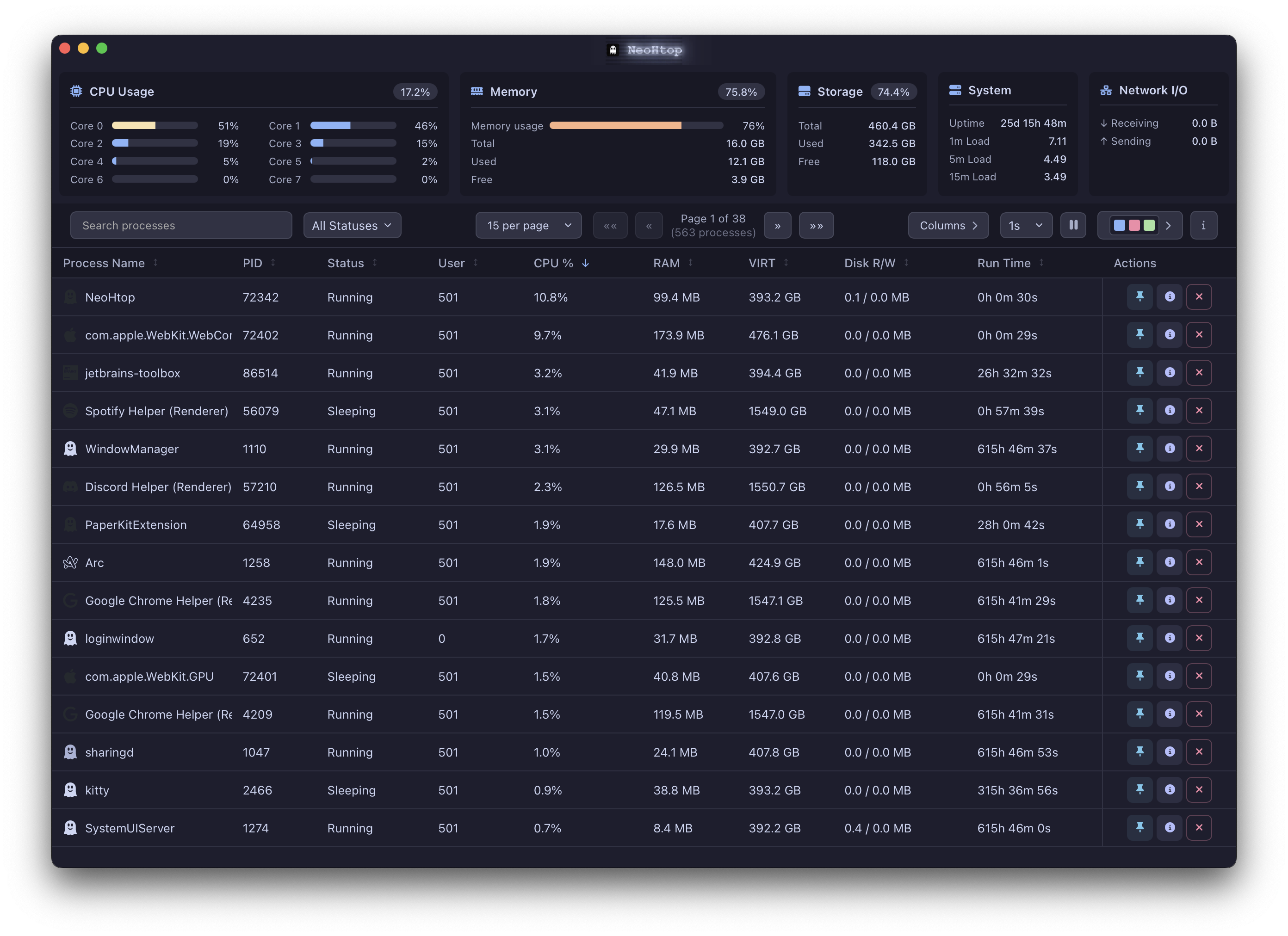
NeoHtop is a system monitoring application for the desktop. Its interface is written in SvelteKit and TypeScript, its backend in Rust on top of Tauri, and theming is handled through CSS variables with FontAwesome icons. It runs on macOS, Linux and Windows, and the README describes it as modern and cross-platform. Official builds are published through the GitHub Releases page, and the macOS release is notarized by Apple.
It sits in the same niche as terminal monitors such as htop and btop, both of which appear in its topic list, but it delivers that functionality as a graphical application rather than a curses-style interface. The concrete problem it solves is process inspection and control: a user who needs to find a misbehaving process, read its CPU and memory footprint, and terminate it, does so in a windowed UI instead of scrolling a terminal. The project also publishes a separate CLI, NeoHtop CLI, built with Go and the Charm ecosystem, for people who prefer the terminal.
Key capabilities
- Real-time process monitoring with auto-refreshing system statistics.
- CPU and memory usage tracking for the machine and for individual processes.
- Advanced process search and filtering by name, command or PID, with comma-separated terms such as
arm, x86 for multiple matches.
- Regular expression support in the search box, for example
d$ to list daemons or ^(\w+\.)+\w+$ to find reverse domain name notation processes such as com.docker.vmnetd.
- Process management, including killing processes and pinning important ones so they stay visible.
- Sortable columns, allowing any column to be used as the sort key.
- Dark and light themes, plus a terminal companion, installed with
npm install -g neohtop-cli, offering real-time CPU sparklines, memory bars, a process tree view, search, filters and themes.
Who uses it and how
- macOS users install it as a cask with
brew install --cask neohtop and can launch it with elevated privileges via sudo /Applications/NeoHtop.app/Contents/MacOS/NeoHtop to monitor processes that require sudo.
- Arch Linux users install from the AUR with
yay -S neohtop or paru -S neohtop; Fedora users enable the Terra repository and run dnf install neohtop.
- Windows users add the Scoop extras bucket and install with
scoop install extras/neohtop; Solus users run eopkg install neohtop.
- Operators who work in a terminal rather than a GUI use the CLI, which runs on macOS, Linux and Windows.
- Builders and contributors work from source, which requires Node.js v16 or later, a recent stable Rust toolchain, and Xcode Command Line Tools on macOS.
Getting started
Download the latest release from the GitHub Releases page, or install through a package manager such as Homebrew, the AUR, Terra, Scoop or eopkg. The terminal version installs from npm with npm install -g neohtop-cli.
How it compares
NeoHtop occupies the space filled by htop and btop, but trades the terminal interface for a graphical one built on Tauri, while keeping the same MIT licence and cross-platform reach. Where those tools are distributed primarily as source or distro packages, NeoHtop ships notarized macOS builds and community packages for Homebrew, the AUR, Terra, Scoop and eopkg. It requires no account, licence key or hosted service, and all monitoring data stays on the local machine.
When to use it — and when not to
A self-hoster operates nothing beyond the application itself, since there is no database, storage backend or mail service to run, but monitoring some processes does require launching with sudo. Users who want only a terminal monitor are better served by htop, btop or the project's own CLI rather than the desktop app. The main caveat is distribution: the README states plainly that the package-manager builds are community-maintained and not officially released, reviewed or endorsed, that only GitHub Releases builds are official, and that their security, integrity and update frequency cannot be guaranteed.
project readme (upstream, from github) — read inline

NeoHtop
A modern, cross-platform system monitor built on top of Svelte, Rust, and Tauri.



If you find this project helpful, consider buying me a coffee:

Or sponsor me on GitHub:

Table of Contents
Why NeoHtop?
Read about the back story and motivation behind NeoHtop
Features
- 🚀 Real-time process monitoring
- 💻 CPU and Memory usage tracking
- 🎨 Beautiful, modern UI with dark/light themes
- 🔍 Advanced process search and filtering
- 📌 Pin important processes
- 🛠 Process management (kill processes)
- 🎯 Sort by any column
- 🔄 Auto-refresh system stats
Search Functionality
Search for processes by name, command, or PID. Use commas to search for multiple terms simultaneously. Regular expressions are supported for advanced filtering.
Examples:
arm, x86: Returns processes with "arm" or "x86" in the name or commandd$: Lists daemons (processes ending with 'd')^(\w+\.)+\w+$: Shows processes with reverse domain name notation (e.g., com.docker.vmnetd)
Tech Stack
- Frontend: SvelteKit, TypeScript
- Backend: Rust, Tauri
- Styling: CSS Variables for theming
- Icons: FontAwesome
Getting Started
Prerequisites
- Node.js (v16 or later)
- Rust (latest stable)
- Xcode Command Line Tools (for macOS)
Installation
Manual
Download the latest release from the releases page.
Package Managers
Members of the community have kindly published unofficial packages for various platforms and package managers.
Please note, these packages are community-maintained and not officially released, reviewed, or endorsed by NeoHtop.
We only provide official builds through the GitHub Releases page.
Since these external packages are managed by third parties, we cannot guarantee their security, integrity, or update frequency.
Please use them at your own discretion.
macOS
Using Homebrew.
brew install --cask neohtop
Arch Linux (AUR)
Using the AUR and an AUR helper.
yay -S neohtop
or
paru -S neohtop
Fedora Linux
Install the Terra repository.
dnf install neohtop
Windows
Install the Scoop repository, then make sure you have the Scoop extras bucket added:
scoop bucket add extras
Then install with:
scoop install extras/neohtop
Solus
eopkg install neohtop
Running with Sudo
Some processes require monitoring with sudo privileges. To monitor these processes, launch NeoHtop with sudo:
- macOS:
sudo /Applications/NeoHtop.app/Contents/MacOS/NeoHtop
- Linux:
pkexec /path/to/neohtop (recommended)
Development
Setup
# Install dependencies
npm install

# Run in development mode
npm run tauri dev

# Build for production
npm run tauri build
Code Formatting
We use Prettier for web code and cargo fmt for Rust code.
# Format all files
npm run format

# Check formatting without making changes
npm run format:check
Pull Requests
Before submitting a PR, ensure:
- All code is formatted (
npm run format)
- The format check passes (
npm run format:check)
- Your commits follow the project's commit message conventions
Contributing
We welcome contributions! Please see our contributing guidelines for more information.
License
This project is licensed under the MIT License - see the LICENSE file for details.

