Nebula Logger for Salesforce


The most robust observability solution for Salesforce experts. Built 100% natively on the platform, and designed to work seamlessly with Apex, Lightning Components, Flow, OmniStudio, and integrations.
Unlocked Package - v4.19.5



sf package install --wait 20 --security-type AdminsOnly --package 04tg7000000IzRdAAK
Managed Package - v4.19.0



sf package install --wait 30 --security-type AdminsOnly --package 04tg7000000GZbJAAW
AI Agent Skills
Nebula Logger includes Agent Skills that help AI coding agents (Claude Code, GitHub Copilot, Cursor, and others) install, configure, and use Nebula Logger with the recommended patterns.
npx skills add jongpie/NebulaLogger
Features
A unified logging tool that supports easily adding log entries across the Salesforce platform, using:
- Apex: classes, triggers, and anonymous Apex scripts
- Lightning Components: lightning web components (LWCs) & aura components
- Flow & Process Builder: any Flow type that supports invocable actions
- OmniStudio: omniscripts and omni integration procedures
Built with an event-driven pub/sub messaging architecture, using
LogEntryEvent__eplatform events. For more details on leveraging platform events, see the Platform Events Developer Guide siteActionable observability data about your Salesforce org, available directly in your Salesforce org via the 5 included custom objects
Log__cLogEntry__cLogEntryTag__cLoggerTag__cLoggerScenario__c
Customizable logging settings for different users & profiles, using the included
LoggerSettings__ccustom hierarchy settings objectEasily scales in highly complex Salesforce orgs with large data volumes, using global feature flags in
LoggerParameter__mdtAutomatic data masking of sensitive data, using rules configured in the
LogEntryDataMaskRule__mdtcustom metadata type objectView related
LogEntry__crecords on any Lightning record page in App Builder by adding the 'Related Log Entries' component (relatedLogEntriesLWC)Dynamically assign tags to
Log__candLogEntry__crecords for tagging/labeling your logsExtendable with a built-in plugin framework: easily build or install plugins that enhance Nebula Logger, using Apex or Flow (not currently available in the managed package)
ISVs & package developers have several options for leveraging Nebula Logger in your own packages
- Optional Dependency: dynamically leverage Nebula Logger in your own packages - when it's available in a subscriber's org - using Apex's
Callableinterface and Nebula Logger's included implementationCallableLogger(requiresv4.14.10of Nebula Logger or newer) - Hard Dependency: add either Nebula Logger's unlocked (no namespace) package or its managed package (
Nebulanamespace) as a dependency for your package to ensure customers always have a version of Nebula Logger installed - No Dependency: Bundle Nebula Logger's metadata into your own project - all of Nebula Logger's metadata is fully open source & freely available. This approach provides with full control of what's included in your own app/project.
- Optional Dependency: dynamically leverage Nebula Logger in your own packages - when it's available in a subscriber's org - using Apex's
Learn more about the design and history of the project on Joys Of Apex blog post
Architecture Overview
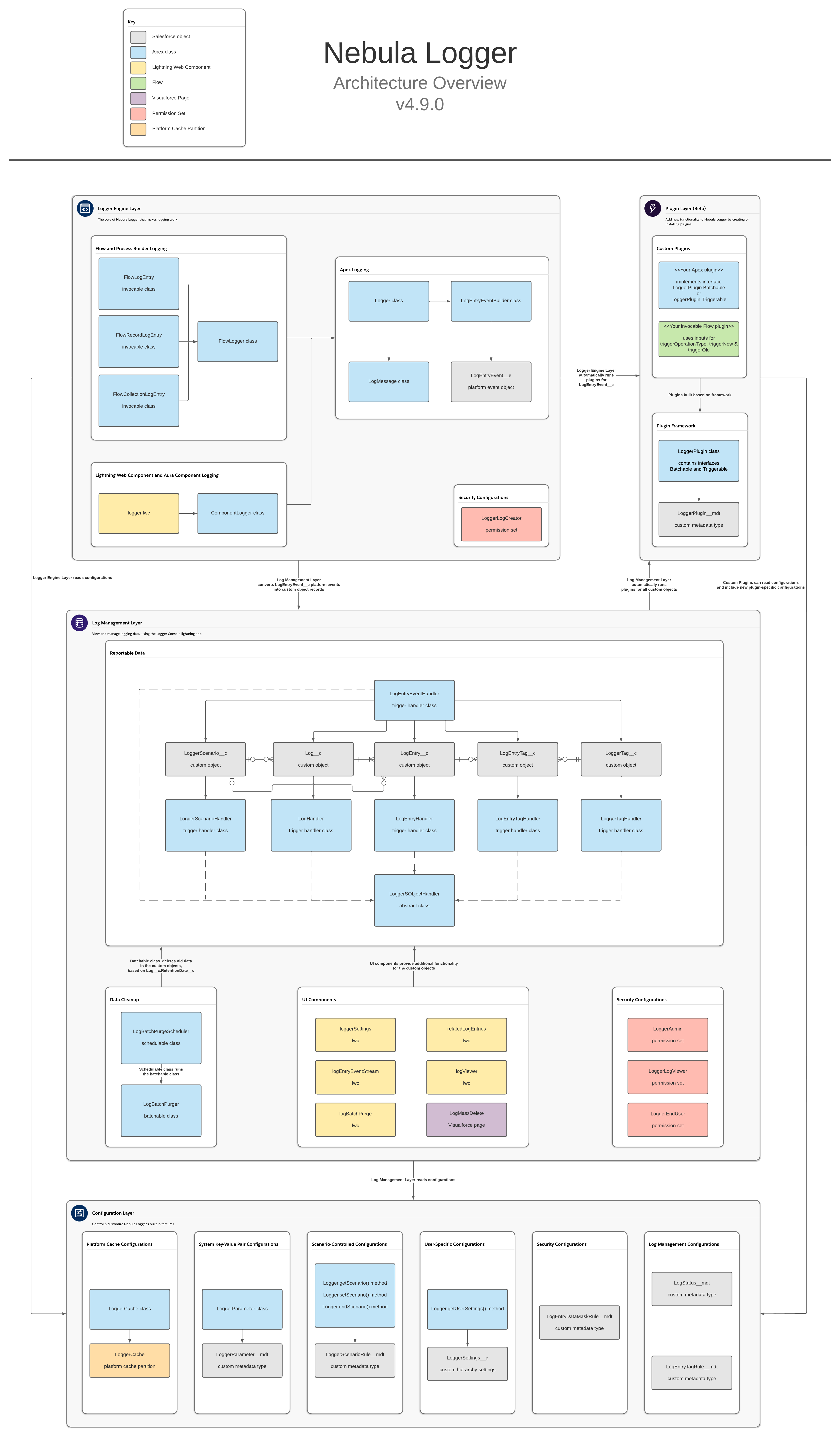
Nebula Logger is built natively on Salesforce, using Apex, lightning components and various types of objects. There are no required external dependencies. To learn more about the architecture, check out the architecture overview in the wiki.
Installing
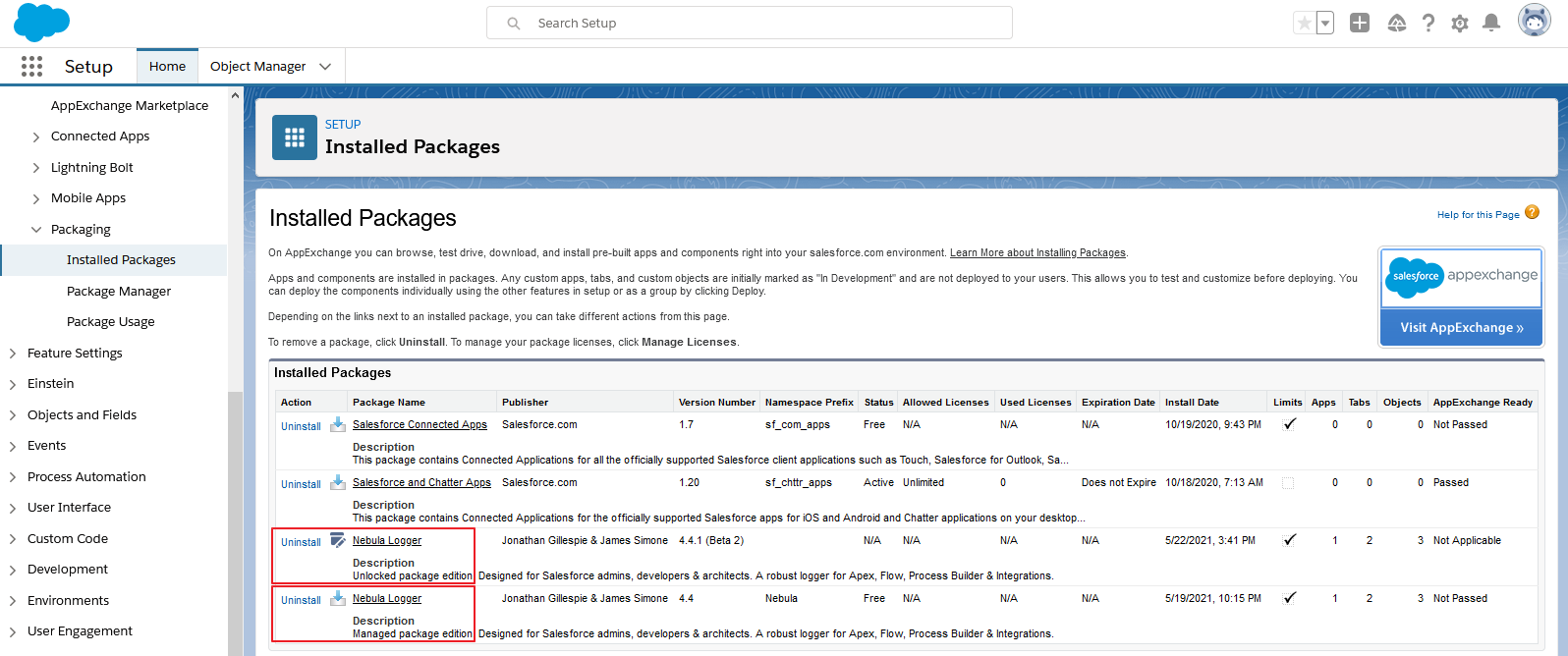
Nebula Logger is available as both an unlocked package and a managed package. The metadata is the same in both packages, but there are some differences in the available functionality & features. All examples in README are for the unlocked package (no namespace) - simply add the Nebula namespace to the examples if you are using the managed package.
| Unlocked Package (Recommended) | Managed Package | |
|---|---|---|
| Namespace | none | Nebula |
| Future Releases | Faster release cycle: new patch versions are released (e.g., v4.4.x) for new enhancements & bugfixes that are merged to the main branch in GitHub |
Slower release cycle: new minor versions are only released (e.g., v4.x) once new enhancements & bugfixes have been tested and code is stabilized |
| Public & Protected Apex Methods | Any public and protected Apex methods are subject to change in the future - they can be used, but you may encounter deployment issues if future changes to public and protected methods are not backwards-compatible |
Only global methods are available in managed packages - any global Apex methods available in the managed package will be supported for the foreseeable future |
| Apex Debug Statements | System.debug() is automatically called - the output can be configured with LoggerSettings__c.SystemLogMessageFormat__c to use any field on LogEntryEvent__e |
Requires adding your own calls for System.debug() due to Salesforce limitations with managed packages |
| Logger Plugin Framework | Leverage Apex or Flow to build your own "plugins" for Logger - easily add your own automation to the any of the included objects: LogEntryEvent__e, Log__c, LogEntry__c, LogEntryTag__c and LoggerTag__c. The logger system will then automatically run your plugins for each trigger event (BEFORE_INSERT, BEFORE_UPDATE, AFTER_INSERT, AFTER_UPDATE, and so on). |
This functionality is not currently available in the managed package |
Getting Started
After installing Nebula Logger in your org, there are a few additional configuration changes needed...
- Assign permission set(s) to users
- See the wiki page Assigning Permission Sets for more details on each of the included permission sets
- Customize the default settings in
LoggerSettings__c- You can customize settings at the org, profile and user levels
Logger for Apex: Quick Start
For Apex developers, the Logger class has several methods that can be used to add entries with different logging levels. Each logging level's method has several overloads to support multiple parameters.
// This will generate a debug statement within developer console
System.debug('Debug statement using native Apex');

// This will create a new `Log__c` record with multiple related `LogEntry__c` records
Logger.error('Add log entry using Nebula Logger with logging level == ERROR');
Logger.warn('Add log entry using Nebula Logger with logging level == WARN');
Logger.info('Add log entry using Nebula Logger with logging level == INFO');
Logger.debug('Add log entry using Nebula Logger with logging level == DEBUG');
Logger.fine('Add log entry using Nebula Logger with logging level == FINE');
Logger.finer('Add log entry using Nebula Logger with logging level == FINER');
Logger.finest('Add log entry using Nebula Logger with logging level == FINEST');
Logger.saveLog();
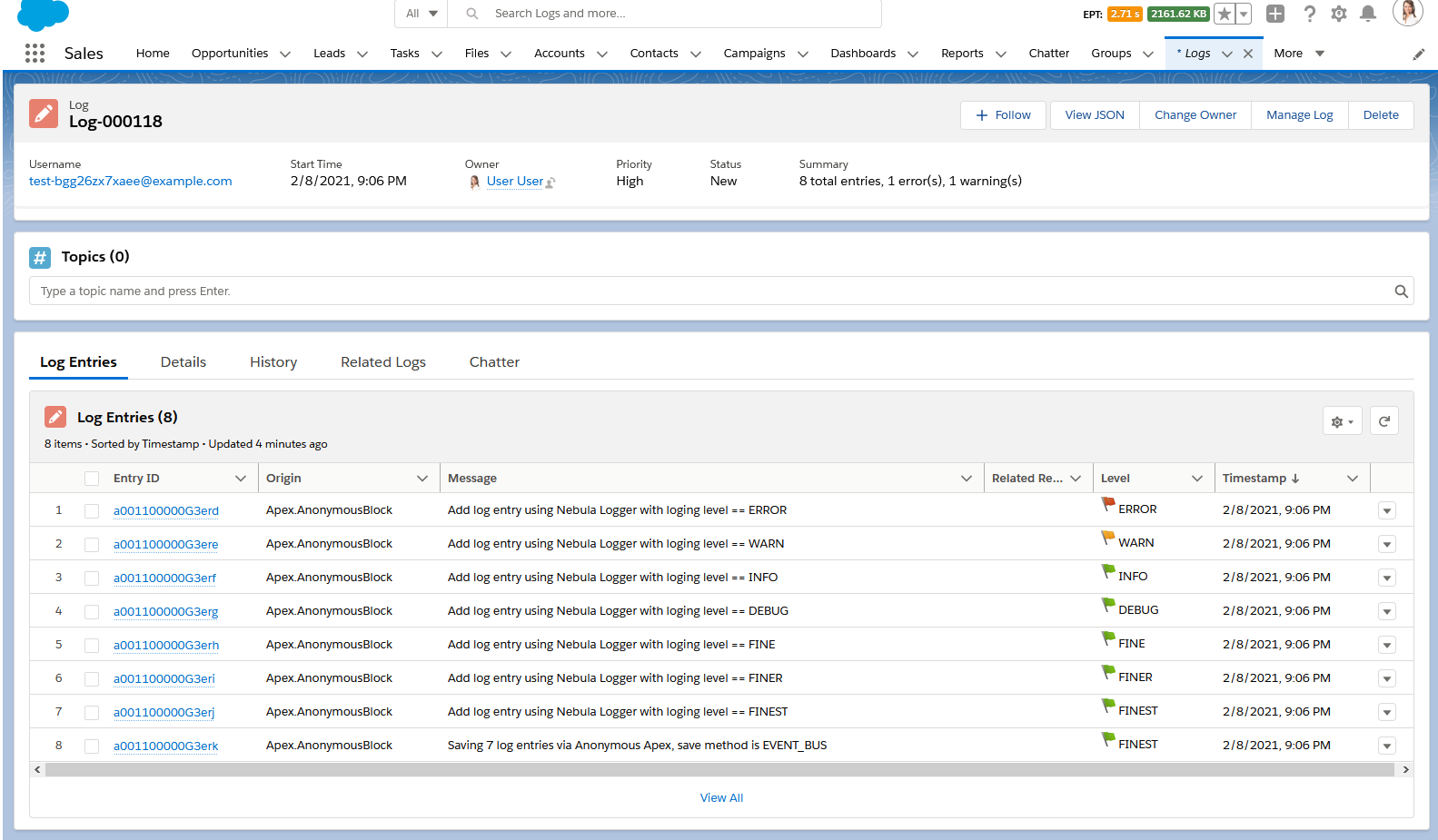
This results in 1 Log__c record with several related LogEntry__c records.
Logger for Lightning Components: Quick Start
For lightning component developers, the logger LWC provides very similar functionality that is offered in Apex. Simply incorporate the logger LWC into your component, and call the desired logging methods within your code.
// For LWC, import logger's getLogger() function into your component
import { getLogger } from 'c/logger';

export default class LoggerDemo extends LightningElement {
  logger = getLogger();

  connectedCallback() {
    this.logger.info('Hello, world');
    this.logger.saveLog();
  }
}
// For aura, retrieve logger from your component's markup
const logger = component.find('logger');

logger.error('Hello, world!').addTag('some important tag');
logger.warn('Hello, world!');
logger.info('Hello, world!');
logger.debug('Hello, world!');
logger.fine('Hello, world!');
logger.finer('Hello, world!');
logger.finest('Hello, world!');
logger.saveLog();
Logger for Flow & Process Builder: Quick Start
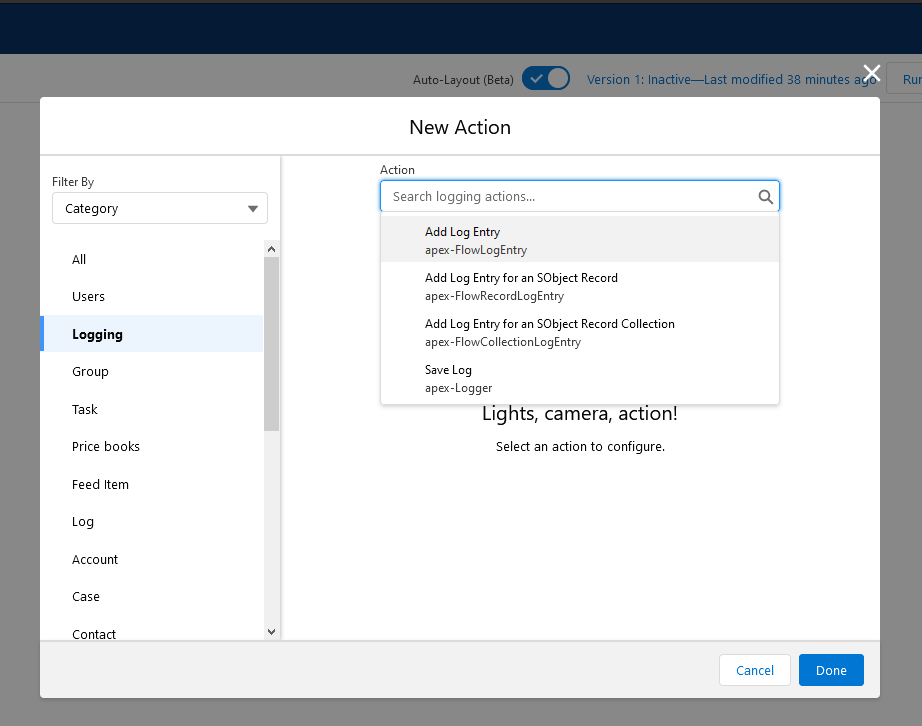
Within Flow & Process Builder, you can select 1 of the several Logging actions
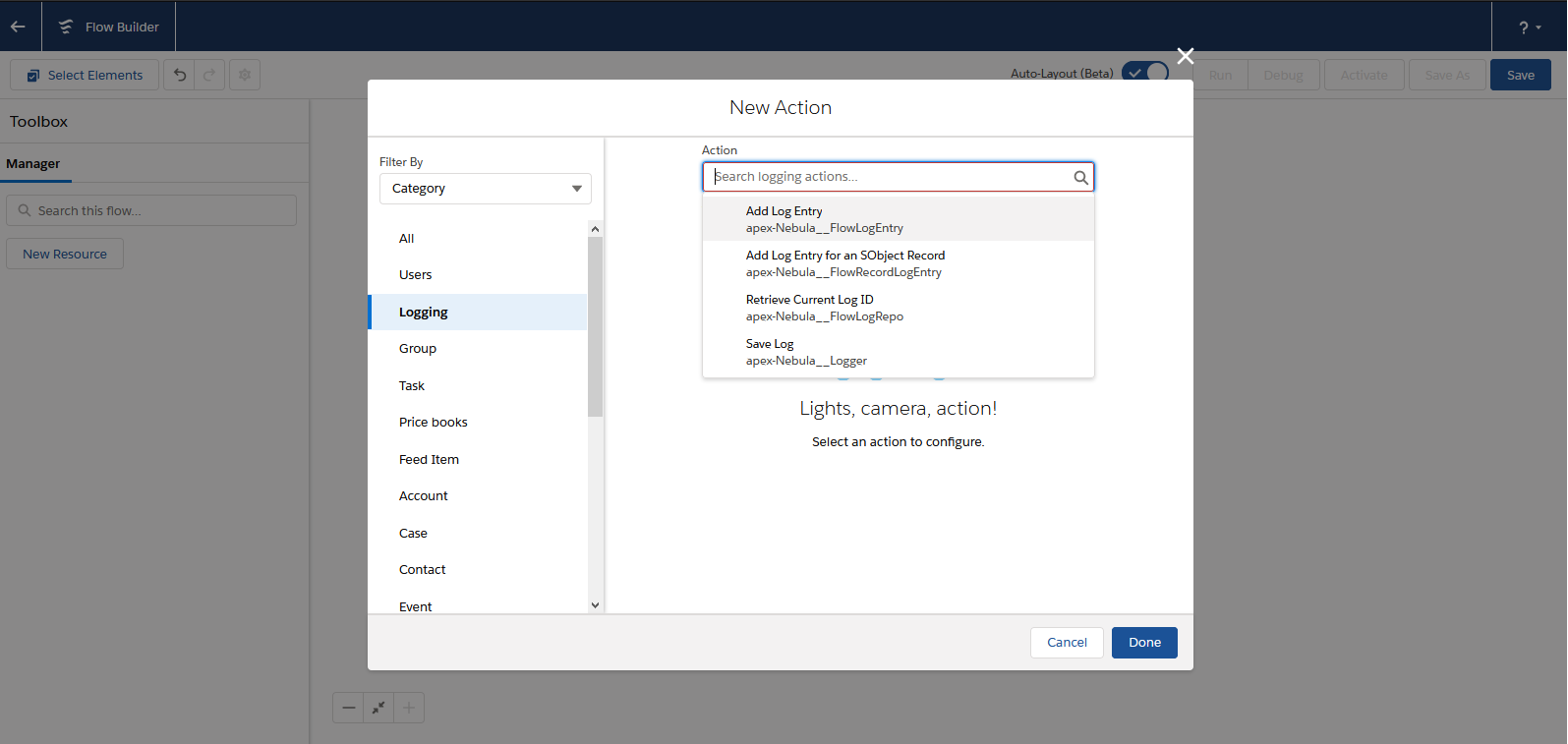
In this simple example, a Flow is configured after-insert and after-update to log a Case record (using the action 'Add Log Entry for an SObject Record')
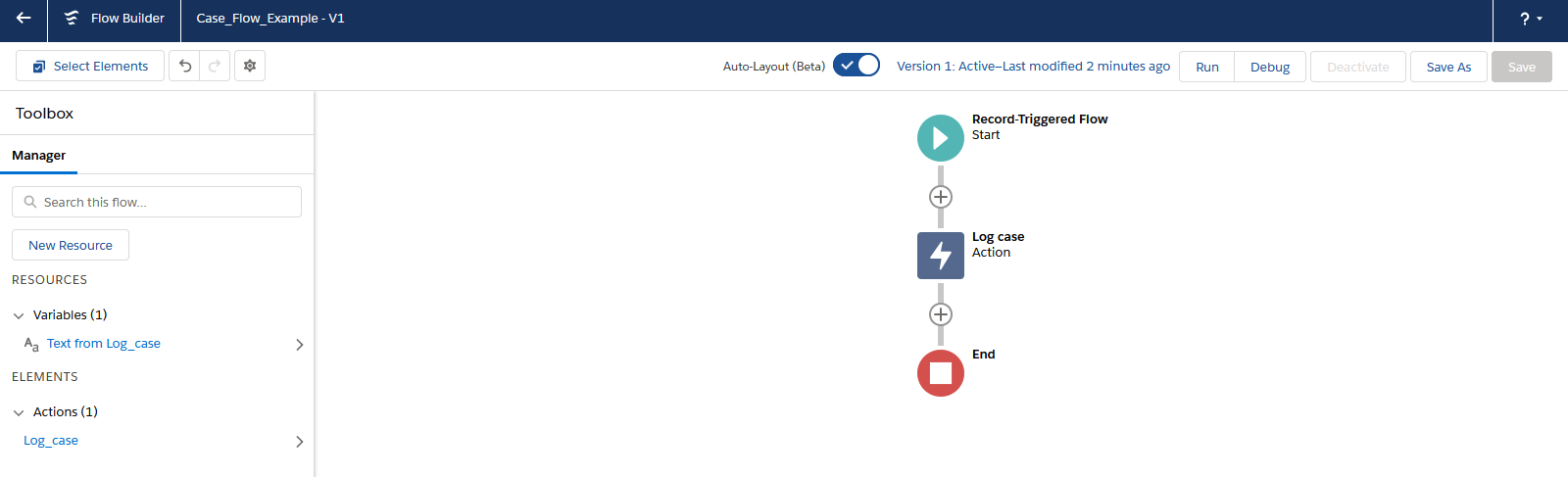
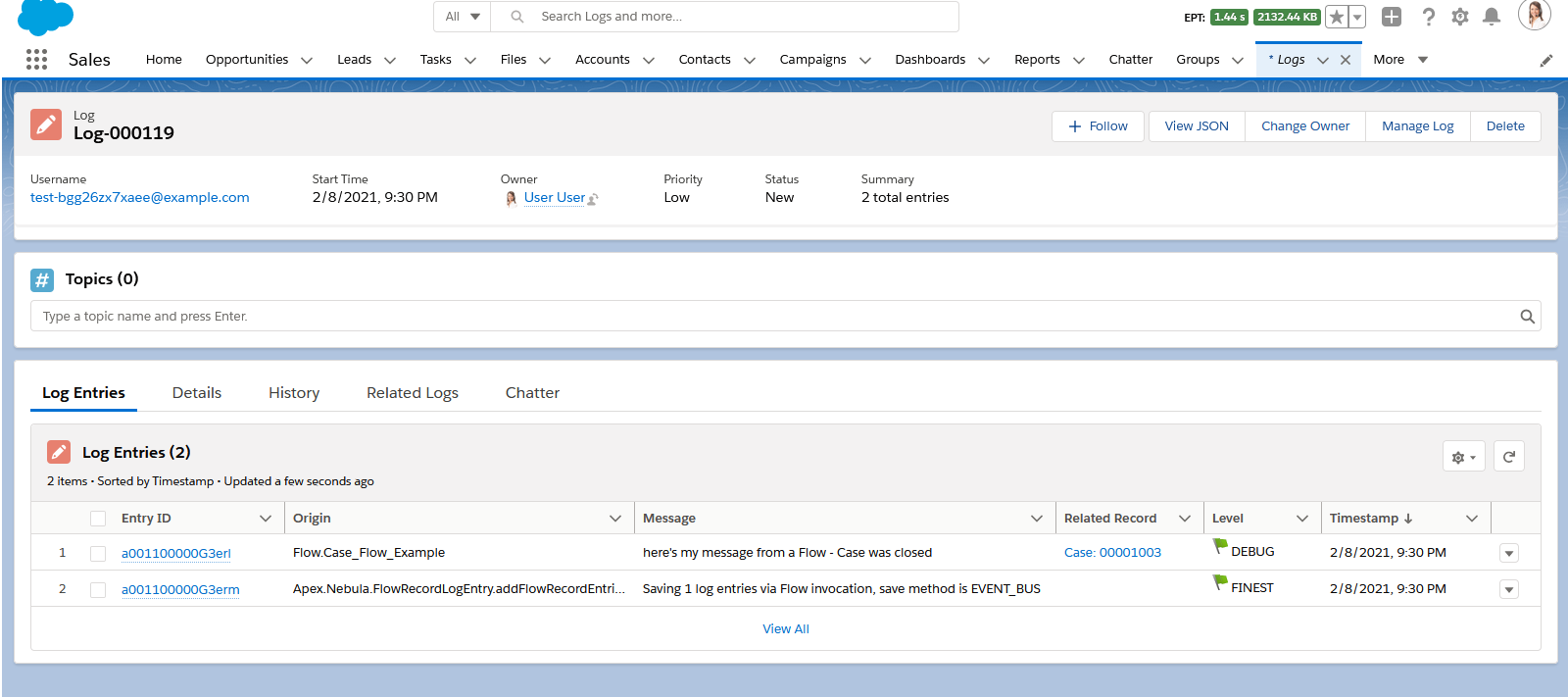
This results in a Log__c record with related LogEntry__c records.
Logger for OmniStudio: Quick Start
For OmniStudio builders, the included Apex class CallableLogger provides access to Nebula Logger's core features, directly in omniscripts and omni integration procedures. Simply use the CallableLogger class as a remote action within OmniStudio, and provide any inputs needed for the logging action. For more details (including what actions are available, and their required inputs), see the section on the CallableLogger Apex class. For more details on logging in OmniStudio, see the OmniStudio wiki page
Features for Apex Developers
Within Apex, there are several different methods that you can use that provide greater control over the logging system.
Transaction Controls
Apex developers can use additional Logger methods to dynamically control how logs are saved during the current transaction.
Logger.suspendSaving()– causesLoggerto ignore any calls tosaveLog()in the current transaction untilresumeSaving()is called. Useful for reducing DML statements used byLoggerLogger.resumeSaving()– re-enables saving aftersuspendSaving()is usedLogger.flushBuffer()– discards any unsaved log entriesLogger.setSaveMethod(SaveMethod saveMethod)- sets the default save method used when callingsaveLog(). Any subsequent calls tosaveLog()in the current transaction will use the specified save methodLogger.saveLog(SaveMethod saveMethod)- saves any entries in Logger's buffer, using the specified save method for only this call. All subsequent calls tosaveLog()will use the default save method.- Enum
Logger.SaveMethod- this enum can be used for bothLogger.setSaveMethod(saveMethod)andLogger.saveLog(saveMethod)Logger.SaveMethod.EVENT_BUS- The default save method, this uses theEventBusclass to publishLogEntryEvent__erecords. The default save method can also be controlled declaratively by updating the fieldLoggerSettings__c.DefaultSaveMethod__cLogger.SaveMethod.QUEUEABLE- This save method will triggerLoggerto save any pending records asynchronously using a queueable job. This is useful when you need to defer some CPU usage and other limits consumed by Logger.Logger.SaveMethod.REST- This save method will use the current user’s session ID to make a synchronous callout to the org’s REST API. This is useful when you have other callouts being made and you need to avoid mixed DML operations.Logger.SaveMethod.SYNCHRONOUS_DML- This save method will skip publishing theLogEntryEvent__eplatform events, and instead immediately createsLog__candLogEntry__crecords. This is useful when you are logging from within the context of another platform event and/or you do not anticipate any exceptions to occur in the current transaction. Note: when using this save method, any exceptions will prevent your log entries from being saved - Salesforce will rollback any DML statements, including your log entries! Use this save method cautiously.
Track Related Logs in Batchable and Queuable Jobs
In Salesforce, asynchronous jobs like batchable and queuable run in separate transactions - each with their own unique transaction ID. To relate these jobs back to the original log, Apex developers can use the method Logger.setParentLogTransactionId(String). Logger uses this value to relate child Log__c records, using the field Log__c.ParentLog__c.
This example batchable class shows how you can leverage this feature to relate all of your batch job’s logs together.
:information_source: If you deploy this example class to your org,you can run it using
Database.executeBatch(new BatchableLoggerExample());
public with sharing class BatchableLoggerExample implements Database.Batchable<SObject>, Database.Stateful {
  private String originalTransactionId;

  public Database.QueryLocator start(Database.BatchableContext batchableContext) {
    // Each batchable method runs in a separate transaction,
    // so store the first transaction ID to later relate the other transactions
    this.originalTransactionId = Logger.getTransactionId();

    Logger.info('Starting BatchableLoggerExample');
    Logger.saveLog();

    // Just as an example, query all accounts
    return Database.getQueryLocator([SELECT Id, Name, RecordTypeId FROM Account]);
  }

  public void execute(Database.BatchableContext batchableContext, List<Account> scope) {
    // One-time call (per transaction) to set the parent log
    Logger.setParentLogTransactionId(this.originalTransactionId);

    for (Account account : scope) {
      // Add your batch job's logic here

      // Then log the result
      Logger.info('Processed an account record', account);
    }

    Logger.saveLog();
  }

  public void finish(Database.BatchableContext batchableContext) {
    // The finish method runs in yet-another transaction, so set the parent log again
    Logger.setParentLogTransactionId(this.originalTransactionId);

    Logger.info('Finishing running BatchableLoggerExample');
    Logger.saveLog();
  }
}
Queueable jobs can also leverage the parent transaction ID to relate logs together. This example queueable job will run several chained instances. Each instance uses the parentLogTransactionId to relate its log back to the original instance's log.
:information_source: If you deploy this example class to your org,you can run it using
System.enqueueJob(new QueueableLoggerExample(3));
public with sharing class QueueableLoggerExample implements Queueable {
  private Integer numberOfJobsToChain;
  private String parentLogTransactionId;

  private List<LogEntryEvent__e> logEntryEvents = new List<LogEntryEvent__e>();

  // Main constructor - for demo purposes, it accepts an integer that controls how many times the job runs
  public QueueableLoggerExample(Integer numberOfJobsToChain) {
    this(numberOfJobsToChain, null);
  }

  // Second constructor, used to pass the original transaction's ID to each chained instance of the job
  // You don't have to use a constructor - a public method or property would work too.
  // There just needs to be a way to pass the value of parentLogTransactionId between instances
  public QueueableLoggerExample(Integer numberOfJobsToChain, String parentLogTransactionId) {
    this.numberOfJobsToChain = numberOfJobsToChain;
    this.parentLogTransactionId = parentLogTransactionId;
  }

  // Creates some log entries and starts a new instance of the job when applicable (based on numberOfJobsToChain)
  public void execute(System.QueueableContext queueableContext) {
    Logger.setParentLogTransactionId(this.parentLogTransactionId);

    Logger.fine('queueableContext==' + queueableContext);
    Logger.info('this.numberOfJobsToChain==' + this.numberOfJobsToChain);
    Logger.info('this.parentLogTransactionId==' + this.parentLogTransactionId);

    // Add your queueable job's logic here

    Logger.saveLog();

    --this.numberOfJobsToChain;
    if (this.numberOfJobsToChain > 0) {
      String parentLogTransactionId = this.parentLogTransactionId != null ? this.parentLogTransactionId : Logger.getTransactionId();
      System.enqueueJob(new QueueableLoggerExample(this.numberOfJobsToChain, parentLogTransactionId));
    }
  }
}
Overloads for Logging Methods
Each of the logging methods in Logger (such as Logger.error(), Logger.debug(), and so on) has several static overloads for various parameters. These are intended to provide simple method calls for common parameters, such as:
- Log a message and a record -
Logger.error(String message, SObject record) - Log a message and a record ID -
Logger.error(String message, Id recordId) - Log a message and a save result -
Logger.error(String message, Database.SaveResult saveResult) - ...
To see the full list of overloads, check out the Logger class documentation.
Using the Fluent Interface
Each of the logging methods in Logger returns an instance of the class LogEntryEventBuilder. This class provides several additional methods together to further customize each log entry - each of the builder methods can be chained together. In this example Apex, 3 log entries are created using different approaches for calling Logger - all 3 approaches result in identical log entries.
// Get the current user so we can log it (just as an example of logging an SObject)
User currentUser = [SELECT Id, Name, Username, Email FROM User WHERE Id = :UserInfo.getUserId()];

// Using static Logger method overloads
Logger.debug('my string', currentUser);

// Using the instance of LogEntryEventBuilder
LogEntryEventBuilder builder = Logger.debug('my string');
builder.setRecord(currentUser);

// Chaining builder methods together
Logger.debug('my string').setRecord(currentUser);

// Save all of the log entries
Logger.saveLog();
Using LogMessage for Dynamically-Generated Strings
The class LogMessage provides the ability to generate string messages on demand, using String.format(). This provides 2 benefits:
Improved CPU usage by skipping unnecessary calls to
String.format()String formattedString = String.format('my example with input: {0}', List{'myString'}); Logger.fine(formattedString); // With LogMessage, when the specified logging level (FINE) is disabled for the current user, `String.format()` is not called LogMessage logMessage = new LogMessage('my example with input: {0}', 'myString'); Logger.fine(logMessage);Easily build complex strings
 String unformattedMessage = 'my string with 3 inputs: {0} and then {1} and finally {2}';
 String formattedMessage = new LogMessage(unformattedMessage, 'something', 'something else', 'one more').getMessage();
 String expectedMessage = 'my string with 3 inputs: something and then something else and finally one more';
 System.assertEquals(expectedMessage, formattedMessage);
For more details, check out the LogMessage class documentation.
ISVs & Package Developers: Dynamically Call Nebula Logger in Your Packages with CallableLogger
As of v4.14.10, Nebula Logger includes the Apex class CallableLogger, which implements Apex's Callable interface.
- The
Callableinterface only has 1 method:Object call(String action, Map args). It leverages string values and genericObjectvalues as a mechanism to provide loose coupling on Apex classes that may or may not exist in a Salesforce org. - This can be used by ISVs & package developers to optionally leverage Nebula Logger for logging, when it's available in a customer's org. And when it's not available, your package can still be installed, and still be used.
Using the provided CallableLogger class, a subset of Nebula Logger's features can be called dynamically in Apex. For example, this sample Apex code adds & saves 2 log entries (when Nebula Logger is available).
// Check for both the managed package (Nebula namespace) and the unlocked package to see if either is available
Type nebulaLoggerType = Type.forName('Nebula', 'CallableLogger') ?? Type.forName('CallableLogger');
Callable nebulaLoggerInstance = (Callable) nebulaLoggerType?.newInstance();
if (nebulaLoggerInstance == null) {
  // If it's null, then neither of Nebula Logger's packages is available in the org 🥲
  return;
}

// Example: Add a basic "hello, world!" INFO extry
Map<String, Object> newEntryInput = new Map<String, Object>{
  'loggingLevel' => System.LoggingLevel.INFO,
  'message' => 'hello, world!'
};
nebulaLoggerInstance.call('newEntry', newEntryInput);

// Example: Add an ERROR extry with an Apex exception
Exception someException = new DmlException('oops');
Map<String, Object> newEntryInput = new Map<String, Object>{
  'exception' => someException,
  'loggingLevel' => LoggingLevel.ERROR,
  'message' => 'An unexpected exception was thrown'
};
nebulaLoggerInstance.call('newEntry', newEntryInput);

// Example: Save any pending log entries
nebulaLoggerInstance.call('saveLog', null);
For more details, visit the wiki.
Features for Lightning Component Developers
For lightning component developers, the included logger LWC can be used in other LWCs & aura components for frontend logging. Similar to Logger and LogEntryBuilder Apex classes, the LWC has both logger and logEntryBuilder classes. This provides a fluent API for JavaScript developers so they can chain the method calls.
Once you've incorporated logger into your lightning components, you can see your LogEntry__c records using the included list view "All Component Log Entries'.
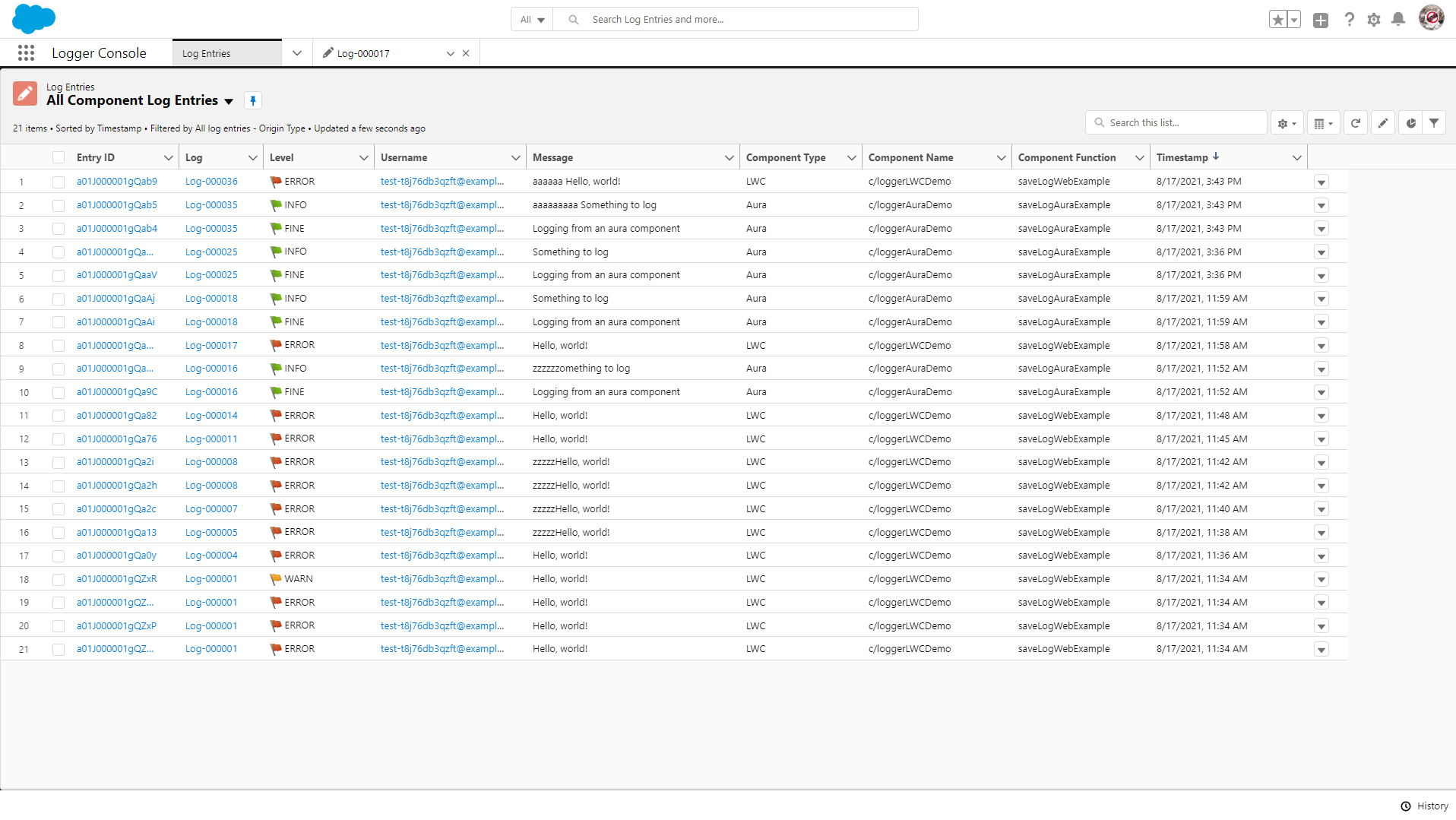
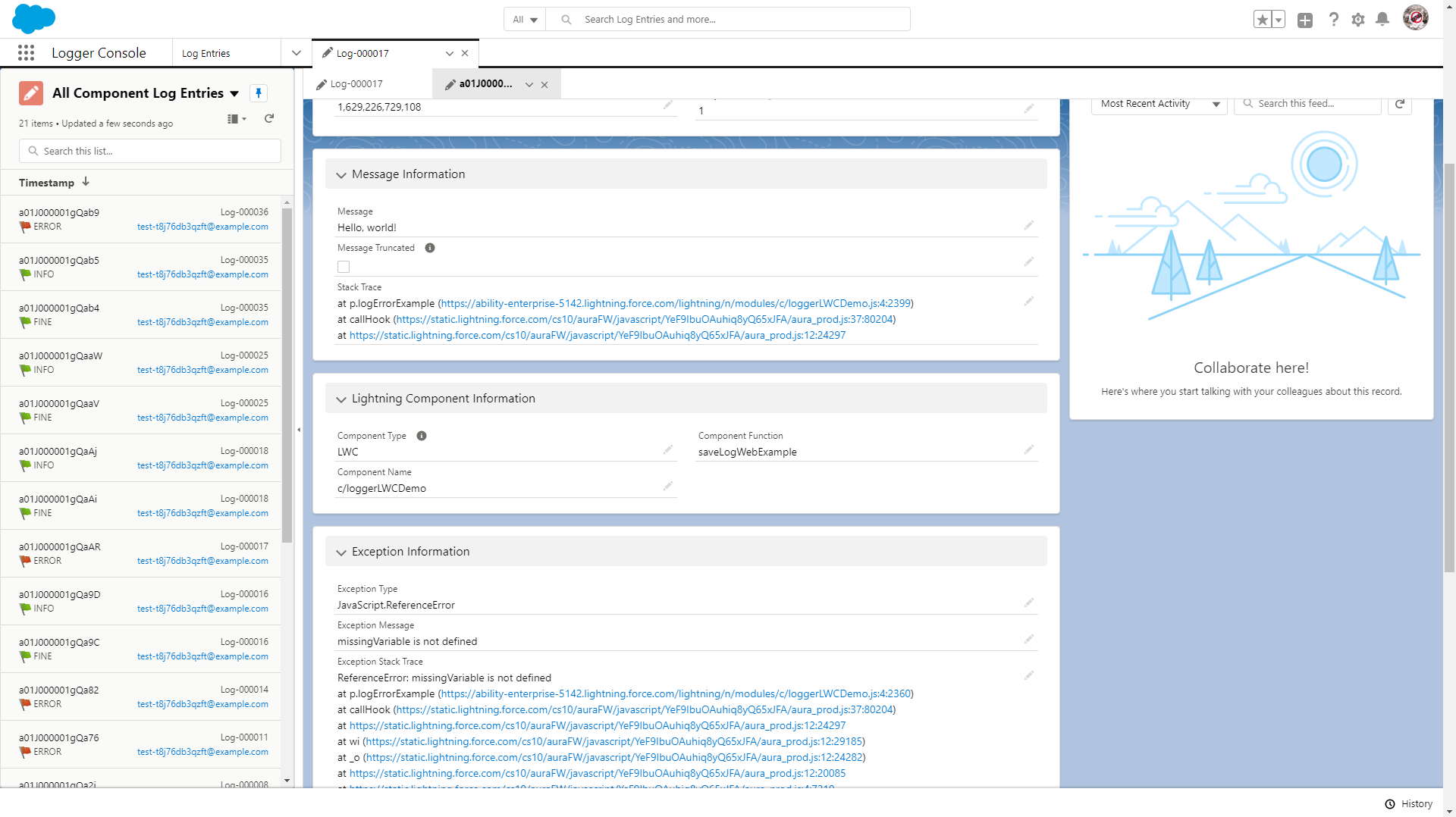
Each LogEntry__c record automatically stores the component's type ('Aura' or 'LWC'), the component name, and the component function that called logger. This information is shown in the section "Lightning Component Information"
Example LWC Usage
For lightning component developers, the logger LWC provides very similar functionality that is offered in Apex. Simply import the getLogger function in your component, use it to initialize an instance once per component, and call the desired logging methods within your code.
// For LWC, import logger's createLogger() function into your component
import { getLogger } from 'c/logger';
import callSomeApexMethod from '@salesforce/apex/LoggerLWCDemoController.callSomeApexMethod';

export default class LoggerDemo extends LightningElement {
  // Call getLogger() once per component
  logger = getLogger();

  async connectedCallback() {
    this.logger.setScenario('some scenario');
    this.logger.finer('initialized demo LWC, using async connectedCallback');
  }

  @wire(callSomeApexMethod)
  wiredCallSomeApexMethod({ error, data }) {
    this.logger.info('logging inside a wire function');
    if (data) {
      this.logger.info('wire function return value: ' + data);
    }
    if (error) {
      this.logger.error('wire function error: ' + JSON.stringify(error));
    }
  }

  logSomeStuff() {
    this.logger.error('Add log entry using Nebula Logger with logging level == ERROR').addTag('some important tag');
    this.logger.warn('Add log entry using Nebula Logger with logging level == WARN');
    this.logger.info('Add log entry using Nebula Logger with logging level == INFO');
    this.logger.debug('Add log entry using Nebula Logger with logging level == DEBUG');
    this.logger.fine('Add log entry using Nebula Logger with logging level == FINE');
    this.logger.finer('Add log entry using Nebula Logger with logging level == FINER');
    this.logger.finest('Add log entry using Nebula Logger with logging level == FINEST');

    this.logger.saveLog();
  }

  doSomething(event) {
    this.logger.finest('Starting doSomething() with event: ' + JSON.stringify(event));
    try {
      this.logger.debug('TODO - finishing implementation of doSomething()').addTag('another tag');
      // TODO add the function's implementation below
    } catch (thrownError) {
      this.logger
        .error('An unexpected error log entry using Nebula Logger with logging level == ERROR')
        .setExceptionDetails(thrownError)
        .addTag('some important tag');
    } finally {
      this.logger.saveLog();
    }
  }
}
Example Aura Usage
To use the logger component, it has to be added to your aura component's markup:
<aura:component implements="force:appHostable">
  <c:logger aura:id="logger" />

  <div>My component</div>
</aura:component>
Once you've added logger to your markup, you can call it in your aura component's controller:
({
  logSomeStuff: function (component, event, helper) {
    const logger = component.find('logger');

    logger.error('Hello, world!').addTag('some important tag');
    logger.warn('Hello, world!');
    logger.info('Hello, world!');
    logger.debug('Hello, world!');
    logger.fine('Hello, world!');
    logger.finer('Hello, world!');
    logger.finest('Hello, world!');

    logger.saveLog();
  }
});
Features for Flow Builders
Within Flow (and Process Builder), there are 4 invocable actions that you can use to leverage Nebula Logger
- 'Add Log Entry' - uses the class
FlowLogEntryto add a log entry with a specified message - 'Add Log Entry for an SObject Record' - uses the class
FlowRecordLogEntryto add a log entry with a specified message for a particular SObject record - 'Add Log Entry for an SObject Record Collection' - uses the class
FlowCollectionLogEntryto add a log entry with a specified message for an SObject record collection - 'Save Log' - uses the class
Loggerto save any pending logs
Tagging Your Log Entries
Nebula Logger supports dynamically tagging/labeling your LogEntry__c records via Apex, Flow, and custom metadata records in LogEntryTagRule__mdt. Tags can then be stored using one of the two supported modes (discussed below).
Adding Tags in Apex
Apex developers can use 2 new methods in LogEntryBuilder to add tags - LogEntryEventBuilder.addTag(String) and LogEntryEventBuilder.addTags(List).
// Use addTag(String tagName) for adding 1 tag at a time
Logger.debug('my log message').addTag('some tag').addTag('another tag');

// Use addTags(List<String> tagNames) for adding a list of tags in 1 method call
List<String> myTags = new List<String>{'some tag', 'another tag'};
Logger.debug('my log message').addTags(myTags);
Adding Tags in Flow
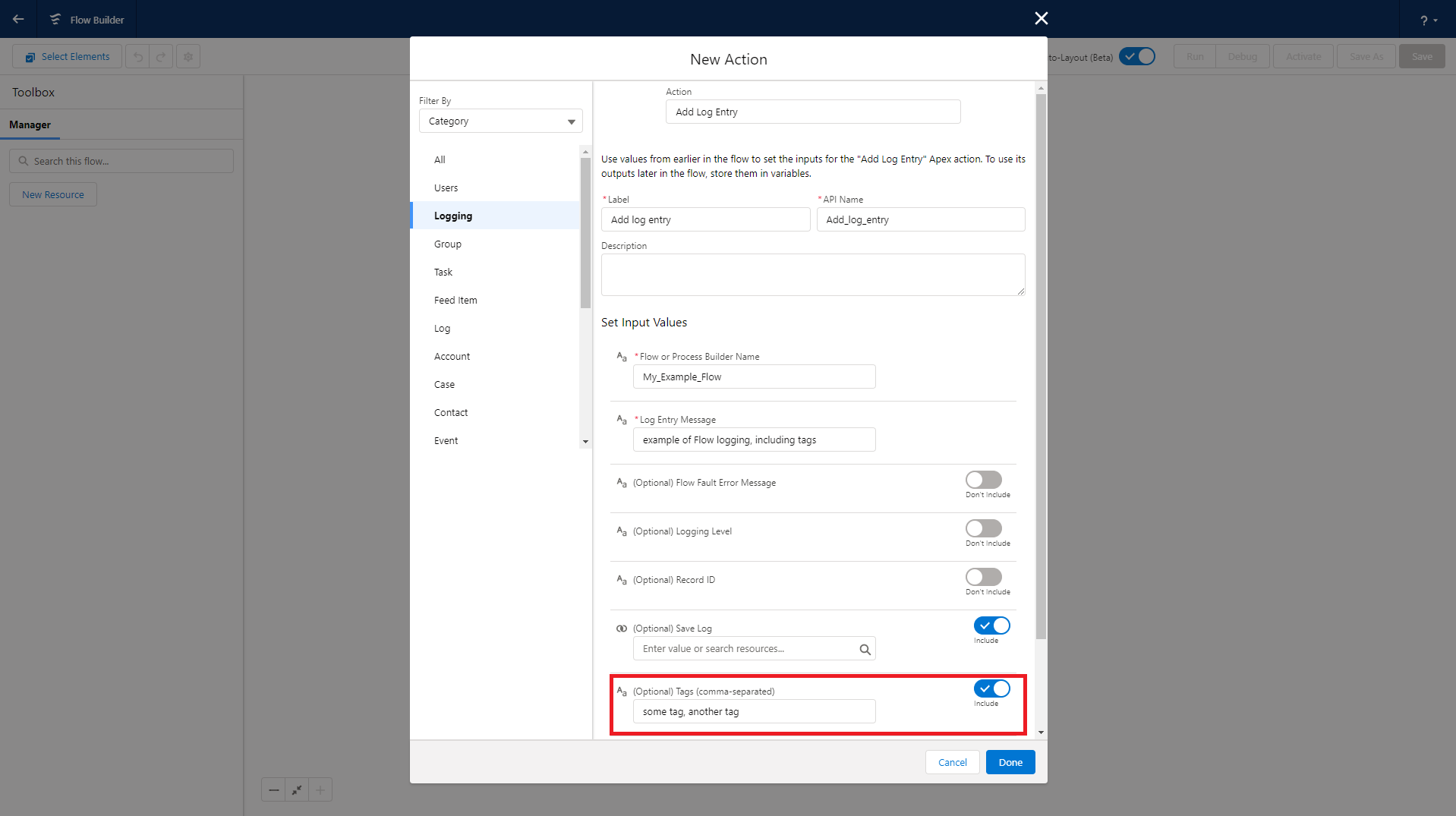
Flow builders can use the Tags property to specify a comma-separated list of tags to apply to the log entry. This feature is available for all 3 Flow classes: FlowLogEntry, FlowRecordLogEntry and FlowCollectionLogEntry.
Adding Tags with Custom Metadata Records
Admins can configure tagging rules to append additional tags using the custom metadata type LogEntryTagRule__mdt.
- Rule-based tags are only added when
LogEntry__crecords are created (not on update). - Rule-based tags are added in addition to any tags that have been added via Apex and/or Flow.
- Each rule is configured to apply tags based on the value of a single field on
LogEntry__c(e.g.,LogEntry__c.Message__c). - Each rule can only evaluate 1 field, but multiple rules can evaluate the same field.
- A single rule can apply multiple tags. When specifying multiple tags, put each tag on a separate line within the Tags field (
LogEntryTagRule__mdt.Tags__c).
Rules can be set up by configuring a custom metadata record with these fields configured:
- Logger SObject: currently, only the "Log Entry" object (
LogEntry__c) is supported. - Field: the SObject's field that should be evaluated - for example,
LogEntry__c.Message__c. Only 1 field can be selected per rule, but multiple rules can use the same field. - Comparison Type: the type of operation you want to use to compare the field's value. Currently supported options are:
CONTAINS,EQUALS,MATCHES_REGEX, andSTARTS_WITH. - Comparison Value: the comparison value that should be used for the selected field operation.
- Tags: a list of tag names that should be dynamically applied to any matching
LogEntry__crecords. - Is Enabled: only enabled rules are used by Logger - this is a handy way to easily enable/disable a particular rule without having to entirely delete it.
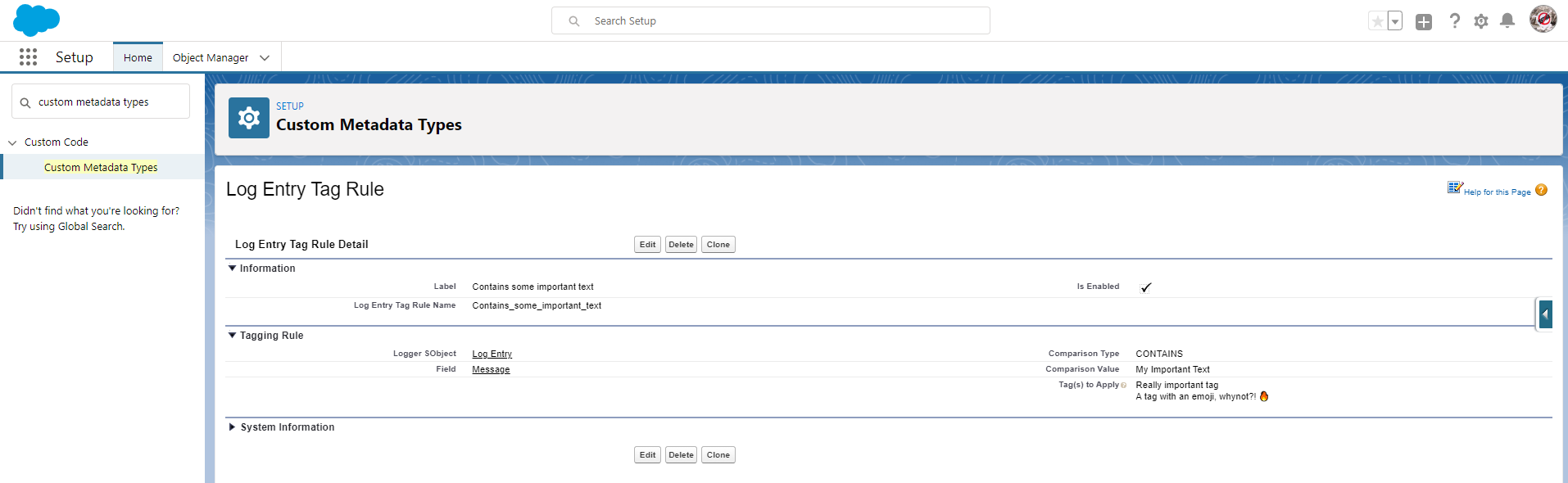
Below is an example of what a rule looks like once configured. Based on this rule, any LogEntry__c records that contain "My Important Text" in the Message__c field will automatically have 2 tags added - "Really important tag" and "A tag with an emoji, whynot?! 🔥"
Choosing a Tagging Mode
Once you've implementing log entry tagging within Apex or Flow, you can choose how the tags are stored within your org. Each mode has its own pros and cons - you can also build your own plugin if you want to leverage your own tagging system (note: plugins are not currently available in the managed package).
| Tagging Mode | Logger's Custom Tagging Objects (Default) | Salesforce Topic and TopicAssignment Objects |
|---|---|---|
| Summary | Stores your tags in custom objects LoggerTag__c and LogEntryTag__c |
Leverages Salesforce's Chatter Topics functionality to store your tags. This mode is not available in the managed package. |
| Data Model |
|
|
| Data Visibility |
|
|
| Leveraging Data | Since the data is stored in custom objects, you can leverage any platform functionality you want, such as building custom list views, reports & dashboards, enabling Chatter feeds, creating activities/tasks, and so on. | Topics can be used to filter list views, which is a really useful feature. However, using Topics in reports and dashboards is only partially implemented at this time. |
Adding Custom Fields to Nebula Logger's Data Model
Nebula Logger supports defining, setting, and mapping custom fields within Nebula Logger's data model. This is helpful in orgs that want to extend Nebula Logger's included data model by creating their own org/project-specific fields.
This feature requires that you populate your custom fields yourself, and is only available in Apex & JavaScript currently. The plan is to add in a future release the ability to also set custom fields via Flow.
v4.13.14added this functionality for Apexv4.14.6added this functionality for JavaScript (lightning components)
Adding Custom Fields to the Platform Event LogEntryEvent__e
The first step is to add a field to the platform event LogEntryEvent__e
Create a custom field on
LogEntryEvent__e. Any data type supported by platform events can be used.In this example, a custom text field called
SomeCustomField__chas been added: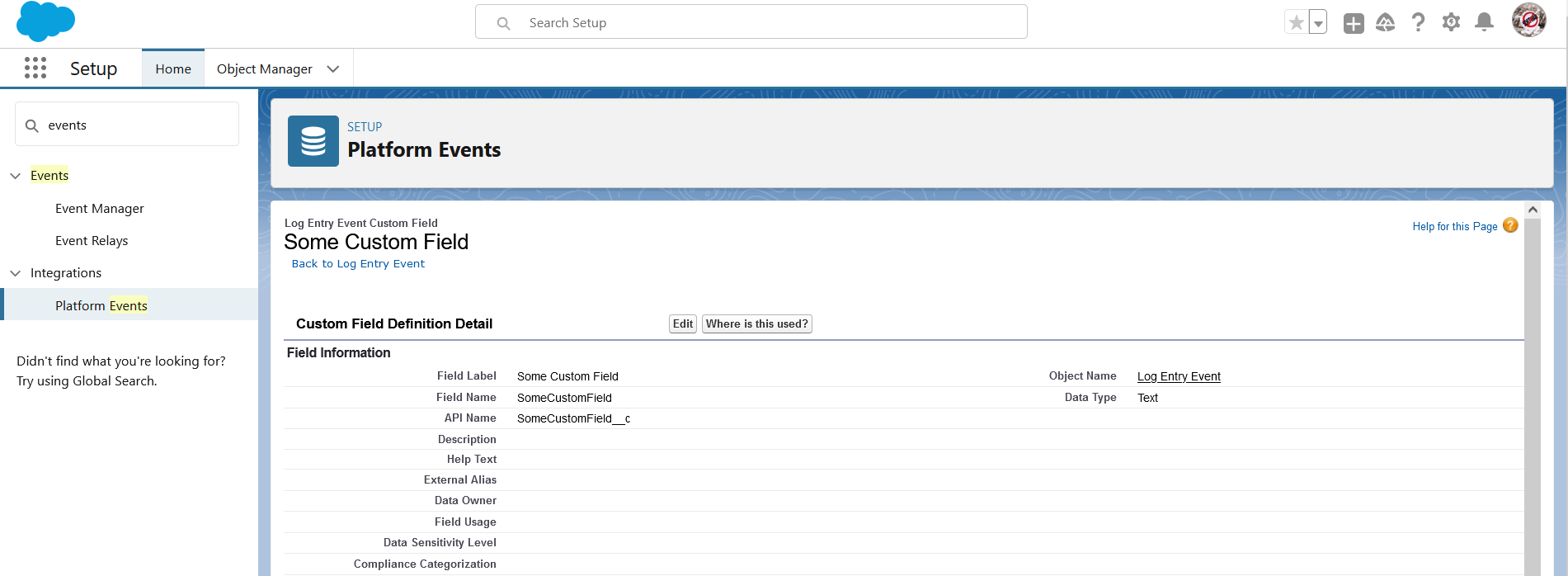
In Apex, you have 2 ways to populate your custom fields
- Set the field once per transaction - every
LogEntryEvent__elogged in the transaction will then automatically have the specified field populated with the same value.- This is typically used for fields that are mapped to an equivalent
Log__corLoggerScenario__cfield.
- This is typically used for fields that are mapped to an equivalent
- How: call the static method overloads
Logger.setField(Schema.SObjectField field, Object fieldValue)orLogger.setField(Map fieldToValue)
- Set the field on a specific
LogEntryEvent__erecord - other records will not have the field automatically set.- This is typically used for fields that are mapped to an equivalent
LogEntry__cfield. - How: call the instance method overloads
LogEntryEventBuilder.setField(Schema.SObjectField field, Object fieldValue)orLogEntryEventBuilder.setField(Map fieldToValue)
- This is typically used for fields that are mapped to an equivalent
// Set My_Field__c on every log entry event created in this transaction with the same value Logger.setField(LogEntryEvent__e.My_Field__c, 'some value that applies to the whole Apex transaction'); // Set fields on specific entries Logger.warn('hello, world - "a value" set for Some_Other_Field__c').setField(LogEntryEvent__e.Some_Other_Field__c, 'a value') Logger.warn('hello, world - "different value" set for Some_Other_Field__c').setField(LogEntryEvent__e.Some_Other_Field__c, 'different value') Logger.info('hello, world - no value set for Some_Other_Field__c'); Logger.saveLog();- Set the field once per transaction - every
In JavaScript, you have 2 ways to populate your custom fields. These are very similar to the 2 ways available in Apex (above).
- Set the field once per component - every
LogEntryEvent__elogged in your component will then automatically have the specified field populated with the same value.- This is typically used for fields that are mapped to an equivalent
Log__corLoggerScenario__cfield.
- This is typically used for fields that are mapped to an equivalent
- How: call the
loggerLWC functionlogger.setField(Object fieldToValue)
- Set the field on a specific
LogEntryEvent__erecord - other records will not have the field automatically set.- This is typically used for fields that are mapped to an equivalent
LogEntry__cfield. - How: call the instance function
LogEntryEventBuilder.setField(Object fieldToValue)
- This is typically used for fields that are mapped to an equivalent
import { getLogger } from 'c/logger'; export default class LoggerDemo extends LightningElement { logger = getLogger(); connectedCallback() { // Set My_Field__c on every log entry event created in this component with the same value this.logger.setField({My_Field__c, 'some value that applies to any subsequent entry'}); // Set fields on specific entries this.logger.warn('hello, world - "a value" set for Some_Other_Field__c').setField({ Some_Other_Field__c: 'a value' }); this.logger.warn('hello, world - "different value" set for Some_Other_Field__c').setField({ Some_Other_Field__c: 'different value' }); this.logger.info('hello, world - no value set for Some_Other_Field__c'); this.logger.saveLog(); } }- Set the field once per component - every
Adding Custom Fields to the Custom Objects Log__c, LogEntry__c, and LoggerScenario__c
If you want to store the data in one of Nebula Logger's custom objects, you can follow the above steps, and also...
Create an equivalent custom field on one of Nebula Logger's custom objects - right now, only
Log__c,LogEntry__c, andLoggerScenario__care supported.In this example, a custom text field also called
SomeCustomField__chas been added toLog__cobject - this will be used to store the value of the fieldLogEntryEvent__e.SomeCustomField__c: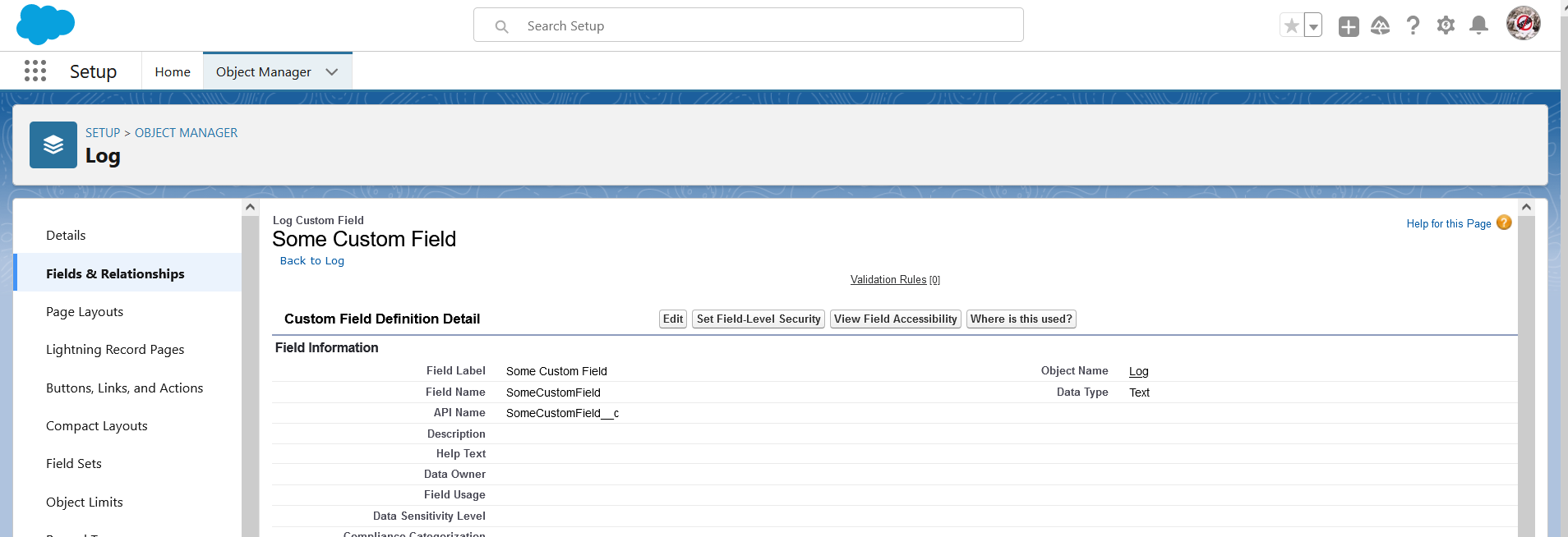
Create a record in the new CMDT
LoggerFieldMapping__mdtto map theLogEntryEvent__ecustom field to the custom object's custom field, shown below. Nebula Logger will automatically populate the custom object's target field with the value of the sourceLogEntryEvent__efield.In this example, a custom text field called
SomeCustomField__chas been added to bothLogEntryEvent__eandLog__c.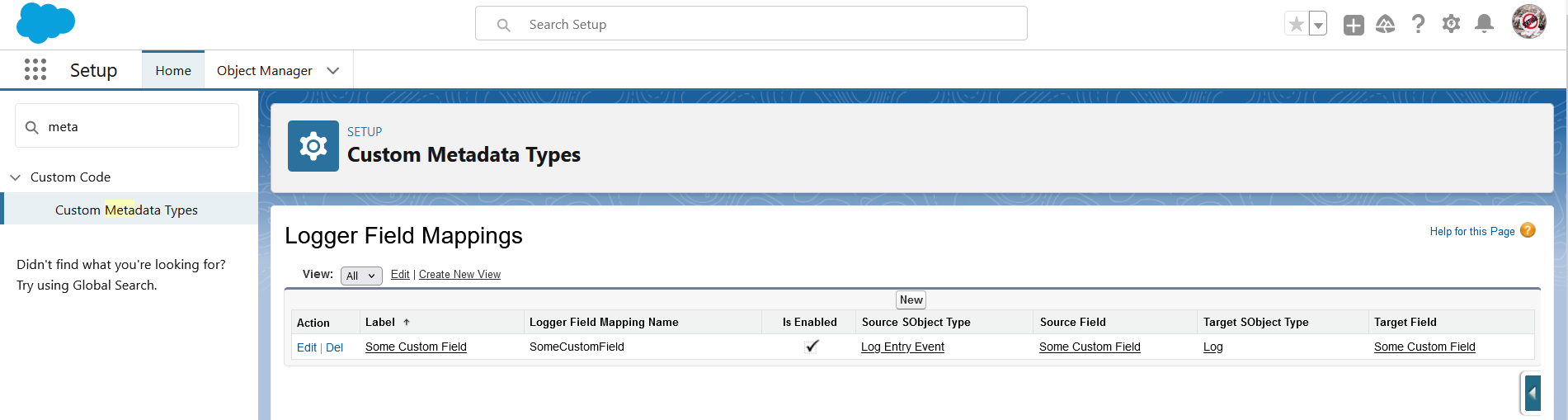
Log Management
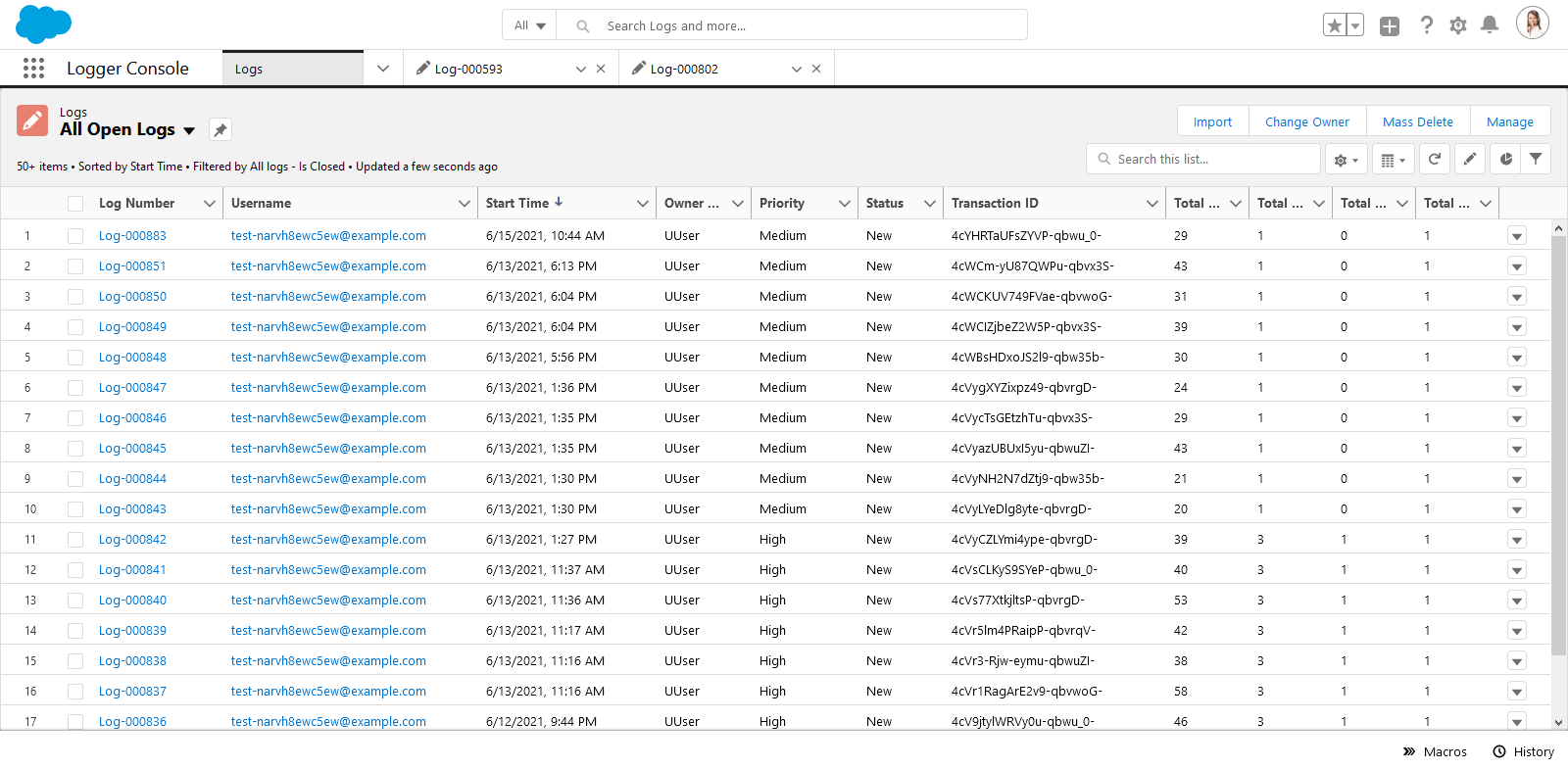
Logger Console App
The Logger Console app provides access to the tabs for Logger's objects: Log__c, LogEntry__c, LogEntryTag__c and LoggerTag__c (for any users with the correct access).
Log's 'Manage' Quick Action
To help development and support teams better manage logs (and any underlying code or config issues), some fields on Log__c are provided to track the owner, priority and status of a log. These fields are optional, but are helpful in critical environments (production, QA sandboxes, UAT sandboxes, etc.) for monitoring ongoing user activities.
All editable fields on
Log__ccan be updated via the 'Manage Log' quick action (shown below)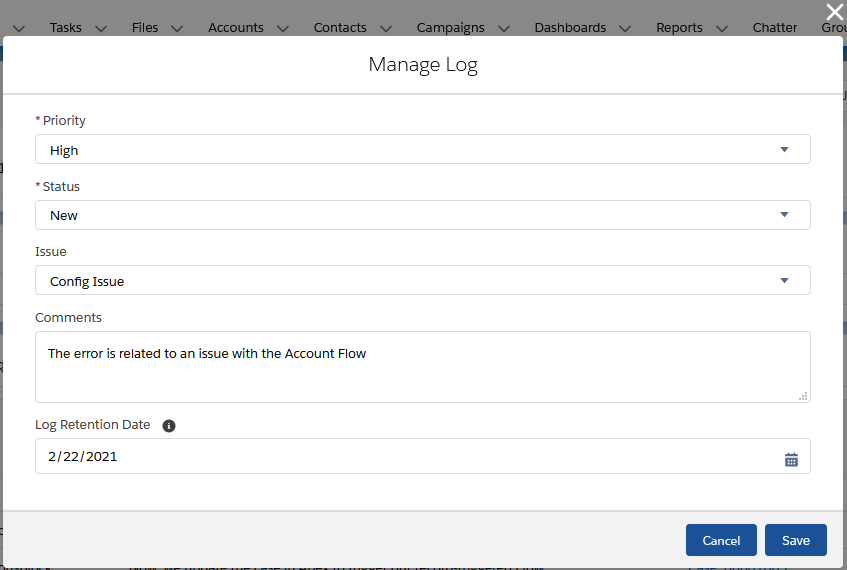
Additional fields are automatically set based on changes to
Log__c.Status__cLog__c.ClosedBy__c- The user who closed the logLog__c.ClosedDate__c- The datetime that the log was closedLog__c.IsClosed__c- Indicates if the log is closed, based on the selected status (and associated config in the 'Log Status' custom metadata type)Log__c.IsResolved__c- Indicates if the log is resolved (meaning that it required analaysis/work, which has been completed). Only closed statuses can be considered resolved. This is also driven based on the selected status (and associated config in the 'Log Status' custom metadata type)
To customize the statuses provided, simply update the picklist values for
Log__c.Status__cand create/update corresponding records in the custom metadata typeLogStatus__mdt. This custom metadata type controls which statuses are considered closed and resolved.
Log's 'View JSON' Quick Action
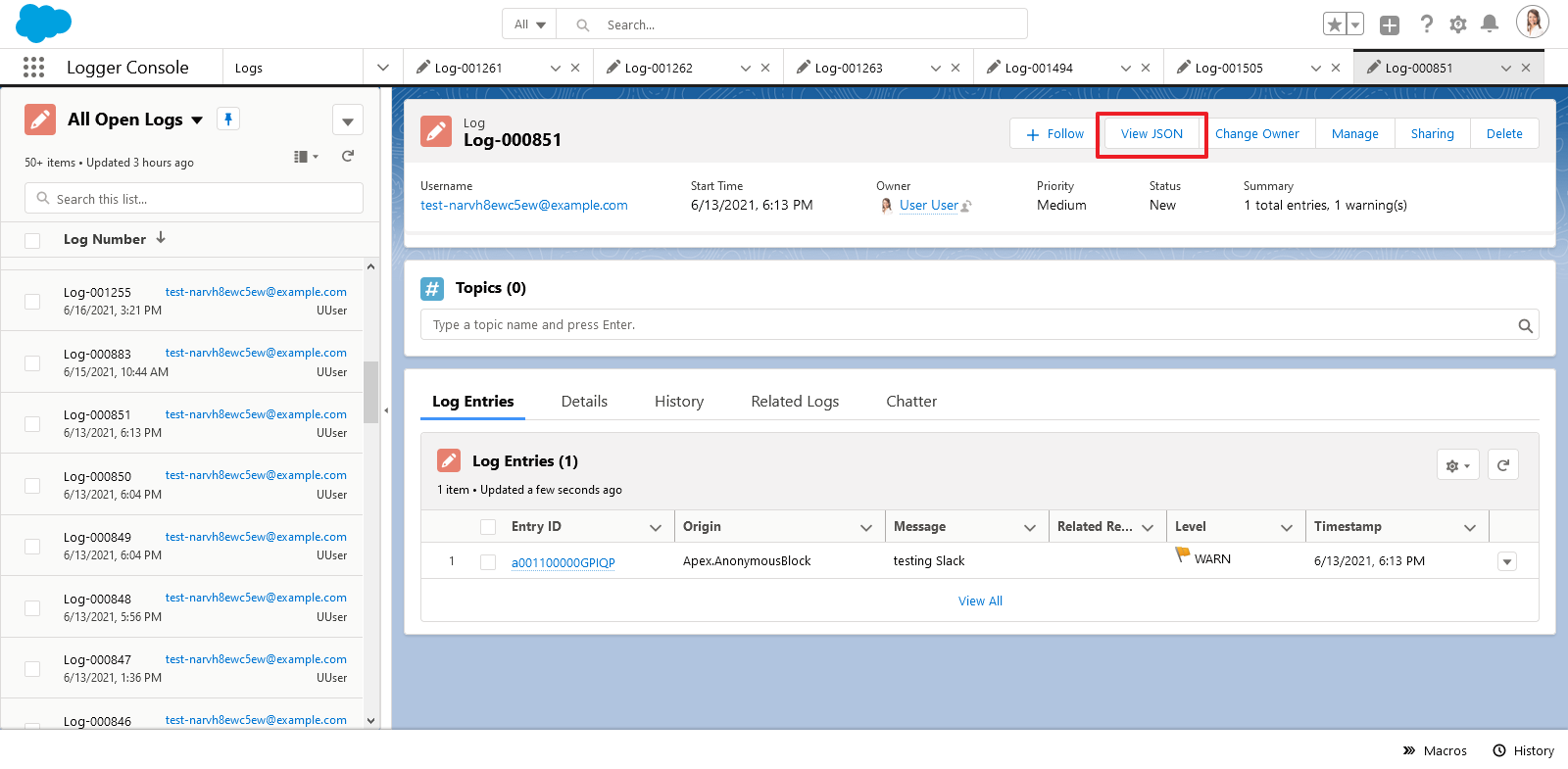
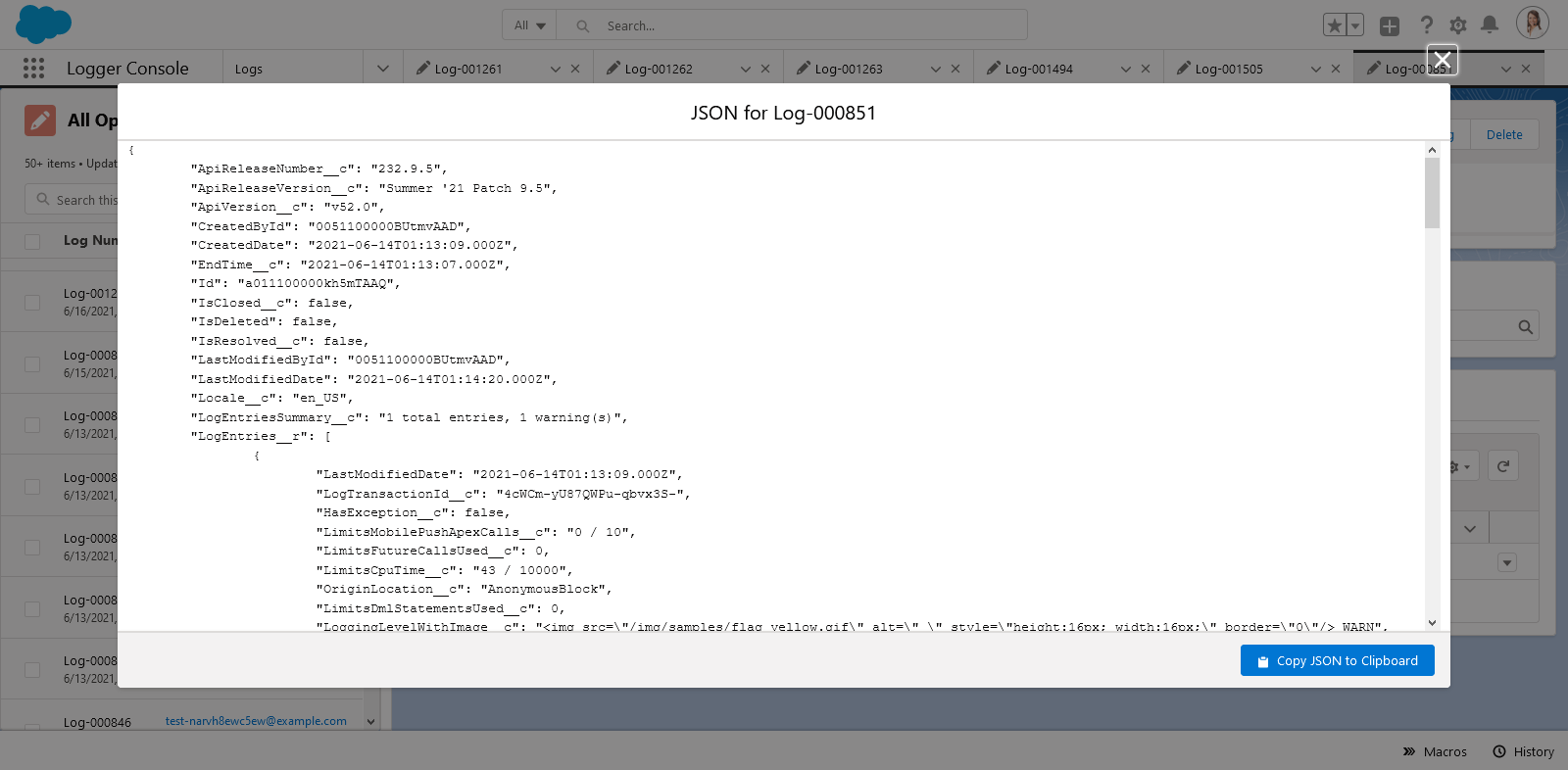
Everyone loves JSON - so to make it easy to see a JSON version of a Log__c record, you can use the 'View JSON' quick action button. It displays the current Log__c + all related LogEntry__c records in JSON format, as well as a handy button to copy the JSON to your clipboard. All fields that the current user can view (based on field-level security) are dynamically returned, including any custom fields added directly in your org or by plugins.
Real-Time Monitoring with Log Entry Event Stream
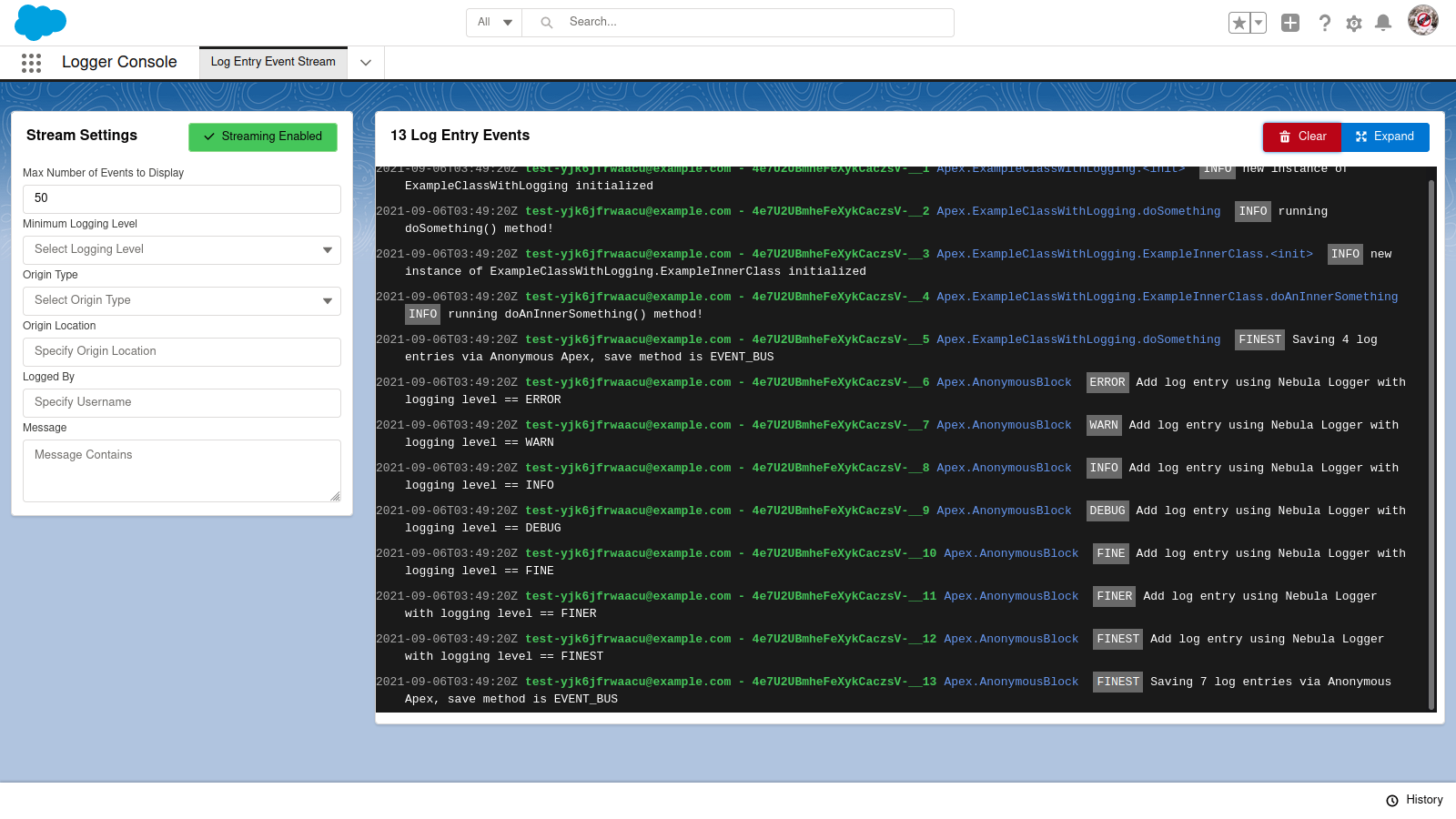
Within Logger Console app, the Log Entry Event Stream tab provides real-time monitoring of LogEntryEvent__e platform events. Simply open the tab to start monitoring, and use the filters to further refine with LogEntryEvent__e records display in the stream.
View Related Log Entries on a Record Page
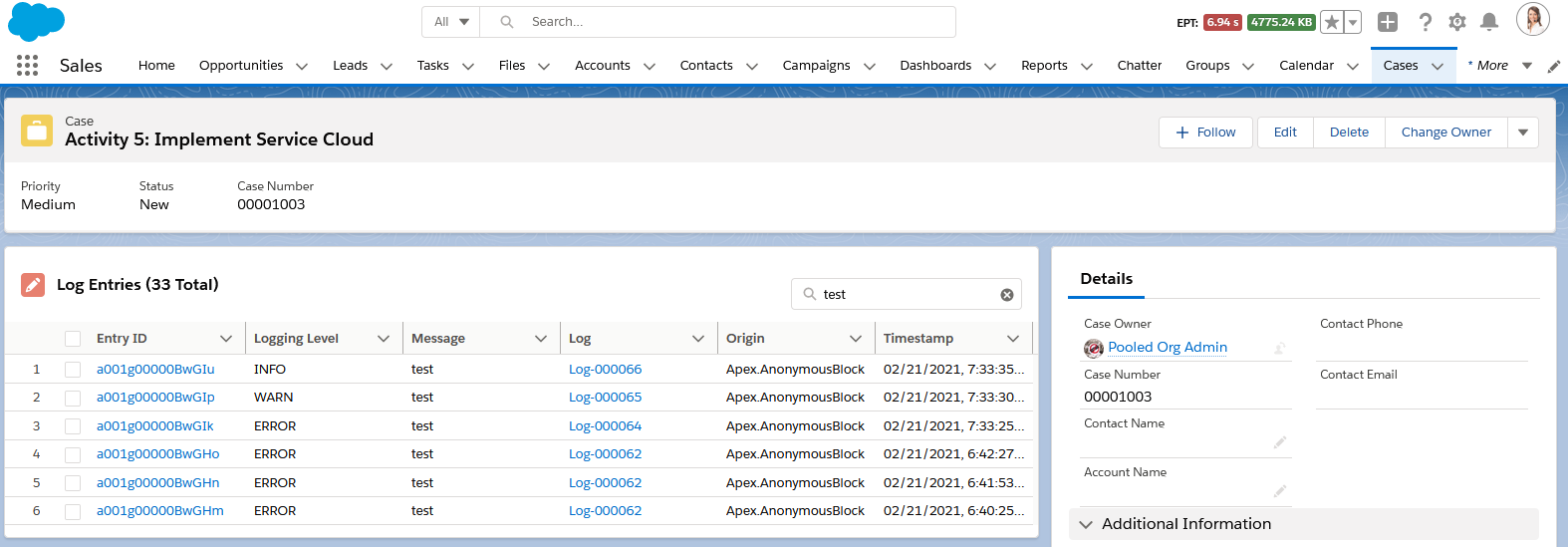
Within App Builder, admins can add the 'Related Log Entries' lightning web component (lwc) to any record page. Admins can also control which columns are displayed be creating & selecting a field set on LogEntry__c with the desired fields.
- The component automatically shows any related log entries, based on
LogEntry__c.RecordId__c == :recordId - Users can search the list of log entries for a particular record using the component's built-insearch box. The component dynamically searches all related log entries using SOSL.
- Component automatically enforces Salesforce's security model
- Object-Level Security - Users without read access to
LogEntry__cwill not see the component - Record-Level Security - Users will only see records that have been shared with them
- Field-Level Security - Users will only see the fields within the field set that they have access to
- Object-Level Security - Users without read access to
Deleting Old Logs
Admins can easily delete old logs using 2 methods: list views or Apex batch jobs
Mass Deleting with List Views
Salesforce (still) does not support mass deleting records out-of-the-box. There's been an Idea for 11+ years about it, but it's still not standard functionality. A custom button is available on Log__c list views to provide mass deletion functionality.
- Admins can select 1 or more
Log__crecords from the list view to choose which logs will be deleted
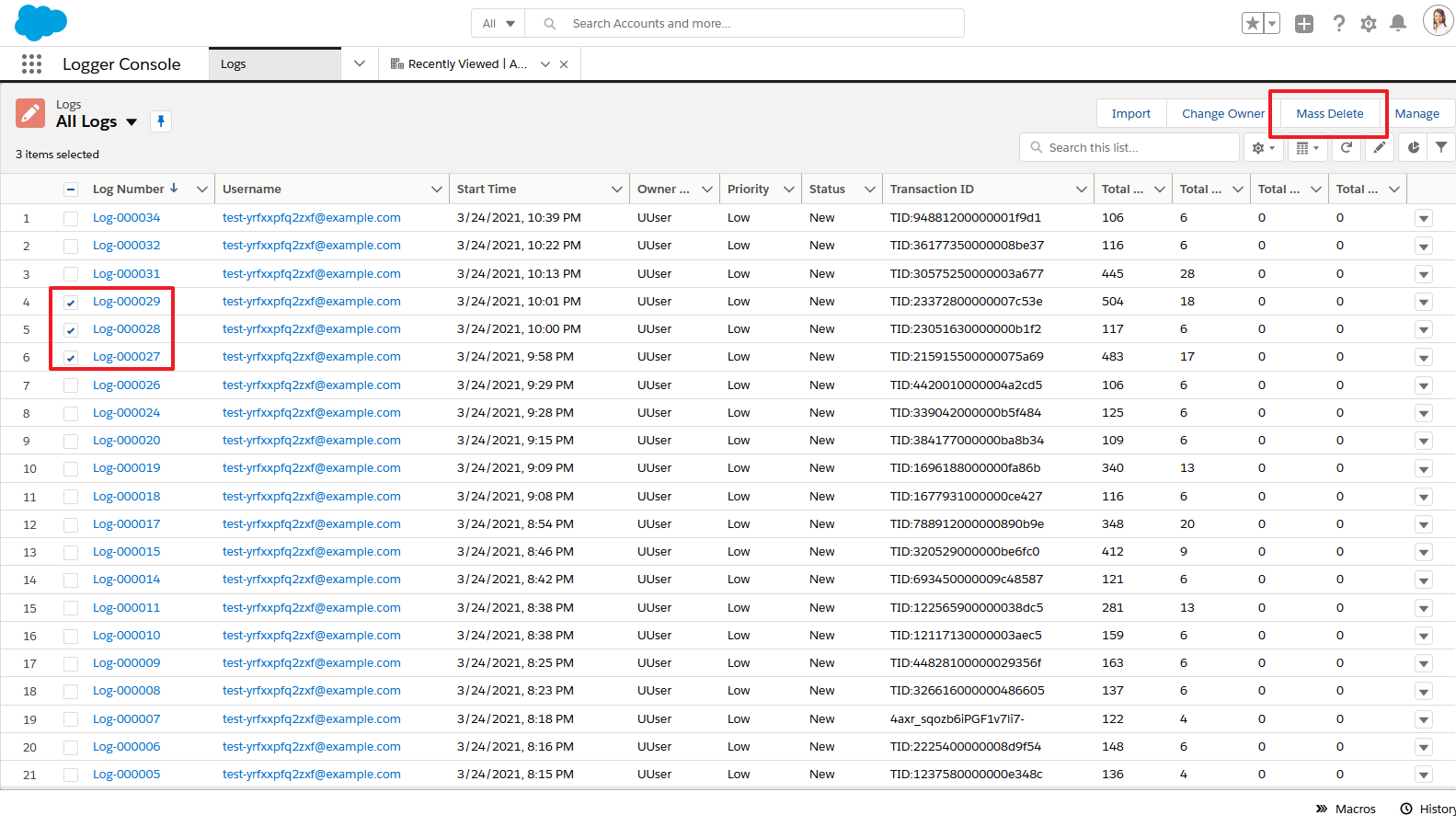
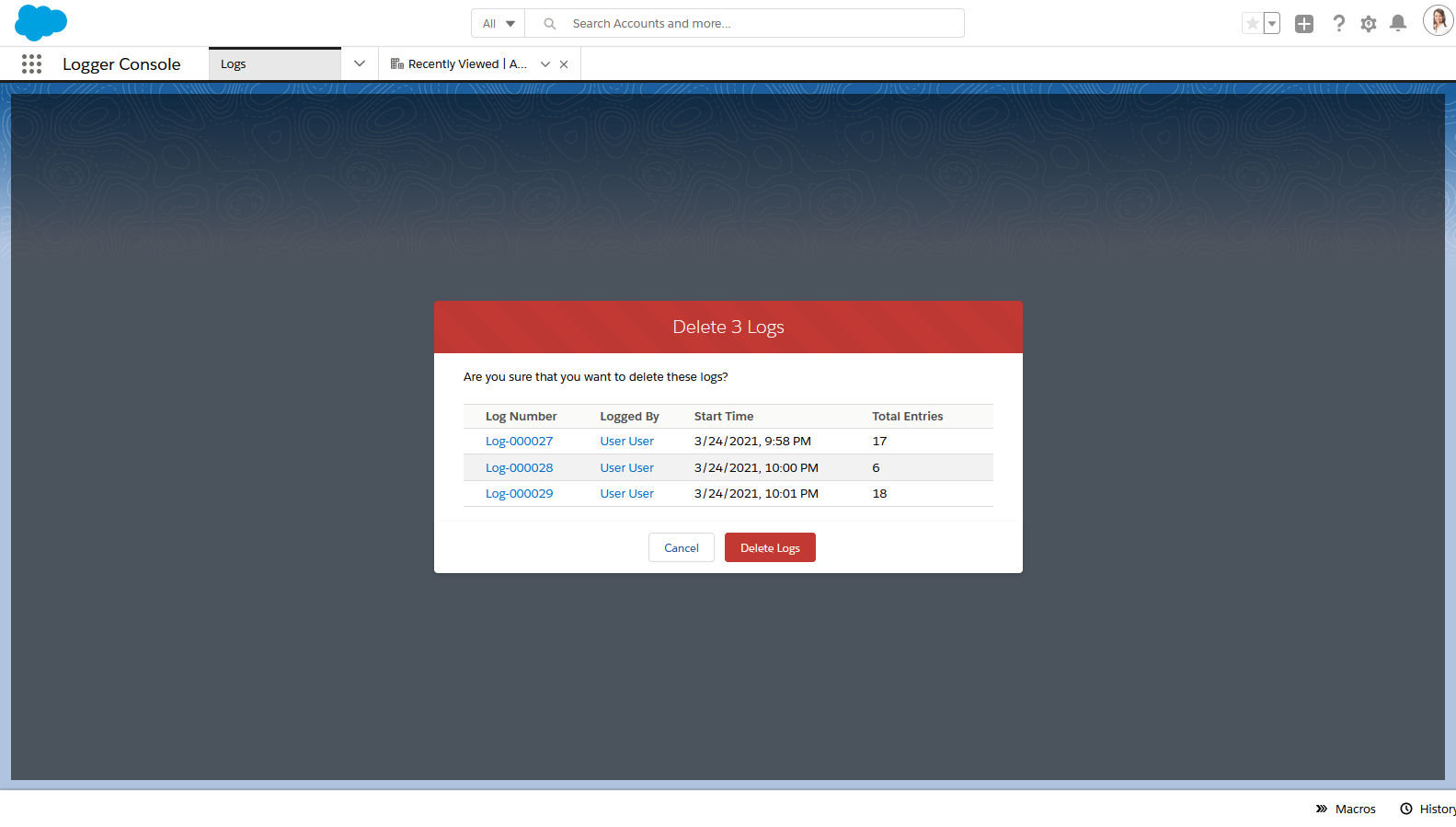
- The button shows a Visualforce page
LogMassDeleteto confirm that the user wants to delete the records
Batch Deleting with Apex Jobs
Two Apex classes are provided out-of-the-box to handle automatically deleting old logs
LogBatchPurger- this batch Apex class will delete anyLog__crecords with `Log__c.LogRetentionDate__c logs = (List) input.triggerNew; switch on input.triggerOperationType { when BEFORE_INSERT { for (Log__c log : logs) { log.Status__c = 'On Hold'; } } when BEFORE_UPDATE { // TODO add before-update logic } } } }
Once you've created your Apex or Flow plugin(s), you will also need to configure the plugin:
- 'Logger Plugin' - use the custom metadata type `LoggerPlugin__mdt` to define your plugin, including the plugin type (Apex or Flow) and the API name of your plugin's Apex class or Flow
- 'Logger Parameter' - use the custom metadata type `LoggerParameter__mdt` to define any configurable parameters needed for your plugin, such as environment-specific URLs and other similar configurations
Note: the logger plugin framework is not available in the managed package due to some platform limitations & considerations with some of the underlying code. The unlocked package is recommended (instead of the managed package) when possible, including if you want to be able to leverage the plugin framework in your org.
#### Beta Plugin: Slack Integration
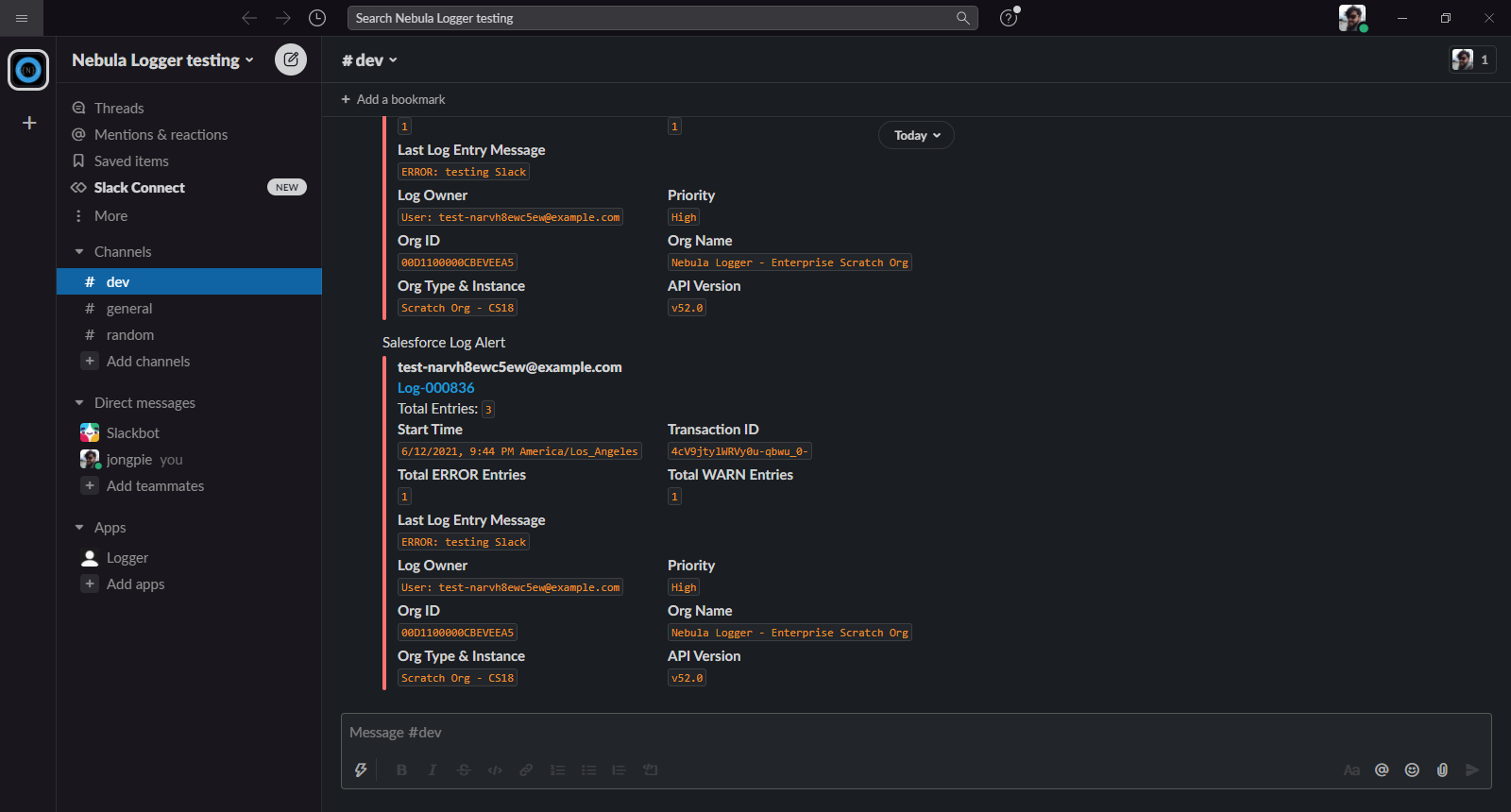
The optional [Slack plugin](./nebula-logger/plugins/slack) leverages the Nebula Logger plugin framework to automatically send Slack notifications for logs that meet a certain (configurable) logging level. The plugin also serves as a functioning example of how to build your own plugin for Nebula Logger, such as how to:
- Use Apex to apply custom logic to `Log__c` and `LogEntry__c` records
- Add custom fields and list views to Logger's objects
- Extend permission sets to include field-level security for your custom fields
- Leverage the new `LoggerParameter__mdt` CMDT object to store configuration for your plugin
Check out the [Slack plugin](./nebula-logger/plugins/slack) for more details on how to install & customize the plugin
---
### Uninstalling/Removing Logger
If you want to remove the unlocked or managed packages, you can do so by simply uninstalling them in your org under Setup --> Installed Packages.