
Muximux
A self-hosted homelab dashboard with an optional built-in embedding proxy that makes stubborn apps work in iframes.
One binary. One port. One YAML config file.






AI Disclosure -- Muximux is developed with significant AI assistance (Claude Code). All code is reviewed, tested, and approved by the maintainer before shipping. See Development for details.
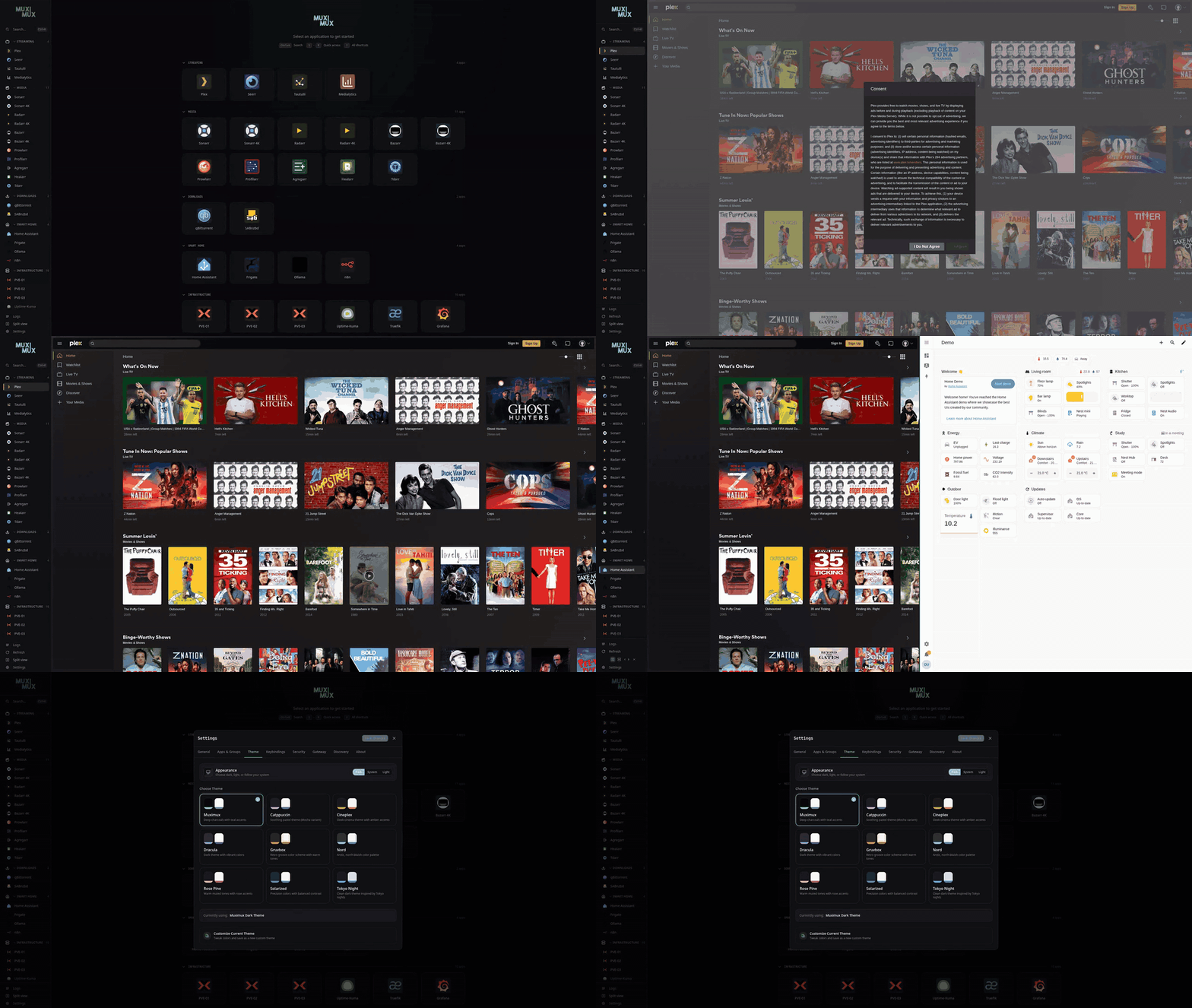
The dashboard, Plex running inside a pane (it refuses to be framed without the proxy), split view, and themes.
More screenshots - onboarding wizard, light mode, themes, split view, command palette
 Dashboard (Light) |
 Onboarding - Welcome |
 Onboarding - Security |
 Onboarding - App Catalog |
 Onboarding - Apps Configured |
 Onboarding - Style |
 Onboarding - Themes (Dark) |
 Onboarding - Themes (Light) |
 Onboarding - Done |
 Real-Time Log Viewer |
 Theme Selector |
 Theme Customizer |
 Split View - Horizontal |
 Split View - Vertical |
 Command Palette |
 Mobile - App Open |
 Mobile - Navigation |
What Is Muximux?
There's a good chance you already have a homelab dashboard. Homepage, Homarr, Organizr, and Dashy are all excellent tools in this space. If one of them already fits your workflow, you probably don't need to read further.
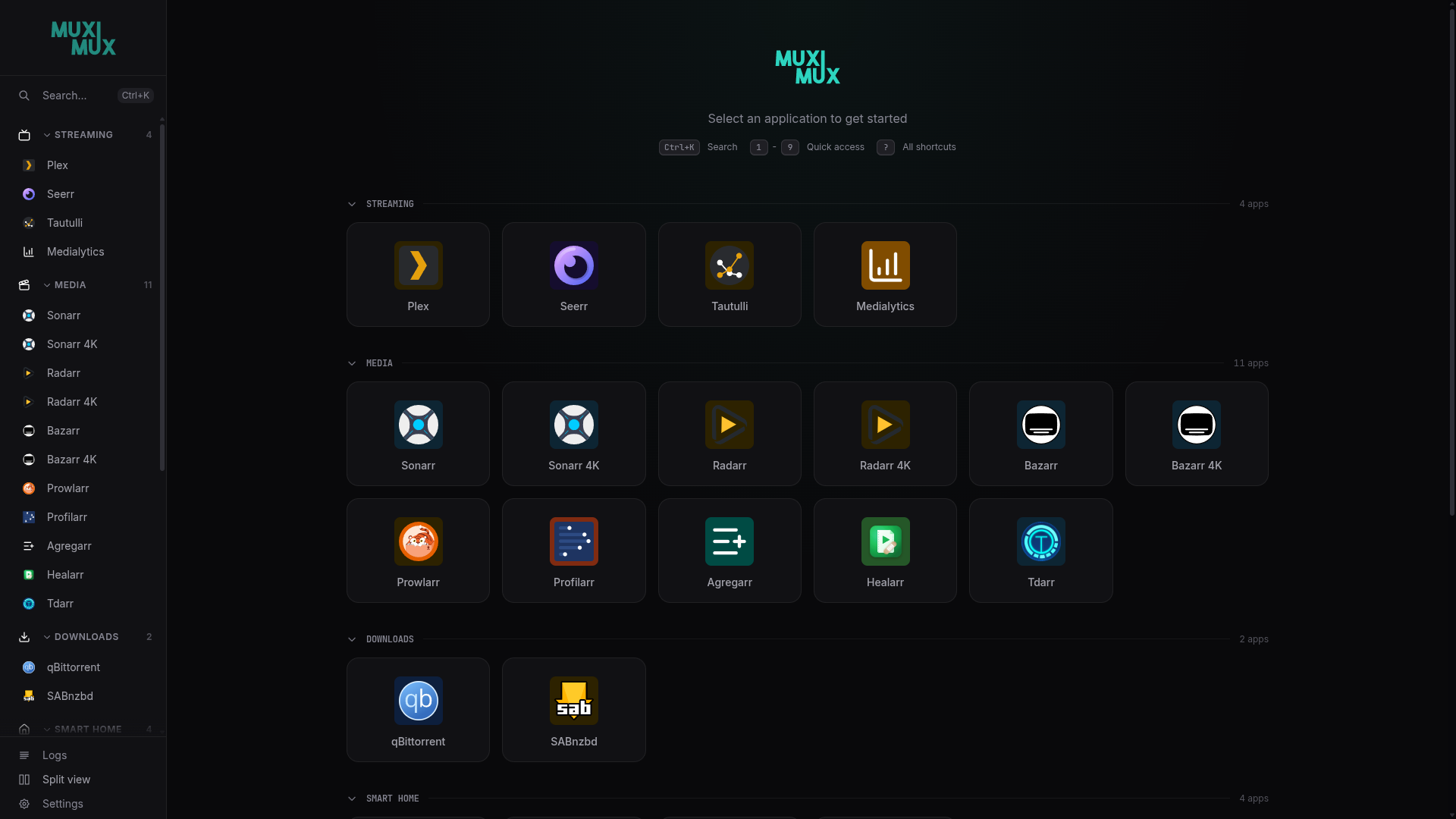
Muximux is built for a specific kind of user: someone who spends the day working inside their self-hosted apps, not glancing at widgets on a landing page. Click Sonarr and Sonarr opens inside the dashboard. Click Plex and Plex does too. No new tabs, no context switches. You never actually leave Muximux.
Making apps embed reliably is where it gets interesting. Most self-hosted apps set X-Frame-Options: DENY and refuse to load in an iframe. Muximux includes a built-in embedding proxy that strips those headers, rewrites paths in HTML/CSS/JS, and patches fetch() and XMLHttpRequest at runtime so even heavy single-page apps work the way they do when opened directly. Most dashboards point at your apps. Muximux makes them actually embed. No other dashboard does this, and it is the reason Muximux exists.
There are things Muximux deliberately doesn't do. It doesn't pull live widgets from Sonarr or qBittorrent (Homepage is lovely at that). It doesn't have a freeform grid editor where you arrange resizable widgets on a canvas (Homarr is built around that). It doesn't have Dashy's breadth of built-in monitoring widgets. It's focused on one thing: making apps work side by side inside a single tab, polished enough to live in.
Everything is configured in one YAML file, no database, no external dependencies. The entire application ships as a single binary with the frontend embedded. Every setting is configurable through the built-in GUI, so you never have to touch the YAML directly. Back up or migrate your entire setup by copying a single file.
How does it compare?
The dashboards in this space approach things differently. This table is a quick way to see where each one leans.
| Muximux | Homepage | Homarr | Organizr | Dashy | |
|---|---|---|---|---|---|
| Apps open inside the dashboard | Iframe (default) | iFrame widget | Link-out + widgets | Iframe tabs | Workspace view |
| Rewrites iframe-blocking headers | ✅ | ❌ | ❌ | ❌ | ❌ |
| Runtime SPA interceptor (fetch / XHR / WebSocket) | ✅ | ❌ | ❌ | ❌ | ❌ |
| Iframe permission delegation (camera, mic, geo, passkeys) | ✅ | ❌ | ❌ | ❌ | ❌ |
| Notification bridge for embedded apps | ✅ | ❌ | ❌ | ❌ | ❌ |
| Split view (two apps side by side) | ✅ | ❌ | ❌ | ❌ | ❌ |
| Live service widgets (torrent counts, episode lists, etc.) | ❌ | ✅ (100+) | ✅ | Partial | ✅ (50+) |
| Drag-and-drop visual editor | ✅ apps + groups | ❌ | ✅ | Partial | ✅ |
| Real-time health checks | ✅ (WebSocket) | ✅ | ✅ | ✅ | ✅ |
| Built-in users and roles | ✅ | ❌ (external auth) | ✅ | ✅ | Simple |
| Forward-auth / OIDC / SSO | ✅ | Via external proxy | ✅ (OIDC + LDAP) | ✅ (Plex / Emby / LDAP) | ✅ (Keycloak) |
| Auto-HTTPS via Let's Encrypt | ✅ (embedded Caddy) | ❌ | ❌ | ❌ | ❌ |
| Can front other services on their own subdomains (embedded Caddy) | ✅ | ❌ | ❌ | ❌ | ❌ |
| Start / stop / restart Docker containers from the dashboard | ✅ | ❌ | ✅ | ❌ | ❌ |
| Keeps app URLs working as container IPs / names change | ✅ | ❌ | ❌ | ❌ | ❌ |
| Config | YAML + Docker labels (no DB) | YAML + Docker labels | Database | Database | YAML / UI |
| Deployment | Docker / single static binary | Docker / K8s / binary | Docker | Docker / PHP | Docker / Node.js |
If the rows near the top describe what you want, keep reading.
Why v3?
Muximux v3 is a ground-up rewrite. The original Muximux was a PHP application that served as a simple bookmark portal. v3 replaces it with a modern stack and a much broader feature set:
- Go backend with the frontend embedded in the binary - no PHP, no web server, no runtime dependencies
- Built-in embedding proxy that rewrites HTML, CSS, JS, and headers so apps actually work inside iframes (distinct from the optional gateway below)
- Real-time health monitoring via WebSocket - see which apps are up or down without refreshing
- Built-in authentication - username/password, forward auth (Authelia/Authentik), or OIDC (configurable in Settings)
- Optional TLS and gateway - an embedded Caddy instance can handle HTTPS certificates and serve other sites alongside Muximux
- Guided onboarding - a setup wizard walks you through security setup and adding your first apps
- Split view - display two apps side by side or stacked with a draggable divider
- 1,600+ icons from Lucide plus thousands of service-specific icons from Dashboard Icons
- Themes - built-in light and dark modes, plus custom themes via CSS
How You Can Use It
Muximux fits different setups. Pick the level that matches yours.
Dashboard behind your existing proxy
You already have Traefik, nginx, or Caddy handling TLS and auth. Run Muximux behind it with auth: none and let your proxy do the heavy lifting. Muximux serves on a single port and your proxy forwards to it. This is the simplest setup.
Dashboard with the embedding proxy
Same as above, but some of your apps refuse to load in iframes. Set proxy: true on those apps and Muximux's embedding proxy forwards them through /proxy/{slug}/, stripping iframe-blocking headers and rewriting paths so they render inside the dashboard. This runs inside the Go server, works in every deployment mode, and is the one thing no other dashboard does - no extra configuration needed.
Note these are two different jobs: the embedding proxy exists to make an app render inside the dashboard, which a general-purpose proxy can't do. The gateway below is the ordinary "route a subdomain to a backend" kind of proxy.
Dashboard plus gateway (skip the separate proxy)
No existing proxy, and you would rather not run one? Muximux's optional gateway - an embedded Caddy - can front your other services too. Set tls.domain for automatic HTTPS via Let's Encrypt and declare services under gateway_sites: in config.yaml (or Settings -> Gateway) to serve them on their own subdomains, with optional per-site auth. TLS certificates, HTTP-to-HTTPS redirects, and routing all come from the same single binary.
The gateway is deliberately homelab-simple. If you need wildcard certificates, complex routing rules, load balancing, or access-control lists, keep a dedicated proxy - Nginx Proxy Manager, Traefik, or Caddy on its own - and run Muximux behind it (the first option above). The gateway is here so you do not have to run a separate proxy for a homelab-sized setup, not to out-feature the tools that specialize in it.
See the Deployment Guide for Docker Compose examples for each setup.
Quick Start
Docker
docker run -d \
  --name muximux \
  -p 8080:8080 \
  -v $(pwd)/data:/app/data \
  ghcr.io/mescon/muximux:latest
Open http://localhost:8080 and an onboarding wizard guides you through security and initial setup.
It asks for a one-time setup token, generated on first boot so that nobody who reaches the port before you can claim the instance. The command above runs detached, so read the token from the container output or from the mounted data directory:
docker logs muximux | grep token
# or
cat data/.setup-token
Docker Compose
services:
  muximux:
    image: ghcr.io/mescon/muximux:latest
    ports:
      - "8080:8080"
    volumes:
      - ./data:/app/data
    restart: unless-stopped
Binary
./muximux
By default, Muximux uses data/ beside the binary as its data directory (containing config, themes, icons). Override it with --data or the MUXIMUX_DATA environment variable.
Release binaries and images carry signed build provenance and ship with an SBOM, so you can confirm a download came from the workflow that claims to have built it -- see Verifying a Download.
See docker-compose.yml for a full example with environment variables, health checks, and optional TLS/gateway ports.
Documentation
Full documentation is available in the Wiki:
- Installation - Docker, binary, building from source, and verifying a download
- Getting Started - First launch and onboarding
- Configuration Reference - All config.yaml options
- Apps - Adding and configuring applications
- Built-in Reverse Proxy - How the proxy works and when to use it
- Docker Discovery - Import containers as apps (one-click, or automatically from labels) and control them from the dashboard
- HTTP Actions - Turn an app into a one-click HTTP request
- Security - Security measures and OWASP ASVS compliance
- Authentication - Auth methods and setup
- TLS & HTTPS - Certificates and gateway mode
- Gateway Auth Gate - Single sign-on for gateway subdomains
- Deployment Guide - Production deployment examples
- Split View - Side-by-side or stacked app panels
- Themes - Customizing the look
- Keyboard Shortcuts - Shortcuts, keyboard navigation and accessibility
- Troubleshooting - Common issues, and what changes when upgrading to 3.6
- API Reference - REST API endpoints
Configuration at a Glance
Everything lives in one YAML file. Here's the essentials:
server:
  listen: ":8080"
  title: "My Homelab"

apps:
  - name: Sonarr
    url: http://sonarr:8989
    icon: { type: dashboard, name: sonarr }
    group: Media
    proxy: true            # Proxy through /proxy/sonarr/
    open_mode: iframe      # iframe, new_tab, new_window, redirect, http_action

  - name: Grafana
    url: http://grafana:3000
    icon: { type: dashboard, name: grafana }
    group: Monitoring

groups:
  - name: Media
    icon: { type: lucide, name: play }
    color: "#e5a00d"

  - name: Monitoring
    icon: { type: lucide, name: activity }
    color: "#27ae60"
Configuration values can reference environment variables (${OIDC_CLIENT_SECRET}), and the listen address can be overridden via --listen flag or MUXIMUX_LISTEN env var. Logging, Docker auto-import, the auth method and every OIDC setting have MUXIMUX_* overrides too; see the environment variable reference. The data directory (where config, themes, and icons live) defaults to data/ beside the binary and can be set via --data or MUXIMUX_DATA.
Or configure apps with Docker labels
With Docker Discovery enabled, a container can declare its own Muximux entry -- the labels pre-fill the import modal, or with discovery.docker.auto_import the app appears (and stays in sync) with no clicks at all. Declare it once in your compose file and Muximux picks it up:
services:
  sonarr:
    image: linuxserver/sonarr
    labels:
      - muximux.app.name=Sonarr
      - muximux.app.group=Media
      - muximux.app.icon=sonarr
      - muximux.app.port=8989
      - muximux.app.proxy=true
muximux.app.* labels cover the whole app entry (icon, group, open mode, health check, access control, ...), and muximux.gateway.* can additionally publish the container on its own gateway subdomain. A background poller keeps imported URLs current as container IPs change across restarts. Full label reference: Docker Discovery.
Already behind your own reverse proxy? Add muximux.app.url=https://sonarr.example.com and the app opens at its public name while health checks keep going to the container.
For the full configuration reference, authentication options, TLS setup, and more, see the Wiki.
Features
| Reverse Proxy | Strips iframe-blocking headers, rewrites HTML/CSS/JS paths, handles gzip, and isolates window.parent/window.top - makes apps work in iframes that normally refuse. Per-app TLS settings, custom headers, and configurable timeout |
| Health Monitoring | Periodic health checks with real-time WebSocket updates and colored status indicators |
| Real-Time Log Viewer | In-app log viewer with level/source filtering, search, auto-scroll, pause/resume, and download. Debug level exposes detailed request tracing |
| Authentication | Built-in users (bcrypt), forward auth (Authelia/Authentik), or OIDC (set up in Settings) - with user management and roles. The auth method and every OIDC setting can also come from MUXIMUX_* environment variables, with the client secret in a Docker secret, so a fresh container starts on single sign-on with no config file and no setup wizard |
| TLS / HTTPS | Automatic Let's Encrypt certificates or manual cert/key, powered by embedded Caddy |
| Gateway | Reverse proxy other sites and services on your network on their own subdomains -- declarative YAML gateway_sites with per-site TLS modes (automatic Let's Encrypt, none, or custom certs), header forwarding, iframe-blocker stripping, and streaming-safe backends. Edit visually in Settings -> Gateway or by hand. Optionally gate each subdomain behind the Muximux login (require_auth) so one sign-in covers your whole homelab |
| Docker Discovery | Connect Muximux to the Docker daemon and one click imports running containers as apps with auto-filled name, icon, and URL. Pick per-row how each app is exposed -- direct, proxy, or its own gateway subdomain. A background poller keeps URLs current as container IPs shift across restarts. Prefer GitOps? Opt into automatic import (discovery.docker.auto_import) and Muximux picks up muximux.*-labeled containers on its own -- declare an app in your compose file and it appears, no clicks. Off by default. Labels you set (name, icon, group, order, health check, and the icon, colour and order of the group) stay applied while the app is tracked, icon labels take Dashboard Icons, Lucide icons or image URLs, and Docker Swarm services and Compose projects keep one app across redeploys |
| Container Controls | Start, stop, and restart Docker-discovered containers from the dashboard, with a status dot on each app card that stays quiet until a container is stopped, unhealthy, or restarting. Opt-in behind a read-write socket mount and role/group permissions; every action is audit-logged |
| HTTP Actions | Turn an app into a button that fires an HTTP request (any method, custom headers) through a server-side relay instead of opening a page -- useful for webhooks and automations such as triggering a backup or waking a host. Optional confirmation prompt, and every fire is audit-logged |
| Split View | Display two apps side by side or stacked with a draggable divider, panel selector for targeting left/right or top/bottom, and URL hash routing (#app1+app2) for bookmarking layouts |
| Navigation | 5 positions (top, left, right, bottom, floating), pinned apps as one-click buttons in the bar, draggable FAB, auto-hide, customizable width |
| Icons | 1,600+ Lucide icons, thousands of Dashboard Icons, URL icons, custom uploads |
| Keyboard Shortcuts | Keybindings for switching apps, toggling navigation, and search |
| Accessibility | Usable from the keyboard, with a visible focus outline, focus kept inside dialogs, named controls and screen reader announcements, and reduced motion when the operating system asks for it |
| Themes | 9 built-in theme families (Default, Nord, Dracula, Catppuccin, Solarized, Tokyo Night, Gruvbox, Cineplex, Rose Pine) with dark/light variants, all meeting WCAG 2.1 AA contrast, plus custom themes via CSS |
| Config Export/Import | Export config as YAML, import to preview and apply - sensitive data stripped on export |
| Environment Variables | ${VAR} expansion in config.yaml, plus MUXIMUX_* overrides for the data directory, listen address, base path, logging, Docker auto-import, the auth method and OIDC. Overrides stay in memory and never end up in config.yaml (full list) |
| REST API | Full CRUD for apps, groups, config, health, and auth |
| Single Binary | Frontend embedded in the Go binary - one file to deploy, no runtime dependencies |
| Portable | No database - one YAML config file stores everything. Every setting is editable in the GUI, saves merge onto the live config, and every open browser picks up a change at once. Copy one file to back up or migrate |
Project Philosophy
Muximux aims to be a solid, focused piece of software. The goal is a homelab dashboard that does its job well - not a monitoring suite, not a system management tool, not a kitchen sink. Features are evaluated by whether they serve the core purpose: giving you a single page to access and organize your self-hosted apps.
Suggestions and ideas are always welcome. Not everything will make it in, but that's by design - quality over quantity, and the project is better for it.
Development
Muximux is developed using Claude Code (Opus 4.6 through 4.8, currently Claude Fable 5) with MCP servers for browser automation (Playwright), GitHub integration, and other validation tools. It's a heavily AI-assisted workflow, but all code is reviewed, tested, and committed by the sole maintainer, @mescon. AI output is treated the same way as a pull request from a contributor - nothing ships without understanding and approval.
Every push goes through CI with 85%+ test coverage on both backend (./internal/...) and frontend (the src/lib and src/components surface; the app shell is excluded and verified by browser testing), golangci-lint, ESLint, svelte-check, CodeQL analysis, Snyk vulnerability scanning (Go, Node, Docker), govulncheck, SonarCloud quality gates, and a pre-push hook that blocks pushes below coverage thresholds. The security model is designed against OWASP ASVS Level 2.
git clone https://github.com/mescon/Muximux.git
cd Muximux

# Enable git hooks (pre-push runs tests with coverage checks)
git config core.hooksPath .githooks

# Frontend dev server (hot reload)
cd web && npm install && npm run dev &

# Backend (uses data/ beside the binary by default for config, themes, icons)
go run ./cmd/muximux
Building
# Build frontend (outputs to internal/server/dist/)
cd web && npm run build && cd ..

# Build binary (embeds frontend)
go build -tags embed_web -o muximux ./cmd/muximux

# With version info (uses latest git tag)
go build -tags embed_web -ldflags "-X main.version=$(git describe --tags --abbrev=0)" -o muximux ./cmd/muximux
License
GPL v2 - see LICENSE for details.
Credits
- Lucide Icons for the icon library
- Dashboard Icons by Homarr Labs
- Caddy for embedded TLS and gateway support