
musicbox is a free, open source frameworks & platforms project written in Python and released under MIT. It has 9,845 GitHub stars, 1,567 forks and 54 open issues, and was last pushed 23 days ago. On this registry it ranks #23 of 44 tracked projects in Frameworks & Platforms, with 5 head-to-head comparisons available.

What is musicbox?

MusicBox (NetEase-MusicBox) is a Python command-line client for NetEase Cloud Music that searches the catalogue, plays tracks and controls playback from a terminal, built for Linux and macOS users who prefer a keyboard-driven player or want an AI agent to drive their music.

What it is

MusicBox is an open-source terminal client for NetEase Cloud Music, written in Python and released under the MIT licence. It renders the service's catalogue as an interactive terminal interface, with Vim-style navigation, playlists, lyrics and playback controls handled entirely from the shell. Its music API layer is provided by NeteaseCloudMusicApiEnhanced/api-enhanced, so the project concentrates on the client experience rather than reverse-engineering endpoints itself.

The concrete problem it solves is access to NetEase Cloud Music without a graphical application. Desktop music players normally require a window, a mouse and a heavier runtime; MusicBox replaces that with a single musicbox command that runs over SSH, on a headless Raspberry Pi, or inside a script. It also exposes the same operations to automation through JSON output, which turns a listening session into something an AI agent or shell script can invoke.

Key capabilities

  • Multi-tier audio playback: MP3 at extreme, higher and standard quality, plus FLAC lossless, Hi-Res and ultra-clear master; the client switches to mpv automatically once it is installed.
  • Fuzzy search across songs, artists, albums and the local list.
  • Browsing surfaces for charts, new releases, curated playlists, DJ radio, my playlists, my cloud disk, personal FM and daily recommendations.
  • Vim-style keybindings with numeric modifiers — num + j quick jump, num + Shift + g to jump to a numbered song — alongside custom global hotkeys.
  • Scriptable CLI with JSON output, for example musicbox search 邓丽君 --type song --json, musicbox song url 1847408145 --quality lossless --quiet, musicbox status --json and musicbox queue list --json.
  • Agent Skill installation through npx skills add darknessomi/musicbox -y, letting Codex, Claude Code and Cursor operate MusicBox directly.
  • Local favourites, song comments, album jump, timed exit, play modes, current and history playlists, desktop lyrics, and downloads such as musicbox download --playlist 3778678 --path ./music --json.

Who users it and how

  • Desktop Linux and macOS users on the verified systems Ubuntu 24.04 LTS x64 and macOS.
  • Raspberry Pi 4 and other low-power devices running Ubuntu 22.04 arm64, where a reduced install of pipx and mpg123 with --no-install-recommends avoids pulling the full mpv graphics and video dependency set.
  • Automation and agent workflows that need non-interactive operation, using musicbox auth login --no-wait --json and the --json flags on search, play, pause, status and queue commands.
  • Terminal users with a window of at least 25 rows and a monospace font, since login renders the QR code as character blocks.
  • NetEase Cloud Music account holders with the mobile app, because QR confirmation on the phone is the only supported login path.

Getting started

Install the system dependencies mpg123 for MP3 and optionally mpv for FLAC and Hi-Res, then install the client as a global command with uv tool install netease-musicbox or pipx install NetEase-MusicBox and run musicbox. Python 3.10 or newer is required.

How it compares

No similar tools are named in the facts, so in this registry MusicBox stands alone as a terminal client in its category. Its only named upstream relationship is the NeteaseCloudMusicApiEnhanced/api-enhanced project that supplies the API capability, which means the client depends on that separate service layer rather than reimplementing it.

When to use it — and when not to

A self-hoster must supply Python 3.10 or newer and the mpg123 playback binary, with optional mpv, aria2 for caching, libnotify-bin for Linux notifications, and a Qt plus dbus stack for desktop lyrics. Choose something else if a graphical player is wanted, if the catalogue must come from a service other than NetEase Cloud Music, or if the environment lacks a phone for QR login, since account and password login is no longer supported. Older Raspberry Pi OS or Debian systems still on Python 3.9 cannot install the current version at all, and the PyPI package may lag behind the source.

project readme (upstream, from github) — read inline

NetEase-MusicBox

Software License PyPI - Version PyPI - Python Version

高品质网易云音乐命令行客户端,基于 Python 编写。

感谢为 MusicBox 的开发付出过努力的每一个人

网易云音乐 API 能力由 NeteaseCloudMusicApiEnhanced/api-enhanced 提供支持。

Demo
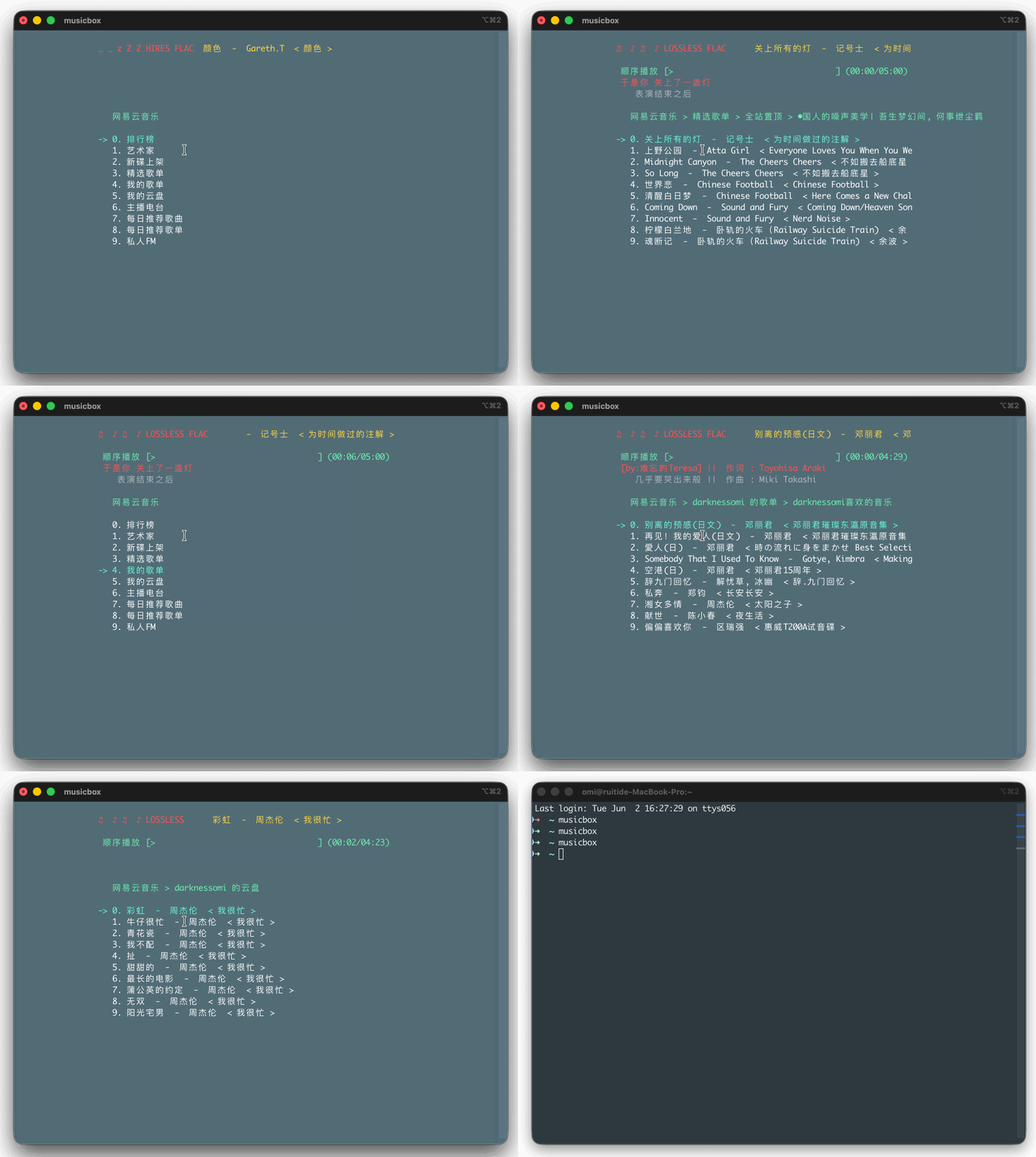
NetEase-MusicBox-GIF

功能特性

  • 支持多档音质播放:MP3(极高/较高/标准)及无损、高清臻音、超清母带等 FLAC,安装 mpv 后自动切换
  • 支持歌曲、艺术家、专辑、本地列表模糊搜索
  • 支持排行榜、新碟上架、精选歌单、主播电台、我的歌单、我的云盘、私人 FM 和每日推荐
  • 支持本地收藏、歌曲评论、专辑跳转、随心打碟和定时退出
  • 支持播放进度、播放模式、当前/历史播放列表和桌面歌词显示
  • 支持 Vim 风格快捷键、数字快捷键和自定义全局快捷键

安装

推荐用 uvpipx 安装为全局命令 musicbox;参与开发见下文「本地开发」。

环境要求

  • Python 3.10 及以上
  • mpg123(MP3)、mpv(可选,FLAC / Hi-Res)

安装系统依赖

macOS:

brew install mpg123 mpv uv

Ubuntu/Debian:

sudo apt-get install mpg123 mpv

CentOS/Red Hat:

sudo yum install -y python3-devel mpg123 mpv

安装 MusicBox

PyPI(可能落后于源码):

uv tool install netease-musicbox
# 或 pipx install NetEase-MusicBox

源码(全局命令;改代码后需重装,开发期可用 -e):

git clone https://github.com/darknessomi/musicbox.git
cd musicbox
uv tool install .      # 或 pipx install .
uv tool install -e .   # 可编辑安装,源码改动即时生效

本地开发(不装全局命令):

git clone https://github.com/darknessomi/musicbox.git
cd musicbox
uv sync
uv run musicbox

可选依赖

  • aria2:缓存歌曲
  • libnotify-bin:Linux 消息提示
  • qtpy python-dbus dbus qt:桌面歌词。根据系统 Qt 版本,可能还需要安装 pyqt4pysidepyside2

树莓派 / 老旧设备

Ubuntu 22.04 / 64 位树莓派系统自带 Python 3.10,可用 pipx 直接安装。低性能设备建议先只装 MP3 播放必需依赖,避免一次性拉取 mpv 的大量图形/视频依赖:

sudo apt-get update
sudo apt-get install -y --no-install-recommends pipx mpg123
pipx ensurepath
pipx install NetEase-MusicBox
musicbox

注意:项目要求 Python 3.10 及以上;旧版 Raspberry Pi OS / Debian 如果仍是 Python 3.9,不能直接安装当前版本。

已验证系统

  • Ubuntu 24.04 LTS x64
  • macOS 26.5
  • Raspberry Pi 4 / Ubuntu 22.04 arm64(Docker 镜像:balenalib/raspberrypi4-64-ubuntu:jammy

使用

启动 MusicBox:

musicbox

进入需要登录的功能时,终端会显示二维码。登录方式仅支持扫码登录,已不再支持账号密码登录。

  1. 用网易云音乐手机 App 扫描二维码,并在手机上确认。
  2. 登录成功后 Cookie 写入 ~/.local/share/netease-musicbox/cookie.txt(未设置 XDG_DATA_HOME 时为 ~/.netease-musicbox/cookie.txt)。

终端以字符块渲染二维码,窗口建议 ≥25 行、等宽字体。必须使用网易云音乐 App 扫描二维码并在手机上确认,不支持打开 URL 完成登录。

CLI 与 AI Agent

MusicBox 支持命令行和 AI Agent 调用:搜索歌曲、获取播放链接、播放控制、查询状态和登录都可以通过 musicbox 命令完成。

musicbox search 邓丽君 --type song --json
musicbox artist 6452 --limit 10 --json
musicbox album 32311 --json
musicbox song url 1847408145 --quality lossless --quiet
musicbox play --id 1847408145 --json
musicbox play --artist 6452 --limit 10
musicbox play --album 32311
musicbox play --songs 33894312 28258988
musicbox pause --json
musicbox status --json
musicbox queue list --json
musicbox auth login --no-wait --json
musicbox download --playlist 3778678 --path ./music --json

安装 Agent Skill 后,可直接让 Codex、Claude Code、Cursor 等 Agent 操作 MusicBox:

npx skills add darknessomi/musicbox -y

快捷键

num + 的快捷键支持数字修饰,先输入数字,再输入被修饰的按键。

按键 功能 说明
j Down 下移
k Up 上移
num + j Quick Jump 快速向后跳转 n 首
num + k Quick Up 快速向前跳转 n 首
h Back 后退
l Forward 前进
u Prev Page 上一页
d Next Page 下一页
f Search 当前列表模糊搜索
[ Prev Song 上一曲
] Next Song 下一曲
num + [ Quick Prev Song 快速前 n 首
num + ] Quick Next Song 快速后 n 首
num + Shift + g Index for Song 跳到第 n 首
= Volume + 音量增加
- Volume - 音量减少
Space Play/Pause 播放/暂停
? Shuffle 手气不错
m Menu 主菜单
p Present/History 当前/历史播放列表
i Music Info 当前音乐信息
Shift + p Playing Mode 播放模式切换
a Add 添加曲目到打碟
Shift + a Enter Album 进入专辑
g To the First 跳至首项
Shift + g To the End 跳至尾项
z DJ List 打碟列表
s Star 添加到收藏
c Collection 收藏列表
r Remove 删除当前条目
Shift + j Move Down 向下移动当前项目
Shift + k Move Up 向上移动当前项目
Shift + c Cache 缓存歌曲到本地
, Like 喜爱
. Trash FM 删除 FM
/ Next FM 下一 FM
q Quit 退出
t Timing Exit 定时退出
w Quit & Clear 退出并清除用户信息

配置

配置文件位于 ~/.netease-musicbox/config.json,可配置缓存、快捷键、消息提示和桌面歌词。

无损播放相关配置:

  • music_quality:音质等级,可填数字或 level 名称。

    配置值 说明
    jymaster 超清母带,192kHz/24bit
    4 / hires 高清臻音,96kHz/24bit
    3 / lossless 无损,最高 48kHz/16bit
    0 / exhigh 极高,最高 320kbps
    1 / higher 较高,192kbps
    2 / standard 标准,128kbps
  • player_backend:默认 mpg123;设为 mpv 则全程用 mpv,否则仅 FLAC 自动切到 mpv

  • mpv_parameters: 传给 mpv 的额外参数列表。

由于歌曲 API 只接受中国大陆地区访问,非中国大陆地区用户需要自行设置代理。可用 polipo 将 socks5 代理转换成 http 代理:

export http_proxy=http://IP:PORT
export https_proxy=http://IP:PORT
curl -L ip.cn

确认显示 IP 属于中国大陆地区即可。

排错

  • 某些歌曲不能播放且总时长为 00:01 时,通常是版权问题。
  • 特定终端不能播放时,先检查同一终端下 mpg123 能否正常使用,再检查其他终端下 musicbox 能否正常使用。报告 issue 时请附上这些检查结果和终端报错。
  • 可通过 tail -f ~/.local/share/netease-musicbox/musicbox.log 查看日志。

更新日志

详见 CHANGELOG.md

License

MIT

Frequently asked questions

Is musicbox free to use?

musicbox is open source under the MIT licence. There is no licence fee and no seat count — you can self-host it or, where the project offers one, pay a vendor for a managed version instead.

What does musicbox do?

网易云音乐命令行版本

What is musicbox written in?

musicbox is primarily written in Python. Its source is publicly available at https://github.com/darknessomi/musicbox, and it has 9,845 GitHub stars.