Metabase is an open-source business intelligence and embedded analytics tool, written in Clojure, that lets everyone in a company ask questions of their data and build dashboards without needing to know SQL.
What it is
Metabase is an open-source business intelligence and reporting platform in the Data & Analytics category. It connects to the databases an organization already runs — the README points to officially supported databases and community-contributed drivers, and the repository topics list MySQL among them — and puts a question builder, a SQL editor, dashboards, and scheduling on top of that data. The project is written in Clojure, is distributed under a licence that GitHub reports as NOASSERTION, and has accumulated roughly 49,300 stars and 6,800 forks, with a public issue tracker holding around 4,350 open issues.
The concrete problem it solves is the bottleneck between a data question and a data answer. Without a tool of this kind, every question about company data routes through someone who can write SQL, and the answer arrives as a static result rather than something a colleague can revisit, filter, or share. Metabase replaces that hand-written-query workflow with a self-service layer: non-technical colleagues compose questions through a visual interface, analysts drop into the SQL editor when the question is complex, and both kinds of work land in the same curated collection of dashboards, documents, and metrics.
Key capabilities
- Question builder for people who do not know SQL, plus a full SQL editor for more complex queries.
- Metabot for AI-assisted answers and query writing, and an agent API for building a custom AI agent against your data.
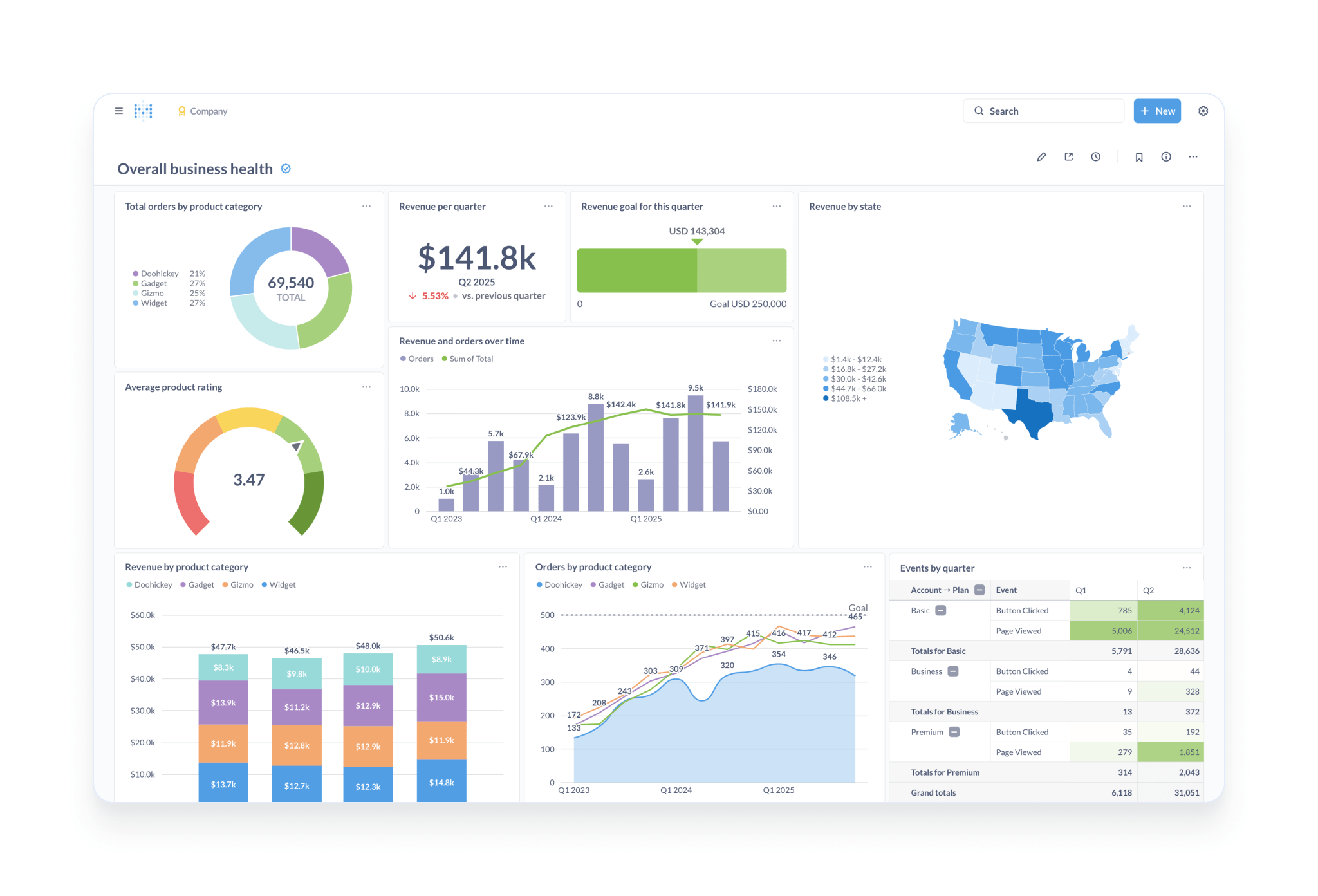
- Interactive dashboards with filters, auto-refresh, fullscreen mode, and custom click behaviour.
- Alerts on data and scheduled dashboard subscriptions delivered to email, Slack, or a webhook.
- Embedding components for charts, dashboards, the data browser, and AI chat, including full interactive embedding of an entire Metabase instance inside another application.
- Data Studio transforms that turn raw data into analytics-ready tables, surface broken dependencies, and define canonical metrics.
- Granular permissions that serve both internal teams and embedded analytics, whether customer data is co-located or each customer has a separate database.
Who uses it and how
- Internal teams across a company use it as the shared place to ask questions, so that engineering time is not consumed by routine reporting requests.
- Product and platform teams embed Metabase into their own application, shipping charts, dashboards, and AI chat to their users through the embedding components or through interactive embedding.
- Data teams curate content in the Library and version their work with Git through remote sync, which suits organizations that want review and history around analytics definitions.
- Operations and business groups schedule dashboard subscriptions to email, Slack, or a webhook so that recurring reporting happens without anyone opening the tool.
- Multi-tenant businesses configure permissions per customer, either sharing an underlying database or provisioning a database per customer.
Getting started
The README recommends the free trial of Metabase Cloud as the easiest route, with the option to switch to self-hosting later or the reverse. Self-hosting instructions live in the installation guides, and the project publishes a Docker image under the name metabase/metabase.
How it compares
No other products are named in the provided facts, so no direct comparison can be drawn here. On the evidence available, this entry stands alone in this registry.
When to use it — and when not to
Self-hosting means operating the application, its application database, SMTP for subscriptions and alerts, and your own backups, upgrades, and SSL termination — precisely the items Metabase Cloud advertises as included. Organizations with no appetite for that operational load, or those requiring a licence with a clearer OSI designation than the NOASSERTION value reported in the repository metadata, should weigh the hosted option or look elsewhere. A public backlog of roughly 4,350 open issues also suggests that bug reports and feature requests can sit for a long time before resolution.
project readme (upstream, from github) — read inline
Metabase
Metabase is the easy, open-source way for everyone in your company to ask questions and learn from data.



Get started
The easiest way to get started with Metabase is to sign up for a free trial of Metabase Cloud.
You get expert support, backups, upgrades, an SMTP server, SSL certificate, SoC2 Type 2 security auditing, and more (plus your money goes toward improving a major open-source project). Check out our quick overview of cloud vs self-hosting. If you need to, you can always switch to self-hosting Metabase at any time (or vice versa).
Key Features
- Set up in five minutes (we're not kidding), or have us host Metabase for you so you don't even need to think about it.
- Let anyone on your team ask questions without knowing SQL.
- Use the SQL editor for more complex queries.
- Ask AI: Metabot gives you answers you can trust, helps you write queries, and more. Or build your own AI agent to query your data.
- Build handsome, interactive dashboards with filters, auto-refresh, fullscreen, custom click behavior, and more.
- Use documents for long-form data analysis, and invite people to comment.
- Transform raw data into analytics-ready tables, track down broken dependencies, and define canonical metrics in Metabase's Data Studio.
- Set up alerts on your data, or schedule dashboard subscriptions to email, Slack, or even a webhook.
- Curate content in a Library, and version your work with Git.
- Embed Metabase in your app, with components for charts, dashboards, data browser, AI chat, and more. You can even put an entire Metabase in your app.
- Set granular permissions that work for both internal teams and embedded analytics, whether you co-locate your customer data, or give each customer their own database.
- Dark mode, content translations, and way more stuff than we can list here.
Take a tour of Metabase.
Supported databases
Installation
Metabase can be run just about anywhere. Check out our Installation Guides.
Documentation
The Metabase handbook.
Contributing
Extending Metabase
Hit our API to integrate analytics. Check out our guide, Working with the Metabase API.
Internationalization
We want Metabase to be available in as many languages as possible. See which translations are available and help contribute to internationalization using our project over at Crowdin. You can also check out our policies on translations.
Security Disclosure
See SECURITY.md for details.
License
This repository contains the source code for both the Open Source edition of Metabase, released under the AGPL, as well as the commercial editions of Metabase, which are released under the Metabase Commercial Software License.
See LICENSE.txt for details.
Unless otherwise noted, all files © 2026 Metabase, Inc.
Community
Metabase Experts
If you’d like more technical resources to set up your data stack with Metabase, connect with a Metabase Expert.