Megacubo is a free, open-source, cross-platform IPTV player for the M3U ecosystem, built for people on Windows, macOS, Linux, and Android who want to organize and watch publicly available live TV, radio, and community stream lists in one place.
What it is
Megacubo is a JavaScript application, distributed under the GPL-3.0 licence and maintained in the EdenwareApps/Megacubo repository, that plays IPTV streams. It ships as an Electron-based desktop app for Windows, Linux, and macOS, with a separate Android build for phones and TV boxes. The player handles M3U playlists, live TV, and radio streams, and adds bookmarks, watch history, a miniplayer or picture-in-picture mode, a multi-language interface, hardware-accelerated playback, Chromecast output, and support for launching an external player. Development has stayed active: the repository holds 604 stars, 91 forks, and 15 open issues, and it last received a push on 6 September 2026.
The concrete problem it solves is organization. The internet already carries thousands of publicly available TV channels, radio stations, live streams, and community broadcasts, and many broadcasters, public networks, and independent media outlets distribute their own streams online. That material is real but scattered across raw M3U links, M3U8, HLS, DASH, and MPEGTS sources that are awkward to collect, label, and revisit in tools that were not designed for them. Megacubo replaces that ad-hoc handling with a dedicated IPTV player: the user adds personal playlists or a community source, and the app keeps the resulting channel list, history, and bookmarks in one place. It sits in the IPTV and M3U ecosystem rather than in general-purpose media playback, and it deliberately takes no position on content, since the application does not decide what users watch and the responsibility for the sources and playlists added rests with the user.
Key capabilities
- Plays IPTV streams from M3U playlists, with support for live TV and radio sources alongside the M3U8, HLS, DASH, and MPEGTS formats listed in its topics.
- Community mode, which surfaces community-shared public streams for discovery rather than requiring every playlist to be found manually.
- Miniplayer and picture-in-picture mode, so a channel can keep running in a small window while the user works on something else.
- Bookmarks and watch history, which preserve frequently watched channels and previously opened streams.
- Hardware-accelerated playback, with Chromecast output and the option to hand a stream to an external player.
- A multi-language interface, distributed across Windows, Linux, macOS, and Android, with Linux packages offered as AppImage, Snap, and Flatpak.
- Cross-platform support including Android TV boxes, and Electron-based desktop builds.
Who uses it and how
- Viewers who want to watch free-to-air channels already available in their own country without hunting for a separate player per source.
- Listeners who use it for radio streams rather than video, since radio is a supported first-class source type.
- Households and individuals who maintain personal IPTV or M3U playlists and want one place to load, browse, and revisit them.
- People who follow international public channels and broadcaster-operated streams, using community mode to find shareable public lists.
- Users who keep the miniplayer running while working or studying, treating live TV as background rather than a full-screen activity.
Getting started
The recommended path is to download the official installer for the target platform from https://megacubo.tv, which provides Windows installers, Linux packages, macOS builds, and the Android version, with portable and release assets also published on the GitHub Releases page. Developers can build from source by cloning the repository, then running npm install, npm run prepare, and npm run debug, with installer builds available through npm run build:electron:win, npm run build:electron:linux, and npm run build:electron:mac.
How it compares
No list of paid products this project replaces is provided in the facts, and no comparable tool is named alongside it either, so Megacubo stands alone in this registry rather than being positioned against another entry. Its distinguishing attributes are the ones already stated: GPL-3.0 licensing, source-available code, and no cost to the user.
When to use it — and when not to
There is no server, database, or mail service to operate, because Megacubo is a client application, so the operational burden falls on the user's own machine and on the quality and legality of the playlists they choose to add. Anyone expecting the app to supply channels, guarantee uptime, or curate content should not choose it, since the project explicitly leaves source responsibility to the user. The honest weaknesses are scope limits: mobile coverage is Android only, the release and build documentation lives in separate DEVELOPING.md and BUILDING.md files rather than the README, and there are 15 open issues against an otherwise steady development pace.
project readme (upstream, from github) — read inline
Megacubo


Megacubo
Cross-platform IPTV player for Windows, Linux, macOS and Android with support for M3U playlists, live TV streams, bookmarks, history, miniplayer mode and community lists.
Website
·
Releases
·
Download
·
Issues
Why use Megacubo?
The internet already contains thousands of publicly available TV channels, radio stations, live streams and community broadcasts from around the world. Many broadcasters distribute their own streams online, including free-to-air channels, public networks and independent media.
Megacubo helps users organize and access this open media ecosystem in one place through personal playlists and community discovery features. The application itself does not decide what users watch — users are responsible for the sources and playlists they add and access.
Many people use Megacubo to:
- watch free-to-air channels already available in their country
- access publicly available broadcaster streams
- organize personal IPTV/M3U playlists
- watch international public channels
- listen to radio streams
- use miniplayer mode while working or studying
- access community-shared public streams
Megacubo was designed as a flexible media player focused on accessibility, organization and cross-platform compatibility.
Features
- IPTV player with M3U support
- Live TV and radio streaming
- Community mode
- Miniplayer / Picture-in-picture mode
- Bookmarks and watch history
- Multi-language interface
- Cross-platform support
- Hardware accelerated playback
- Chromecast support
- External player support
- Electron-based desktop app
- Android support
- Open source
Platforms
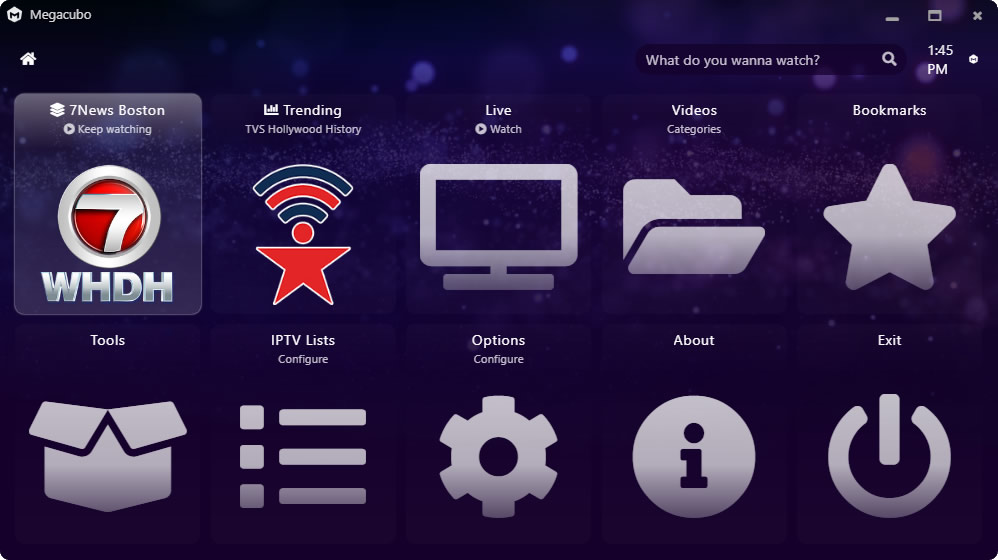
Screenshots

Download
Recommended Download
The latest official builds, installers and platform-specific packages are available on the official website:
➡️ https://megacubo.tv
The website provides:
- Windows installer
- Linux packages
- macOS builds
- Android version
- latest stable releases
- setup instructions
GitHub Releases
Portable and release assets are also available in the GitHub Releases section:
➡️ https://github.com/EdenwareApps/Megacubo/releases
Quick Start
If you're new to Megacubo:
- Install the app for your platform
- Open Megacubo
- Add your M3U playlist or community source
- Start watching live streams and channels
Installation
Windows
Download from:
Linux
Megacubo supports Linux desktop environments and distributions through:
Linux users can also build directly from source.
macOS
macOS builds are available from the official website and releases section.
Android
Android version available on the official website.
Development
Getting Started
# clone repository
git clone https://github.com/EdenwareApps/Megacubo.git

# enter folder
cd Megacubo

# install dependencies
npm install

# prepare project
npm run prepare

# run development build
npm run debug
Build Installers
# Linux
npm run build:electron:linux

# Windows
npm run build:electron:win

# macOS
npm run build:electron:mac
See:
- DEVELOPING.md
- BUILDING.md
for detailed instructions.
Documentation
Getting Started
User Guide
Advanced
Help
Development
Legal
Community Mode
Megacubo includes a community mode where users may discover and share publicly available streams and playlists.
Users remain responsible for:
- the playlists they add
- the streams they access
- compliance with local laws and broadcaster rights
Megacubo does not host media content itself.
Available Languages
Want to help translating Megacubo?
➡️ https://github.com/EdenwareApps/megacubo/tree/master/www/nodejs-project/lang
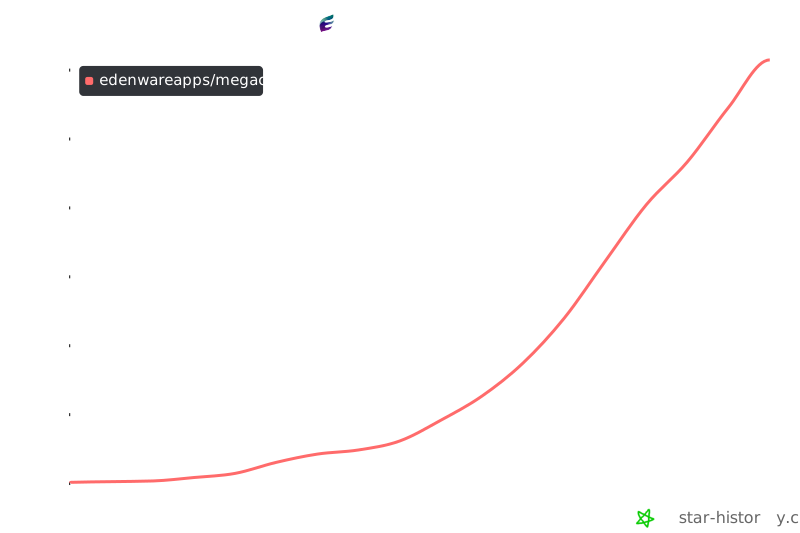
Star History
Contributing
Big thanks to everyone who contributed to Megacubo.
Please feel free to:
- open issues
- submit pull requests
- improve translations
- improve documentation
- contribute channel metadata
- report bugs
- suggest features
Support
GitHub Issues
https://github.com/EdenwareApps/Megacubo/issues
Official Website
https://megacubo.tv
Email
contact@megacubo.tv
Disclaimer
Megacubo is a media player application.
The project does not provide, host or own TV channels or copyrighted streams. Users are responsible for the playlists, streams and content sources they access through the software.


