mdserver-web is a free, open source databases project written in Python and released under Apache-2.0. It has 4,523 GitHub stars, 710 forks and 7 open issues, and was last pushed 7 hours ago. On this registry it ranks #155 of 206 tracked projects in Databases, with 5 head-to-head comparisons available. It gained 5 stars over the last 30 tracked days.

What is mdserver-web?

mdserver-web is a simple, Apache-2.0-licensed Linux server control panel written in Python that gives administrators a browser-based way to manage websites, databases and the software stack behind them.

What it is

mdserver-web is a Linux server administration panel distributed under the Apache-2.0 licence and written in Python. It presents server management as a set of web pages rather than a sequence of shell commands, and it organises functionality through a plugin system rather than a fixed feature set. The README recommends Debian as the operating system of choice, while the compatibility badges also list EulerOS, Ubuntu, Fedora and CentOS. In this registry the project sits under Infrastructure and Operations, in the databases group.

The problem it solves is the gap between hand-editing configuration files and a full hosting control panel. The author writes that on seeing BT.CN, a widely used web management panel, he recognised page-based management as what he wanted, copied the backend management interface and reimplemented it. mdserver-web does not replace the underlying services; it supplies the management layer over them, installing and controlling a typical hosting stack — OpenResty, one or more PHP versions, and a choice of relational or key-value databases — from one browser interface. It replaces manual, command-line administration of that stack and reimplements the BT.CN administration interface.

Key capabilities

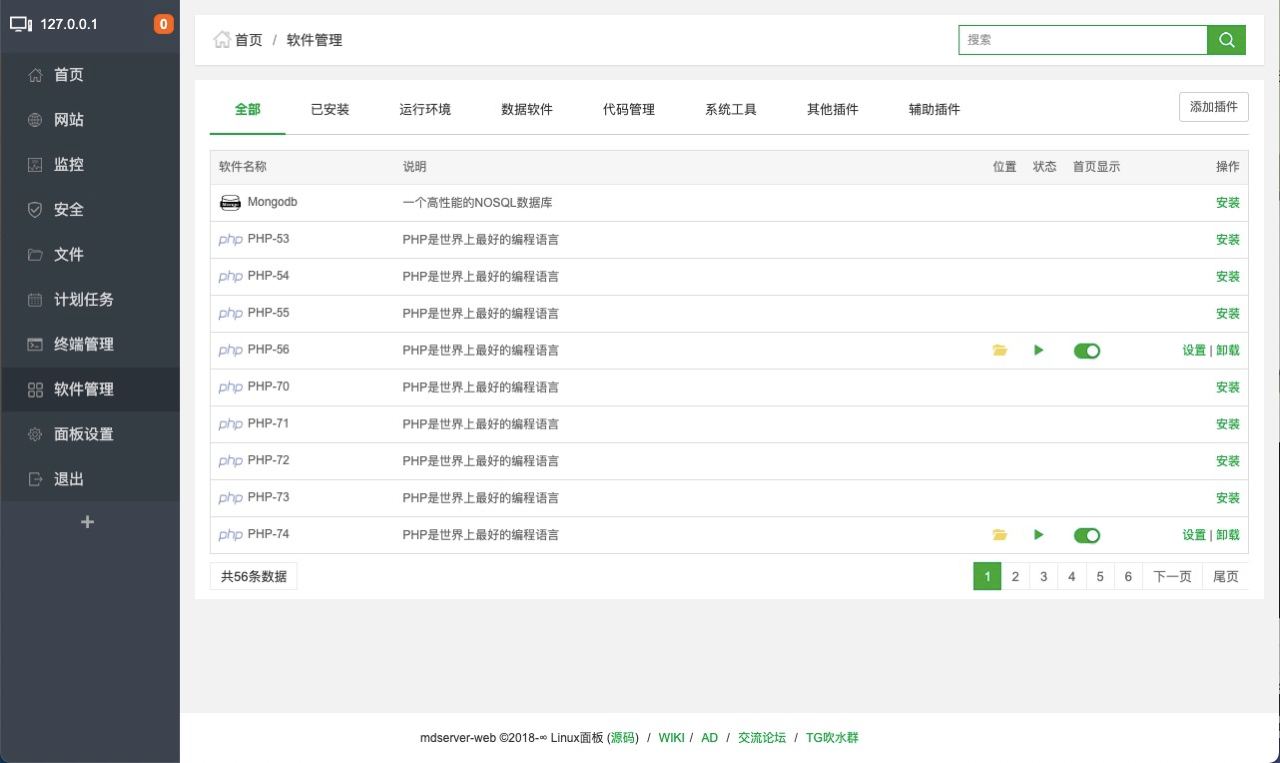
  • Plugin-based management covering OpenResty, PHP versions listed as PHP[53-85], MySQL, MariaDB, MySQL[community], MongoDB, PostgreSQL, phpMyAdmin, Memcached, Redis, PureFtpd, Gogs and Rsyncd.
  • Built-in SSH terminal tool.
  • Website backup function.
  • Panel favourites for bookmarking frequently used pages.
  • Plugin development surface: published plugins and examples live under the mw-plugin organisation, including simple-plugin as the example and op_auth as an OP authentication plugin, with development documentation on the project wiki.
  • Command-line entry points documented as mw default and mw dev, with a compatibility test report in compatibility.md and common command notes in cmd.md.
  • Documented version pairings: phpMyAdmin 4.4.15 with MySQL 5.5-5.7 and PHP 53-72; phpMyAdmin 5.2.1 with MySQL 8.0+ and PHP 72-84.

Who uses it and how

  • Single-server administrators running one Linux host, Debian recommended, who want page-based control of the web server, PHP runtimes and databases.
  • Operators who need several PHP versions side by side, since the PHP plugin spans PHP[53-85] and the phpMyAdmin notes split support across PHP 53-72 and PHP 72-84.
  • Docker users running the community-maintained image ddsderek/mw-server:latest, which starts privileged and publishes ports 7200, 80, 443 and 888.
  • Plugin authors and integrators, who publish through the mw-plugin organisation and raise issues to share or request work.
  • Community members who seek support through the Telegram group and the bbs.midoks.icu forum.

Getting started

Install runs through the shell installer served by jsDelivr: bash <(curl --insecure -fsSL https://cdn.jsdelivr.net/gh/midoks/mdserver-web@latest/scripts/install.sh), with update.sh and uninstall.sh alongside it and mirror addresses on raw.githubusercontent.com and code.midoks.icu. A Docker alternative is published as ddsderek/mw-server:latest from the DDS-Derek repository.

How it compares

BT.CN is the reference point named in the README: mdserver-web reimplements that panel's backend management interface rather than interoperating with it, and it ships as an independent Apache-2.0 project in Python. The README's declaration states that the project does not sell anything, does not monitor beyond usage statistics and does not inject viruses; beyond BT.CN, the facts name no other comparable panel, and this registry lists no paid products that mdserver-web is documented as replacing.

When to use it — and when not to

The panel needs privileged access to the host to install and manage services, and the Docker route makes this explicit by running with the privileged flag. Plugin documentation is described as incomplete and the README is written in Chinese, so operators who need mature English documentation or formal commercial support, or who will not give a management interface root-level control of a server, should look elsewhere. The most recent release noted, 0.18.6, is described only as routine optimisation, which makes this a panel to adopt when the page-based model fits the workflow rather than for a fast feature cadence.

project readme (upstream, from github) — read inline

logo

mdserver-web

一款简单Linux面板服务

强烈推荐系统:debian

简介

简单的Linux面板,感谢BT.CN写出如此好的web管理软件。我一看到,就知道这是我一直想要的页面化管理方式。 复制了后台管理界面,按照自己想要的方式写了一版。

EulerOS Debian Ubuntu Fedora CentOS

Wiki jsdelivr

  • SSH终端工具
  • 面板收藏功能
  • 网站备份功能
  • 插件方式管理

基本上可以使用,后续会继续优化!欢迎提供意见!

如果出现问题,最好私给我面板信息。不要让我猜。如果不提供,不要提出问题,自行解决。  — 座右铭
Talk is cheap, show me the code.  -- linus

特别赞助

主要插件介绍

  • OpenResty - 轻量级,占有内存少,并发能力强。
  • PHP[53-85] - PHP是世界上最好的编程语言。
  • MySQL - 一种关系数据库管理系统。
  • MariaDB - 是MySQL的一个重要分支。
  • MySQL[community] - 一种关系数据库管理系统。
  • MongoDB - 一种非关系NOSQL数据库管理系统。
  • PostgreSQL - 功能强大的开源数据库。
  • phpMyAdmin - 著名Web端MySQL管理工具。
  • Memcached - 一个高性能的分布式内存对象缓存系统。
  • Redis - 一个高性能的KV数据库。
  • PureFtpd - 一款专注于程序健壮和软件安全的免费FTP服务器软件。
  • Gogs - 一款极易搭建的自助Git服务。
  • Rsyncd - 通用同步服务。

插件开发相关

插件文档还不完善,如果有不明白的地方提Issue! 我会尽力完善。
如果你自己写了插件,想分享出来,也可以提Issue。

其他插件

Note

phpMyAdmin[4.4.15]支持MySQL[5.5-5.7]
phpMyAdmin[5.2.1]支持MySQL[8.0+]

PHP[53-72]支持phpMyAdmin[4.4.15]
PHP[72-84]支持phpMyAdmin[5.2.1]

郑重声明

不卖、不会监控(统计使用除外)、更不会注入病毒,大家使用方便(望大家不吝捐赠)。

AD - VPS推荐 - 🙏

服务商 LOGO 推广地址 优惠码
digitalvirt digitalvirt https://digitalvirt.com/aff.php?aff=154 mdserver-web

Docker

docker run -itd --name mw-server --privileged=true -p 7200:7200 -p 80:80 -p 443:443 -p 888:888 ddsderek/mw-server:latest

版本更新 0.18.6

  • 常规优化。

JSDelivr安装地址

  • 初始安装
bash <(curl --insecure -fsSL https://cdn.jsdelivr.net/gh/midoks/mdserver-web@latest/scripts/install.sh)
  • 直接更新
bash <(curl --insecure -fsSL https://cdn.jsdelivr.net/gh/midoks/mdserver-web@latest/scripts/update.sh)
  • 卸载脚本
wget --no-check-certificate -O uninstall.sh https://cdn.jsdelivr.net/gh/midoks/mdserver-web@latest/scripts/uninstall.sh && bash uninstall.sh

备用地址

  • 初始安装

bash <(curl --insecure -fsSL https://raw.githubusercontent.com/midoks/mdserver-web/dev/scripts/install.sh)
bash <(curl --insecure -fsSL https://code.midoks.icu/midoks/mdserver-web/raw/branch/master/scripts/install.sh)
  • 直接更新
bash <(curl --insecure -fsSL https://raw.githubusercontent.com/midoks/mdserver-web/master/scripts/update.sh)
  • 卸载脚本
wget --no-check-certificate -O uninstall.sh https://raw.githubusercontent.com/midoks/mdserver-web/master/scripts/uninstall.sh && bash uninstall.sh

通用软件安装[命令行安装]

  • 需已经安装mdserver-web
bash <(curl --insecure -fsSL https://raw.githubusercontent.com/midoks/mdserver-web/dev/scripts/quick/app.sh)

DEV使用

bash <(curl --insecure -fsSL https://raw.githubusercontent.com/midoks/mdserver-web/dev/scripts/install.sh)
bash <(curl --insecure -fsSL https://raw.githubusercontent.com/midoks/mdserver-web/dev/scripts/update.sh)

bash <(curl --insecure -fsSL https://raw.githubusercontent.com/midoks/mdserver-web/dev/scripts/install_dev.sh)
bash <(curl --insecure -fsSL https://raw.githubusercontent.com/midoks/mdserver-web/dev/scripts/update_dev.sh)

wget --no-check-certificate -O install.sh https://raw.githubusercontent.com/midoks/mdserver-web/dev/scripts/install.sh && bash install.sh

wget --no-check-certificate -O uninstall.sh https://raw.githubusercontent.com/midoks/mdserver-web/dev/scripts/uninstall.sh && bash uninstall.sh

bash <(curl --insecure -fsSL https://raw.githubusercontent.com/midoks/mdserver-web/dev/scripts/quick/debug.sh)

bash <(curl --insecure -fsSL https://code.midoks.icu/midoks/mdserver-web/raw/branch/dev/scripts/install.sh)
bash <(curl --insecure -fsSL https://code.midoks.icu/midoks/mdserver-web/raw/branch/dev/scripts/update.sh)

bash <(curl --insecure -fsSL https://code.midoks.icu/midoks/mdserver-web/raw/branch/dev/scripts/install_dev.sh)
bash <(curl --insecure -fsSL https://code.midoks.icu/midoks/mdserver-web/raw/branch/dev/scripts/update_dev.sh)

旧版安装/更新

curl --insecure -fsSL  https://raw.githubusercontent.com/midoks/mdserver-web/dev/scripts/old/install.sh | bash
curl --insecure -fsSL  https://raw.githubusercontent.com/midoks/mdserver-web/dev/scripts/old/update.sh | bash

偶然问题

  • 在安装/更新时,突然出现python插件pip,psutil,可尝试如下解决方案
cd /www/server/mdserver-web rm -rf lib
cd /www/server/mdserver-web && rm -rf lib64
cd /www/server/mdserver-web && rm -rf bin
cd /www/server/mdserver-web && rm -rf include

mw update/mw update_dev/mw dev

捐赠地址 USDT(TRC20)

TVbNgrpeGBGZVm5gTLa21ADP7RpnPFhjya

日行一善,以后必定大富大贵

支付宝赞助

截图

无图不真相

截图

Stargazers over time

Stargazers over time

感谢开发赞助

digitalvirt

授权许可

本项目采用 Apache 开源授权许可证,完整的授权说明已放置在 LICENSE 文件中。

Frequently asked questions

Is mdserver-web free to use?

mdserver-web is open source under the Apache-2.0 licence. There is no licence fee and no seat count — you can self-host it or, where the project offers one, pay a vendor for a managed version instead.

What does mdserver-web do?

Simple Linux Panel

What is mdserver-web written in?

mdserver-web is primarily written in Python. Its source is publicly available at https://github.com/midoks/mdserver-web, and it has 4,523 GitHub stars.