MCP Gateway
MCP Gateway is a reverse proxy and management layer for Model Context Protocol (MCP) servers, enabling scalable, session-aware routing, authorization and lifecycle management of MCP servers in Kubernetes environments.
Table of Contents
- Overview
- Key Concepts
- Architecture
- Features
- Getting Started – Local Deployment
- Getting Started – 1-Click Deploy to Azure
Overview
This project provides:
- A data gateway for routing traffic to MCP servers with session affinity.
- A control plane for managing the MCP server lifecycle (deploy, update, delete).
- Enterprise-ready integration points including telemetry, access control and observability.
Key Concepts
- MCP Server: A server implementing the Model Context Protocol, which typically a streamable HTTP endpoint.
- Adapters: Logical resources representing MCP servers in the gateway, managed under the
/adaptersscope. Designed to coexist with other resource types (e.g.,/agents) in a unified AI development platform. - Tools: Registered resources with MCP tool definitions that can be dynamically routed via the tool gateway router. Each tool includes metadata about its execution endpoint and input schema.
- Tool Gateway Router: An MCP server that acts as an intelligent router, directing tool execution requests to the appropriate registered tool servers based on tool definitions. Multiple router instances may run behind the gateway for session affinity.
- Session-Aware Stateful Routing: Ensures that all requests with a given
session_idare consistently routed to the same MCP server instance. - Agents & Sessions (Preview): Optional, opt-in resources for running LLM-driven agents on top of registered MCP tools. Agents are metadata (system prompt + model + allowed tool list); Sessions are individual runs that stream events over Server-Sent Events. Disabled unless
FoundrySettings:Endpointis configured.
Architecture
flowchart LR
    subgraph Clients[" "]
        direction TB
        DataClient["🔌 Agent/MCP<br>Data Client"]
        MgmtClient["⚙️ Management<br>Client"]
    end

    subgraph Gateway["MCP Gateway"]
        direction TB

        subgraph Auth1["Authentication & Authorization"]
            Auth["🔐 Data Plane Auth<br>Bearer Token / RBAC"]
            Auth2["🔐 Control Plane Auth<br>Bearer Token / RBAC"]
        end

        subgraph DataPlane["Data Plane"]
            Routing["🔀 Adapter Routing<br>/adapters/{name}/mcp"]
            ToolRouting["🔀 Tool Router Gateway<br>/mcp"]
        end

        subgraph ControlPlane["Control Plane"]
            direction LR
            AdapterMgmt["📦 Adapter Management<br>/adapters CRUD"]
            ToolMgmt["🔧 Tool Management<br>/tools CRUD"]
        end

        subgraph Management["Backend Services"]
            DeploymentMgmt["☸️ Deployment Manager"]
            MetadataMgmt["📋 Metadata Manager"]
        end
    end

    subgraph Cluster["Kubernetes Cluster"]
        direction TB

        subgraph ServerRow[" "]
            direction LR

            subgraph MCPServers["MCP Servers"]
                direction TB
                PodA["mcp-a-0"]
                PodA1["mcp-a-1"]
                PodB["mcp-b-0"]
            end

            subgraph ToolRouters["Tool Gateway Routers"]
                direction TB
                Router1["toolgateway-0"]
                Router2["toolgateway-1"]
            end
        end

        subgraph ToolServers["Registered Tool Servers"]
            direction LR
            Tool1["tool-1-0"]
            Tool2["tool-2-0"]
        end
    end

    Metadata[("💾 Metadata Store<br>Server & Tool Info")]

    DataClient -->|"MCP Requests"| Auth
    MgmtClient -->|"API Calls"| Auth2

    Auth --> Routing
    Auth --> ToolRouting
    Auth2 --> AdapterMgmt
    Auth2 --> ToolMgmt

    AdapterMgmt & ToolMgmt --> DeploymentMgmt
    AdapterMgmt & ToolMgmt --> MetadataMgmt

    Routing -.->|"Session Affinity"| MCPServers
    ToolRouting -.->|"Session Affinity"| ToolRouters
    ToolRouters ==>|"Dynamic Routing"| ToolServers

    DeploymentMgmt -->|"Deploy & Monitor"| Cluster
    MetadataMgmt <-->|"Read/Write"| Metadata

    style Gateway fill:#e1f5ff
    style Cluster fill:#fff4e1
    style Metadata fill:#f0f0f0
Features
Control Plane – RESTful APIs for MCP Server Management
MCP Server Management (Adapters)
POST /adapters— Deploy and register a new MCP server.GET /adapters— List all MCP servers the user can access.GET /adapters/{name}— Retrieve metadata for a specific adapter.GET /adapters/{name}/status— Check the deployment status.GET /adapters/{name}/logs— Access the server's running logs.PUT /adapters/{name}— Update the deployment.DELETE /adapters/{name}— Remove the server.
Tool Registration and Management
POST /tools— Register and deploy a tool with MCP tool definition metadata.GET /tools— List all registered tools the user can access.GET /tools/{name}— Retrieve metadata and tool definition for a specific tool.GET /tools/{name}/status— Check the tool deployment status.GET /tools/{name}/logs— Access the tool server's running logs.PUT /tools/{name}— Update a tool deployment and definition.DELETE /tools/{name}— Remove a registered tool.
Agent and Session Management (Preview, opt-in)
Available only when FoundrySettings:Endpoint is configured. See Agents and Sessions below for details.
POST /agents,GET /agents,GET|PUT|DELETE /agents/{name}— CRUD for agent definitions.POST /sessions,GET /sessions,GET|DELETE /sessions/{id}— CRUD for sessions.POST /sessions/run— Start a session and stream events (SSE).POST /sessions/{id}/messages— Continue an existing session with a new user message; streams events (SSE).
Data Plane – Gateway Routing for MCP Servers
Direct MCP Server Access
POST /adapters/{name}/mcp— Establish a streamable HTTP connection.
Dynamic Tool Routing via Tool Gateway Router
POST /mcp— Route requests to the tool gateway router, which dynamically routes to registered tools based on tool definitions. The router itself is an MCP server with multiple instances hosted behind the gateway for scalability.
Authentication & Authorization Support
The gateway provides entra id authentication and basic application role authorization for mcp servers and tools:
- Read access is granted to the resource creator, principals assigned the configured
requiredRolesvalues (for examplemcp.engineer), and anyone holding the mandatory administrator rolemcp.admin. WhenrequiredRolesis empty or omitted, only the creator andmcp.adminprincipals can read the resource. - Write access is restricted to the resource creator or principals holding the
mcp.adminrole.
For step-by-step guidance on configuring Azure Entra ID (creating mcp.admin and other role values, assigning them to users or service principals, and supplying those values in adapter/tool payloads), see docs/entra-app-roles.md.
Additional Capabilities
- Support for Proxying Local & Remote MCP Servers. See examples and usage.
- Stateless reverse proxy with a distributed session store (production mode).
- Kubernetes-native deployment using StatefulSets and headless services.
- Management portal (React SPA) served by the gateway itself at
/portal/— list / create / edit / delete adapters and tools, inspect status and pod logs, and exercise each MCP server with an in-browser JSON-RPC test console. Authentication mirrors the API: anonymous in dev mode (with an optional dev-identity switcher) and MSAL / Entra ID in cloud mode, so every list call already filters down to the resources the signed-in user is allowed to see.
Tool Registration and Dynamic Routing
The MCP Gateway now supports tool registration with dynamic routing capabilities, enabling a scalable architecture for managing and executing MCP tools.
How It Works
Tool Registration: Developers register tools via the
/toolsAPI endpoint, providing:- Container image details (name and version)
- MCP tool definition (name, description, input schema)
- Execution endpoint configuration (port and path)
- Deployment configuration (replicas, environment variables)
Tool Gateway Router: A specialized MCP server that acts as an intelligent router:
- Runs as multiple instances behind the gateway for high availability
- Maintains awareness of all registered tools and their definitions
- Dynamically routes tool execution requests to the appropriate tool server
- Accessed via
POST /mcpendpoint (without adapter name)
Dynamic Routing: When clients send MCP requests to
/mcp:- The gateway routes requests to available tool gateway router instances with session affinity
- The router analyzes the tool call in the request
- Based on the tool definition, it forwards the execution to the correct registered tool server
- Results are returned through the router back to the client
Agents and Sessions (Preview)
Preview / single-replica. This subsystem is opt-in and intended for evaluation and single-pod deployments. Built-in tools execute in-process inside the gateway pod, and per-session state (working directory, disk-quota counters) is local to that pod. Do not enable this in a multi-replica or multi-tenant production deployment without adding an out-of-process sandbox and shared session storage.
The gateway can optionally run LLM-driven agents that call registered MCP tools and a small set of built-in tools (builtin:bash, builtin:read_file, builtin:write_file). The agent CRUD endpoints (/agents, /sessions GET/DELETE/LIST) are always available, but streaming session execution (POST /sessions/run, POST /sessions/{id}/messages) is only enabled when FoundrySettings:Endpoint is configured. Without it, a streaming request fails fast with an error SSE event saying that Foundry must be configured.
Enabling
Add a FoundrySettings section to appsettings.json (or supply via environment variables):
{
  "FoundrySettings": {
    "Endpoint": "https://<your-resource>.cognitiveservices.azure.com/",
    "DeploymentName": "gpt-4o"
  }
}
Authentication uses DefaultAzureCredential; grant the gateway's identity (managed identity in AKS, or your local user via az login) the Cognitive Services User role on the target resource. Tool-emitting models are required for any agent with a non-empty tools array — gpt-4o-class deployments are recommended.
Defining an agent
POST /agents
Authorization: Bearer <token>
Content-Type: application/json
{
  "name": "weather-helper",
  "model": "gpt-4o",
  "system": "You answer weather questions concisely.",
  "tools": ["mcp:weather"],
  "description": "Demo agent backed by the weather MCP tool."
}
tools entries are namespaced by prefix:
mcp:— routes to a tool registered via/tools.agent:— delegates to another agent (subagent / Task pattern).builtin:bash,builtin:read_file,builtin:write_file— in-process built-ins (see Built-in tools and limits below).
Referenced mcp: and agent: resources are validated at agent create/update time: the call fails if the resource does not exist or the caller lacks read access, so an agent can never reference tools or peer agents the creator could not invoke directly.
Running a session
POST /sessions/run
Authorization: Bearer <token>
Content-Type: application/json
Accept: text/event-stream
{ "agentName": "weather-helper", "input": "What's the weather in Seattle?" }
The response is a Server-Sent Events stream; each event is event: \ndata: \n\n. Event types include Started, ToolCallStarted, ToolCallCompleted, TokenDelta, Completed, and Failed.
To continue an existing session with a follow-up message:
POST /sessions/{id}/messages
Content-Type: application/json

{ "input": "And in Portland?" }
Built-in tools and limits
When an agent lists builtin:bash / builtin:read_file / builtin:write_file in its tools, those built-ins run in the gateway pod under a per-session working directory. They are guarded by:
- A scrubbed, default-deny process environment for
builtin:bash: the spawned shell receives only a minimal allowlist (PATH, locale,TERM,TZ) withHOME/TMPDIR/PWDpinned to the session directory. The full gateway process environment is not inherited. - A regex denylist for clearly dangerous shell operations (
sudo, network egress, mounts, package managers, etc.). This is defense-in-depth, not a sandbox. - 30s default / 120s max bash timeout; 16 KiB output cap per stream; 256 KiB max file size; 4 MiB total writes per session.
- Path resolution rejects absolute paths and
..traversal.
For multi-tenant or production use, replace these with a real per-session sandbox (e.g. ephemeral pod, gVisor, firejail) — see the inline comments in BuiltinToolExecutor.cs.
Getting Started - Local Deployment
1. Prepare Local Development Environment
2. Run Local Docker Registry
docker run -d -p 5000:5000 --name registry registry:2.7
3. Build & Publish MCP Server Images
Build and push the MCP server images to your local registry (localhost:5000).
docker build -f sample-servers/mcp-example/Dockerfile sample-servers/mcp-example -t localhost:5000/mcp-example:1.0.0
docker push localhost:5000/mcp-example:1.0.0
4. Build & Publish MCP Gateway and Tool Gateway Router
(Optional) Open dotnet/Microsoft.McpGateway.sln with Visual Studio.
Publish the MCP Gateway image:
dotnet publish dotnet/Microsoft.McpGateway.Service/src/Microsoft.McpGateway.Service.csproj -c Release /p:PublishProfile=localhost_5000.pubxml
Publish the Tool Gateway Router image:
dotnet publish dotnet/Microsoft.McpGateway.Tools/src/Microsoft.McpGateway.Tools.csproj -c Release /p:PublishProfile=localhost_5000.pubxml
5. Deploy MCP Gateway to Kubernetes Cluster
Apply the deployment manifests:
kubectl apply -f deployment/k8s/local-deployment.yml
6. Enable Port Forwarding
Forward the gateway service port:
kubectl port-forward -n adapter svc/mcpgateway-service 8000:8000
7. Test the API - MCP Server Management
Import the OpenAPI definition from
openapi/mcp-gateway.openapi.jsoninto tools like Postman, Bruno, or Swagger Editor.Send a request to create a new adapter resource:
POST http://localhost:8000/adapters
Content-Type: application/json
{ "name": "mcp-example", "imageName": "mcp-example", "imageVersion": "1.0.0", "description": "test" }
8. Test the API - MCP Server Access
After deploying the MCP server, use a client like VS Code to test the connection. Refer to the guide: Use MCP servers in VS Code.
Note: Ensure VSCode is up to date to access the latest MCP features.
- To connect to the deployed
mcp-exampleserver, use:http://localhost:8000/adapters/mcp-example/mcp(Streamable HTTP)
Sample
.vscode/mcp.jsonthat connects to themcp-exampleserver{ "servers": { "mcp-example": { "url": "http://localhost:8000/adapters/mcp-example/mcp", } } }- To connect to the deployed
For other servers:
http://localhost:8000/adapters/{name}/mcp(Streamable HTTP)
9. Test Tool Registration and Dynamic Routing
Build & Publish a Tool Server Image
First, build and push a tool server image to your local registry:
docker build -f sample-servers/tool-example/Dockerfile sample-servers/tool-example -t localhost:5000/weather-tool:1.0.0
docker push localhost:5000/weather-tool:1.0.0
Register a Tool
Send a request to register a tool with its definition:
POST http://localhost:8000/tools
Content-Type: application/json
{
  "name": "weather",
  "imageName": "weather-tool",
  "imageVersion": "1.0.0",
  "description": "Weather tool for getting current weather information",
  "toolDefinition": {
    "tool": {
      "name": "weather",
      "title": "Weather Information",
      "description": "Gets the current weather for a specified location.",
      "type": "http",
      "inputSchema": {
        "type": "object",
        "properties": {
          "location": {
            "type": "string",
            "description": "The city and state, e.g. San Francisco, CA"
          }
        },
        "required": ["location"]
      }
    },
    "port": 8000
  }
}
Verify Tool Deployment
Check the tool deployment status:
GET http://localhost:8000/tools/weather/status
Test Tool Routing via Tool Gateway Router
Use an MCP client (like VS Code) to connect to the tool gateway router:
Sample .vscode/mcp.json that connects to the tool gateway router:
{
  "servers": {
    "tool-gateway": {
      "url": "http://localhost:8000/mcp"
    }
  }
}
The router will automatically route tool calls to the appropriate registered tool servers based on the tool name in the MCP request.
10. Clean the Environment
To remove all deployed resources, delete the Kubernetes namespace:
kubectl delete namespace adapter
Getting Started - Deploy to Azure
Cloud Infrastructure
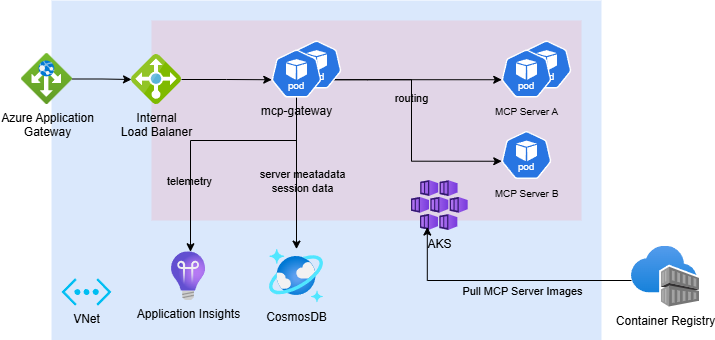
1. Prepare Cloud Development Environment
- An active Azure subscription with Owner access
- Install Azure CLI
2. Setup Entra ID (Azure Active Directory)
The cloud-deployed service requires bearer token authentication using Azure Entra ID. Follow these steps to configure an app registration.
Create and Configure the App Registration
Go to App Registrations
Click + New registration
- Name: Choose a meaningful name, e.g.,
mcp-gateway - Supported account types: Select Single tenant
- Click Register
- Name: Choose a meaningful name, e.g.,
Go to the app registration Overview and copy:
- Application (client) ID — this is your API Client ID for deployment
Expose an API (Define a Scope)
In the left menu, go to Expose an API
Click Add next to Application ID URI, and leave it as the default value:
api://Click + Add a scope
- Scope name:
access - Admin consent display name:
Access MCP Gateway - Admin consent Description: Any brief description
- Click Add scope
- Scope name:
Authorize Azure CLI & VS Code as a Client Application
To allow Azure CLI & VS Code to work as the client for token acquisition.
- Still in Expose an API, scroll down to Authorized client applications
- Click + Add a client application
- Client ID:
04b07795-8ddb-461a-bbee-02f9e1bf7b46(Azure CLI) - Client ID:
aebc6443-996d-45c2-90f0-388ff96faa56(VS Code) - In Authorized scopes, select the scope
access - Click Add
- Client ID:
Configure Application Role for Authorization
3. Deploy Service Resources
Parameters
| Name | Description |
|---|---|
resourceGroup |
The name of the resource group. Must contain only lowercase letters and numbers (alphanumeric). |
clientId |
The Entra ID (Azure AD) client ID from your app registration. |
location |
(Optional) The Azure region where resources will be deployed. Defaults to the resource group's location. |
resourceLabel |
(Optional) A lowercase alphanumeric string used as a suffix for naming resources and as the DNS label. If not provided, it will be the resourceGroup name. Recommendation: Set this value as the default the same with resource group name and make sure resource group name contains only lower alphanumeric. |
The deployment will:
Deploy Azure infrastructure via Bicep templates
Resource Name Resource Type mgreg\ Container Registry mg-storage-\ Azure Cosmos DB Account mg-aag-\ Application Gateway mg-ai-\ Application Insights mg-aks-\ Kubernetes Service (AKS) mg-identity-\ Managed Identity mg-pip-\ Public IP Address mg-vnet-\ Virtual Network Deploy Kubernetes resources (including
mcp-gateway) to the provisioned AKS cluster
Note: It's recommended to use Managed Identity for credential-less authentication. This deployment follows that design.
4. Build & Publish MCP Server Images
The gateway service pulls the MCP server image from the newly provisioned Azure Container Registry (ACR) during deployment.
Build the MCP server image in ACR:
az acr build -r "mgreg$resourceLabel" -f sample-servers/mcp-example/Dockerfile sample-servers/mcp-example -t "mgreg$resourceLabel.azurecr.io/mcp-example:1.0.0"
5. Test the API - MCP Server Management
Import the OpenAPI spec from
openapi/mcp-gateway.openapi.jsoninto Postman, Bruno, or Swagger EditorAcquire a bearer token locally:
az account get-access-token --resource $clientIdSend a POST request to create an adapter resource:
POST http://..cloudapp.azure.com/adapters
Authorization: Bearer
Content-Type: application/json
{ "name": "mcp-example", "imageName": "mcp-example", "imageVersion": "1.0.0", "description": "test", "requiredRoles": [] // Only creator and mcp.admin can access. Add roles (e.g. ["mcp.engineer"]) to grant read access to other principals. }
6. Test the API - MCP Server Access
After deploying the MCP server, use a client like VS Code to test the connection. Refer to the guide: Use MCP servers in VS Code.
Note: Ensure VSCode is up to date to access the latest MCP features.
- To connect to the deployed
mcp-exampleserver, use:http://..cloudapp.azure.com/adapters/mcp-example/mcp(Streamable HTTP)
Sample
.vscode/mcp.jsonthat connects to themcp-exampleserver{ "servers": { "mcp-example": { "url": "http://..cloudapp.azure.com/adapters/mcp-example/mcp", } } }Note: Authentication is still required to access the MCP server, VS Code will help handle the authentication process.
- To connect to the deployed
For other servers:
http://..cloudapp.azure.com/adapters/{name}/mcp(Streamable HTTP)
7. Test Tool Registration and Dynamic Routing
Build & Publish a Tool Server Image
Build and push a tool server image to ACR:
az acr build -r "mgreg$resourceLabel" -f sample-servers/tool-example/Dockerfile sample-servers/tool-example -t "mgreg$resourceLabel.azurecr.io/weather-tool:1.0.0"
Register a Tool
Acquire a bearer token:
az account get-access-token --resource $clientId
Send a request to register a tool with its definition:
POST http://<resourceLabel>.<location>.cloudapp.azure.com/tools
Authorization: Bearer <token>
Content-Type: application/json
{
  "name": "weather",
  "imageName": "weather-tool",
  "imageVersion": "1.0.0",
  "useWorkloadIdentity": true,
  "description": "Weather tool for getting current weather information",
  "requiredRoles": [], // Only creator and mcp.admin can access. Add roles (e.g. ["mcp.engineer"]) to grant read access to other principals.
  "toolDefinition": {
    "tool": {
      "name": "weather",
      "title": "Weather Information",
      "description": "Gets the current weather for a specified location.",
      "type": "http",
      "inputSchema": {
        "type": "object",
        "properties": {
          "location": {
            "type": "string",
            "description": "The city and state, e.g. San Francisco, CA"
          }
        },
        "required": ["location"]
      },
      "annotations": {
        "readOnly": true
      }
    },
    "port": 8000
  }
}
Verify Tool Deployment
Check the tool deployment status:
GET http://<resourceLabel>.<location>.cloudapp.azure.com/tools/weather/status
Authorization: Bearer <token>
Test Tool Routing via Tool Gateway Router
Use an MCP client (like VS Code) to connect to the tool gateway router:
Sample .vscode/mcp.json that connects to the tool gateway router:
{
  "servers": {
    "tool-gateway": {
      "url": "http://<resourceLabel>.<location>.cloudapp.azure.com/mcp"
    }
  }
}
Note: Authentication is required. VS Code will handle the authentication process.
The router will automatically route tool calls to the appropriate registered tool servers based on the tool name in the MCP request.
8. Clean the Environment
To remove all deployed resources, delete the resource group from Azure portal or run:
az group delete --name <resourceGroupName> --yes
9. Production Onboarding
TLS Configuration
Set up HTTPS on Azure Application Gateway (AAG) listener using valid TLS certificates.Network Security
Restrict incoming traffic within the virtual network and configure Private Endpoints for enhanced network security.Service-to-Service Authentication
The Tool Gateway requires a shared secret (GatewaySettings:Secret) to accept forwarded identity headers from the MCP Gateway. In production, generate a strong random value and supply it to both themcpgatewayandtoolgatewaypods via theGatewaySettings__Secretenvironment variable or a Kubernetes secret. Requests without a validX-Gateway-Secretheader are rejected with401 Unauthorized.Telemetry
Enable advanced telemetry, detailed metrics, and alerts to support monitoring and troubleshooting in production.Scaling
Adjust scaling formcp-gatewayservices and MCP servers based on expected load.Authentication & Authorization
Set up OAuth 2.0 with Azure Entra ID (AAD) for authentication. Implement fine-grained access control using RBAC or custom ACLs foradapterlevel permissions.
Contributing
This project welcomes contributions and suggestions. Most contributions require you to agree to a Contributor License Agreement (CLA) declaring that you have the right to, and actually do, grant us the rights to use your contribution. For details, visit https://cla.opensource.microsoft.com.
When you submit a pull request, a CLA bot will automatically determine whether you need to provide a CLA and decorate the PR appropriately (e.g., status check, comment). Simply follow the instructions provided by the bot. You will only need to do this once across all repos using our CLA.
This project has adopted the Microsoft Open Source Code of Conduct. For more information see the Code of Conduct FAQ or contact opencode@microsoft.com with any additional questions or comments.
Trademarks
This project may contain trademarks or logos for projects, products, or services. Authorized use of Microsoft trademarks or logos is subject to and must follow Microsoft's Trademark & Brand Guidelines. Use of Microsoft trademarks or logos in modified versions of this project must not cause confusion or imply Microsoft sponsorship. Any use of third-party trademarks or logos are subject to those third-party's policies.
Data Collection
The software may collect information about you and your use of the software and send it to Microsoft. Microsoft may use this information to provide services and improve our products and services. You may turn off the telemetry as described in the repository. There are also some features in the software that may enable you and Microsoft to collect data from users of your applications. If you use these features, you must comply with applicable law, including providing appropriate notices to users of your applications together with a copy of Microsoft’s privacy statement. Our privacy statement is located at https://go.microsoft.com/fwlink/?LinkID=824704. You can learn more about data collection and use in the help documentation and our privacy statement. Your use of the software operates as your consent to these practices.