Marksman is an MIT-licensed Markdown language server, written in F#, that brings code-assist features such as completion, go-to-definition, find references, rename refactoring and diagnostics into any editor that speaks the Language Server Protocol, and it is aimed at writers and note-takers who maintain Markdown documents and Zettelkasten-style wikilink notes.
What it is
Marksman is a program that integrates with an editor to assist in writing and maintaining Markdown documents. It implements the LSP protocol to provide completion, goto definition, find references, rename refactoring, diagnostics and more. In addition to regular Markdown, it supports wiki-link-style references that enable Zettelkasten-like note taking. It works on macOS, Linux and Windows and is distributed as a self-contained binary for each operating system, so it lives in the ecosystem of language servers and LSP client tooling rather than in the ecosystem of note applications.
The concrete problem it solves is keeping links and headings consistent across a body of Markdown files. Inline links such as "inline link", internal anchor links, reference links such as "See [reference]." with a "[reference]: /url "Title"" definition, and wiki-links such as "[[another-note]]" or "[[another-notes#heading]]" all need their targets to exist and their headings to be unambiguous. Marksman replaces the manual, per-editor bookkeeping of those targets with a single server that the editor already knows how to talk to, resolving navigation, renames and link checks over the whole document set.
Key capabilities
- Completion, hover, goto definition, find references, rename refactoring and diagnostics delivered over the LSP protocol.
- Markdown inline links and internal anchor links, including completion, hover and goto definition/references.
- Markdown reference links, including the "[reference]: /url "Title"" definition form.
- Wiki-links in the forms "[[another-note]]", "[[another-notes#heading]]" and the internal "[[#a-heading]]".
- Diagnostics for wiki-links that detect broken references and duplicate or ambiguous headings.
- Self-contained binaries per operating system for macOS, Linux and Windows.
- Distribution through Homebrew and Snapcraft, alongside GitHub release downloads.
Who uses it and how
- VSCode users install it through the Marksman VSCode extension.
- Neovim users install the server automatically with mason.nvim (requiring mason-lspconfig.nvim) or wire it up with nvim-lspconfig or CoC-marksman.
- Vim users rely on ale, which has built-in Marksman support, or on the lsp plugin, registering the server in "~/.vim/after/ftplugin/markdown.vim" with the "server" argument.
- Emacs users get automatic server installation through LSP Mode, or configure Eglot manually with "(add-to-list 'eglot-server-programs '(markdown-mode . ("marksman")))".
- Helix supports Marksman out of the box once the binary is on PATH; Kakoune works with kakoune-lsp, Sublime Text through LSP-marksman, Zed by listing "marksman" under the Markdown language servers in its settings.json, and BBEdit through a documented discussion configuration.
Getting started
Installation instructions live in the project's install documentation at /docs/install.md, and the project also ships through Homebrew and Snapcraft as well as self-contained binaries on its releases page. Running "marksman server" starts the language server for an editor to connect to.
How it compares
The facts provided name no competing or paid products, so no licence, self-hosting or cost-model contrast can be drawn against commercial alternatives. Among the tools named, the LSP clients such as mason.nvim, nvim-lspconfig, CoC-marksman, ale, lsp, LSP Mode, Eglot and kakoune-lsp are integrations rather than rivals, so Marksman stands alone in this registry as a Markdown language server.
When to use it — and when not to
Pick Marksman if you already edit Markdown in an LSP-capable editor and want link completion, navigation and diagnostics over a directory of notes, accepting that you must install and update a per-OS binary and perform per-editor configuration. That configuration is uneven: Helix needs the binary placed on PATH manually, Eglot needs explicit setup unless a pending pull request is merged, and BBEdit setup is documented only in a discussion comment. Anyone who does not use an LSP-capable editor, or who expects installer-provided setup rather than the separate install documentation page, should look elsewhere; the project also carries 134 open issues, worth checking against your editor's integration before committing a large note collection.
project readme (upstream, from github) — read inline





Marksman
Write Markdown with code assist and intelligence in the comfort of your favourite editor.
Marksman is a program that integrates with your editor to assist you in writing and maintaining your Markdown documents.
Using LSP protocol it provides completion, goto definition, find references, rename
refactoring, diagnostics, and more. In addition to regular Markdown, it also supports wiki-link-style references
that enable Zettelkasten-like[^roam-research], [^markdown-memo] note taking. See more about Marksman's
features below.
Marksman works on MacOS, Linux, and Windows and is distributed as a self-contained binary for each OS.
The server provides assistance with:
- Markdown inline links:
This is [inline link](/some-file.md#some-heading).
This is an internal [anchor link](#heading).
- Markdown reference links:
See [reference].

[reference]: /url "Title"
- Wiki-links:
Link to [[another-note]].
Link to [[another-notes#heading]].
Internal link to [[#a-heading]].
All types of links support completion, hover, goto definition/references. Additionally, Marksman provides diagnostics
for wiki-links to detect broken references and duplicate/ambiguous headings.
Existing editor integrations[^lsp]:
VSCode via Marksman VSCode.
Neovim:
Vim:
via ale - Ale has built-in support for Marksman
via lsp
Example config (add the following to your ~/.vim/after/ftplugin/markdown.vim):
if exists('g:loaded_lsp')
  call LspAddServer([#{ name: 'marksman', filetype: ['markdown'], path: '/path/to/marksman', args: ['server'], syncInit: v:true }])
end
Emacs:
via LSP Mode (automatic server installation).
Example config for use-package users:
(use-package markdown-mode
  :hook (markdown-mode . lsp)
  :config
  (require 'lsp-marksman))
via Eglot, requires configuration (unless
eglot#1013 gets merged); add the following to your
init.el
(add-to-list 'eglot-server-programs '(markdown-mode . ("marksman")))
(add-hook 'markdown-mode-hook #'eglot-ensure)
Helix supports Marksman out of the box. However, you need add marksman binary to
your PATH manually.
Kakoune can be used with kakoune-lsp with
no other configuration.
Sublime Text via LSP-marksman (automatic server
installation).
BBEdit can be configured to use Marksman as an LSP server for Markdown files.
Zed supports Marksman through it's integrated LSP support,
by addinging it as an available LSP for Markdown in Zed's settings.json:
// Zed settings
{
  // ...
  "languages": {
    "Markdown": {
      "language_servers": ["marksman"]
    }
  }
}
How to install
See the installation instructions.
Demos and tutorials
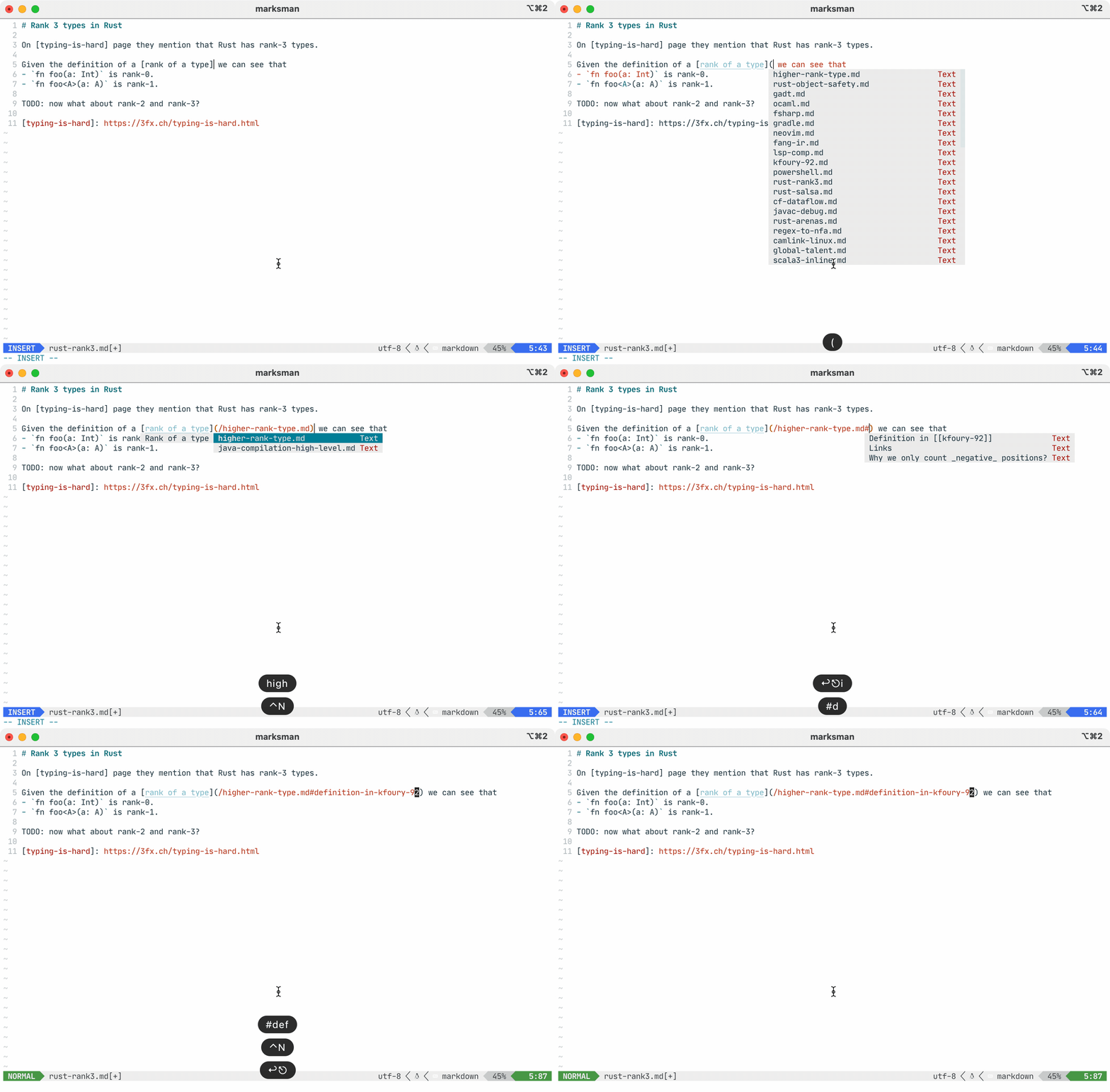
Features
See the Features page to learn more about language features, configurations, and single- and multi-file modes.
FAQ
- Cross-file references and completions don't work.
- Either create an empty
.marksman.toml in the root folder of your project or initialize a repository (e.g. git init). See this page to learn more about single- and mult-file modes.
- I'm getting "marksman can’t be opened because Apple cannot check it for malicious software" on MacOS.
- Run the following command to bypass it and let Mac know that it's fine:
xattr -d com.apple.quarantine .
[^roam-research]: You may have heard about Roam Research. That is a commercial implementation of the
Zettelkasten method and another point of reference for what Marksman is about. However, unlike a proprietary Roam
Research, Marksman is free, open-source and integrated into your favourite editor (albeit for not not as feature rich as
Roam Research).
[^markdown-memo]: There is an excellent VSCode extension called Markdown Memo. You definitely need
to check it out if you're primarily using VSCode as it has some features that are missing in Marksman and Marksman
VSCode extension. However, Markdown Memo is VSCode specific while Marksman is a generic language server, so
can be used with any editor that has LSP support: Emacs, Vim, Neovim, etc.
[^lsp]: Since Marksman is a regular Language Server most of the functionality works out of the box
with any LSP client.
[^single-file-mode]: There is an initiative to add a single-file mode to
LSP but it's not a part of the spec at least until and including v3.17.