MarkFlowy is a free, open source note taking & knowledge management project written in TypeScript and released under AGPL-3.0. It has 2,393 GitHub stars, 92 forks and 28 open issues, and was last pushed 4 days ago. On this registry it ranks #30 of 41 tracked projects in Note Taking & Knowledge Management, with 5 head-to-head comparisons available.

What is MarkFlowy?

MarkFlowy is a free, open-source, cross-platform desktop Markdown and text editor, built with Tauri, Rust and Prosemirror, for developers, writers and knowledge workers who want WYSIWYG or source-mode editing of large documents with built-in AI assistance.

What it is

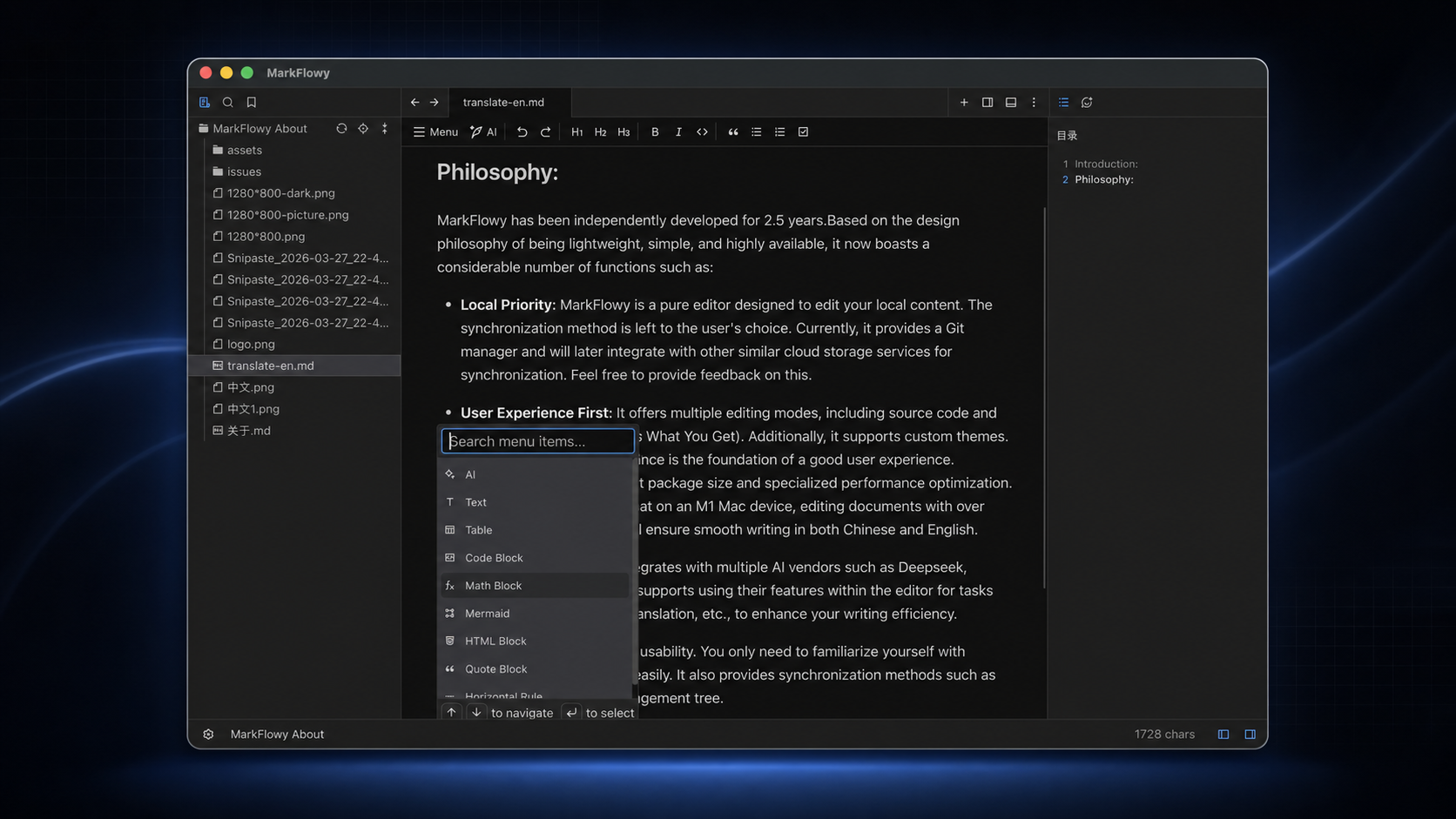
MarkFlowy is a desktop editor written in TypeScript and Rust and packaged with Tauri, distributed for Windows, macOS and Linux. Its core editor is Prosemirror, which the README cites as the source of its extensibility and editing experience, and it is licensed under AGPL-3.0. The project is currently labelled beta and its source lives on GitHub alongside a homepage at markflowy.cc. Its interface supports multiple editing modes, including source code and WYSIWYG, and it is translated into Chinese, English, Spanish, Japanese and French.

The concrete problem it solves is speed and tool-switching on large files. The README states that the rebuilt editor dramatically improves opening speed for big documents, with a 2 MB Markdown file opening in around one second in testing. Alongside that, it folds capabilities that would otherwise require separate programs into one window: an AI assistant, a file tree with global search and drag-and-drop movement, image handling, theming and configurable shortcuts. The README describes the built-in AI as an assistant for translation, article summaries and one-click export of dialogues, work that would otherwise be done in a separate chat client.

Key capabilities

  • WYSIWYG and source-code editing modes built on Prosemirror, with custom keyboard shortcuts.
  • Built-in AI that supports large models such as DeepSeek and Chatgpt, covering Copilot, dialogue export, translation into any language and article summaries.
  • Editing of JSON, TXT and other file types in addition to Markdown.
  • File tree with drag-and-drop movement and global search.
  • Image processing on paste, choosing between writing to a specified path or converting to base64.
  • Custom themes that can be shared with other users.
  • Lightweight Tauri packaging, under 20MB, with multi-language support across five languages.

Who uses it and how

  • Writers and developers working with large single Markdown files, where the README's tested 2 MB document is the reference case.
  • Developers keeping notes, JSON and TXT files in one workspace and navigating them through the file tree rather than a terminal.
  • Multilingual users writing in Chinese, English, Spanish, Japanese or French, or translating and summarising articles through the built-in AI.
  • Linux x86_64 users installing through Flatpak, the install script for .deb or .rpm, or the AppImage.
  • Users who prefer a portable, no-install workflow on Windows, via the MarkFlowy_v _x64_portable.zip build.

Getting started

Downloads for Windows, macOS and Linux are published on the latest GitHub release. Windows users take MarkFlowy_v _x64-setup.exe or MarkFlowy_v _x64.msi, with an offline installer variant that bundles the WebView2 runtime; macOS users take the aarch64 or x64 .dmg; Linux users run the Flatpak commands against the flatpark remote for io.github.drl990114.MarkFlowy, or the install-linux.sh script.

How it compares

No list of paid products that this project replaces is supplied in the facts, and no similar tools are named either, so on the evidence available MarkFlowy stands alone in this registry. Judged only on what is documented, its terms are AGPL-3.0 with no stated paid tier, and everything runs locally as a desktop application.

When to use it — and when not to

Pick MarkFlowy if a local, lightweight desktop editor with fast large-file opening and integrated AI is what is wanted; nothing needs to be self-hosted, since there is no server, database or mail service to operate. Avoid it on Linux ARM or any non-x86_64 Linux system, as the README states Linux is x86_64 only for now. Be aware that the project is labelled beta, that the macOS aarch64 build cannot be opened without manually running xattr -cr MarkFlowy.app in the Applications directory, and that the macOS aarch64 download is restricted by Apple's policy for software without developer certification.

project readme (upstream, from github) — read inline

MarkFlowy beta


Modern and intelligent Markdown editor.

GitHub Repo stars G-Star [![App Version][version-badge]][release] [![Downloads][downloads-badge]][release]
[![Build Status][build-badge]][build] [![Code of Conduct][coc-badge]][coc] [![Commit Activity][commit-badge]][commit] ![issues-closed]
[![PRs Welcome][prs-welcome-badge]][prs-welcome] ![TypeScript-version-icon] ![Rust-version-icon] [![License][license-badge]][license] ![codefactor]


English | 简体中文 | 日本語

Features

  • High Performance: The rebuilt editor dramatically improves opening speed for large documents. A 2 MB Markdown file opened in around 1 second in testing.

  • Built-in AI: Currently supports Copilot, one-click export of dialogues, translation of articles to any language, and article summaries. It supports large models like DeepSeek and Chatgpt, making them your intelligent assistant.

  • lightweight: MarkFlowy is based on Tauri, boasting a size of less than 20MB and improved performance.

  • Multiple Editing Modes: MarkFlowy uses Prosemirror as its core editor, offering high extensibility and a superior editing experience. It supports multiple editing modes, such as source code and wysiwyg.

  • Editing Multiple File Types: In addition to Markdown, it supports editing JSON, TXT, and other file types.

  • Custom Themes: Supports custom themes, and you can share your themes with others.

  • Custom Keyboard Shortcuts: Supports custom keyboard shortcuts to meet individual needs.

  • Image Processing: When pasting images into MarkFlowy, you can choose to paste them to a specified path or convert them to base64.

  • File Management: A powerful file tree that supports drag-and-drop movement, global search, and other common functions.

  • Multi-language support: Supports multiple languages ​​including Chinese, English, Spanish, Japanese, and French.

Download

Available for Windows, macOS and Linux, from the latest release.

Windows

Download and run one of the x64 builds:

  • MarkFlowy_v_x64-setup.exe or MarkFlowy_v_x64.msi — installer.
  • MarkFlowy_v_offline_installer_x64-setup.exe / .msi — same, with the WebView2 runtime bundled.
  • MarkFlowy_v_x64_portable.zip — unpack and run, no installation.

macOS

Download MarkFlowy_v_aarch64.dmg (Apple silicon) or MarkFlowy_v_x64.dmg (Intel).

[!NOTE] Because of Apple’s security policy restrictions on software without developer certification, the macOS aarch64 version cannot be downloaded and used directly. You can ignore the limit by doing the following:

  • Open your terminal
  • Go to the Applications directory. .e.g /Applications.
  • Run xattr -cr MarkFlowy.app and open the app again
  • Please make sure you download from github releases.

Linux

x86_64 only for now.

Flatpak

On FlatParkapp page:

flatpak remote-add --if-not-exists flatpark https://dl.flatpark.org/flatpark.flatpakrepo
flatpak install flatpark io.github.drl990114.MarkFlowy
Install script

Installs the .deb or .rpm for your distribution, or the AppImage if it is not recognized:

curl -fsSL https://raw.githubusercontent.com/drl990114/MarkFlowy/main/scripts/install-linux.sh -o install-linux.sh
sh install-linux.sh

Use wget -O install-linux.sh if curl is unavailable. Add --appimage to force the AppImage, or --uninstall to remove MarkFlowy.

Why

Actually, the initial inspiration for MarkFlowy stemmed from a casual conversation with a friend a few years ago. As developers, we shared many expectations for an ideal Markdown editor. After trying many existing applications, I felt they couldn't fully meet our comprehensive needs in terms of efficiency, aesthetics, lightweight design, and workflow integration. We envisioned our ideal editor together. Although we later went our separate ways and lost touch, that seed of desire to create something beautiful has always remained in my heart.

It was this initial aspiration that propelled me step by step to transform MarkFlowy from a concept into reality. I hope to create a lightweight, intelligent editor that not only handles content securely and reliably but also improves editing efficiency through AI.

MarkFlowy is a product, and also a testament to a life journey. Through continuous learning and development, it has grown into my response to the concepts of efficiency, intelligence, and lightweight. I hope MarkFlowy will become a tool that everyone finds convenient and enjoyable, and I welcome everyone to experience it and provide valuable feedback.

Contribute

The current MarkFlowy is still in its infancy, and there may be some bad experiences or bugs, for which I am sorry. All partners who are interested or encounter usage problems are welcome to submit issues or PR to participate in this project.

How to Contribute

You can read CONTRIBUTING to know how to start the project and modify the code, Welcome to participate in code contribution.

Support

MarkFlowy is completely and permanently open source, if you want to support MarkFlowy, you can star this project. For special support, please contact me via email.

Special Thanks

  • rino by ocavue - The initial version of the editor in this project was developed based on rino.
  • remirror - A powerful ProseMirror-based rich text editor framework.
  • tauri - Build smaller, faster, and more secure desktop apps with a web frontend.
  • And thanks to all the open source libraries and projects that MarkFlowy depends on.

Contributors

The development of MarkFlowy cannot be separated from these contributors. They have contributed a lot of abilities to MarkFlowy. Meanwhile, welcome to follow them! ❤️

readme truncated — read the full docs on github

Frequently asked questions

Is MarkFlowy free to use?

MarkFlowy is open source under the AGPL-3.0 licence. There is no licence fee and no seat count — you can self-host it or, where the project offers one, pay a vendor for a managed version instead.

What does MarkFlowy do?

A high-performance, cross-platform editor that supports WYSIWYG Markdown and general text editing.

What is MarkFlowy written in?

MarkFlowy is primarily written in TypeScript. Its source is publicly available at https://github.com/drl990114/MarkFlowy, and it has 2,393 GitHub stars.

drl990114
Drl990114
KiraKiraAyu
Lysastriel
codeErrorSleep
Qiu Shao
hobostay
Qiaochu Hu